1
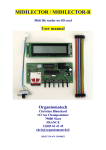
MIDILECTOR
Midi file reader on SD card
User manual
Orgautomatech
Christian Blanchard
113 rue Champommier
79000 Niort
FRANCE
33(0)9 63 41 45
[email protected]
SIRET 399 479 138 00022
Introduction
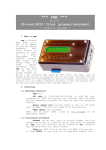
Midilector is a Midi file reader on SD card intended to drive a midi decoder (as
Midi_2org_64 for example). He can obviously pilot any midi electronic instrument
(piano, synthesizer, etc.)
It is delivered , without any case. It has been designed to be the most compact
possible and to be integrated into an organ panel or any other automatic music
instrument. The buyer is thus considered for having the technical knowledge
necessary for this.
Midilector is based on the Simon Lehmayr's open source project, Mr Midi:
www.mikrocontroler.net
Main features
• Play any standard midi files (format 0) from an SD Memory card. Files may
be organised into folders.
• Support any standard SD card up to 2 GO
• Multi tracks 16 channel
• Board size: 116*52 mm
• 24*2 LCD screen with back light (optional button to switch off the light and
save battery).
• Tempo variations (+ or - ) while playing with 2 buttons
• Possibility of synchronisation: crank rotation can drive song start, tempo and
stop.
• Lyrics on screen when present in the file
• Designed to be fitted into any musical instrument panel or case. Buttons has
been choose to allow different possible installations.
• Powered by any DC current 8 up to 18 volts
Electric wiring
Very easy: + and – are marked on the boards. Don't worry, there is a polarity
protection. You can use either 9 volt battery or any DC power source from 8 up to 24
volts.
Screen wiring
There are two ways to link screen and main PCB, just look at the pictures.
You can adjust the contrast with the small potentiometer near the display connector.
Midi wiring
Wire a 5 pin DIN cable (midi standard) between your Midilector midi output (no
error possible there is only one socket !) and your decoder board or electronic
instrument MIDI IN socket
SD card preparation
First you must prepare your SD card (maxi 2 GO). On your computer make sure it is
formatted in FAT 16
One suppose the midi files has been adapted to your instrument. They must be saved
in format midi 0. You can find on the internet free ware able to change any midi
format to another.
Transfer your files to the card. Just remember Midilector will read them in the order
they have been record.
Functioning
If you switch on Midilector before inserting SD card you see this screen:
So, insert a card and toggle the power switch. The connector is a « push - push » like
on your camera. If you have prepared your card as said before, you should see the
first file or folder:
« DIR » indicates a folder. Change folder with « UP » and « DOWN », enter with
« RIGHT »
Second line indicates number of files/folders (here folder #5 on 5) et the size: 0000
indicates a empty folder
By entering a folder you can discover files. Change file with « UP » or « DOWN ».
This file is the #2 on 46
Push the « PLAY » button:
Song starts: On second line you have:
• Tempo : 100% = normal
• Transposition : unused except if you have added the « REC » button (see
further in this document)
• Time in minutes and seconds from start
To increase tempo use the « RIGHT » key:
To decrease tempo use « LEFT » key:
If you push again « PLAY » key: pause.
To stop, push on « STOP » button. At this moment, Midilector send a « all note off »
(CC123) and a « all sound off » on all the 16 channels to be sure everything is
stopped. Be sure you decoder board is up-to-date with these controls, that's not
always the case for some old models.
If you have lyrics in your file and have allowed them, here is what you can see:
Installation in your instrument:
Midilector of a main board with buttons and SD reader strictly speaking, on one
hand, and 24*2 screen on the other hand. The cable is supplied of course to connect
the screen to the main board, as well as the small switch and its thread to be also
connected on the board.
You can arrange it as you think is the best in your instrument by using the templates
(further in this document).
Buttons can be activated by 2 manners:
• Standard, by pushing on. The main board in that case is vertically arranged
with the screen in right angle above.
• By gently toggle the button (I really said gently !). In that case the board can be
horizontally disposed, and the screen can be right angle or in any position is
good for you !
Example: mounting on my own accordion. I count on you to make much better! You
will hide certainly the reader. I wanted to show it on the contrary! Note that it is the
very first model of Midilector, with the Midi socket on the right side and not behind.
Example: mounting in a plastic box:
Set-up:
By pushing on « UP » and « DOWN » simultaneously you come in the menu: there
are 10 pages, here is the #1
Here you can set the midi channel for drums, not important, you can leave it. Only
used if you want to use the transpose function.
• #2:
Switch on with « RIGHT » button if you want to allow the lyrics on the screen.
Your file must be prepared first. You can transform any karaoke file into a midi one.
Just change the .kar in .mid.
• #3
You can mute one or more channels. Mute with “RIGHT”, un-mute with “LEFT”,
selection by “UP or “DOWN”. No need to change any thing here is your files are
well prepared in advance.
• #°4
Repetition: OFF means the player reads the song and stops. It can also repeat the
song (SONG), all the folder songs once (DIR once), all the song on the card (ALL) or
random (RANDOM) . Select by « RIGHT » or « LEFT ».
Let the #5 and #-6 page as there are.
• #7
Speed control. Let it Off if you don't have installed any sensor on your crank. If you
set ON, when you'll press the “PLAY” button, Midilector will wait for the impulsions
from the crank sensor. The tempo will follow the speed of the crank. The song will
stop if you stop cranking. In you set “PA”, the song will start when you turn and stop
when you stop turning but wont follow the speed of crank.
• #8
Signal frequency from the crank sensor in BPM. Set here your “normal” speed. If you
turn faster, the tempo will increase, if you slow down, tempo will decrease. Let it as it
is if you don't use synchronisation.
• #9
That's the minimum speed under which the song stops. Let it if you don't use
synchronisation
• #10
Numbers of pulsations from the crank sensor before starting. Needed for fulling the
reservoir. Let it if you don't use the synchronisation.
Leave the menu by « STOP ». Midilector has got a good memory, it will remember
your set-up even after a night sleeping !
Back light
The screen is normally back-lit. To save your battery, you can install a switch to
switch off it when it is useless, outside for example. Just connect 2 threads from the
switch to the marked " back light " pins on the board
If you don't have got switch, that exists as optional at Orgautomatech's, with the cable
and the adapted connector.
Synchronisation
For synchronisation you just need a reed relay like this one:
This tiny thing is sensitive to magnetic field, so, if you approach a magnet close to it,
it will switch on. If you manage to install it near your crank organ and glue on this
one a small magnet, the relay will send an impulse on each crank turn. You have to
wire the two ends of the relay to the “RC”pin and the “Gnd” pin on the PCB, (no
polarity) and set the synchronisation menu (#7 to #10) at your need.
For better speed stability, you can put to magnet on your crank but think to double the
BPM in the menu #8.
Recording
If you are absolutely anxious to have the ability of recording songs with Midilector,
this is left to you by using the marked pin "rx" on the board. It will be necessary to
add a button and some other components (schematic on inquiry).
In that case, you will also have the possibility of transposing while playing. This is
perfectly useless (and even impossible according to your instrument!) if you suitably
arrange your files in advance...
Guarantee
Midilector as all Orgautomatech board is guaranteed 1 year against any
manufacturing defect. Every board is tested before sending. The SD card connector is
of professional quality and the electronic is "ad hoc". We tested numerous SD cards
including certain bought in supermarket, with no problem at all. I know a very few
may have problem, so I advise you to use rather a good brand card to assure
compatibility.
Quick repair guide
This message means there is no SD card or non-recognized card.
Insert another SD card, good brand preferably and toggle power.
If a song refuses to start, it's probably because it's not a format Midi 0. Try « midi
converter » in Google.
If you have to push twice on “PLAY” to start the song, and are not able to control the
speed with “Right” and “Left” buttons, set the speed control (menu #7) to OFF.
Tips & tricks for midi files
We find now on the web numerous midi files . They do not correspond necessarily to
the range of your instrument, and furthermore, they have passed in the hands of
numerous persons, more or less expert, before arriving at you. Most of the time they
are extremely "charged", it's the result of numerous tries. I dis-advise you to use them
" as they are ". It is better to spend some minutes to adapt them to your needs.
Useless for example to have multiple tracks on 16 channels if you use only a single
Midi2Org board. It is only slowing down pointlessly the transmissions. The MIDI
standard is a "serial" connection, what means that every information is sent one after
the other to the same thread. Why to block it with messages of pitch bend which
make hundreds of messages for nothing? The first thing to be made on a midi file is
to delete all you do not need. Keep only notes and possibly sustain if the card was
programmed for a piano(on demand for Midi2Og). If you are using Cubase, the
function " erase everything except note " is very helpful for this. I think that
Cakewalk should have such a function too. To work for more than 20 years with
MIDI, particularly on stage, I can tell you that this is very important and will avoid
you many problems, notes remaining blocked, or something else...
Extra Light version
The version of Midilector for those who like challenges. Supplied with just the
printed circuit with the SD card already soldered on (phew!) and the processor with
its socket. You have only to solder the other components (not supplied but easy to
find) in marked locations on the board.
For the rest you summits as you think best. If you are planning to install a 16* 2
screen, please, specify with order, the program is not the same.
Have fun !
Christian Blanchard
Orgautomatech
Christian Blanchard
113 rue Champommier
79000 Niort
FRANCE
33(0)9 63 41 45
[email protected]
SIRET 399 479 138 00022
Mise à jour le 22/09/11