1
3 Using the CamView Cont.
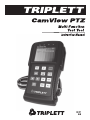
Use the following diagram as a guide to connect the CamView to a PTZ camera.
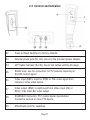
Connect the video output of the camera to the Video Input of the CamView.
The Video Output of the CamView may be connected to the video input of another video monitor (such as the monitor in the video closet or the monitor at the
guard station). The CamView usually operates in ‘Loopthrough” mode, passing
the Video Input signal to the Video Output connector.
Connect the PTZ control signal from the CamView RS485 or RS232 connector
to the mating connector on the PTZ camera. Observe the proper polarity (D +/ A
to D+ or A, D -/ B to D- or B).
Caution: Do not connect the CamView PTZ connector to anything other than a
camera’s PTZ connections. To do otherwise may damage the CamView.
Page 15