1
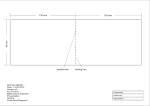
210MM
105MM
74MM
105MM
Folding line
Diecut
APN ref. no : A98104
Date : 12-09-2013
Vendor ref :
no. of color : 1C(BLACK) + 1C(BLACK)
B&W artwork attached :
Presentation
□
Testing
□
Production/Shipment
□
Prepared by :
Verified by :
Approved by :
1.0 Introduction
Thank you for your purchase. This watch includes 4 function modes: Current
Time, Heart Rate Chronograph, Memory and Timer.
With this watch, you can get ECG accurate heart rate readings with the use of
a chest strap!
To have a continuous heart rate readings, just put on the chest strap and
switched to the Heart rate Chronograph mode. Also, the exercise time and
calories consumption for either type of information will be calculated.
WARNING !
● DO NOT use this Watch for commercial or professional
purposes.
● Make sure that you fully understand the functions and
limitations of this watch before using it.
● This Watch is a supplementary device for measuring heart
rate; it is NOT a substitute for medical devices. You should
periodically compare the heart rate readings acquired by
this watch with the readings from a doctor.
● Consult a doctor or trainer before setting your Upper and
Lower heart rate limits.
2.0 Buttons Operation of the Watch
Power saving mode
This watch may arrive been set to power saving mode. If the display is blank, simply press
any button to activate it.
To conserve the battery during a long period of inactivity, you can switch on the power
saving mode by holding the “reset” buttons for 5 seconds.
Note: entering power saving mode will only turn off the screen and will not reset the watch
or any of its data. The watch continues to function regularly in power saving mode.
Light
Button
[EL]
Mode
Button
[M]
Display
Start/Stop/Lap
Button
[S/S]
Reset
Button
[R]
3.0 Buttons Operation Summary
Mode Button [M]
● Press to select one of the function modes
● In function mode: Hold to select the setting display
● In any setting display: Press to choose between different settings.
● Press and hold the button to exit the setting sequence.
Start/Stop/Lap Button [S/S]
● In Current Time Mode: Press to show Alarm Time and Hold to enter the setting of Daily
Alarm Mode
● In Heart Rate Chronograph Mode: Press to start the counting or take Laps, Hold to stop
counting.
● In Timer Mode: Press to start or stop counting.
● In setting displays: Press to change the settings.
Reset Button [R]
● In Heart Rate Chronograph Mode: Press to select sub-function modes. When the counting
is stopped, Hold to reset display to zero
● In Timer Mode (Stop Counting): Hold to reset the timer to target time
● In setting displays: press to change the settings.
Light Button [EL]
● In any mode/display, press to turn ON the EL back light for about 3 seconds.
Note: The button operations are summarized above, for detailed operating instructions,
please read the following chapters.
4.0 Major Function Modes
[M]
Current Time Mode
Heart Rate Chronograph
Mode
[M]
[M]
Memory Mode
[M]
Timer Mode
5.0 Current Time Mode
Current Time Mode
● Current Time Mode includes two functional
displays:
1) Current Time Display
2) Daily Alarm Display
Current Time Display
● The day of week and date exhibit in the 1st row of
display.
● The current time (hour, minute, second) exhibits in
the 2nd row of display.
Daily Alarm Display
● The preset daily alarm time (hours, minutes)
exhibits on the display.
To Select between the Current Time Display and
Daily Alarm Display
● Press and hold the [S/S] button to show the Daily
Alarm Display.
● When you release the [S/S.] button within 2
seconds, it will go back to the Current Time
Display.
● If you hold it more than 2 seconds, it will go to
alarm setting display.
5.1 Current Time Mode - Setting Sequence
5.1 Current Time Mode - Setting Sequence
To Set the Current Time Mode
● To set the current time, date, and other settings, press and hold the [M] button for about 2
seconds to select the setting display (the second digits will start flashing).
The Setting Sequence
● When the second digits start flashing, press the [M] button to move the flashing following the
setting sequence diagram in the previous page or press the [S/S] or [R] button to reset the
second digits to zero.
● When one of the settings (minute, hour, year, month, day, 'BIRTH '-birth year, 'HGT '-height,
'WGT '-weight) is flashing, press the [S/S] or [R] button to scroll through the setting (hold the
button down to scroll the setting at a faster pace).
● When the '12Hr ' or '24Hr ' icon is flashing, press the [S/S] or [R] button to switch between
'12Hr ' (12 hour format) and '24Hr ' (24 hour format).
● When the hourly chime (CHIME) or the beep tone (BEEP) 'on ' or 'oFF ' icon is flashing,
press the [S/S] or [R] button to turn it ON ('on ') or OFF ('oFF '). And when the hourly chime
is ON, an indicator ' ' will appear and the watch will beep once every hour.
● When the Gender 'F ' or 'M ' icon is flashing, press the [S/S] or [R] button to switch between
'F ' (Female) and 'M ' (Male).
● When the Height Unit 'In ' or 'CM ' icon is flashing, press the [S/S] or [R] button to switch
between 'In ' (Inch) and 'CM ' (Centimeter).
● When the Weight Unit 'kG ' or 'LB ' icon is flashing, press the [S/S] or [R] button to switch
between 'kG ' (Kilogram) and 'LB ' (Pound).
● When the setting is completed, press and hold the [M] button for about 2 seconds to exit the
setting sequence. The setting display will return to Current Time Mode automatically if NO
button is pressed for about 1 minute.
5.2 Current Time Mode - Daily Alarm
Daily Alarm Display
● In the Daily Alarm Display, Alarm Time (hours, minutes)
appears in the 2 row of the display.
Daily Alarm ON and OFF
● When the Daily Alarm Indicator '
' appears (which
means the daily alarm is ON), the watch starts beeping
at the alarm time.
Daily Alarm Sound
● The alarm beeps for 1 minute when the daily alarm
function is turned ON and it reaches the pre-set alarm
time.
● You can stop the beeping by pressing any button.
5.3 Current Time Mode - Setting the Daily Alarm
To Set the Daily Alarm Function
● In the Current Time Mode: Press and hold the
[S/S] button for more than 2 seconds to enter the
alarm setting display (the ' on ' or ' oFF ' will start
flashing).
The Setting Sequence
● Press the [M] button to select among Alarm
ON/OFF, hour and minute settings.
● When the ' on ' or ' oFF ' flashes on the display,
press the [S/S] or [R] button to turn ON or OFF the
alarm.
● When the ' hour ' or ' minute ' digit flashes on the
display, press the [S/S] or [R] button to scroll
through the setting (hold down the button to scroll
the setting at a faster pace).
● Press and hold the [M] button for about 2 seconds
to exit the setting sequence.
● The setting display will return to Current Time
Mode automatically if NO button is pressed for
about 1 minute.
6.0 Heart Rate Measuring - Sensors Configurations
Naming of the parts:
This product includes 2 parts:
1 Chest Strap
Chest Strap: Goes around the body
Electrode areas
Connector: To send the heart rate signal
to the receiving device.
Electrode areas: To detect heart rate.
Hook: To fix the strap on user’s chest
Buttons: To attach the connector to the
strap
Hook
2 Connector
Buttons
O
N
P E
Battery door
Front
Battery door: To cover the battery
compartment
Back
Operating temperature : -10°C to +50°C
This product is compliant with Directives
1999/5/EC.
6.1 Heart Rate Measuring - Precautions and Tips
● In exercise or sports, your heart naturally speeds up pumping blood in your body in
accordance with your increased energy level. This watch can calculate that increase
expressed as the number of beats per minute (bpm) to determine a safe target heart rate
for an individual.
PRECAUTIONS/TIPS
1. There are 2 contacts located on the back of the chest strap. The sensors must make firm
contact with the user’s skin during heart rate measurement.
2. DO NOT take heart rate measurement when diving or under water.
3. Clean the back of the chest strap occasionally by applying a few drops of water and wipe it
dry with a paper towel. It can help remove any residual grease.
4. DO NOT use hand cream; it will insulate the signal between the skin and the sensors.
5. Clean skin around chest area with soap and water for a better signal transmission.
6. For those with extremely dry skin, moistening the skin with tap water or applying a
conductive gel may help.
7. Adjust the Chest Strap with the supplied elastic band until it holds on your chest firmly to
avoid loosening when doing exercise.
8. For best results, maintain a natural gait while moving. Jerkey or unnatural movement will
create muscle noise, and will interfere with the sensor.
6.2 Heart Rate Measuring - Heart Rate Zone
What is Heart Rate Zone
● Some particular training/exercise objectives like
'aerobics', 'fat burn' or 'cardo' require the trainee/exerciser to maintain his/her heart rate (exercise pace)
within one particular heart rate zone during the
exercise.
WARNING: Consult a doctor or trainer prior to
setting the heart rate alert zone for a serious
Cardio-fitness training.
How to Select a Zone (for Heart Rate Zone Alert)
● This Watch includes three pre-defined heart rate
zones (“HEALTH”, “FAT-B” and “AEROBIC”) and one
user-defined heart rate zone (“USR”) for selection.
● The upper and lower limits of these Zones are shown
in the adjacent diagram. Check chapter 6.5 for the
details on how to select a Zone.
6.2.1 Heart Rate Measuring - Heart Rate Zone Alert
Note:
● When a user taking a heart rate measurement, various visual indications will be
displayed according to his/her heart rate and the pre-set limits. Besides, a single
beep will sound to alert the user when his or her heart rate is out of the preset zone.
● Please refer to chapter 6.5 for details on how to turn ON/OFF the Zone Alert.
6.2.2 Heart Rate Measuring - About EMHR and %EMHR
Estimated Maximum Heart Rate
(EMHR):
● EMHR = 220 - user age.
● Example: What is Tom's EMHR at the
age of 27?
● His EMHR = 220-27 = 193.
NOTE: This Watch can calculate the
user’s EMHR with the age up to 99.
Percentage of Estimated Maximum
Heart Rate (%EMHR):
● %EMHR = Acquired heart rate / EMHR
X 100%
● Example: What is Tom's %EMHR if he
has acquired a heart rate of 78.
● %EMHR=78/193 X 100% = 40%
● During exercise or sports, your heart naturally
speeds up pumping blood in your body in
accordance with your increased energy level.
● The Heart Rate Chronograph Mode and Instant
Heart Rate Mode show the current heart rate in term
of :
● Heart Rate (e.g 78) : The number of heart beats
per minute (bpm), and
● Percentage of Estimated Maximum Heart Rate
(e.g 40%): The percentage of the acquired heart
rate with respect to one's estimated maximum
heart rate.
Percentage of Estimated Maximum Heart Rate
● It is a useful figure for analysing the cardio- fitness
of a person.
● It can be used to define a heart rate zone for cardiofitness training.
● Consult your doctor for more information on the
implications of Percentage of Estimated Maximum
Heart Rate.
NOTE: The user MUST input his/her age and gender
into the Watch before using this function as the pre-set
values do not fit the user’s personal information. The
result/reading may not be relevant. Check chapter 5.1
for more details on age and gender settings.
6.3 Heart Rate Measuring - Wearing the chest strap
Wear the Heart Rate Sensor:
1 Moisten the electrode areas
of the strap.
2 Attach the connector to the
strap.
3 Adjust the strap length to fit
tightly but comfortably.
4 Tie the strap around your
chest just below the chest
muscles, and attach the
hook to the other end of the
strap.
5 Check that the moist
electrode areas are firmly
against your skin and that
the logo of the connector is
in a central and upright
position.
NOTE:
Detach the connector
from the strap and rinse
the strap under running
water after every use.
Sweat and moisture may
keep the electrodes wet
and
the
transmitter
activated. This will reduce
the transmitter battery life.
6.3.1 Heart Rate Measuring - Chest-Strap Measurement
Measuring Heart Rate by the Chest Strap
● First, wear the chest strap following the
instruction in chapter 6.3.
● Go to the “Heart Rate Chronograph Mode” and
the watch will start measuring automatically.
● When the heart rate signal is detected, the heart
rate acquired will be exhibited on the screen. The
Percentage of Estimated Maximum Heart Rate
(%EMHR) will also be exhibited on the right.
● The Maximum heart rate and Average heart rate
during measurement will also be shown in the 1st
row.
NOTE:
● Holding the [R] button in the Heart Rate
Chronograph Mode will reset all the calculations
and records stored in the watch, including
Chronograph, Zone Timers, Fat Burnt and
Calorie consumption.
6.4 Heart Rate Measuring - Heart Rate Chronograph Mode
Heart Rate Chronograph Mode and the
Sub-Functional Displays
● In the Heart Rate Chronograph Mode, there
are 8 different displays for showing the
exercise information. They are:
● Maximum / Average Heart Rate Display,
● Chronograph Display,
● Below Zone Timer Display,
● In Zone Timer Display,
● Above Zone Timer Display,
● Calorie Consumption Display,
● Fat Burnt Display and,
● Current Time Display.
● Press [R] to scroll through different
Sub-Functional Displays from the top row of
the display.
6.4.1 Heart Rate Measuring - Chronograph Display
To Use the Chronograph
● In 'Zero' Display, press the [S/S] button once
to start the counting. When it is counting, hold
the [S/S] button to stop the counting, and the
accumulative elapsed time will appear.
● Press the [S/S] button once to take a Lap
Record.
To Reset the Chronograph
● When the chronograph is stopped, hold the
[R] button to reset the chronograph (ready for
a new counting).
NOTE
● While taking Lap Time, the average heart rate
for the Lap is also recorded.
● When the Chronograph is reset, the records
will also be reset.
6.4.2 Heart Rate Measuring - Zone Timer Display
Heart Rate Zone Timer
● This Watch provides 3 Heart Rate Zone Timers: In
Zone Timer, Above Zone Timer and Below Zone
Timer, all of which can count the time of the user’s
heart rate in or out of the Heart Rate Zone.
NOTE: The Heart Rate Zone Timer that corresponds
with the current heart rate will start counting
automatically when the Heart Rate is detected in the
Heart Rate Chronograph Mode. To stop the counting,
either take off the chest strap or exit the Heart Rate
Chronograph Mode.
For example, “FAT-B” (55% to 75%EMHR) is set for
the Heart Rate Zone Alert, the Below Zone Exercise
Timer will start counting automatically if the current
heart rate is fall into the 'below' zone, like 40% of
EMHR. On the contrary, when the EMHR is over
75%, the Above Zone Timer will start counting
automatically.
● Press [R] to view the different timers according to the
sequence in chapter 6.4.
● These readings will be updated to the Heart Rate
Chronograph Mode display all the time during the
exercise.
6.4.3 Heart Rate Measuring - Calorie and Fat Display
Calorie Consumption
● By calculating the calorie consumption, we can have a
brief image of the quality of the exercise and keeping our
body fit.
Fat Burnt
● Fat is something that stores energy for our body use.
● To keep our body fit and healthy, we need to keep a habit
of doing exercise to burn extra fat stored in our body.
Calculation on Calorie and Fat
● This watch can calculate the Calorie Consumption and Fat
Burnt during exercise according to the user’s age, gender,
heart rate and the activity level of exercise.
● This information can be reviewed real time while
measuring heart rate. Just press the [R] button in Heart
Rate Chronograph Mode according to the diagram in
chapter 6.4.
● For the settings of activity level, age and gender, please
refer to chapter 6.5.
NOTE: The Calorie Consumption and Fat Burnt counters will
start counting automatically when the Heart Rate is detected
in the Heart Rate Chronograph Mode. To stop the counting,
either take off the chest strap or exit the Heart Rate
Chronograph Mode.
6.5 Heart Rate Measuring - Zone Setting Sequence
To Set the Heart Rate Zone
● In the Heart Rate Chronograph Mode: Press and hold the
[M] button to enter the Zone setting display (the 1st row will
start flashing).
The Setting Sequence
● Press the [M] button to select different settings following the
sequence of the adjacent diagram.
● When the 'USR ', 'HEALTH ', 'FAT-B ' or 'AROBIC ' flashes
on the display, press the [S/S] or [R] button to select target
Heart Rate Zone. (For different Heart Rate Zone details,
please refer to chapter 6.2)
● When the 'on ' or ' - - ' flashes on the display, press the
[S/S] or [R] button to turn ON or OFF the Zone Alert. If any
of the Zone Alert is ON, 'ZONE ’ icon will be shown.
● When the digits flash on the display, press the [S/S] or [R]
button to scroll the Zone Limit setting (Hold down to scroll
at a faster speed and the corresponding %EMHR will be
calculated on the right).
● When the 'LOW ', 'MEDIUM ' or 'HIGH ' flashes on the
display, press the [S/S] or [R] button to select activity level
(Low, Medium or High) for the exercise.
● Press and hold the [M] button for about 2 seconds to exit
the setting sequence.
● The setting display will return to the Heart Rate
Chronograph Mode automatically if NO button is pressed
for about 1 minute.
7.0 Memory Mode
Memory Mode
● This watch can record the Lap
Time and Heart Rate during
exercise for the user to review at a
later time.
● The Lap Time exhibits in the 1st
row of display.
● The Heart Rate Measured exhibits
on the left hand side of the 2rd row
of display.
● The Lap Number exhibits on the
right hand side of the 2rd row of
display.
To Recall Records
● In the Memory Mode, press [S/S] or
[R] button to select which record
you want to check.
8.0 Timer Mode - Setting Sequence
To Set the Timer Mode
● To set the pre-defined target time in the
timer mode, press and hold the [M]
button for about 2 seconds (the 'Hour '
digits will start flashing)
The Setting Sequence
● When the 'Hour ' digits start flashing,
press the [M] button to move the flash
following the sequence of the adjacent
diagram.
● When one of the settings (hour, minute,
second) is flashing, press the [S/S] or
[R] button to scroll through the setting
(hold down the button to scroll the
setting at a faster pace).
● Press and hold the [M] button for about
2 seconds to exit the setting sequence.
● The setting display will return to Timer
Mode automatically if NO button is
pressed for about 1 minute.
8.1 Timer Mode - Using Timer
To Use the Timer Mode
● Once a target time has been set (for
example 3 hours), press the [S/S] button
once to start the countdown. The
countdown time will be displayed
continuously throughout the countdown.
● To stop counting, press the [S/S] button
once.
To Reload the Timer
● Hold the [R] button to reload the timer to
the preset target time when the counting is
stopped.
● To start the counting at a target time, set a
new value for the pre-defined target time.
Check the previous chapter 8.0 for more
details on how to set the Target Time.
Timer Alarm Sound
● When the timer reaches the last 10
seconds, the watch will beep once for each
second left. When it counts to zero, a
double-beep sound will be heard for 15
seconds
● You can stop the beeping by pressing any
button.
9.0 Power Saving Mode
Power Saving Mode
■ This Watch has a Power Saving Function which
can turn off the LCD display so that the battery
can last longer.
■ While in the Power Saving Mode, the watch
function is still worked normally. (i.e. The
timekeeping function is still running during
Power Saving Mode.)
How to enter/exit the Power Saving Mode
■ To enter the Power Saving Mode, hold down the
[R] button in Time Mode for about 5 seconds
and the LCD display will be turned off.
■ Press any key during Power Saving Mode will
exit the mode and the LCD display will be
resumed.
10.0 Battery Replacement for Cheat Strap
Batteries:
All connectors have user changeable batteries. To change the battery yourself, follow
the instructions below, and see the markings on the connector.
1 Turn the cover counterclockwise with a coin gently
until it pops out.
2 Remove the exhausted
battery and insert a new one
(CR2032) with (-) side
against the metal contact.
32
32
N
CR20
E
O
OO
N
P E
4 Turn the cover clockwise
with the coin again until the
little arrow pointed to the dot.
2b
O P
E N
PP E
3 Press the cover back into
the connector.
2a
20
32
32
CR
CR20
CR20
Make sure the battery
is placed under the
golden slot.
NOTE: Keep batteries away
from children. If swallowed,
contact a doctor immediately.
O
P
E
CAUTION: Risk of explosion
if battery is replaced by an
incorrect type.
O
N
P E
O
N
N
P E
11.0 Potential Causes for
NO Heart Rate Reading or Long Response Time
1) Cause: Dry Skin.
Solution: Apply conductive gel or saliva thoroughly to the chest area. Even water will help if
conductive gel is not available.
2) Cause: Not firmly contact with the user’s skin.
Solution: Make sure the chest strap is properly placed over the chest.
3) Cause: Muscle tremors caused by holding too hard.
Solution: Make sure the chest strap is properly secured over the chest.
4) Cause: Dead skin on chest.
Solution: Usually rubbing your skin with a towel will help.
5) Cause: A thin layer of body grease insulates the ECG signal which prevents the
Chest Strap from picking up your ECG.
Solution: Wipe chest / wrist and the back of Chest Strap with a tissue or soft towel.
6) Cause: Hairy skin.
Solution: Apply conductive gel to the chest area.
7) Cause: Irregular heartbeats.
Solution: N/A It is difficult to consistently pick up a reading for those with irregular heart
beats. Inconsistent response times are expected for those with arrhythmia.
8) Cause: Battery Low.
Solution: It might be due to the low battery level of the Chest Strap/watch. Replace the
battery and try again.
9) Cause: Interference of other RF devices (Chest-Strap Measurement)
Solution: Depart from the place where the RF source potentially exists.
12.0 Specifications
Current Time Mode
● Time System: am, pm, hour, minute, second
● Time Format: 12-hour or 24-hour format
● Calendar: date and day of week display
(Auto-Calendar function for day of week and
leap year)
Daily Alarm
● Daily alarm and hourly chime
● Alarm Sound: 1 minute
Timer Mode
● Resolution: 1 second
● Measuring Range: 9 hours 59 minutes 59
seconds
● Timer Sounds: will beep once per second for
the last 10 seconds and beep for 15 seconds
when counting to zero.
Memory Mode
● Lap Recall / Total Lap Time Recall
● Lap Average Heart Rate Recall
● Total Average Heart Rate Recall
Back Light
● Back Light Type: Electro-Luminescent (EL)
back light
Heart Rate Chronograph Mode
Chest Strap Heart Rate Measurement
● Chest Strap Measurement
● Range: 40 to 240 bpm
● Heart Rate Zone Alert
● 4 Heart Rate Zones - Selectable
● 3 Activity Levels - Selectable
Chronograph
● Resolution: 1/100 second
● Measuring Range: 9 hours 59 minutes 59.99
seconds
● Number of Laps: Maximum 25 Laps
Heart Rate Zone Timer
● Resolution: 1 second
● Measuring Range: 9 hours 59 minutes 59
seconds
Calorie Consumption
● Range: 0 to 9999 kilo-calorie
Fat Burnt
● Range: 0 to 9999 gram