1
RI-8010 User’s Manual
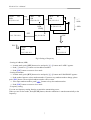
- A starts key agreement by pressing button [2]. Then “IDnumber” and “Pub Key” appears on upper
side of screen. number is current ID(1~8).
- OK is appeared on the display of B and also A. Then the key agreement is finished
successfully.
- The new TEK is stored with current ID. You may see what current ID is.
b) How to set current ID
Transmission Encryption Keys of 8 can be stored with IDs of 8.
In clear mode to press button [*] and then button [3] will be show current ID to you.
To change current ID, press button [/\] or [\/] till ID that you want is seen.
c) Buttons for Key Management
Button [*] – displays FUNC menu to operate Key Management.
Button [1] – waits for call for key agreement.
Button [2] – starts key agreement.
Button [3] – views or sets current ID.
Note:
* During key exchanging, you must not touch any key.
If Key Agreement is not finished successfully, you must re-take the procedure.
* Because ID N is for network communication, you should not set current ID to N in key
agreement.
10) Data Communication by Computer
It follows to communicate data by computer:
ㅇ Connects between the device and RS-232C port of computer by the provided RS-232C
cable(CA-2).
ㅇ Powers on the device.
ㅇ Push button [*] to display FUNC menu.
ㅇ Push button [\/] to select data communication mode.
ㅇ Push button [9]. Then “PC comm” appears in display.
ㅇ Starts up program SHIELD installed in computer and makes communication you
want by the program.(Refer to SHIELD You ‘s Manual.)
While data communicating, “Rx” appears in display during receiving and “Tx”
appears during transmitting. If no response, “Resp No” appears.
11