1
ECA 450
Operation
2.17.16 High Resolution NOx Enable
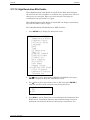
When High Resolution NOx Enable is turned ON the ECA 450 will display
the values of NO, NO2 and NOx at a resolution of 0.1 ppm when the values of
these gases are <100 ppm. When a gas value becomes ≥100 ppm, the
resolution for that gas switches to 1 ppm.
When High Resolution NOx Enable is turned OFF, the display resolution for
NO, NO2 and NOx is always 1 ppm.
Turn High Resolution NOx Enable ON or OFF as follows:
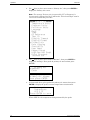
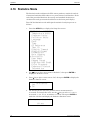
1. Press SETUP key to display the Setup List screen.
«««««SETUP LIST«««««
Temperature Units
Pressure Units
Pollution Units
Language
Date
Time
O2 Reference
Test ID
Display Timeout
Display Format
Primary Air
Data Logging
Statistics
User Name
Keypad Sound
ª High Res NOX Enabl
Print Pressure
Enhanced Printout
Information
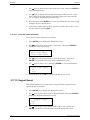
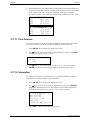
2. Use ∧∨ keys to place cursor next to “High Res NOX Enabl”; then press
ENTER to display the High Res NOX Enable screen.
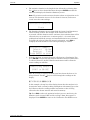
3. Use ∧∨ keys to place cursor next to “On” or “Off”; then press ENTER to
make the selection and be returned to the Setup List screen.
High Res NOX Enable
Off
ª On
4. Press RUN to exit the Setup List screen and display the Combustion Test
HOLD screen. Combustion efficiency and emissions testing can now be
performed as described in Section 2.4 Performing a Combustion Test.
Instruction 0024-9400
47