1
Calibration
Initial Setup
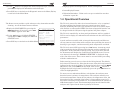
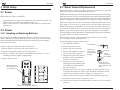
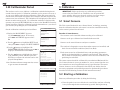
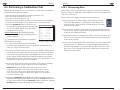
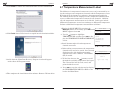
5.6 CO-LO Sensor Calibration
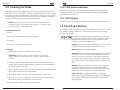
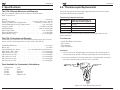
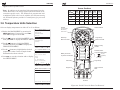
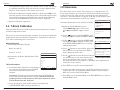
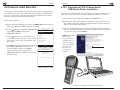
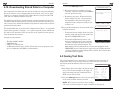
3.14 Battery Charger Selection
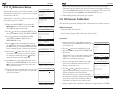
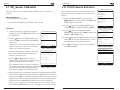
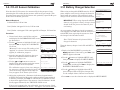
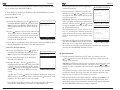
Note that the CO-LO sensor also measures H2 for the purpose of compensating the CO reading for the presence of H2 in the gas sample. This
procedure first spans the CO-LO sensor and, optionally, spans the H2 part
of the sensor to known gas levels.
When using rechargeable NiMH batteries, the AC
power adapter can be used to charge the batteries
while inside the analyzer. The analyzer’s rapidcharger circuit, however, must be first turned ON.
IMPORTANT: When using disposable alkaline
batteries, the analyzer’s battery charger circuit
should be OFF to prevent the batteries from
overheating.
Material Required:
Calibration Kit, P/N 24-7059
Gas Cylinder: 500 ppm CO in air, P/N 24-0492
MAIN MENU
FUEL
PRESSURE
TEMPERATURE
MEMORY
SETUP
CALIBRATION
DIAGNOSTICS
STATUS
MENU
F1
Gas Cylinder: 1,000 ppm CO & 1,000 ppm H2 in Nitrogen, P/N 24-0794
Procedure:
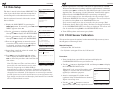
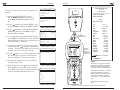
1. If not already done, turn ON the analyzer
and display the CALIBRATION LIST screen
per Section 5.2.
2. Use the
buttons to highlight CO-LO, and
then press ENT to display the CALIBRATE
CO screen.
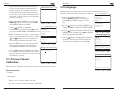
“Measured” is the current CO reading, while
“Applied” is a known CO level that will be
applied for calibration purposes.
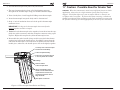
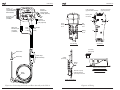
3. Attach a 500 ppm CO cylinder to the regulator of the calibration fixture shown in
Figure 5-2 on Page 5-14.
4. Use the
and
buttons to enter an
Applied value that exactly equals the concentration stamped on the CO cylinder.
The calibration range is from 9 to 1,500 ppm.
An attempt to calibrate outside this range will
cause the message “Applied Value High” (or
Low) to appear at the bottom of the screen.
CALIBRATION MENU
As a precaution, the charger circuit is automatically toggled to its OFF state when the analyzer is
turned OFF, thus requiring the operator to turn
the charger back ON when needed.
Note: The PCA2 must be left turned ON to
charge the batteries.
T-Air
CO-LO
SO2
Turn the battery charger circuit ON and OFF as
follows:
NO
NO2
SETUP MENU
(more)
TIME
O2 REFERENCE
ZOOM
BATTERY CHARGER
LOGGING
(more)
MENU
F1
(more)
MENU
F1
F2
F3
CALIBRATE CO
Measured 480 PPM
Applied
500 PPM
Press ENT
06/27/06 11:55:30 PM
PRINT
F1
F2
1.Display the MAIN MENU by pressing the
MENU (F2) button. If necessary, press ESC until
MENU appears above F2.
F3
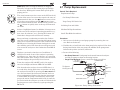
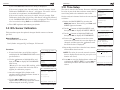
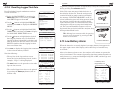
5. Adjust the regulator for a flowmeter indication of approximately
2 SCFH. Wait until the Measured reading stabilizes (approximately
3 minutes), and then press ENT to calibrate the CO Measured value
to that of the Applied value. The message “Good Calibration” should
briefly appear followed by the TEST GAS CO/H2 screen.
F2
F3
BATTERY CHARGER
OFF
ON
2.Use the
buttons to highlight SETUP, and
then press ENT to display the SETUP MENU.
3.Use the
buttons to highlight BATTERY
CHARGER, and then press ENT to display the
BATTERY CHARGER screen.
to calibrate
F3
PRINT PRESSURE
Pressure
T-Stack
F2
05/26/06 09:25:30 AM
MENU
F1
F2
F3
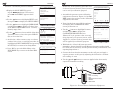
4.Use the
buttons to highlight either OFF
(turn charger OFF) or ON (turn charger ON).
In the example shown, ON has been selected.
5.Press ENT to save the selection and re-display the SETUP MENU.
If the sensor’s output is low, but still usable, then the message “Good
Calibration WARNING Low Sensor” will appear. The sensor will now
5-8
Instruction 24-9448
3-14
Instruction 24-9448