1
Item Checklist..................................................................................................2
System Requirements .....................................................................................2
Installing Hardware..........................................................................................2
Installing PG-32200 / PG-32400 Series with USB 2.0 cable........................................ 2
LED Display.....................................................................................................2
Installing Software ...........................................................................................3
Guide To Operations .......................................................................................3
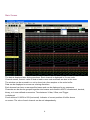
Main Screen ....................................................................................................4
Horizontal Scroll Bar........................................................................................5
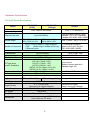
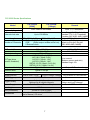
Hardware Specification....................................................................................6
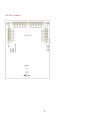
I/O Pin Location...............................................................................................8
File Menu.........................................................................................................9
View Menu.....................................................................................................10
Setup Menu ...................................................................................................10
Trigger Word..................................................................................................10
External Clock ............................................................................................... 11
Group Edit ..................................................................................................... 11
Mnemonic Edit...............................................................................................12
Initialize (Hardware) ......................................................................................12
Toolbar...........................................................................................................12
Pattern Editor ................................................................................................13
Search Data ..................................................................................................13
State List (Window Menu) .............................................................................14
Color Setup ...................................................................................................15
Pattern4k.la Data Format ..............................................................................16
Window USB Driver Install ............................................................................17
Windows 98/ME USB driver install............................................................................. 17
Windows 2000 USB driver install ............................................................................... 19
Windows XP USB driver install .................................................................................. 22
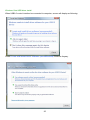
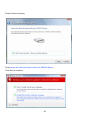
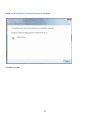
Windows Vista USB driver install ............................................................................... 25
Technical Support..........................................................................................28
Software Updates..........................................................................................28
1