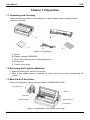
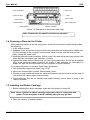
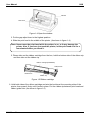
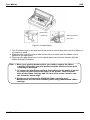
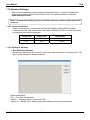
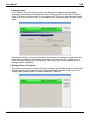
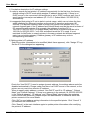
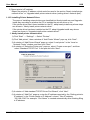
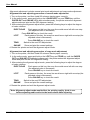
1
User Manual MAN10xxx-01 User Manual Compuprint 2056 Declare About Trademark Corporation names and product names are the registered trademarks or commodity names of the corporation. * EPSON and ESC/PK2 are registered trademarks of Seiko Epson Corporation. * IBM and IBM 2391 are registered trademarks of International Business Machines Corporation. * Windows is a registered trademark of Microsoft Corporation. MAN10xxx-01 i User Manual Compuprint 2056 Important Safety Instructios Read all of these instructions carefully and thoroughly and save them for later reference. The unauthorized operation would lead to malfunction or accident. Manufacturers have no responsibilities for the problems which are led by unauthorized operations. 1. 2. 3. 4. 5. 6. 7. 8. 9. 10. 11. 12. 13. 14. 15. 16. Follow all warnings and instructions in the manual as well as marked on the product. If the printer has just been used, please do not touch the print head for overheating. Do not put your fingers under the left and right tractor sprocket covers of the tractor when installing the tractor paper. Unplug this product from the power outlet before cleaning. Do not use liquid or aerosol cleaners. Use a damp cloth for cleaning. Do not use this product near water. Do not place this product on an unstable cart, stand or table. The product may fall, causing serious damage to you or to the product. Slots and openings on the cabinet and the back or bottom are provided for air ventilation. To ensure reliable operation of the product and to protect it from overheating, do not block or cover these openings. The openings should never be blocked by placing the product on a bed, sofa, rug or other similar surface. This product should never be placed near or over a radiator or heater. This product should not be placed in a built-in installation or kiosk stand unless proper ventilation is provided. This product should never be placed near or over a radiator or heat origin, and should avoid of direct sunshine. Do not locate this product where the cord would be walked on. When the cord or the plug is mangled, please stop using and get a new one replaced. Make sure the old one is far away from the printer, so it can avoid someone who does not know the inside story getting damage. Do not use in locations subject to high humidity or dust levels. Excessive humidity and dust may cause equipment damage or fire. Never push objects of any kind into this product though cabinet slots as they may touch dangerous voltage dots or short out parts. Don’t remove the printer’s out-cover and repair the printer. When needed, call or take it to the professional. To ensure safety, please unplug this product prior to leaving it unused for an extended period. The wall outlet you plan to connect to should be nearby and unobstructed. This product belongs to the impact printer; it produces obviously noise during printing, so we suggest placing this printer in a relatively independent area. When using the printer in room where ventilation is not good or printing a large amount of files, it is suggested to change the air in time. Unplug this product from the power outlet and leave servicing to qualified service personnel under the following conditions: MAN10xxx-01 ii User Manual Compuprint 2056 A. When the power cord or plug is damaged or frayed. B. If liquid has been spilled into the product. C. If the product has been exposed to rain or water. D. If the product does not operate normally when the operating instructions are followed. E. If the product has been dropped or the cabinet has been damaged. F. If the product exhibits a distinct change in performance, it indicates a need for service. Note: The contents of this manual are subject to change without notice. * All parts of the printer can be recycled. When it is abandoned, we can call it back freely. Please contact us when you abandon it. Warnings, Cautions and Notes Pay attention to the following promises when using this manual: Warnings: Warnings must be followed carefully to avoid bodily injury. Cautions: Cautions must be observed to avoid damage to your equipment. Notes: Notes contain important information and useful tips on the operation of your printer. MAN10xxx-01 iii User Manual Compuprint 2056 Overview First thanks for purchasing this Compuprint printer. Your printer is a 24-pin 80-column dot matrix printer, offering a wide range of features and multiple functions. It can be widely used in tax, mail, telecom, police, hospital, insurance, finance, stock, customhouse, cabaret, aviation and transport etc. Printer Features: Install print paper easily The design of this printer makes you install paper rapidily and save your time. Tear off function This causes tractor paper to be automatically fed to the tear-off position at the edge of the window cover, for easy tear-off at the perforations after printing. This zero tear-off capability helps eliminate paper wastage. Facility switch between cut sheet and tractor paper Feed the tractor paper back to the installing position through LOAD/EJECT key on the control panel, pull the paper select lever to the cut-sheet position. Insert the cut-sheet from front to print. If you want to use tractor paper again, pull the paper select lever back to the tractor paper position after cut-sheet printing. Then press LOAD/EJECT key, tractor paper may be fed to the printer again. Eject function The function allows the user eject the tractor paper through the facility key on the control panel. Select the data transfer interface function automatically The printer configures with a parallel interface, two USB interfaces, a serial interface or an Ethernet interface (Please take the specific interface as standard). Connect the printer to the computer with the correct cables. The printer would switch to the correct interface according to the received data type automatically. Emulation The printer supports the Epson ESC/PK2 and IBM 2391 emulations as standard. Pin break compensation function User can set the printer to print using the pin which is in good condition to compensate the break pin. Pin rotation replacement function User can set pins to switch while printing form transverse line in order to improve print head’s life. MAN10xxx-01 iv User Manual Compuprint 2056 Table of Contents 1.1 Unpacking and Checking................................................................................................... 1 1.2 Removing the Protective Materials.................................................................................... 1 1.3 Main Parts of the Printer .................................................................................................... 1 1.4 Choosing a Place for the Printer........................................................................................ 2 1.5 Installing the Ribbon Cartridge .......................................................................................... 2 1.6 Connecting the Power Cord .............................................................................................. 5 1.7 Self-test .............................................................................................................................. 5 1.8 Connecting the Printer to Your Computer ......................................................................... 7 1.8.1 Connecting to the Parallel Interface ............................................................................ 7 1.8.2 Connecting to the USB Interface................................................................................. 8 1.8.3 Connecting to the Serial Interface ............................................................................... 8 1.8.4 Connecting to the Ethernet Interface .......................................................................... 8 1.9 Installing Printer Driver....................................................................................................... 9 1.10 Network Settings ............................................................................................................ 12 1.10.1 Connecting Printer ................................................................................................... 12 1.10.2 Setting IP Address ................................................................................................... 12 1.10.3 Installing Printer Network Driver .............................................................................. 15 Chapter 2 Control Panel...................................................................................................22 2.1 Control Panel ................................................................................................................... 22 2.2 LED Description ............................................................................................................... 22 2.3 Control Panel Basic Function Description ....................................................................... 22 2.4 Other Function Descriptions of Control Panel ................................................................. 23 2.4.1 In the Tractor Paper Mode ........................................................................................ 23 2.4.2 In the Cut Sheet Mode .............................................................................................. 24 2.4.3 Print Speed ................................................................................................................ 24 2.4.4 Copy Setup Mode...................................................................................................... 24 2.4.5 Micro-Adjust of the Printing Home Position and the Tear Position........................... 24 2.4.6 Feed Paper to the Tear Position ............................................................................... 25 2.4.7 Other Functions of the Control Panel ........................................................................ 25 2.5 Paper Select Lever ....................................................................................................... 26 2.6 Paper Feed Knob............................................................................................................. 26 2.7 The Gap Adjust Lever ...................................................................................................... 26 Chapter 3 How to Use the Printer ....................................................................................27 3.1 Loading the Paper............................................................................................................ 27 3.1.1 Loading Cut Sheet ..................................................................................................... 27 3.1.2 Loading Tractor Papers ............................................................................................. 29 3.1.3 Loading Multiply Papers ............................................................................................ 32 3.1.4 Loading Labels .......................................................................................................... 32 3.1.5 Loading Envelopes .................................................................................................... 32 3.2 Changing the Printer Settings.......................................................................................... 33 3.2.1 Setting Printer Parameter Through the Control Panel .............................................. 33 3.2.2 Online-aptitude Parameter Settings .......................................................................... 35 3.3 Printer Setting Description ............................................................................................ 40 MAN10xxx-01 v User Manual Compuprint 2056 Table of Contents Chapter 4 Troubleshooting...............................................................................................43 4.1 Problems in Power Supply .............................................................................................. 43 4.2 Problems in Printing ......................................................................................................... 43 4.3 Paper Handling ................................................................................................................ 45 4.4 Alignment Adjust Mode .................................................................................................... 46 Chapter 5 Printer Maintenance and Technical Service ....................................................48 5.1 Cleaning the Printer ......................................................................................................... 48 5.2 Contact the Technical Service Centre ............................................................................. 48 Appendix A Specifications................................................................................................49 A.1 General Specification ...................................................................................................... 49 A.2 Interface Specifications ................................................................................................... 52 A.2.1 Parallel Interface ....................................................................................................... 52 A.2.2 USB Interface ............................................................................................................ 52 A.2.3 Serial Interface .......................................................................................................... 52 A.2.4 Ethernet Interface ...................................................................................................... 53 A.3 Printable Area............................................................................................................... 54 Appendix B Commands Summary .................................................................................55 MAN10xxx-01 vi User Manual 2056 Chapter 1 Preparation 1.1 Unpacking and Checking Check the following items in the packing box, if any of these items is missing, please contact your dealer. A C B D E Figure 1-1 Packing list A: Printer B: Ribbon cartridge PRKN2056 C: Driver CD (Including user's manual and driver) D: Power cord E: Facility user’s guide 1.2 Removing the Protective Materials 1. Open the packing box, take out the printer. 2. Save all the original packing materials, so that it can be used when transporting the printer. 1.3 Main Parts of the Printer Figure1-2 and figure1-3 show the main parts of COMPUPRINT 2056. Gap adjust lever Window Print head Paper feed knob Ribbon cartridge Control panel Figure 1-2 Main parts of the printer (front view) MAN10xxx-01 1 User Manual 2056 Rear cover Paper guide slider Tractor Paper feed knob Power switch Serial interface Power supply inlet Parallel interface USB interface USB interface Ethernet interface Figure 1-3 Main parts of the printer (rear view) Note: Please take the specific interface as standard. 1.4 Choosing a Place for the Printer When selecting a place to set up your printer, choose a convenient location that provides the following: 1. A flat, stable surface. 2. Adequate room around the printer to allow easy operation and maintenance. Make sure it’s close enough to the computer for the printer cable to reach, and be sure you can easily unplug the power cord. 3. Moderate environmental conditions. Select a cool, dry area and protect your printer from direct sunlight, excessive heat, moisture, or dusty. 4. Appropriate power source. Make sure you use a grounded outlet; do not use an adapter plug. Avoid electrical outlets controlled by timers or wall switches; an interruption in power can wipe out the information in your computer or printer memory. If you place the printer on a stand, follow these guidelines: 1. Use a stand that supports at least 9 kg (19 lb). 2. Never use a stand which is slant. Always keep it level. 3. Provide enough clearance below the stand and between the printer rack and the legs of the rack so the tractor paper flows smoothly. 4. Place cables so they do not interfere with paper feeding; secure them to a leg of the stand if possible. 1.5 Installing the Ribbon Cartridge 1. Before installing the ribbon cartridge, make sure the printer is turned off. Note: Never replace the ribbon cartridge when the printer is connected with power. Printer may start to work suddenly and you may get hurt. 2. Open the window. (As shown below) MAN10xxx-01 2 User Manual 2056 Window Print head Figure 1-4 Open the window 3. Put the gap adjust lever to the highest position. 4. Slide the print head to the middle of the printer. (As shown in figure 1-4) Note: Never move the print head while the printer is on, or it may damage the printer. Also, if you have just used the printer, let the print head cool for a few minutes before you touch it. 5. Please take out the ribbon cartridge from the box, hold the bottom side of the ribbon nip and then take out the ribbon nip. Ribbon cartridge (PRKN2056) Ribbon knob Ribbon core Ribbon nip Figure 1-5 Ribbon cartridge 6. Hold both sides of the ribbon cartridge and aim the buckles at the mounting slots of the printer, then press it firmly until it locks in place. Put the ribbon nip between print head and ribbon guide slice. (As shown in figure 1-6) MAN10xxx-01 3 User Manual 2056 Ribbon knob Ribbon nip Ribbon guide slice Print head Figure 1-6 Install ribbon 7. Turn the ribbon knob in the direction of the arrow to remove any slack from the ribbon so it is easier to install. 8. Slide the print head from side to side several times to make sure the ribbon core is installed in the right place. 9. Please put the gap adjust lever to the original place and close the window after the ribbon cartridge is installed. Note: 1. When your printing becomes faint, you need to replace the ribbon cartridge. Otherwise, the print quality would be affected and the print head may be damaged. 2. To remove the old ribbon cartridge, first make sure the power is turned off, move the print head to the center of the printer. Then hold both sides of the ribbon cartridge and lift it out of the printer. Install a new one follow the above steps. 3. Please use the Compuprint PRKN120 ribbon cartridge only. Manufacturer will not honor warranty when using unauthorized ribbon cartridge. MAN10xxx-01 4 User Manual 2056 1.6 Connecting the Power Cord 1. Make sure the printer’s power is turned off. (The pressed down side on the power switch with “O” mark denotes the printer is off.) 2. Make sure the voltage required by the printer matches that of your electrical outlet. 3. Plug one end of the power cord into the printer’s power supply inlet. (As figure 1-7 shown) 4. Plug the other end of the power cord into a properly grounded electrical outlet. Power switch Power supply inlet Electrical outlet Power cord Grounding Figure 1-7 Turn off the printer Note: 1. If the rated voltage does not match your outlet voltage, contact your dealer for assistance. Do not plug in the power cord. 2. Adopt the electrical outlet connecting the ground properly. 1.7 Self-test The built-in self-test function demonstrates that the printer works properly. You can run the test with either tractor paper or cut sheet; this section describes the easiest way of ASCII self-test with cut sheet. Note: You should use paper at least 210 mm (8.3 inches) wide to run the selftest; otherwise, the print head would print directly on the platen. 1. Make sure the printer is turned off and the paper-select lever is at the cut sheet position. Raise the rear cover. Figure 1-8 Set paper select MAN10xxx-01 5 User Manual 2056 2 While holding down the TEAR key, turn on the printer. The Paper Out and ONLINE LEDs blink which indicates the printer is out of paper. 3. Adjust the right paper guide of the rear cover to the range of the scale. Then adjust the left paper guide to make the distance match the width of the paper. (As shown below) Figure 1-9 Adjust the right and the left paper guides of the rear cover 4. Slide a piece of cut sheet down firmly between the right and left paper guides until it meets resistance. The printer loads the cut sheet automatically and begins printing when pressing ONLINE key. Figure 1-10 Install cut sheets Caution: Make sure the window is closed while printing. 5. Press the ONLINE key to pause the printing. 6. To end the self test, make sure the printer is not printing. Press LF/FF or LOAD/EJECT key to eject cut sheet; then turn off the printer. ASCII Self-test mode COMPUPRINT 2056 VX.X XXXXXXX/XX/XX SN: XXXXXXXXXXX !"#$%&’( )*+-./0123456789:;<=>?@ABCDEFGHIJKLMNOPQRSTUVWXYZ[\]^_`ab !"#$%&'( )*+ /0123456789:;<=>?@ABCDEFGHIJKLMNOPQRSTUVWXYZ[\]^ `abcd Figure 1-11 ASCII Self-test mode Note: If the self test did not print satisfactorily, see details in Chapter 4. If it prints correctly, go on to the next section. MAN10xxx-01 6 User Manual 2056 1.8 Connecting the Printer to Your Computer The printer configures with a parallel interface, two USB interfaces, a serial interface or an Ethernet interface. (Please take the specific interface as standard) Connect the printer to the computer with the correct cables. Before you begin, place the printer upright, as shown in figure 1-12. Parallel interface Serial interface Ethernet interface USB interface USB interface Figure 1-12 Lay the rear part of the printer upwards Note: Before connecting the parallel interface or the serial interface, please make sure the power of the printer is shut down. Only after tightening the cable, could you turn on the printer, or it would damage the printer. 1.8.1 Connecting to the Parallel Interface 1. Turn off both the computer and the printer. Plug the parallel interface cable into the printer’s parallel interface. Squeeze the wire clips on both sides of the connector and make the connector fixed. (Shown as figure 1-13) Wire clips Parallel interface Parallel interface cable Figure 1-13 Connect to the parallel interface 2. Plug the other end of the cable into the computer's parallel interface, and make sure it is connected firmly. MAN10xxx-01 7 User Manual 2056 1.8.2 Connecting to the USB Interface 1. Plug the USB cable A end (flat shape) into the computer's USB interface. 2. Plug the USB cable B end (square shape) into the printer's USB interface (As shown in figure 1-14). USB interface USB interface USB cable Figure 1-14 Connect to USB cable Note: Don't impact the plug after connecting to the USB cable. 1.8.3 Connecting to the Serial Interface 1. Turn off both the computer and the printer. Plug the serial interface cable into the printer’s serial interface. Tighten the screws on both sides of the connector and make the connector fixed. (As shown in figure 1-15) Screw Serial interface cable Serial interface Figure 1-15 Connect to serial interface 2. Plug the other end of the cable into the computer’s serial interface, make sure it connects tightly. 1.8.4 Connecting to the Ethernet Interface 1. Plug the RJ-45 crystal end of the Ethernet interface cable into the printer Ethernet interface, and plug the other end into the LAN. (Shown as figure 1-16) MAN10xxx-01 8 User Manual 2056 Ethernet interface cable Ethernet interface Figure 1-16 Connect to the Ethernet interface Note: The detailed instructions of network setting please refer to the User’s Manual. 1.9 Installing Printer Driver Please use the cable to connect computer with printer, then turn on the computer and the printer, put the driver CD into the CD-ROM. Install driver by the following ways: Auto-installing way Double click the file “Setup.exe” in the driver disc, install driver by the following direct. Note: Auto-install way needs the operating systems of Windows 2000 and above and the operating systems of Window 98/ME and below are not supported. Hand operated installing way Note: The hand-operated installing ways of serial interface and parallel interface are the same. 1) The installing steps of parallel interface for Windows 2000/XP/Vista are as follows: 1 Click “Start” → “Settings” → Select “Printers”. 2. Click “Add Printer”, then it pops up a window of “Add Printer Wizard”, click “Next”, then please read the select guide carefully, such as, select “Local printer” in the “Local or Network Printer” window, then click “Next”. 3. A window of “Select a Printer Port” pops up, select “LPT1: (Recommended Printer Port)”, (If you need to use other ports, please select the respective port), click “Next”. 4. A window of “Install Printer Software" pops up, click “Have Disk...”. 5. A window of “Install From Disk” pops up. Please according to the operating system environment, you should select the path as follow: CD-ROM → “Drivers” → “WIN2000 (XP-Vista-Win7)”, click “Open”, then click “OK” to return to the window of “Install Printer Software”, click “Next”. 6. Follow the guide click “Next” gradually till the installation is finished. MAN10xxx-01 9 User Manual 2056 2) The installing steps of parallel interface for Windows 7 are as follows: 1. Click “Start” → “Device and Printers”. 2. Click “Add Printer”, then it pops up a window of “Add Printer Wizard”, click “Local printer” in the “Local or Network Printer” window, then click “Next”. 3. A window of “Select a Printer Port” pops up, select “LPT1: (Recommended Printer Port)”, (If you need to use other ports, please select the respective port), click “Next”. 4. A window of “Install Printer Software” pops up, click “Have Disk...”. 5. A window of “Install From Disk” pops up. Please according to the operating system environment, such as Windows XP operating system, you should select the path as follow: CD-ROM → “Drivers” →“WIN2000 (XP-Vista-Win7)”, click “Open”, then click “OK” to return to the window of “Install Printer Software”, click “Next”. 6. Follow the guide click “Next” gradually till the installation is finished. The USB interface installing steps for Windows 2000/XP/Vista/Win7 are as follows: The following steps are used Windows XP as an example. There are slight differences among different operating systems. 1. Connect with a USB cable and turn on both the computer and the printer. After the computer find out new hardware, and a window of “Found New Hardware” pops up “Welcome to the new hardware wizard”. 2. Select the “Set from the list or specific position”, then click “Next” 3. A window of “Please choose your search and installation options” pops up, choose “Don't search, I will choose the driver to install”, click “Next”. 4. A window of "Add Printer Wizard" pops up, click "Have Disk...”. 5. A window of “Install From Disk” pops up. Please according to the operating system environment, you should select the path as follow: CD-ROM → “Drivers” → “WIN2000 (XP-Vista-Win7)”, click “Open”, then click “OK” to return to the window of “Add Printer Wizard", click “Next”. 6. Follow the guide click “Next” gradually till the installation is finished. The installing steps for Windows 98 are as follows: (1) The installing steps with a parallel interface cable or a serial interface cable: 1. Click “Start” → “Settings” → “Printers”. 2. Click “Add Printer”, then a window of “Add Printer Wizard” pops up, select “Local printer” in the “Local or Network Printer” window, then click “Next”. 3. A window of “Click the manufacturer and model of your printer” pops up, click “Have Disk...”, please click “Browse”, select the path as follow: CD-ROM → “Drivers” → “WIN98 (WINME)”, then click “OK”. 4. A window of “Install From Disk” pops up, click "OK, return to the window of “Add Printer Wizard”, then click "Next". 5. A window of “Printer port” pops up, select “Available ports”, such as, select “LPT1: Printer Port”, click “Next”, and then show the printer’s name. If the system is not installed by other printer driver process, the printer is treated as default printer by the application process of Window98 environment, click “Next”. Otherwise according to prompt, choose the printer is default: “Yes”, click “Next”, choose “Yes-(recommended)”, click “Finish”. A window of “Printer test page completed” pops up, click “Yes”. 6. The printer driver process is installed successfully. MAN10xxx-01 10 User Manual 2056 (2) The installing steps with the USB cable: Note: 1. As the system of Windows 98/ME doesn’t have integrated USB driver control, please install USB driver before using USB interface printing. Then install USB printer driver. 2. If it has installed the USB driver, please install the USB printer driver directly as the following steps. USB driver installing steps: 1. Connect with the USB cable and turn on the printer. 2. After the computer find out new hardware and finish searching, a window of “Add New Hardware Wizard” pops up, click “Next”. 3. A window of “Add New Hardware Wizard” — “Windows operation” pops up, choose “Search the best driver for the device (recommended)”, and click “Next”. 4. A window of “Search for new drivers” pops up, check “Specify a location”, click “Browse”, select the path as follows: CD → ROM → “Drivers”-“[WIN98 (WINME) \ USBdriver]”, then click “OK”. 5. Return to the window of “Add New Hardware Wizard”, click “Next”; a window of “Windows driver file search for the device” pops up, click “Next”. 6. After the system finishing installing the file automatically, a window of “USB Print Supported” pops up, click "Finish". 7. The printer USB driver process is installed successfully. USB printer driver installing steps: 1. Click “Start” → “Settings” → “Printers”. 2. Click “Add Printer”, then a window of “Add Printer Wizard” pops up, click “Next”. 3. A window of “Click the manufacturer and model of your printer” pops up, click “Have Disk...”, please click “Browse”, select the path as follow: CD-ROM → “Drivers” → “WIN98 (WINME)”, and then click “OK”. 4. A window of “Install From Disk” pops up, click “OK”, return to the window of “Add Printer Wizard”, then click "Next". 5. A window of “Printer port” pops up, select “Available ports”, select “JMUSB”, click "Next", and then show the printer’s name. If the system is not installed by other printer driver process, the printer is treated as default printer by the application process of Window98 environment, click “Next”. Otherwise according to prompt, choose the printer is default: "Yes", click "Next" choose “Yes-(recommended)”, click “Finish”. A window of “Printer test page completed” pops up, click “Yes”. 6. The printer driver process is installed successfully. MAN10xxx-01 11 User Manual 2056 1.10 Network Settings Please use Compuprint network setting software NetFinder to set the IP address for Compuprint printers, which can be found in the CD or downloaded from web site: www.compuprint.com. Note: The network printing function needs the operation system of Windows 2000 or above. 1.10.1 Connecting Printer Power on the printer, connect with the Ethernet interface cable which has been connected to LAN, and look into the information of Ethernet LED to ensure the printer has entered the normal connection. Yellow LED ON Green LED Blink OFF OFF Description Online Offline 1.10.2 Setting IP Address 1. Run NetFinder Software Double click NetFinder.exe in the PC which connects the printer in the same LAN. The figure of the software is shown as follow: Button description: Exit — Exit from the software Search — Search printers in the same LAN Assign IP — Modify the IP address and other settings for the specified printer. MAN10xxx-01 12 User Manual 2056 2. Search printer Click "Search" key in the main interface, the dialogue box appearing would begin searching automatically and displays the status, listing a printer in the main interface if found. The time is counting down in the progress bar (10s in total) and the search would finish as soon as the time is over. If you need to go on searching, press “Search” button again. If the printer still can not be found out when the network connection is correct and in the same network, please check whether the network fire wall on the PC is open or not. If there is fire wall, please close it temporarily, open again after finishing searching and setting a printer completely. 3. Setting printer’s IP address The printer’s information is listed in the main interface, the left side of which is the model and description and the right are the IP address and MAC address. What’s more, the assign mode (dynamic/static) is noted behind the IP address. MAN10xxx-01 13 User Manual 2056 1) Correlative description for IP address settings In order to search and set printer’s IP address conveniently for the first time, the factory default setting is DHCP mode which assigns IP address dynamically. If there is no DHCP server in the connected LAN and printer is set to DHCP mode as well, then it would use the internal pre-set address (IP: 10.0.0.1, Subnet Mask: 255.255.255.0) automatically. It is suggested that printer’s IP set to static in actual usage, which can cut down the time when initializing the Ethernet interface as the printer is turned on and prevent IP conflicts (The dynamic address used in printer may conflict with another one). The network segment part of the IP address and Subnet Mask must be the same as those of PC connecting with a printer. For example, the address of working PC is 192.168.0.1/255.255.255.0 (IP/Subnet Mask),then which of printer should be set to 192.168.0.x/255.255.255.0(x=2~254 and should avoid the IP in used. It is not restricted for NetFinder to search printers in the same network but different segment parts (can not stride gateway). Relative glossary of IP address may refer to corresponding information. 2) Setting printer’s IP address Select the printer information to be modified (black frame appears), click "Assign IP" key. Set the IP in the dialogue box appearing. Check the “Use DHCP” if need to assign dynamic address, the settings above would be disabled automatically. Please make sure there is a DHCP server in the network, or the printer can not receive an effective IP address. When to specify static address, uncheck “Use DHCP” and fill in “IP address”, “Subnet Mask” and “Default Gateway”. If there is no gateway in the network, fill 255.255.255.255 in the “Default gateway”. “IP address” and “Subnet Mask” should obey the assigning rules of local LAN (Ethernet), please enquire the administrator of networks which the printer connects to for more details. Click “OK” to send address setting information to the specified printer. Click “Cancel” if you abandon the modification. Click “Search” in the main interface again to update printer information after modifying the printer’s IP address. MAN10xxx-01 14 User Manual 2056 3) Report printer’s IP address Report the printer’s IP address, which would be used in the section “Newly-install printer network driver” or “Upgrade-install printer network driver (setting driver’s network port)”. 1.10.3 Installing Printer Network Driver The ways of installing network driver are classified into Newly-install way and Upgradeinstall way according to whether the PC is installed the printer driver or not. If the printer driver hasn’t been installed on the PC, adopt newly-install way whose steps are shown in “Newly-install printer network driver”. If the printer driver has been installed on the PC, adopt Upgrade-install way whose steps are shown in “Upgrade-install printer network driver”. 1. Newly-install printer network driver 1) Click “Start” → “Settings” → Select “Printers”. 2) Click “Add printer”, then a window of “Add Printer Wizard” pops up, click “Next”. 3) A window of “Add Printer Wizard” pops up, select “Local printer” in the “Local or Network Printer” window, and then click “Next”. 4) A window of “Select the Printer port” pops up, select “Create a new port”, and then select “Standard TCP/IP Port” in the port and click “Next”. 5) A window of “Add standard TCP/IP Printer Port Wizard”, click “Next”. 6) A window of “Add Port” pops up, enter the IP address reported by the “Setting printer’s IP address” in the “Printer Name or IP Address” column. Take IP address “192.168.0.240” for example. “Port Name” is created automatically after finishing filling in IP address. MAN10xxx-01 15 User Manual 2056 7) A window of “Additional Port Information Required” pops up, select “Custom” in the “Device Type”, then click “Settings”. 8) A window of “Port Settings” pops up. Affirm that “Port name” and “Printer name or IP address” are correct, “Protocol” is “RAW” and “Port Number” is “9100”, click “OK”. MAN10xxx-01 16 User Manual 2056 9) Return to “Additional Port Information Required”, click “Next”. 10) A window of “Completing the Add Standard TCP/IP Printer Port Wizard” pops up, click “Finish”. 11) In the selection of “Manufacturers/Printers”, click “Have Disk”, and then click “Next”. 12) A window of “Install From Disk” pops up. Please according to the operating system environment, such as Windows 2000/XP/Vista/Win7 operating system you should select the path as follows: CD-ROM → “Drivers” → “WIN2000 (XP-Vista-Win7)”, click “Open”, then click “OK” to return to the window of “Install Printer Software”, click “Next”. 13) Follow the direction click “Next” gradually till the installation is finished. At this time, printer network driver is installed completely. 2. Upgrade-install printer network driver (setting driver’s network port) If PC has installed the printer’s driver, set driver’s network port to carry out network printing. The concrete steps are shown below: 1) Click “Start” → “Settings” → Select “Printers”. 2) Right click COMPUPRINT 2056 driver, click “Properties” on the window popping up. 3) A window of “Properties” pops up; click “Ports” and “Add Ports”. MAN10xxx-01 17 User Manual 2056 4) A window of “Printer port” pops up, select “Standard TCP/IP Port”, click “New port”. 5) A window of “Add Standard TCP/IP Printer Port Wizard” pops up, click “Next”. MAN10xxx-01 18 User Manual 2056 6) A window of “Add a port” pops up, import the IP address reported by the “Setting printer’s IP address” in the “Printer name or IP address” column. Take IP address “192.168.0.240” for example. “Port name” is created automatically after finishing filling in IP address. Click “Next”. 7) A window of “Additional Port Information Required” pops up, select “Custom” in the “Device Type”, then click “Settings”. 8) A window of “Port Settings” pops up. Affirm that “Port name” and “Printer name or IP address” are correct, “Protocol” is “RAW” and “Port Number” is “9100”, click “OK”. MAN10xxx-01 19 User Manual 2056 9) Return to “Additional Port Information Required”, click “Next”. 10) A window of “Completing the Add Standard TCP/IP Printer Port Wizard” pops up, click “Finish”. 11) Return to “Printer Ports”, click “Close”. 12) Return to “Properties”, make sure the network port is selected, click “Apply”, and then click “Close”. Thus, printer’s network port setting is finished. MAN10xxx-01 20 User Manual MAN10xxx-01 2056 21 User Manual 2056 Chapter 2 Control Panel 2.1 Control Panel There are 5 keys and 3 LED indicators on the control panel. (Shown as figure2-1) Figure 2-1 Control 2.2 LED Description LED PAPER OUT ONLINE SPEED OFF ON BLINK Normal —— Paper out or malfunction —— Online Offline The green LED denotes normal speed mode (or letter speed mode), the yellow LED denotes the high speed mode and the red LED denotes the super high speed mode. 2.3 Control Panel Basic Function Description Key Function ONLINE Press ONLINE key to switch between online mode and offline mode. At the state of paper out, press LOAD/EJECT key, the paper would be fed to the printing home position automatically when the paper is at the ready position. In the tractor paper mode and press LOAD/EJECT key, the paper would eject one page when it is at the tear position or just load paper. When it is at other positions, press LOAD/EJECT key, the tractor paper would eject one line, Alternatively, hold the LOAD/EJECT key down, the printer would eject one page of tractor paper. If in the cut sheet mode, press the LOAD/EJECT key, the paper would entirely eject from the printer. If the paper is at the print position, press the LF/FF key in the sleep or offline mode, the printer would feed the paper one line. Alternatively, hold the LF/FF key down, the printer would feed one page of tractor paper or eject the cut sheet. In the tractor paper mode, in the sleep or offline mode, press TEAR key to switch between the tear position and the printing home position. In the offline mode, pressing SPEED key can switch among normal speed mode (or letter speed mode), the high speed mode and the super high speed mode. LOAD/ EJECT LF/FF TEAR SPEED MAN10xxx-01 22 User Manual 2056 Note: Print speed is divided into Normal print mode (letter mode or normal speed mode), the high speed mode and the super high speed mode. If Letter mode is set through online aptitude parameter setting or menu setup mode, press SPEED key on the control panel when offline, print speed will switch among letter mode, high speed mode and super high speed mode. If any other mode (not including letter mode) is set through online aptitude parameter setting or menu setup mode, press SPEED key on the control panel when offline, print speed will switch among normal speed mode, high speed mode and super high speed mode. Note: When using tractor paper, if paper is out, please press LOAD/EJECT key or LF/FF key to feed paper after loading paper again. 2.4 Other Function Descriptions of Control Panel 2.4.1 In the Tractor Paper Mode TEAR 1. In the offline mode, if the paper is at the print position, press TEAR key and the printer feeds paper to the tear position. 2. In the offline mode, if the paper is at the tear position, press TEAR key and the printer ejects paper to the next page or to the printing home position of the current page. LF/FF In the offline mode, if the paper is at the print position, press the LF/FF key (less than 0.5 second), the printer would feed the paper one line based on current line spacing setting. Alternatively, hold the LF/FF key down, the printer would load one page of tractor paper. LOAD/EJECT 1. When the paper is at the ready position, press LOAD/EJECT key, the paper would be fed into the printing home position automatically. 2. When the paper is at the printing home position, press LOAD/EJECT key in the offline mode, the paper would return to the ready position. 3. When the paper is at the general print position (not the printing home position), press LOAD/EJECT key in the offline mode (less than 0.5 seconds), the paper ejects one line. Alternatively, hold the LOAD/EJECT key down, the printer would eject one page of tractor paper if the eject-able page length is more than one page. If the paper eject-able length is less than one page, the paper would return to the ready position. 4. When the paper is at the tear position, press LOAD/EJECT key, the printer would eject one page of tractor paper. ONLINE 1. If the printer has loaded paper in the offline mode, press this key to enter ONLINE mode, the ONLINE LED is on and the printer enters the print mode. Press this key in the online mode, the printer is offline, ONLINE LED blinks and the printer can not print. 2. If the paper is at the tear position in the offline mode, press ONLINE key, the printer would go back to the printing home position of the current page or that of the next page. MAN10xxx-01 23 User Manual 2056 2.4.2 In the Cut Sheet Mode LF/FF If the paper is at the print position in the offline mode, press the LF/FF key (less than 0.5 second), the printer would feed the paper one line based on the current line spacing setting. Alternatively, hold the LF/FF key down, the printer would eject the paper until the cut sheet is entirely ejected. LOAD/EJECT If the paper is at the print position in the offline mode, press the LOAD/EJECT key, the paper would be entirely ejected from the printer. ONLINE If the printer has loaded paper in the offline mode, press the key to enter ONLINE mode, the ONLINE LED is on and the printer enters the print mode. Press this key in the online mode, the printer is offline, ONLINE LED blinks and the printer can not print. 2.4.3 Print Speed The setting method of the print speed: In offline mode, press the SPEED key to switch the print mode among Normal Speed mode, High Speed mode and Super High Speed mode. The green LED denotes normal speed mode, the yellow one denotes the high speed mode and the red one denotes the super high speed mode. 2.4.4 Copy Setup Mode Printer will turn on the Copy mode automatically when the gap adjust lever is set to 3 (or higher). In order to improve the copy definition when using multi-ply paper, you can select the copy capability through the following steps: 1. In Online mode, long press SPEED key + TEAR key for about 3 seconds, after the printer beeps three times, the PAPER OUT LED and ONLINE LED blink at the same time, and the printer would present one beep every one or two seconds which indicates the printer has entered Copy setup mode. 2. The SPEED LED indicates the current Copy setup mode: Green denotes the quiet mode; Orange denotes the normal mode and Red denotes the copy mode. 3. In Copy setup mode, press LF/FF key can switch the printer among quiet mode, normal mode and copy mode. 4. After setting the Copy setup mode. Long press SPEED key + TEAR key for about 3 seconds, the printer beeps 3 times, which indicates the printer saves the setting and exits the Copy setup mode. 5. You could also set Copy setup mode through driver or menu setup mode. (See details in User's Manual) 2.4.5 Micro-Adjust of the Printing Home Position and the Tear Position Operation steps of adjusting the printing home position: (the printing home position of cut sheet is separated with that of the tractor paper. The following uses tractor paper as an example) MAN10xxx-01 24 User Manual 2056 1. Turn on the printer. Pull the paper-select lever to tractor paper mode, press LOAD/EJECT key to load tractor paper. 2. Press ONLINE key to ensure the ONLINE LED blinks. Hold on pressing ONLINE key for about 3 seconds till the printer beeps once. The ONLINE LED and PAPER OUT LED blinks alternately. Note: Don't press SPEED key now, or the printer can’t enter the micro-adjust mode. 3. Press LF/FF and LOAD/EJECT keys to adjust the printing home position. 4. Press the ONLINE key again to save and quit the alternate mode after finishing adjusting. The operation step of adjusting the tear position is generally the same with that of the printing home position. But the exclusive difference is pressing TEAR to feed paper to the tear position after installing the tractor paper. Note: Don't revolve the paper feed knob when the printer is in the process of the micro-adjust. Note: The adjustable range of printing home position is from -18/60 inch to +60/60 inch (based on the factory default setting). The adjustable range of tear position is from -15/60 inch to +15/60 inch (based on the factory default setting). 2.4.6 Feed Paper to the Tear Position 1. Turn on the printer; hold the ONLINE key for 3 seconds when offline till the ONLINE LED blinks with a beep. 2. Hold the TEAR key for 3 seconds that you can switch the function of feeding paper to the tear position to ON or OFF automatically. 2.4.7 Other Functions of the Control Panel KEY FUNCTION ONLINE + POWER Print current setting mode; If long press the LOAD/EJECT+ LF/FF keys down in online mode, the printer would enter menu setup mode. POWER + LOAD/EJECT Chinese self-test mode TEAR + POWER ASCII self-test mode TEAR + LF/FF + POWER Hex dump mode LF/FF + POWER Pin test mode, which is to test whether the print pins are in good condition. MAN10xxx-01 25 User Manual 2056 2.5 Paper Select Lever Paper select lever is to set the printing mode for cut sheet or tractor paper. For cut sheet, you need to pull the paper select lever to the position for cut sheet before loading. For tracor paper, pull the paper select lever to the position for tractor paper before loading. Figure 2-2 Paper select lever 2.6 Paper Feed Knob The paper feed knob is used to feed paper or eject paper manually. In general, it’s better not to use it. 2.7 The Gap Adjust Lever Please adjust the gap adjust lever according to the paper thickness. The factory default setting is suitable for standard office paper. POSITION -1 0 1 2 3 4 5 PAPER TYPE Reserved Cut sheet 2 plies Fanfold 3 plies paper 4 plies Reserved Reserved Figure 2-3 The gap adjust MAN10xxx-01 26 User Manual 2056 Chapter 3 How to Use the Printer Here are the steps of using printer: 1. Install the printer as the description in chapter 1, connect the printer to your computer and install the driver correctly. 2. Load the correct type of paper. 3. Set the printer if necessary. 4. Send the print command to the printer to print. 3.1 Loading the Paper In addition to printing on cut sheet and tractor papers, your printer can also print on a wide variety of paper types, including multi-ply paper, labels and envelopes. Caution: When printing on multi-ply paper, the print force is stronger as the paper is thicker than other common paper. Please make sure the printing are entirely within the printable area or it can damage the print head. Please make sure the printing contents are all within the printable area while printing. The correlative printable area, see the Appendix A for reference. 3.1.1 Loading Cut Sheet 1. Make sure the printer is powered off, and open the window of the printer, refers to chapter Gap Adjust Lever of this manual, pull the gad adjust lever to cut sheet position according to the paper type. Figure 3-1 Adjust the gap adjust lever MAN10xxx-01 27 User Manual 2056 2. Close the window, and pull paper select lever toward the cut sheet position. Figure 3-2 Adjust the paper select 3. Raise the printer rear cover to the proper position (shown as figure 3-3), then turn on the printer. Rear cover Figure 3-3 Adjust the position of the rear 4. Slide the right paper guide of the back cover to the range of the scale. Then adjust the left paper guide to make the distance match the width of the print paper. (Shown as below) Figure 3-4 Adjust the right and the left paper guides MAN10xxx-01 28 User Manual 2056 5. Slide a piece of cut sheet down firmly between the right and left paper guides until it meets resistance. The printer loads the sheet automatically. (Shown as below) Figure 3-5 Install cut h t 6. Adjust the printing home position according to the steps of Chapter Micro-Adjust of the Printing Home Position and the Tear Position if necessary. Note: Don’t feed the paper with paper feed knob, or it would influence the consistency of paper-in position. 3.1.2 Loading Tractor Papers For tractor paper, please refer to the following guide: 1. Make sure the printer is powered off, and open the window of the printer, refers to chapter Gap Adjust Lever of this manual, pull the gad adjust lever to tractor paper position according to the paper type. Figure 3-6 Adjust the gap adjust lever MAN10xxx-01 29 User Manual 2056 2. Close the window, and set paper select lever toward the tractor paper position. Figure 3-7 Adjust the paper select lever 3. Pull up the right handle of the tractor to loosen the right tractor. (Shown as below) Right handle Right tractor cover Figure 3-8 Loosen the right tractor 4. Slide the right paper guide referring to the scale on the printer. The printer can print to the right of the scale 0. Push the right handle of the tractor to lock it in place. Then slide the left paper guide to match the width of your paper, but do not lock it. Move the paper support so it is midway between the tractors. (Shown as below) Figure 3-9 Adjust the distance between the right and left 5. Make sure the paper edge is clean and straight. Open the right and left tractor covers. Fit the first holes of the paper over the tractors pins and then close the tractors covers. Slide the left tractors to remove any slack from the paper and lock it in place (Shown as below). Now the paper is in the ready position. MAN10xxx-01 30 User Manual 2056 Figure 3-10 Install the tractor paper on the tractors Note: Only when the printer is off and the jammed paper is removed, can the paper feed knob on the right side of the printer be used. Otherwise, the printer may be damaged and printing home position may be changed. 6. Make sure the printer window is closed. Turn on the printer, and press LOAD/EJECT key to feed paper. You can adjust the printing home position according to chapter Micro-Adjust of the Printing Home Position and the Tear Position. When the printer receives data, it begins printing automatically. Note: Do not use the paper feed knob to adjust the paper-in position due to the micro-range is limited. When the adjustment exceeds the up-limit or down-limit, the beeper beeps and the position can not be adjusted further. The position is in effect before next adjustment. (The margin set in the software can cover this adjustment, so you had better adjust the printing home position with the software.) 7. When you finish printing (the printer receives no data for several seconds) the printer feeds the perforation of the tractor paper to the edge of the printer cover so that you can tear off easily. Note: Set the auto tear off function ON in the Menu Setup Mode. Otherwise, the printer does not feed the perforation to the edge of the printer cover. 8. If the perforation and the edge of the printer cover do not match, you should adjust the tear off position following the steps in chapter Micro-Adjust of the Printing Home Position and the Tear Position, after adjusting, tear down the paper. When the printer receives print data, the paper automatically feeds back to the printing home position and begins to print. How to switch tractor paper to cut sheet Firstly, tear down the printed tractor paper, then hold LOAD/EJECT key down continuously to eject the paper in the offline mode. Pull the paper select lever to the cut sheet position, and load the cut sheet according to chapter Loading Cut Sheet. Caution: Make sure the printed tractor paper is tore off before ejecting from the printer, as too many pages ejected could cause paper jammed. MAN10xxx-01 31 User Manual 2056 3.1.3 Loading Multiply Papers The installing ways of multi-ply papers and tractor paper are the same. Just pay attention to the following tips: 1. Mus lift up the rear cover refer to the figure below, otherwise, it may cause paper jam during printing. 2. Never load multi-ply papers joined by metal staples, tape, or continuous gluing. 3. Avoid printing beyond the printable area of multi-ply papers, or it may damage the print head (See Appendix for details). Figure 3-11 Raise the rear cover 3.1.4 Loading Labels The installing ways of label and tractor paper are the same. Keep these tips in mind: 1. Set the gap adjust lever to position “1”. 2. Make sure the printout stays entirely within the printable area or the print head may be damaged. (See the Appendix for specifications.) 3. Labels are especially sensitive to temperature and humidity, so please use them only under normal operating conditions. 4. Do not leave labels in the printer while doing other jobs, or they would curl around the platen and cause paper jam when you resume printing. 5. Remove the labels from the printer, tear off the fresh supply at the rear of the printer; and then press LF/FF key to advance the remaining labels out of the printer. Caution: Never feed labels in and out through the printer; they can easily peel off the mount and jam the printer. If a label does stick inside the printer, contact your dealer. 3.1.5 Loading Envelopes The method of loading envelopes is generally the same with that of the cut sheet. Just pay attention to the following tips: 1. Before loading an envelope, set the gap adjust lever to position 4 or 5. 2. Insert the envelope into the printer rear cover (as shown below), push it down gently until it feeds into the printer. MAN10xxx-01 32 User Manual 2056 Figure 3-12 Loading the envelope 3. Make sure the printout stays entirely within the printable area or the print head may be damaged (See the Appendix for specifications). It’s a good idea to print a test sample using a normal single sheet of paper before you print on the envelopes. 4. Use envelopes only under normal temperature and humidity conditions. 3.2 Changing the Printer Settings 3.2.1 Setting Printer Parameter Through the Control Panel 1. Press the ONLINE key on the control panel while turning on the printer. The print head returns with the printer beeping once. If the ONLINE LED and the PAPER OUT LED blink at the same time, it indicates that there is no paper. 2. Set the paper select lever to the proper position. (If in cut sheet mode, the paper select lever should be in the cut sheet position, otherwise, it should be in the tractor paper position.) 3. After loading paper, in cut sheet mode, the printer would print out the Current Setting Report automatically. In tractor mode, after install the paper to the tractor, press LOAD/EJECT key, the printer would load paper to the printing home position and start to print the Current Setting Report. MAN10xxx-01 33 User Manual 2056 Compuprint 2056 Current Setting VX.X XXX XXXX/XX/XX SN: XXXXXXXXXXXXXXXXXXXX SANS SER COURIER PRESTIGE ENG PITCH 12 CPI 15 CPI PROPORTIONAL CHI PITCH 7.5 CPI 11/3 INCH FONT SCRIPT OCR-B OCR-A 4 INCH 5 INCH 5.5 INCH 6 INCH A4 12 INCH ORATOR 8 LPI LINE SPACING FORM LENGTH 3 INCH 3.5 INCH 7 INCH 8.5 INCH FORM LOCK ON L_SPACING LOCK ON PAGE SKIP ON COMPRESS PRINT ON LANGUAGE CHINESE EMULATION IBM PRT-QUALITY LETTER PRINT DIR BI-DIR UNI-DIR CHINESE CHAR.MODE INTL CHAR SET CHARACTER SET FRANCE GERMANY U.K. DENMARK 1 SWEDEN ITALY SPAIN 1 JAPAN NORWAY DENMARK 2 SPAIN 2 LATIN AM KOREA LEGAL HOLAND TURKEY MULTL PORTUGAL GANADA NORWAY EAST EURO CYRILLIC RUSSIAN HUNGARY KAMENICKY TURKEY ICELAND BULGARIA MAZOVIA GRK 437 GRK 851 GRK8859-7 GRK 1253 ARAB NLS ARAB EXT WIN LAT1 WIN LAT2 ISO LTN1 ISO LTN2 TUR8859-9 ISO LTN9 KBL LATIN 7 BY CONT1 BY CONT2 BY CONT3 FORM LEN 4800 BPS 2400 BPS 1200 BPS ITALICS CODE PAGE COPY MODE QUIET COPY ON AUTO LF TEAR OFF OFF TEAR POS BY CONT COVER OPEN OFF BLACK MARK ON PIN SWITCH ON 19200 BPS BAUD RATE PARITY ODD DATA BIT 7 BIT EVEN STOP BIT 2 BIT XON/XOFF PROTOCOL Please press the ONLINE key to enter the online status, the hole down the LF/FF key and PARK/LOAD key for 3 second to enter SETUP MENU SYSTEM. PIN TEST 01 02 03 04 05 06 07 08 09 10 11 12 13 14 15 16 17 18 19 20 21 22 23 24 Figure 3-13 Current menu setting MAN10xxx-01 34 User Manual Note 2056 1. The items printed in shadow are the current settings. 2. When select the compress printing in the setup menu, high speed printing is invalid. 3. Black mark function is optional. It can be set up according to the customers’ requirement. If the fittings of black mark do not install, the black mark item should be closed. 4. Printer would print out the menu according to the selected interface. 1. Make sure the printer is in online mode. (ONLINE LED is on), holding the LOAD/EJECT + FF/LF keys for 3 seconds at the same time. The PAPER OUT LED and ONLINE LED would blink twice simultaneously which indicates that the printer enters the menu setup system. The title and main menu are printed out firstly (as the following figure shown), the default settings are underlined. Print head stays under the current default item. Compuprint 2056 SETUP MENU SYSTEM Use the LOAD/EJECT key to point the print head to the desired setting. Use the LF/FF key to confirm the current setting. Use the ONLINE key to go back to the previous menu (Press and hold the ONLINE key to go back to the main menu). Press and hold the TEAR key to save settings and exit. Current settings are New settings will be FILLED. Figure 3-14 Menu setup 2. Using the following keys to modify the menu setting: LOAD/EJECT Select the menu option or menu setting value. LF/FF Enter submenu or confirm menu setting value. Note: The newly set item would be shown in FILLED. ONLINE Return to the upper menu (Hold on pressing ONLINE key would return to main menu directly). TEAR Save the settings and exit the menu setup system. 3. Give up the settings modified; just turn off the printer directly. If you need to save the newly setting, hold on pressing TEAR key to save and exit the menu setup mode. 4. Turn off and restart the printer, newly settings are in operation. 3.2.2 Online-aptitude Parameter Settings COMPUPRINT 2056 supports the function of online-aptitude parameter settings, which can be set in the PC with the driver installed in. The concrete setting steps are shown as follows: MAN10xxx-01 35 User Manual 2056 1. Make sure that the computer and the printer are connected with the USB cable and both the computer and the printer are turned on, the printer should be in normal working condition as well. 2. Under the operation systems of WIN 2000/WIN XP/VISTA/WIN7, Click “Start” → “Settings” → “Printers” and open the window of “Printers”. 3. Under the operation system of Windows 8, click “Desktop” in the main panel firstly, and then double click and enter the window of “Control panel”, click “Hardware and Sound” to find “Devices and printers”, at last, open the window of “Devices and printers”. 4. Right click “COMPUPRINT 2056”, select “Properties”. 5. Click “Printer settings” in the Properties page and open the window of “Printer settings”. 6. Printer settings are classified into three levels: the first level is the normal items, the second level is maintenance items and the third level is non-driver settings. Items shown in Printer Settings are normal items; Click Printer maintenance button in “Printer settings”, the items which in the popped up window of “Printer maintenance” are the maintenance items; Click Non-driver print setup button in “Printer maintenance”, the items which in the popped up window of “Non-driver print setup” are the non-driver settings. MAN10xxx-01 36 User Manual MAN10xxx-01 2056 37 User Manual 2056 6. The left side of each items is the parameter icon, the top right is the item name and the bottom right is the current setting. The current settings of the printer will be loaded automatically when opening each parameters settings window. If the printer isn’t online or uses the wrong port, the current settings will be blank, therefore, please make sure the printer is in ONLINE mode and the printer should connect the computer with the correct port. MAN10xxx-01 38 User Manual 2056 7. When setting the parameter, please click the parameter icon firstly to open the parameter setting window. In the parameter setting window, there are parameter items, item explanation and control buttons. After selecting the corresponding parameter, click “Set”, the printer will change the setting at the moment it receives the changed command. Click “Cancel” to return to the upper window. Click “Default” can show the default setting of this item. MAN10xxx-01 39 User Manual 2056 8. If you need to change multi-items, please refer to the upper steps to modify them one by one. 9. After finishing setting, click “OK” to exit the Properties window. 3.3 Printer Setting Description Terms Description FONT Specify a kind of ASCII fonts to print when printer receives character printing task. If the print data with font instruction, printer gives priority to print data instruction. (Only valid when CHARACTER MODE is choosing ASCII) ENG PITCH Specify the ASCII character spacing in characters per inch (cpi). CHI PITCH Specify the Chinese character spacing in characters per inch (cpi). LINE SPACING Specify the line spacing in lines per inch (lpi).If the print data with vertical pitch instruction, printer would give priority to print data instruction. FORM LENGTH Specify the page length of the form to be used, for both cut sheet and continuous paper. Printer feeds to next page according to the specified page length. If the print data is with page length instruction, printer would give priority to print data instruction. FORM LOCK After selecting this function on, the page length setting would be locked. Printer feeds to next page according to the current setting value and would not be affected by the page length instruction of the print data. L_SPACING LOCK After selecting this function on, line spacing setting would be locked. Printer feeds the paper according to the current setting parameter and is not affected by the line spacing instruction of the print data. PAGE SKIP After select this function on, printer would leave one inch (25.4mm) margin at the perforation of the tractor paper automatically. If the print data is with page margin instruction, printer would give priority to print data instruction. COMPRESS PRINT After selecting this function on, printer would print out transverse compressed content according to the specified percentage in normal speed. When autocompress mode is selected, printer would detect paper width automatically and choose the proper percentage to print. LANGUAGE Specify the printer menu language as English or Chinese. MAN10xxx-01 40 User Manual Terms EMULATION 2056 Description Specify printer's control commands. Choose the printing quality to normal or LQ, when setting to LQ, printer will print in the highest printing quality. PRT-QUALITY Note: Letter Quality is only valid when the printing speed is normal. PRINT DIR Select the printing direction of the print head: unidirectional, bidirectional or selected via software. CHAR. MODE Select ASCII or Chinese character mode to print when printer receives character printing task. INTL CHAR SET Specify the printer internal character set according to different using circumstances of international characters. CHARACTER SET Specify character set as Italic Character or Graphic Character. CODE PAGE Select the code page according to different national characters use circumstances. COPY MODE According to customer's printing requirement, select the printing capability. AUTO LF If this function is on, printer would advance the paper one line automatically after receiving every carriage return instruction. TEAR OFF After select this function on, when the printer has finished printing, paper would be fed to the set tear off position automatically, and you should tear off the paper manually. TEAR POS Specify the compensated value to aim the continuous paper gap at the tear off bar of printer. COVER OPEN After select this function on, if the window is open, printer would stop printing with an alarm. BLACK MARK After select this function on, printer would carry out black mark detect instruction so that to make the vertical positioning printing precisely. (Bills or papers should have black mark on the printed side) PIN SWITCH After select this function on, printer would switch different pins to print table line automatically. BAUD RATE Specify the printer serial data transfer rate. PARITY Specify the parity bit for serial data transfer. DATA BIT Specify the serial data bits. STOP BIT Specify the serial data transfer stop bit. PROTOCOL Specify the protocol of printer serial data transfer as software control (XON/XOFF) or hardware control (DTR). PIN TEST Select the broken pin. Printer would automatically replace it with other pin to print. MAN10xxx-01 41 User Manual 2056 3.4 Restore the Factory Default Settings 1. Hold on pressing the TEAR, LOAD/EJECT and LF/FF keys on the control panel at the same time while turning on the printer. The PAPER OUT and ONLINE LEDs on the control panel blink 3 times simultaneously and the printer beeps twice to confirm that printer’s settings have been reset. 2. Loosen the keys and switch the printer off and turn it on again. 3. After these steps, the printer restores the factory default settings Note: After restoring all the factory default settings, network setting parameters resume default value at the same time. MAN10xxx-01 42 User Manual 2056 Chapter 4 Troubleshooting You may encounter some problems while operating your printer. Please refer to this chapter for solution. You can check the operation of your printer using the self test. See “Printer self-test function” on chapter Self-test. If the self test works properly, the problem probably lies in the computer, the software, or the interface cable. If the self test does not work, contact your dealer or qualified service person for assistance. Note: Press LOAD/EJECT key while turning on the printer, you can run the Chinese self test. Press TEAR key while turning on the printer, you can run the English self test. If you are an experienced user or a programmer, you can print a hexadecimal dump to isolate communication problems between the printer and computer. To print a hex dump: 1. Firstly to install paper and turn off the printer. Next, hold down the LF/FF and TEAR keys while you turning on the printer. 2. Send data to the printer. The printer prints all the codes it receives in hexadecimal format. 4.1 Problems in Power Supply Power is not being supplied normally. Phenomenon 1: The LEDs on the control panel are off, and the printer has no action. Solutions: 1. Check that the power cord is properly plugged into the electrical outlet. 2. If the electrical outlet is controlled by an outside switch or automatic timer, use another outlet. 3. Plug another electrical device, such as a lamp, into the outlet to determine whether the outlet operates properly. Phenomenon 2: The LEDs blink temporarily and then go off. The LEDs stay off even when the power is turned on again. Solutions: Check whether the printer’s rating voltage matches with the electrical outlet. If not, unplug the power cord immediately and contact your dealer or a specified Compuprint authorized service center or Compuprint Support for advice. Do not plug the power cord to the electrical outlet again. 4.2 Problems in Printing The printer does not print. Phenomenon 1: The ONLINE LED is on but nothing is printed. Solutions: 1. Check whether the Driver is installed properly for your printer, as described on chapter Installing the Printer Driver. Check the driver’s printer settings. 2. Check both ends of the interface cable. Make sure the cable meets both the printer and computer specifications. MAN10xxx-01 43 User Manual 2056 Phenomenon 2: The ONLINE LED and PAPER OUT LED blink, the printer beeps once. Solutions: The printer may be out of paper. Load paper in the printer. Phenomenon 3: The printer sounds like it is printing, but nothing is printed. Solutions: 1. The ribbon cartridge may not be installed properly. See chapter Installing the Ribbon Cartridge. 2. The ribbon may be worn out. Replace the ribbon. 3. The gap adjust lever may be too high. If so, please set the gap adjust lever to the corresponding position according to the paper thickness. 4. Check if the printer entered the overheating protective state. Phenomenon 4: The printer makes strange noise while printing. Solutions: Turn off the printer and check for a paper jam, a ribbon jam, or other problems. Phenomenon 5: The beeper beeps some times and the ONLINE LED is off. Solutions: 1. Switch off the printer and power it on again. 2. If the ONLINE LED stays off, check for a paper jam or ribbon jam. If it does, turn the printer off and clear the jam. 3. If an error occurs when you switching between cut sheet and tractor paper, make sure the paper select lever is in the correct position. 4. If the printer still does not work correctly, turn off the printer and contact immediately your dealer or a specified Compuprint authorized service center or Compuprint Support for advice The print is faint or uneven Phenomenon 1: Printed characters have parts missing at the top or bottom. Solutions: The ribbon cartridge may not be installed properly. See chapter Installing the Ribbon Cartridge. Phenomenon 2: The printout is faint. Solutions: The ribbon may be worn out. Replace the ribbon as described on chapter Installing the Ribbon Cartridge. The ribbon can not move smoothly. Solutions: The ribbon may be worn out. Replace the ribbon as described on chapter Installing the Ribbon Cartridge. Dots are missing in printed characters or graphics Phenomenon 1: A line of dots is missing in the printout. Solutions: The print head may be damaged. Stop printing and contact your dealer or a Compuprint technical support to have the print head replaced. Phenomenon 2: Dots are missing in random positions. Solutions: The ribbon may be damaged. Replace a new one. MAN10xxx-01 44 User Manual 2056 Printed characters are not what you expected Phenomenon 1: The fonts or characters you sent with your software can not be printed out. Solutions: Check whether the driver is correctly installed for your printer. For instructions, see chapter Installing the Printer Driver. Phenomenon 2: The font selected on the control panel can not be printed. Solutions: Your software may override your control panel setting. Use the font setting in your software program. The print position is not what you expected Phenomenon 1: The original print position is not correct or the bottom part of one page is printed at the top of the next page. Solutions: 1. Refer to the chapter Micro Adjust of Printing Home Position and Tear Position to adjust the printing home position. 2. Check the page length set by your software and adjust it in the software or in the printer to match the paper length. Phenomenon 2: Regular gaps occur in the printout. Solutions: Page skip function may be on. Set page skip function to off in the Menu setup mode. 4.3 Paper Handling Cut sheet do not feed properly Phenomenon 1: Paper does not feed. Solutions: 1. Tractor paper may be left in the printer. Remove the tractor paper. Set the paper select lever to the cut sheet position. Insert a new sheet. 2. If there is no tractor paper in the printer and the paper select lever is in the proper position, maybe the sensor can not detect paper. Try to move the paper a little leftwards to make sure it touches the paper sensor. Phenomenon 2: Paper feeding is skew or paper jam occurs Solutions: Turn off the printer and remove the jammed paper. Reinsert a piece of cut sheet straightly into the paper guide, and adjust the paper guide to match with paper width. Make sure that the printer window is closed, and power it on again. Phenomenon 3: Paper does not eject completely. Solutions: 1. Press the LOAD/EJECT key to eject the page. 2. Make sure the printer window is closed. 3. (The paper may be too long) Check whether the paper used meets the specifications specified in the Appendix, and the using paper must be within the specified range. MAN10xxx-01 45 User Manual 2056 Tractor paper does not feed properly Phenomenon 1: The tractor does not feed the paper. Solutions: 1. Check that the paper select lever is pulled forward to the tractor paper position. If not, move the lever to the correct position. 2. If this problem still can not be solved, the paper may peel off the tractor. Reattach the paper to the tractor. Phenomenon 2: Paper feeding is crooked or paper jam occurs Solutions: 1. Make sure the location of the tractor paper do not block the feeding. 2. Make sure your paper is located within 1 meter (3 feet) from the printer. 3. Make sure the printer window is closed. 4. Make sure the tractors positions are correct. Position the right tractor at the triangular guide marks. 5. Check that the holes on both sides of the paper are aligned with each other. Also, make sure the tractors are locked and their covers are closed. 6. Check whether the paper specifications meet the standard request according to Appendix A. Phenomenon 3: The paper does not eject completely. Solutions: 1. May be the page length is too long. When using the tractor, tear off the paper having entered the printer, then press the LF/FF key to feed the paper forward. When using the tractors, tear off the last printed paper, then press the LOAD/EJECT key to feed the paper backward. 2. Please make sure the paper length is within specified range. (Refer to the paper specifications in Appendix A) Phenomenon 4: When you switch between cut sheet and tractor paper, printer beeps some times and the ONLINE LED is off. Solutions: There is paper left in the paper feed path while you change the paper select lever position. Pull the paper select lever to the previous position and eject the paper. Then change the paper select lever position again. 4.4 Alignment Adjust Mode Enter the alignment adjust mode to improve the print quality when the printer has been used for a long time. Note: 1. When the gap adjust lever is in the position of 3 or above, the printer enters copy mode automatically. Users can set the gap adjust lever according to specific paper type (cut sheet or tractor paper), then adjust the alignment as the steps below. 2. You must use the 80 columns tractor paper when adjusting alignment. MAN10xxx-01 46 User Manual 2056 Alignment adjustment includes normal print mode adjustment and copy mode adjustment. Alignment test and adjusting procedure of normal mode adjustment: 1. Turn on the printer, and then install 80 columns tractor paper correctly. 2. In the online mode, press and hold on the LOAD/EJECT key and TEAR key until the PAPER OUT and ONLINE LEDs blink simultaneously, the printer enters the alignment adjust mode and print out the DPI alignment setting. 3. After entering the alignment adjust mode, press the following keys to adjust the degree of make columns: EJECT/LOAD Each press on this key, the even line would move left with one step (the adjusted value is increased) Press ONLINE key to check the result. LF/FF Each press on this key, the even line would move right with one step (the adjusted value is decreased) Press ONLINE key to check the result. TEAR Switch to the next DPI adjust state ONLINE Store and print the current settings 4. Restart the printer and exit the alignment adjust mode. Alignment test and adjusting procedure of copy mode adjustment: 1. Turn on the printer, and then install 80 columns tractor paper correctly. 2. In the online mode, press and hold on the LF/FF key and TEAR key until the PAPER OUT and ONLINE LEDs blink simultaneously, the printer enters the alignment adjust mode and print out the DPI alignment setting. 3. After entering the alignment adjust mode, press the following keys to adjust the degree of make columns: EJECT/LOAD Each press on this key, the even line would move left with one step (the adjusted value is increased) Press ONLINE key to check the result. LF/FF Each press on this key, the even line would move right with one step (the adjusted value is decreased) Press ONLINE key to check the result. TEAR Switch to the next DPI adjust state ONLINE Store and print the current settings 4. Restart the printer and exit the alignment adjust mode. Note: Alignment adjust mode would affect the printing quality, think it over before adjusting and be strict to the instructions while adjusting. MAN10xxx-01 47 User Manual 2056 Chapter 5 Printer Maintenance and Technical Service 5.1 Cleaning the Printer Carriage shaft Figure 5-1 Cleaning the Cleaning periodically and the cleaning tool Periodical cleaning: Every 3 months or 300 working hours Cleaning tool: Dry cloth (Use soft cloth to clean metal parts) Cleaning carriage shaft There is a layer of oil covered on the carriage shaft which guarantees the carriage runs smoothly. But the oil is easy to absorb dust, please clean the dust with soft cloth first, and then add proper lube (NYE180 lube of NYE Company is recommended), move print head back and forth to make lube scattered. Cleaning the paper feed path Wipe off the wasted paper, clean dirt and dust. Note: 1. Turn off printer and pull out the power cord before cleaning. 2. Being used under dust circumstance, the carriage shaft may stack much dust and affect the print quality. Please shorten the cleaning period. 3. Print head and the surrounding part may be high temperature after using. Please avoid cleaning it at the moment. 4. Please use a soft cloth for cleaning, do not use combustible solvent. 5.2 Contact the Technical Service Centre If malfunction occurs and cannot be solved through the operation shown in 4.2, the components of the printer are damaged during using or you need to buy some consumables, please contact the nearest technical service centre. MAN10xxx-01 48 User Manual 2056 Appendix A Specifications A.1 General Specification Item Printing method Description 24-pin Dot Matrix Impact Printer Print direction Bidirectional logic seeking Printing width 80 columns (10cpi) / 203.2 mm ASCII Character Speed Letter 102 CPS Normal speed 150 CPS High speed 300 CPS Super high speed 400 CPS Print speed Print head 10 CPI Pin dots: 24 Pins Diameter of wire: 0.22 mm Resolution 360 x 360 dpi (Max.) Character set ASCII: 17 international character sets (U.S.A, France, Germany, U.K., Denmark I, Sweden, Italy, Spain I, Japan, Norway, Denmark II, Spain II, Latin America, Korea, LEGAL, Holland, Turkey) Code page U.S.A, MULTI, PORTUGAL, CANADA, NORWAY, EAST EURO, CYRILLIC, RUSSIAN, HUNGARY, KAMENICKY, TURKEY, ICELAND, BULGARIA, MAZOVIA, GRK 437, GRK 851, GRK8859-7, GRK 1253, ARAB NLS, ARAB EXT, WIN LAT1, WIN LAT2, ISL LTN1, ISO LTN2, TUR8859-9, ISO LTN9, KBL, LATIN 7 ASCII: Draft, Roman, Sans Serif, Courier, Prestige, Script, OCR-B, OCRA , Orator Font Note: In high speed mode or super high mode, printer would automatically change the ASCII font to Draft when printing ASCII characters. Bar code EAN-13, EAN-8, Interleaved 2 of 5, matrix 2 of 5, industry 2 of 5, code 39, code 128 B, code 128 C, NW-7 Character pitch ASCII: 10 CPI, 12 CPI, 15 CPI, proportional Line spacing 1/6 inch, 1/8 inch, programmable in 1/360 inch increments Max paper feed speed 152.4 mm/s Emulation EPSON ESC/PK2, IBM 2391 MAN10xxx-01 49 User Manual Item Interface 2056 Description This printer can be configured with the following interfaces: Parallel Interface: Centronics (IEEE1284 NIBBLE) USB Interface 1: 2.0 Full-Speed USB Interface 2: 2.0 Full-Speed Serial Interface: RS-232C Ethernet Interface: 10/100Base-T Please take the specific interface as standard. Input buffer Ribbon 132 KB Model: PRKN2056 Life: 10 million characters (draft mode) Noise 53 dB (A) (ISO7779 standard) Control panel 5 keys, 3 LEDs Paper feed type Cut sheet: feed and eject from top Paper thickness Tractor paper: feed from rear and eject from top Set through gap adjust lever Width: 48 ~ 261 mm Cut sheet Thickness: 0.065 ~ 0.14 mm Weight: 52 ~ 90 g/m2 Width: 56 ~ 267 mm Paper specification Tractor paper Thickness: 0.065 ~ 0.39 mm Weight (single sheet) : 52 ~ 82 g/m2 Multiple paper (each page): 40 ~ 58 g/m2 Width (mount): 101.6 ~ 254 mm Smallest label: 63.5 mm × 23.8 mm Label Thickness (mount): 0.07 ~ 0.09 mm Total thickness: 0.16 ~ 0.19 mm Weight: 68 g/m2 Max paper thickness 0.52 mm Copy Copy: 1 + 3 Quiet mode: Original + 1 page (0.065 mm/page) -- print twice Normal mode: Original + 2-3 pages (0.065 mm/page) -- print once Copy mode: Original + 3-4 pages (0.065 mm/page) -- print once Auto function Optional: Paper edge detect, Black mark detect. MAN10xxx-01 50 User Manual 2056 Item Description Compress printing Support graph and character compress printing. Special function Pin Break Compensation; Pin Rotation Replacement; Automatic Emulation Match; Online Aptitude Parameter Setting. Physical dimensions 384 (width) × 280 (depth) × 139 (height) mm Weight Approx. 6 Kg Environmental conditions Temperature: 5 ~ 35℃ Operating environment Humidity: 25 ~ 80%RH (No condensation) Storage environment Temperature: -40 ~ 55℃ Humidity: ≤93%RH (40℃, No condensation) Power requirements Rated voltage: 220 V(AC) Rated frequency: 50Hz ~ 60Hz Operating: 70 W; Power consumption Certificate Standby: Approximately 4.6 W Note: Only when the product is unconnected with outer power supply, it can achieve zero energy consumption state. CE Certificate CCC Certificate Note: All the technical instructions in this user's manual are the laboratorial measurements which achieved under national standard store and work environment (room temperature), the measuring paper accords with the specification in this user's manual. MAN10xxx-01 51 User Manual 2056 A.2 Interface Specifications Your printer can be equipped with a parallel interface, two USB interfaces, a serial interface or an Ethernet interface. The printer switches automatically to the appropriate interface when it receives data. A.2.1 Parallel Interface The parallel interface has the following characteristics: 8-bit Data format: /STROBE pulse Synchronization: BUSY and /ACKNLG signals Handshaking: TTL compatible Signal level: Figure A-1 Parallel interface connector pin A.2.2 USB Interface The following table provides the standardized contact terminating assignments by number and color for Series “A” and Series “B” connectors of Full-speed USB 2.0. Contact Number Signal Name Color 1 VBUS Red 2 D- White 3 D+ Green 4 GND Black 2 1 3 4 Figure A-2 USB-B type A.2.3 Serial Interface The characteristics of serial interface are as following: Baudrate (bps): 1200 bps, 2400 bps, 4800 bps, 9600 bps, 19200 bps (selectable) 7 or 8-bit (selectable) Word length: 1 bit Start bit: Odd, even, or none (selectable) Parity bit: 1 bit Stop bit: DTR protocol, X-ON/X-OFF protocol (selectable) Handshaking: MAN10xxx-01 52 User Manual 2056 Serial pin assignments The following table lists the serial connector pin assignments and describes their respective interface signals. Pin Signal Direction Description No. — 1 Frame Ground (FG) Printer’s chassis ground Transmitted Data 2 Out Printer has transmitted serial data (TXD/SD) Received Data 3 In Printer has received serial data (RXD/RD) — 7 Signal Ground (SG) Return path for data control signals Positive when the printer is ready to Data Terminal Ready 20 Out receive data, and negative when the (DTR) printer is not ready Figure A-3 Serial interface connector pin A.2.4 Ethernet Interface 10/100Base-T Ethernet interface can connect to 10/100M Ethernet. Figure A-4 Ethernet interface MAN10xxx-01 53 User Manual 2056 A.3 Printable Area Note: 1. To assure the print quality, please make sure the print contents are within the printable area. 2. If the print contents exceed the printable area, the print head may be damaged. Cut Sheet: ≥ 8 mm ≥ 3 mm Max. 203.2 ≥ 3 mm Printable ≥ 9 mm A: The top margin ≥ 8.0 mm. B: The right/left margin ≥ 3.0 mm. However, the maximum printable width is 203.2 mm. C: The bottom margin ≥ 9.0 mm. Tractor paper: Max 203.2 Printable area ≥ 8 mm ≥ 13 mm ≥ 13 mm A: The top and bottom margins are above and below the perforation ≥ 8.0 mm. B: The left and right margins ≥ 13.0 mm. The maximum printable width is 203.2 mm. MAN10xxx-01 54 User Manual 2056 Appendix B Command Summary This printer supports EPSON ESC/PK2 control commands shown as the follow table: Classify Printer control commands Image and color handling MAN10xxx-01 No 1 Command ESC @ Description Initialize Printer 2 CAN Cancel Line 3 DC1 Select Printer 4 DC3 Deselect Printer 5 DEL Delete Character 6 ESC # Cancel MSB Control Sequence 7 ESC > Set MSB to 1 8 ESC = Reset MSB to 0 9 BEL Beeper 10 BS Backspace 11 ESC U Select Print Direction 12 ESC < Select character Unidirectional Mode (on one line) 13 ESC s n Select/Cancel Quiet Print Mode 14 CR Carriage Return 15 LF Line Feed 16 FF Form Feed 17 ESC $ Set Absolute Horizontal print position 18 ESC \ Set Relative Horizontal print position 19 ESC ( U Define Unit 20 ESC ( V Set Absolute Vertical Print Position 21 ESC ( v Set Relative Vertical Print Position 22 ESC J n/180” Line Feed 23 ESC j n/180” Reverse Line Feed 24 HT Horizontal Tab 25 VT Vertical Tab 26 ESC ? m n Reassign Graphics Mode 27 ESC * Set Graphics Mode 28 ESC ( G Select Graphics Mode 29 ESC . Print Raster Graphics 30 ESC K 8 dot Single-Density Graphics Mode 31 ESC L 8 dot Double-Density Graphics Mode 32 ESC Y 8 dot High-speed, Double-Density Graphics Mode 33 ESC Z 8 dot Quadruple-Density Graphics Mode 55 User Manual Classify Chinese character print command MAN10xxx-01 2056 No Command Description 34 FS & Set Chinese character mode 35 FS · Cancel Chinese character mode 36 FS SO Select Double Width Mode (Chinese) 37 FS DC4 Cancel Double Width Mode 38 FS W Select/Cancel quadruple-size mode for Chinese character 39 FS J Select lengthways printing 40 FS K Select transverse printing 41 FS D Two character lengthways half-size mode paratactically printing 42 FS - Select/Cancel Underline Mode for Chinese character 43 FS S Select full-size mode pitch for Chinese character 44 FS T Select half-size mode pitch for Chinese character 45 FS U Select half-size mode pitch adjustment for character 46 FS V Cancel half-size mode pitch adjustment for character 47 FS x Select /Cancel high speed printing 48 FS 2 Chinese character of user-defined 49 FS SI Select half-size mode for Chinese character 50 FS DC2 Cancel half-size mode for Chinese character 51 FS r Select demisemi-size mode for Chinese character 52 FS ! Select Chinese character print mode 53 FS v Select/Cancel form connect line 54 FS k Select Chinese font 55 FS Y Select Chinese character dot-matrix and width 56 FS c Set Chinese character HMI (Horizontal motion space) 57 FS b Set Chinese character datum line 58 ESC I Select Chinese CC-DOS print mode 56 User Manual Classify ASCII Character Font enhancement MAN10xxx-01 2056 No Command Description 59 ESC k Select Font Style 60 ESC X Select ASCII character width and height 61 ESC P Select 10CPI Mode 62 ESC M Select 12CPI Mode 63 ESC g Select 15CPI Mode 64 ESC p Select/Cancel Proportional Mode 65 ESC x Select Print Quality 66 ESC 4 Select Italic Mode 67 ESC 5 Cancel Italic Mode 68 ESC E Select Emphasized Mode 69 ESC F Cancel Emphasized Mode 70 ESC ! n Select Print Mode 71 ESC q n Select Character Style 72 ESC t n Select Character Table 73 ESC ( t Assign Character Table 74 ESC R Select International Character Set 75 ESC & Define Downloaded Characters 76 ESC : Copy ROM Characters Set into RAM 77 ESC % n Select/Deselect User-Defined Set 78 ESC 6 Enable Character Set 2 79 ESC 7 Cancel command ESC 6 80 SI Select Compressed Mode 81 DC2 Cancel Compressed Mode 82 SO Select Double Width Mode 83 DC4 Cancel Double Width Mode 84 ESC W n Select/Cancel Double Width Mode 85 ESC w n Select/Cancel Double height Mode 86 ESC G Select Double Strike Mode 87 ESC H Cancel Double Strike Mode 88 ESC - n Select/Cancel Underline Mode 89 ESC ( - Define and Apply a Style of Scoring 90 ESC ( ^ Print Data as Characters 91 ESC S n Select Superscript/Subscript Mode 92 ESC T Cancel Superscript/Subscript Mode 57 User Manual Classify Format control MAN10xxx-01 2056 No Command Description 93 ESC C Set Form Length in Lines 94 ESC C NUL Set Form Length in Inches 95 ESC ( C Set Form Length in Defined Unit 96 ESC ( c Define Form Format 97 ESC N n Select Skip-Over-Perforation 98 ESC O Cancel Skip-Over-Perforation 99 ESC l Set Left Margin 100 ESC Q Set right Margin 101 ESC D Set Horizontal Tab Positions 102 ESC B Set Vertical Tab Positions 103 ESC / Select a VFU Channel 104 ESC b Select VFU Positions 105 ESC 0 Select 1/8-inch Line Spacing 106 ESC 2 Select 1/6-inch Line Spacing 107 ESC 3 Select n/180-inch Line Spacing 108 ESC A Select n/60-inch Line Spacing 109 ESC + Select n/360-inch Line Spacing 110 ESC SP Set Character Space 111 ESC a n Select Justification Mode 58 COMPUPRINT s.r.l. Via Cottolengo, 77 10072 Caselle T.se (TO) ITALY SPECIFICATIONS ARE SUBJECT TO CHANGE WITHOUT NOTICE. This manual refers to various company and products by their trade names. In most of the cases, these designations are claimed as trademarks or registered tramarkers by their respective companies. Copyright 2015 COMPUPRINT s.r.l. - Printed in Italy