1
Pannello di controllo
Control Panel
Bedienfeld
Panneau de contrôle
Panel de control
d-COLOR MF652/d-COLOR MF752
Code: 571506
PUBLICATION ISSUED BY:
Olivetti S.p.A.
Gruppo Telecom Italia
Via Jervis, 77 - 10015 Ivrea (ITALY)
www.olivetti.com
Copyright © 2012, Olivetti
All rights reserved
The mark affixed to the product certifies that the
product satisfies the basic quality requirements.
The manufacturer reserves the right to carry out modifications to the product described in this manual at any time
and without any notice.
ENERGY STAR is a U.S. registered mark.
The ENERGY STAR program is an energy reduction plan introduced by theUnited States Environmental Protection
Agency in response to environmental issues and for the purpose of advancing the development and utilization of
more energy efficient office equipment.
Your attention is drawn to the following actions which could compromise the conformity attested to above, as well as
the characteristics of the product:
• incorrect electrical power supply;
• incorrect installation, incorrect or improper use or use not in compliance with the warnings provided in the
User’s Manual supplied with the product;
• replacement of original components or accessories with others of a type not approved by the manufacturer, or
performed by unauthorised personnel.
All rights reserved. No part of this material may be reproduced or transmitted in any form or by any means,
electronic or mechanical, including photocopying, recording or by any information storage and retrieval
system, without permission in writing from the Publisher.
Table of contents
1
Names and Functions of Control Panel Keys
2
Operations of Touch Panel and Explanation of Major Screens
3
2.1
2.1.1
Touch Panel..................................................................................................................................... 2-3
Operating the Touch Panel ................................................................................................................ 2-3
Tap ..................................................................................................................................................... 2-3
Flick.................................................................................................................................................... 2-3
Double-tap ......................................................................................................................................... 2-4
Drag ................................................................................................................................................... 2-4
2.1.2
2.2
Precautions for using the Touch Panel .............................................................................................. 2-4
Main Menu ....................................................................................................................................... 2-5
Displaying Main Menu........................................................................................................................ 2-5
Selecting functions to be arranged on the main menu (for the administrator) .................................. 2-6
Changing the theme of the main menu (for the administrator) .......................................................... 2-7
2.3
2.3.1
2.3.2
Main Screen in each Mode............................................................................................................. 2-8
Screen Layout .................................................................................................................................... 2-8
Customizing a function key displayed in each mode (for the administrator) ..................................... 2-9
Selecting a function key display pattern ............................................................................................ 2-9
Selecting function keys to be displayed in the main screen............................................................ 2-10
2.3.3
Viewing the current settings............................................................................................................. 2-12
Viewing the settings in the copy mode ............................................................................................ 2-12
Viewing the settings in the scan/fax mode ...................................................................................... 2-12
Viewing the settings in the User Box mode ..................................................................................... 2-13
2.4
Types of icons ............................................................................................................................... 2-14
Icons indicating the status of this machine ..................................................................................... 2-14
Icons to change to entry or selection screen................................................................................... 2-14
2.5
Viewing Current Job or Job History ............................................................................................ 2-15
Displaying the Job screen................................................................................................................ 2-15
Viewing Current Jobs....................................................................................................................... 2-15
Viewing the job history..................................................................................................................... 2-17
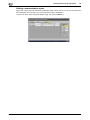
Printing a communication report ..................................................................................................... 2-18
2.6
Configuring settings of this machine .......................................................................................... 2-19
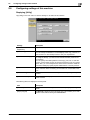
Displaying [Utility]............................................................................................................................. 2-19
Displaying administrator settings..................................................................................................... 2-20
Displaying Help on the Touch Panel
Using the guidance function .............................................................................................................. 3-3
Using the animation guidance ........................................................................................................... 3-5
4
Changing a Function to be Assigned to a Register Key
5
Managing the Power Supply of this Machine
5.1
How to Use the Power Key ............................................................................................................ 5-3
When using this machine in factory default status ............................................................................ 5-3
When using the Power key as a power save key............................................................................... 5-3
5.2
5.3
Configuring the Power key and power save operations (for the administrator)....................... 5-5
Switching to Power Save mode at the specified time (for the administrator) .......................... 5-7
Using Weekly Timer ........................................................................................................................... 5-7
Using this machine while the weekly timer is active .......................................................................... 5-8
d-Color MF752/652
Contents-1
6
Login Screen
Logging in to this machine................................................................................................................. 6-3
Performing user authentication (MFP authentication)........................................................................ 6-3
Performing user authentication (External server authentication) ....................................................... 6-5
Performing account track .................................................................................................................. 6-7
7
Entering Characters
Contents-2
d-Color MF752/652
1
Names and Functions of
Control Panel Keys
1
1
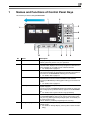
Names and Functions of Control Panel Keys
This machine provides a sliding Control Panel.
No.
Name
Description
1
Touch Panel
Displays setting screens and messages.
Directly press this panel to carry out operations.
2
Menu
Press this key to display the Main Menu.
The Main Menu displays shortcut keys assigned to selected functions, enabling you to quickly access a desired function.
• For details, refer to page 2-5.
Guidance
Press this key to display the Help Menu.
This function displays the explanation and operation procedure of
a function on the Touch Panel, enabling you to view them.
• For details, refer to page 3-3.
Access
Press this key to perform authentication in the Login screen if user
authentication or account track is installed on this machine.
Pressing the Access key while logged in will log you out of this machine.
• For details, refer to page 6-3.
Interrupt
Press this key to interrupt active jobs on this machine and deal with
a quick copy job.
In interrupt mode, the Interrupt indicator lamp lights up green, and
the message [Interrupt Mode in effect.] appears on the Touch Panel.
• For details, refer to [User's Guide: Copy Operations].
Preview
Press this key to display a finishing image with the current settings
on the Touch Panel, so that you can view it. This function prints
only one copy before processing multiple copies, and enables you
to check the proof copy.
This is useful for preventing misprinting from occurring.
Enlarge Display
Press this key to change the display of the Touch Panel to Enlarge
Display mode.
• For details on Enlarge Display, refer to [User's Guide: Accessibility].
3
d-Color MF752/652
1-3
1
No.
Name
Description
4
Keypad
Use this keypad to enter numeric values such as the number of
copies or zoom ratio. This keypad is also used to select a numbered setting key.
5
C (Clear)
Press this key to clear all numeric values, for example, the number
of copies, zoom ratio, and size that you entered using the Keypad.
6
Reset
Press this key to reset the settings you entered or changed on the
Control Panel.
7
Stop
Press this key to temporarily stop an active copy, scan, or print job.
• To restart, press the Start key.
• To delete, select a target job in the currently stopped screen,
then press [Delete].
8
Start
Press this key to start an operation such as copying, scanning, faxing, or printing.
• Lights up blue: This machine is ready to start operating.
• Lights up orange: This machine is not ready to start operating.
If this indicator lamp lights up orange, check whether any warning
or message is displayed on the Touch Panel.
9
Register Key 1 to Register Key 3
Press each key to switch the display of the Touch Panel to a function assigned to a Register key.
• By default, the Register keys are assigned as follows. Register
Key 1: [Scan/Fax], Register Key 2: [Copy], Register Key 3: [10
Keypad]
• A function to be assigned to a Register key can be changed to
suit your environment. For details, refer to page 4-3.
10
Power key
Press this key to switch this machine to Power Save mode.
• If the Power key is pressed while this machine is active, the sub
power is turned off to reduce power consumption. While the
sub power is turned off, this machine can receive data or faxes,
however, it cannot scan or print an original.
• If the Power key is held down while this machine is operating,
Power Save mode shifts to the ErP Auto Power Off mode (close
to Main Power Off mode), which offers a higher power saving
effect than Sub Power Off mode. In ErP Auto Power Off mode,
this machine cannot receive data or faxes, and also it cannot
scan or print an original.
• The Power key can also be used as a power save key to switch
to Power Save mode. For details on how to use the Power key,
refer to page 5-3.
11
Status Indicator
Indicates the status of this machine by the lamp color, flashing, or
a lamp lighting up.
• Flash in orange: Warning
• Lights up orange: The machine has stopped.
d Reference
If necessary, you can adjust the angle of the Control Panel to make it easier use. For details on the adjustment, refer to [User's Guide: Accessibility].
1-4
d-Color MF752/652
2
Operations of Touch Panel
and Explanation of Major
Screens
2.1
Touch Panel
2
2
Operations of Touch Panel and Explanation of Major Screens
2.1
Touch Panel
2.1.1
Operating the Touch Panel
Tap
Lightly touch the screen with your finger, then remove your finger from the screen immediately.
This action is available when selecting or determining a menu.
Flick
Make a slight fillip while sliding your finger on the screen.
This is used to scroll an address or job list or to feed thumbnail-view or preview screens.
d-Color MF752/652
2-3
Touch Panel
2
2.1
Double-tap
Lightly touch the screen with your finger twice in succession.
This is used to retrieve detailed information, to enlarge a thumbnail or preview image, and to open a User Box.
Drag
Slide your finger on the screen while pressing it.
This is use to move a display position on an application or preview screen.
2.1.2
Precautions for using the Touch Panel
This machine features a capacitance-base touch panel. Note the following points when operating the Touch
Panel.
Use your finger or the Stylus Pen supplied with this machine. Note that the Touch Panel will not respond appropriately if you operate it using your nail or a pen tip instead of your finger or the Stylus Pen.
Applying a strong force to the Touch Panel will damages the Touch Panel, and potentially cause a
breakage.
When operating the Touch Panel, do not press on it using excessive force or with a pointed object such
as a mechanical pencil.
2-4
d-Color MF752/652
2.2
2.2
Main Menu
2
Main Menu
Displaying Main Menu
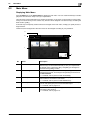
Press the Menu key on the Control Panel to display the main menu. You can customize the keys to be displayed on the main menu freely to suit your requirements.
The main menu can be extended to two screens as necessary. It can show 12 shortcut keys in each screen,
and up to 24 shortcut keys in two screens. Any function can be assigned to 23 shortcut keys, excluding the
fixed function, [Utility].
If shortcut keys of frequently-used functions are arranged on the main menu, it helps you quickly access a
target function.
Furthermore, the background of the main menu can be changed according to your preference.
3
4
2
1
5
No.
Name
Description
1
Main menu keys
Display shortcut keys assigned to any function.
Shortcut keys can be customized freely to suit your requirements.
By default, [Copy], [Scan/Fax], [Box], and [Utility] are arranged on
the main menu. ([Utility] is fixed.)
2
[Accessibility]
Press this button to adjust a Touch Panel pressing position,
change keying sounds, and configure the operating environment of
the Control Panel.
• For details, refer to [User's Guide: Accessibility].
3
[Counter]
Press this button to display the total number of pages printed on
this machine on a function or color basis.
• For details, refer to [User's Guide: Maintenance].
4
[Job List]
Press this button to display current or standby jobs. If necessary,
you can view job logs or print a communication report.
• For details, refer to page 2-15.
5
[Utility]
Press this button to configure settings of this machine or view the
use status of this machine.
• For details, refer to page 2-19.
d-Color MF752/652
2-5
Main Menu
2
2.2
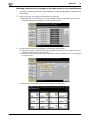
Selecting functions to be arranged on the main menu (for the administrator)
1
Tap [Utility] - [Administrator Settings] - [System Settings] - [Custom Display Settings] - [Main Menu Default Settings].
2
Select a main menu key number to be assigned to a shortcut key.
% [Main Menu Key 1] to [Main Menu Key 11] are assigned to the first screen of the main menu. It is
useful that these keys are assigned to commonly-used functions.
3
Tap [ON], select a function to be assigned to a shortcut key, then tap [OK].
% Tap [Copy Program] or [Fax/Scan Program], and select Programs; you can arrange the programs
registered on this machine on the main menu.
% If Programs is selected, tap [Icon] in the screen shown in step 2, and select an icon to be displayed
on the main menu.
The shortcut keys of the selected functions are arranged in the main menu.
2-6
d-Color MF752/652
2.2
Main Menu
2
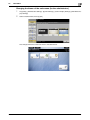
Changing the theme of the main menu (for the administrator)
1
Tap [Utility] - [Administrator Settings] - [System Settings] - [Custom Display Settings] - [Main Menu Display Settings].
2
Select a desired theme, then tap [OK].
This changes the theme of the main menu to the selected one.
d-Color MF752/652
2-7
Main Screen in each Mode
2
2.3
Main Screen in each Mode
2.3.1
Screen Layout
2.3
This example shows the screen layout for the main screen of the copy mode.
2
1
3
4
5
2-8
No.
Name
Description
1
Message display area
Displays a message to show the status of this machine and operation procedures.
2
Icon display area
Displays an icon that indicates information such as the job status,
warning, or USB memory connection status. Tapping the icon allows you to view the details.
• For details on the icons that indicate the status of this machine,
refer to page 2-14.
3
Date/Time, Memory, or
Toner Level display area
Displays the current date and time, free space in memory, and toner
level for each color.
4
[Check Setting]
Press this button to view the function specified currently in each
mode.
5
Functions/settings display area
Configure optional settings in each mode, for example, scan setting
or original setting.
• You can customize a function key displayed in the functions/settings display area. For details, refer to page 2-9.
d-Color MF752/652
2.3
2.3.2
Main Screen in each Mode
2
Customizing a function key displayed in each mode (for the administrator)
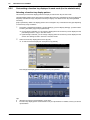
Selecting a function key display pattern
This machine provides three display patterns to display or hide function keys in each mode.
The three display patterns are [Full Functions] to display all function keys, [Standard Functions] to display the
frequently used function keys, and [Basic Functions] to display more basic function keys than [Standard
Functions].
[Full] is specified by default. The display pattern can be changed to any of the above three types depending
on function key usage conditions.
1
Tap [Utility] - [Administrator Settings] - [System Settings] - [Custom Display Settings] - [Custom Pattern
Function], and select [Copy/Print] or [Send/Save].
% If [Copy/Print] is selected, you can change a display pattern of function keys to be displayed in the
print settings screen in copy or User Box mode.
% If [Send/Save] is selected, you can change a display pattern of function keys to be displayed in the
send or save settings screen in scan/fax or User Box mode.
2
Select a function key display pattern, then tap [OK].
% To view the function displayed in each pattern, tap [Details].
This changes the display pattern of the function keys as specified.
Tips
[Standard Functions] is not displayed in some areas.
A function key display pattern can be added to suit your requirements. For details, contact your service
representative.
d-Color MF752/652
2-9
Main Screen in each Mode
2
2.3
Related setting (for the administrator)
If user authentication or account track is employed, you can select whether to restrict a change of a
display pattern for each user or account track (default: [Restrict]). For details, refer to [User's Guide:
Copy Operations].
To configure settings, select [Utility] - [Administrator Settings] - [System Settings] - [Custom Display
Settings] - [User/Admin Function Permissions].
To change a function key display pattern for each user or account track, edit user or account track information, and individually select the desired function key display pattern.
–
To configure settings for each user: [Utility] - [Administrator Settings] - [User Authentication/Account
Track] - [User Authentication Settings] - [User Registration] - [Edit] - [Custom Pattern Function]
–
To configure settings for each account track: [Utility] - [Administrator Settings] - [User Authentication/Account Track] - [Account Track Settings] - [Account Track Registration] - [Edit] - [Custom Pattern
Function]
Selecting function keys to be displayed in the main screen
You can change the type or layout of function keys to be displayed in the main screen in each mode.
You can arrange the frequently used function keys in the main screen or hide unused function keys depending on function key usage conditions.
0
To change a function key to be displayed in the main screen, permit a change of a function key in advance (default: [Restrict]). For details, refer to [User's Guide: Copy Operations].
To configure settings, select [Utility] - [Administrator Settings] - [System Settings] - [Custom Display
Settings] - [Function Display Key Permission Setting].
1
Tap [Utility] - [User Settings] - [Custom Display Settings], and select [Function Display Key(Copy/Print)]
or [Function Display Key(Send/Save)].
% If [Function Display Key(Copy/Print)] is selected, you can change a key to be displayed in the main
screen of copy mode and the print setting screen of User Box mode.
% If [Function Display Key(Send/Save)] is selected, you can change a function key to be displayed in
the main screen of scan/fax mode and in the send settings screen or save settings screen of User
Box mode.
2
Select a function key number to be reconfigured.
% If [Function Display Key(Copy/Print)] is selected, [Function Key 1] to [Function Key 7] are assigned
to [Function 1], and [Function Key 8] to [Function Key 14] are assigned to [Function 2]. It is convenient that commonly-used functions are to be assigned to [Function Key 1] to [Function Key 7].
2-10
d-Color MF752/652
2.3
Main Screen in each Mode
3
2
Tap [ON], select a function to be assigned to a function key, then tap [OK].
This changes the function keys displayed in the main screen.
Tips
If function key settings are changed by selecting [Function Display Key(Copy/Print)], the functions that
are not assigned to [Function Key 1] to [Function Key 14] are displayed in [Application].
If function key settings are changed by selecting [Function Display Key(Send/Save)], the functions that
are not assigned to [Function Key 1] to [Function Key 7] are displayed in [Application].
d-Color MF752/652
2-11
Main Screen in each Mode
2
2.3.3
2.3
Viewing the current settings
Viewing the settings in the copy mode
Tap [Check Setting] in the main screen of the copy mode to view the current settings.
Viewing the settings in the scan/fax mode
Tap [Check Setting] on the main screen of the scan/fax mode to view the specified addresses or current settings.
2-12
Item
Description
[Broadcast Destinations]
Allows you to view the specified destination.
• Select a destination, and tap [Details..] to display detailed information
of the selected destination.
• Select a destination, then tap [C] to cancel the selected destination.
[Scan Settings]
Allows you to view the current settings.
Select E-mail Subject, From, Text, or Document Name, then tap [Details..]
to display settings.
d-Color MF752/652
2.3
Main Screen in each Mode
2
Viewing the settings in the User Box mode
Tap [Check Setting] in each User Box mode screen to view the current settings.
When saving the original in a User Box, you can view the save settings.
When printing a file from a User Box, you can view the print settings. If necessary, you can view a list of selected files.
When sending a file from a User Box, you can view the specified address or send settings. If necessary, you
can view a list of selected files.
d-Color MF752/652
2-13
Types of icons
2
2.4
2.4
Types of icons
Icons indicating the status of this machine
Icons indicating the status of this machine may appear in the icon display area. The types of icons to be displayed are as follows.
Icon
Description
Indicates that a USB memory device is connected to this machine.
Tapping this icon displays the screen to select a function (print, save, or scan) supported
by the USB memory.
Indicates that a USB connection is disabled because a nonstandard USB memory device
is connected to this machine.
Indicates that there are messages related to the consumables replacement or device
maintenance. Tap this icon to check the message and perform the relevant replacement
or maintenance procedure.
Indicates that an error occurred during an image stabilization operation, a print operation
or a scan operation.
Tap this icon to change to a screen that shows a warning code.
Indicates that the machine is waiting for the fax redial.
Indicates that the machine is receiving data, regardless of the current mode.
Indicates that data is being sent from the machine, regardless of the current mode.
Indicates that an error has occurred in a connection to the E-mail server (POP).
Indicates that enhanced security mode is enabled.
Icons to change to entry or selection screen
When you enter text or select a registered item while operating this machine, the following icons may be displayed. Tap a target icon to change to the screen on which you want to enter text or select a registered item.
Icon
Description
Displays the text entry (keyboard) screen.
This icon is referred to as a "keyboard icon" in the manual.
Displays a screen through which a program address can be directly entered.
This icon is referred to as an "entry icon" in the manual.
Displays a list of registered items.
This icon is referred to as a "list icon" in the manual.
Displays a screen to configure detailed settings.
This icon is referred to as a "detail icon" in the manual.
2-14
d-Color MF752/652
2.5
2.5
Viewing Current Job or Job History
2
Viewing Current Job or Job History
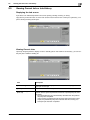
Displaying the Job screen
A job refers to an individual operation unit such as printing, sending, receiving, or saving.
Tap [Job List] on the main menu or on the main screen of each mode to view current job or job history, or to
print a sending-receiving result report.
Viewing Current Jobs
Tap the [In Progress] button to display current or standby jobs on this machine. As necessary, you can reorder print jobs or delete a standby job.
Item
Description
[Select Job Ty]
Used to filter jobs to be displayed in the list based on the job type such as
a print job or send job.
[Delete]
Press this button to delete a job selected in the list.
[Increase Priority]
(Print Job)
Press this button to change the printing priority when print jobs are
queued. Select a job to be printed first in the list of queued print jobs, then
tap [Start].
• The interrupted print job is automatically restarted when the preferential print job is completed.
• If the currently processed print job cannot be interrupted due to Fold or
Staple, the preferential print job is executed after the currently processed print job has been completed.
d-Color MF752/652
2-15
Viewing Current Job or Job History
2
2.5
Item
Description
[Release Job]
(Print Job)
Press this button to configure the proof print function and display a list of
executed print jobs using the printer driver.
When printing, select a desired print job, then tap [Start]. If necessary, you
can change print settings or delete a job.
• For details on the proof print function, refer to [User's Guide: Print Operations].
[Redial]
Press this button to manually send a redial waiting fax you select from the
list.
A redial waiting fax is sent automatically by the auto redial function after
the specified time lapsed; however, you can manually start sending without
waiting for automatic sending.
[Settings]
Press this button to view the setting of a job selected in the list.
[Forward]
Press this button to forward a fax received by the in-memory proxy reception function to another destination.
Select a destination in the address book or directly enter it, then tap [Start].
• For details on the in-memory proxy reception function, refer to [User's
Guide: Fax Operations].
[Details..]
Press this button to view detailed information of a job selected in the list.
Related setting (for the administrator)
Select whether to hide personal information such as an address or file name in the [Job List] screen
(default: [No]). For details, refer to [User's Guide: Copy Operations].
To configure settings, select [Utility] - [Administrator Settings] - [Security Settings] - [Security Details] [Personal Data Security Settings].
Select whether to permit a deletion of other user's job (default: [Restrict]). For details, refer to [User's
Guide: Copy Operations].
For settings: [Utility] - [Administrator Settings] - [System Settings] - [Restrict User Access] - [Restrict
Access to Job Settings] - [Delete Other User Jobs]
Select whether to permit a change on the priority of a print job specified in [Increase Priority] (default:
[Allow]). For details, refer to [User's Guide: Copy Operations].
To configure settings, select [Utility] - [Administrator Settings] - [System Settings] - [Restrict User Access] - [Restrict Access to Job Settings] - [Changing Job Priority].
2-16
d-Color MF752/652
2.5
Viewing Current Job or Job History
2
Viewing the job history
Tap [Log] to display a list of jobs processed on this machine up till then. You can check a job that could not
be ended due to an error.
Item
Description
[Select Job Ty]
Used to filter jobs to be displayed in the list based on the job type such as
a print job or send job. Jobs can be further filtered in combination with
[Limitation Filter].
[Limitation Filter]
Used to filter jobs to be displayed in the list based on the selected conditions.
• [All Jobs]: Displays all jobs.
• [Finished Jobs]: Displays the jobs that have been ended normally.
• [Deleted Jobs]: Displays the jobs that were deleted before they are ended.
[Details..]
Press this button to view detailed information of a job selected in the list.
Tips
If user authentication is installed on this machine, change the authentication method and clear all management data; the job history is deleted.
Related setting (for the administrator)
Select whether to hide personal information such as an address or file name in the [Job List] screen
(default: [No]). For details, refer to [User's Guide: Copy Operations].
To configure settings, select [Utility] - [Administrator Settings] - [Security Settings] - [Security Details] [Personal Data Security Settings].
Select whether to display job thumbnail images (first page) in the job history (default: [OFF]). For details,
refer to [User's Guide: Copy Operations].
To configure settings, select [Utility] - [Administrator Settings] - [Security Settings] - [Security Details] [Job History Thumbnail Display].
The job history can be initialized if necessary. For details, refer to [User's Guide: Copy Operations].
To configure settings, select [Utility] - [Administrator Settings] - [Security Settings] - [Security Details] [Initialize].
d-Color MF752/652
2-17
Viewing Current Job or Job History
2
2.5
Printing a communication report
Tap [Comm. List] to print a fax report that contains the results of Scan, Fax TX, Fax RX, and fax communication (TX/RX) jobs. For a fax report, you can specify the number of destinations.
To print a fax report, select a target for [Report Type], then press the Start key.
2-18
d-Color MF752/652
2.6
2.6
Configuring settings of this machine
2
Configuring settings of this machine
Displaying [Utility]
Tap [Utility] on the main menu to view the settings or use status of this machine.
Settings
Description
[One-Touch/User Box
Registration]
Register destinations or User Boxes.
[User Settings]
Press this button to enable users to change settings.
You can change the defaults or screen displays of the copy, scan/fax, or
print function in a user-friendly manner to suit your requirements.
[Administrator Settings]
This button displays items that can be changed only by the administrator.
To configure settings, you need to enter the administrator password for
this machine.
You can specify the initial operations of the copy, print, fax, or User Box
function, power saving function, and network function to suit your requirements. Also, you can manage the use status of this machine or inhibit an
information leakage by specifying the authentication or security function.
[Check Consumable Life]
Press this button to check the status of consumables (consumption level)
on this machine. When necessary, print the status of consumables in list
form.
[Banner Printing]
Press this button to select whether to permit banner printing of the print
function.
[Device Information]
Press this button to display the function version or IP address (IPv4/IPv6)
of this machine.
The following items are displayed in the left panel.
Item
Description
[Bookmark]
Press this button to view a position of the currently displayed setting
screen.
[Display Keypad]
The Keypad is displayed in the left-hand pane. This enables you to enter
numeric values without sliding the Control Panel.
d-Color MF752/652
2-19
Configuring settings of this machine
2
2.6
Displaying administrator settings
To display administrator settings, you need to enter the administrator password for this machine.
1
Tap [Administrator Settings].
2
Enter the administrator password for this machine.
% For details on the administrator password, refer to the booklet manual [Quick Assist Guide].
The [Administrator Settings] screen appears. The available setting items are as follows.
2-20
Settings
Description
[System Settings]
Configure the operating environment of this machine such as the date and
time of this machine, power saving function, functional operations, and
screen displays.
[Administrator/Machine
Settings]
Register information on the administrator and this machine.
[One-Touch/User Box
Registration]
Register destinations or User Boxes. Also, print an address list, or specify
the maximum number of User Boxes that can be created.
[User Authentication/Account Track]
Configure user authentication and account track.
This function allows you to restrict users who can use this machine or manage the use status of this machine. Specify the authentication method, or
register user information or account track information.
[Network Settings]
Configure the network function such as TCP/IP settings or Scan-to-send
function operating environment.
[Copier Settings]
Configure each function used in copy mode.
[Printer Settings]
Specify the time-out time to limit a communication between this machine
and a computer, or configure settings of a communication with the printer
driver.
[Fax Settings]
Configure the settings to use the fax or network fax function.
[System Connection]
Configure settings to establish the association of this machine and other
system.
[Security Settings]
Configure the security function of this machine such as password setting
or data management method.
[License Settings]
Issue a request code required to use an advanced function, or enable an
advanced function.
[OpenAPI Certification
Management Setting]
Specify a restriction code to prevent an OpenAPI connection application
from being registered on this machine.
[Remote Access Setting]
Specify whether to remotely rewrite (import or export) user data such as
address information using the remote diagnosis system.
d-Color MF752/652
3
Displaying Help on the Touch
Panel
3
3
Displaying Help on the Touch Panel
Using the guidance function
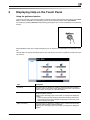
To check an overview or operation procedure of a specific function while operating this machine, press Guidance to view the explanation corresponding to the currently displayed screen on the Touch Panel.
For example, by pressing Guidance while [Finishing] is displayed, you can view a description of the finishing
function.
When Help Menu (main menu of Help) is displayed, you can search for a target based on an objective or function.
The Help Menu consists of the following items. View and check an overview or operation procedure of a specific function.
Item
Description
[Function]
Press this button to display the guidance menu that has been sorted according to the function names to be displayed in the screen. This menu is
useful to learn an overview of a specific function.
[Search by Operation]
Press this button to display operation examples and explanations of this
machine sorted by function.
Tapping [Go to function] jumps to the screen to configure the displayed
function.
• Select [Copying] and tap [Copying Special Documents]; instructions
and guidance using moving images are displayed to show the procedure for placing an original.
[Other Functions]
Press this button to display the guidance menu of the functions and settings that make it easier to use this machine.
Tapping [Go to function] jumps to the screen to configure the displayed
function.
d-Color MF752/652
3-3
3
Item
Description
[Name and Function of
Parts]
Press this button to display the keys of the Control Panel or the keys of
the optional units installed on this machine, and view their functions.
[Service/Admin. Information]
Press this button to display the name, extension number, and E-mail address for the administrator of this machine.
[Consumables Replace/Processing Procedure]
Press this button to view moving images on how to replace consumables
or punch scrapping.
Tapping [Start Guidance] starts an explanation with moving images.
Tips
By using Bookmark in the left panel, you can view a position of the currently displayed Guidance
screen.
Tap [Close] on the Guidance screen to move up one level in the menu structure. Tap [Exit] to exit Guidance mode and return to the screen that was displayed before the Guidance key was pressed.
Tap [To Menu] on the Guidance screen or [Help Menu] on Bookmark to display the Help Menu.
The Guidance screens cannot be displayed when the following operations are being performed:
Scanning, printing a proof copy, preview of a finished copy, operating in Enlarge Display mode, or operating in Accessibility mode
While the Guidance screen is displayed, the following keys on the Control Panel are disabled:
Start, C (Clear), Interrupt, Preview, Access, and Enlarge Display
3-4
d-Color MF752/652
3
Using the animation guidance
The animation guidance demonstrate the procedure, using moving images, on how to deal with a paper or
staple jam and how to replace consumables such as Toner Cartridges. While checking a procedure on the
Touch Panel, you can carry out the removal procedure or replace consumables.
If a warning screen appears, for example, when a paper or staple jam occurs or consumables are to be replaced, tap [Start Guidance] on that screen; an explanation with moving images will start.
When you want to confirm a jam removal or replacement procedure while no warning screen is displayed,
follow the procedure below to view the animation guidance.
This example shows you how to replace a Toner Cartridge.
1
Press the Guidance key.
2
Tap [Consumables Replace/Processing Procedure] - [Replace Toner Cartridge] - [Start Guidance].
The animation guidance starts.
d-Color MF752/652
3-5
3
Tips
You can also press Guidance and tap [Search by Operation] - [Replace consumables.] to view a jam
removal or replacement procedure.
3-6
d-Color MF752/652
4
Changing a Function to be
Assigned to a Register Key
4
4
Changing a Function to be Assigned to a Register
Key
Select a function to be assigned to a Register key on the Control Panel to suit your requirements. It will be
useful to assign frequently-used functions to Register keys.
This example explains how to change a function to be assigned to Register Key 1.
1
Tap [Utility] - [Administrator Settings] - [System Settings] - [Registered Key Settings] - [Register Key 1].
d-Color MF752/652
4-3
4
2
Select a function to be assigned to Register Key 1, then tap [OK].
% You cannot select a function assigned to other Register keys.
Settings
Description
[Copy]
Press this button to display the main screen in the copy mode.
[Scan/Fax]
Press this button to display the main screen in the scan/fax mode.
[User Box]
Press this button to display the main screen in the User Box mode.
[10 Keypad]
Press this button to display the Keypad on the Touch Panel when entering
numeric values such as the number of copies or zoom ratio. Using this
function saves a step to slide the Control Panel when entering numeric
values using the Keypad.
[Utility]
Press this button to display the [Utility] screen.
Tips
If the Web browser, one of the extension functions, is enabled, you can assign the [Web Browser] to a
Register key.
4-4
d-Color MF752/652
5
Managing the Power Supply
of this Machine
5.1
How to Use the Power Key
5
5
Managing the Power Supply of this Machine
5.1
How to Use the Power Key
When using this machine in factory default status
For details on how to use the Power key in factory default status, refer to [User's Guide Preface (Trademark
Licenses)].
When using the Power key as a power save key
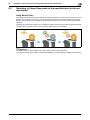
The Power key can be used as a power save key to manually switch to Power Save mode. Power Save mode
is classified into two modes: Low Power mode and Sleep mode.
To use the Power key as a power save key, change the Power key setting (default: [Sub Power OFF]).
For details, refer to page 5-5([Power Key Settings]).
Press the Power key to select whether to switch to Low Power or Sleep mode (default: [Low Power]).
For details, refer to page 5-5([Power Save Settings]).
When the Power key is pressed, the status of this machine changes as shown below. The way status changes varies depending on how the Power key is pressed.
Power Saving Effect:
Low
Short press
Sleep Mode
Hold down
Sub Power OFF
Power Saving Effect:
High
Power key
Status of this machine
Status of
LED
Description
Short press
Low Power mode
(Default value)
Flash:
Blue
Turns off the display of the Touch Panel to reduce power use.
This machine returns to the normal mode when
it receives data or faxes or when the user operates the Touch Panel.
Sleep mode
Flash:
Blue
Provides power-saving effect higher than Low
Power mode. A time required to return to the
normal mode is longer than Low Power mode.
This machine returns to the normal mode when
it receives data or faxes or when the user operates the Touch Panel.
d-Color MF752/652
5-3
How to Use the Power Key
5
5.1
Power key
Status of this machine
Status of
LED
Description
Hold down
Sub Power OFF
Light up:
Orange
Provides power-saving effect higher than Sleep
mode.
While the sub power is turned off, this machine
can receive data or faxes, however, it cannot
scan or print an original.
To turn it on, press the Power key again. If data
or faxes are received while the sub power is
turned off, they are printed when the sub power
is turned on.
Related setting (for the administrator)
Specify whether to return to normal mode when you press the Touch Panel in Power Save mode (default: [ON]). For details, refer to page 5-5([Awake from Power Save Mode by Touching Control Panel]).
5-4
d-Color MF752/652
5.2
5.2
Configuring the Power key and power save operations (for the administrator)
5
Configuring the Power key and power save operations (for the administrator)
Configure the settings on how to use the Power key and the machine action in Power Save mode.
Press [Utility] - [Administrator Settings] - [System Settings] - [Power supply/power save settings], and configure the following settings.
Settings
Description
[Low Power Mode Settings]
Change the time required to automatically change to Low Power mode after you have not operated this machine for a fixed period of time.
In Low Power mode, the display of the Touch Panel is turned off to reduce
power consumption.
[15] minute is specified by default (allowable range: [10] to [240] min.).
[Sleep Mode Settings]
Change the time required before the machine automatically enter Sleep
mode if you have not operated this machine.
Sleep mode provides a greater power saving effect than Low Power mode.
However, the time required to return to the normal mode is longer than the
time required to recover from Low Power mode.
[30] minute is specified by default (allowable range: [15] to [240] min.).
[Power Key Setting]
Select whether to use the Power key on the Control Panel as a sub power
OFF key or as a power save key.
• [Sub Power OFF]: Press the Power key to turn the sub power off. If the
Power key is held down, Power Save mode shifts to ErP Auto Power
Off mode (close to Main Power Off mode), which offers a higher power
saving effect than Sub Power Off mode.
• [Power Save]: Press the Power key to shift to Power Save mode (Low
Power or Sleep mode). Hold down the Power key to shift to sub power
off mode.
[Sub Power OFF] is specified by default.
[Power Save Settings]
If [Power Save] is selected for [Power Key Setting], select the type of Power
Save mode you want to switch when pressing the Power key on the Control Panel.
• [Low Power]: Switches to Low Power mode. Turns off the display of the
Touch Panel to reduce power consumption.
• [Sleep]: Switches to the Sleep mode. Sleep mode provides a greater
power saving effect than Low Power mode. However, the time required
to return to the normal mode is longer than the time required to recover
from Low Power mode.
[Low Power] is specified by default.
[Enter Power Save Mode]
Select the timing for the machine to return to the Power Save mode after
printing a job it has received in the Power Save mode from a fax machine
or computer.
• [Normal]: Switches to Power Save mode based on the time specified in
[Low Power Mode Settings] or [Sleep Mode Settings].
• [Immediately]: Switches to Power Save mode immediately after a print
job has ended.
[Immediately] is specified by default.
[Power Consumption in
Sleep Mode]
Select whether to reduce power consumption in the Sleep mode.
• [Enabled]: Further reduces power consumption in Sleep mode. Usually,
select [Enabled].
• [Disabled]: Select this option when a smooth network communication
is not established while [Enabled] is enabled.
[Enabled] is specified by default.
[Power Saving Fax/Scan]
Select whether to give priority to the power saving when the machine returns from Sleep or sub power off mode to a mode other than copy mode.
When returning to a mode that does not involve printing, such as scan/fax
mode, power consumption can be reduced by not adjusting the temperature of the Fusing Unit on this machine.
You can set this option when you have selected an option other than
[Copy] in [Priority Mode] that is selected by [Administrator Settings] - [System Settings] - [Reset Settings] - [System Auto Reset].
• [Power Save]: The temperature of Fusing Unit is not adjusted when the
machine returns to the normal mode.
• [Standard]: The temperature of Fusing Unit is adjusted when the machine returns to the normal mode.
[Standard] is specified by default.
d-Color MF752/652
5-5
Configuring the Power key and power save operations (for the administrator)
5
5-6
5.2
Settings
Description
[Awake from Power Save
Mode by Touching Control
Panel]
Select whether to return to normal mode when you press the Touch Panel
in Power Save mode.
If you select [OFF], the machine returns to normal mode only via the Power
key.
[ON] is selected by default.
d-Color MF752/652
5.3
5.3
Switching to Power Save mode at the specified time (for the administrator)
5
Switching to Power Save mode at the specified time (for the administrator)
Using Weekly Timer
The weekly timer is a function that automatically switches this machine to normal mode or Power Save mode
(Sleep mode or ErP Auto Power OFF mode) at the pre-specified time. This machine supports the tracking
function to automatically set a schedule for switching to the normal or Power Save mode to suit the office
use status.
Employing the weekly timer enables you to establish an efficient power saving scheme by taking advantage
of certain periods of office use, such as lunch breaks, night time hours and holidays.
d Reference
For details on how to set the weekly timer, refer to [User's Guide: Copy Operations].
To configure settings, select [Utility] - [Administrator Settings] - [System Settings] - [Weekly Timer Settings].
d-Color MF752/652
5-7
Switching to Power Save mode at the specified time (for the administrator)
5
5.3
Using this machine while the weekly timer is active
Using the weekly timer restricts the use of this machine in the Power Save mode with a password. This example shows you how to temporarily enable this machine when the use of this machine is restricted with a
password.
1
Press the Power key.
2
Enter the password, then tap [OK].
3
Use the Keypad to enter the time period before the machine switches to Power Save mode, then tap
[OK].
The main menu appears.
5-8
d-Color MF752/652
6
Login Screen
6
6
Login Screen
Logging in to this machine
If user authentication or account track is installed on this machine, the Login screen appears on the Touch
Panel.
Enter the user or account track name and the password on the Login screen, then tap [Login] or press the
Access key to perform authentication. After a target operation is completed, press the Access key to log out.
Performing user authentication (MFP authentication)
Enter the user name and the password, and perform user authentication. The contents of the Login screen
may vary depending on the authentication setting of this machine.
1
Tap the keyboard icon of [User Name].
% If Public User Access (unregistered users) is enabled, tap [Public User Access] to log in to this machine.
% Select whether to display the list icon that recalls the user name list in the login screen (default:
[OFF]). For details, refer to [User's Guide: Copy Operations].
To configure settings, select [Utility] - [Administrator Settings] - [User Authentication/Account Track]
- [User Authentication Settings] - [Administrative Settings] - [User Name List].
% Tapping the list icon that recalls the user name list displays a list of user names and enables you to
select a login user.
d-Color MF752/652
6-3
6
2
Enter the user name and the password, then tap [OK].
3
Tap [Login] or press the Access key to log in to this machine.
% If user authentication and account track are installed without being synchronized, account track is
required after this. For details, refer to page 6-7.
% If user authentication and account track are synchronized, account track is not required.
If authentication succeeds, you can log in to this machine.
4
After a target operation is completed, press the Access key to log out.
% If you do not operate this machine for a certain period of time during login (default: one min.), you
will be automatically logged out.
5
Tap [Yes].
% Select whether to display the logout confirmation screen (default: [ON]). For details, refer to [User's
Guide: Copy Operations].
To configure settings, select [Utility] - [Administrator Settings] - [User Authentication/Account Track]
- [User/Account Common Setting] - [Logout Confirmation Screen Display Setting].
6-4
d-Color MF752/652
6
Performing user authentication (External server authentication)
Enter the user name and the password, and select a server to be authenticated. The contents of the Login
screen may vary depending on the authentication setting of this machine.
1
Tap the keyboard icon of [User Name].
% If Public User Access (unregistered users) is enabled, tap [Public User Access] to log in to this machine.
% Select whether to display the list icon that recalls the user name list in the login screen (default:
[OFF]). For details, refer to [User's Guide: Copy Operations].
To configure settings, select [Utility] - [Administrator Settings] - [User Authentication/Account Track]
- [User Authentication Settings] - [Administrative Settings] - [User Name List].
% Tapping the list icon that recalls the user name list displays a list of user names and enables you to
select a login user.
2
Enter the user name and the password, then tap [OK].
d-Color MF752/652
6-5
6
3
When using multiple authentication servers, tap the list icon for [Server Name], and select a server to
be authenticated.
% By default, the default authentication server is selected.
4
Tap [Login] or press the Access key to log in to this machine.
% If user authentication and account track are installed without being synchronized, account track is
required after this. For details, refer to page 6-7.
% If user authentication and account track are synchronized, account track is not required.
If authentication succeeds, you can log in to this machine.
5
After a target operation is completed, press the Access key to log out.
% If you do not operate this machine for a certain period of time during login (default: one min.), you
will be automatically logged out.
6
Tap [Yes].
% Select whether to display the logout confirmation screen (default: [ON]). For details, refer to [User's
Guide: Copy Operations].
To configure settings, select [Utility] - [Administrator Settings] - [User Authentication/Account Track]
- [User/Account Common Setting] - [Logout Confirmation Screen Display Setting].
6-6
d-Color MF752/652
6
Performing account track
Enter the account name and the password to perform account track. The contents of the Login screen may
vary depending on the authentication setting of this machine.
0
0
If user authentication and account track are installed without being synchronized, perform user authentication first. For details, refer to page 6-3 (Performing user authentication (MFP authentication)) or
page 6-5 (Performing user authentication (External server authentication)).
If user authentication and account track are synchronized, account track is not required.
1
Tap the keyboard icon of [Account Name].
% When performing account track only using the password, tap the keyboard icon of [Password], and
enter the password.
% If the password consists only of numbers, it can be entered directly using the Keypad without displaying the keyboard.
2
Enter the account name and the password, then tap [OK].
3
Tap [Login] or press the Access key to log in to this machine.
If authentication succeeds, you can log in to this machine.
4
After a target operation is completed, press the Access key to log out.
% If you do not operate this machine for a certain period of time during login (default: one min.), you
will be automatically logged out.
d-Color MF752/652
6-7
6
5
Tap [Yes].
% Select whether to display the logout confirmation screen (default: [ON]). For details, refer to [User's
Guide: Copy Operations].
To configure settings, select [Utility] - [Administrator Settings] - [User Authentication/Account Track]
- [User/Account Common Setting] - [Logout Confirmation Screen Display Setting].
6-8
d-Color MF752/652
7
Entering Characters
7
7
Entering Characters
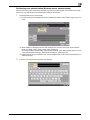
When entering characters to register an address or program, use the keyboard screen displayed on the
Touch Panel. When entering numbers, you can also use the Keypad.
Item
Description
Keyboard
Tap the keys of characters you want to enter.
[
Press this key to move the cursor.
]/[
]
[Delete]
Press this key to delete characters you entered one by one.
[Shift]
Tap this key to enter uppercase letters or symbols.
[Enlarge ON]
Press this key to enlarge the keyboard.
• To release the enlargement, tap [Enlarge OFF].
[Undo]
Press this key to delete all characters you entered.
• You can also delete all characters you entered when C (Clear) is
pressed.
[OK]
Press this key to apply the character you entered.
d-Color MF752/652
7-3
7
7-4
d-Color MF752/652
DIRECTIVE 2002/96/EC ON THE TREATMENT, COLLECTION, RECYCLING AND
DISPOSAL OF ELECTRIC AND ELECTRONIC DEVICES AND THEIR COMPONENTS
INFORMATION
1. FOR COUNTRIES IN THE EUROPEAN UNION (EU)
The disposal of electric and electronic devices as solid urban waste is strictly prohibited: it must be collected separately.
The dumping of these devices at unequipped and unauthorized places may have hazardous effects on health and the
environment.
Offenders will be subjected to the penalties and measures laid down by the law.
TO DISPOSE OF OUR DEVICES CORRECTLY:
a) Contact the Local Authorities, who will give you the practical information you need and the instructions for handling the
waste correctly, for example: location and times of the waste collection centres, etc.
b) When you purchase a new device of ours, give a used device similar to the one purchased to our dealer for disposal.
The crossed dustbin symbol on the device means that:
- when it to be disposed of, the device is to be taken to the equipped waste collection centres and is to be
handled separately from urban waste;
- The producer guarantees the activation of the treatment, collection, recycling and disposal procedures in
accordance with Directive 2002/96/EC (and subsequent amendments).
2. FOR OTHER COUNTRIES (NOT IN THE EU)
The treatment, collection, recycling and disposal of electric and electronic devices will be carried out in accordance with the
laws in force in the country in question.