1
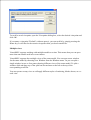
as you prefer, by dragging the top handle. Once you have selected the Trunnion, click
.
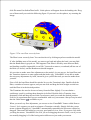
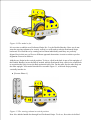
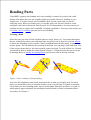
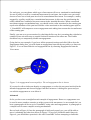
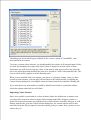
Now you have a Trunnion displayed in the document window of VirtualMEC. Let's spend
some time exploring the various ways to look at it using different points of view.
Verify that the Drag toolbar button is pressed. Just click and drag your mouse around the
model to see it from different points of view following your mouse movements. You can
zoom in
and out and you can pan the model using the scrollbars or clicking and
dragging using your mouse central button or mouse wheel. Once you have mastered the
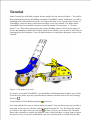
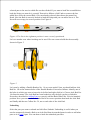
various movements, end with the Trunnion in about the same position as in Figure 1.
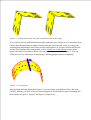
Now it's time to add a Bolt to the Trunnion. Locate the correct hole nearest to you, where you
want to fix the Double Angle Strip No. 48a. Simply click in that hole. A Bolt No. 37b will
appear in the chosen hole. The Bolt is selected (red colour) so that you can operate on it. The
first thing to do is change its direction. While it is still selected, click on the Invert button .
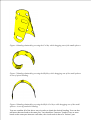
Now you can add the Double Angle Strip No. 48a. Locate it in the Parts Bar and double-click
it. The Double Angle Strip adds itself to the selected Bolt, through the correct hole, but it is
incorrectly rotated. Click on it to select it, then press the Rotate 180° button . Now it should
be in the correct position. Re-select the Bolt and add a Nut to it by pressing the Add Nut
button .
Repeat the same procedure to add the other Double Angle Strip.
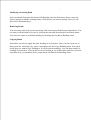
It's now time to add the rear axle and wheel. Select part Axle Rod No. 17 in the Parts Bar,
then locate the central hole of the left Double Angle Strip. Verify that the corresponding hole
of the other Double Angle Strip is NOT visible through the first hole, then click in the first
hole. The Axle Rod appears.
Double-click on the Axle Rod just added and a couple of movement arrows appear. You can
click and drag the red straight arrow to verify that the movements of the Rod are constrained
by the hole you clicked in. Leave the Rod in a half-way position with respect to the hole.
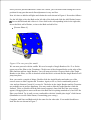
With the Axle Rod still selected (if it is not selected, click on it), add the following parts: a
Flat Trunnion No. 126a, a Spring Clip No. 35, a Pulley No. 22 which forms the wheel,
another Spring Clip and another Flat Trunnion. It doesn't matter for the moment if the
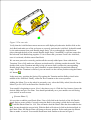
Trunnions are not correctly oriented, you can adjust their positions later. You should have
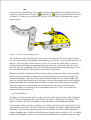
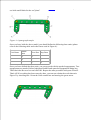
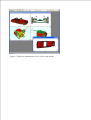
reached a result similar to the one in Figure 2.
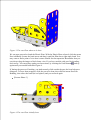
[Scooter Phase 1]