1
N21 ShowNet Node
Installation & User’s Manual
Option
DMX A Out End Slot
Meaning
Enter the end slot number of the DMX512 range
Netslot
Enter the Netslot start number.
Priority
Each Netslot can be set as one (1) of sixteen (16) priorities by selecting
from the drop-down menu. A DMX512 slot can be patched to multiple
Netslots with each Netslot assigned to a different priority. The DMX512
slot outputs the level of the Netslot with the highest priority if HTP (see
below) is not selected.
HTP (Highest Takes
Precedence)
When a DMX512 slot is patched to multiple Netslots with different
priorities, selecting HTP makes the DMX512 slot output the highest level
of the multiple Netslots, ignoring the priority settings.
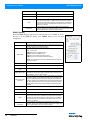
DMX B Button
When the DMX B button is pressed, the following options are available as shown.
Having set up the DMX B options, press Update button to save the Node
configuration.
Option
Meaning
DMX B Label
This field contains a character string of up to eight (8) characters used to
identify the function of the DMX512 B Port.
For DMX B Mode, there are five subsettings:
DMX B Mode
Off: Turns port OFF
DMX out: Sets Port for DMX512 output
DMX in: Sets port for DMX512 input
SVN: Sets port for Strand Vision-Net Protocol*
SMX: Sets port for Strand Report-Net/Outlook/SWC*
NOTE: *SVN and SMX are factory test settings and SHOULD NOT be
altered or changed.
DMX B In Start Slot
Enter the start slot number for DMX512 B Input
DMX B In End Slot
Enter the end slot number for DMX512 B Input
DMX B In Starting Net
Slot
DMX B Monitor Slot
Start, End and Net
Slot Fields
10
Start number of the Net Slot for DMX512 B Input
This field determines which of the 512 slots from the DMX512 port are
displayed on the status bar graph at the sides of the LCD screen. Any
slots between 1 and 512 can be entered.
These fields allow you to enter a range of DMX outputs to be patched to
a range of Netslots for each DMX port. Initially, the window permits two
ranges of DMX output slots to be entered. However, when the second
range is entered and the UPDATE button is pressed, another blank row
is added, permitting another range of outputs to be entered for another
Netslot range. This will continue until all ranges of outputs have been
entered.
DMX B Out Start Slot
Enter the start slot number of the DMX512 range.
DMX B Out End Slot
Enter the end slot number of the DMX512 range
Netslot
Enter the Netslot start number.
Priority
Each Netslot can be set as one (1) of sixteen (16) priorities by selecting
from the drop-down menu. A DMX512 slot can be patched to multiple
Netslots with each Netslot assigned to a different priority. The DMX512
slot outputs the level of the Netslot with the highest priority if HTP (see
below) is not selected.
HTP (Highest Takes
Precedence)
When a DMX512 slot is patched to multiple Netslots with different
priorities, selecting HTP makes the DMX512 slot output the highest level
of the multiple Netslots, ignoring the priority settings.
OPERATION
DMX B Button Screen