1
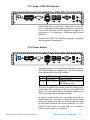
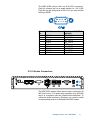
2.2.1 Power, HDD LED Indicator
Yellow-HDD LED: A hard disk / CFast LED. If the LED
is on, it indicates that the system’s storage is functional.
If it is off, it indicates that the system’s storage is not
functional. If it is flashing, it indicates data access
activities.
Green-Power LED: If the LED is solid green, it indicates
that the system is powered on.
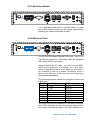
2.2.2 Power Button
The power button is a non-latched switch with dual color
LED (Blue/Orange) for indication S0, S3 and S5 status.
Power button dual-color LED indicator:
Status
S0
S3, S5
LED Display System Situation
Solid Blue
System working
Solid Orange Suspend to RAM, System off
with standby power
To turn on the ABP-2000 series, press the power button
and the blue LED is lighted up.To turn off the ABP-2000
series, you can either issue a shutdown command in
OS, or just simply press the power button.
In case of system halts, you can press and hold the
power button for 4 seconds to compulsorily shut down
the system.Please note that a 4 seconds interval is kept
by the system between two on/off operations (i.e. once
turning off the system, you shall wait for 4 seconds to
initiate another power-on operation).
©Vecow ABP-2000 Series Advanced Box PC User Manual
Getting to Know Your ABP-2000
10