1
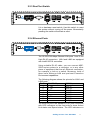
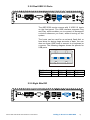
2.2.3 Rest Tact Switch
It is a hardware reset switch. Use this switch to reset
the system without turning off the power. Momentarily
pressing the switch will activate a reset.
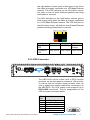
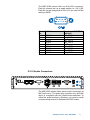
2.2.4 Ethernet Ports
The 10/100/1000 Mbps Ethernet LAN ports 1 and 2 use
8-pin RJ-45 connectors. LNA1 and LAN2 are equipped
with Intel® 82574L controllers.
Using suitable RJ-45 cable, you can connect ABP2000 series system to a computer, or to any other
piece of equipment that has an Ethernet connection,
for example, a hub or a switch. Moreover, both of
them have Wake-on-LAN and pre-boot Execution
Environment capabilities.
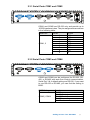
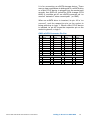
The following diagram shows the pinouts for LAN1 and
LAN2 ports.
Pin No. 10 / 100 Mbps
1000 Mbps
1
E_TX+
MDI0_P
2
E_TXMDI0_N
3
E_RX+
MDI1_P
4
---MDI2_P
5
----MDI2_N
6
E_RXMDI1_N
7
----MDI3_P
8
-----MDI3_N
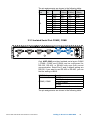
The Ethernet ports use standard RJ-45 jack connectors
with LED indicators on the front side to show Active/
Link status and Speed status. The LED indicators on
Getting to Know Your ABP-2000
11