1
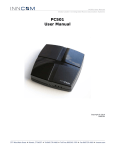
B573 User Manual
Revision 1.2, Issued 5/15/08
Section 1: B573 Installation
Read First:
The B573 is not a stand-alone device like its predecessor, the B572. For its intended operation as a bridge/router,
the B573 hardware relies on being “connected” to a software program called the “B573_MC.exe” (B573 Media
Connector) that must always be running on the Inncom server computer:
The B573 is “dumb” without being connected to the “B573_MC.exe” software, and only provides the ability to
locally configure its network IP address and Subnet, reset itself and a perform a few other troubleshooting
functions.
The “B573_MC.exe” software connects to the B573 using the IP address and Subnet defined in the
“B573_MC.cfg” script file that must be present in the “C:\Inncom\Scripts” folder on the Inncom server. This script
file defines the IP address(s) of any B573(s) physically installed. When the “B573_MC.exe” program first starts
up, it scans the network for the defined B573 IP addresses defined in the “B573_MC.cfg” script file. Once the
“B573_MC.exe” program connects to the defined B573(s), the room data passing through the B573(s) now
becomes available to other software running on the Inncom server, specifically the “WinP5PT.exe” program.
The “WinP5PT.exe” software on the Inncom server handles gathering and routing “process images” to/from
rooms via the above mentioned “B573_MC.exe” program. WinP5PT.exe then makes this room information
available to other software components running on the Inncom server, such as Netcom.exe, WSCon.exe
(Workstation Concentrator) and DCenter.exe (Data Center).
Single B573 “MBX”
Configured for TCT’s
Application
Multiple B573’s
Configured for “FLN5”
RS-485 Floor Bridge
Application
277 · West Main Street· Niantic, CT · USA ·
860-739-4468 · www.inncom.com
5