1
Plugins:
Plugins are a very handy feature that expands GS further than what we could ever
hope to achieve. With Plugins we can control a variety of features turning them on and
off to configure GS just the way we want it.
Make sure you save your progress then proceed to the next step, after changing
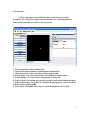
Plugins you have to restart the program. Now click 'Plugins' then 'Manager' you will get
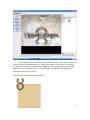
something that looks like this.
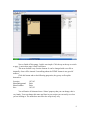
On the left we have the Plugins that are already loaded, on the right we have the
Plugins that we can load. For example, if we wanted to have a grid in our work area
accessible we would click 'SnapToGrid' then click the arrow pointing left. Now it will be
loaded. If we wanted to get rid of 'WolfpackExporter' we would click it and click the
arrow pointing right. Do this now if you will.
Also go ahead and select RunUO and put that on the left hand side. This will
make sure we can export RunUO code. Click ok and it will ask you to restart the app.
11