1
User Interface:
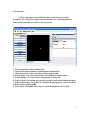
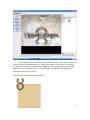
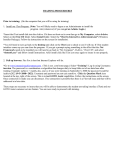
I will be referring to each individual object in the latter part of this
document. This will just be a quick conventional label for each item displayed
below. Please read this, as I will be referring it later.
1. File descriptor bar with document title.
2. Various file control elements, explained more in depth later.
3. Object Insert Bar: Allows for insert of object and so forth.
4. Selector Pane: Can select single items even if hidden by another object.
5. Sorting Buttons: For easier access to properties in a long list.
6. Property Pane: For editing and selecting an objects action and coherent property.
7. Property Descriptor: For a little more insight on what property you are working
with. Just incase you forget ☺.
8. Work Table: Worktable where objects will be manipulated. (W/O Grid)
2