1
Trouble shooting :
1. The device is not online or offline on the web platform.
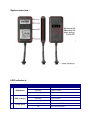
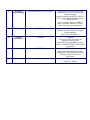
2. First, please check the three LED working state. If possible, you can call the device’s SIM
card number to check. If not connected, the device is out of signal.
If you remind that you have used a prepaid card the device SIM card may be out of deposit,
please make deposit by the telecom provider or with a contract the provider has disabled
the number.
If remember the device is on power off, please turn back the device power and proceed as
followings: Check if the red LED is in constant glow. If the LED is dark, please check the
power connecting. If fuse is broken, please return the device to the seller.
If the blue GSM LED is not in constant glow, please check the installation of SIM card.
3. Please check the offline area in order to judge if the network problem of operators.
4. When GPS cannot receive the signals, please drive in the open sky and ensure there is
no metal thins on the device.
5. When the device cannot receive any GSM signal, please check the SIM card installation.
6. The red LED is not glowing when “power on”. check the fuse of the power line. If the fuse
is fused, please change the fuse.
7. If one of the following items isn’t the problem please contact immediately the distributor
or retailer where you purchased the X-Track.
User-friendly tips :
If you use a prepaid SIM card or have a low monthly data subscription service on your
contract with your provider, then we advise the following settings. Please change the
interval upload time to a different setting with more seconds between the upload times.
For example set the interval to 30 or 60 seconds, TIMER,30# or TIMER,60#.