1
4
16
18
17
19
TC
1
2
3
21
Input/Output
Module-2
0 to 50 mV Z
0 to 10 V Z
24 V Z
Pt-100
TC
2
Maks.50mA
0 to 20 mA Z
1
22
23
4
5
3
ESM-4450
c Y CAT II
C
NO
C
NC
MODULE - 1
Communication
Module
(RS-232(standart)/
RS-485(optional))
Maximum 20mm / 0.78 inch
14
15
N
5
6
7
8
9
NO
10
NC
11
24 V Z
Max.50mA
Pt-100
12
5A@250VV
17
Process Controller
ESM-9950
18
19
20
Input/Output
Module-2
0 to 50 mV Z
0 to 10 V Z
0 to 20 mA Z
2
21
22
23
Max.50mA
24
L
1AVT
3
11
L
12
Maximum 20mm / 0.78 inch
°C
OUTPUT-3
°F
V
4
5
6
7
NC
8
9
NO
10
11
12
C
O3
5A@250VV
RAMP
MAN
AUTO
Process
Controller
16
17
18
19
20
21
22
23
Input/Output
Module-2
24
L
1AVT
SET
Fuse
Power
Supply
Switch
ESM-9450
Maximum 20mm / 0.78 inch
100...240 VV
50/60 Hz
48mm / 1.89 inch
10.5 ± 1 mm /0.41 inch
°F
V
REMOTE
RAMP
MAN
AUTO
Process Controller
SET
100...240 VV
50/60 Hz
4
1
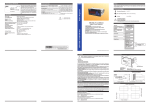
1-Before mounting the device in
your panel, make sure that the
cut-out is of the right size.
2- Check front panel gasket
position
48mm / 1.89 inch
Control,Alarm
or Logic Output
OUTPUT-3
5
NO
6
NC
11.5 ± 1 mm /0.45 inch
104.5 mm/ 4.11 inch
33
Maximum 20mm / 0.78 inch
7
8
9
Communication
Module
(RS-232(standart)/
RS-485(optional))
5A@250VV
13
14
15
16
N
17
18
L
1A V T
Fuse
Input/Output
Module-2
4
ESM-7750
C
Power
Supply
Switch
5
3-Insert the device through the
cutout. If the mounting clamps are
on the unit, put out them before
inserting the unit to the panel.
°C
°F
V
O1
O2
O3
AT
SV
RAMP
MAN
AUTO
SET
4-Insert the unit in the panel cut-out
from the front side.
5-Insert the mounting clamps to the
holes that located top and bottom
sides of device and screw up the
fixing screws until the unit
completely immobile within the
Panel
Process Controller
100...240 VV
50/60 Hz
76mm / 2.99 inch
PANEL MOUNTING
°C
REMOTE
Input/Output
Module-1
O2
REMOTE
MODULE - 2
15
14
11.5 ± 1 mm /0.45 inch 76mm / 2.99 inch
100...240 VV
50/60 Hz
Control,Alarm
or Logic Output
DIMENSIONS
1A V T
MODULE-2
12
96mm / 3.78 inch
Fuse
Power
Supply
Switch
O1 AT SV
3
O3
ESM-7750
c Y CAT II
11
SET
2
Universal Process Input
10
SV
AT
O1
O2
O3
C
72mm / 2.83 inch
0 to 20 mA Z
MODULE-1
V
MAN
AUTO
N
Input/Output
Module-1
Power
Supply
Switch
Sensor Supply
Voltage
0 to 50 mV Z
0 to 10 V Z
2
°F
RAMP
OUTPUT-3
16
O2
1
°C
Remote
48 mm / 1.89 inch
10
Input/Output
Module-2
TC
10.5 ± 1 mm /0.41 inch 76mm / 2.99 inch
5A@250VV
9
Input/Output
Module-1
96mm / 3.78 inch
MODULE - 2
Input/Output
Module-1
MODULE-2
8
SV
Fuse
ESM-4450
7
AT
1AVT
100...240 VV
50/60 Hz
4
MODULE - 1
6
O1
O2
O3
24
L
Control,Alarm
or Logic Output
Universal Process Input
13
MAN
Power
Supply
Switch
ESM-9950 c Y CAT II
13
V
12
SET
N
Universal Process Input
MODULE-1
20
Sensor Supply
Voltage
Input/Output
Module-1
ESM-9450 c Y CAT II
OUTPUT-3
11
96mm / 3.78 inch
15
TC
Control,Alarm
or Logic Output
10
C
AUTO
Universal Process Input
Pt-100
9
NO
5A@250VV
14
1
0 to 50 mV Z
0 to 10 V Z
0 to 20 mA Z
8
NC
MODULE - 2
O1 AT SV
Supply Voltage
100-240V V 50/60 Hz (-%15;+%10) -6VA
24V V 50/60 Hz(-%15 ; +%10)-6VA or 24V Z (-%15 ; +%10)-6W
(Supply Voltage must be determined in order.)
7
6
N
Fuse
OUTPUT
Standard Relay Output : 5A@250VV (Programmable control or
alarm output) (Electrical Life : 100.000 Operation (Full Load))
Output Modules
-Relay Output Module
-SSR Driver Output Module (Max.20mA @18V Z)
-Digital (Transistor) Output Module (Maks.40 mA @18V Z)
-0/4...20 mA Z Current Output Module
Input Modules
-Digital Input Module
-0/4...20 mA Z Current Input Module
-0...5A V CT Input Module
-TC or 0...50mV Z Input Module
-PT-100 Input Module
-0...10V Z Input Module
5
c Y CAT II
MODULE - 1
13
°F
RAMP
3
ESM - 4950
°C
REMOTE
Universal Process Input
ESM-4950
Process Controller
OUTPUT-3
48mm/ 1.89 inch
2
Maximum 20mm / 0.78 inch
Control,Alarm
or Logic Output
96mm / 3.78 inch
1
Max.50mA
24 V Z
TC
Electrical Connections
Sensor Supply
Voltage
SPECIFICATIONS:
Process Inputs
Universal Input: Universal input, TC, RTD, ZVoltage/Current
Thermocouple (TC) : L(DIN 43710) ,J , K , R , S , T , B , E ve N
(IEC584.1)(ITS90) ,C (ITS90)
Thermoresistance (RTD): PT-100 (IEC751)(ITS90)
Z Input : mV, V, mA
Measurement Range: Please refer to Table-1 for selection of input
type and scala.
Accuracy: ± 0,25% of full scale for thermocouple, thermoresistance
and voltage
Cold Junction Compensation: Automatically ± 0.1°C/1°C.
Line Compensation: Maximum 10 Ohm
Sensor Break Protection: Upscale
Sampling Cycle: 3 samples per second
Input Filter : 0.0 ile 900.0 seconds
CONTROL
Control Forms: Programmable ON / OFF, P, PI, PD or PID.
Pt-100
Pt-100
Max.50mA
- Universal process input(TC, RTD, mV Z, V Z, mA Z)
- Optional secondary sensor input
- Dual or multi point calibration for Zvoltage & ZCurrent input
- Configurable ON/OFF, P, PI, PD and PID control forms
- Auto-tune and Self-tune PID
- Manual/Automatic mode selection for control outputs
- Bumpless transfer
- Motorized valve control function
- Programmable heating, cooling and alarm functions for control
outputs
- 8 steps profile control ( Ramp & Soak ) function and start-holdstop by
using logic input module
-Remote set point function by using analogue input modules
- Re-Transmission
- Detection of heater failure by using 0...5 AVCT input module
- Smart I/O module system
- RS-232 (standard) or RS-485 (optional) serial communication
with Modbus RTU protocol
24 V Z
ESM-4450, ESM-7750, ESM-9950, ESM-4950, ESM-9450
Universal Input PID Process Controller with
Smart I/O Module System
- 4 digits process (PV) ve 4 digits process set (SV) display
Environmental Ratings and Pyhsical Spesifications
Operating Temperature: 0...50°C
Max. Operating Humidity : 0-90%RH (non-condensing)
Protection Class : NEMA 4X (IP65 at front, IP20 at rear).
Weight:
ESM-4450 : 210 gr.
ESM-4950 : 260 gr.
ESM-7750 : 270 gr.
ESM-9950 : 370 gr.
ESM-9450 : 260 gr.
Dimensions:
ESM-4450 : (48 x 48mm, Depth :116 mm)
ESM-4950 : (96 x 48mm, Depth :86.5 mm)
ESM-7750 : (72 x 72mm, Depth :87.5 mm)
ESM-9950 : (96 x 96mm, Depth :87.5 mm)
ESM-9450 : (48 x 96mm, Depth :86.5 mm)
Panel Cut-Out
ESM-4450 : (46 x 46mm)
ESM-4950 : (92 x 46mm)
ESM-7750 : (69 x 69mm)
ESM-9950 : (92 x 92mm)
ESM-9450 : (46 x 92mm)
0 to 20 mA Z
Sensor Supply
Voltage
Setpoint Indicators :
ESM-4450, ESM-4950 and ESM-9450 : 8 mm Green 4 dijit LED Display
ESM-7750 : 9.1 mm
Green 4 dijit LED Display
ESM-9950 : 10.8 mm Green 4 dijit LED Display
LED Indicators : AT(Auto Tuning), SV(Set Value), Man(Manuel
Operation),Auto(Auto Operation), O1/2/3 (Output status Leds),°C,°F, V,
Ramp and Remote LEDs
0 to 50 mV Z
0 to 10 V Z
Sensor Supply
Voltage
INDICATORS
Process Indicators :
ESM-4450 and ESM-9450 : 10.1 mm Red 4 digit LED Display
ESM-4950 and ESM-7750 : 13.2 mm Red 4 digit LED Display
ESM-9950
: 19 mm
Red 4 digit LED Display
24 V Z
PROCESS CONTROL UNITS
ESM-XX50
72mm / 2.83 inch
11.5 ± 1 mm /0.45 inch
76mm / 2.99 inch
Introduction Brochure. ENG ESM-XX50 01 V01 11/12
Adjustment of Process Set Value
Main Operation
°C
°F
°C
°F
V
MAN
AUTO
O1 AT SV
O2
O3
RAMP
V
O1 AT SV
O2
O3
°F
V
O1 AT SV
O2
°C
°F
V
O1 AT SV
REMOTE
While passing from manual control to automatic control, last process
output value in manual control is accepted as first process output value in
automatic control and automatic control continues to run. Last % process
output value in automatic control is accepted as process output value of
manual control and manual control continues to run.
Proses Set Ekraný
°C
O2
O3
REMOTE
RAMP
MAN
SET
AUTO
O3
REMOTE
RAMP
MAN
AUTO
SET
REMOTE
RAMP
MAN
AUTO
SET
Press menu Change set value with
button
increment and
decrement buttons.
Press menu button to
exit without saving Set
value.
Alarm latch canceling is not performed.
Easy Access Diagram for Operator Parameters
Main Operation Screen
ALARM LATCH CANCELING
SET
If there is an alarm output with latching and there is no
alarm status, latching operation will be finished by the
device. When it is finished, this parameter becomes
Automatically
Easy Access Diagram for Technician Parameters
Operator Menu Entering Screen
Main Operation Screen
Operator menu entering screen
°C
°C
°C
°C
°C
°C
°C
°C
°C
°F
°F
°F
°F
°F
°F
°F
°F
°F
V
V
V
V
V
V
V
V
V
O1 AT SV
O1 AT SV
O1 AT SV
O1 AT SV
O1 AT SV
O1 AT SV
O1 AT SV
O1 AT SV
O1 AT SV
O2
O2
O3
O2
O3
REMOTE
RAMP
MAN
AUTO
O2
O3
REMOTE
RAMP
MAN
AUTO
O2
O3
REMOTE
RAMP
MAN
AUTO
REMOTE
MAN
AUTO
RAMP
MAN
AUTO
REMOTE
°C
°C
°C
°C
°F
°F
°F
°F
V
V
V
V
O1 AT SV
O1 AT SV
O1 AT SV
O1 AT SV
O2
O2
O3
AUTO
REMOTE
MAN
AUTO
REMOTE
MAN
AUTO
REMOTE
O3
REMOTE
RAMP
MAN
AUTO
REMOTE
RAMP
MAN
AUTO
SET
Press SET/OK
button
Confirm the
password with
SET/OK button
Enter the password
with increment
and decrement
buttons
°C
°C
°C
°C
°F
°F
°F
°F
V
V
V
V
V
Not1
O1 AT SV
O2
O3
RAMP
MAN
AUTO
SET
O1 AT SV
O1 AT SV
O2
RAMP
MAN
AUTO
REMOTE
O1 AT SV
O2
O3
REMOTE
O2
O3
RAMP
MAN
SET
AUTO
SET
REMOTE
Result of subtraction of process set value from process
value (SV-PV) is shown in top display
O3
RAMP
MAN
AUTO
REMOTE
RAMP
MAN
SET
AUTO
SET
°F
O3
RAMP
AUTO
RAMP
MAN
AUTO
V
O1 AT SV
SET
SET
SET
SET
O2
O3
REMOTE
RAMP
MAN
SET
SET
SET
SET
SET
SET
SET
SET
SET
SET
AUTO
SET
SET
SET
SET
SET
SET
SET
SET
SET
SET
SET
SET
SET
SET
SET
SET
SET
SET
Status of the Ramp/Soak function is shown in bottom
Display.
SET
SET
SET
SET
If one of the analogue input modules is plugged in Module-1
or Module-2 socket, measured value from this module input
is shown in top display.
SET
SET
SET
SET
SET
SET
SET
SET
°F
°C
V
O1
SET
O2
O3
AT SV
REMOTE
SET
RAMP
MAN
AUTO
SET
SET
SET
SET
SET
SET
SET
SET
SET
SET
SET
SET
SET
SET
SET
SET
SET
SET
SET
SET
SET
SET
°C
SET
°F
V
O1 AT SV
SET
SET
O2
O3
REMOTE
SET
SET
SET
Alarm-1 Set (-1999,9999)Unit
Alarm-2 Set (-1999,9999)Unit
Alarm-3 Set (-1999,9999)Unit
Run LýSt: Selection of PID Tune and Operation Form
TUNE SELECTIONBy selecting one of the methods below,
device can determine the PID parameters.
Device operates according to the defined PID
Auto tune (Limit Cycle Tuning) operation
Self tune (Step Response Tuning) operation
Auto-Self Tune Self Tune operation is performed, if the conditions are
realized when power on firstly. In normal operation, it controls the tune
conditions in Auto Tune selection which explained below. If any of the
conditions is realized, it performs the Auto Tune operation
AUTOMATIC TUNE SELECTION
Device does not do (Limit Cycle Tuning) operation
MAN
AUTO
SET
SET
Set LýSt: Set values
Proses Set (-1999,9999)Unit
RAMP
SET
SET
OPERATION FORM SELECTION
Automatic:The device automatically calculates the %output
Ramp Soak tolerans parametresi (%0;%50 Skala)Birim
Ramp/Soak iþleminde, proses deðerinin artý veya eksi
yönde bu parametre ile tanýmlanan toleransýn dýþýna
çýkmasý durumunda zaman durdurulur.
Ramp/Soak program step selection parameter.
Process output value in manual control is not taken into consideration
while passing from manual control to automatic control. New control output
that is measured in automatic control is applied to process output. Last
%output value is taken output value of manual control and manual control
continues while passing from automatic control to manual control
B (44.0°C;999.9°C) or (111.0°F ; 999.9°F)
E (-150°C;700°C) or (-238°F;1292°F)
E (-150.0°C;700.0°C) or (-199.9°F;999.9°F)
N (-200°C;1300°C) or (-328°F;2372°F)
N (-199.9°C;999.9°C) or (-199.9°F;999.9°F)
C (0°C;2300°C) or (32°F;3261°F)
C (0.0°C;999.9°C) or (32.0°F;999.9°F)
Defines type and scale of sensor for RTD input. It is active if
RTD input
PT-100 ( -200°C ; 650°C ) or ( -328°F ; 1202°F)
PT-100 ( -199.9°C ; 650.0°C ) or ( -199.9°F ;999.9°F)
Z Voltage / Current Input Selection
This parameter is active if ZVoltage / Current is selected.
Display Point Position
This parameter is active if ZVoltage / Current is selected.
No point
Between first and second digits “0.0”
Between second and third digits “0.00”
Between third and fourth digits “0.000”
1.program 1-4 steps
2.program 5-8 steps
Steps between 1-8 is used as one program.
Display Value Adjustment Type
Ramp/Soak step set value.
Fixed dual point display adjustment. Display adjustment low
point value is fixed to -1999, display adjustment high point
value is fixed to 9999.
Ramp time for Ramp/Soak
Process value reaches to step set values at the end of the
time that are defined in these parameters.
BUMPLESS TRANSFER
K (-200°C;1300°C) or (-328°F;2372°F)
K (-199.9°C;999.9°C) or (-199.9°F;999.9°F)
R (0°C;1700°C) or (32°F;3092°F)
R (0.0°C;999.9°C) or (32.0°F;999.9°F)
S (0°C;1700°C) or (32°F;3092°F)
S (0.0°C;999.9°C) or (32.0°F;999.9°F)
T (-200°C;400°C) or (-328°F;752°F)
T (-199.9°C;400.0°C) or (-199.9°F;752.0°F)
B (44°C;1800°C) or (111°F;3272°F)
0...20mA Z ( -1999 ; 9999 )
4...20mA Z ( -1999 ; 9999 )
Soft-Start parameter
Proses deðeri, cihaz enerjilendiðinde set deðerine bu
parametrede tanýmlanan süre sonunda eriþir.
Ramp/Soak function is deactivated
Ramp/Soak function is active
Ramp/Soak function is holding. Real time is stopped
Motorized valve control is deactive
Motorized valve runs with heating PID function.
Motorized valve runs with cooling PID function.
J (-199.9°C;900.0°C) or (-199.9°F;999.9°F)
rmP SoA: Configuration of RAMP/SOAK Function and Step SET Values
Ramp/Soak Control
MOTORIZED VALVE CONTROL
J (-200°C;900°C) or (-328°F;1652°F)
0...50mV Z ( -1999 ; 9999 )
0...5V Z ( -1999 ; 9999 )
0...10V Z ( -1999 ; 9999 )
For ramp operation ; process value reaches to step set values that are
defined with these parameters at the end of the time that are defined in
ramp time parameters. For soak operation ; process value is constant in
step set value that are defined in these parameters for time that are
defined in soak time parameters. Ramp/Soak step set values can be
adjusted from minimum value of set scale to maximum value of set
scale.
Manual: %cutput rate can be controlled manually by using
direction buttons.
L (-100°C;850°C) or (-148°F;1562°F)
L (-100.0°C;850.0°C) or (-148.0°F;999.9°F)
If CTV input module (EMI-420) is plugged in Module-1 or
Module-2 socket, measured value from this module input is
shown in bottom display.
SET
SET
Device does (Limit Cycle Tuning) operation
It defines the function of the bottom display
This parameter determines which value is shown in bottom
display.
Process set value (SV) is shown in bottom display.
%Output value that is applied to process control output is
shown in bottom display.
SET
SET
If one of the analogue input modules is plugged in Module-1
or Module-2 socket, measured value from this module input
is shown in top display.
°C
O2
O3
RAMP
MAN
It defines the function of the top display.
This parameter determines which value is shown in top
display.
Process value (PV) is shown in top display
O2
O3
RAMP
°F
O3
MAN
REMOTE
AUTO
°C
O2
RAMP
MAN
Press menu button Press menu
changing next
Button
Enter the password Confirm the
with increment and password with
decrement buttons SET/OK
button
O1 AT SV
O3
RAMP
SET
REMOTE
O2
O2
O3
O3
REMOTE
SET
Press menu button Press
for entering to the
SET/OK
operator parameters button
section.
REMOTE
O2
O2
O3
RAMP
SET
dýSP LýSt: Function Selection for Top and Bottom Display
Defines type and scale of the thermocouple for TC input. It
is active if TC input type is selected
Soak time for Ramp/SoakProcess value is constant in step
set value for time that are defined in these parameters.
PýnP ConF: Process Input Type and Relevant Parameters with Process Input
Defines the process input
TC input type selection
RTDinput type selection
ZVoltage/Current input type selection.
User can do dual point display adjustment with tPoL and tPoH.
User can do defined 16 display adjustment points.
Low Point Display adjustment (-1999, 9999)Unit
Active if ZVoltage / Current input is selected.
High Point Display adjustment (-1999, 9999)Unit
Active if ZVoltage / Current input is selected.
Display adjustment points (-1999, 9999)Unit
This parameter is active if ZVoltage / Current is selected.
In multi point display adjustment operation, defined scale is
divided into 16 adjustment points.
For example :
is
(0-50 mVZ) .
Po10
Po11
Po12
PROCESS VALUE STABILIZATION
(1, SCALE HIGH POINT)Unit
MAXIMUM CONTROL OUTPUT (
, 100.0)%
Even as a result of the PID calculation device calculates the %
output value greater than this parameter, heating or cooling
output is active maximum for OUL parameter.
Process
Set value
It is used for controlling if process value oscillates or not
when
Parameter is
or
If;
<= Process Value <=
+
condition is not true, then device start tunn operation
Po09
Po08
Po13
Po14 Po07
Po15
Po06
Po16
Po05
HEATING MINIMUM CONTROL OUTPUT TIME(0.0,
Po02
Po01
Po00 = 0
)sec
50
3.125
6.25
9.375
12.5 15.625 18.75 21.825
25
28.125 31.25 34.375
37.5 40.625 43.75 46.875
mV Z
3.125 3.125 3.125 3.125 3.125 3.125 3.125 3.125 3.125 3.125 3.125 3.125 3.125 3.125 3.125 3.125
0-50 mVZ range are divided into 16 egual parts. Every “Poxx” SET value is defined
50 / 16 = 3.125 mVZ range.
Coefficient value (1.000, 9.999)
Process value is multiplied with this value.
Active if ZVoltage / Current input is selected.
Unit selection
Unit°C
Unit °F
Unit is Voltage. Active if ZVoltage / Current input is selected
No unit. Active if ZVoltage / current input is selected
Operating Scale Minimum Value
(Scale Low Point, Scale High Point)Unit
Used for Proportional band calculation and display blink.
Operating Scale Maximum Value
(Scale Low Point, Scale High Point)Unit
Used for Proportional band calculation and display blink.
Display offset for process value (Scale -10%, Scale
+10%)Unit This parameter value is added to the process value.
Filter Time (0.0, 900.0)Second
Defines filter time for display value.
Cold Junction Compensation
This parameter is active if process input is selected TC input.
Cold junction compensation is active.
Cold junction compensation is not active.
Scale: The difference, between high point and low point of the process
input type. Example: If tCSL = 2 (low point is -200, high point is 900),
then scale is 1100. If input type is Voltage/Current, then the scale is
difference between tPoH and tPoL parameters.
Pýd ConF: PID Configuration Parameters
PROPORTIONAL BAND (0.0, 999.9)%
If
= 1000 °C,
= 0 °C and
= 50.0
then Proportional Band = (
)*
/ 100.0
Proportional Band = (1000-0)*50.0/100.0 = 500 °C
INTEGRAL TIME (0, 3600)Second
Can be changed by the user. After complated the tunning
correctly, integral time value changes automatically. If it is 0,
integral control is deactivated.
DERIVATIVE TIME (0.0, 999.9)Second
Can be changed by the user. After complated the tunning
correctly, integral time value changes automatically. If it is 0,
derivative control is deactivated.
CONTROL PERIOD TIME (1, 150)Second
Process output period time
MINIMUM CONTROL OUTPUT (0.0,
)%
Even as a result of the PID calculation device calculates the
%output value less than this parameter, heating or cooling
output is active minimum for OLL parameter.
SOÐUTMA ORANSAL BAND KATSAYISI (0.0, 100.0)
If heating and cooling PID is used in a system, tune operation is
performed by heating output.Cooling proportional parameter is
calculated with heating proportional band value and coefficient(PCL = P-Ht * CCoE / 100.0)
COOLING PROPORTIONAL BAND ( 000.0% , 999.9% )
= 1000 °C,
= 0 °C and
= 50.0 ise
If
)*
/ 100.0
Proportional Band = (
Proportional Band = (1000-0)*50.0/100.0 = 500 °C
If cooling function is performed ;
Cooling process set value is calculated by adding set value
With parameter
Control form can be ON/OFF or PID.
COOLINGDERIVATIVE TIME (000.0 sec, 999.9 secs)
If set value for heating =
+
Then set value for cooling =
+
SENSOR BREAK OUTPUT VALUE
(FOR HEATING PID 0.0, 100.0)%
(FOR COOLING PID -100.0, 0.0)%
It can be changed by the user. When tune operation finishes, it can be
changed by the device. If it is 0, derivative control part does not perform.
When tune operation finishes if this parameter is 0, it can not
be changed because derivative control part does not perform.
COOLING OUTPUT PERIOD TIME (1 sec, 150 secs)
It is control period of cooling output.
Alarm output runs according to the analogue input module
(2nd sensor input) in Module-2 socket
MODULE-1 alarm
It determines alarm type. It is active if logic output function
of Module-1 is an alarm output.
Process high alarm
Process low alarm
It is % of cooling minimum output. If heating and cooling PID
control functions operate together, this parameter is not
considered. Even as a result of the cooling PID calculation device
calculates the output value less than this parameter, cooling
output is active minimumor OLLC parameter.
COOLING MAXIMUM CONTROL OUTPUT (
,100.0)%
It is%of cooling maximum output.
Even as a result of the cooling PID calculation device
calculates the output value greater than this parameter,
cooling output is active maximum forOULCparameter.
)
Cooling output can not be active less than this parameter.
Even if this parameter is 0, this parameter is accepted 50
msecs for security.
ANTI-RESET WINDUP (0-SCALE HIGH POINT)UNIT
While PID operation is running if
<= process value <=
+
condition is true, integral value is calculated. If the condition
is not true, integral value is not calculated and last
calculated integral value is used.
SETVALUEOFFSET
((- SCALE HIGH POINT / 2) , (SCALE HIGH POINT / 2) )Unit
+
is used as set value in PID calculations. This
parameter is used for shifting the proportional band.
PID OUTPUT OFFSET
(FOR HEATING PID 0.0, 100.0)%
(FOR COOLING PID -100.0, 0.0)%
(FOR HEATING&COOLIND PID : -100.0, 100.0)%
This parameter is added to “Output %” which is calculated at
the end of the PID.
OUTPUT OFFSET RELATED TO PID SET
(FOR HEATING PID 0.0, 100.0)%
(FOR COOLING PID -100.0, 0.0)%
(FOR HEATING&COOLIND PID : -100.0, 100.0)%
This parameter is added to the %process output that is
calculated at the end of the PID according to process set value
*
/(
)
Deviation high alarm
Deviation low alarm
Deviation band alarm.
Deviation range alarm
Heater failure alarm. It is active ifV CT input module is
plugged in Module-2 socket.
;
+
MODULE-1 Alarm- 1 hysteresis value.
It is active if logic output function of Module-1 is an alarm
output.
When sensor breaks, controlling of the process can continue
by entering %output value to
parameter.
If this parameter 0.0, process control output does not perform
an output when sensor breaks.
)%
COOLING MINIMUM CONTROL OUTPUT ( 0.0% ,
Alarm output runs according to the process input.
PROPORTIONAL BAND SHIFTING
((- SCALE HIGH POINT / 2 ) , ( SCALE HIGH POINT / 2 ) )Unit
COOLINGINTEGRALTIME (0000 sec, 3600 secs)
It can be changed by the user. When tune operation finishes,
it can be changed by the device. If it is 0, integral control
part does not perform.
COOLING MINIMUM CONTROL OUTPUT( 0.0,
Measurement input selection for Module-1 alarm output.
This parameter is visible if Logic output function of Module-1
is Alarm output and one of the analogue input modules is
plugged in Module-2 socket
SCALE LOW POINT : Minimum process input value in Pt-100
and Tc inputs. -1999 for fixed dual point display adjustment
used inputs, Scale low point is the lowest one from
or
for selectable dual point display adjustment used inputs
Scale low point is the lowest one from
or
for multi
point display adjustment used inputs
SCALE HIGH POINT : Maximum process input value in Pt-100
and Tc inputs. 9999 for fixed dual point display adjustment used
inputs, Scale high point is the biggest one from
or
for selectable dual point display adjustment used inputs
Scale high point is the biggest one from
or
for
multi point display adjustment used inputs
Heating output can not be active less than this parameter.
Even if this parameter is 0, this parameter is accepted
50 msecs for security.
Po04
Po03
If process value is less than minimum value of operating
scale for analogue input module in Module-2 socket
or greater than maximum value of operating scale for
analogue input module in Module-2 socket, process output
becomes active.(This parameter is visible if one of the
analogue input modules is plugged in Module-2 socket)
Alarm on delay time (0, 9999)Seconds
It is active if logic output function of Module-1 is an alarm
output
Alarm off delay time (0, 9998)Seconds
Alarm off delay time. It can be adjusted from 0000 to 9998
seconds.When the value is greater than 9998
, is
seen on the display. It means alarm latching output is
selected.
ýoP1 ConF: MODULE-1 Configuration Parameters
i
These parameters are active if EMO-400 (Relay Output) ,
EMO-410 (SSR Driver) or EMO-420 (Digital Output) module
is plugged in Module-1 socket.
Defines output function for Module-1
Heating
Cooling
Logic output
ýoP1 ConF: MODULE-1 Configuration Parameters
i
These parameters are active if EMO-x30 (0/4...20 mA Z
Akým Çýkýþ) mmodule is plugged in Module-1 socket.
Configuration of analogue output module in odule-1
It is active if output function of Module-1 is heating or cooling.
0...20mAZ output is selected
ON/OFF
PID
4...20mAZ output is selected
Function selection of analogue output module in
Module-1 socket.
Heating
Cooling.
Re-transmission
Hysteresis value for OUT-1. It can be adjusted from 0% to
50% of defined scale. ( It is active if ON/OFF control is selected. )
It determines operation form of hysteresis. ( ON/OFF )
SV + HYS/2 and SV - HYS/2
SV and SV+HYS or SV and SV-HYS
MODÜL-1 re-transmission function
(It is active if “re-transmission” function is selected for
analogue output module in Module-1 socket
In ON/OFF operation, this time must be passed for the
output to be
It retransmits Process value to analogue output.
difference of the process value and the set value
It retransmits Set value to analogue output.
logic output function of output module in Module-1
It is active if output function of Module-1 is Lout (Logic Output)
Alarm output
Manual /Automatic data output
Sensor break alarm output
Output is active when the process value is out of the band
which is defined with minimum value of operating scale
And maximum value of operating scale
Output indicates that Ramp/Soak function has finished
Sensor break alarm output for analogue input module in
Module-2 socket. ( It is visible if one of analogue input
modules is plugged in Module-2 socket )
ýoP1 ConF: MODULE-1 Configuration Parameters
i
These parameters are active if EMI-400 (Digital Input)
plugged in Module-1 socket.
Configuration of digital input in Module-1 socket.
Manual /Automatic selection input
Auto Tune ( Limit Cycle Tuning ) Start/Stop input.
Ramp&Soak Start/Stop input.
Ramp&Soak Start/Hold input.
Alarm Latch Canceling.
Defines minimum value for selectable dual point calibration.
ýoP1 ConF:MODULE-1 Configuration Parameters
These parameters are active if EMI-410 (0/4...20mA
Zcurrent Input) , EMI-430 (TC or 0...50mVZ Input), EMIi X40
(PT-100 Input) or EMI-450 (0...10VZ Input) module is
plugged in Module-1
.It is active if input type of Module-1 is selected ZVoltage /Current.
Defines maximum value for selectable dual point calibration.
.It is active if input type of Module-1 is selected ZVoltage /Current.
Unit selection
Configuration of analogue input module in Module-1 socket.
Unit is °C
Unit is °F
Unit is U.
No unit.
TC input type selection. This must be selected if analogue
input module in Module-1 socket is EMI-430.
PT-100 input type selection. This must be selected, if
analogue input module in Module-1 socket is EMI-440.
MODULE-1TC input module in Module-1 sensor type selection
It is active if input type of Module-1 is selected TC.
J (-200°C;900°C) or (-328°F;1652°F)
J (-199.9°C;900.0°C) or (-199.9°F;999.9°F)
K (-200°C;1300°C) or (-328°F;2372°F)
K (-199.9°C;999.9°C) or (-199.9°F;999.9°F)
R (0°C;1700°C) or (32°F;3092°F)
R (0.0°C;999.9°C) or (32.0°F;999.9°F)
S (0°C;1700°C) or (32°F;3092°F)
S (0.0°C;999.9°C) or (32.0°F;999.9°F)
T (-200°C;400°C) or (-328°F;752°F)
T (-199.9°C;400.0°C) or (-199.9°F;752.0°F)
B (44°C;1800°C) or (111°F;3272°F)
E (-150°C;700°C) or (-238°F;1292°F)
E (-150.0°C;700.0°C) or (-199.9°F;999.9°F)
N (-200°C;1300°C) or (-328°F;2372°F)
N (-199.9°C;999.9°C) or (-199.9°F;999.9°F)
0...20mA Z ( -1999 ; 9999 )
4...20mA Z ( -1999 ; 9999 )
point position for display
.It is active if input type of Module-1 is selected ZVoltage /Current.
No point
000.0
00.00
0.000
Calibration type
.It is active if input type of Module-1 is selected ZVoltage /Current.
Fixed dual point calibration is performed. Minimum
value of calibration is -1999 and maximum value of
calibration is 9999.
Selectable dual point calibration is performed.
It is active if logic output function of Output-3
is alarm output.
Process high alarm
Process low alarm
Measured value from analogue input module in Module-1
socket is not used as process set value. User defined
process set value is considered
Deviation high alarm.
Example : For 100:5A type current transformer
;This parameter must be Ctr1= 100/5 = 20
PT-100 ( -199.9°C ; 650.0°C ) or ( -199.9°F ;999.9°F)
0...50mV Z ( -1999 ; 9999 )
0...5V Z ( -1999 ; 9999 )
0...10V Z ( -1999 ; 9999 )
HYS
Deviation low alarm
ýoP2 ConF: MODULE-2 Configuration Parameters
i
All the functions that apply for module-1, module-2
applies to.
out3 ConF: Output-3 Configuration Parameters
Defines output function for Output-3
Heating
Cooling
Logic output
Defines control algorithm of Output-3.
It is active if output function of Output-3 is heating or cooling
ON/OFF control algorithm
PID control algorithm
Hysteresis value for OUT-3. It can be adjusted from 0% to
50% of defined scale. ( It is active if ON/OFF control is selected)
It determines operation form of hysteresis. ( It is active if
ON/OFF control is selected)
SV+ HYS/2 and SV- HYS/2
SV and SV+HYS or SV and SV-HYS
In ON/OFF operation, this time must be passed for the output to
be energised again. ( It is active if ON/OFF control is selected)
Process Value
Alarm
Output
ON
Process Value - Alarm Set
Process Value
OFF
HYS
Process Value
Deviation Band Alarm
Alarm
Output
Process Value
Process Value - Alarm Set
Process Value + Alarm Set
ON
OFF
HYS
HYS
It determines alarm
Measured value from analogue input module in Module-1
socket is used as process set value. User defined process
set value is not considered
Current transfer ratio for Module-1. It can be adjusted from
0 to 100.
PT-100 ( -200°C ; 650°C ) or ( -328°F ; 1202°F)
MODÜL-1 ZVoltage/Current Input Module Selection
Alarm output runs according to the analogue input module
(2nd sensor input) in Module-1 or Module-2 socket.
These parameters are active if EMI-420(V CT) Input
Module is plugged in Module-1 socket.
i
Process Value + Alarm Set
OFF
Process Value
Deviation Range Alarm
Alarm
Output
Process Value
Process Value - Alarm Set
Process Value + Alarm Set
ON
Deviation low alarm.
Deviation band alarm.
OFF
Deviation range alarm
MODULE-1 PT-100 input module in Module-1 sensor type
selection It is active if input type of Module-1 is selected PT-100
It is active if input type of Module-1 is selected ZVoltage/Current
POutput is active when the process value is out of the band
which is defined with minimum value of operating scale
And maximum value of operating scale
Output indicates that Ramp/Soak function has finished
Cold junction compensation is not active
ýoP1 ConF: MODULE-1 Configuration Parameters
C (0°C;2300°C) or (32°F;3261°F)
C (0.0°C;999.9°C) or (32.0°F;999.9°F)
Process
Value
ON
Cold junction compensation is active
It determines if the measured value from analogue input module
in Module-1 socket is used as Remote Set or not. This parameter
is visible if point position and unit parameters are same for
process input and analogue input module.
B (44.0°C;999.9°C) or (111.0°F ; 999.9°F)
Output
Alarm output runs according to the process input
Display offset for value in analogue input module. It can be
adjusted from -10% to +10% of scale. This value is added
to the process value.
L (-100°C;850°C) or (-148°F;1562°F)
L (-100.0°C;850.0°C) or (-148.0°F;999.9°F)
Deviation high alarm
Alarm
It is filter time for input signal. It can be adjusted from 0.0
to 900.0
It decides if cold junction compensation is active or not for
TC input module in Module-1 socket. It is active if process
input of Module-1 is TC input.
Maximum value of operating scale (High Limit). It can be
changed according to analogue input type and scale
Alarm Types
Alarm output
Manual /Automatic data output
Sensor break alarm output
Sensor break alarm output for analogue input module in
Module-1or Module-2 socket. ( It is visible if one of analogue
input modules is plugged in Module-1 or Module-2 socket )
If process value is less than minimum value of operating scale
or for analogue input module in Module-1 or Module-2 socket
or greater than maximum value of operating scale or for
analogue input module in Module-1 or Module-2 socket,
process output becomes active.(This parameter is visible if
one of the analogue input modules is plugged in Module-1 or
Module-2 socket)
Measurement input selection for Output-3 alarm output.
This parameter is visible if Logic output function of Output-3 is
Alarm output and one of the analogue input modules is
plugged in Module-1 or Module-2 socket
Minimum value of operating scale (Low Limit). It can be
changed according to analogue input type and scale.
Z Voltage / Current input type selection. This must be
selected if analogue input module in Module-1 socket is
EMI-410 , EMI-430 or EMI - 450.
It determines logic output function of Output-3.
It is active if output function of Output-3 is Lout(Logicoutput)
Isýtýcý Arýzasý Alarmý. It is active if VCT input module is
plugged in Module-1 or Module-2 socket.
Alarm- 3 hysteresis value. (Scale 0% , scale 50%)Unit
It is active if logic output function of Output-3
Alarm on delay time(0, 9999)Seconds
It is active if logic output function of Module-1 is alarm output.
Alarm off delay time (0, 9998)Seconds
When the value is than 9998,
is seen on the display.
It means alarm latching output is selected. It is active if
logic output function of Output-3 is alarm output.
Alarm Types
Process high alarm
Alarm
Output
Alarm
Set
HYS
HYS
Process Value
Gen ConF: General Parameters
Minimum value for process set and alarm set values
Maximum value for process set and alarm set values
2. Sensor Set Point Low Limit .sensor scale min.
)
2. Sensor Unit
Module-1 or Module-2 socket Analog Input Modules.
(If you have any of these parameters is observed)
2. Sensor Set Point Hýgh Limit .sensor scale min.
)
2. Sensor Unit
Module-1 or Module-2 socket Analog Input Modules.
(If you have any of these parameters is observed)
While the motor is completely off the valve fully open
While the fully open or fully closed for the pass time required.
Value between 5 and 600 seconds can be entered.
(If motorized valve control is selected this parameter is active)
ON
The minimum duration of the valve motor drive output (0.1, 5.0)%
OFF
Ultt = 100 sec and
= %1.0 and the motor driving the
valve outlet. The minimum time to be active in 100 * 1.0%=1 sec.
(If motorized valve control is selected this parameter is active)
HYS
Com ConF: Parameters for Configuration of Serial Communication
Process Value
Process low alarm
Alarm
Output
Alarm
Set
Communication Baud Rate
ON
OFF
Communication Accessing Address (1,247)
Communication accessing address of device. It can be
adjusted from 1 to 247.
1200 Baud Rate.
2400 Baud Rate .
4800 Baud Rate
HYS
Process Value
9600 Baud Rate
19200 Baud Rate
Com ConF: Parameters for Configuration of Serial Communication
Parity Selection for Communication
No parity.
Odd parity.
Installation
4- If top display blinks : If analogue input
value is less than minimum value of
operating scale
top display starts to
blink.
°C
°F
V
O1 AT SV
O2
Even parity.
Stop Bit Selection for Communication
O3
REMOTE
RAMP
MAN
1 stop bit
2 stop bit
AUTO
SET
PASS ConF: Operator and Technician Passwords
Operator Passwords (0, 9999)
5- If top display blinks : If analogue input
value is greater than maximum value of
operating scale
top display starts to
blink.
°C
°F
It is used for accessing to the operator parameters.
; no password protection while entering to
If it is
the operator Parameters.
If it is different from “ 0” and user wants to access to
the operator parameters;
1- If user does not enter
password correctly :It turns
to operation screen without accessing to parameters.
2- When
in top display
and in bottom
display are seen, if user presses SET button without entering
Password (For observing the parameters):
Operator can see operator menus and parameters but
operator can not change the parameters
V
O1 AT SV
O2
O3
REMOTE
RAMP
MAN
AUTO
SET
°C
°F
V
O1 AT SV
Technician Passwords(0, 9999)
O2
It is used for accessing to the technician parameters.
If it is
no password protection while entering to the
technician Parameters.
If it is different from “ 0” and user wants to access to
the technician parameters;
password correctly :It turns
1- If user does not enter
to operation screen without accessing to parameters.:
When
in top display
and in bottom display
are seen, if user presses SET button without entering
Password (For observing the parameters):
Operator can see operator menus and parameters but
operator can not change the parameters.
REMOTE
O3
RAMP
MAN
AUTO
SET
6- If operator or technician password is
different from “0” and user accesses to the
parameter by Set button without entering
the operator or technician password and
wants to change a parameter, the warning
message is shown on the bottom display
as shown on the left. Device does not
allow to do any changes without entering
the password correctly.
7- If tuning operation can not be completed
in 8 hours, AT led starts to blink.Blinking
can be canceled by pressing Enter button.
°C
°F
V
O1 AT SV
O2
RAMP
MAN
AUTO
SET
Failure Messages in ESM-XX50 Process Controllers
1 - Sensor failure in analogue inputs. Sensor
connection is wrong or there is no sensor
connection.
°C
°F
V
O1 AT SV
8-If user does not do anything for 120
seconds while device is on operator or
technician menus, device turns to
operation screen.
°F
V
O1 AT SV
O2
O2
O3
REMOTE
°C
RAMP
MAN
O3
AUTO
REMOTE
RAMP
MAN
SET
A visual inspection of this product for possible damage occured during
shipment is recommended before installation. It is your responsibility to
ensure that qualified mechanical and electrical technicians install this
product.
If there is danger of serious accident resulting from a failure or defect in
this unit, power off the system and seperate the electrical connection of
the device from the system.
The unit is normally supplied without a power switch or a fuse. Use
power switch and fuse as required.
Be sure to use the rated power supply voltage to protect the unit
against damage and to prevent failure.
Keep the power off until all of the wiring is completed so that electric
shock and trouble with the unit can be prevented.
Never attempt to disassemble, modify or repair this unit. Tampering
with the unit may results in malfunction, electric shock or fire.
Do not use the unit in combustible or explosive gaseous
atmospheres.
During the equipment is putted in hole on the metal panel while
mechanical installation some metal burrs can cause injury on hands,
you must be careful.
Montage of the product on a system must be done with it’s own
fixing clamps. Do not do the montage of the device with
inappropriate fixing clamps. Be sure that device will not fall
while doing the montage.
It is your responsibility if this equipment is used in a manner not
specified in this instruction manual.
Warranty
EMKO Elektronik warrants that the equipment delivered is free from
defects in material and workmanship. This warranty is provided for a
period of two years. The warranty period starts from the delivery
date. This warranty is in force if duty and responsibilities which are
determined in warranty document and instruction manual performs
by the customer completely.
O3
REMOTE
c
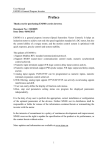
Before beginning installation of this product, please
read the instruction manual and warnings below
carefully.
In package ,
- One piece unit
- Twopiece mounting clamp
- One piece instruction manual
AUTO
Maintenance
Repairs should only be performed by trained and specialized
personnel. Cut power to the device before accessing internal parts.
Do not clean the case with hydrocarbon-based solvents (Petrol,
Trichlorethylene etc.). Use of these solvents can reduce the
mechanical reliability of the device. Use a cloth dampened in ethyl
alcohol or water to clean the external plastic case.
SET
Other Informations
2- If parameter in “Disp List” menu is and
analogue input module is plugged in Module1 or Module-2 socket, this is sensor failure of
analogue input module. Sensor connection is
wrong or there is no sensor connection.
°C
°F
V
O1 AT SV
O2
O3
REMOTE
RAMP
MAN
AUTO
°C
°F
V
O1 AT SV
O2
O3
REMOTE
RAMP
MAN
AUTO
SET
SET
3-If parameter is and parameter is and
analogue input module is plugged in Module1 or Module-2 socket, this is sensor failure of
analogue input module. Sensor connection is
wrong or there is no sensor connection.
°C
°F
V
O1 AT SV
O2
O3
REMOTE
RAMP
MAN
AUTO
Repair and maintenance service information:
Emko Elektronik Sanayi ve Ticaret A.Þ.
Demirtaþ Organize Sanayi Bölgesi Karanfil Sk. No:6 16369 BURSA
BURSA / TURKEY
Phone : +90 224 261 1900
Fax
: +90 224 261 1912
°C
°F
V
O1 AT SV
O2
O3
SET
9- The device is powered up, the normal
does not begin to run, and the bottom of the
screen As the side flashing;
Module-1 and Module-2 slots, EMIX10
EMI-X30, X40-EMI, EMI-X50 Analog input
modules installed at the same time the
event occurs. The unit normal to return to
work, the device energy cut-off and Analog
Input one of the modules must be removed.
Manufacturer Information:
Emko Elektronik Sanayi ve Ticaret A.Þ.
Demirtaþ Organize Sanayi Bölgesi Karanfil Sk. No:6 16369
BURSA / TURKEY
Phone : +90 224 261 1900
Fax
: +90 224 261 1912
REMOTE
RAMP
MAN
AUTO
SET
10- When power is on ; not starting the
normal operation and blinking the bottom
display as shown on the left; It appears
when two analogue input modules ( EMI410, EMI-430,EMI-440, EMI-450 ) are
plugged in Module-1 and Module-2 socket
at the same time. For starting normal
operation power off and pull out one of the
analogue input modules.
Ordering Information
ESM-4450 ( 48x48 DIN 1/16 )
ESM-4950 ( 96x48 DIN 1/8 )
ESM-7750 ( 72x72 DIN Sizes)
ESM-9950 ( 96x96 DIN 1/4 )
ESM-9450 ( 48x96 DIN 1/8 )
A
1
2
9
A BC D
/
1
/
FG HI
/
U
V
W Z
/
Supply Voltage
100-240V V (-15%;+10%) 50/60Hz
24V V (-15%;+10%) 50/60Hz
24V Z (-15%;+10%)
Customer (Maximum 240V V (-15%;+10%))50/60Hz
BC Input Type
20 Configurable(Tablo-1)
D
0
1
2
E
Scale
Table-1
Serial Communication
Product Code
None
-
RS-232
EMC-X00
RS-485
EMC-X10
E Output-1 (Alarm)
1 Relay Output (5A@250VVat Resistive Load)
FG Module-1
00
01
02
03
04
07
08
09
10
11
12
Product Code
None
Relay Output Module
EMO-X00
EMO-X10
EMO-X20
EMO-X30
EMI-X00
EMI-X10
EMI-X20
EMI-X30
EMI-X40
EMI-X50
SSR Driver Output Module
Digital (Transistor) Output Module
Current Output Module ( 0/4 ...20 mA Z )
Digital Input Module
0/4...20 mA Z Current Input Module
0...5A V CT Input Module
TC veya 0...50mV Z Input Module
PT-100 Input Module
0...10 V Z Input Module
HI Module-2
00
01
02
03
04
07
08
09
10
11
12
Table-1
BC Input Type(TC)
21
22
23
24
25
26
27
28
29
30
31
32
33
34
35
36
37
38
L ,Fe Const DIN43710
L ,Fe Const DIN43710
J ,Fe CuNi IEC584.1(ITS90)
J ,Fe CuNi IEC584.1(ITS90)
K ,NiCr Ni IEC584.1(ITS90)
K ,NiCr Ni IEC584.1(ITS90)
R ,Pt13%Rh Pt IEC584.1(ITS90)
S ,Pt10%Rh Pt IEC584.1(ITS90)
T ,Cu CuNi IEC584.1(ITS90)
T ,Cu CuNi IEC584.1(ITS90)
B ,Pt30%Rh Pt6%Rh IEC584.1(ITS90)
B ,Pt30%Rh Pt6%Rh IEC584.1(ITS90)
E ,NiCr CuNi IEC584.1(ITS90)
E ,NiCr CuNi IEC584.1(ITS90)
N ,Nicrosil Nisil IEC584.1(ITS90)
N ,Nicrosil Nisil IEC584.1(ITS90)
C , (ITS90)
C , (ITS90)
BC Input Type(RTD)
39
40
Ürün Kodu
None
Relay Output Module
SSR Driver Output Module
Digital (Transistor) Output Module
Current Output Module ( 0/4 ...20 mA Z )
Digital Input Module
0/4...20 mA Z Current Input Module
0...5A V CT Input Module
TC veya 0...50mV Z Input Module
PT-100 Input Module
0...10 V Z Input Module
PT 100 , IEC751(ITS90)
PT 100 , IEC751(ITS90)
EMO-X00
EMO-X10
EMO-X20
EMO-X30
EMI-X00
EMI-X10
EMI-X20
EMI-X30
EMI-X40
EMI-X50
Scale(°C)
Scale(°F)
-100°C,850°C
-100.0°C,850.0°C
-200°C,900°C
-199.9°C,900.0°C
-200°C,1300°C
-199.9°C,999.9°C
0°C,1700°C
0°C,1700°C
-200°C,400°C
-199.9°C,400.0°C
44°C,1800°C
44.0°C,999.9°C
-150°C,700°C
-150.0°C,700.0°C
-200°C,1300°C
-199.9°C,999.9°C
0°C,2300°C
0.0°C,999.9°C
-148°F ,1562°F
-148.0°F,999.9°F
-328°F,1652°F
-199.9°F,999.9°F
-328°F,2372°F
-199.9°F,999.9°F
32°F,3092°F
32°F,3092°F
-328°F,752°F
-199.9°F,752.0°F
111°F,3272°F
111.0°F,999.9°F
-238°F,1292°F
-199.9°F,999.9°F
-328°F,2372°F
-199.9°F,999.9°F
32°F,3261°F
32.0°F,999.9°F
Skala(°C)
Scale(°F)
-200°C,650°C
-328°F,1202°F
-199.9°C,650.0°C -199.9°F,999.9°F
BC Input Type( Z Voltage and Current)
41
42
43
44
45
0...50 mV Z
0...5 V Z
0...10 V Z
0...20 mA Z
4...20 mA Z
Scale
-1999,9999
-1999,9999
-1999,9999
-1999,9999
-1999,9999
Thank you very much for your preference to
use Emko Elektronik products, please visit our
Your Technology Partner web page to download detailed user manual.
www.emkoelektronik.com.tr