1
WWW.TRUGOLF.COM
VIDEO • SWING • FORCE
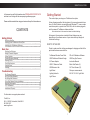
SETTING UP THE TRUBALANCE FORCE PLATE
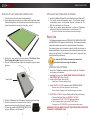
1. Carefully remove the force plate from its packaging.
2. Using supplied panel screws and a phillips head screwdriver attach
the black side panels to the indicated sides (see illustration). Align top
edge of panel with the top edge of force plate - not turf.
INSTALLING THE TRUBALANCE SOFTWARE
1. Insert the TruBalance Software CD into the Disk Drive of your Windows PC.
2. The installer should automatically launch. If the installer doesn’t
automatically launch, use Windows Explorer to browse the CD/
DVD drive and launch the Setup.exe
3. Follow the on screen setup instructions to install the TruBalance
software and Sony Eye Camera driver on your Windows 7 PC.
For Sony Eye Camera driver installation instructions see Page 9.
Basic Use
The TruBalance software focuses on VIDEO ANALYSIS, WEIGHT BALANCE
and SWING ANALYSIS aspects of the Golf Swing. The following information
is intended to educate users as to the individual features of the software.
3. Position the force plate with the side labeled “This Side of Force
Plate Towards Hitting Mat” adjacent to the hitting mat.
4. Plug the TruBalance’s power adapter into the power strip your sensor
pad uses.
The contents herein are not intended to identify “ideal” golf positions or
fundamentals. Rather, they are meant to help users better understand and
improve their golf swing. This information is best used in conjunction with
a certified teaching professional.
Tip: Use the HELP button to access the manual and
instructional videos on using the software.
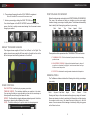
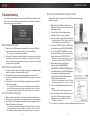
STARTING THE SOFTWARE
1. Launch the TruBalance software by double clicking the TruBalance
Icon located on the desktop.
2. Initializing the Force Plate. MAKE SURE THERE IS NOTHING ON
THE FORCE PLATE, then Click OK.
3. Select or Add a Player, then click OK.
Power Cable
Delete Player - Removes selected Player.
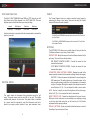
4. Select RECORD A SWING otherwise select REVIEW A SWING.
Record a Swing - Activates the system to record a swing.
Review a Swing - Displays the last recorded swing for your review.
5. RECORDING A SWING - Set your Position with the Club you’ll be using.
5. Slide the TruBalance Force Plate against the sensor pad foam edge.
6. Check to make sure the force plate is level. Use the
screws on each leg to modify the level if necessary.
7. Connect the supplied USB RECEIVER MODULE to
an open USB port on the Windows PC.
2
i. Stand on the Force Plate and ADDRESS THE BALL.
ii. Come to an UPRIGHT POSITION with even balance.
iii. Click OK when player is set or use TIMER if alone.
(Timer gives you 10 SECONDS to get into neutral position stance.
IMPORTANT: YOU WILL NEED TO DO SET POSITION ANYTIME THE GOLFER
CHANGES TO A DIFFERENT CLUB.
3