1
 Important Notes
Do NOT plug the QSK board into your USB port
until instructed to do so in Section 2: In-Circuit
Debugger USB Driver Installation.
Also, during the installation process, you may be
prompted to restart your computer. Do NOT restart
until the installer has completed installation of all
the software items.
1
Development Tools Software Install
Please insert the enclosed CD into your computer’s CDROM drive. The CD should auto-start, displaying the
install Window. This QuickStart Guide and the Installation
CD cover the BNS Solutions QSK62P Plus kit. From the
opening Window click <Install…>. Follow the directions
in the installation windows to install the QSK software tools
for your kit.
uDuring the installation process, the AutoUpdater
installer will launch. Allow this to proceed.
uIf the installation screen does not appear, please
browse the CD root folder and double-click
on “QSK-Installer.exe”.
2
In-Circuit Debugger USB Driver Installation
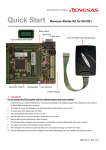
Your QSK board features on-board circuitry for in-circuit
debugging (ICD) and programming. The board is powered
via the USB bus and does not require any external power
supply. The ICD portion of the circuit is located on the back
side of the PCB and connects to your PC via a USB cable. It
requires the installation of a USB driver on your PC. When you
connect the QSK board to your computer for the first time,
Windows will recognize the new device and request the driver.
The green Link LED (D5) and the red Power LED (D1)
indicate operating status of the QSK board
(as shown in the following table).
2 of 8