1
Setting Parameters
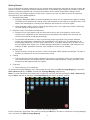
Before you begin Coverage Mapping, the parameters should be adjusted appropriately. In order to do so, first
access the coverage mapping menu. Once there, select Measurement Setup and then to edit the measurement
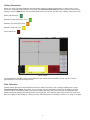
settings, touch the RSSI button. The threshold RSSI values provide the user with easy visibility of the power level.
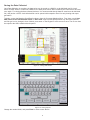
Better than Excellent Between Excellent and Very Good Between Very Good and Good Between Good and Poor Worse than Poor Figure 4: RSSI
The thresholds for the dBm values can be altered so the measurement indications on the map are colored
appropriately for the expected signal levels.
Data Collection
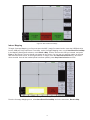
Another setting that can be personalized is the way the data is recorded. In the coverage mapping menu, select
Point Distance/Time Setup. Once there, you can set the way it records data by either time or distance, and the
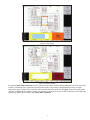
intervals of which it collects the data. If the collection setting was set to time, the instrument will interpolate data
points between the starting and ending position in a straight line. If the distance option was set, the user receives a
data point whenever the position is noted by the user, indicated by either touching the screen or by using the keypad.
4