1
User manual
I Product introduction
Preface
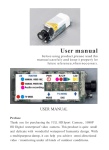
Thank you for purchasing the Full HD LCD screen waterproof
sport camera. This product is quite small and delicate with
wonderful waterproof humanity design. With a multipurpose
damp, it can help you achieve omni-directional video /
monitoring under all kinds of outdoor conditions.
As an underwater activity fan, are you always impressed by the
beautiful scene in the sea or lakes, or are you still looking for a
companion that can help you record your unforgettable
experiences?
Try this camera, it is ideal for outdoor and underwater pursuits.
Water-proof feature makes it possible to take photos and record
videos under water up to 20 meters. With HD lens and low light
level sensitivity, you will never miss any opportunity of taking
beautiful underwater shots again.
This manual contains important safety and operating
information. Please read all the information carefully before you
use the device to avoid accidents and keep it for future
reference.
II Important safety precautions
-1-
To use this camera safely, please read and follow the
instruction carefully before using it. We will be not
responsible for maintaining, if camera damaged by
unreasonable operation.
Please avoid camera from dropping or harsh impacting, avoid
TFT LCD screen from shaking violently, or it may cause damage
or abnormal display on TFT screen.
Please use the qualified adaptor(5V, 1A or above) and USB
Cable for unit charging. If not, we will not be responsible for
any loss caused by electric short, burned, even exploded.
Please charge unit in time:
1. When the battery watermark indicates it is low power.
2. When OSD clue on camera will turn off automatically.
In order to prevent program error, never disconnect the
camera suddenly from a PC during transferring files or
formatin memory.
Do not disassemble the camera and not clean unit by using
corrosive liquid.
To keep the camera waterproof, tightly close the waterproof
cover properly for best water sealing.
Don't open the waterproof cover under water.
The camera is operable up to a water depth of 20m for 180
minutes. Take care when using the camera outdoor. Do not
use this appliance under water depth over 20m.
If water has entered the camera, open the waterproof cover
and remove the card carefully. Allow camera to air-dry for at
least 24 hours and contact qualified service personnel.
Cleaning after using the camera under/near water
-2-
1. Wipe by clean water after used and keep it dry for storage.
Do not use with corrosive liquid to clean the surface of the
product
2. Always clean the camera with water after use within 30
minutes, and do not open the waterproof cover before
cleaning is finished. Sand or water may get inside places
where it cannot be seen. If not rinsed, waterproof
performance will be degraded.
3. Allow the camera to sit in pure water poured into a
cleaning bowl for more than 5 minutes. Then, gently shake
the camera and press each button inside the water to clean
away any salt, sand or other materials.
III Accessory
Standard Accessories
01
-3-
Option Accessories
In view of different usage purpose, such as motorbike,
airplanes,golf carts, vehicle, bicycles and many others round and
square rail applications,we also offer the optional accessories to
user to meet their different demand.
>01
>02
>03
>04
>05
>06
>07
>08
>09
>10
>11
Mount bracket
Suction cup mount
Base bracket
Adhesive base (with 1pc 3M sticker)
Upright bracket
90°bracket
Hexagonal plastic nut
Anise plastic nut
Silicon strap 15cm
Silicon strap 35cm
Silicon strap 70cm
Option 1
Multi-functional sport bracket
-4-
Option 2
-28-
Sucker
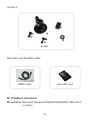
MicroSD Card & HDMI Cable
microSD card
HDMI cable
IV Product overview
OS systerm: Microsoft Windows2000/XP/VISTA/WIN 7/Mac10.4
or above
-5-
Product Features
> Waterproof up to 20 meters, ideal for outdoor and
underwater pursuits
> 1.5"HD 480*240 TFT-LCD screen
> 1/ 2.5 5 MP COMS sensor
> F/2.8 f=3.53mm 140° wide-angle HD camera lens, let you
shoot more freely
> Optional video resolutions:
A. Full HD30=1920*1080P(16:9), 30pfs
B. 1080P30=1440*1080P(16:9), 30pfs
C. 720P30=1280*720P(16:9), 30pfs
D. WVGAP= 848*480(16:9), 60fps
>12MP photo resolution, JPG format
> Built-in high capacity Li-battery lasting video recording for 3 h
> Built-in 8Ω/1W speaker, easy inform function
> Support HDMI and TV-out, easy to share more funs
> Unique loop recording
> Optional continuous photo-taking time:
2S/5S/10S/30S/60S/OFF
> Support driving recorder, easy for obtain evidence
> Laser light help for fixing position of the target object
> 2 high brightness LED lights for night using
> Flashlight function lasting working up to 15h
> Support MicroSD card up to 32 GB (CLASS 4 or above is
recommended)
> Support PC charging
-6-
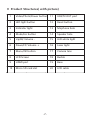
V Product Structures( with picture)
1
Video/Photo/Power button
11
USB/TV-OUT port
2
LED light button
12
Reset button
3
Indicator light
13
Micphone hole
4
Mode/Esc button
14
Speaker hole
5
Up/FB/ Volume -
15
LED white light
6
Down/FF/ Volume +
16
Laser light
7
Menu/OK button
17
Camera lens
8
LCD Screen
18
Buckle
9
HDMI port
19
Base
10
Micro SD card slot
20
LCD cable
-7-
LED light button
Video/Photo/Power button
Indicator light
Laser light
LED white light
Camera lens
Buckle
LCD Screen
Menu/OK button
Down/FF/ Volume +
Up/FB/ Volume Mode/Esc button
Base
USB/TV-OUT port
Micphone hole
HDMI port
Micro SD card slot
Speaker hole
Reset button
LCD cable
-8-
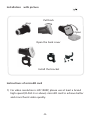
Installation(with picture)
Pull back
up
Open
Open the back cover
Install the bracket
Instructions of microSD card
1) For video resolution is HD 1080P, please use at least a brand
high-speed (CLASS 4 or above) microSD card to achieve better
and more fluent video quality.
-9-
2) In order to make the camera and microSD card reach good
compatibility, we suggest you to format microSD card by TV
setting when you use it first time because it won’t reach good
compatibility if format microSD card by PC. After format
microSD card by TV setting, it can avoid some situations, such
as purple indicator flashes quickly warning or camera
automatically stops, etc.
3) Please copy the files taken in the camera to your computer
desktop, and then replay it to avoid ragged playback.
Charging & indicating
1) Please use the qualified adaptor(5V, 1A or above) and USB
Cable for unit charging.
2) Charging time is about 4h, red LED indicator keeps on during
charging, red LED indicator will go out after fully charged.
3) For this unit comes with built-in rechargeable li-battery,
please charge unit for 8h in first three times, and recharge it
after battery is used up for long-time lifespan.
4) Ways of charging
a. Charging by adaptor, connect USB cable with adaptor, and
then connect USB cable with unit for unit charging.
b. Charging by PC, directly connect to PC by USB cable for unit
charging no matter unit turning on&off, but it needs longer
time for charging.
Notes:
It is a normal phenomenon that the temperature of unit and
adaptor will increase a little during charging.
-10-
Instructions before using and matters needing attention
The unit supports time&date stamp, when use it first time or no
operation for a long time, please set up correct time and date
before using, please refer to system settings.
VI Function specification
1. Turning on
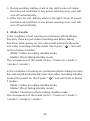
> Insert microSD card, long press “
” , blue LED indicator is
lit up with warning tone and LCD screen opens and shows
“ Welcome”.That means the unit enters into standby mode.
> Initialization time depends on capacity and load data quantity
of microSD card, please check LCD screen warning.
> For video resolution is HD 1080P, please use at least a brand
high-speed (CLASS 4 or above) microSD card to achieve better
and more fluent video quality.
Notes:
1) The blue indicator flashes quickly and no memory warning
appears in LCD screen when turned on without microSD card.
2) After setting driving recorder mode, once a car starts, unit
will automatic turn on and enter into video-recording standby
mode.
2. Turning off
> In any mode, long press “
”then the blue indicator flashes
several times quickly and with warning tone the LCD screen
shows“ Goodbye”.
-11-
> During working, battery mark in top right corner of screen
becomes red and there is low power warning tone, unit will
turn off automatically.
> After turn on unit, battery mark in top right corner of screen
becomes red and there is low power warning tone, unit will
turn off automatically.
3. Mode transfer
In the condition of not turning on continuous photo-taking
function, there are just video-recording and photo-taking
functions. After power on, the unit would automatically enter
into video recording standby mode. Short press “ M ”, unit will
circle in below 2 modes:
Mode1: Video recording standby mode;
Mode2: Photo taking standby mode.
The consequence of the mode circle is : Power on->mode 1>mode 2->mode 1
In the condition of turning on continuous photo-taking function,
the unit would automatically enter into video recording standby
mode after power on. Short press “ M ”, unit will circle in below
3 modes:
Mode1: Video recording standby mode;
Mode2: Photo taking standby mode;
Mode3: Continuous photo-taking standby mode.
The consequence of the mode circle is : Power on->mode 1>mode 2->mode 3->mode 1
-12-
Notes:
1) Each time there is warning tone after you successfully press
the operation button.
2) After setting screen off saving energy time, unit will
automatic enter into screen saver mode without pressing any
buttons within setting time.
3) After connect to TV via HDMI or AV cable, LCD screen will
automatic turn off, mode circles are same.
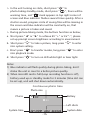
4. Video Recording
Recording time
Loop mode
Recording
System time
REC
H 00:00:25
C
23:35:50
2011/01/01
Battery
System date
> After unit turns on, short press “ M ”, unit enters into video
recording standby mode, then short press “
”, red “REC”
appears in top right corner of screen, blue indicator flashes
slowly, that’s mean unit is recording video.
-13-
> Short press “
” again, blue indicator flashes several times
quickly with warning tone, progress circle of saving files will
appears in the screen. When progress circle is missing, blue
indicator will be constantly on, that means video recording is
stopped and saved.
> During video recording mode, the buttons function as below;
a. Short press “◄” or “►” to achieve EV “+” or EV “-”, please
set up prompt screen brightness according to environment.
b. Short press “ ” to real-time snapshot a picture, long press
“ ” to enter into system setting.
c. Short press “ M ” to transfer modes, long press “ M ” to enter
into playback mode.
d. Short press “ ” to turn on LED white light or laser light.
Notes:
1) When the loop recording function is off, the unit will
automatically save a file after it fully record a 4GB video fill
and then start to record the new file.
2) When microSD card is full (Loop recording function is off),
battery used up or standby mode for 3 minutes (time slot can
be set up), unit will shut down automatically.
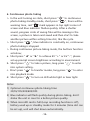
5. Photo Taking
Photo
System time
Photo size
Battery
3M
2011/01/01 2542
23:36:29
Left shots
-13-
System date
> In the unit turning on state, short press “ M ” to
photo-taking standby mode, short press “
”, there will be
warning tone, red “ ” mark appears in top right corner of
screen and blue indicator flashes several times quickly. After a
shutter sound, progress circle of saving files will be missing in
the screen and blue indicator will be constantly on, that
means a picture is taken and saved.
> During picture-taking mode, the buttons function as below;
a. Short press “◄” or “►” to achieve EV “+” or EV “-”, please
set up prompt screen brightness according to environment.
b. Short press “ ” to take a picture, long press “ ” to enter
into system setting.
c. Short press “ M ” to transfer modes, long press “ M ” to enter
into playback mode.
d. Short press “ ” to turn on LED white light or laser light.
Notes:
1) Blue indicator will flash quickly during photo-taking, don’t
shake the unit in case for a better picture quality.
2) When microSD card is full (Loop recording function is off),
battery used up or standby mode for 3 minutes (time slot can
be set up), unit will shut down automatically.
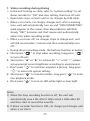
Continuous photo time
Photo size
Photo
Battery
3M
03
Left shots
System time
2011/01/01 2542 23:36:29
-15-
System date
6. Continuous photo taking
> In the unit turning on state, short press “ M ” to continuous
photo-taking standby mode, short press “
”, there will be
warning tone, red “ ” mark appears in top right corner of
screen and blue indicator flashes quickly. After a shutter
sound, progress circle of saving files will be missing in the
screen, a picture is taken and saved and then start to take
another picture within setting time slot, like the cycle.
> Short press “
”, blue indicator is constantly on, continuous
photo-taking is stopped.
> During continuous picture-taking mode, the buttons function
as below;
a. Short press “◄” or “►” to achieve EV “+” or EV “-”, please
set up prompt screen brightness according to environment.
b. Short press “ ” to take a picture, long press “ ” to enter
into system setting.
c. Short press “ M ” to transfer modes, long press “ M ” to enter
into playback mode.
d. Short press “ ” to turn on LED white light or laser light.
Notes:
1) Optional continuous photo-taking time:
2S/5S/10S/30S/60S/OFF.
2) Blue indicator will flash quickly during photo-taking, don’t
shake the unit in case for a better picture quality.
3) When microSD card is full (Loop recording function is off),
battery used up or standby mode for 3 minutes (time slot can
be set up), unit will shut down automatically.
-16-
7. Video recording during driving
> In the unit turning on state, refer to “systerm setting” to set
driver recorder to “ON” and save setting, then turn off unit.
> Open back cover, connect unit to car charger by USB cable.
> When a car starts, car charger charges unit, after a warning
tone, unit will automatically turn on and “USB CONNECTING”
mark appears in the screen, then blue indicator will flash
slowly, “REC” becomes red, that means unit automatically
enters into video recording mode.
> When a car turns off, car charger stops to charge unit, unit
will still record video 1 minute and then automatically turn
off.
> During driver recording mode, the buttons function as below;
a. Short press “
” to stop video recording, long press “
”
to turn off unit.
b. Short press “◄” or “►” to achieve EV “+” or EV “-”, please
set up prompt screen brightness according to environment.
c. Short press “ ” to real-time snapshot a picture, long press
“ ” to enter into system setting.
d. Short press “ M ” to transfer modes, long press “ M ” to enter
into playback mode.
e. Short press “ ” to turn on LED white light or laser light.
Notes:
1) When the loop recording function is off, the unit will
automatically save a file after it fully record a 4GB video fill
and then start to record the new file.
2) If driver recorder function is OFF, car charger just charges unit
when a car starts.
-17-
3) Please use car charger in good quality, if not, bad quality car
charger will burn unit or couldn’t charge unit.
4) Please set driver recorder to OFF if you don’t use this function
5) When microSD card is full (Loop recording function is off),
unit will shut down automatically.
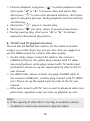
File type
MOVIE
Playback file
100-0005
File name
A. Playback by unit
> Long press “
” to turn on camera, you can see POWER
LOGO and hear short warning tone, and then blue indicator
will be constantly on and unit enters into standby mode.
> Videos playback: Long press “ ” to video playback mode,
short press “◄” or “►” to browse video and photo files.
Short press “ ” to enter into playback interface, short press
again to playback video files. During playback, buttons
function as following;
a. Short press “ ”, pause or resume play.
b. Short press “ M ” per time, return to previous layer menu.
c. During video playing, long press “◄” or “►” to achieve fast
forward or backward play videos.
d. During video playing, short press “◄” or “►” to achieve
volume “+” or volume “-” .
-18-
> Pictures playback: Long press “ M ” to photo playback mode,
short press “◄” or “►” to browse video and photo files.
Short press “ ” to enter into playback interface, short press
again to playback pictures. During playback, buttons function
as following;
a. Short press “ ”, pause or resume play.
b. Short press “ M ” per time, return to previous layer menu.
c. During pausing play, short press “◄” or “►” to achieve
upward or downward play photos.
B. TV-OUT and TV playback function
The unit has AV &HDMI two options for the audio and video
output, you could choice any one you like. Here we suggest to
use the HDMI output for a better HD video quality.
> Via AV cable, please connect AV cable to the camera’s
USB&AV-OUT port, the yellow plug connect with TV video
input port(yellow), white plug connect with TV audio input
port(white). Please set up the signal input by refer to the TV
user manual.
> Via HDMI cable, please connect one plug of HDMI cable to
the camera’s HDMI port, another plug connect with TV HDMI
port. Please set up the signal input by refer to the TV user
manual.
> After well connect with TV, turn on unit to playback video and
photo files, operation ways are same as playback by unit.
Notes:
1) If the capacity of video files is too big, it would be normal
condition to wait some seconds to play the video.
-19-
2) When the unit is in the video playing state, you could adjust
the unit and TV volume to get a better audio quality.
3) During playing, HDMI cable is recommended to achieve
better audio and video effect.
4) After connect with TV, LCD screen will automatically turn off,
it would be a normal phenomenon.
9. LED and Laser light
> Unit provides 2 high brightness LED lights and 1 laser light.
> In any turning on state (except TV-out playback mode), short
press “ ”, the LED light and laser light will circle in below
five modes:
Mode0: All lights go out. (Unit would enter into this mode
after turn on)
Mode1: The laser light would light up for 30 seconds for the
purpose of positioning the object, and then laser light will go
out.
Mode 2: The LED lights are constantly on for the purpose of
video recording and strength the color quality in the dark
place condition.
Mode 3: The laser light is constantly on for positioning in all
the recording state.
Mode 4: The LED lights keep quickly flashing in a high
frequency to save flashlight energy.
Notes:
1) Each time there is warning tone after you successfully press
the operation button.
2) In any mode, long press “ ”, the unit will transfer to mode0
(all lights go out).
-20-
3) The consequence of the mode circle is : mode 0->mode
1->mode 2->mode 3->mode 4->mode 0
10. Flashlight and laser positioning function
The unit has the single flashlight and laser positioning function.
When this single function works, the DV system would come to
the state of turning off, it would help to get more longer time
for the usage. The way to operate as below details:
> During DV system is power off, long press “ ”, flashlight is
lit up, then short press “ ”, unit will circle in below 5
modes:
Mode 0: Torch state: Flashlight is lit up and can be working
up to 15h.
Mode 1: The laser light is on for positioning purpose.
Mode 2: The LED lights keep quickly flashing in a high
frequency to save flashlight energy.
Mode 3: Laser light flashes slowly for intermittent laser
positioning.
Mode 4: Turn off all LED lights.
Notes:
1) When in the single flashlight/laser positioning function, it is
common condition if there is no warning tone after press
buttons.
2) In any mode, long press “ ” and unit will transfer to mode
4(all lights go out).
3.) The consequence of the mode circle is: mode 0->mode
1->mode 2->mode 3->mode 4->mode 0
-21-
3) Unit will turn off automatically if micro SD card is full, no
operation in standby mode for 3 minutes (time slot can be set
up), but it is still in the charging status.
VII System setting and the diagram
> There are two ways to do the system setting for the camera,
>
>
A.
B.
C.
D.
E.
by the product or by the TV, the button functions are the
same.
When you choose setting by the TV, please refer to the
“TV-OUT and TV playback function”, turn on the unit, and
then connect unit with computer by AV cable or HDMI cable
to set the signal input. Then enter into the video or photo
standby mode, long press “ ”, TV will display system
setting interface.
Buttons functions as follows:
Long press “
” to turn on/off the camera.
Long press “ ” to enter into the system setting menu.
Short press “◄” or “►” to achieve upward or downward
menu choice.
Short press “ ” to enter into and confirm the menu, long
press “ ” to save and quit the menu.
Short press “ M ” to return the video standby mode directly.
SYSTEM
RESOLUTION
QUALITY
PHOTO SIZE
WHITE BALANCE
-22-
11. Connecting computer
> Firstly turn on back cover;
> Connect unit to computer by USB cable, long press “
” to
turn on unit, and a removable disk will appear in "my
computer", you can view the pictures or videos files in the
removable disk, and you can also copy these files to your
computer.
> Remove disk: Click “Removable disk” mark in the bottom
right corner of computer to safely remove hardware.
Notes:
Please do not remove disk from computer suddenly during
formatting, uploading or downloading files to avoid unit
program error.
12. Shooting when charging
> Firstly turn on back cover;
> In the condition of turning on, refer to “system setting”
chapter, please set driving recorder to “OFF”;
> Connect USB cable with adaptor, and then connect USB cable
with unit;
> Long press “
” to turn on unit, “USB CONNECTING” mark
appears in the screen, after warning tone finishes, you can
operate any function of the unit.
Notes:
1) Please use the qualified adaptor(5V, 1A or above) and USB
Cable for unit charging.
2) If driver recorder function is ON, unit will automatically enter
into driver recording function once connecting with adaptor.
-23-
Diagram:
NO.
Project of the
system setting
1
RESOLUTION
2
QUALITY
3
]PHOTO SIZE
4
WHITE BALANCE
5
SCENE
6
SELF CAPTURE
Menu options
Instructions
FULL HD30/1080P30 Video Specification
/720P30/WVGAP60
H/M/L
Video quality
setting
3M/5M/8M/12M
Photo Size
FLUORESCENT/
INCANDESCENT
/AUTO/D4000/D5000
/SUNNY/CLOUDY
SKIN/SPOTLIGHT/WAT
ER/AUTO/NIGHT
SCENE/SPORTS/LAND Set the Video/Photo
scene according to
SCAPE/PORTRAIT
environment
/SUNSET/SAND
SNOW
2S/5S/10S/30S/60S/
OFF
Set the self capture
and the time
7
TIME STAMP
DATE-TIME/OFF
Turn on or turn off
the time stamp
8
FLICKER
AUTO/60HZ/50HZ
Illuminant frequency
set
9
TV TYPE
NTSC/PAL
Video output
format
OFF/2MIN/5MIN
/15MIN
MD time setting
10 RECORD
OVERWRITE
-24-
11 CAR MODE
ON/OFF
Turn on/off the car
driving
12 BEEP SOUND
ON/OFF
Turn on/off the
keypad tone
13 AUTO POWER
OFF
1MIN/2MIN/3MIN/5
MIN/OFF
Set the time of
camera turn off
automatically
14
LCD AUTO TURN
OFF
30S/1MIN/5MIN/NO
15 TIME AND DATE
2011:01:01 01:01
16 FORMAT
NO/YES
17 DEFAULT SETTING NO/YES
18 FIRMWARE
VERSION
FW VER: ********
Set the time of LCD
screen turn off
automatically
Set the time and
date of the
video/photo
Set the format of
the TF card
Set camera’s system
reset function
Query camera’s
version
Notes:
Choose TV connections, it is normal phenomenon that the screen
of the camera will turn off automatically!
VIII
System Resetting
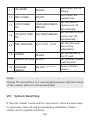
If the unit couldn’t work well for any reason, there are two ways
to reset unit, and unit will be mandatory shutdown. Please
restart unit to operate functions.
-25-
a) Press “Reset” button to reset unit;
b) Long press “ ” for 5 seconds to reset unit.
IX
Troubleshooting Tips
Camera couldn’t turn on
Camera turns off
automatically
The video files deadlocks or
jumps
a.Charge unit in case unit is out of
power
b.Try to reset the camera
a.Check if the battery is used up
b.Standby time exceeds 3 minutes
without any operation
c.Check if memory card is full
a.Use brand high speed(Class 4 or
above) memory cards
b.The memory card maybe damage
a.Check whether AV&HDMI cable is
well connected and cables quality
LCD screen doesn’t display
files in unit
is good or not
b.Check whether USB and HDMI
ports of unit are good and
relevant ports are well connected
or not
c.Check setting for TV signal input is
right or not
The camera couldn’t record
video or photograph
Make sure you have a memory card
inserted into the camera and the
battery still has power
Images are dim or out of
focus
Check whether the inside lens of the
camera is dirty or the camera is
leaking or not
-26-
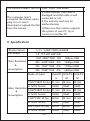
The camera couldn’t turn off Press “reset” and restart
The computer cann’t
recognize the camera when
plug it in or cann’t
download or upload the files
from the camera
a.Check whether USB cable is
damaged and USB cable is well
connected or not
b.The memory card may be
malfunctioning
c.Make sure that camera supports
the system of your PC, try to
connect to another PC
X Specification
Effective Sensor
1/ 2.5 5.0MP CMOS SENSOR
LCD Screen
1.5" TFT-LCD 480*240
12M 4000*3000 JPG
900pcs /4GB
Photo Resolution
8M 3200*2400 JPG
1200pcs/4GB
&
Consumption
5M 2592*1944 JPG
1700pcs/4GB
3M 2048*1536 JPG
2600pcs/4GB
Mode of Video
QUALITY: QUALITY: QUALITY:
H
1920*1080P 30 fps, 41 min
Video Resolution
&
Consumption
H MOV format
(4GB)
1440*1080P 30 fps, 41 min
H MOV format
(4GB)
1280*720P 30 fps, 62min
M
M
49 min
49 min
(4GB)
(4GB)
49 min
49 min
(4GB)
(4GB)
82 min
82 min
(4GB)
(4GB)
(4GB)
848 x 480P 60 fps, 62min
82min
82min
H MOV format
(4GB)
(4GB)
H MOV format
-27-
(4GB)
Lens specification
F/2. 8 f=3. 53 mm 140° wide angle
MIN. illumination
1LUX
Flashlight using
15h
Laser positioning
20M (Indoor)
Built-in Speaker
Yes, 8Ω/1W
Operation Tone
Available
Battery capacity
3.7V/ 1500mAh
Continuous recording
About 3h(LED light off)
Charging spec.
DC5V 1A or above
Charging time
About 4h
USB port
USB2.0 High Speed
HDMI
Available
Type of Memory
Micro SD card
Capacity of Memory
2GB-32GB
IP grade
IPX8 (Lasting 3h under 20M)
Weight
130g
Dimension
107(L)*65(H)*57(W)(mm)
Notes:
1) The video time related to the memory consumption and video
situation, the real time date would be some different with the
date we mentioned above.
2) Pictures, design and specifications illustrated in this manual
may be slightly different from the actual product and
packaging that shall be subject to change without further
notice.
-28-