1
2.1 Water Cooling Tubes
Users must provide their own water cooling tubing.
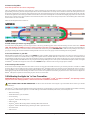
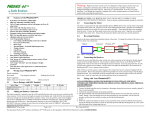
There are 4 aluminum cooling tubes on the Hydra Ice™ speed controllers. You must make three crossover sections of plastic or silicon tubing that are
approximately 3.75-4” long. Connect the input/output tubes to the two aluminum tubes on the top of the controller closest to the battery wires. Connect
the bottom controller tubes on the motor side together with a 3.75” inch length of tubing. Connect the top left tube on the battery side of the controller
to the bottom right tube on the battery side with a 3.75” tube. Now connect the remaining tubes on that side with a slightly longer tube. The water should
flow into the controller on the top board, flow to the bottom board, then to the other side of the top board, down to the remaining side of the bottom
board and then out of the controller.
Please see the diagram below for reference.
2.2 Add a Battery Connector to your Hydra Ice™:
You must attach a quality battery connector of your choice to the red (+) and black (-) power wires. Solder the battery connector to the wires. ENSURE
THAT THE POLARITY IS CORRECT (red wire to battery red wire, black wire to battery black wire). Follow the instructions provided with the
battery connector. After the connector is soldered and insulated with shrink tubing check it ONE MORE TIME to make sure the polarity is correct before
you plug in a battery. We recommend 6.5mm or 8mm gold bullet connectors due to the gauge of motor and battery wires being utilized.
2.3 Connect the Motor to your ESC:
With a brushless system, there is no polarity on the MOTOR side of the controller. Simply solder the three leads to your motor or solder your choice of
connectors to the motor and controller leads, and plug them together. After the throttle calibration routine below – if the motor runs backwards with
forward throttle, simply swap any two of the motor/controller connections and it will reverse the rotation of the motor. You can also reverse the motor
rotation using the Castle Link™ USB software or by using the manual programming function of the speed controller. Both the Hydra Ice 240™ and Hydra
Ice2 HV200™ controllers are designed to control one motor. NEVER attempt to drive two motors using a single speed controller.
2.4 Connecting to the receiver:
Connect the receiver lead (the three color wires with a connector on the end) to the throttle channel on your receiver (channel 2 or throttle on 2.4GHz
receivers). Do not connect a battery to the receiver, as the Hydra Ice 240™ will supply power to the receiver and servo through the receiver connector.
If you would like to use a separate receiver battery with the Hydra Ice 240™ simply remove the red wire from the receiver lead, and use some heat
shrink tubing to keep the wire from shorting out while not in use. Then use a separate receiver battery to power the servos and receiver. The Hydra Ice2
HV200™ will require a separate receiver battery to power the servos and receiver.
3.0 Calibrating the Hydra Ice™ to Your Transmitter:
IMPORTANT NOTE: Calibration is required for the very first use of the HYDRA™ Ice 240™ and Hydra Ice2 HV200™, after updating software
using the Castle Link™ USB programmer, or whenever used with a new/different transmitter.
NOTE TO USERS WITH A FUTABA TRANSMITTER: You must reverse the throttle channel signal on your transmitter. Please refer to your Futaba
instructions.
The Hydra Ice™ contains a throttle calibration feature that you’ll want to use the first time you power it up with a new/different transmitter. Performing
the sequence below will teach the Hydra Ice™ controller what your transmitter’s full throttle, full reverse, and neutral points are.
• Disconnect battery
• Hold full throttle on your transmitter
• Connect battery
• Hydra Ice™ flashes LED and rings once
• Wait 2 seconds
• Hydra Ice™ flashes LED and rings 4 times indicating full throttle measured
• Hydra Ice™ flashes LED while beeping, indicating it’s time to push full reverse
• Push full reverse
• Wait 1 second
Hydra Ice™ User Guide
© 2012 Castle Creations, Inc. All rights reserved.
Page 2