1
5
9.2.
RS232 cable wiring
9.3.
Ethernet cable wiring
10.Specifications, packing & ordering Information
10.1. Specifications & packing information
10.2. Ordering Information
50
51
52
52
52
1. Introduction
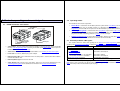
1.1. What is the DS100?
The DS100 is a Serial Device Server. The main function of the DS100 is to network-enable existing
serial devices. Using the DS100 you can connect practically any serial device with RS232 interface to an
Ethernet Local Area Network (LAN). You can then communicate with your serial device from any PC (or
other device) connected to your LAN. And if your LAN has a direct connection to the Internet, then you can
*
access and control your serial device from anywhere in the world !
1.2. Three basic ways of using the DS100
•
If you have a serial device and an existing PC software to control it then you can use the
DS100 in conjunction with our Virtual Serial Port Driver (VSPD). Virtual Serial Ports (VSPs) created
by the driver are logical COMs that behave like standard hardware COMs but in reality
transparently reroute the data via the TCP/IP network to the DS100 and the serial device attached
to it. By using the VSPs you can continue using your existing PC software without any modification.
•
If you have a serial device and are creating a new PC software to control it then you can
communicate with the DS100 directly (without VSPD). The DS100 transmits the data using
industry-standard UDP/IP and TCP/IP communications protocols. Most software development
packages like Visual Basic from Microsoft® provide an easy to use components that simplify
exchanging data with the DS100. Turn to our tutorial Using VB to communicate with the
DS100/EM100 for more information
•
If you have two serial devices that you want to link over the network you can use two DS100s at
both sides to create a Virtual Serial Link over the TCP/IP network.
For more information on how to use the DS100 with different kinds of serial devices please turn to our
Connectivity Manual.
* Provided that you have assigned a valid “true” IP-address to the DS100. “True” IP-address is the address that is unique Internet-wide.