1
DSL-504T User’s Manual
Table of Contents
Table of Contents
Table of Contents ............................................................................................... 2
Package Contents .............................................................................................. 4
Installation Overview ......................................................................................... 5
Installation Requirements .................................................................................. 6
Information you will need from your ADSL service provider .............................. 8
Information you will need about your DSL-504T ADSL service router ............... 9
Information you will need about your LAN or computer ................................... 10
Introduction ..................................................................................................... 11
Features and Benefits ....................................................................................... 12
Standards Compatibility & Compliance ........................................................... 14
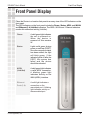
Front Panel Display .......................................................................................... 16
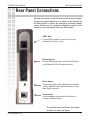
Rear Panel Connections ................................................................................... 17
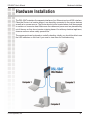
Hardware Installation ....................................................................................... 18
Power ON Router ............................................................................................. 19
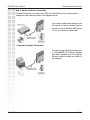
Network Connections ....................................................................................... 20
Basic Router Configuration .............................................................................. 22
Access the Configuration Manager ................................................................... 29
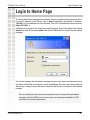
Login to the Home Page .................................................................................. 30
Configure the Router ........................................................................................ 31
Using the Setup Wizard ................................................................................... 33
Configuring the WAN connection ..................................................................... 46
LAN IP Settings ............................................................................................... 55
DHCP Server Settings ...................................................................................... 56
DNS Server Settings ........................................................................................ 58
D-Link Systems, Inc.
2