1
Contents
Contents
1
2
3
4
5
6
6.1
Introduction
Getting Started
Overview
Your VP-501xl/VP-502xl Scan Converter
Connecting the VP-501xl/VP-502xl
Operating the VP-501xl/VP-502xl
Using the Quick-Set Buttons
1
1
2
2
5
6
6
6.1.1
6.1.2
6.1.3
Using the AUTO IMAGE Button
Using the FREEZE Button
Using the OS/US Button
6
6
7
6.2
6.3
Adjusting the Display via the Menu Buttons
Using the Menu
7
8
6.3.1 The Advanced Menu
6.3.1.1 Test Patterns
6.3.1.2 Save and Recall
8
8
9
6.4
Setting the Dipswitches for VP-501xl and VP-502xl
10
6.4.1
6.4.2
VP-501xl Dipswitch Settings
VP-502xl Dipswitch Settings
10
11
7
Technical Specifications
11
Figures
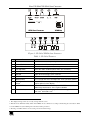
Figure 1: VP-501xl UXGA Scan Converter
Figure 2: VP-502xl UXGA/HD Scan Converter
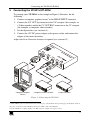
Figure 3: Connecting the VP-501xl
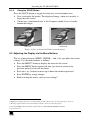
Figure 4: Over-scanned and Under-scanned images
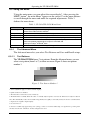
Figure 5: Test Pattern Number 1
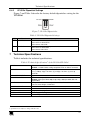
Figure 6: VP-501xl Dipswitches
Figure 7: VP-502xl Dipswitches
3
4
5
7
8
10
11
Tables
Table 1: VP-501xl Features
Table 2: VP-502xl Features
Table 3: VP-501xl/VP-502xl Menu Items
Table 4: VP-501xl Dipswitch Settings
Table 5: VP-502xl Dipswitch Settings
Table 6: Technical Specifications of the VP-501xl/VP-502xl
3
4
8
10
11
11
i