1
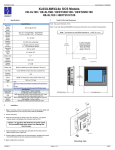
MAN0808-10-EN 4 Specifications / Installation Serial Communications: 5.2 Wiring Examples (continued) MJ1: (RS-232 / RS-485) Use for Cscape programming and Application-Defined Communications. J2 Black Terminal Connector C6 R6 C5 R5 C4 R4 C3 R3 C2 R2 C1 R1 H4 H3 H2 MJ2: (RS-232 / RS-485) Use for Application-Defined Communications. Pin 8 MJ1 Pins Signal 1 MJ2 Pins Direction Signal Direction 8 TXD OUT TXD OUT 7 6 RXD 0V +5 60mA IN Ground RXD 0V +5 60mA IN Ground 4 RTS OUT TX- OUT 3 CTS IN TX+ OUT IN / OUT RX- IN 5* 2 1 RX- / TXRX+ / TX+ OUT IN / OUT OUT RX+ IN Name Relay 6 COM Relay 6 NO Relay 5 COM Relay 5 NO Relay 4 COM Relay 4 NO Relay 3 COM Relay 3 NO Relay 2 COM Relay 2 NO Relay 1 COM Relay 1 NO HSC4 / IN12 HSC3 / IN11 HSC2 / IN10 * +5 on XLe Rev E and later 5 J2 Black Positive Logic Digital In / Relay Out 230VAC OR 25VDC 230VAC OR 25VDC 230VAC OR 25VDC 230VAC OR 25VDC 230VAC OR 25VDC 230VAC OR 25VDC C6 N L R6 LOAD C5 N L R5 LOAD C4 N L R4 LOAD C3 N L R3 LOAD C2 N L R2 LOAD C1 N L R1 LOAD H4 Wiring and Jumpers H3 12-24VDC Wire according to the type of inputs / outputs used, and select the appropriate jumper option. H2 0V ON J1 001XLE015 Wiring Specifications For shielded Analog I/O wiring, use the following wire type or equivalent: Belden 8441, 18 AWG (0.8 mm2) or larger. 5.3 Location of I/O jumpers (JP) and wiring connectors (J1 and J2). For I/O wiring (discrete), use the following wire type or equivalent: Belden 9918, 18 AWG (0.8 mm2) or larger. I/O Jumpers Settings (JP1 - JP2) JP1 Digital DC In / HSC Positive Negative Logic Logic J1 A1 A2 A3 A4 J2 JP2 JP1 For CAN wiring, use the following wire type or equivalent: Belden 3084, 24 AWG (0.2 mm2) or larger. Use copper conductors in field wiring only, 60/75° C Default 001XLE025 Positive Logic vs. Negative Logic Wiring The XLe can be wired for Positive Logic inputs or Negative Logic inputs. I1 I1 0V 001XLE026 001XLE027 External DIP Switch Settings (or Jumpers Settings) Some XLes have jumpers to set RS-485 port termination, though most use DIP Switches. 0V Default Note: When using JP2 (A1-A4), each channel can be independently configured. Note: The Cscape Module Setup configuration must match the selected I/O (JP) jumper settings. 5.4 12-24VDC JP2 Analog In (A1 – A4) Current Voltage (20 mA) (10 V) As seen when looking at the top of the XLE unit: Refer to Section 3 for the location of the DIP Switches (or External Jumpers). 001XLE036 Positive Logic In 5.1 Negative Logic In XE102 J1 Orange Positive Logic In Digital In / Analog In Wiring Examples J1 Orange Terminal Connector I1 I2 I3 I4 I5 I6 I7 I8 H1 0V A1 A2 A3 A4 0V Name I1 IN1 IN2 IN3 IN4 IN5 IN6 IN7 IN8 HSC1 /IN9 Ground Analog IN1 Analog IN2 Analog IN3 Analog IN4 Ground I2 I3 The External Jumpers or DIP Switches are used for termination of the RS-485 ports. The XLe is shipped un-terminated. To terminate, select one of the jumpers shipped with the product and insert it based upon the option that is desired or, select the switch and configure based upon the option that is desired. DIPSW3: FACTORY USE ONLY (tiny bootloader firmware downloading). NOT TO BE USED FOR NORMAL OCS OPERATION. DIPSW2: MJ2 Termination (Default – none) DIPSW1: MJ1 Termination (Default – none) 001XLE037 I4 I5 12-24VDC I6 I7 I8 H1 0V 20mA A1 A2 DIPSW3: FACTORY USE ONLY (tiny bootloader firmware downloading). NOT TO BE USED FOR NORMAL OCS OPERATION. DIPSW2: MJ2 Termination (Default – none) DIPSW1: MJ1 Termination (Default – none) 001XLE037-R1 A3 LOOP PWR Note: Loop Power requirements are determined by the transmitter specification. Note: A common cause of Analog Input Tranzorb Failure on Analog Inputs Model 2, 3, 4 & 5: If a 4-20mA circuit is initially wired with loop power, but without a load, the Analog input could see 24Vdc. This is higher than the rating of the tranzorb. This can be solved by NOT connecting loop power prior to load connection, or by installing a low-cost PTC in series between the load and Analog input. A4 0-10VDC 0V 001XLE017 __________________________________________________________________________________________________________________________________________________________________ 5/8/2014 Page 2 of 4