1
1. First steps with RowPro
STEP 1: CONNECT YOUR CONCEPT2 PM AND START ROWPRO
RowPro can connect to a Concept2 PM3 or PM4 via USB or to a Concept2 PM2+ via a USBSerial adaptor.
It’s important to put on your HRM chest belt, sync it with your Concept2 PM, and connect your
Concept2 PM to your RowPro PC before you start RowPro.
When you’re all connected, start RowPro by double-clicking the RowPro desktop icon.
Note: If you have problems starting RowPro or connecting your Concept2 PM, check the Troubleshooting
section in RowPro Help Online at www.digitalrowing.com/help
STEP 2: UNDERSTAND THE IN-ROW DISPLAY
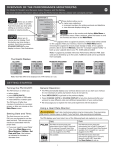
The main RowPro display screen is called the ‘In-Row Display’. Before you row, familiarise
yourself with the main parts of the In-Row Display shown below: