1
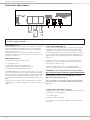
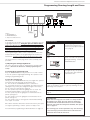
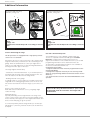
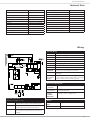
Printed Circuit Board: Adjustments and Connections
Special Functions
Readjusting the time for the internal light
The time for the internal light may be adjusted from 10 seconds to
5 minutes. The factory setting is 3 minutes.
To readjust the time procede as described below:
1. Keep the LERN/LEARN button pressed for 6 seconds. Release
the button once the green LED „TEST/FUNK“ turnes on.
2. Shortly press the LERN/LEARN button again.
3. The green LED „TEST/FUNK“ now starts blinking at 1 second
intervalls - each blinking increases the time by 10 seconds.
5. Once the required time is reached, press again the LERN/LEARN
button shortly. The value is then saved in the memory - the programming is finished.
LED TEST/FUNK blinks .... times Time for light is:
6x
1 minute
12 x
2 minutes
18 x
3 minutes
24 x
4 minutes
30 x
5 minutes
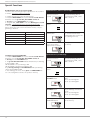
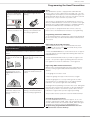
Quick Reference „Time for internal light“
1.) Keep the red LEARN
button pressed for 6
seconds
After 3 seconds the operators‘
light starts blinking, after 6
seconds the green LED „TEST/
FUNK“ turnes on
TEST/RUN
KRAFT/ LERN/LEARN
PRESSURE
8k2/ TEST/
DIAG FUNK
Vp
HF-MODUL/RECEIVER CARD
2.) Release LERN/LEARN
button
LED „TEST/FUNK“ is on
3.) Shortly press LERN/
LEARN button
LED „TEST/FUNK“ begins blinking
at 1 second intervalls. Each
blinking adds 10 seconds to the
time (starting from zero)
KRAFT/ LERN/LEARN
PRESSURE
TEST/RUN
8k2/ TEST/
DIAG FUNK
Vp
HF-MODUL/RECEIVER CARD
4.) Press LERN/LEARN
button shortly when
required time is reached
KRAFT/ LERN/LEARN
PRESSURE
The adjusted time will be saved in
the memory.
TEST/RUN
8k2/ TEST/
DIAG FUNK
Vp
HF-MODUL/RECEIVER CARD
Setting the pre-warning ON/OFF
1. Keep the LERN/LEARN button pressed for 6 seconds. Release
the button once the green LED „TEST/FUNK“ turnes on.
2. Shortly press the TEST/RUN button
3. The green LED TEST/FUNK indicates whether the pre-warning
is switched ON or OFF:
LED TEST/FUNK is off: pre-warning is OFF
LED TEST/FUNK is glowing: pre-warning is ON
4. by shortly pressing the TEST/RUN button the pre-warning
can be switched ON and OFF
5. after making your choice shortly press the LERN/LEARN button - the setting will be saved to the operators‘ memory.
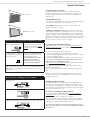
Quick Reference „Pre-Warning“
1.) Keep the red LEARN
button pressed for 6
seconds
After 3 seconds the operators‘
light starts blinking, after 6
seconds the green LED „TEST/
FUNK“ turnes on
TEST/RUN
KRAFT/ LERN/LEARN
PRESSURE
8k2/ TEST/
DIAG FUNK
Vp
HF-MODUL/RECEIVER CARD
2.) Release LERN/LEARN
button
LED „TEST/FUNK“ is on
3.) Shortly press the black
TEST/RUN button
LED „TEST/FUNK“ indicates
status:
LED on: pre-warning ON
LED off: pre-warning OFF
KRAFT/ LERN/LEARN
PRESSURE
TEST/RUN
8k2/ TEST/
DIAG FUNK
Vp
HF-MODUL/RECEIVER CARD
4.) Shortly press the
TEST/RUN button
KRAFT/ LERN/LEARN
PRESSURE
By pressing the TEST/RUN button
the pre-warning is switched on
and off:
LED on: pre-warning ON
LED off: pre-warning OFF
TEST/RUN
8k2/ TEST/
DIAG FUNK
Vp
HF-MODUL/RECEIVER CARD
5.) Shortly press the red
LERN/LEARN button
KRAFT/ LERN/LEARN
PRESSURE
TEST/RUN
8k2/ TEST/
DIAG FUNK
HF-MODUL/RECEIVER CARD
12
The chosen adjustment is saved
into the memory.
Vp