1
Tutorial A (First GeoModeller Model)
78
| Back |
GeoModeller User Manual
Contents | Help | Top
A5 Stage 3—Re-compute including the drillholes & modify Granite contact
Parent topic:
Tutorial A5—
Incorporating
drillhole data
A5 Stage 3—Steps
1
We now re-compute the model including all three drillholes
Compute the 3D model Selecting all: Series, Faults and Sections.
This time you will see Drillholes to take into account is offered too: Select All
2
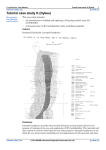
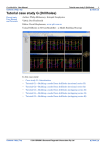
Plot the model using lines on Section2.
Including the drillhole data in the model-compute, the inconsistencies still occur.
Therefore the interpreted shape of the Granite in Section2 needs adjusting to fit with the
observed data from drillholes, which has higher reliability.
3
Check you agree with these observations by utilising Pan & Zoom tools on 2D sections.
Movement
Operation
Zoom
(make diagram larger or
smaller)
Hold CTRL and drag with left mouse button. Drag up to
zoom in, drag down to zoom out.
Pan
(move diagram)
Hold CTRL and drag with centre mouse button OR
4
From the 2D Viewer toolbar choose Pan
and drag the
display to the place you require using the left mouse button.
Save your project.
In the next step we describe methods for moving and deleting points graphically – on
Section2 - and thus fixing the bottom of Granite inconsistency compared with the
drillhole H1 data.
Contents | Top
© 2012 Intrepid Geophysics & BRGM
| Back |