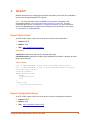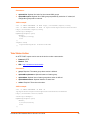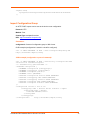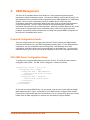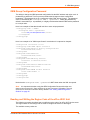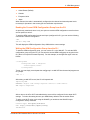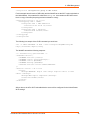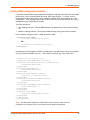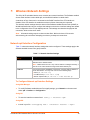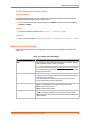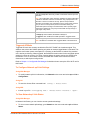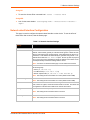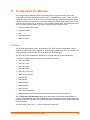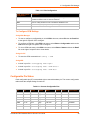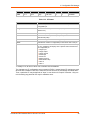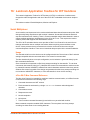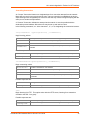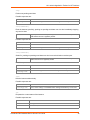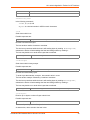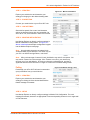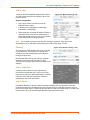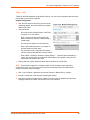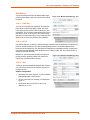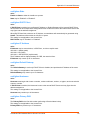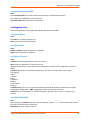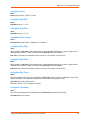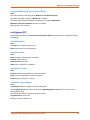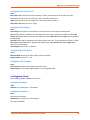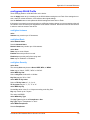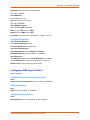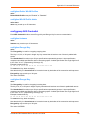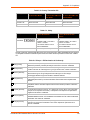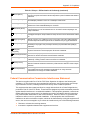
1
xPico Wi-Fi Embedded Device Server User Guide Part Number 900-691-R Revision G January 2015 Intellectual Property © 2015 Lantronix, Inc. All rights reserved. No part of the contents of this book may be transmitted or reproduced in any form or by any means without the written permission of Lantronix. Lantronix and xPico are registered trademarks of Lantronix, Inc. in the United States and other countries. DeviceInstaller is a trademark of Lantronix, Inc. U.S. Patents 7,309,260; 8,024,446; 8,219,661; 7,698,405; 8,504,740. Additional patents pending. Internet Explorer is a registered trademark of Microsoft Corporation. Mozilla and Firefox are registered trademarks of the Mozilla Foundation. Chrome is a trademark of Google Inc. Wi-Fi is a registered trademark of Wi-Fi Alliance Corporation. All other trademarks and trade names are the property of their respective holders. Warranty For details on the Lantronix warranty policy, please go to our web site at www.lantronix.com/support/warranty. Contacts Lantronix, Inc. Corporate Headquarters 167 Technology Drive Irvine, CA 92618, USA Toll Free: Phone: Fax: 800-526-8766 949-453-3990 949-453-3995 Technical Support Online: www.lantronix.com/support Sales Offices For a current list of our domestic and international sales offices, go to the Lantronix web site at www.lantronix.com/about/contact. Disclaimer All information contained herein is provided “AS IS.” Lantronix undertakes no obligation to update the information in this publication. Lantronix does not make, and specifically disclaims, all warranties of any kind (express, implied or otherwise) regarding title, non-infringement, fitness, quality, accuracy, completeness, usefulness, suitability or performance of the information provided herein. Lantronix shall have no liability whatsoever to any user for any damages, losses and causes of action (whether in contract or in tort or otherwise) in connection with the user’s access or usage of any of the information or content contained herein. The information and specifications contained in this document are subject to change without notice. xPico® Wi-Fi® Embedded Device Server User Guide 2 Revision History Date Rev. Comments July 2013 A Initial document (firmware 1.0.0.0R7). November 2013 B Updated serial port information. January 2014 C Updated for firmware 1.1.0.2. to include new CPM, diagnostics, modem emulation, monitor, performance, SPI, XML, CLI and command reference information. February 2014 D Updated for firmware version 1.1.0.2R10. February 2014 E Updated serial port configuration information. November 2014 F Updated for version 1.3.0.0 of the firmware. January 2015 G Updated with new Japan ID numbers. xPico® Wi-Fi® Embedded Device Server User Guide 3 Table of Contents Intellectual Property ________________________________________________________ 2 Warranty _________________________________________________________________ 2 Contacts _________________________________________________________________ 2 Disclaimer ________________________________________________________________ 2 Revision History ___________________________________________________________ 3 List of Figures ____________________________________________________________ 10 List of Tables ____________________________________________________________ 11 1: Using This Guide 13 Purpose and Audience _____________________________________________________ 13 Summary of Chapters ______________________________________________________ 13 Additional Documentation ___________________________________________________ 14 2: Introduction 15 Key Features _____________________________________________________________ 15 Protocol Support _________________________________________________________ 16 Troubleshooting Capabilities _________________________________________________ 17 Configuration Methods _____________________________________________________ 17 Addresses and Port Numbers ________________________________________________ 17 Hardware Address _____________________________________________________ 17 IP Address ___________________________________________________________ 17 Port Numbers _________________________________________________________ 17 Product Information Label ___________________________________________________ 18 3: Configuration Using XML 19 XML Architecture and Device Control __________________________________________ 19 Configuration Using Serial Port _______________________________________________19 Configuration Using the Network _____________________________________________ 20 Configuration Using XML ___________________________________________________ 20 XML Configuration Record Document Type Definition _____________________________ 20 Quick Tour of XML Syntax __________________________________________________ 21 Declaration ___________________________________________________________ 21 Element Start and End Tags _____________________________________________ 21 Element Attributes _____________________________________________________ 21 Record, Group, Item, and Value Tags _________________________________________ 22 XML Import and XML Export _________________________________________________ 23 To Configure Flow Control Options on the CLI ________________________________ 23 To Import or Export XML Configuration _____________________________________ 24 xPico® Wi-Fi® Embedded Device Server User Guide 4 4: Configuration Using Web Manager 25 Accessing Web Manager ___________________________________________________ 25 Status Page ______________________________________________________________ 26 Web Manager Components _________________________________________________ 27 Navigating Web Manager ___________________________________________________ 27 5: WebAPI 29 Export Status Group _______________________________________________________ 29 Export Configuration Group _________________________________________________ 29 Take Status Action ________________________________________________________ 30 Import Configuration Group __________________________________________________ 31 6: OEM Management 32 Protected Configuration Details ______________________________________________ 32 XCR OEM Group Configuration Group _________________________________________ 32 OEM Group Configuration Password __________________________________________ 33 Reading and Writing the Region Code of the xPico Wi-Fi Unit _______________________ 33 Reading the Current OEM Configuration Group from the CLI ____________________ 34 Writing the OEM Configuration Group from the CLI ____________________________ 34 Setting OEM Configuration Defaults ___________________________________________ 36 7: Wireless Network Settings 38 Network ap0 Interface Configuration ___________________________________________ 38 To Configure Network ap0 Interface Settings _________________________________ 38 To View Network ap0 Interface Status ______________________________________ 39 Network ap0 Link Settings __________________________________________________ 39 Triggered AP Mode ____________________________________________________ 40 To Configure Network ap0 Link Settings ____________________________________ 40 To View Network ap0 Link Status __________________________________________ 40 Network wlan0 Interface Configuration _________________________________________ 41 To Configure Network wlan0 Interface Settings _______________________________ 42 To View Network wlan0 Interface Status ____________________________________ 42 Network wlan0 Link Status __________________________________________________ 42 To View Network wlan0 Link Status ________________________________________ 42 WLAN Profiles ____________________________________________________________ 43 To Configure WLAN Profiles _____________________________________________ 43 To Configure WLAN Profile Settings _______________________________________ 44 WLAN Quick Connect ______________________________________________________ 45 To Configure WLAN Quick Connect ________________________________________ 46 Hidden Access Points ___________________________________________________ 46 Lantronix Smart Connect EasyWEP ___________________________________________ 47 xPico® Wi-Fi® Embedded Device Server User Guide 5 8: Interface Settings 48 Line Settings (Serial) _______________________________________________________ 48 To Configure Line Settings _______________________________________________49 To View Line Status ____________________________________________________ 49 Serial Command Mode __________________________________________________ 49 Boot to CLI ___________________________________________________________ 50 Escape Characters _____________________________________________________ 51 Device Recovery ______________________________________________________ 52 Serial Peripheral Interface (SPI) Settings _______________________________________ 52 To Configure SPI Settings _______________________________________________53 To View SPI Status _____________________________________________________ 53 Lantronix Query Port _______________________________________________________ 53 Discovery _______________________________________________________________ 54 To Configure Discovery Settings __________________________________________ 54 9: Tunnel Settings 55 Tunnel Settings ___________________________________________________________ 55 Line Settings __________________________________________________________ 55 To View Tunnel Serial Settings ___________________________________________ 55 Packing Mode _________________________________________________________ 56 To Configure Tunnel Packing Mode Settings _________________________________ 57 Accept Mode __________________________________________________________ 57 To Configure Tunnel Accept Mode Settings __________________________________ 58 Connect Mode ________________________________________________________ 59 To Configure Tunnel Connect Mode Settings ________________________________ 60 Disconnect Mode ______________________________________________________ 60 To Configure Tunnel Disconnect Mode Settings ______________________________ 61 Statistics _____________________________________________________________ 61 To View Tunnel Statistics ________________________________________________ 61 10: Modem Emulation Settings 62 11: Configurable Pin Manager 64 CP Roles ________________________________________________________________ 64 To Configure CPM Settings ______________________________________________ 65 Configurable Pin Status ____________________________________________________ 65 xPico® Wi-Fi® Embedded Device Server User Guide 6 12: Application Aware Power Management 67 Power Up Mode __________________________________________________________ 67 Sleep Mode ______________________________________________________________ 67 Standby Mode ____________________________________________________________ 67 Dynamic Power Mode Configuration ___________________________________________ 68 Power Settings ___________________________________________________________ 68 To Configure Power ____________________________________________________ 69 13: Services Settings 70 HTTP Settings ____________________________________________________________ 70 To Configure HTTP Settings and Access Control _____________________________ 70 To View HTTP Status ___________________________________________________ 71 Real Time Clock and Current Time ____________________________________________ 71 To View or Configure the Clock ___________________________________________ 72 Simple NTP Client _________________________________________________________ 72 To View or Configure the NTP ____________________________________________ 72 14: Maintenance and Diagnostics Settings 73 File System Settings _______________________________________________________ 73 File System Statistics ___________________________________________________ 73 To View File System Statistics, Compact or Format the File System _______________ 73 File Display ___________________________________________________________ 73 To Display Files _______________________________________________________ 73 File Manipulation ______________________________________________________ 74 To Transfer or Modify File System Files _____________________________________ 74 Device Settings ___________________________________________________________ 74 Device Management ____________________________________________________ 74 To Save Configuration, Reboot, Restore Factory Defaults or Upload Firmware ______ 75 Admin User ______________________________________________________________ 75 To Configure Admin User on the Device ____________________________________ 75 Diagnostics Settings _______________________________________________________ 76 To View Buffer Pool Status _______________________________________________76 To View Hardware Status ________________________________________________ 76 To View Heap Status ___________________________________________________ 76 To View IP Socket Status ________________________________________________ 76 To View Modules Status _________________________________________________ 77 To View Threads Status _________________________________________________ 77 15: Security Settings 78 Serial Tunneling: TCP AES __________________________________________________ 78 AES Credential Management ________________________________________________ 78 To Manage AES Credentials _____________________________________________ 79 xPico® Wi-Fi® Embedded Device Server User Guide 7 16: Lantronix Application Toolbox for IOT Solutions 80 Serial Multiplexer __________________________________________________________ 80 Usage _______________________________________________________________ 80 xPico Wi-Fi Mux Command Reference ______________________________________ 80 Example #1 ___________________________________________________________ 85 Example #2 of Using Mux Feature _________________________________________ 85 Monitor Settings __________________________________________________________ 86 Explorer _____________________________________________________________ 87 Configuration _________________________________________________________ 88 To Configure Monitor ___________________________________________________ 90 Example: Data Capture on a Serial Device ______________________________________ 91 Initialization ___________________________________________________________ 91 Polling _______________________________________________________________ 92 Filtering ______________________________________________________________ 93 Data Mining __________________________________________________________ 95 Presenting ___________________________________________________________ 96 Data Capture on SPI _______________________________________________________ 97 17: Branding the xPico Wi-Fi Unit 98 Web Manager Customization ________________________________________________ 98 Changing the Presentation _______________________________________________98 Path Format __________________________________________________________ 98 Other Overridable Files _________________________________________________ 99 Adding Your Own Web Files _____________________________________________ 99 18: Updating Firmware Over the Air 100 Obtaining Firmware _______________________________________________________ 100 Loading New Firmware through Web Manager _________________________________ 100 Loading New Firmware without Web Manager __________________________________ 102 Importing WLAN Configuration with XML ______________________________________ 102 Appendix A: Command Reference 103 Conventions ____________________________________________________________ 103 Configuration Using Serial Port ______________________________________________104 Boot to CLI __________________________________________________________ 104 Navigating the CLI Hierarchy _______________________________________________ 105 Using Keyboard Shortcuts and CLI ___________________________________________ 105 Understanding the CLI Level Hierarchy _______________________________________ 106 XML for xPico Wi-Fi Embedded Device Server _________________________________ 107 xPico® Wi-Fi® Embedded Device Server User Guide 8 Appendix B: Technical Support 132 Appendix C: Compliance 133 Federal Communication Commission Interference Statement ______________________ 135 Radiation Exposure Statement ___________________________________________ 136 End Product Labeling __________________________________________________ 136 Manual Information To the End User ______________________________________ 136 Industry Canada Statement ________________________________________________ 136 Radiation Exposure Statement ___________________________________________ 137 Déclaration d'exposition aux radiations ____________________________________ 137 End Product Labeling __________________________________________________ 138 Plaque signalétique du produit final _______________________________________ 138 Manual Information To the End User ______________________________________ 138 Manuel d'information à l'utilisateur final ____________________________________ 138 Antenna Requirement __________________________________________________ 138 xPico® Wi-Fi® Embedded Device Server User Guide 9 List of Figures Figure 2-1 xPico Wi-Fi Product Label ________________________________________________ 18 Figure 3-1 DTD for XCRs __________________________________________________________ 20 Figure 3-2 XML Example __________________________________________________________ 22 Figure 3-3 XML Example __________________________________________________________ 23 Figure 3-4 Single Character Commands_______________________________________________24 Figure 4-1 Status Page ____________________________________________________________ 26 Figure 4-2 Components of the Web Manager Page ______________________________________ 27 Figure 16-7 Monitor Initialization ____________________________________________________ 92 Figure 16-8 Monitor Polling (1 of 2)___________________________________________________ 92 Figure 16-9 Monitor Polling (2 of 2)___________________________________________________ 93 Figure 16-10 Monitor Filtering (1 of 2)_________________________________________________ 93 Figure 16-11 Monitor Filtering (2 of 2)_________________________________________________ 94 Figure 16-12 Monitor Data Mining (1 of 2) _____________________________________________ 95 Figure 16-13 Monitor Data Mining (2 of 2) _____________________________________________ 95 Figure 16-14 Monitor Presenting_____________________________________________________ 96 Figure 16-15 Monitor CLI Command Level _____________________________________________ 96 Figure 16-16 Monitor XML Commands ________________________________________________ 97 Figure 18-1 Uploading New Firmware _______________________________________________ 101 Figure A-2 Root Level Commands __________________________________________________ 106 xPico® Wi-Fi® Embedded Device Server User Guide 10 List of Tables Table 4-3 Web Manager Pages _____________________________________________________ 28 Table 7-1 Network Interface Settings _________________________________________________ 38 Table 7-2 Network ap0 Link Settings _________________________________________________ 39 Table 7-3 Network Interface Settings _________________________________________________ 41 Table 7-4 Creating, Deleting or Enabling WLAN Profiles __________________________________ 43 Table 7-5 WLAN Profile Basic Settings _______________________________________________44 Table 7-6 WLAN Profile Security Settings _____________________________________________ 44 Table 7-7 WLAN Profile Advanced Settings ___________________________________________ 45 Table 7-8 WLAN Quick Connect ____________________________________________________ 46 Table 8-1 Line Configuration Settings ________________________________________________ 48 Table 8-2 SPI Configuration Settings _________________________________________________ 52 Table 8-3 Discovery Settings _______________________________________________________ 54 Table 9-1 Tunnel Line Settings _____________________________________________________ 55 Table 9-2 Tunnel Packing Mode Settings _____________________________________________ 56 Table 9-3 Tunnel Accept Mode Settings ______________________________________________ 57 Table 9-4 Tunnel Connect Mode Settings _____________________________________________ 59 Table 9-5 Tunnel Disconnect Mode Settings ___________________________________________ 60 Table 10-1 Modem Emulation Settings _______________________________________________62 Table 10-2 Modem Emulation Commands and Descriptions ____________________________63 Table 11-1 Role Configuration ______________________________________________________ 65 Table 11-2 Current Configurable Pins ________________________________________________ 65 Table 11-3 CP Status _____________________________________________________________ 66 Table 12-1 Power Settings _________________________________________________________ 68 Table 13-1 HTTP Settings _________________________________________________________ 70 Table 13-2 Clock Settings _________________________________________________________ 71 Table 13-3 NTP Settings __________________________________________________________ 72 Table 14-1 File System Statistics Settings _____________________________________________ 73 Table 14-2 Device Management Settings _____________________________________________ 74 Table 14-3 Admin User Settings ____________________________________________________ 75 Table 15-1 AES Credential Settings _________________________________________________ 78 Table 16-1 Monitor Explorer Settings _________________________________________________ 87 Table 16-2 Monitor Initialization Settings ______________________________________________ 88 Table 16-3 Monitor Control Settings _________________________________________________ 89 Table 16-4 Monitor Poll Settings ____________________________________________________ 89 Table 16-5 Monitor Filter Settings ___________________________________________________ 90 xPico® Wi-Fi® Embedded Device Server User Guide 11 Table 16-6 Monitor Data Settings ___________________________________________________ 90 Table A-1 Keyboard Shortcuts _____________________________________________________ 105 Table C-1 Country Certifications ___________________________________________________ 133 Table C-2 Country Transmitter IDs _________________________________________________ 134 Table C-3 Safety _______________________________________________________________ 134 Table C-4 Europe – EU Declaration of Conformity _____________________________________ 134 Table C-5 Approved Antenna(s) List ________________________________________________ 139 xPico® Wi-Fi® Embedded Device Server User Guide 12 1: Using This Guide Purpose and Audience This guide provides the information needed to configure, use, and update the Lantronix® xPico® Wi-Fi® embedded device server. It is intended for software developers and system integrators who are embedding this product into their designs. Summary of Chapters The remaining chapters in this guide include: Chapter Description 2: Introduction Main features of the product and the protocols it supports. Includes technical specifications. 3: Configuration Using XML Instructions for using XML to configure settings for the device. 4: Configuration Using Web Manager Instructions for accessing Web Manager and using it to configure settings for the device. 5: WebAPI Instructions for viewing status information and configuring a unit through HTTP request. 6: OEM Management Instructions for accessing OEM management features for the device. 7: Wireless Network Settings Instructions for configuring wireless client and access point network settings. 8: Interface Settings Instructions for configuring various interface settings. 9: Tunnel Settings Instructions for configuring tunnel settings. 11: Configurable Pin Manager Information about the Configurable Pin Manager (CPM) and how to set the configurable pins to work with a device. 12: Application Aware Power Management Description and information on how to configure and use power management framework capabilities. 13: Services Settings Instructions for configuring HTTP settings. 14: Maintenance and Diagnostics Settings Instructions to maintain the xPico Wi-Fi embedded device server, view statistics, files, and diagnose problems. 15: Security Settings Instructions for updating TCP AES and AES Credential Management. 16: Lantronix Application Toolbox for IOT Solutions Instructions for configuring MUX and monitor settings. 17: Branding the xPico Wi-Fi Unit Instructions for branding the Web Manager user interface. 18: Updating Firmware Over the Air Instructions for obtaining the latest firmware and updating the xPico Wi-Fi units. Appendix A: Command Reference Information on configuring settings using XML or the command line interface. Appendix B: Technical Support Instructions for contacting Lantronix Technical Support. Appendix C: Compliance Lantronix compliance information. xPico® Wi-Fi® Embedded Device Server User Guide 13 1: Using This Guide Additional Documentation Visit the Lantronix Web site at www.lantronix.com/support/documentation for the latest documentation and the following additional documentation. Document Description xPico Wi-Fi SMT Embedded Device Server Datasheet Datasheet for the xPico Wi-Fi W1002 and W1003 SMT modules. xPico Wi-Fi Embedded Device Server Integration Guide Information about the xPico Wi-Fi SMT hardware testing the device server using the demonstration board and integrating the unit into your product. xPico Wi-Fi SMT Embedded Device Server Integration Guide Information about the xPico Wi-Fi SMT hardware, testing the device server using the demonstration board, and integrating the unit into your product. xPico Wi-Fi Evaluation Kit Embedded Device Server Quick Start Guide Instructions for getting the xPico Wi-Fi unit up and running. xPico Wi-Fi Evaluation Kit Embedded Device Server User Guide Information needed to use the xPico Wi-Fi embedded device server on the evaluation board. xPico® Wi-Fi® Embedded Device Server User Guide 14 2: Introduction This chapter summarizes the basic information and features of the xPico Wi-Fi embedded device server. Key Features Wireless LAN Interface: - IEEE 802.11 b/g and IEEE 802.11n (single stream) - WLAN interface (2.4 GHz only) - IEEE 802.11 d/h/i/j/k/w/r - IEEE 802.11i Support - WEP(Client only), WPA-Personal, WPA2-Personal - On Module Antenna version (XPCW1003100) - Version with u.FL connector for external antenna - Soft Access Point (SoftAP) with DHCP Server - Simultaneous SoftAP and Client - Roaming: continually tracks Wi-Fi signal strength within range, resulting in smooth and automatic transition between access points without delay. - QuickConnect: Dynamic Profiles facilitate easy and rapid connections to access points Host Interface: - Serial Interface Two Serial CMOS Ports 1200 to 921.6 Kbps Flow control: XON/XOFF, RTS/CTS (Line 1 uses dedicated hardware, Line 2 uses configurable pins) Lantronix tunneling application Modem Emulation MUX commands Trouble log Command line - SPI Interface Configurable master SPI interface that can be clocked at 30MHz. - USB Interface 2.0 (device) USB 2.0 (12 Mbps) Full Speed Device port interfaces for connection to an upstream USB host device. Support for USB CDC Serial profile1 - GPIO Interface 1.Feature will be available in a future software release. Contact Lantronix for more information. xPico® Wi-Fi® Embedded Device Server User Guide 15 2: Introduction 8 configurable general purpose Input/Output pins Custom pin manager Network Protocols: TCP/IP, UDP/IP1, DHCP Server (software-enabled Access Point interface), ARP, ICMP, DHCP Client (WLAN interface), Auto-IP, DNS, HTTP Management and Control: - Web Server - CLI (Serial Monitor Port) - XML Configuration Import and Export (XCR, XML Status Export [XSR]) - WebAPI - Field upgradable firmware (OTA) - Power Management Framework - OEM Support Kit - Simple Customization and device configuration management Security: - 256-bit AES encryption Architecture: - ARM Cortex-M3 class processor with on-chip Flash and SRAM - 1 MB Flash and 128KB SRAM - SPI Flash 1 MB - Zero Host Load Driver Physical Interface: 40-pin Board-to-Board SMT Connector Note: See the xPico Wi-Fi SMT Embedded Device Server Integration Guide to view the xPico Wi-Fi SMT unit footprint. Certifications: FCC, IC, EU, Japan, UL, CE, AU/NZ Warranty: 5-Year Limited Protocol Support The xPico Wi-Fi embedded device server contains a full-featured IP stack and WLAN connection manager. Supported protocols include: IEEE 802.11 b/g and IEEE 802.11n (single stream) WLAN interface (2.4 GHz only) 802.11i - WPA-Personal, WPA2-Personal Soft-AP with DHCP Server HTTP Server TCP/IP, UDP/IP1, DHCP Server (Software enabled Access Point interface), ARP, ICMP, DHCP Client (WLAN interface), Auto-IP, DNS 1.Feature will be available in a future software release. Contact Lantronix for more information. xPico® Wi-Fi® Embedded Device Server User Guide 16 2: Introduction Troubleshooting Capabilities The xPico Wi-Fi device offers the ability to view Trouble Log messages (see Line Settings (Serial) on page 48). Configuration Methods After installation, the xPico Wi-Fi device server requires configuration. For the unit to operate correctly on a network, it must have a unique IP address on the network. These methods may be used for logging into the xPico Wi-Fi and assigning IP addresses and other configurable settings: Web Manager: View and configure settings easily through a web browser using the Lantronix Web Manager. See “Configuration Using Web Manager” on page 25. XML: The xPico Wi-Fi supports XML import and XML export. See “Power Settings” on page 68. Command Mode: Access the Command Mode (CLI) by connecting a PC or other host running a terminal emulation program to the unit’s serial port. See “Command Reference” on page 103. The xPico Wi-Fi unit also supports a cloud function WebAPI allowing partial access to configuration and status information of xPico Wi-Fi embedded device server through standard HTTP request. See “WebAPI” on page 29. Some OEM configuration options are also available. See “OEM Management” on page 32. Addresses and Port Numbers Hardware Address The hardware address is also referred to as the physical address or MAC address, and can be found on the product label of the device. Sample hardware address: 00-80-A3-FF-FF-FF 00:80:A3:FF:FF:FF IP Address Every device connected to an IP network must have a unique IPv4 address. This address references the specific unit. Port Numbers Available IP address port numbers enabled and accessible on the xPico Wi-Fi unit include the following: TCP Port 80: HTTP Server (Web Manager configuration) TCP Port 10001: Tunnel (Line 1) TCP Port 10002: Tunnel (Line 2) xPico® Wi-Fi® Embedded Device Server User Guide 17 2: Introduction Product Information Label The product information label on the unit contains the following information about the specific unit: Lantronix Datamatrix Code Product Revision Part Number Serial Number Hardware Address (MAC Address) Manufacturing Date Code Figure 2-1 xPico Wi-Fi Product Label xPico® Wi-Fi® Embedded Device Server User Guide 18 3: Configuration Using XML The xPico Wi-Fi embedded device server supports four convenient configuration methods: Extensible Markup Language (XML), Web Manager, Command Line Interface (CLI), and WebAPI. This chapter describes how to configure the xPico Wi-Fi embedded device server using Extensible Markup Language (XML). Note: For more information about the Web Manager, see Chapter 4: Configuration Using Web Manager. For more information about using CLI to access device configuration and management interface, see Appendix A: Command Reference. For more information about using Web API to configure and manage the xPico Wi-Fi device, see Chapter 5: WebAPI. XML Architecture and Device Control XML is a fundamental building block for the future growth of Machine-to-Machine (M2M) networks. The xPico Wi-Fi embedded device server supports XML configuration records that make configuring the device server easy for users and administrators. XML configuration records are easy to edit with a standard text editor or an XML editor. For a brief overview of XML, see Configuration Using XML. It provides rules on basic XML syntax, a guide to the specific XML tags used, and a guide to using XML configuration records. Configuration Using Serial Port XML over Serial Port. The serial port can be used to send and receive XML data. To use the serial port in this manner refer to the set up and use of the Boot to CLI as described in Line Settings (Serial) (on page 48) It is important to note that in order to ensure integrity of data when exchanging XML over the serial port that the user has flow control enabled. This can be either hardware or software flow control and can be set up initially by means of the CLI if necessary. The Command Line Interface can be accessed via these methods: Boot to CLI as described on page 48. Permanently enable a serial port to Command Line Interface as described in Line Settings (on page 55). From the Modem Emulation serial application by entering the ATD 0 command. From the Mux serial application by entering the D command. xPico® Wi-Fi® Embedded Device Server User Guide 19 3: Configuration Using XML Configuration Using the Network The XML configuration can be imported and exported via the Web Server, using the WebAPI. Refer to Chapter 5: WebAPI on page 29. Configuration Using XML The xPico Wi-Fi embedded device server provides an Extensible Markup Language (XML) interface that you can use to configure xPico Wi-Fi embedded device servers. Every configuration setting, excluding XML import and export, that can be issued from the xPico Wi-Fi Web Manager and CLI can be specified using XML. The XPico Wi-Fi embedded device server can import and export configuration settings as an XML document known as an XML Configuration Record (XCR). An XCR can be imported or exported via the CLI or the xPico Wi-Fi embedded device server filesystem. An XCR can contain many configuration settings or just a few. For example, it might change all of the configurable parameters for a xPico Wi-Fi embedded device server, or it may only change the baud rate for a single serial line. Using XCRs is a straightforward and flexible way to manage the configuration of multiple XPico Wi-Fi embedded device servers. Note: For directions on exporting or importing XML, please refer to Power Settings. XML Configuration Record Document Type Definition An XML document type definition (DTD) is a description of the structure and content of an XML document. It verifies that a document is valid. XCRs are exported using the DTD as shown in Figure 3-1 DTD for XCRs. Figure 3-1 DTD for XCRs <!DOCTYPE <!ELEMENT <!ELEMENT <!ELEMENT <!ELEMENT <!ATTLIST <!ATTLIST <!ATTLIST <!ATTLIST <!ATTLIST ]> configrecord [ configrecord (configgroup+)> configgroup (configitem+,configgroup*)> configitem (value+)> value (#PCDATA)> configrecord version CDATA #IMPLIED> configgroup name CDATA #IMPLIED> configgroup instance CDATA #IMPLIED> configitem name CDATA #IMPLIED> value name CDATA #IMPLIED> The xPico Wi-Fi DTD rules state the following: The XML document element is a <configrecord> element. This is the root element. A <configrecord> must have one or more <configgroup> elements and can have a version attribute. A <configgroup> must have one or more <configitem> elements and can have name and instance attributes. xPico® Wi-Fi® Embedded Device Server User Guide 20 3: Configuration Using XML A <configitem> element must have one or more <value> elements and can have a name attribute. A <value> element can have only data and can have a name attribute. The name attribute identifies a group, item, or value. It is always a quoted string. The instance attribute identifies the specific option, like the serial port number. The "instance" attribute is always a quoted string. Note: The name for each <configgroup> (specified with the name attribute) is the group name listed in the Web Manager XCR groups or with the "xcr list" CLI command. See XCR OEM Group Configuration Group (on page 32) for more information about the XCR groups. An empty or missing <value> element in each present <configgroup> clears the setting to its default. Quick Tour of XML Syntax Declaration The first line, <?xml version="1.0" standalone="yes"?>, is called the XML declaration. It is required and indicates the XML version in use (normally version 1.0). The remainder of the file consists of nested XML elements, some of which have attributes and content. Element Start and End Tags An element typically consists of two tags: start tag and an end tag that surrounds text and other elements (element content). The start tag consists of a name surrounded by angle brackets, for example <configrecord>. The end tag consists of the same name surrounded by angle brackets, but with a forward slash preceding the name, for example </configrecord>. The element content can also contain other "child" elements. Element Attributes The XML element attributes that are name-value pairs included in the start tag after the element name. The values must always be quoted, using single or double quotes. Each attribute name should appear only once in an element. Figure 3-2 shows an XML example which consists of a declaration (first line), nested elements with attributes and content. xPico® Wi-Fi® Embedded Device Server User Guide 21 3: Configuration Using XML Figure 3-2 XML Example <configgroup name = "HTTP Server"> <configitem name = "State"> <value>Enabled</value> </configitem> <configitem name = "Port"> <value>80</value> </configitem> <configitem name = "Inactivity Timeout"> <value>5 minutes</value> </configitem> <configitem name = "Access Control" instance = "1"> <value name = "URI">/</value> <value name = "AuthType">Basic</value> <value name = "Users">admin</value> </configitem> </configgroup> The xPico Wi-Fi embedded device server uses the attributes in the following subsections to label the group configuration settings. Record, Group, Item, and Value Tags A <configgroup> is a logical grouping of configuration parameters and must contain one or more <configitem> elements. It must have a name attribute and may have an instance attribute. A <configitem> is a specific grouping of configuration parameters relevant to its parent group. An item takes the name attribute and must contain one or more value elements. For example, the line group might have parameters such as baud rate, data bits, and parity. A value may specify the value of a configuration parameter. It may contain the name attribute. In this example, a value of 9600 might be specified for baud rate; 7 may be specified for data bits, and even may be specified for parity A name attribute identifies the group, item, or value. It is always quoted (as are all XML attributes). For example,a group that contains serial port parameters has the name "line" An instance attribute identifies which of several instances is being addressed. It is always quoted. For example,the serial port name (in the line configgroup) has the instance "1" to indicate serial port 1 or "2" to specify serial port 2 The following figures show examples of XML configuration records and the use of the <configrecord>, <configgroup>, <configitem>, and <value> XML elements. xPico® Wi-Fi® Embedded Device Server User Guide 22 3: Configuration Using XML Figure 3-3 XML Example <configrecord version = "0.1.0.1"> <configgroup name = "Access Point" instance = "ap0"> <configitem name = "SSID"> <value>XpicoWiFi_98010B</value> </configitem> <configitem name = "Channel"> <value>1</value> </configitem> <configitem name = "Suite"> <value>WPA2</value> </configitem> <configitem name = "Encryption"> <value>CCMP</value> </configitem> <configitem name = "Passphrase"> <value><Configured></value> </configitem> <configitem name = "Mode"> <value>Always Up</value> </configitem> </configgroup> XML Import and XML Export The xPico Wi-Fi embedded device server allows for the configuration of devices by using XML configuration records (XCRs). You can export an existing configuration for use on other xPico WiFi devices or import a saved configuration file. XML import and export are only available through the CLI. Note: The xPico Wi-Fi module itself only supports serial TTL signaling on both Lines. If used with the evaluation board (see the xPico Embedded Device Server Evaluation Kit User Guide), then Line 2 may be routed through a serial-to-USB converter via jumper settings. To ensure optimal performance when configuring and managing the device using XML, it is required that serial port flow control is enabled. This maybe hardware or soft flow control. Lantronix recommends the use of hardware flow control to ensure the best throughput. To Configure Flow Control Options on the CLI Selecting Hardware Flow Control 1. Start at the > prompt. 2. Type config and press Enter on the keyboard to get to the config> prompt. 3. Type Line 1 and press Enter on the keyboard to get to the config Line 1> prompt. 4. Type Flow Control Hardware and press Enter on the keyboard. xPico® Wi-Fi® Embedded Device Server User Guide 23 3: Configuration Using XML Selecting Software Flow Control 1. Start at the > prompt. 2. Type config and press Enter on the keyboard to get to the config> prompt. 3. Type Line 1 and press Enter on the keyboardto get to the config Line 1> prompt. 4. Type Flow Control Software and press Enter on the keyboard. To Import or Export XML Configuration 1. Connect the xPico Wi-Fi embedded device server to the PC. 2. Configure command line on line and select hardware or software flow control. Note: If you are using hardware flow control on line 2, make sure the line 2 flow CP roles are enabled and the hardware is wired to the xPico Wi-Fi unit. Flow control is not supported over USB. 3. Open a terminal emulator from the PC, e.g., Tera Term version 4.58. 4. Select the Com port and set the serial settings on the terminal emulator to match the appropriate line on the device server. 5. When you see the > prompt on the terminal emulator, type '?' to view the single character commands available. Figure 3-4 Single Character Commands >? config help tlog xml file system status wlan scan [network-name] xml > 6. Issue xcr command to dump xml configuration. 7. Copy and paste the configuration text into notepad or some other basic text editor. 8. Remove all the spaces in the script within the text editor. This basic text is the exported XML configuration and is now available for copy-paste into any xPico Wi-Fi embedded device server. 9. Make any additional changes to the configuration text to modify the XML configuration. 10. Copy and paste <CR> all of the text into the terminal emulator connected to the desired xPico Wi-Fi embedded device server, to "import" the new configuration. Note: Software flow control experiences overrun above 460800 baud. xPico® Wi-Fi® Embedded Device Server User Guide 24 4: Configuration Using Web Manager This chapter describes how to configure the xPico Wi-Fi embedded device server using Web Manager, the Lantronix browser-based configuration tool. The unit’s configuration is stored in nonvolatile memory and is retained without power. All changes take effect immediately, unless otherwise noted. It contains the following sections: Accessing Web Manager Web Manager Components Navigating Web Manager Note: For more information about using XML to access device configuration and management interface, see Configuration Using Serial Port on page 104. For more information about the CLI, see Appendix A: Command Reference. For more information about using Web API to configure and manage the xPico Wi-Fi device, see Chapter 5: WebAPI. Accessing Web Manager To access Web Manager, perform the following steps: 1. Open a standard web browser. Lantronix supports the latest version of Internet Explorer, Mozilla Firefox, Safari and Chrome browsers. 2. Enter the IP address or hostname of the xPico Wi-Fi device in the address bar. The IP address may have been assigned manually or automatically by DHCP. If connecting via the SoftAP interface, the default IP address of the xPico Wi-Fi device server is 192.168.0.1. 3. Enter your username and password.The factory-default username is “admin” and the password is “PASSWORD” (all capitalized). The Status web page displays product information, network settings, line settings, and tunneling settings. xPico® Wi-Fi® Embedded Device Server User Guide 25 4: Configuration Using Web Manager Status Page The Status page is the first to appear after you log into Web Manager. The Status page also appears when you click Status tab in Web Manager. Figure 4-1 Status Page xPico® Wi-Fi® Embedded Device Server User Guide 26 4: Configuration Using Web Manager Web Manager Components The layout of a typical Web Manager page is below. Figure 4-2 Components of the Web Manager Page Items to configure Links to subpages Header Menu Bar Footer Configuration and/or Status Area Information and Help Area Navigating Web Manager The web manager provides an intuitive point-and-click interface. A menu bar on the left side of each page provides links you can click to navigate between pages. Some pages are read-only, while others let you change configuration settings. Note: There may be times when you must reboot the xPico Wi-Fi unit for the new configuration settings to take effect. The chapters that follow indicate when a change requires a reboot. Anytime you reboot the unit, this operation will take some time to complete. Please wait a minimum of 10-20 seconds after rebooting the unit before attempting to make any subsequent connections. xPico® Wi-Fi® Embedded Device Server User Guide 27 4: Configuration Using Web Manager Table 4-3 Web Manager Pages Web Manager Page Description See Page Status Shows product information, network, line status, and tunneling settings. 26 AES Credentials Lets you view, edit and delete or create an AES credential. 79 Clock Lets you view and configure clock settings for keeping time. 71 CPM Shows information about the Configurable Pins Manager (CPM) and how to 64 set the configurable pins and roles to work with a device. Device Lets you reboot the device, restore factory defaults and upload new firmware. 74 Diagnostics Lets you perform various diagnostic procedures. 76 Discovery Lets you view and configure discovery settings. 54 File System Shows file system statistics and lets you perform file system operations. 73 HTTP Shows HyperText Transfer Protocol (HTTP) status and lets you change the current configuration and authentication settings. 70 Line Shows statistics and lets you change the current configuration and Command 55 mode settings of a serial line. Modem Emulation Lets you view and configure Modem Emulation. 61 Monitor Lets you query and capture information during serial port to serial device connection. 68 Network Shows status and lets you configure the network interface. 38 NTP Lets you view the statistics from the last successful NTP server synchronization as well as configuration of simple NTP (SNTP). 72 Quick Connect Lets you scan for available network in vicinity and create WLAN profile easily. 45 Power Lets you change settings effecting power. 78 SPI Lets you configure SPI settings. 52 Tunnel Lets you change the current configuration settings for an incoming tunnel connection. 55 Users Lets you configure Admin User password. 75 WLAN Profiles Lets you view, edit, delete and create a WLAN profile on a device. 43 xPico® Wi-Fi® Embedded Device Server User Guide 28 5: WebAPI WebAPI allows access to configuration and status information of the xPico Wi-Fi embedded device server through standard HTTP requests. Note: For more information about using XML to access device configuration and management interface, see Configuration Using Serial Port on page 104. For more information about the CLI, see Appendix A: Command Reference. For more information about using Web Manager to configure and manage the xPico Wi-Fi device, see Chapter 4: Configuration Using Web Manager. Export Status Group An HTTP POST request can be sent to the device to retrieve status information. Protocol: HTTP Method: Post URL: http://<hostname>/export/status Parameters: optionalLine: Optional line index for line oriented XML groups optionalGroupList: Optional list of XML groups separated by semicolon. If omitted, all status groups will be returned. CURL example: curl -u admin:PASSWORD -X POST http://<hostname>/export/status curl -u admin:PASSWORD -X POST -d "optionalGroupList=Device" http:// <hostname>/export/status Javascript example: myXmlhttprequest.open( "POST", "/export/status", true ); request.send( "optionalGroupList=Device" ); Export Configuration Group An HTTP POST request can be sent to the device to retrieve configuration information. Protocol: HTTP Method: Post URL: http://<hostname>/export/config xPico® Wi-Fi® Embedded Device Server User Guide 29 Parameters: optionalLine: Optional line index for line oriented XML groups optionalGroupList: Optional list of XML groups separated by semicolon. If omitted, all configuration groups will be returned. CURL example: curl -u admin:PASSWORD -X POST http://<hostname>/export/config curl -u admin:PASSWORD -X POST -d "optionalGroupList=Interface:wlan0" http://<hostname>/export/config Javascript example: myXmlhttprequest.open( "POST", "/export/config", true ); request.send( "optionalGroupList= Interface:wlan0" ); Take Status Action An HTTP POST request can be sent to the device to take a status action. Protocol: HTTP Method: Post URL: http://<hostname>/action/status Parameters: group: Required. The status group where action is defined. optionalGroupInstance: Optional instance of status group. optionalItem: Optional item of status group where action is defined. optionalItemInstance: Optional instance of status item. action: Required. The action to be taken. CURL example: curl -u admin:PASSWORD -X POST -d "group=Interface&optionalGroupInstance=wlan0&action=Renew" http://<hostname>/action/status Javascript example: myXmlhttprequest.open( "POST", "/action/status", true ); xPico® Wi-Fi® Embedded Device Server User Guide 30 request.send( "group=Interface&optionalGroupInstance=wlan0&action=Renew" ); Import Configuration Group An HTTP POST request can be sent to the device to set configuration. Protocol: HTTP Method: Post Content-Type: multipart/form-data URL: http://<hostname>/import/config Parameters: configrecord: Content of configuration group in XML format. CURL example (configuration is saved in a local file config.xml): curl -u admin:PASSWORD -X POST --form [email protected] http://<hostname>/import/config CURL example (configuration as part of command): curl -u admin:PASSWORD -X POST --form-string 'configrecord=<?xml version="1.0" standalone="yes"?> <!-- Automatically generated XML --> <!DOCTYPE configrecord [ <!ELEMENT configrecord (configgroup+)> <!ELEMENT configgroup (configitem+)> <!ELEMENT configitem (value+)> <!ELEMENT value (#PCDATA)> <!ATTLIST configrecord version CDATA #IMPLIED> <!ATTLIST configgroup name CDATA #IMPLIED> <!ATTLIST configgroup instance CDATA #IMPLIED> <!ATTLIST configitem name CDATA #IMPLIED> <!ATTLIST configitem instance CDATA #IMPLIED> ]> <configrecord version = "0.1.0.1"> <configgroup name = "Access Point" instance = "ap0"> <configitem name = "SSID"> <value>MY DEVICE</value> </configitem> </configgroup> </configrecord>' http://<hostname>/import/config xPico® Wi-Fi® Embedded Device Server User Guide 31 6: OEM Management The xPico Wi-Fi embedded device server allows for a more protected original equipment manufacturer (OEM) configuration options. This allows an OEM to configure the xPico Wi-Fi unit with settings that can be saved and retained specifically for the OEM application (i.e. OEM factory defaults). Some of these configurations cannot be modified by any of their end users. Configuration parameters such as MAC address and region code are sensitive and designed to not be changed easily. The Wi-Fi region code has to be protected because it affects the certification requirements for the country of operation. Obviously, the MAC address is also unique and must not be changed without some reasonable steps to make sure it stays unique and protested. The following section describes how to manage the protected OEM’s configuration of the xPico Wi-Fi embedded device server. Protected Configuration Details There are multiple options for configuring the xPico Wi-Fi device including the WEB manager, Command Line Interface (CLI) and XML Configuration Records (XCR). For the OEM protected configuration, the only configuration option is using XCRs. One advantage of the XCR configuration is that the multiple units can be configured in an automated way. The xPico Wi-Fi embedded device server can only accept XCR configuration via the CLI or through the WebAPI. XCR OEM Group Configuration Group To configure the protected OEM settings you will use an XCR. The XCR will need to define a configgroup called "OEM". The XML for the configgroup = "OEM" is as follows: <configrecord version = "0.1.0.1"> <configgroup name = "OEM"> <configitem name = "MAC Address"> <value>00 80 A3 98 06 1C</value> </configitem> <configitem name = "Region"> <value>United States</value> </configitem> </configgroup> </configrecord> As you can see, with the OEM Group, you can change or set the value for two different settings: MAC Address and Wi-Fi region. See below for more detail on how to configure these settings. Please keep in mind that this XML can be read from the CLI on a serial port but the entire record is hidden when the XML configuration is exported over the Network using the WebAPI. xPico® Wi-Fi® Embedded Device Server User Guide 32 6: OEM Management OEM Group Configuration Password The ability to change the OEM protected configuration like the MAC address and region code is protected by a password. This is to prevent unauthorized changes to these configuration parameters. The password is set in a configgroup called "XML Import Control". The password value is controlled by the <configitem name = "password">. Initially the password by default is set as blank (i.e. no password). It is highly recommended that the OEM set the password to a unique value. Here is an example of what that should look like to set a unique password: <configgroup name = "OEM"> <configitem name = "password"> <value>Set your OEM password here</value> </configitem> </configgroup> Here is an example of an "XML Import Control" record when it is exported or dumped: <configrecord version="0.1.0.1"> <configgroup name="XML Import Control"> <configitem name="Restore Factory Configuration"> <value>Disabled</value> </configitem> <configitem name="Reboot"> <value>Disabled</value> </configitem> <configitem name="Missing Values"> <value>Set to Default</value> </configitem> <configitem name="Delete WLAN Profiles"> <value>Enabled</value> </configitem> <configitem name="WLAN Profile delete"> <value name="name" /> </configitem> </configgroup> </configrecord> Notice that the configitem name = password is NOT shown when the XML is exported. Note: It is important that when using the OEM Configuration Password that the user keeps a secure record of it. Once set there is no way to recover it if forgotten. The only recourse is a full reset to Lantronix factory defaults. See “Setting OEM Configuration Defaults” on page 36. Reading and Writing the Region Code of the xPico Wi-Fi Unit The following procedure describes how to modify the region code of an xPico Wi-Fi device server. The region codes are text strings and are used to configure the device for that region. The available country codes are: xPico® Wi-Fi® Embedded Device Server User Guide 33 6: OEM Management United States (Default) Canada European Union Japan When selected, the radio is automatically configured to the channel and transmit power levels necessary for operation in that country per the certification requirements. Reading the Current OEM Configuration Group from the CLI As previously mentioned, there is only one option to read the OEM configuration record but there are two options to write it. To read the OEM configuration from the serial port (configured for CLI) you can use the following commands to read the configuration >xml xml>xcr dump OEM This will display the OEM configuration Group XML with the current settings. Writing the OEM Configuration Group from the CLI To write the OEM configuration group, you can use the CLI or the WebAPI. To write the OEM configuration group using the CLI, you can write the desired OEM configgroup at any point in the CLI (there is no explicit command required). For this example, we changed the region value as follows: </configitem> <configitem name = "Region"> <value>Japan</value> </configitem> To test, you can simply cut and paste the configgroup in a valid XCR into the terminal program at a CLI prompt. >xml or > After writing a valid XCR record, the CLI will respond with Importing XML WARNING: Region code change requires reboot to take effect. XML import completed. > After a reboot, the xPico Wi-Fi embedded device server will be configured for the Japan Wi-Fi settings. To make this setting become your OEM factory defaults. See the section below. To write a new Wi-Fi region code using the WebAPI, you would use the WebAPI Import Configuration Group command. Content-Type: multipart/form-data URL: http://<hostname>/import/config Parameters: xPico® Wi-Fi® Embedded Device Server User Guide 34 6: OEM Management configrecord: configuration group in XML format. For this example we will use the CURL utility and the WebAPI to set the Wi-Fi region code back to the United States. We created a file called OEMconfig.xml that contains a valid XCR record. Here is a copy of that file (the prelog has been omitted for clarity): configrecord version = "0.1.0.1"> <configgroup name = "OEM"> <configitem name = "MAC Address"> <value>00 80 A3 98 06 1C</value> </configitem> <configitem name = "Region"> <value>United States</value> </configitem> </configgroup> </configrecord> The following is a sample of the CURL command you would use. curl -u admin:PASSWORD -X POST --form [email protected] http://<hostname>/import/config The WebAPI returned the following response: <!-- Automatically generated XML --> <!DOCTYPE function [ <!ELEMENT function (return)> <!ELEMENT return (result,message+)> <!ELEMENT result (#PCDATA)> <!ELEMENT message (#PCDATA)> <!ATTLIST function version CDATA #IMPLIED> ]> <function version = "0.1.0.0"> <return> <message>WARNING: Region code change requires reboot to take effect.</message> <message>XML import completed.</message> <result>Succeeded</result> </return> </function> After a reboot, the xPico Wi-Fi embedded device server will be configured for the United States Wi-Fi settings. xPico® Wi-Fi® Embedded Device Server User Guide 35 6: OEM Management Setting OEM Configuration Defaults It is possible for the OEM to change the default configuration settings of the xPico Wi-Fi embedded device server. This is controlled within the group "XML Import Control". To set ALL current configuration values to the default, use the configitem ="OEM" value and set that value to "Set Configuration". After writing the XML Import Control XCR to the CLI or the WebAPI, ALL current settings become your OEM factory defaults. There are two options: Set Configuration: Sets the OEM defaults to be whatever the current product settings are. Remove Configuration: Removes the OEM defaults, leaving just Lantronix defaults. Here is what the configitem name = “OEM” looks like in XML: <configitem name="OEM"> <value>Set Configuration</value> OR <value>Remove Configuration</value> </configitem> Interesting note: the configitem ="OEM" is a hidden field in the XML Import Control group whether you read it from the WebAPI or the CLI. This is what it would look like if you could read it <configrecord version="0.1.0.1"> <configgroup name="XML Import Control"> <configitem name="Restore Factory Configuration"> <value>Disabled</value> </configitem> <configitem name="Reboot"> <value>Disabled</value> </configitem> <configitem name="Missing Values"> <value>Set to Default</value> </configitem> <configitem name="Delete WLAN Profiles"> <value>Enabled</value> </configitem> <configitem name="WLAN Profile delete"> <value name="name" /> </configitem> </configitem> <configitem name="OEM"> <value>Set Configuration</value> </configitem> </configgroup> </configrecord> Note: Be careful when writing the ="XML Import Control" group to make sure this configitem is not included if you do not intend to set the default configuration. xPico® Wi-Fi® Embedded Device Server User Guide 36 6: OEM Management If you are unsure about any of the device settings we recommend that you reset to (Lantronix) factory defaults first, configure your unique settings, then commit then to the OEM defaults by writing the group "XML Import Control" with the OEM item set to "Set Configuration". After you set your OEM factory defaults, anytime a reset to factory defaults is executed the OEM default configuration will be used rather than the Lantronix factory default settings. Import controls can set or restore factory configuration, reboot the device, determine how to manage missing values and manage the password setting. xPico® Wi-Fi® Embedded Device Server User Guide 37 7: Wireless Network Settings The xPico Wi-Fi embedded device server contains two network interfaces. The Software enabled Access Point interface is also called ap0, and the WLAN interface is called wlan0. A maximum of four clients can be connected to the SoftAP interface if the STA interface is disabled. If the STA interface is enabled a maximum of three clients may be connected The wireless network settings show the status of the Software-enabled Access Point (SoftAP) or WLAN interface/link and let you configure the settings on the device. Interface settings are related to the configuration of the IP and related protocols. Link settings are related to the physical link connection, which carries the IP traffic. Note: All network settings require a reboot to take effect. Wait a minimum of 20 seconds after rebooting the unit before attempting to make any subsequent connections. Network ap0 Interface Configuration Table 7-1 shows the network interface settings that can be configured. These settings apply to the Software enabled Access Point (ap0) interface. Table 7-1 Network Interface Settings Network (ap0) Interface Settings Description State Click to enable or disable the SoftAP. If enabled, the DHCP server will assign IP addresses to the SoftAP’s clients. Note: A DHCP lease lasts for a day. If the IP network is managed manually, a static IP can be used outside the range of the DHCP address pool. IP Address If not using the DHCP capabilities of the device, enter the static IP address to use for the interface. You may enter it in one of the following ways: Alone (i.e., 192.168.1.1) In CIDR format (i.e., 192.168.1.1/24) With an explicit mask (i.e., 192.168.1.1 255.255.255.0) To Configure Network ap0 Interface Settings Using Web Manager To modify Software enabled Access Point (ap0) settings, go to Network on the menu and select ap0 -> Interface -> Configuration. Using CLI To enter the Interface command level: config -> Interface <ap0> Using XML Include in your file: <configgroup name = "Interface" instance = "ap0"> xPico® Wi-Fi® Embedded Device Server User Guide 38 7: Wireless Network Settings To View Network ap0 Interface Status Using Web Manager In Network Interface Status, you can view both the current operational settings as well as the settings that would take effect upon a device reboot. To view current access point (ap0) settings, go to Network on the menu and select ap0 -> Interface -> Status. Using CLI To enter the Interface command level: status -> Interface <ap0> Using XML Look for the status header: <statusgroup name = "Interface" instance = "ap0"> Network ap0 Link Settings Physical link parameters can be configured for an access point (ap0) Network Interface (see Table 7-2). Table 7-2 Network ap0 Link Settings Network ap0 Link Settings Description SSID Specify the name of the wireless network (SSID) for the SoftAP. SSID will update immediately without a reboot to the device. Note: The soft ap0 SSID can also be connected from a pc utilizing Internet Explorer (8 or newer) browser. Enter http://xpicowifi.lantronix.com. There may be a wait time of approximately 5 minutes, but try again in case there are many requests at once. Channel Specify the channel for the SoftAP. Suite Encryption The channel for the SoftAP will be this value if the wlan0 interface is not connected to an Access Point. If the wlan0 interface is connected, then the channel used in that interface will be the one used for the SoftAP. Specify the security suite to be used for the SoftAP. None = no authentication or encryption method will be used. WPA = Wi-Fi protected access WPA2 = robust secure network. Select one or more encryption types, listed from strongest to least strong. CCMP = Uses AES as basis and is the strongest encryption option. TKIP = Uses WEP as the basis, but adds extra checks and variations for added protection. xPico® Wi-Fi® Embedded Device Server User Guide 39 7: Wireless Network Settings Network ap0 Link Settings Description Passphrase Select the passphrase which may consist of a minimum of 8 and up to 63 characters. Note: This configuration option becomes available only when suites WPA or WPA2 are selected. Lantronix recommends using a passphrase of 20 characters or more for maximum security. Spaces and punctuation characters are permitted. The passphrase input is not the same as ASCII input (as used on some products.) ASCII is translated directly into hexadecimal bytes according to the ASCII table, while a possibly larger passphrase is hashed into a key and provides better security through a larger range of key values. Mode Select the desired mode for the link connection from the drop-down menu: Uptime Always Up: when enabled, the SoftAP is always on. Triggered: when enabled, the SoftAP operates in Triggered mode. Enter the length of uptime for the link connection. Note: This feature is available when Triggered Mode is selected above. Triggered AP Mode Triggered AP mode is a means to enable the xPico Wi-Fi SoftAP via a hardware signal. This allows a user to have the SoftAP operating only when an external signal/button is activated. This might be useful when power consumption is a concern yet the SoftAP is needed. One potential use is device provisioning. When triggered, the SoftAP will remain active for the configured uptime waiting for a client to connect. If no client connects before the uptime expires, the SoftAP goes back down. If one or more clients connect, the SoftAP will remain active until the last client disconnects, at which point it will go down. Refer to Chapter 11: Configurable Pin Manager for details on how to set up the xPico Wi-Fi unit for this feature. To Configure Network ap0 Link Settings Using Web Manager To modify network ap0 Link information, click Network on the menu and select apo > Link > Configuration. Using CLI To enter the Access Point command level: config -> Access Point Using XML Include in your file: <configgroup name = "Access Point" instance = "ap0"> To View Network ap0 Link Status Using Web Manager In Network Link Status, you can view the current operational settings. To view current network ap0 settings, go to Network on the menu and select ap0 -> Link -> Status. xPico® Wi-Fi® Embedded Device Server User Guide 40 7: Wireless Network Settings Using CLI To enter the Access Point command level: status -> Access Point Using XML Look for the status header: <statusgroup name = "Access Point" instance = "ap0"> Network wlan0 Interface Configuration This page is used to configure the network wlan0 interface on the device. To see the effect of these items after a reboot, view the Status page. Table 7-3 Network Interface Settings Network Interface Settings Description State Click to enable or disable the WLAN interface. DHCP Client Click to enable or disable the DHCP client. If enabled, any configured IP address, network mask, gateway or hostname will be ignored. DHCP will autodiscover and eclipse those configured items. When DHCP fails to discover an IP address, a new address will automatically be generated using AutoIP. This address will be within the 169.254.x.x space. At boot up, after the physical link is up, the xPico Wi-Fi will attempt to obtain IP settings from a DHCP server and will periodically renew these settings with the server. IP Address Enter the static IP address to use for the interface. You may enter it in one of the following ways: Note: Click renew on Interface Status page to force DHCP lease renewal. Alone (i.e., 192.168.1.1) In CIDR format (i.e., 192.168.1.1/24) With an explicit mask (i.e., 192.168.1.1 255.255.255.0) Note: This setting will be used if Static IP is active (DHCP Client is Off). Default Gateway Enter the IP address of the router for this network. Note: This setting will be used if Static IP is active (DHCP Client is Off). Hostname Enter the hostname for the interface. It must begin with a letter, continue with a letter, number or hyphen, and must end with a letter or number. The device will not register the hostname with a DNS server until the next reboot. Primary DNS Enter the IP address of the primary Domain Name Server. Note: This setting will be used when Static IP is active. Secondary DNS Enter the IP address of the secondary Domain Name Server. Note: This setting will be used when Static IP is active. xPico® Wi-Fi® Embedded Device Server User Guide 41 7: Wireless Network Settings To Configure Network wlan0 Interface Settings Using Web Manager To modify network wlan0 interface information, click Network on the menu and select wlan0 > Interface > Configuration. Using CLI To enter the Interface command level: config -> Interface <wlan0> Using XML Include in your file: <configgroup name = "Interface" instance = "wlan0"> To View Network wlan0 Interface Status Using Web Manager In Network Interface Status, you can view both the current operational settings as well as the settings that would take effect upon a device reboot. To view current WLAN (wlan0) settings, go to Network on the menu and select wlan0 -> Interface -> Status. Using CLI To enter the WLAN command level: status -> interface wlan0 Using XML Look for the status header: <statusgroup name = "Interface" instance = "wlan0"> Network wlan0 Link Status This page shows status of a Link on the device. To View Network wlan0 Link Status Using Web Manager To view network 2 link interface information, click Network on the menu and select wlan0 > Link > Status. Using CLI To enter the WLAN command level: status -> WLAN Using XML Include in your file: <statusgroup name = "WLAN" instance = "wlan0"> xPico® Wi-Fi® Embedded Device Server User Guide 42 7: Wireless Network Settings WLAN Profiles A WLAN profile defines all of the settings necessary to establish a wireless connection with an access point (in infrastructure mode). A maximum of four profiles can exist on the xPico Wi-Fi embedded device server at a time and only one profile may be active at any given time. The xPico Wi-Fi device supports dynamic profiles. Dynamic Profiles are the ones created via the Lantronix QuickConnect feature. WLAN Profile WEP Settings WEP is a simple and efficient security mode encrypting the data via the RC4 algorithm. However, WEP is acknowledged to have become more vulnerable due to advances in hacking technology. For stronger security, please use WPA, or better, WPA2 with AES (CCMP). WEP is only supported on the wlan0 interface and should only be used for associating with older access points that do not have the more secure technologies. WLAN Profile WPA and WPA2 Settings WPA is a security standard specified by the Wi-Fi Alliance and is a close derivative of an early draft of the IEEE802.11i specification. WEP was becoming vulnerable when finalizing the IEEE802.11i standard was still far away. WPA2 is a Wi-Fi technology subset of the broad IEEE802.11i standard to enforce better interoperability. The xPico Wi-Fi embedded device server is compliant with both WPA2 and IEEE802.11i. To Configure WLAN Profiles You can view, edit, create or delete a WLAN profile. Using WebManager Click WLAN Profiles on the menu. Using CLI To enter the WLAN Profile command level: config -> WLAN Profile <instance> Using XML Include in your file: <configgroup name = "WLAN Profile" instance = "name"> Table 7-4 Creating, Deleting or Enabling WLAN Profiles WLAN Profile Basic Settings Description Create new WLAN Profile Type the name of the new profile to be created into the Create new WLAN Profile field. Then, click the Submit button which appears to create the profile. Once created, the profile name may be clicked so you may edit profile settings. Delete (checkbox) Click the Delete checkbox beside the profile(s) to be deleted. Two buttons will appear: Click the Apply button to delete the profile for testing purposes. If the device reboots, this change will not be applied. Click the Submit button to permanently delete profile(s). xPico® Wi-Fi® Embedded Device Server User Guide 43 7: Wireless Network Settings WLAN Profile Basic Settings (continued) Description View or Edit (link to specific profile) Click on a specific WLAN Profile name to edit the WLAN profile basic settings. To Configure WLAN Profile Settings Using Web Manager To view or edit an existing WLAN profile, click WLAN Profiles on the menu and select an existing profile (see Table 7-5, Table 7-6 and Table 7-7). Using CLI To enter the WLAN Profile command level: config -> WLAN Profile <instance> Using XML Include in your file: <configgroup name = "WLAN Profile" instance = "name"> Table 7-5 WLAN Profile Basic Settings WLAN Profile Basic Settings Description Network Name (SSID) Specify the name of the wireless network (SSID.) State Select to enable or disable this profile. Table 7-6 WLAN Profile Security Settings WLAN Profile Security Settings Description Suite Specify the security suite to be used for this profile. WEP Key Size None = no authentication or encryption method will be used. WEP = wired equivalent privacy WPA = Wi-Fi protected access WPA2 = robust secure network. Select the appropriate key size in bits. Select 40 for WEP40 and WEP64; select 104 for WEP104 and WEP128. Note: This option is available if WEP suite is selected above. WEP TX Key Index Select one of four index listing keys for transmitting data. Reception is allowed with all four keys. Note: For operability with some products that generate four identical keys from a passphrase, this index must be one. This option is available if WEP suite is selected above. WEP Key 1-4 Enter one or more encryption keys in hexadecimal format. Enter 10 hexadecimal digits (0-9, a-f) for WEP40 and 26 for WEP104. The configured keys are not shown for security reasons. Note: This option is available if WEP suite is selected above. Some access point devices do not support transmit key index 2, 3 and 4 for WEP. xPico® Wi-Fi® Embedded Device Server User Guide 44 7: Wireless Network Settings WLAN Profile Security Settings Description WPAx Key Type Select the format of the security key. Note: This configuration option becomes available only when suites, WPA or WPA2 are selected. WPAx Key Enter the WPAx key. Note: This configuration option becomes available only when suites, WPA or WPA2 are selected and the Hex key type is selected. WPAx Passphrase Select the password consists of up to 63 characters. Note: Lantronix recommends using a passphrase of 20 characters or more for maximum security. Spaces and punctuation characters are permitted. The passphrase input is not the same as ASCII input (as used on some products.) ASCII is translated directly into hexadecimal bytes according to the ASCII table, while a possibly larger passphrase is hashed into a key and provides better security through a larger range of key values. This configuration option becomes available only when suites, WEP, WPA or WPA2 are selected. WPAx Encryption Select one or more encryption types, listed from strongest to least strong. At least one selection will have to match the Access Points intended to connect with. CCMP = Uses AES as basis and is the strongest encryption option. TKIP = Uses WEP as the basis, but adds extra checks and variations for added protection. Note: In case the encryption settings on the Access Point(s) can still be chosen, the capabilities of the Access Point(s) and the other clients that need to use the network need to be taken into account.This configuration option becomes available only when suites WPA or WPA2 are selected. Table 7-7 WLAN Profile Advanced Settings WLAN Profile Advanced Settings Description TX Power Maximum Specify the maximum transmission output power in dBm. Power Management Select to Enable or Disable power management, which reduces the overall power consumption of the xPico Wi-Fi unit, but can increase latency. PM Interval Enabled = allows the xPico Wi-Fi to turn off the receiver when it is idling. Disabled = keeps the receiver on at all times. Select number of beacons (100 msec interval) between 1 and 5. The above-mentioned latency can be up to this number “X” 100 msec. WLAN Quick Connect Lantronix WLAN QuickConnect allows users to view and add up to four WLAN profiles from a list of up to 20 wireless devices sorted by RSSI. Details of the selected network are pre-populated, so little or no configuration is required by the user. xPico® Wi-Fi® Embedded Device Server User Guide 45 7: Wireless Network Settings To Configure WLAN Quick Connect Using Web Manager To view or edit an existing WLAN Quick Connect settings, click QuickConnect on the menu. Using CLI Not applicable. Using XML Not applicable. Table 7-8 WLAN Quick Connect WLAN Quick Connect Settings Description Network Name (search field) Enter a network name and click Scan to search for a network. Scan “<network SSID>” Perform a scan for devices within range of the xPico Wi-Fi. Including the optional network SSID limits the scan to devices configured with the specified network SSID. Omitting the network SSID performs a scan for all devices in range. Network Name (link) Lists the SSID of a network. Click a specific Network Name to display the Quick Connect profile. If you provide the Password for a specific Quick Connect Profile, you can add that profile to your list of WLAN Profiles. Up to four WLAN profiles may be added, and only one may be connected at any given time. BSSID Lists the basic service set identifier. This is a unique 48-bits address that identifies the access point that creates the wireless network. CH Provides the channel number of a network. RSSI Displays an instantaneous value indicating the signal strength of the network. The best to worst signal strength is indicated by green, yellow and red respectively. Security Suite Lists the security suite of a network (e.g., WEP, WPA, WPA2). Note: RSSI reported in scan results is a single sampling. Hidden Access Points SSIDs can be hidden for a particular access point (AP). In this case, QuickConnect will display a blank table entry for that device. QuickConnect indicates there is an access point present during a scan. Knowledge of the SSID and the passphrase are required for connection to a 'hidden' access point. It is possible to connect to an AP with a hidden SSID if the SSID is known by entering the SSID in the Network field of the QuickConnect page and clicking Scan. The xPico Wi-Fi unit then performs a directed scan for the selected network. The scan will produce a list of all in-range APs with that SSID. From this point, click on the desired entry in the list, fill in the required details, and submit the changes. xPico® Wi-Fi® Embedded Device Server User Guide 46 7: Wireless Network Settings Lantronix Smart Connect EasyWEP Lantronix recommends that you use WPA2 with AES encryption for all Wi-Fi networks. However your device might be deployed into a legacy network that uses the less-secure WPA with TKIP encryption, or WEP. For that reason, the xPico Wi-Fi supports all three methods for the Client connection. WEP requires a key of either 10 (WEP64) or 26 (WEP128) hexadecimal digits. Because such a key is difficult for end users to remember, Access Point manufacturers allow users to enter a passphrase instead. Since the passphrase to hexadecimal key conversion is not part of the WEP specification, different Access Point manufacturers chose different conversion algorithms. Lantronix has identified 32 different algorithms and permutations that Access Points use. The Lantronix Smart Connect EasyWEP feature takes care of managing the different conversion algorithms so that your users can enter their passphrase and are not required to use a hexadecimal key to connect to their WEP network. The Smart Connect EasyWEP feature uses the xPico Wi-Fi's WebAPI to accept a passphrase, and then tries each known conversion algorithm to try to establish a connection to the Access Point. When it finds the conversion algorithm that completes the connection, it saves the WLAN Profile into flash with the correct hexadecimal key for future use. The following is an example application of using the WebAPI to trigger the SmartConnect EasyWEP: $ curl -u admin:PASSWORD -X POST -d "ajax=WLANSmartConnect&ssid=ejlwep&passphrase=testpass" http://<hostname> Where IP Address, ssid and passphrase are user inputs. The response is ajax xml which logs progress and error messages. Note: It can take 30 seconds to try each transform method supported There may be existing Access Points that use proprietary key generation algorithms which may not be supported by the Lantronix Smart Connect EasyWEP. xPico® Wi-Fi® Embedded Device Server User Guide 47 8: Interface Settings This section describes the configuration and use of the line and host interfaces for the xPico Wi-Fi embedded device server. Line Settings (Serial) The Line Settings allow configuration of the serial lines (ports). Some settings may be specific to only certain lines. Such settings are noted below. Table 8-1 Line Configuration Settings Line Settings Description Name Enter a name or short description for the line, if desired. By default, there is no name specified. A name that contains white space must be quoted. State Select to Enable or Disable the operational state of the Line. The default is an enabled state. Protocol Set the operational protocol for the Line. The default is Tunnel for Line 1 and Command Line for Line 2. Choices are: Baud Rate Command Line Modem Emulation Monitor Mux None Trouble Log Tunnel = Serial Network tunneling protocol Set the Baud Rate (speed) of the Line. The default is 9600. A custom speed or any set speed between 1200 and 921600 may be selected: 1200, 2400, 4800, 9600, 14400, 19200, 38400, 57600, 115200, 230400, 460800, 921600. If a custom speed is selected, indicate the bits per second in the field which appears. Parity Set the Parity of the Line. The default is None. Note: Serial lines do not support the following Data Bit/Parity combinations: a) 7 Data Bits with No Parity and 1 Stop Bit. b) 8 Data Bits with 2 Stop Bits. Data Bits Set the number of data bits for the Line. The default is 8. Note: Serial lines do not support the following Data Bit/Parity combinations: a) 7 Data Bits with No Parity and 1 Stop Bit. b) 8 Data Bits with 2 Stop Bits. Stop Bits Set the number of stop bits for the Line. The default is 1. Flow Control Set the flow control for the Line. The default is None. Hardware flow control is only supported on Line 1. Xon Char Specify the Xon Character which is used when Flow Control is set to Software. Set the prefix in one of the three ways: Prefix decimal with a backslash (\17) Prefix hexadecimal with 0x (0x11) Prefix control character with <control> (<control>Q) xPico® Wi-Fi® Embedded Device Server User Guide 48 8: Interface Settings Line Settings Xoff Char Description Specify the Xoff Character which is used when Flow Control is set to Software. Set the prefix in one of the three ways: Prefix decimal with backslash (\19) Prefix hexadecimal with 0x (0x13) Prefix control character with <control> (<control>S) Gap Timer Set the Gap Timer delay to Set the number of milliseconds to pass from the last character received before the driver forwards the received serial bytes. By default, the delay is four character periods at the current baud rate (minimum 1 msec). Gap Timer range is 1 to 5000 milliseconds. Threshold Set the number of threshold bytes which need to be received in order for the driver to forward received characters. Default value is 56 bytes. To Configure Line Settings Note: The following section describes the steps to view and configure Line 1 settings; these steps apply to other line instances of the device. Using Web Manager To configure a specific line, click Line in the menu and select Line 1 -> Configuration (Table 8-1). Using CLI To enter the Line command level: config -> Line <1> Using XML Include in your file: <configgroup name = "Line" instance = "1"> To View Line Status Using Web Manager To view statistics for a specific line, click Line in the menu and select Line 1 -> Status. Using CLI To enter the Line command level: status -> Line <1> Using XML Look for the status header: <statusgroup name = "Line" instance = "1"> Serial Command Mode The serial port can be configured to operate in command mode permanently or to be triggered under specified conditions. See the line <line> level command description for more information. xPico® Wi-Fi® Embedded Device Server User Guide 49 8: Interface Settings Boot to CLI The Boot to CLI feature allows a host to have initial access to the status and configuration CLI via a single serial port that is subsequently used for Tunnel or another application. Examples of this mode would be to allow loading of a region code using the OEM group configuration, to allow the user to switch the line protocol to modem emulation or other required default configuration parameter etc. Regardless of the configured settings, the CLI can be accessed via Line 1 using fixed settings and the "Boot to CLI" procedure. The original configured line settings will be restored once the user exits the CLI, unless any Line 1 settings are changed within the CLI. To configure the Lantronix xPico Wi-Fi embedded device server locally using a serial port: Note: The xPico Wi-Fi embedded device server requires that flow control be used on the serial port when importing XML. 1. Connect a terminal or a PC running a terminal emulation program host to Line 1 of the xPico Wi-Fi embedded device server's serial ports. 2. Configure the terminal host to the following settings: - 9600 baud - 8-bit - No parity - 1 stop bit 3. Power off the device. 4. Follow the Boot to CLI procedure referring to the timing diagram shown below Get into the serial backdoor as follows: a. While asserting the defaults signal, b. Reset the device while sending X, Y, or Z ASCII characters. c. When the incoming characters are recognized, a prompt in the following form will be seen: xPicoWifi <MAC ADDRESS> d. Release the default line. OR a. While asserting the defaults signal, b. Reset the device while sending the ASCII ! character until it is echoed back. c. Then release the defaults line, and enter xyz. 5. Use CLI to enable hardware or software flow control (required in order to import XML over the serial port.) xPico® Wi-Fi® Embedded Device Server User Guide 50 8: Interface Settings The Host may query the device or change configuration without time limitation. The host exits from the Command Line Interface (via the "exit" command) and subsequent characters are directed to the Tunnel or other application (depending on the Line "Protocol" setting). When the Tunnel closes, the device shuts down (if Power Management has enabled the specific Tunnel application) and the sequence can repeat. The Host can see the message "Command Line started" when the device boots up. Escape Characters There are three escape codes that can be used with the Boot to CLI procedure. These are the ASCII characters 'X', 'Y' and 'Z' (not case sensitive). The choice of code is dependent upon how the CLI is to be used. The 'X' character is intended to be used if the CLI requires human intervention; the response to the 'X' character is the device identifier string followed by a prompt to continue: xPicoWifi <MAC ADDRESS> Press <enter> to continue> Once a newline is sent, the CLI prompt will appear. The 'Y' and 'Z' characters are intended for use when there is automated intervention. The response in both cases is just the device identifier string. As with the 'X' escape sequence, a subsequent newline will result in the CLI prompt. In addition to the 'X', 'Y' and 'Z' characters, the escape string '!xyz' is also recognized. The procedure starts similar to the one described above: assert the default signal and send a single character, '!' in this case. Once the '!' is recognized, it will be echoed back by the device. At this point, de-assert the defaults line and send the 'xyz' string; the device identifier string will be presented as it is with the 'X' and 'Y' escape modes. xPico® Wi-Fi® Embedded Device Server User Guide 51 8: Interface Settings Depending on the escape sequence used, a prompt may also be presented. The Host may query the device or change configuration without time limitation. The host exits from the Command Line Interface (via the "exit" command) and subsequent characters are directed to the Tunnel or other application (depending on the Line "Protocol" setting). When the Tunnel closes, the device shuts down (if Power Management has enabled the specific Tunnel application) and the sequence can repeat. The Host can see the message "Command Line started" when the device boots up. This feature applies only to Serial Line 1 and not to Serial Line 2. Device Recovery The Boot to CLI procedure can also serve as a device recovery method, the Command Line Interface will come up using default Line settings (NOT any user configured settings). Any changes to the Line settings take place immediately, replace any previous stored settings, and affect the CLI operation. Upon exit from the CLI, the Line will use configured settings (which could be different if the CLI session has not made changes to the Line configuration) and apply the designated Line Protocol. Serial Peripheral Interface (SPI) Settings SPI settings pertaining to the bus master device can be modified in the xPico Wi-Fi unit. SPI settings, like line settings, allow for the selection of a protocol to be used with SPI. Changes take effect immediately. Table 8-2 SPI Configuration Settings Line Settings Description Name Enter a name or short description for the line, if desired. By default, there is no name specified. This name is for display only. State Select to Enable or Disable the SPI. Protocol Select the operational protocol for connection to the SPI: None: selects no application to connect to the SPI. Monitor: selects Monitor application to connect to the SPI. Target Speed Set the target clock speed of the SPI in Hz (range is 234.375 KHz - 30 MHz). The target speed may be lowered to the closest operating speed capability of the device. If so, a warning will be noted. 0 or clearing the selection selects the minimum speed. Idle Clock Level Select the level of the clock or clock polarity (CPOL) when the clock is idle: Clock Edge Select the clock edge or clock phase (CPHA) for latching data: Bits Per Word Low: the idle clock is at a low level. This is equivalent to CPOL=0. High: the idle clock is at a high level. This is equivalent to CPOL=1. First: each bit is latched on the first edge of the clock. This is equivalent to CPHA=0. Second: each bit is latched on the second edge of the clock. This is equivalent to CPHA=1. Select the number of bits per word to transfer. Choices in drop-down menu are 8 or 16. xPico® Wi-Fi® Embedded Device Server User Guide 52 8: Interface Settings Line Settings First Transfer Description Select the first transfer bit of each word. Choices in the drop-down menu include: Most Significant Bit Least Significant Bit To Configure SPI Settings Using Web Manager To configure the SPI bus master device settings, click SPI in the menu and select Configuration. Using CLI To enter the SPI command level: config -> SPI Using XML Include in your file: <statusgroup name = "SPI" instance = "1"> To View SPI Status Using Web Manager To view the current status and statistics for the SPI bus master device, click SPI in the menu and select Status. Using CLI To enter the SPI command level: status -> SPI Using XML Include in your file: <statusgroup name = "SPI" instance = "1"> Lantronix Query Port The xPico Wi-Fi embedded device server supports a query port discovery service. The query port is a Lantronix proprietary discovery protocol which implements a simple protocol on port 0x7FFE (30718). This service can be used by Lantronix network tools such as the Lantronix DeviceInstaller™ Utility and Com Port Redirector. See http://www.lantronix.com/support/ downloads/ for more information. The port is simply enabled or disabled via the Query Port Configuration web page. Note: Certain aspects of the DeviceInstaller utility are not supported as the xPico Wi-Fi device does not support TFTP. xPico® Wi-Fi® Embedded Device Server User Guide 53 8: Interface Settings Discovery Discovery status can be viewed and configured utilizing the Lantronix discovery protocol server. Changes to discovery settings take effect immediately. Table 8-3 Discovery Settings Discovery Settings State Description Select to enable or disable discovery. To Configure Discovery Settings Using Web Manager To configure Discovery settings, click Discovery in the menu and select Configuration. Using CLI To enter the SPI command level: config -> Discovery Using XML Include in your file: <statusgroup name = "discovery"> xPico® Wi-Fi® Embedded Device Server User Guide 54 9: Tunnel Settings Serial tunneling allows serial devices to communicate over a network, without "being aware" of the devices which establish the network connection between them. Tunneling parameters are configured using the Tunnel menu and submenus in Web Manager as described in this chapter. Tunnel Settings The Tunnel settings allow you to configure how the Serial-Network tunneling operates. Note: The following section describes the steps to view and configure Line 1 settings; these steps apply to other line instances of the device. Line Settings These serial settings for the tunnel apply to the Serial Line interface. The Line Settings and Protocol are displayed for informational purposes and must be configured from the Line settings. Table 9-1 Tunnel Line Settings Tunnel Serial Settings Description Line Settings Line Settings information here is display only. Go to the section, To Configure Line Settings to modify these settings. Protocol Protocol information here is display only. Go to the section, To Configure Line Settings to modify these settings. DTR Select the DTR conditions in which Data Terminal Ready control signal on the Serial Line is asserted. Asserted while connected (Causes DTR to be asserted whenever either a connect or an accept mode tunnel connection is active). Continuously asserted Unasserted To View Tunnel Serial Settings Using Web Manager To view the Serial Settings for a specific tunnel, click Tunnel in the menu and select Tunnel 1 -> Line. Using CLI To enter the Tunnel command level: config -> Tunnel <instance> Using XML Include in your file: <configgroup name = "Tunnel Line" instance = "1"> xPico® Wi-Fi® Embedded Device Server User Guide 55 9: Tunnel Settings Packing Mode With Packing, data from the serial Line is not sent over the network immediately. Instead, data is queued and sent in segments, when either the timeout or byte threshold is reached. Packing applies to both Accept and Connect Modes. Table 9-2 Tunnel Packing Mode Settings Tunnel Packing Mode Settings Mode Description Configure the Tunnel Packing Mode. Choices are: Timeout Disable = Data not packed. Timeout = data sent after timeout occurs. Send Character = data sent when the Send Character is read on the Serial Line. Set the timeout value, in milliseconds, after the first character is received on the serial line, before data is sent on the network. Valid range is 1 to 30000 milliseconds. Default is 1000. Note: This configuration option becomes available when Timeout is the selected Mode. Threshold Set the threshold (byte count). If the received serial data reaches this threshold, then the data will be sent on the network. Valid range is 100 to 1450 bytes. Default is 512. Note: This configuration option becomes available when Timeout is the selected Mode. Send Character Enter Control Characters in any of the following forms: <control>J 0xA (hexadecimal) \10 (decimal) If used, the Send Character is a single printable character or a control character that, when read on the Serial Line, forces the queued data to be sent on the network immediately. Note: This configuration option becomes available when Send Character is the selected Mode. Trailing Character Enter Control Characters in any of the following forms: <control>J 0xA (hexadecimal) \10 (decimal). If used, the Trailing Character is a single printable character or a control character that is injected into the outgoing data stream right after the Send Character. Disable the Trailing Character by blanking the field (setting it to <None>). Note: This configuration option becomes available when Send Character is the selected Mode. xPico® Wi-Fi® Embedded Device Server User Guide 56 9: Tunnel Settings To Configure Tunnel Packing Mode Settings Using Web Manager To configure the Packing mode for a specific tunnel, click Tunnel in the menu and select Tunnel 1 -> Packing. Using CLI To enter the Tunnel command level: config -> Tunnel <instance> -> Packing Using XML Include in your file: <configgroup name = "Tunnel Packing" instance = "1"> Accept Mode In Accept mode, the xPico Wi-Fi listens (waits) for incoming connections from the network. A remote node on the network initiates the connection. The configurable local port is the port the remote device connects to for this connection. There is no remote port or address. The default local port is 10001 for serial port 1 and 10002 for port 2. Serial data can still be received while waiting for a network connection, keeping in mind serial data buffer limitations. Table 9-3 Tunnel Accept Mode Settings Tunnel Accept Mode Settings Mode Description Set the method used to start a tunnel in Accept mode. Choices are: Disable = do not accept an incoming connection. Always = accept an incoming connection (default). Any Character = start waiting for an incoming connection when any character is read on the serial line. Start Character = start waiting for an incoming connection when the start character for the selected tunnel is read on the serial line. Local Port Set the port number for use as the network local port. The default local port is 10001 for serial port 1, and 10002 for serial port 2.. Protocol Select the TCP type for use with Accept Mode. Start Character Enter the start character which will enable the tunnel to listen for a network connection. The start character may be designated as a single printable character or as a control character. Control characters may be input in any of the following forms: <control>J or 0xA (hexadecimal) or \10 (decimal) Note: This configuration option becomes available when Start Character is the selected Mode. xPico® Wi-Fi® Embedded Device Server User Guide 57 9: Tunnel Settings Tunnel Accept Mode Settings (continued) Flush Start Character Description Enable or disable the flush start character: Enabled = prevents forwarding of a start character from the Line into the network. Disabled = the flush start character allows forwarding of a start character from the line into the network. Note: This configuration option becomes available when Start Character is the selected Mode. Flush Line Set whether the serial line data buffer is flushed upon a new network connection. Choices are: Block Line Set whether Block Line is enabled for debugging purposes. Choices are: Block Network Enabled = if Enabled, incoming characters from the serial line will not be forwarded to the network. Instead, they will be buffered and will eventually flow off the serial line if hardware or software flow control is configured. Disabled = this is the default setting; incoming characters from the Serial Line are sent into the network. Any buffered characters are sent first. Set whether Block Network is enabled for debugging purposes. Choices are: Password Enabled = serial data buffer is flushed on network connection Disabled = serial data buffer is not flushed on network connection (default) Enabled = if Enabled, incoming characters from the network will not be forwarded to the Serial Line. Instead, they will be buffered and will eventually flow off the network side. Disabled = this is the default setting; incoming characters from the network are sent on the Serial Line. Any buffered characters are sent first. Enter a password. This password can be up to 31 characters in length and must contain only alphanumeric characters and punctuation. When set, clients must send the correct password string to the unit within 30 seconds from opening network connection in order to enable data transmission. The password sent to the unit must be terminated with one of the following: 0A (Line Feed) 00 (Null) 0D 0A (Carriage Return/Line Feed) 0D 00 (Carriage Return/Null) If, Prompt for Password is set to Enabled and a password is provided, the user will be prompted for the password upon connection. To Configure Tunnel Accept Mode Settings Using Web Manager To configure the Accept Mode for a specific tunnel, click Tunnel in the menu and select Tunnel 1 -> Accept. Using CLI To enter the Tunnel command level: config -> Tunnel <instance> -> Accept xPico® Wi-Fi® Embedded Device Server User Guide 58 9: Tunnel Settings Using XML Include in your file: <configgroup name = "Tunnel Accept" instance = "1"> Connect Mode Specifies the conditions for connecting any Accept Mode connection that may be established locally. Table 9-4 Tunnel Connect Mode Settings Tunnel Connect Mode Settings Mode Description Select the method to start the Connect Tunnel: Local Port View and if desired, override the default Local Value values. Host <Number> (Edit button) Local port default values: Tunnel 1 is 10001 and Tunnel 2 is 10002. Blank the display field to restore to default random setting. Lists existing hosts, if any for viewing and editing. Connections Disabled: never started. Always: always started Any Character: started when any character is detected on the Serial Line Start Character: started when the Start Character is detected on the Serial Line. Click the Edit button beside a particular host to view the Address, Port and Protocol fields for this host. Make any changes, as desired in the Address, Port and Protocol fields and click Submit to save. Up to 2 hosts can be established. Additional hosts become available for editing/ submitting as a host is edited. Select the type of connection. Sequential: connections for tunneling will begin from host 1 and proceed in sequence until a connection is accepted. Simultaneous: all hosts accepting connections will be connected. Reconnect Time Enter the reconnection time, which specifies how long the xPico Wi-Fi device server will wait in seconds before trying to reconnect to the remote host after a failed attempt or closed connection. Blank the display field to restore the default. Flush Line Select to enable or disable the flush line at the time a connection is established with the network. Block Line Enabled: buffered characters from the serial line will be discarded when a connection is established. Disabled: any characters received on the serial line will be buffered and sent after a connection is established. Select to enable or disable the block line, which is used for debugging purposes. Enabled: incoming characters from the serial line will not be forwarded to the network but will be buffered and will eventually flow off the serial line, if hardware or software flow control is configured. Disabled: incoming characters from the serial line are sent to the network. Any buffered characters are sent first. This is the “normal” setting. xPico® Wi-Fi® Embedded Device Server User Guide 59 9: Tunnel Settings Tunnel Connect Mode Settings Block Network Description Select to enable or disable the block network, which is used for debugging purposes. Enabled: incoming characters from the network will not be forwarded to the serial line but will be buffered and eventually flow off the network side. Disabled: incoming characters from the network are sent on into the serial line. Any buffered characters are sent first. This is the “normal” setting. To Configure Tunnel Connect Mode Settings Using Web Manager To configure the Disconnect Mode for a specific tunnel, click Tunnel in the menu and select Tunnel 1 -> Connect. Using CLI To enter the Tunnel command level: config -> Tunnel <instance> -> Connect Using XML Include in your file: <configgroup name = "Tunnel Connect" instance = "1"> Disconnect Mode This capability specifies the optional conditions for disconnecting any Accept Mode connection that may be established. If any of these conditions are selected but do not occur and the network disconnects from the device, a Connect Mode connection will attempt to reconnect. However, if none of these conditions are selected, a closure from the network is perceived as a disconnect. Table 9-5 Tunnel Disconnect Mode Settings Tunnel Disconnect Mode Settings Description Stop Character Enter the Stop Character which when received on the Serial Line, disconnects the tunnel. The Stop Character may be designated as a single printable character or as a control character. Control characters may be input in any of the following forms: <control>J or 0xA (hexadercimal) or \10 (decimal). Disable the Stop Character by blanking the field to set it to <None>. Modem Control Select to enable or disable the disconnect when modem control pin is not asserted on the serial line. Timeout Enter the number of milliseconds a tunnel may be idle before disconnection. The value of zero disables the idle timeout. Flush Line Set whether to flush the Serial Line when the Tunnel is disconnected. Choices are: Enabled Disabled (default) xPico® Wi-Fi® Embedded Device Server User Guide 60 9: Tunnel Settings To Configure Tunnel Disconnect Mode Settings Using Web Manager To configure the Disconnect Mode for a specific tunnel, click Tunnel in the menu and select Tunnel 1 -> Disconnect. Using CLI To enter the Tunnel command level: config -> Tunnel <instance> -> Disconnect Using XML Include in your file: <configgroup name = "Tunnel Disconnect" instance = "1"> Statistics Tunnel statistics contains data counters, error counters, connection time and connection information. Statistics are available at each individual connection and aggregated across all connections. To View Tunnel Statistics Using Web Manager To view statistics for a specific tunnel, click Tunnel in the menu and select the Tunnel 1 -> Status. Using CLI To enter the Tunnel command level: status -> Tunnel <instance> Using XML Look for the status header: <statusgroup name = "line" instance = "1"> xPico® Wi-Fi® Embedded Device Server User Guide 61 10: Modem Emulation Settings For commands that can take address information (ATD, ATDT, ATDP), the destination address can be specified by entering the IP Address, or entering the IP Address and port number. The destination can also be specified with a Fully Qualified Domain Name, and the xPico Wi-Fi embedded device server will perform a DNS query to find the IP address of the destination address.. For example, <ipaddress>:<port>. The port number cannot be entered on its own. For ATDT and ATDP commands less than 255 characters, the xPico Wi-Fi replaces the last segment of the IP address with the configured Connect Mode remote station address. It is possible to use the last two segments also, if they are under 255 characters. For example, if the IP address is 100.255.15.5, entering the command " ATDT 16.6" results in 100.255.16.6. Use the "ATDT 0" or "ATDP 0" to switch to the Command Line Interface (CLI). Once the CLI is terminated by using the CLI exit command, the xPico Wi-Fi embedded device server reverts back to modem emulation mode. By default, the +++ characters are not passed through the connection. Turn on this capability using the modem echo pluses command. Note: If the network connection is slow or faulty, data characters received from the Host may be backed up to the point that the Modem Emulation application is no longer reading characters from the Line, so +++ will not be effective. A Line "break" can be used to flush the queued data, close any network connection, and return to command mode. The following describes the configuration capabilities of the xPico Wi-Fi for the Modem Emulation Mode of operation. It is important to note that this mode is not the same as Serial Tunneling. The configuration pages for Modem Emulation 1 and Modem Emulation 2 are the same. Modem Emulation does not offer the same level of capabilities and does not use the Zero-Host Load mode of operation. The following section describes the steps to view and configure Modem Emulation 1 settings; these steps also apply to Modem Emulation 2 settings. Table 10-1 Modem Emulation Settings Modem Emulation Settings Description Listen Port Specify a listen port to accept connections. Echo Pluses Select to enable or disable echo pluses to be echoed back during “pause +++ pause” escape sequence on the serial line. Echo Commands Select to enable or disable echo commands. If enabled, characters read on the serial line are echoed while the modem is in Modem Command Mode. Verbose Response Select to enable or disable verbose response. If enabled, modem response codes are sent out on the serial line. Response Type Select either Text or Numeric representation for the modem response codes sent out on the serial line. Error Unknown Commands Select to enable or disable error unknown commands. If enabled, ERROR is returned to the serial line for unrecognized AT commands. Incoming Connection Select Automatic, Manual or Disabled for the handling of incoming connections. Connect String Specify a customized string to be sent with the CONNECT modem response code to the serial line, if any. Display Remote IP Select to enable or disable display remote IP. If enabled, the incoming ring sent on the serial line is followed by the IP address of the caller. xPico® Wi-Fi® Embedded Device Server User Guide 62 10: Modem Emulation Settings Using Web Manager To configure the modem emulation for a specific tunnel, click Modem Emulation in the menu and select Modem Emulation 1 -> Configuration. To view the modem emulation status for a specific tunnel, click Modem Emulation in the menu and select Modem Emulation 1 -> Status. Using the CLI To enter the Modem Emulation command level: config -> Modem Emulation 1 Using XML Include in your file: <configgroup name=”Modem Emulation” instance=”1”> Table 10-2 Modem Emulation Commands and Descriptions Command Description AT? Help. Displays this table. ATA Answer incoming call request (if ATS0=2 or greater). ATD Connects to the configured Connect Mode address and port. ATD <address>:<port> ATD 0 Enters the Command Line Interface (CLI); exit returns to AT commands. ATDP Same as ATD. ATDT Same as ATD. ATEn Switches echo in command mode (n=0: off, n=1: on). ATH Disconnects the network session. ATI Displays modem information. ATO Switches to data mode if connection still exists. Reverse of '+++'. ATQn Quiet mode (n=0: enable results code, n=1: disable results code.) ATS0=n Accept connection. (n=0: no, n=1: auto, n=2+: via ATA command). ATUn Accept unknown commands. (n=0: off, n=1: on). ATVn Verbose mode (n=0: numeric result codes, n=1: text result codes.) ATXn Command does nothing and returns OK status. ATZ Restore active settings from defaults. AT&F Reset saved settings in NVR to factory defaults. AT&V Display current and saved settings. AT&W Save active settings to NVR. AT&Z Restore active settings from NVR. A/ Repeat last command. +++ Switches to command mode if entered from serial port during connection. Connects to the specified address and port. xPico® Wi-Fi® Embedded Device Server User Guide 63 11: Configurable Pin Manager The Configurable Pin Manager (CPM) is responsible for the assignment and control of the configurable pins (CPs) available on the xPico Wi-Fi embedded device server. There are eight configurable pins on the xPico Wi-Fi unit. Each of these pins can be defined as general purpose input/output (GPIO) or a special role. You must configure the CPs by making them part of a role. A CP role may consist of one or more CPs. This increases flexibility when incorporating the xPico Wi-Fi device into another system. The currently supported special roles include: Serial flow and modem control Triggered SoftAP SPI User data updated WLAN is active CP Roles The CP Role settings allow for the management of CP roles. Roles are configurable, may be enabled or disabled and can be assigned or unassigned to a configurable pin. A role, based on its state, can trigger outside events. Only an enabled role can be a trigger. The xPico Wi-Fi roles available for assignment to a configurable pin include the following: Role AP Trigger (activates or deactivates the SoftAP interface) Role Line 1 DSR Role Line 1 DTR Role Line 2 DSR Role Line 2 DTR Role Line 2 Flow.CTS Role Line 2 Flow.RTS Role SPI.CS Role SPI.INT Role SPI.MISO Role SPI.MOSI Role SPI.SCK Role User Data Updated Role WLAN Active (indicate when the wlan0 interface has an active IP address) The CP Role User Data Updated pertains to the User Data module which allows definition of custom configurable data. It provides a hardware signal indicating that a Web user has changed at least one of the User Data items. The Custom status group contains the action "Acknowledge" that clears this signal. The items listed in the Table 11-1 can be configured for each role. xPico® Wi-Fi® Embedded Device Server User Guide 64 11: Configurable Pin Manager Table 11-1 Role Configuration CPM – Role Current Configuration Description CP View or modify the number of the configurable pin assigned to this role. Enter 0 or blank the field to revert to <No CP Selected>. State View or modify whether the role is enabled or disabled for use. Assert View or modify the polarity of the cp role as High or Low. Mode Shows the number of CPs assigned to the role. To Configure CPM Settings Using Web Manager To view or configure a configurable pin, click CPM in the menu, select CPs then the Detail link to the right of a specific CP to configure. To configure a CPM role, click CPM in the menu, select Roles > Configuration and then the Edit link to the right of a specific role to configure. To view a CPM role status, click CPM in the menu, select Roles > Status and then the Detail link to the right of a specific role to view details. Using the CLI To enter the CPM command level: config -> CPM Using XML Include in your file: <configgroup name=”cpm”> Include in your file: <statusgroup name= “CPM Roles”> Include in your file: <statusgroup name= “CPM CPs”> Configurable Pin Status Each configurable pin (CP) is associated with an external hardware pin. The current configuration table shows the sample settings for each CP. Table 11-2 Current Configurable Pins CP Ref Usage Assert Mode Value Roles Active in Role CP1 Pin 35 Input High Push-Pull 0 1 <available> CP2 Pin 26 Input High Push-Pull 1 1 <available> CP3 Pin 28 Input High Push-Pull 0 0 <available> CP4 Pin 30 Input High Push-Pull 1 0 <available> CP5 Pin 32 Input High Push-Pull 0 0 <available> CP6 Pin 34 Input High Push-Pull 0 0 <available> CP7 Pin 27 Input High Push-Pull 0 0 <available> xPico® Wi-Fi® Embedded Device Server User Guide 65 11: Configurable Pin Manager CP Ref Usage Assert Mode Value Roles Active in Role CP8 Pin 3 Input High Push-Pull 0 -0 <available> Table 11-3 CP Status CPM – CPs Status Description Ref Indicates the pin number on the device which corresponds to this configurable pin. Usage Indicates whether this pin is set as Input, Output or Reserved (for a different use). Assert Indicates the polarity of the configurable pin as High or Low. Mode Indicates whether this pin is setup for push-pull or if it enables an internal weak pullup. Value Indicates the logical value of the configurable pin. Roles Indicates the number of configurable pin roles which refer to this pin. Active in Role Indicates the current active role that uses this pin. If there is currently no role, <available> will display. Click a specific action as desired for the configurable pin: Usage Input Usage Output Usage Unused Assert High Assert Low Mode Push-Pull Mode Weak Pullup Value 0 Value 1 To modify a CP, all roles in which it is a member must be disabled. The changes to a CP configuration are not saved in FLASH. Instead, these CP settings are used when the CP is added to a CP Role. When the CP Role is saved, its CP settings are saved with it. Thus, a particular CP may be defined as "Input" in one role but as "Output" in another. Only one role containing any particular CP may be enabled at once. xPico® Wi-Fi® Embedded Device Server User Guide 66 12: Application Aware Power Management The xPico Wi-Fi embedded device server is intended to be used in applications that require or are sensitive to the amount of power consumed. Consequently the power management framework of the xPico Wi-Fi is intended to provide methods in which users can optimally manage the power consumption of the device. The Power Management framework offers Dynamic Power Modes that supports the compromise between power savings and response time that best suits the application. It is generally accepted that the lowest power consuming mode has the longer response time from the low power mode to being fully connected and active. The power management framework also allows the ability for the device to be managed by a host using the dedicated Wake-Up System Pin. The Power Management Framework consists of the following modes. Power Up Mode Sleep Mode Standby Mode Note: More information on the on response times and power values will be provided in the xPico Wi-Fi user collateral as soon as it is available. Power Up Mode This is the only mode available if the Access Point is enabled or if none of the Dynamic Power Saving modes are enabled for the WLAN interface. However, even in the Continuous Transmission mode, the xPico Wi-Fi embedded device server provides some form of power savings capability. The xPico Wi-Fi device supports "ps-poll", when a STA makes an initial association with an access point, it negotiates and informs of its ability of supporting a low power mode and what the low power duration is. The connected Access Point must be capable of supporting the standard capabilities of Traffic Indication Map (TIM) and Power Save Poll (ps-poll). The xPico Wi-Fi device automatically manages this capability when in the continuous mode. Sleep Mode Sleep mode is the power saving mode which the xPico Wi-Fi embedded device server powers down the Wi-Fi radio and system clocks while preserving the system state. This mode offers a compromise of power versus wake response time for those applications that need reduced power consumption but with a speedy wake up and connection reacquisition response time. Standby Mode Standby mode of operation is the deepest sleep mode of the xPico Wi-Fi, and offers the lowest power consumption. In this mode the xPico Wi-Fi has the only the RTC operating and the system runtime state is not preserved. This mode has the longest wake up response time, since the system state has to be reinitialized and connections reacquired. xPico® Wi-Fi® Embedded Device Server User Guide 67 12: Application Aware Power Management Dynamic Power Mode Configuration All the power framework parameters are located and can be configured on the "Performance" page of the on-board Web page. Changing any of the fields on this page takes effect immediately. Dynamic Power Mode: The drop down configuration allows the user to select which of the power modes to use. Either Sleep or Standby. Note if SoftAP is enabled then these modes are not enabled. Application: This configuration parameter allows the user to select which application can override the power settings. For example if Tunnel Connect and Tunnel Connect are both checked then if there is any activity with these applications the ability to switch to the power reduction off state is over-ridden. The application can also cause the power framework to wake up earlier. WKUP Pin Power Down: If enabled the system will only transition into the selected Dynamic Power Mode power savings state if there is a falling edge on the WKUP system pin. WKUP Pin Power Up: Similar to the previous parameter, enabling this option will cause the system to return to the active power on state either on a rising edge of the WKUP pin or after the Maximum Time Powered Down timer is expired. If the option is disabled, then the system will use the Maximum Time Powered Down timer expiration only to return to its active condition. Maximum Time Powered Down: This parameter determines how long the device can remain in the selected power savings state. The device can be woken earlier if the WKUP Pin Power Up or an Application override is enabled. The Value for this field is in seconds. Time Powered Up: This is the maximum duration in which the device is powered on before transitioning into the selected Power Savings mode. If the WKUP Pin Power Down is enabled, the system will not transition until a falling edge of the pin is detected. Power Settings Change settings pertaining to power consumption including application, maximum time powered down, wake-up pin power up, and time powered up. Table 12-1 Power Settings Power Settings Description Dynamic Power Mode Select a power down mode or disable the power mode. Time Powered Up Indicate the amount of time the device will hold power during Time Powered Up. Default time powered up is 1 hour. Application Select the performance application: Tunnel Accept Tunnel Connect Command Line HTTP Server Any application selected for performance may hold the power on longer or wake up sooner. Maximum Time Powered Down Indicates the maximum amount of time for the device to be powered down. After this time, the device wakes up. WKUP Pin Select the role of the WKUP power up pin in powering up or staying up. Maximum Time Powered Down Indicates the amount of time for the device to wake up after being powered down. xPico® Wi-Fi® Embedded Device Server User Guide 68 12: Application Aware Power Management To Configure Power Using Web Manager To modify performance settings, click Power in the menu. Using CLI To enter the Performance command level: config -> Power Using XML Include in your file: <configgroup name = "Performance" xPico® Wi-Fi® Embedded Device Server User Guide 69 13: Services Settings HTTP Settings Hypertext Transfer Protocol (HTTP) is the transport protocol for communicating hypertext documents on the Internet. HTTP defines how messages are formatted and transmitted. It also defines the actions web servers and browsers should take in response to different commands. HTTP Authentication enables the requirement of usernames and passwords for device access. Table 13-1 HTTP Settings HTTP Settings Description State Select to enable or disable the HTTP server: Enabled (default) Disabled Port Enter the port for the HTTP server to use. The default (80) will be restored when the field is cleared. Inactivity Timeout Enter the amount of time the HTTP server will hold power on after completing a request. This setting only applies if HTTP Server is enabled in Performance. URI Displays the root of the Uniform Resource Identifier (URI) to apply access control settings. Note: The URI must begin with ‘/’ to refer to the entire file system. Auth Type Select the authentication type: Users None: no authentication is necessary. Basic: encodes passwords using Base64. Displays the username allowed to access the configured URI. To Configure HTTP Settings and Access Control Using Web Manager To configure HTTP settings, click HTTP in the menu and select Configuration. Using CLI To enter the HTTP Server command level: config -> HTTP Server Using XML Include in your file: <configgroup name = "HTTP Server"> Include in your file: <configgroup name = "HTTP Server Access Control" instance=”1”> xPico® Wi-Fi® Embedded Device Server User Guide 70 13: Services Settings To View HTTP Status Using Web Manager To view HTTP status, click HTTP in the menu and select Status. Using CLI To enter the HTTP Server command level: status -> HTTP Server> Using XML Look for the status header: <statusgroup name = "HTTP Server"> Real Time Clock and Current Time The xPico Wi-Fi device includes the ability to display and access the current time. The status and configuration of the real time clock is located via the "Clock" Menu. The Status page displays the current time in a YYYY-MM-DD hh:mm:ss format, where the hours are in 24-hour format. The xPico Wi-Fi supports dates in the range 2000-01-01 00:00:00 to 2100-12-31 23:59:59 UTC. Source: This parameter allows the user to select the timing source for the current time. The default time source for the clock is Manual, but can be changed to be NTP. UTC offset: Offset to UTC is specified in minutes, between the ranges of -1440 and 1440 and can be up to 5 characters. Lists of common time zones and corresponding UTC offsets can be found at the following websites (IANA Time Zone Database or the Wikipedia list of UTC time offsets). If the time source is set to manual, the current time can be set with the "Current Time" status (set) action. Table 13-2 Clock Settings HTTP Settings Description Set Click the Set button in the Status window to manually configure the time source. The format for setting time is YYYY-MM-DD hh:mm:ss, where the hours are in 24-hour format. The xPico Wi-Fi unit supports dates in the range of 2000-01-01 00:00:00 to 2100-12-31 23:59:59 UTC. Source Set the time source: UTC Offset Manual: select this time source and click the Status link above to access the Set button (see description above.) This is the default setting. NTP: select this time source and see Simple NTP Client to set the NTP. Specify the UTC offset in minutes between the range of -1440 and 1440. List of common time zones and corresponding UTC offsets can be found at several websites, including the IANA Time Zone Database or the Wikipedia list of UTC time offsets. xPico® Wi-Fi® Embedded Device Server User Guide 71 13: Services Settings To View or Configure the Clock Using Web Manager To configure HTTP settings, click Clock in the menu. Using CLI To enter the HTTP Server command level: config -> clock Using XML Include in your file: <configgroup name = "clock"> Simple NTP Client The xPico Wi-Fi embedded devic server includes support of a Simple NTP (SNTP) client. To use SNTP, the time source must be configured as NTP as described in Real Time Clock and Current Time. The configuration for the SNTP client is located via a separate NTP menu option. When configured as the time source, NTP will automatically update the clock from the configured NTP server. The Server Hostname can be entered in the appropriate field in the NTP Configuration page. Additionally, an immediate manual NTP synchronization can be run with the "Sync" status action. Table 13-3 NTP Settings HTTP Settings Description Sync Click the Sync button to immediately sync clock synchronization with the NTP server. Server Hostname Enter the name or IP address of the NTP server (e.g., pool.ntp.org.) To View or Configure the NTP Using Web Manager To configure NTP settings, click NTP in the menu. Using CLI To enter the HTTP Server command level: config -> ntp Using XML Include in your file: <configgroup name = "ntp"> xPico® Wi-Fi® Embedded Device Server User Guide 72 14: Maintenance and Diagnostics Settings File System Settings The xPico Wi-Fi embedded device server uses a flash file system to store files. The file system can be formatted and compacted: formatting erases all files while preserving configuration, and compacting reclaims dirty space while preserving all files. The file system also provides statistics and the ability to create, delete, and manipulate files and directories. File System Statistics Table 14-1 File System Statistics Settings File System Commands Description Compact Compact the File System to reclaim dirty flash storage while preserving any existing files and directories. Format Format the File System to erase all existing files and directories, while preserving configuration. To View File System Statistics, Compact or Format the File System Using Web Manager To view file system statistics, compact or format the file system, click FIle System in the menu. Using CLI To enter the File System command level: status -> File System Using XML Look for the status header: <statusgroup name = "File System”> File Display It is possible to view the list of existing files, and to view their contents. To Display Files Using Web Manager To view existing files and file contents, click File System in the menu and select Browse. Using the CLI To enter the File System command level: enable -> file system xPico® Wi-Fi® Embedded Device Server User Guide 73 14: Maintenance and Diagnostics Settings Using XML Not applicable. File Manipulation The xPico Wi-Fi embedded device server allows for files to be deleted, moved, renamed, and uploaded via HTTP. Directories can be created, deleted, moved, and renamed. To Transfer or Modify File System Files Using Web Manager To create a new file or directory, upload an existing file, copy or move a file, click File System in the menu and select Browse. Using the CLI To enter the File System command level: enable -> file system Using XML Not applicable. Device Settings The xPico Wi-Fi device settings allow for rebooting the device, restoring factory defaults, and uploading new firmware. Anytime you reboot the unit, this operation will take some time to complete. Please wait a minimum of 10-20 seconds after rebooting the unit before attempting to make any subsequent connections. Device Management Table 14-2 Device Management Settings System Settings Description Save Any cached configuration changes are committed, so they will apply after a reboot. Without saving, cached configuration changes are lost after a reboot. Reboot (button) Reboots the device. When rebooted, your browser should be refreshed and redirected to the main status page after 30 seconds. Note: The redirect will not work as expected if the IP address of the devices change after reboot. After setting the configuration back to factory defaults, the device will automatically be rebooted. If Web Manager is access through SoftAP, your connection to SoftAP may be dropped when device reboots. Factory Defaults (button) Restores the device to the original factory settings. All configuration will be lost. The xPico Wi-Fi automatically reboots upon setting back to the defaults. Firmware Upload (button) Device will reboot to the Over-The-Air (OTA) firmware upgrade application to continue the operation. xPico® Wi-Fi® Embedded Device Server User Guide 74 14: Maintenance and Diagnostics Settings Note: Go to Chapter 18: Updating Firmware Over the Air for directions on uploading new firmware. To Save Configuration, Reboot, Restore Factory Defaults or Upload Firmware Using Web Manager To access the area with options to reboot, restore to factory defaults, upload new firmware, click Device in the menu. Using CLI To enter the Device command level: status -> Device Using XML Look for the status header: <statusgroup name = "Device”> Admin User Table 14-3 Admin User Settings System Settings Description Password Enter a new password. Users will need to log in again after changing the password. To Configure Admin User on the Device Using Web Manager To change the password setting, click Users in the menu. Using CLI To enter the Users command level: config -> Users Using XML Look for the status header: <configgroup name = "Users" instance=”admin”> xPico® Wi-Fi® Embedded Device Server User Guide 75 14: Maintenance and Diagnostics Settings Diagnostics Settings The xPico Wi-Fi embedded device server has tools for diagnostics and statistics. Options allow for the viewing of hardware, IP sockets, threads, and buffer pools. To View Buffer Pool Status Using WebManager To view information for each Buffer Pool, click Diagnostics in the menu and select Buffer Pools. Using CLI To enter the Buffer Pools command level: status -> Diagnostics -> Buffer Pools Using XML Include in your file: <statusgroup name=”Diagnostics Buffer Pools” To View Hardware Status Using WebManager To view hardware information, click Diagnostics in the menu and select Hardware. Using CLI To enter the Diagnostics command level: status -> Diagnostics -> Hardware Using XML Include in your file: <statusgroup name=”Diagnostics Hardware”> To View Heap Status Using WebManager To view hardware information, click Diagnostics in the menu and select Heap. Using CLI To enter the Diagnostics command level: status -> Diagnostics -> Heap Using XML Include in your file: <statusgroup name=”Diagnostics Heap”> To View IP Socket Status Using WebManager To view IP Sockets information, click Diagnostics in the menu and select IP Sockets. xPico® Wi-Fi® Embedded Device Server User Guide 76 14: Maintenance and Diagnostics Settings Using CLI To enter the IP Sockets command level: status -> Diagnostics -> IP Sockets Using XML Include in your file: <statusgroup name=”Diagnostics IP Sockets”> To View Modules Status Using WebManager To view hardware information, click Diagnostics in the menu and select Modules. Using CLI To enter the Diagnostics command level: status -> Diagnostics -> Modules Using XML Include in your file: <statusgroup name=”Diagnostics Modules”> To View Threads Status Using WebManager To view hardware information, click Diagnostics in the menu and select Threads. Using CLI To enter the Diagnostics command level: status -> Diagnostics -> Threads Using XML Include in your file: <statusgroup name=”Diagnostics Threads”> xPico® Wi-Fi® Embedded Device Server User Guide 77 15: Security Settings Serial Tunneling: TCP AES Tunneling Security for TCP AES is enabled for both Accept and Connect Tunnel configurations. The function can be enabled from the Accept or Connect configuration pages under the Tunnel menu. Protocol: The drop down configuration allows the user to select whether to use TCP or TCP with AES when a connection attempt originates from the network. AES Encrypt Key and AES Decrypt Key: These two fields are used to enter the Encryption and Decryption keys. These keys are a shared secret, so both sides of the connection must be knowledgeable of them and kept secret. The keys can be 16, 24 or 32 bytes in length. A key that is entered with less than one of these options is padded with zeroes. The form is in hexadecimal and takes up to 32 bytes, separated by spaces. A byte specification comprises two nibble specifications with no intervening spaces. A nibble specification is a single digit from 0 to 9 or from "a" to "f" (representing 10 through 15). To delete the key blank its display. Example Hexadecimal Key: 12 34 56 78 9a bc de f0 01 02 03 04 05 06 07 08. To enable TCP-AES for Connect mode edit the Host 1 option on the Tunnel Connect Configuration page, as shown below. On selecting Edit the menu expands to offer the ability to select TCP AES as the protocol to be used on the connection. When TCP AES is selected the menu further expands to reveal the fields for the Encryption and Decryption Keys. AES Credential Management AES credential management allows you to view, edit, delete or create an AES credential on the device. Table 15-1 AES Credential Settings AES Credential Settings Description Create new AES Credential (field) Enter the name of the AES credential to be created in this field and click the Submit button which will appear. View or Edit Existing AES credentials previous updated or never updated will be listed under the View or Edit header. (Links of any AES credentials, if any, are listed below this header) Encrypt Key To delete a particular AES credential, click the checkbox to the right of a particular credential (under the Delete header), and click the Submit button which appears. To update or modify an AES credential, click on an AES credential. Enter the Encrypt Key to be used for decrypting incoming data. This field appears when a specific AES credential is selected/clicked under the View or Edit header (see field description above). The key may be 16, 24 or 32 bytes in length. xPico™ Wi-Fi® Embedded Device Server User Guide 78 15: Security Settings AES Credential Settings (continued) Decrypt Key Description Enter the Decrypt Key to be used for encrypting outgoing data. This field appears when a specific AES credential is selected/clicked under the View or Edit header (see field description above). The key may be 16, 24 or 32 bytes in length. To Manage AES Credentials Using Web Manager To view or manage AES credentials, click AES Credentials in the menu. Using CLI To enter the Tunnel command level: config -> AES Credential -> <name> Using XML Include in your file: <configgroup name = "AES Credential"> instance = "<name>" xPico™ Wi-Fi® Embedded Device Server User Guide 79 16: Lantronix Application Toolbox for IOT Solutions The Lantronix Application Toolbox for IOT Solutions (LATIS) is a collection of software tools designed to make the application and use of the xPico Wi-Fi embedded device server simple to use. The toolbox consists of Serial Multiplexer, Monitor and Explorer. Serial Multiplexer As an interface, serial ports tend to be used as a dedicated data channel between two points. With data generally being asynchronous with a simple 'character' format that indicates the start and stop and sometimes error checking. There is a need to establish multiple data channels in order to support multiple applications simultaneously in the xPico Wi-Fi unit . This requires the need to create a protocol that supports the differentiation of data. The xPico Wi-Fi embedded device server provides a "Mux" Line Protocol for the serial Line to manage and transfer data on multiple connections without requiring custom software on the device. A host processor that is connected to the device via the serial Line sees a simple command/response interface. There are no intentional delays required in the normal handshake. Usage The selected serial line on the device must be configured with Line Protocol set to "Mux" and with settings compatible with the connected device. Flow control is recommended. The Mux intentionally does not require configuration, as it's behavior is governed entirely by the Mux commands themselves. Some commands are expected to offer binary-escape encoding for data transfer. To use these commands, data must be 8 bits (not 7.) Hardware flow control is recommended to avoid errors due to contention between XON/XOFF software flow control characters and data in the binary stream. Software flow control is possible if the design can guarantee that the binary-escape encoding will not include the XON/XOFF characters, or if the data transfer is done via hex encoding. xPico Wi-Fi Mux Command Reference The Mux (Line Protocol) is intended for machine to machine communication, so it differs from the Command Line Interface in the following ways: 1. Command characters are NOT echoed. 2. Each command is terminated by a single <CR> or <LF> character unless designated otherwise. 3. Commands are terse. 4. Responses are terse. 5. No tab completion. 6. No help text. 7. Times out when command character(s) received but not yet ended with newline. Most commands comprise readable ASCII characters. The exceptions use binary-escape encoding, but these have a hex encoding alternate. xPico® Wi-Fi® Embedded Device Server User Guide 80 16: Lantronix Application Toolbox for IOT Solutions Controlling Connections An "Accept" Connection listens on a designated port for a connection attempt from the network. More than one may be set up and used at a time. Once a connection is established, the device stops listening on the designated port; at this time the host may choose to begin accepting with the same port on another accept instance. A "Connect" Connection initiates the attempt into the network. It must be provided with the destination port and address. More than one may be set up and used at a time. In the following commands, <n> is the character 1, 2, 3, or 4, designating the connection instance. <n>a[<interface> :]<port><protocol>[ ,<credential>] Begin listening, where: <interface> (Optional): can be “ap0” or “wlan0” to restrict listening to that specific interface <port> is a decimal number from 1 to 65535 representing the port to listen on <protocol> can be “TCP” or “TCP AES” <credential> is the name of the credential to be used, present only if <protocol> requires a credential Possible responses are: K Successfully waiting for an inbound connection; may become Active any time E<string><LF> Error, where <string> is a readable ASCII message terminated by a Line Feed <n>c<destination>:<port><protocol>[ ,<credential>] Begin connecting, where: <destination> is either a hostname or an IP address <port> is a decimal number from 1 to 65535 representing the destination port <protocol> can be “TCP” or “TCP AES” <credential> is the name of the credential to be used, present only if <protocol> requires a credential Possible responses are: K Waiting for an outbound connection; will reach either Active or Disabled over time E<string><LF> Error, where <string> is a readable ASCII message terminated by a Line Feed <n>h Begin listening for HTTP. This option works with the HTTP server, listening for a transaction directed to the URL “/mux_http”. Possible responses are: K Successfully waiting for an inbound connection; may become Active any time E<string><LF> Error, where <string> is a readable ASCII message terminated by a Line Feed xPico® Wi-Fi® Embedded Device Server User Guide 81 16: Lantronix Application Toolbox for IOT Solutions <n>p Pushes out pending send data. Possible responses are: K Successful E<string><LF> Error, where <string> is a readable ASCII message terminated by a Line Feed <n>e[<timeout>] Ends the instance gracefully, pushing out pending send data over time but immediately dropping any receive data. timeout (Option) This is a number representing milliseconds for timeout. If not provided, a 5000 millisec timeout is applied by default. Possible responses are: K Successful T Timed out before all the data could be sent; instance is not ended E<string><LF> Error, where <string> is a readable ASCII message terminated by a Line Feed <n>f[<timeout>] Sends fin, pushing out pending send data over time but receive direction remains open. timeout (Option) This is a number representing milliseconds for timeout. If not provided, a 5000 msec timeout is applied by default. Possible responses are: K Successful T Timed out before all the data could be sent; instance remains open for send E<string><LF> Error, where <string> is a readable ASCII message terminated by a Line Feed <n>k Kills the instance without delay. Possible responses are: K Successful E<string><LF> Error, where <string> is a readable ASCII message terminated by a Line Feed <n> Requests the current status of the instance. Possible responses are: D Disabled W Waiting for connection establishment F Received fin, but send remains active xPico® Wi-Fi® Embedded Device Server User Guide 82 16: Lantronix Application Toolbox for IOT Solutions R Sent fin, but receive remains active K Active Transferring Data In the following commands, <n> is 1, 2, 3, or 4, and <bytes> is a decimal number in ASCII numeric characters. <n>sx Send data coded in hex. Possible responses are: <bytes>K Okay for no more than <bytes> number of bytes Now the host sends hex bytes. The host sends a newline character to terminate. The device may terminate while the host is still sending bytes by sending E<string><LF>; otherwise the device will acknowledge the host terminating newline by sending K. The host may decide not to send all the bytes that are allowed. E<string><LF> Error, where <string> is a readable ASCII message terminated by a Line Feed <n>sb<escape> Send data coded in binary-escape. Possible responses are: <bytes>K Okay for <bytes> number of bytes Now the host sends binary bytes. To send a byte that matches <escape>, host sends it twice in a row. The host sends <escape> followed by a newline to terminate. The device may terminate while the host is still sending bytes by sending E<string><LF>; otherwise the device will acknowledge the host terminating newline by sending K. The host may decide not to send all the bytes that are allowed. E<string><LF> Error, where <string> is a readable ASCII message terminated by a Line Feed <n>rx<bytes> Receive up to <bytes> number of bytes coded in hex. Possible responses are: K Accepted The host will possibly wait indefinitely until data arrives. As data arrives, device sends to the host in hex. xPico® Wi-Fi® Embedded Device Server User Guide 83 16: Lantronix Application Toolbox for IOT Solutions Device sends <LF> after data when it terminates data mode. Data mode terminates when 1. Number of bytes specified in command has been reached. 2. Connection is dropped. 3. Any single character is sent by the host. E<string><LF> Error, where <string> is a readable ASCII message terminated by a Line Feed <n>rb<escape><bytes> Receive up to <bytes> number of bytes coded in binary-escape. Possible responses are: Accepted K The host will possibly wait indefinitely until data arrives. As data arrives, device sends to the host in binary. If the host receives <escape><escape>, it treats it a single byte. Device sends <escape><LF> after data when it terminates data mode. Data mode terminates when 1. Number of bytes specified in command has been reached. a. Connection is dropped. b. Any single character is sent by the host. E<string><LF> Error, where <string> is a readable ASCII message terminated by a Line Feed Waiting for Events In the following command, <n> is 1, 2, 3, or 4; and <event> is <n>[s | r] where s is for send ready and r is for receive ready, and <event list> is one or more concatenated events. W<event list> Wait for any of the listed events. Possible responses are: K Agreed to the event list Then, if any event in the list occurs, the first is returned, for example 2r<LF>. The device will wait indefinitely for any event on the list. Host may cancel waiting by sending any single character. Device will not discard the character, so the host may send a newline for no operation or simply begin the next desired command. xPico® Wi-Fi® Embedded Device Server User Guide 84 16: Lantronix Application Toolbox for IOT Solutions Device confirms cancellation by sending a single <LF>. E<string><LF> Error, where <string> is a readable ASCII message terminated by a Line Feed Device Control General device control is achieved via the Command Line Interface. Connections can remain open during this time. D Enters Command Line Interface, but with echo off. Exit from the top level returns to Mux commands. Example #1 Sends hello world to whoever connects TCP to port 10001: 1a10001TCP KW1s K<upon connection>1s 1sb~ 50KHello world!~ Example #2 of Using Mux Feature The following is a simple example on how to use the xPico Wi-Fi Mux Feature. This example shows how to create a simple Web Page that takes two text fields and uses a submit button to send the data to the serial connected host processor.1 The HTML code for this simple form is; <form name="input" action="/mux_http" method="post" autocomplete="off"> Username: <input type="text" name="user"></br> Email: <input type="text" name="email"></br> <input type="submit" value="Submit"> </form> Setup Steps 1. Create a /http directory in the xPico Wi-Fi file system. 2. Save the HTML file into this directory. E.g. myform.html 3. Configure xPico Wi-Fi Line 1 or Line 2 protocol to “Mux” either using the Web manager or CLI. The system is now ready to use the Mux protocol. xPico® Wi-Fi® Embedded Device Server User Guide 85 16: Lantronix Application Toolbox for IOT Solutions Demonstration Steps 1. Perform HTTP listen on instance 1. a. Type into Mux Line: "1h<enter>". b. Expect "K" confirmation. 2. See that HTTP is not yet available. a. Type into Mux Line: "1<enter>". b. Expect "W" (waiting). 3. Point your browser to the form on your device. URL: "xxx.xxx.xxx.xxx/form.html". 4. Fill in a "Username" and "Email" of your choice in the form. 5. Press "Submit". 6. See that HTTP is available. a. Type into Mux Line: "1<enter>". b. Expect "K" confirmation. 7. Read data. a. Type into Mux Line: "1rb.80<enter>". b. Expect to see your data. 8. Send response. a. Type into Mux Line: "1sb~<enter>" Paste in: <html> <head><title>An Example Page</title></head> <body>Thank you for the information.</body> </html> b. Type into Mux Line: ~<enter> 9. Close connection. a. Type into Mux Line: 1e<enter>. b. Expect K confirmation. c. The response appears in the browser. Monitor Settings The Monitor feature can be used to query and capture desired information during an xPico Wi-Fi serial port to serial device connection. Through the Monitor feature in Web Manager, you may configure the monitoring of a connected serial device through a sequence of five pages via Explorer, or go to a specific Configuration page to make specific changes. The device monitoring status can be viewed through the Status page. Note: The easiest way to view monitor status or modify monitor settings is through Web Manager, however you can also utilize the CLI and XML (see To Configure Monitor on page 90). xPico® Wi-Fi® Embedded Device Server User Guide 86 16: Lantronix Application Toolbox for IOT Solutions Explorer Configure the monitoring of a connected serial device through a sequence of pages via Explorer. Table 16-1 Monitor Explorer Settings Explorer Settings Next/Prev (buttons) Description Click the Next and Prev button to move between the five pages below, through which monitor settings are configured: Step 1: Setup Initiation Step 2: Setup Commands Step 3: Define Filters Step 4: Pick Data Step 5: Confirm and submit changes Initial Delay Set the initial delay time in milliseconds before the monitor starts processing the initialization message. This field appears in Step 1: Setup Initiation. Message <Number> Click the Edit link to edit a specific message; this is where a command is entered. Four message fields will open to allow configuration of a specific command. When you begin entering information in these fields, additional Message <Number> options become available containing the four message fields which will also open upon clicking Edit. Complete the Message <Number> fields: Note: In subsequent screens (Commands/ Control and Poll) in Explorer or under Configuration, additional Message <Number> fields will become available to further filter and specify the information you wish to monitor. Command: enter the command in binary format (printable characters or binary string) End Character: indicate as a single printable character or as a control character. Control characters may be input as <control>J, 0xA (hexadecimal) or \10 (decimal). Length: set the length of the response. Maximum reponse length is 2048 bytes. Timeout: set the timeout to receive response. Minimum timeout length is 100 milliseconds. Click Submit after making changes to get real time response displayed if you are utilizing Explorer. Rule <Number> Click the Edit link to edit a specific rule in the Step 2: Setup Commands page. Two rule configuration fields will open for this rule. When you begin entering information in these fields, additional Rule <Number> options become available containing the two rule configuration fields which will also open upon clicking Edit. Complete the Rule <Number> fields: Source: indicate the input of the filter. For example, if the source of this filter is the second trunk of data created by filter 1, the source should be set to 1.2. A Source of 0 indicates the raw response. Mode: select filter mode (All, Delimiters or Binary) Delimiter <Number> Binary String: Enter the filter breaks input up to 8 trunks separated by binary string. Each trunk will not contain the delimiters. This field appears when Delimiter Mode is selected. Start index: set to indicate when delimiters filter start breaking input into trunks, if the Delimiter Mode is selected. Offset: set the size of the first trunik of data created by the binary filter, if selected. Length: set the size of the second trunk of data created by the binary filter, if selected. The third trunk of data created by the binary filter will contain the rest of the input. xPico® Wi-Fi® Embedded Device Server User Guide 87 16: Lantronix Application Toolbox for IOT Solutions Explorer Settings Selector <Number> Description Click the Edit link to edit a specific selector in Step 4: Pick Data page. Three selector configuration fields will open for this selector. When you begin entering information in these fields, additional Selector <Number> options become available containing the three selector configuration fields which will also open upon clicking Edit. Complete the Selector <Number> fields: Display Select the desired live response to view at any time while using Explorer, of the monitoring configuration being established. Filter rule options appear according to your progress establishing commands and rules. Changes in what is displayed can be useful during the configuration of monitor settings. Data (checkbox) Name: define the data name as it will display. Response: set the response instance source of data. Response instance corresopnds to poll or control message instance. Reference: select the output of the monitor filter. For instance, if data should select the second trunk of data created by filter 1, the reference must be set to 1.2. A Reference of 0 indicaets the raw response. Responses 1-4 Filter Rules 1-4 or All Filters Check the Data checkbox to enable the Display feature anytime using the Explorer. Uncheck checkbox to disable Display. Configuration Configure the monitoring of a connected serial device through specific configuration settings pages : Initialization, Control, Poll , Filter, and Data. Access the configuration options displayed in Table 16-2 on the Initialization page. These configuration fields are the same ones in Step 1: Setup Initiation if utilizing Explorer. Table 16-2 Monitor Initialization Settings Initialization Settings Description Initial Delay Set the initial delay time in milliseconds before the monitor starts processing the initialization message. This field also appears in Step 1: Setup Initiation. Message <Number> Click the Edit link to edit a specific message; this is where a command is entered. Four message fields will open to allow configuration of a specific command. When you begin entering information in these fields, additional Message <Number> options become available containing the four message fields which will also open upon clicking Edit. Complete the Message <Number> fields: Note: In other pages (Commands/Control and Poll) in Explorer Command: enter the command in binary format (printable characters or binary or under string) Configuration, End Character: indicate as a single printable character or as a control character. additional Message Control characters may be input as <control>J, 0xA (hexadecimal) or \10 <Number> fields will (decimal). become available to Length: set the length of the response. further filter and specify the information Timeout: set the timeout length. Minimum timeout length is 100 milliseconds. Click Submit after making changes to get real time response displayed if you are you wish to monitor. utilizing Explorer. Access the configuration options displayed in Table 16-3 on the Control page. These configuration fields are the same ones in Step 2: Setup Commands if utilizing Explorer. xPico® Wi-Fi® Embedded Device Server User Guide 88 16: Lantronix Application Toolbox for IOT Solutions Table 16-3 Monitor Control Settings Control Settings Message <Number> Description Click the Edit link to edit a specific message; this is where a command is entered. Four message fields will open to allow configuration of a specific command. When you begin entering information in these fields, additional Message <Number> options become available containing the four message fields which will also open upon clicking Edit. Complete the Message <Number> fields: Note: In other pages (Commands/Control and Poll) in Explorer Command: enter the command in binary format (printable characters or binary or under string) Configuration, End Character: indicate as a single printable character or as a control character. additional Message Control characters may be input as <control>J, 0xA (hexadecimal) <Number> fields will or \10 (decimal). become available to Length: set the length of the response. further filter and specify the information Timeout: set the timeout length. Minimum timeout length is 100 milliseconds. Click Submit after making changes to get real time response displayed if you are you wish to monitor. utilizing Explorer. Access the configuration options displayed in Table 16-4 on the Poll page. These configuration fields are the same ones in Step 3: Define Filters if utilizing Explorer. Table 16-4 Monitor Poll Settings Poll Settings Message <Number> Description Click the Edit link to edit a specific message; this is where a command is entered. Four message fields will open to allow configuration of a specific command. When you begin entering information in these fields, additional Message <Number> options become available containing the four message fields which will also open upon clicking Edit. Complete the Message <Number> fields: Note: In other pages (Commands/Control and Poll) in Explorer Command: enter the command in binary format (printable characters or binary or under string) Configuration, End Character: indicate as a single printable character or as a control character. additional Message Control characters may be input as <control>J, 0xA (hexadecimal) or \10 <Number> fields will (decimal). become available to Length: set the length of the response. further filter and specify the information Timeout: set the timeout length. Minimum timeout length is 100 milliseconds. Click Submit after making changes to get real time response displayed if you are you wish to monitor. utilizing Explorer. Delay Set the initial delay time in milliseconds before the monitor starts processing the initialization message. This field appears in Step 1: Setup Initiation. Access the configuration options displayed in Table 16-5 on the Filter page. These configuration fields are the same ones in Step 3: Define Filters if utilizing Explorer. xPico® Wi-Fi® Embedded Device Server User Guide 89 16: Lantronix Application Toolbox for IOT Solutions Table 16-5 Monitor Filter Settings Filter Settings Rule <Number> Description Click the Edit link to edit a specific rule. Two rule configuration fields will open for this rule. When you begin entering information in these fields, additional Rule <Number> options become available containing the two rule configuration fields which will also open upon clicking Edit. Complete the Rule <Number> fields: Source: indicate the input of the filter. For example, if the source of this filter is the second trunk of data created by filter 1, the source should be set to 1.2. A Source of 0 indicates the raw response. Mode: select filter mode (All, Delimiters or Binary) Delimiter <Number> Binary String: Enter the filter breaks input up to 8 trunks separated by binary string. Each trunk will not contain the delimiters. This field appears when Delimiter Mode is selected. Start index: set to indicate when delimiters filter start breaking input into trunks, if the Delimiter Mode is selected. Offset: set the size of the first trunik of data created by the binary filter, if selected. Length: set the size of the second trunk of data created by the binary filter, if selected. The third trunk of data created by the binary filter will contain the rest of the input. Access the configuration options displayed in Table 16-6 on the Data page. These configuration fields are the same ones in Step 4: Pick Data if utilizing Explorer. Table 16-6 Monitor Data Settings Data Settings Selector <Number> Description Click the Edit link to edit a specific selector. Three selector configuration fields will open for this selector. When you begin entering information in these fields, additional Selector <Number> options become available containing the three selector configuration fields which will also open upon clicking Edit. Complete the Selector <Number> fields: Name: define the data name as it will display. Response: set the response instance source of data. Response instance corresopnds to poll or control message instance. Reference: select the output of the monitor filter. For instance, if data should select the second trunk of data created by filter 1, the reference must be set to 1.2. A Reference of 0 indicaets the raw response. To Configure Monitor The easiest way to view monitor status or modify monitor settings is through Web Manager, however you can also utilize the CLI and XML. Using Web Manager To view monitor status or modify monitor settings, go to Monitor on the menu. Using CLI To enter the Monitor command level: config -> Monitor xPico® Wi-Fi® Embedded Device Server User Guide 90 16: Lantronix Application Toolbox for IOT Solutions Using XML Include in your file: <configgroup name = "Monitor"> Include in your file: <configgroup name = "Monitor Initialization"> Include in your file: <configgroup name = "Monitor Control"> Include in your file: <configgroup name = "Monitor Poll"> Include in your file: <configgroup name = "Monitor Filter"> Include in your file: <configgroup name = "Monitor Data"> Example: Data Capture on a Serial Device Connect the xPico Wi-Fi serial port to a serial device, then query and capture desired information periodically, presenting this information on a Web page. Sample Configuration Connect to the Command Line Interface (CLI) on the EDS2100. The CLI has menu levels, so we will send commands to exit through multiple levels, knowing that an exit at the top level will just return us to the top level. Then we can enter the "enable" command level. Use a null modem cable to connect xPico Wi-Fi unit Line 1 to a Lantronix EDS2100 Line 1. Set both devices to 115200 bits per second, no parity, 8 data bits, 1 stop bit, hardware flow control. Set the first three message Commands to send "exit[0x0d]", the fourth "enable[0x0d]" Initialization Upon xPico Wi-Fi power-up, the state of the external serial device is not known. Monitor will send one or more messages to bring the serial device into a known state. xPico® Wi-Fi® Embedded Device Server User Guide 91 16: Lantronix Application Toolbox for IOT Solutions STEP 1 - STRATEGY Figure 16-7 Monitor Initialization Explore your serial device and determine your strategy for bringing it to the desired starting state. STEP 2 - CONNECTION Connect your serial device to your xPico Wi-Fi unit. STEP 3 - LINE SETTINGS Set serial line speed, flow control, and character options on both devices so they are compatible. On xPico Wi-Fi unit, select "Monitor" under Line Protocol. STEP 4 - MONITOR INITIALIZATION Use Monitor Explorer or directly configure settings in Monitor Initialization Configuration. In Figure 16-7 Monitor Initializationthe example configuration is typed into the Monitor Explorer web page. Note: Non-printable characters are placed in the Command within square brackets. The "Enter" key on your PC is an ASCII Carriage Return, code 0x0d. Note: After each message Command is sent, the Monitor may wait for a response. You may set the Timeout for each message. If the Timeout is too short, your device may become out of sync with Monitor. So make your timeout comfortably high, and then if applicable define an End Character or Length so it will move on without waiting further. Polling Figure 16-8 Monitor Polling (1 of 2) Periodically your xPico Wi-Fi will send commands to query information from your serial device. STEP 1 - STRATEGY Explore your serial device and determine your strategy for eliciting all of the desired data with the fewest message Commands. STEP 2 - SETUP Use Monitor Explorer or directly configure settings in Monitor Poll Configuration. For each message Command, determine an appropriate Timeout and possibly shorten it via a Length and/ or End Character. xPico® Wi-Fi® Embedded Device Server User Guide 92 16: Lantronix Application Toolbox for IOT Solutions STEP 3 - TEST Testing is rapid and simplified using Monitor Explorer. You can see the serial device response right in your browser window. Figure 16-9 Monitor Polling (2 of 2) Sample Configuration Use a single "show" command to elicit the EDS2100 device status. In Monitor Poll Configuration, set Message 1 Command to "show[0x0d]". Testing with this, notice that the default Timeout of 100 milliseconds is too fast-we sometimes poll before all the data comes out. So we set Timeout to 200 milliseconds for stable operation. Note: It is possible to poll with more than one message Command. They will be sent sequentially, and you will define distinct filtering and data mining steps for each. Filtering Figure 16-10 Monitor Filtering (1 of 2) The response to each poll will be sliced up according to your filter rules. The objective is to simply slice enough so you can subsequently point to the data fields you want to mine. Note the raw data in the grey box above; it reflects what was received from the serial device. See "Uptime" in the top right region-that's our target for the example. STEP 1 - STRATEGY Carefully examine the form of the response you received from a particular poll. Look for cues in the response to locate your desired information. Consider if the form of the response might have variations depending on the serial device state. STEP 2 - SETUP Use Monitor Explorer or directly configure settings in Monitor Filter Configuration. Rules are performed sequentially, but note that you can point each Rule to either the raw source (0) or a result of a previous rule (R.f). Each rule (R) slices the raw input into multiple fields (f), so with a dot between them (R.f) you are selecting a particular sliced result from a Rule. xPico® Wi-Fi® Embedded Device Server User Guide 93 16: Lantronix Application Toolbox for IOT Solutions STEP 3 - TEST Testing is rapid and simplified using Monitor Explorer. You can see the response data sliced into pieces right in your browser windows. Sample Configuration First slice the response into lines, point to the one containing Uptime, then slice between the caption and the time value. Setup as follows: Figure 16-11 Monitor Filtering (2 of 2) - We could see the Carriage Return / Line Feed sequence in our raw source. - Rule 1 points to the raw source (Source 0), Mode = Delimiters, Delimiter 1 Binary String = "[0x0d 0x0a]". - We can see our Uptime is in the sixth field. - Rule 2 dices that field (Source 1.6) further, to split the caption from the value. - We see that a colon (:) separates the caption from the data, but the data also contains colons. - Rule 2 Mode - Delimiters, Delimiter 1 Binary String = " :" (that's a space followed by a colon). We use the space so it will match the transition from caption to value, but not match within the Uptime value itself. Testing with this, confirm that the desired data is contained in a single field. Note: Some devices might use a variable number of lines to display status depending on the device state. If so, slicing first by lines will not consistently point to the desired data. Instead, consider a different strategy: Rule 1 can use Mode = Delimiters, but set the Delimiter 1 Binary String = caption. Its field 2 contains all of the response following the caption. Use Rule 2 or more to further slice 1.2 (Rule 1 field 2) in order to separate the value from anything following the caption and from the rest of the response. xPico® Wi-Fi® Embedded Device Server User Guide 94 16: Lantronix Application Toolbox for IOT Solutions Data Mining You have already sliced the raw data multiple ways using the Filter Steps. Now you will select the data to be mined. Figure 16-12 Monitor Data Mining (1 of 2) STEP 1 - STRATEGY You can have multiple Poll messages, and different Filter Steps will generally apply to each, but some Filter Steps may be shared. Here is where you put it all together. The neat thing is that all the slicing of the raw data is virtual, so all of your Filter Rules overlay raw data from each response, but you need only care about some of them on a particular Poll message. STEP 2 - SETUP Use Monitor Explorer or directly configure settings in Monitor Data Configuration. Each Selector picks out a distinct data item you wish to subsequently present. The Selector Name will be presented as the caption for your data. Selector Response is a Message number; it selects the response from that Message. Selector Reference is a Rule number, dot, and a field number; it selects the desired data field. Bottom line, you have placed a stake in the ground naming a result, identifying which poll response it comes from, and which field to pick up. Figure 16-13 Monitor Data Mining (2 of 2) STEP 3 - TEST Testing is rapid and simplified using Monitor Explorer. You can see the selected field contents right in your browser window. Sample Configuration We'll name our result "Up time". It goes in Monitor Data Configuration under "Name". We only used one Poll message, so "Response" is just "1". Our desired data is from Rule 2, field 2. So "Reference" is "2.2". xPico® Wi-Fi® Embedded Device Server User Guide 95 16: Lantronix Application Toolbox for IOT Solutions Presenting STEP 1 - STRATEGY Here you consider your options for sharing the data you have mined. For human users, a Web page presentation is simplest. For machine-to-machine communication, XML might be best. Command Line could be used for either. Figure 16-14 Monitor Presenting STEP 2 - SETUP Automatically your data is available under status on the Web Manager, XML, and CLI. Advanced Web customization can be done with HTML and JavaScript files dropped into the xPico Wi-Fi unit. STEP 3 - TEST With the Web Manager, view all of your data under Monitor Status. In the Command Line Interface (CLI), first type "status" to enter the status menu level, then type "monitor" for the Monitor menu level. From there, type "show" for the data. In the XML status dump, find statusgroup name = "Monitor", then statusitem name = "data" instance = "<the name you gave your data>", and value contains the data received. Sample Configuration We visit our device Web Manager, select the "Monitor" tab at the left of the display, the select "Status" at the top of the display. Our "Up time" and the present value appear there. Figure 16-15 Monitor CLI Command Level Visiting the Command Line Interface, we type "status", then "monitor", then "show". We see "Up time" presented there. xPico® Wi-Fi® Embedded Device Server User Guide 96 16: Lantronix Application Toolbox for IOT Solutions Figure 16-16 Monitor XML Commands For XML we start at the root Command Line Interface, type "xml", then "xsr dump monitor". We see a statusitem name = "data", instance = "Up time", with value containing the present data. Data Capture on SPI Connect xPico Wi-Fi SPI port to peripheral device, query and capture desired information periodically, present on Web page. xPico® Wi-Fi® Embedded Device Server User Guide 97 17: Branding the xPico Wi-Fi Unit This chapter describes how to brand the Web Manager user interface of your xPico Wi-Fi embedded device server. Web Manager Customization Changing the Presentation You can customize the Web Manager’s appearance by modifying index.html and style.css. The style (fonts, colors, and spacing) of the Web Manager is controlled with style.css and the text and graphics are controlled with index.html. The Web Manager files are hidden and are incorporated directly into the firmware image but may be overridden by placing the appropriate file in the appropriate directory within the xPicoWifi file system. Web Manager files can be overridden with the following procedure: 1. Either create a file from scratch, or edit a copy of the existing Lantronix file. To edit a copy of the original file, do the following: a. Obtain the file by entering the following path in a browser: http://<hostname>/embedded/main/http/web_manager/<filename> (or http://<hostname>/embedded/main/http/web_manager/img/<filename> for some files – see below). b. Then save the file (in the case of index.html, you may need to set the browser to view the page source). c. Modify the file as required. 2. Create a path in the file system (the entire path can be created in a single step via either the Web Manager or CLI). The path is the same as that for the hidden files, except for the top-level /embedded directory: /main/http/web_manager/ 3. Upload your file into the directory in step 2. 4. Restart the browser to view the changes. To go back to the default files in the firmware image, simply delete the overriding files in the file system (the directories can be left intact if so desired). Path Format As mentioned above, the root directory for hidden files built into the firmware is /embedded. When overriding these hidden files by placing your own copies in the file system, the path is identical but for the /embedded top directory. For example, the built-in hidden file /embedded/main/http/ web_manager/index.html is overridden by the real file system file /main/http/web_manager/ index.html. If you need to refer to an overridden file within your own web files, the path follows the same format, except the /embedded top directory of the hidden file path is replaced by /.overlay. So, to refer to style.css from within index.html, the path in index.html is /.overlay/main/http/ web_manager/style.css. This format allows the system to look first for an overriding copy of the file before using the built-in copy. xPico® Wi-Fi® Embedded Device Server User Guide 98 17: Branding the xPico Wi-Fi Unit Other Overridable Files In addition to index.html, and style.css, a few other presentation-related files can be overridden. The complete list is as follows: /main/http/web_manager/index.html – Main file controlling text and graphics /main/http/web_manager/style.css – Style sheet /main/http/web_manager/img/bg.gif – Main background /main/http/web_manager/img/company_logo.gif – Company logo in header container /main/http/web_manager/img/product_logo.gif – Product logo in header container /main/http/web_manager/img/favicon.ico – Shortcut icon /main/http/web_manager/img/header_bg.gif – Head container background Note that many of the embedded files are compressed to save space. When overriding files, the user-supplied files can be either compressed or uncompressed, but must indicate so by the file name extension. For example, the style.css file is actually stored as /embedded/main/http/web_manager/index/ style.css.gz. But it can be overridden with either an uncompressed version as /main/http/ web_manager/index/style.css, or a compressed version as /main/http/web_manager/index/ style.css.gz. Adding Your Own Web Files Users can also add their own web files. These must be placed in the /http directory. This directory does not exist by default and must be created by the user. xPico® Wi-Fi® Embedded Device Server User Guide 99 18: Updating Firmware Over the Air The xPico Wi-Fi embedded device server supports a robust over the air (OTA) firmware update capability. This can be performed either via the on device web manager or by using WebAPI to support a scripted method. The Lantronix method is user friendly with no setup required, uses the existing WLAN configuration and preserves the device configuration through the updater process. Updates are protected against failure so that if anything should happen to interrupt the process the device is not made inoperable. OTA updates are stored on the device internal Flash simplifying the integration of this capability into a a final product. Obtaining Firmware Obtain the most up-to-date firmware and release notes for the unit from the Lantronix Web site (www.lantronix.com/support/downloads/) or by using anonymous FTP (ftp://ftp.lantronix.com/). Loading New Firmware through Web Manager Upload the firmware using the device Web Manager Device page. To upload new firmware: 1. Select Device in the menu bar. The Device Status page appears. Note: See Device Settings (on page 74) for options to restore factory defaults or reboot the device. xPico® Wi-Fi® Embedded Device Server User Guide 100 18: Updating Firmware Over the Air Figure 18-1 Uploading New Firmware 2. Click Firmware Upload. 3. Click Okay to confirm uploading a new firmware image. You will be redirected to the Firmware Upgrade page. 4. Click Browse... to browse to the firmware file. 5. Select the file and click Open. 6. Click Upgrade to install the firmware on the xPico Wi-Fi embedded device server. 7. Click OK in the confirmation pop-up which appears. The firmware will be installed and the device will automatically reboot afterwards. 8. Close and reopen the Web Manager Internet browser to view the device’s updated web pages. xPico® Wi-Fi® Embedded Device Server User Guide 101 18: Updating Firmware Over the Air Loading New Firmware without Web Manager Firmware can be uploaded without using the Web Manager. It is possible to use a client like cURL as part of a scriptable upgrade. The following is an example of how to use cURL to perform an OTA firmware upload. # # Example script for xPicoWifi OTA firmware upgrade # curl -u admin:PASSWORD -X POST -d "group=Device&action=Firmware Upload" http://<hostname>/action/status # The system will take some time to reboot and start the OTA firmware curl –X POST -F datafile=@xPicoWifi_1.3.0.0B2.rom http://<hostname>/upgrade curl -X POST http://<hostname>/reboot Importing WLAN Configuration with XML WLAN configuration can be exported and imported between devices. 1. Export an xml wlan configuration from a device. 2. Manually replace the "<Configured%gt;" placeholder for each secret field in the XML with the actual secret value. Note: Five special characters must be replaced as follows: & < > ‘ “ & <> > ' ". 3. Import the configuration to the desired device. xPico® Wi-Fi® Embedded Device Server User Guide 102 Appendix A: Command Reference The xPico Wi-Fi embedded device server supports four convenient configuration methods: Extensible Markup Language (XML), Web Manager, Command Line Interface (CLI), and WebAPI. This chapter describes how to configure the xPico Wi-Fi embedded device server using Extensible Markup Language (XML). This appendix describes how to configure the xPico Wi-Fi embedded device server using the Command Line Interface (CLI). CLI provides an interactive mode for accessing the device configuration and management interface. It is most suited for system and network administrators comfortable with using similar interfaces on Enterprise IT and Networking products. It is also helpful as a quick tool for access via the product's serial ports or console/ management ports. XML provides an extensible mode for software developers. Note: For more information about the Web Manager, see Chapter 4: Configuration Using Web Manager. For more information about using XML to access device configuration and management interface, see Configuration Using Serial Port on page 104. For more information about using Web API to configure and manage the xPico Wi-Fi device, see Chapter 5: WebAPI. Conventions The table below lists and describes the conventions used in this book. Convention Description Bold text Default parameters. Italic text Required values for parameters Brackets [ ] Optional parameters. Angle Brackets < > Possible values for parameters. Pipe | Choice of parameters. Warning Warning: Means that you are in a situation that could cause equipment damage or bodily injury. Before you work on any equipment, you must be aware of the hazards involved with electrical circuitry and familiar with standard practices for preventing accidents. Note Note: Means take notice. Notes contain helpful suggestions, information, or references to material not covered in the publication. Caution Caution: Means you might do something that could result in faulty equipment operation, or loss of data. Screen Font (Courier New) CLI terminal sessions and examples of CLI input. xPico® Wi-Fi® Embedded Device Server User Guide 103 Appendix A: Command Reference Configuration Using Serial Port Serial Command Mode The serial port can be configured to operate in command mode permanently or to be triggered under specified conditions. See Line Settings (Serial) (on page 48) for more information. Boot to CLI Regardless of the configured settings, the CLI can be accessed via Line 1 using fixed settings and the "back door" procedure. The original configured line settings will be restored once the user exits the "back door" CLI, unless any Line 1 settings are changed within the "back door" CLI. To configure the Lantronix xPico Wi-Fi embedded device server locally using a serial port: Note: The xPico Wi-Fi embedded device server requires that flow control be used on the serial port to ensure the best performance when importing XML. 1. Connect a terminal or a PC running a terminal emulation program to one of the xPico Wi-Fi embedded device server's serial ports. 2. Configure the terminal to the following settings: 9600 baud 8-bit No parity 1 stop bit No flow control Note: The latest firmware release, version 1.1.0.2R10, has a known issue for boot to CLI in that it defaults to hardware flow control, thus it requires CTS to be asserted. 3. Power off the device. 4. Get into the serial backdoor as follows: a. While asserting the defaults signal, b. Reset the device while sending X, Y, or Z characters. c. When the incoming characters are recognized, a prompt in the following form will be seen: xPicoWifi <MAC ADDRESS> Note: It is important to release the defaults signal as soon as possible after the prompt is seen; continuing to hold it down may result in a reset to factory defaults. OR a. While asserting the defaults signal, b. Reset the device while sending ! character until it is echoed back. c. Then release the defaults line, and enter xyz. xPico® Wi-Fi® Embedded Device Server User Guide 104 Appendix A: Command Reference Navigating the CLI Hierarchy The CLI is organized into a hierarchy of levels. Each level has a group of commands for a specific purpose. For example, to view diagnostic or device status, one would navigate to the status level where they could then navigate to diagnostics or device. To move to a different level—Enter the name of the level from within its parent level. For example, to enter the file system level, type file system at the enable prompt. To exit and return to one level higher—Type exit and press the Enter key. To view the current configuration, enter the config level by typing config. To view the list of commands available at the current level—Type the question mark ?. Items within < > (e.g. <string>) are required parameters. To view the available commands and explanations—Type the asterisk (*). To view the list of commands available for a partial command—Type the partial command followed by the question mark "?". For example: config>? displays a list of all config commands at the config level. To view available commands and their explanations for a partial command—Type an asterisk (*). For example: config Access Point>* displays a list of all accesss point commands and descriptions at the config > access point level. To view SPI configurations, enter the config level by typing config at the root level, and then the SPI level by typing SPI. To view the tlog, type tlog or t at the root level. Using Keyboard Shortcuts and CLI One useful shortcut built into xPico Wi-Fi embedded device server is that the complete text of a command does not have to be entered to issue a command. Typing just enough characters to uniquely identify a command, then hitting enter, can be used as a short cut for a command. For example, at the enable level, "sh" can be used for the "show" command. Tab Completion is also available using the Tab and Enter keys on the keyboard. Typing the first few characters of a command, then hitting the Tab key displays the first command that begins with those characters. Hitting the Tab key again displays the next command that begins with the original characters typed. You can press Enter to execute the command or you can backspace to edit any parameters. The following key combinations are allowed when configuring the Pico Wi-Fi embedded device server using the CLI: Table A-1 Keyboard Shortcuts Key Combination Description Ctrl + a Places cursor at the beginning of a line Ctrl + b Backspaces one character Ctrl + d Deletes one character Ctrl + e Places cursor at the end of the line Ctrl + f Moves cursor forward one character xPico® Wi-Fi® Embedded Device Server User Guide 105 Appendix A: Command Reference Key Combination (continued) Description Ctrl + k Deletes from the current position to the end of the line Ctrl + l Redraws the command line Ctrl + n Displays the next line in the history Ctrl + p Displays the previous line in the history Ctrl + u Deletes entire line and places cursor at start of prompt Ctrl + w Deletes one word back Ctrl + z Exits the current CLI level Understanding the CLI Level Hierarchy The CLI hierarchy is a series of levels. Arranging commands in a hierarchy of levels provides a way to organize and group similar commands, provide different levels of security, and reduce the complexity and number commands and options presented to a user at one time. When you start a command line session, you begin at the root level. This level can be password protected and provides access to high level status, a few diagnostic commands, and the file system level. Further device information and configuration are accessed via the enable level. The enable level can also be password protected and is the gateway to full configuration and management of the xPico Wi-Fi embedded device server. There are commands for gathering and effecting all elements of device status and configuration, as well as commands that take you to additional levels. For instance, tunnel specific status and configuration is found under the "tunnel" level, and network specific status and configuration commands are found under the "configuration" level. Commands at the root level (see Figure A-2 Root Level Commands below) do not affect current configuration settings and are not displayed initially. If you type ?, you will see the login subcommands. These commands provide diagnostic and status information only. Figure A-2 Root Level Commands >? config help tlog xml xPico® Wi-Fi® Embedded Device Server User Guide file system status wlan scan [network-name] exit 106 Appendix A: Command Reference XML for xPico Wi-Fi Embedded Device Server configgroup Access Point These settings pertain to the Access Point in the device. Changes take effect immediately. After saving the changes, re-establish any connections to the Access Point. configitem SSID value The default value of SSID is XpicoWiFi_hhhhhh, where hhhhhh are the last 6 hex digits from the BSSID. Blank the value to restore the default. SSID may contain up to 32 characters. configitem Channel value No help available. configitem Suite value Suite may be "None", "WPA" or "WPA2". configitem Encryption value Encryption may contain any combination of "CCMP" or "TKIP". configitem Passphrase value Passphrase may contain up to 63 characters. The value is HIDDEN. configitem Mode value Mode may be "Always Up" or "Triggered". configitem Uptime value Uptime has units of seconds. xPico® Wi-Fi® Embedded Device Server User Guide 107 Appendix A: Command Reference configgroup Clock These settings pertain to the Clock settings for keeping time. configitem Source value The time source is Manual by default, but can be set to other sources if they are available, such as NTP. Those sources are configured separately. Source may be "Manual" or "NTP". configitem UTC Offset value The UTC offset is specified in minutes, between the ranges of -1440 and 1440. Lists of common time zones and corresponding UTC offsets can be found at several websites, including the IANA Time Zone Database or the Wikipedia list of UTC time offsets. UTC Offset may contain up to 5 characters. configgroup CPM These settings pertain to the Configurable Pin Manager (CPM). Changes take effect immediately. configitem Role value Instance Instance may contain up to 32 characters. value CP This is the number of the Configurable Pin (CP) assigned to the role. Enter blank or 0 to revert to <No CP Selected>. Blank the value for "<No CP Selected>". value State The Enabled State allows the application to use the designated Configurable Pin. Note that some Roles (those containing a ".") are bundled into a group. Enabling / Disabling any one of them also Enables / Disables the rest of the Roles in the same Group. State may be "Enabled" or "Disabled". value Assert Assert reflects the logical polarity of this Configurable Pin. High means that a logical "1" corresponds to a voltage high condition on the pin. Low means that a logical "1" corresponds to a voltage low condition on the pin. Assert may be "High" or "Low". value Mode Mode indicates if this Configurable Pin is set up for push-pull or if it enables an internal weak pullup. 5-Volt tolerance: In order to sustain a voltage higher than VDD+0.3, the Mode must be set to Push-Pull. Mode may be "Push-Pull" or "Weak Pullup". xPico® Wi-Fi® Embedded Device Server User Guide 108 Appendix A: Command Reference configgroup HTTP Server These settings pertain to the HTTP Server. Changes will take effect after reboot. configitem State value Enable the State to allow the HTTP Server to operate. Disable the State to prevent HTTP from operating on any port. State may be "Enabled" or "Disabled". configitem Port value The Port can be overridden. Blank the display to restore the default. Zero the value for "<None>". configitem Inactivity Timeout value The Inactivity Timeout applies only if the Application "HTTP Server" is enabled in the Power settings. The HTTP Server will hold power on this long after it completes a request. Inactivity Timeout has units of seconds. configitem Access Control value URI The URI must begin with / to refer to the file system. URI may contain up to 255 characters. value AuthType The different AuthType values offer various levels of security. From the least to most secure: None no authentication necessary Basic encodes passwords using Base64 There is no real reason to create an authentication directive using None unless you want to override a parent directive that uses some other AuthType. AuthType may be "None" or "Basic". value Users Users may contain up to 54 characters. configgroup Interface These settings pertain to the Network Interface on the device. To see the effect of these selections after a reboot, view the corresponding Status. Changes will take effect after reboot. When an Access Point is enabled, DHCP Server will assign IP addresses to the access point's clients. DHCP Server manages up to 4 client IP addresses (only 3 if wlan0 is enabled). The first IP Address will be the Access Point's IP Address plus one. For example, if the Access Point's IP Address is 192.168.0.1, the client addresses will range from 192.168.0.2 to 192.168.0.5. xPico® Wi-Fi® Embedded Device Server User Guide 109 Appendix A: Command Reference configitem State value Enable the State to allow the Interface to operate. State may be "Enabled" or "Disabled". configitem DHCP Client value If DHCP Client is enabled, any configured IP Address, or Default Gateway will be ignored. DHCP Client will auto-discover and eclipse those configuration items. Hostname is sent to the remote DHCP Server and may figure into the address assignment. When DHCP Client fails to discover an IP Address, a new address will automatically be generated using AutoIP. This address will be within the 169.254.x.x space. This setting is not applicable to the Access Point. DHCP Client may be "Enabled" or "Disabled". configitem IP Address value IP Address may be entered alone, in CIDR form, or with an explicit mask: 192.168.1.1 (default mask) 192.168.1.1/24 (CIDR) 192.168.1.1 255.255.255.0 (explicit mask) The IP Address will be displayed always in CIDR, the canonical form. IP Address may contain up to 31 characters. configitem Default Gateway value The Default Gateway is used only if DHCP Client is disabled, and provides the IP Address of the router. This setting is not applicable to the Access Point. Default Gateway may contain up to 15 characters. configitem Hostname value Hostname must begin with a letter or number, continue with letter, number, or hyphen, and must end with a letter or number. If DHCP Client is enabled, the Hostname is sent to the remote DHCP Server and may figure into the address assignment. This setting is not applicable to the Access Point. Hostname may contain up to 63 characters. configitem Primary DNS value The Primary DNS is the first choice when performing a Domain Name lookup. This setting is not applicable to the Access Point. Primary DNS may contain up to 15 characters. xPico® Wi-Fi® Embedded Device Server User Guide 110 Appendix A: Command Reference configitem Secondary DNS value The Secondary DNS is the second choice when performing a Domain Name lookup. This setting is not applicable to the Access Point. Secondary DNS may contain up to 15 characters. configgroup Line These settings pertain to the Serial Line. Changes take effect immediately. configitem Name value The Name is for display purposes only. Name may contain up to 25 characters. configitem State value Enable the State to allow the Serial Line to operate. State may be "Enabled" or "Disabled". configitem Protocol value Protocol selects the application to connect to the Line: None selects no application to connect to the Line. Tunnel sets up the Line to work with the Tunnel application. See the Tunnel configuration options for details. Trouble Log sets up an output-only message log on the device. Severity codes in the log are: P Emergency A Alert C Critical E Error W Warning N Notice I Informational D Debug Command Line sets up a user interface containing commands to show device status and to change configuration. Simply paste in XML configuration to apply its settings to the device. Protocol may be "Command Line", "Modem Emulation", "Monitor", "Mux", "None", "Trouble Log" or "Tunnel". configitem Baud Rate value When specifying a Custom baud rate in the Web Manager, select 'Custom' from the drop down list and then enter the desired rate in the text box. Baud Rate has units of bits per second. xPico® Wi-Fi® Embedded Device Server User Guide 111 Appendix A: Command Reference configitem Parity value Parity may be "None", "Even" or "Odd". configitem Data Bits value Data Bits may be "7" or "8". configitem Stop Bits value Stop Bits may be "1" or "2". configitem Flow Control value Flow Control may be "None", "Hardware" or "Software". configitem Xon Char value When specifying Xon Char, prefix decimal with \ or prefix hexadecimal with 0x or prefix a single control character with <control>. These are used when Flow Control is set to Software. Xon Char may contain one character, where <control>J, for example, counts as one. configitem Xoff Char value When specifying Xoff Char, prefix decimal with \ or prefix hexadecimal with 0x or prefix a single control character with <control>. These are used when Flow Control is set to Software. Xoff Char may contain one character, where <control>J, for example, counts as one. configitem Gap Timer value The driver forwards received serial bytes after the Gap Timer delay from the last character received. By default, the delay is four character periods at the current baud rate (minimum 1 ms). Gap Timer has units of milliseconds. Blank the value for "<Four Character Periods>". configitem Threshold value The driver will forward received characters after Threshold bytes have been received. Threshold has units of bytes. xPico® Wi-Fi® Embedded Device Server User Guide 112 Appendix A: Command Reference configgroup Power These settings pertain to Power levels required by the device. Changes take effect immediately. configitem Dynamic Power Mode value Dynamic Power Mode selects which power down mode is active. Disabled mode prevents the device from powering down. Sleep mode powers down the radio and the system clocks, while preserving the system state. Wake up time is quick, and applications will pick up where they left off. This provides good power savings. Standby mode powers down as much as is possible, including the CPU. System runtime state is not preserved. Wake up time is slower, as the entire system must be re-initialized. This provides the best power savings. Dynamic Power Mode may be "Disabled", "Sleep" or "Standby". configitem Time Powered Up value The device holds power on for Time Powered Up duration. After the Time Powered Up duration, power might continue to be held on for other reasons: If WKUP Pin is Level High, power will be held on as long as the WKUP level is high. Any enabled Application can hold power on. Time Powered Up has units of seconds. configitem Application value Instance Instance matches the name of a registered application. Instance may contain up to 32 characters. value State Enable the State to allow the named Application to hold power on. State may be "Enabled" or "Disabled". configitem WKUP Pin value WKUP Pin selects the role of the WKUP pin in powering up or staying up. If Disabled, the WKUP Pin is ignored. Power up will happen after Maximum Time Powered Down or earlier if called for by an enabled Application. If Rising Edge, the system will power up on the rising edge of WKUP. Power up can also happen after Maximum Time Powered Down or earlier if called for by an enabled Application. If Level High, the system will power up on the rising edge of WKUP and will stay up while WKUP remains high. Power up can also happen after Maximum Time Powered Down or earlier if called for by an enabled Application. WKUP Pin may be "Disabled", "Rising Edge" or "Level High". xPico® Wi-Fi® Embedded Device Server User Guide 113 Appendix A: Command Reference configitem Maximum Time Powered Down value The device wakes up after being down Maximum Time Powered Down. The device may wake up earlier if WKUP Pin is enabled. The device may also wake up earlier if called for by an enabled Application. Maximum Time Powered Down has units of seconds. Blank the value for "<Infinite>". configgroup SPI These settings pertain to the Serial Peripheral Interface (SPI) Bus Master device. Changes take effect immediately. configitem Name value The Name is for display purposes only. Name may contain up to 25 characters. configitem State value State selects the operating state of the SPI: Enabled enables the SPI. Disabled disables the SPI. State may be "Enabled" or "Disabled". configitem Protocol value Protocol selects the application to connect to the SPI: None selects no application to connect to the SPI. Protocol may be "Monitor" or "None". configitem Target Speed value Target Speed selects the target clock speed of the SPI. The Target Speed may be lowered to the closest Operating Speed capability of the device. If so, a warning will be noted. 0 or clearing the selection selects the minimum speed. Target Speed has units of Hz. Blank the value for "<Minimum>". xPico® Wi-Fi® Embedded Device Server User Guide 114 Appendix A: Command Reference configitem Idle Clock Level value Idle Clock Level, also known as Clock Polarity or CPOL, selects the level of the clock when idle: Low means the idle clock is at a low level. This is equivalent to CPOL=0. High means the idle clock is at a high level. This is equivalent to CPOL=1. Idle Clock Level may be "Low" or "High". configitem Clock Edge value Clock Edge, also known as Clock Phase or CPHA, selects the clock edge for latching data: First means each bit is latched on the first edge of the clock. This is equivalent to CPHA=0. When Idle Clock Level is Low, data is latched on the rising edge. When Idle Clock Level is High, data is latched on the falling edge. Second means each bit is latched on the second edge of the clock. This is equivalent to CPHA=1. When Idle Clock Level is Low, data is latched on the falling edge. When Idle Clock Level is High, data is latched on the rising edge. Clock Edge may be "First" or "Second". configitem Bits Per Word value Bits Per Word selects the number of bits per word of transfer. Bits Per Word may be "8" or "16". configitem First Transfer value First Transfer selects the first transfer bit of each word. First Transfer may be "Most Significant Bit" or "Least Significant Bit". configgroup Users These settings pertain to Users on the device. configitem Instance value Instance may contain up to 16 characters. configitem Password value Sets the user password. Password may contain up to 32 characters. The value is HIDDEN. xPico® Wi-Fi® Embedded Device Server User Guide 115 Appendix A: Command Reference configgroup WLAN Profile These settings pertain to a WLAN Profile on the device. Use the Apply button to try out settings on the WLAN without saving them to Flash. If the settings do not work, when you reboot the device, it will still have the original settings. Use the Submit button to both update the WLAN settings and save them to Flash. If the device is connecting to an access point on a different wireless channel, current connection to the soft AP interface of the device may be dropped due to the switch of channel. Reconnect to the soft AP interface in order to continue access to the device. configitem Instance value Instance may contain up to 35 characters. configitem Basic value Network Name Sets the Network Name. Network Name may contain up to 32 characters. value State State may be set as follows: Enabled allows this profile to be used. Disabled prevents this profile form being used. State may be "Enabled" or "Disabled". configitem Security value Suite The security Suite may be set to None, WEP, WPA, or WPA2. Suite may be "None", "WEP", "WPA" or "WPA2". value WEP Key Size Select a Key Size of either 40 or 104 bits. Key Size may be "40" or "104". value WEP TX Key Index Select a TX Key Index of 1, 2, 3, or 4. TX Key Index may be "1", "2", "3" or "4". value WEP Key Key Set the Key value in hex, 5 or 13 bytes according to the Key Size. Key may contain up to 13 bytes. The value is HIDDEN. value WPAx Key Type The Key Type may be set to Passphrase or Hex. Key Type may be "Passphrase" or "Hex". value WPAx Passphrase Sets the Passphrase. xPico® Wi-Fi® Embedded Device Server User Guide 116 Appendix A: Command Reference Passphrase may contain up to 63 characters. The value is HIDDEN. value WPAx Key Set the Key value in hex. Key may contain up to 32 bytes. The value is HIDDEN. value WPAx Encryption Select the Encryption method(s): WPA requires TKIP, and only TKIP. WPA2 requires CCMP and/or TKIP. Encryption may contain any combination of "CCMP" or "TKIP". configitem Advanced value TX Power Maximum Set TX Power Maximum in dBm. TX Power Maximum has units of dBm. value Power Management Power Management may be Enabled or Disabled. Power Management may be "Enabled" or "Disabled". value PM Interval The PM Interval applies only if Power Management is enabled. Set the PM Interval in "beacons". Each beacon is 100 msec. PM Interval has units of beacons (100 ms each). configgroup XML Import Control No help available. configitem Restore Factory Configuration value Restore Factory Configuration may be "Enabled" or "Disabled". configitem Reboot value Reboot may be "Enabled" or "Disabled". configitem Missing Values value Missing Values may be "Unchanged" or "Set to Default". xPico® Wi-Fi® Embedded Device Server User Guide 117 Appendix A: Command Reference configitem Delete WLAN Profiles value Delete WLAN Profiles may be "Enabled" or "Disabled". configitem WLAN Profile delete value name name may contain up to 35 characters. configgroup AES Credential Each AES Credential holds a secret Encrypt Key and Decrypt Key for secure communication. configitem Instance value Instance may contain up to 30 characters. configitem Encrypt Key value The Encrypt Key is used for encrypting outgoing data. The Key is 16, 24, or 32 bytes in length. Any Key entered that is less than one of these is padded with zeroes. The Hexadecimal form takes up to 32 byte specifications separated by spaces. A byte specification comprises two nibble specifications with no intervening space. A nibble specification is a single digit from 0 to 9 or from "a" to "f" (representing 10 through 15). Example Hexadecimal key: 12 34 56 78 9a bc de f0 01 02 03 04 05 06 07 08 To remove the Key, blank its display. Note that the Key is a shared secret so it must be known by both sides of the connection and kept secret. Encrypt Key may contain up to 32 bytes. The value is HIDDEN. configitem Decrypt Key value The Decrypt Key is used for decrypting incoming data. The Key is 16, 24, or 32 bytes in length. Any Key entered that is less than one of these is padded with zeroes. The Hexadecimal form takes up to 32 byte specifications separated by spaces. A byte specification comprises two nibble specifications with no intervening space. A nibble specification is a single digit from 0 to 9 or from "a" to "f" (representing 10 through 15). Example Hexadecimal key: 12 34 56 78 9a bc de f0 01 02 03 04 05 06 07 08 To remove the Key, blank its display. Note that the Key is a shared secret so it must be known by both sides of the connection and kept secret. Decrypt Key may contain up to 32 bytes. The value is HIDDEN. xPico® Wi-Fi® Embedded Device Server User Guide 118 Appendix A: Command Reference configgroup Discovery These settings pertain to Discovery. Changes take effect immediately. Query Port is a Lantronix discovery protocol server. It implements a simple proprietary discovery service on port 0x77FE (30718). configitem Query Port value State State may be set as follows: Enabled allows the device to be discovered. Disabled prevents discovery from finding the device. State may be "Enabled" or "Disabled". configgroup Modem Emulation Connections can be initiated and accepted using Modem "AT" commands incoming from the Serial Line. configitem Listen Port value Specify a Listen Port to accept connections on. Blank the value for "<None>". configitem Echo Pluses value With Echo Pluses enabled, pluses will be echoed back during a "pause +++ pause" escape sequence on the Serial Line. Echo Pluses may be "Enabled" or "Disabled". configitem Echo Commands value With Echo Commands enabled (ATE1), characters read on the Serial Line will be echoed while the Line is in Modem Command Mode. Echo Commands may be "Enabled" or "Disabled". configitem Verbose Response value With Verbose Reponse enabled (ATQ0), Modem Response Codes are sent out on the Serial Line. Verbose Response may be "Enabled" or "Disabled". configitem Response Type value Response Type selects either Text (ATV1) or Numeric (ATV0) representation for the Modem Response Codes sent out on the Serial Line. Response Type may be "Text" or "Numeric". xPico® Wi-Fi® Embedded Device Server User Guide 119 Appendix A: Command Reference configitem Error Unknown Commands value With Error Unknown Commands enabled (ATU0), ERROR is returned on the Serial Line for unrecognized AT commands. Otherwise (ATU1) OK is returned for unrecognized AT commands. Error Unknown Commands may be "Enabled" or "Disabled". configitem Incoming Connection value Incoming Connection requests may be disabled (ATS0=0), answered automatically (ATS0=1), or answered manually via the ATA command after an incoming RING (ATS0=2 or higher). Incoming Connection may be "Disabled", "Automatic" or "Manual". configitem Connect String value The Connect String is a customized string that is sent to the Serial Line with the CONNECT Modem Response Code. Connect String may contain up to 30 characters. configitem Display Remote IP value With Display Remote IP enabled, the incoming RING sent on the Serial Line is followed by the IP address of the caller. Display Remote IP may be "Enabled" or "Disabled". configgroup Monitor Initialization These settings pertain to Monitor Initialization in the device. Monitor will process any initialization message before it starts polling or process any control message. Response captured during initialization will be overwritten by any poll or control response. configitem Initial Delay value Sets Initial Delay waited before monitor start processing any initialization message. Initial Delay has units of milliseconds. configitem Message value Command Sets the Command in binary format. Binary format takes printable characters (e.g. 'abc' for characters 'a', 'b' and 'c') or binary string (e.g. [0xa, 0xd] for line feed and carriage return). Command may contain up to 16 bytes. value End Character Sets the End Character to indicate end of response. Response is ended by any configured End Character, Length OR Timeout. xPico® Wi-Fi® Embedded Device Server User Guide 120 Appendix A: Command Reference The End Character may be designated as a single printable character or as a control character. Control characters may be input in any of the following forms: <control>J 0xA (hexadecimal) \10 (decimal) End Character may contain one character, where <control>J, for example, counts as one. value Length Sets the Length of response. Response is ended by any configured End Character, Length OR Timeout. Length has units of bytes. value Timeout Sets the Timeout to receive response. Minimum timeout is 100 milliseconds. Response is ended by any configured End Character, Length OR Timeout. Timeout has units of milliseconds. Blank the value for "<Minimum>". configgroup Monitor Control These settings pertain to Monitor Control in the device. Control Message will be processed after receiving status action Send. Response will overwrite any response captured during initialization or poll. Response must be read before sending another status action Send or buffer will be reset. configitem Message value Command Sets the Command in binary format. Binary format takes printable characters (e.g. 'abc' for characters 'a', 'b' and 'c') or binary string (e.g. [0xa, 0xd] for line feed and carriage return). Command may contain up to 16 bytes. value End Character Sets the End Character to indicate end of response. Response is ended by any configured End Character, Length OR Timeout. The End Character may be designated as a single printable character or as a control character. Control characters may be input in any of the following forms: <control>J 0xA (hexadecimal) \10 (decimal) End Character may contain one character, where <control>J, for example, counts as one. value Length Sets the Length of response. Response is ended by any configured End Character, Length OR Timeout. Length has units of bytes. xPico® Wi-Fi® Embedded Device Server User Guide 121 Appendix A: Command Reference value Timeout Sets the Timeout to receive response. Minimum timeout is 100 milliseconds. Response is ended by any configured End Character, Length OR Timeout. Timeout has units of milliseconds. Blank the value for "<Minimum>". configgroup Monitor Poll These settings pertain to Monitor Poll in the device. Poll Message will be processed periodically. Response will overwrite any response captured during initialization or poll. configitem Message value Command Sets the Command in binary format. Binary format takes printable characters (e.g. 'abc' for characters 'a', 'b' and 'c') or binary string (e.g. [0xa, 0xd] for line feed and carriage return). Command may contain up to 16 bytes. value End Character Sets the End Character to indicate end of response. Response is ended by any configured End Character, Length OR Timeout. The End Character may be designated as a single printable character or as a control character. Control characters may be input in any of the following forms: <control>J 0xA (hexadecimal) \10 (decimal) End Character may contain one character, where <control>J, for example, counts as one. value Length Sets the Length of response. Response is ended by any configured End Character, Length OR Timeout. Length has units of bytes. value Timeout Sets the Timeout to receive response. Minimum timeout is 100 milliseconds. Response is ended by any configured End Character, Length OR Timeout. Timeout has units of milliseconds. Blank the value for "<Minimum>". configitem Delay value Sets Delay waited before monitor starts processing all poll messages again. 0 means poll messages are sent only once. Delay has units of seconds. xPico® Wi-Fi® Embedded Device Server User Guide 122 Appendix A: Command Reference configgroup Monitor Filter These settings pertain to Monitor Filter in the device. Filter settings will be applied to all received response. Filter results can be used to feed another filter or use as Data Reference. configitem Rule value Source Sets the Source in dot number format. Source defines the input of a filter. E.g. If the source of this Filter is the second trunk of data created by filter 1, Source must be set to "1.2". A Source of "0" indicates the raw response. Dot number format could be "0" or two numbers separated by a dot (e.g. "1.2"). Source may contain up to 6 characters. value Mode Sets filter Mode. All makes filter ouput to be a duplicate of input. Delimiters filter breaks input up to 8 trunks separated by Binary String. Each trunk will not contain the delimiters. Binary filter breaks input into 3 trunks according to Offset and Length. Mode may be "All", "Delimiters" or "Binary". value Delimiter Binary String Sets Binary String delimiter in binary format. Delimiters break input up to 8 trunks separated by (but not containing) delimiters. A delimiter is recognized if any of the Binary String is completely matched. Binary format takes printable characters (e.g. 'abc' for characters 'a', 'b' and 'c') or binary string (e.g. [0xa, 0xd] for line feed and carriage return). Binary String may contain up to 6 bytes. value Start Index Sets Start Index to indicate when Delimiters filter starts breaking input into trunks. value Offset Sets Offset for the size of the first trunk of data created by Binary Filter. Offset has units of bytes. value Length Sets Length for the size of the second trunk of data created by Binary Filter. The third trunk of data created by Binary Filter will contain the rest of input. Length has units of bytes. configgroup Monitor Data These settings pertain to Monitor Data in the device. Data configured here will be accessible through the status of Monitor. xPico® Wi-Fi® Embedded Device Server User Guide 123 Appendix A: Command Reference configitem Selector value Name Sets Name to enable the data selector. Name may contain up to 16 characters. value Response Sets Response instance to select the source of data. Response instance corresponds to Poll or Control Message instance. Blank the value for "<None>". value Reference Sets the Reference in dot number format. Reference selects the output of Monitor Filter. E.g. If data should select the second trunk of data created by filter 1, Reference must be set to "1.2". A Reference of "0" indicates the raw response. Dot number format could be "0" or two numbers separated by a dot (e.g. "1.2"). Reference may contain up to 6 characters. configgroup NTP The xPico Wi-Fi implements Simple NTP (SNTP). configitem Server Hostname value The Server Hostname is the name or IP address of an NTP server. Server Hostname may contain up to 128 characters. configgroup Tunnel Accept Tunnel Accept controls how a tunnel behaves when a connection attempt originates from the network. configitem Mode value An Accept Tunnel can be started in a number of ways, according to its Mode: Disabled: never started. Always: always started. Any Character: started when any character is read on the Serial Line. Start Character: started when the Start Character is read on the Serial Line. Modem Control Asserted: started when the Modem Control pin is asserted on the Serial Line. Mode may be "Disable", "Always", "Any Character", "Start Character" or "Modem Control Asserted". configitem Local Port value The Local Port value can be overridden. By default, it is 10001 for Tunnel 1, 10002 for Tunnel 2, and so on. Blank the display field to restore the default. xPico® Wi-Fi® Embedded Device Server User Guide 124 Appendix A: Command Reference configitem Protocol value The Protocol used on the connection can be selected here. Protocol may be "TCP" or "TCP AES". configitem Credential value The Credential named here must belong to the selected Protocol. Configure the named Credential on its seperate page. A Credential typically contains whatever keys, certificates, passwords, or usernames that are required for connection using the selected Protocol. Credential may contain up to 30 characters. configitem Start Character value When the Start Character is received on the Serial Line, it enables the tunnel to listen for a network connection. The Start Character may be designated as a single printable character or as a control character. Control characters may be input in any of the following forms: <control>J 0xA (hexadecimal) \10 (decimal) Start Character may contain one character, where <control>J, for example, counts as one. configitem Flush Start Character value Enabling Flush Start Character prevents forwarding of a start character from the Line into the network. Disabling Flush Start Character allows forwarding of a start character from the Line into the network. Flush Start Character may be "Enabled" or "Disabled". configitem Flush Line value Flush Line applies at the time when a connection is accepted from the network. If Enabled, any buffered characters from the Serial Line will be discarded when a connection is accepted. If Disabled, any characters received on the Serial Line will be buffered and sent after a connection is accepted. Flush Line may be "Enabled" or "Disabled". configitem Block Line value Block Line may be enabled for debugging purposes. If Enabled, incoming characters from the Serial Line will NOT be forwarded to the network. Instead, they will be buffered and will eventually flow off the Serial Line if hardware or software flow control is configured. xPico® Wi-Fi® Embedded Device Server User Guide 125 Appendix A: Command Reference If Disabled (the normal setting), incoming characters from the Serial Line are sent on into the network. Any buffered characters are sent first. Block Line may be "Enabled" or "Disabled". configitem Block Network value Block Network may be enabled for debugging purposes. If Enabled, incoming characters from the network will NOT be forwarded to the Serial Line. Instead, they will be buffered and will eventually flow off the network side. If Disabled (the normal setting), incoming characters from the network are sent on into the Serial Line. Any buffered characters are sent first. Block Network may be "Enabled" or "Disabled". configitem Password value The Password can be up to 31 characters in length and must contain only alphanumeric characters and punctuation. When set, clients must send the correct password string to the unit within 30 seconds from opening network connection in order to enable data transmission. The password sent to the unit must be terminated with one of the following: 0A (Line Feed) 00 (Null) 0D 0A (Carriage Return / Line Feed) 0D 00 (Carriage Return / Null) If Prompt for Password is set to Enabled, the user will be prompted for the password upon connection. Password may contain up to 31 characters. The value is HIDDEN. configitem Prompt for Password value Prompt for Password may be "Enabled" or "Disabled". configgroup Tunnel Line The Line Configuration applies to the Serial Line interface. See also the Line configuration. configitem DTR value The DTR options select the conditions in which the Data Terminal Ready control signal on the Serial Line is asserted. The DTR option Asserted while connected causes DTR to be asserted whenever either a connect or an accept mode tunnel connection is active. DTR may be "Asserted while connected", "Continuously asserted" or "Unasserted". xPico® Wi-Fi® Embedded Device Server User Guide 126 Appendix A: Command Reference configgroup Tunnel Connect Tunnel Connect controls how a tunnel behaves when a connection attempt originates locally. configitem Mode value A Connect Tunnel can be started in a number of ways, according to its Mode: Disabled: never started. Always: always started. Any Character: started when any character is read on the Serial Line. Start Character: started when the Start Character is read on the Serial Line. Modem Control Asserted: started when the Modem Control pin is asserted on the Serial Line. Mode may be "Disable", "Always", "Any Character", "Start Character" or "Modem Control Asserted". configitem Start Character value When the Start Character is received on the Serial Line, it connects the tunnel. The Start Character may be designated as a single printable character or as a control character. Control characters may be input in any of the following forms: <control>J 0xA (hexadecimal) \10 (decimal) Start Character may contain one character, where <control>J, for example, counts as one. configitem Flush Start Character value Enabling Flush Start Character prevents forwarding of a start character from the Line into the network. Disabling Flush Start Character allows forwarding of a start character from the Line into the network. Flush Start Character may be "Enabled" or "Disabled". configitem Local Port value The Local Port is by default random but can be overridden. Blank the field to restore the random default. Blank the value for "<Random>". configitem Host value Address The Host Address is required to enable a Connect Tunnel. It designates the address of the remote host to connect to. Either a DNS address or an IP address may be provided. Address may contain up to 50 characters. xPico® Wi-Fi® Embedded Device Server User Guide 127 Appendix A: Command Reference value Port The Host Port is required to enable a Connect Tunnel. It designates the TCP port on the remote host to connect to. Blank the value for "<None>". value Protocol The Protocol used on the connection can be selected here. Protocol may be "TCP" or "TCP AES". value Credential The Credential named here must belong to the selected Protocol. Configure the named Credential on its seperate page. A Credential typically contains whatever keys, certificates, passwords, or usernames that are required for connection using the selected Protocol. Credential may contain up to 30 characters. value Initial Send The Initial Send string, if present, is sent out the network before any other data when the connection is established. Initial Send may contain up to 32 characters. configitem Connections value Connections controls how multiple hosts shall be used with a Connect Tunnel. With Sequential selected, when it is time for the tunnel to connect, it will start with host 1 and attempt each host in sequence until a connection is accepted. With Simultaneous selected, when it is time for the tunnel to connect, it will connect to all of the hosts that accept a connection. Connections may be "Sequential", "Simultaneous" or "Round-Robin". configitem Reconnect Time value The Reconnect Time specifies how long to wait in seconds before trying to reconnect to the remote host after a previous attempt failed or the connection was closed. Blank the display field to restore the default. Reconnect Time has units of seconds. configitem Flush Line value Flush Line applies at the time when a connection is established to the network. If Enabled, any buffered characters from the Serial Line will be discarded when a connection is established. If Disabled, any characters received on the Serial Line will be buffered and sent after a connection is established. Flush Line may be "Enabled" or "Disabled". xPico® Wi-Fi® Embedded Device Server User Guide 128 Appendix A: Command Reference configitem Block Line value Block Line may be enabled for debugging purposes. If Enabled, incoming characters from the Serial Line will NOT be forwarded to the network. Instead, they will be buffered and will eventually flow off the Serial Line if hardware or software flow control is configured. If Disabled (the normal setting), incoming characters from the Serial Line are sent on into the network. Any buffered characters are sent first. Block Line may be "Enabled" or "Disabled". configitem Block Network value Block Network may be enabled for debugging purposes. If Enabled, incoming characters from the network will NOT be forwarded to the Serial Line. Instead, they will be buffered and will eventually flow off the network side. If Disabled (the normal setting), incoming characters from the network are sent on into the Serial Line. Any buffered characters are sent first. Block Network may be "Enabled" or "Disabled". configgroup Tunnel Disconnect These settings relate to Disconnecting a Tunnel. configitem Stop Character value When the Stop Character is received on the Serial Line, it disconnects the tunnel. The Stop Character may be designated as a single printable character or as a control character. Control characters may be input in any of the following forms: <control>J 0xA (hexadecimal) \10 (decimal) Disable the Stop Character by blanking the field to set it to <None>. Stop Character may contain one character, where <control>J, for example, counts as one. configitem Flush Stop Character value Enabling Flush Stop Character prevents forwarding of a stop character from the Line into the network. Disabling Flush Stop Character allows forwarding of a stop character from the Line into the network. Flush Stop Character may be "Enabled" or "Disabled". configitem Modem Control value Modem Control enables disconnect when the Modem Control pin is not asserted on the Serial Line. Modem Control may be "Enabled" or "Disabled". xPico® Wi-Fi® Embedded Device Server User Guide 129 Appendix A: Command Reference configitem Timeout value Timeout enables disconnect after the tunnel is idle for a specified number of milliseconds. The value of zero disables the idle timeout. Timeout has units of milliseconds. Blank the value for "<Disabled>". configitem Flush Line value Flush Line enabled will flush the Serial Line when the Tunnel is disconnected. Flush Line may be "Enabled" or "Disabled". configgroup Tunnel Packing When Tunneling, instead of sending data on the network immediately after being read on the Serial Line, the data can be Packed (queued) and sent in larger chunks. configitem Mode value A Tunnel can be configured to use Packing Mode in the following ways: Disable: data not packed. Timeout: data sent after timeout occurs. Send Character: data sent when the Send Character is read on the Serial Line. Mode may be "Disable", "Timeout" or "Send Character". configitem Timeout value If the oldest byte of queued data has been waiting for Timeout milliseconds, the queued data will be sent on the network immediately. Timeout has units of milliseconds. configitem Threshold value If the number of bytes of queued data reaches the Threshold, the queued data will be sent on the network immediately. Threshold has units of bytes. configitem Send Character value If used, the Send Character is a single printable character or a control character that, when read on the Serial Line, forces the queued data to be sent on the network immediately. Control characters may be input in any of the following forms: <control>J xPico® Wi-Fi® Embedded Device Server User Guide 130 Appendix A: Command Reference 0xA (hexadecimal) \10 (decimal) Send Character may contain one character, where <control>J, for example, counts as one. configitem Trailing Character value The Trailing Character is an optional single printable character or control character that is injected into the outgoing data stream right after the Send Character. Control characters may be input in any of the following forms: <control>J 0xA (hexadecimal) \10 (decimal) Disable the Trailing Character by blanking the field to set it to <None>. Trailing Character may contain one character, where <control>J, for example, counts as one. configgroup Custom User custom configuration values are stored under this group. configitem Instance value Instance may contain up to 35 characters. configitem Item value Instance Instance may contain up to 35 characters. value Value Sets a custom configurable text Value of an Item. The Item <instance> is the name of this value. Value may contain up to 35 characters. xPico® Wi-Fi® Embedded Device Server User Guide 131 Appendix B: Technical Support Lantronix offers many resources to support our customers and products at http://www.lantronix.com/support. For instance, ask a question, find firmware downloads, access the FTP site and search through tutorials, FAQs, bulletins, warranty information, extended support services, and product documentation. To contact technical support or sales, look up your local office at http://www.lantronix.com/about/contact.html. When you report a problem, please provide the following information: Your name, company name, address, and phone number Lantronix product and model number Lantronix MAC address or serial number Firmware version and current configuration Description of the problem Status of the unit when the problem occurred (please try to include information on user and network activity at the time of the problem). xPico® Wi-Fi® Embedded Device Server User Guide 132 Appendix C: Compliance (According to ISO/IEC Guide and EN 45014) Manufacturer's Name & Address: Lantronix, Inc. 167 Technology Drive, Irvine, CA 92618 USA Declares that the following product: Product Name Models: xPico® Wi-Fi® Embedded Device Server, xPico Wi-Fi SMT Embedded Device Server Conforms to the following standards or other normative documents: Table C-1 Country Certifications Country Specification for xPico Wi-Fi Model USA FCC Part 15, Subpart B, Class B ICES-003:2012 Issue 5, Class B ANSI C63.4-2009 FCC Part 15, Subpart C (Section 15.247) ANSI C63.10-2009 FCC Part 2 (Section 2.1091) FCC OET Bulletin 65, Supplement C (01-01) IEEE C95.1 Canada RSS-210 Issue 8 (2010-12) Canada RSS-Gen Issue 3 (2010-12) ANSI C63.10-2009 RSS-102 Issue 4 (2010-12) EN 300 328 V1.8.1 (2012-06) EN 301 489-1 V1.9.2 (2011-09) EN 301 489-17 V2.2.1 (2012-09) EN 55022:2010+AC:2011, Class B EN62311:2008 EN 300 328 V1.8.1 (2012-06) EN 301 489-1 V1.9.2 (2011-09) EN 301 489-17 V2.2.1 (2012-09) EN 55022:2010+AC:2011, Class B EN62311:2008 AS/NZS 4268: 2012 AS/NZS 4268: 2012 ARIB STD-T66, MIC notice 88 Appendix 43 RCR STD-33, MIC notice 88 Appendix 44 ARIB STD-T66, MIC notice 88 Appendix 43 RCR STD-33, MIC notice 88 Appendix 44 USA Canada EU Australia, New Zealand Japan Specification for xPico Wi-Fi SMT Model FCC Part 15, Subpart B, Class B ICES-003:2012 Issue 5, Class B ANSI C63.4-2009 FCC Part 15, Subpart C (Section 15.247) ANSI C63.10-2009 FCC Part 2 (Section 2.1091) FCC OET Bulletin 65, Supplement C (01-01) IEEE C95.1 Canada RSS-210 Issue 8 (2010-12) Canada RSS-Gen Issue 3 (2010-12) ANSI C63.10-2009 RSS-102 Issue 4 (2010-12) N11206 xPico® Wi-Fi® Embedded Device Server User Guide 133 Appendix C: Compliance Table C-2 Country Transmitter IDs Country Specification for xPico Wi-Fi Model Specification for xPico Wi-Fi SMT with U.FL Model Specification for xPico Wi-Fi SMT with Antenna Model USA FCC ID R68XPICOW R68XPICOW R68XPICOW Canada IC ID 3867A-XPICOW 3867A-XPICOW 3867A-XPICOW Japan ID 201-135275 201-135275 201-135275 Table C-3 Safety Country World Wide US, Canada Specification for xPico Wi-Fi Model Specification for xPico Wi-Fi Model with Antenna CB CB EN 60950-1:2006 + A11:2009 + A1:2010 + A12:2011 EN 60950-1:2006 + A11:2009 + A1:2010 + A12:2011 In accordance with the council directive 2006/95/EC In accordance with the council directive 2006/95/EC UL 60950-1 (2nd Edition) UL 60950-1 (2nd Edition) Hereby, Lantronix, declares that this xPico Wi-Fi and xPico Wi-Fi SMT embedded device server is in compliance with the essential requirements and other relevant provisions of Directive 1999/5/ EC. Table C-4 Europe – EU Declaration of Conformity cs Česky [Czech] Lantronix, Inc. tímto prohlašuje, že tento xPico Wi-Fi, xPico Wi-Fi SMT je ve shodě se základními požadavky a dalšími příslušnými ustanoveními směrnice 1999/5/ES. da Dansk [Danish] Undertegnede Lantronix, Inc. erklærer herved, at følgende udstyr xPico Wi-Fi, xPico WiFi SMT overholder de væsentlige krav og øvrige relevante krav i direktiv 1999/5/EF. de Deutsch [German] Hiermit erklärt Lantronix, Inc., dass sich das Gerät xPico Wi-Fi, xPico Wi-Fi SMT in Übereinstimmung mit den grundlegenden Anforderungen und den übrigen einschlägigen Bestimmungen der Richtlinie 1999/5/EG befindet. et Eesti [Estonian] Käesolevaga Lantronix, Inc. seadme xPico Wi-Fi, xPico Wi-Fi SMT vastavust direktiivi 1999/5/EÜ põhinõuetele ja nimetatud direktiivist tulenevatele teistele asjakohastele sätetele. en English Hereby, Lantronix, Inc., declares that this xPico Wi-Fi, xPico Wi-Fi SMT is in compliance with the essential requirements and other relevant provisions of Directive 1999/5/EC. es Español [Spanish] Por medio de la presente Lantronix, Inc. declara que el xPico Wi-Fi, xPico Wi-Fi SMT cumple con los requisitos esenciales y cualesquiera otras disposiciones aplicables o exigibles de la Directiva 1999/5/CE. el Ελληνική [Greek] ΜΕ ΤΗΝ ΠΑΡΟΥΣΑ Lantronix, Inc. ∆ΗΛΩΝΕΙ ΟΤΙ xPico Wi-Fi, xPico Wi-Fi SMT ΣΥΜΜΟΡΦΩΝΕΤΑΙ ΠΡΟΣ ΤΙΣ ΟΥΣΙΩ∆ΕΙΣ ΑΠΑΙΤΗΣΕΙΣ ΚΑΙ ΤΙΣ ΛΟΙΠΕΣ ΣΧΕΤΙΚΕΣ ∆ΙΑΤΑΞΕΙΣ ΤΗΣ Ο∆ΗΓΙΑΣ 1999/5/ΕΚ. fr Français [French] Par la présente Lantronix, Inc. déclare que l'appareil xPico Wi-Fi, xPico Wi-Fi SMT est conforme aux exigences essentielles et aux autres dispositions pertinentes de la directive 1999/5/CE. xPico® Wi-Fi® Embedded Device Server User Guide 134 Appendix C: Compliance Table C-4 Europe – EU Declaration of Conformity (continued) it Italiano [Italian] Con la presente Lantronix, Inc. dichiara che questo xPico Wi-Fi, xPico Wi-Fi SMT è conforme ai requisiti essenziali ed alle altre disposizioni pertinenti stabilite dalla direttiva 1999/5/CE. Latviski [Latvian] Ar šo Lantronix, Inc. deklarē, ka xPico Wi-Fi, xPico Wi-Fi SMT atbilst Direktīvas 1999/5/ EK būtiskajām prasībām un citiem ar to saistītajiem noteikumiem. Lietuvių [Lithuanian] Šiuo Lantronix, Inc. deklaruoja, kad šis xPico Wi-Fi, xPico Wi-Fi SMT atitinka esminius reikalavimus ir kitas 1999/5/EB Direktyvos nuostatas. nl Nederlands [Dutch] Hierbij verklaart Lantronix, Inc. dat het toestel xPico Wi-Fi, xPico Wi-Fi SMT in overeenstemming is met de essentiële eisen en de andere relevante bepalingen van richtlijn 1999/5/EG. mt Malti [Maltese] Hawnhekk, Lantronix, Inc.], jiddikjara li dan xPico Wi-Fi, xPico Wi-Fi SMT jikkonforma mal-ħtiġijiet essenzjali u ma provvedimenti oħrajn relevanti li hemm fid-Dirrettiva 1999/5/ EC. hu Magyar [Hungarian] Alulírott, Lantronix, Inc. nyilatkozom, hogy a xPico Wi-Fi, xPico Wi-Fi SMT megfelel a vonatkozó alapvetõ követelményeknek és az 1999/5/EC irányelv egyéb elõírásainak. pl Polski [Polish] Niniejszym Lantronix, Inc. oświadcza, że xPico Wi-Fi, xPico Wi-Fi SMT jest zgodny z zasadniczymi wymogami oraz pozostałymi stosownymi postanowieniami Dyrektywy 1999/5/EC. pt Português [Portuguese] Lantronix, Inc. declara que este xPico Wi-Fi, xPico Wi-Fi SMT está conforme com os requisitos essenciais e outras disposições da Directiva 1999/5/CE. sl Slovensko [Slovenian] Lantronix, Inc. izjavlja, da je ta xPico Wi-Fi, xPico Wi-Fi SMT v skladu z bistvenimi zahtevami in ostalimi relevantnimi določili direktive 1999/5/ES. Slovensky [Slovak] Lantronix, Inc. týmto vyhlasuje, že xPico Wi-Fi, xPico Wi-Fi SMT spĺňa základné požiadavky a všetky príslušné ustanovenia Smernice 1999/5/ES. fi Suomi [Finnish] Lantronix, Inc. vakuuttaa täten että xPico Wi-Fi, xPico Wi-Fi SMT tyyppinen laite on direktiivin 1999/5/EY oleellisten vaatimusten ja sitä koskevien direktiivin muiden ehtojen mukainen. sv Svenska [Swedish] Härmed intygar Lantronix, Inc. att denna xPico Wi-Fi, xPico Wi-Fi SMT står I överensstämmelse med de väsentliga egenskapskrav och övriga relevanta bestämmelser som framgår av direktiv 1999/5/EG. Federal Communication Commission Interference Statement This device complies with Part 15 of the FCC Rules. Operation is subject to the following two conditions: (1) This device may not cause harmful interference, and (2) this device must accept any interference received, including interference that may cause undesired operation. This equipment has been tested and found to comply with the limits for a Class B digital device, pursuant to Part 15 of the FCC Rules. These limits are designed to provide reasonable protection against harmful interference in a residential installation. This equipment generates, uses and can radiate radio frequency energy and, if not installed and used in accordance with the instructions, may cause harmful interference to radio communications. However, there is no guarantee that interference will not occur in a particular installation. If this equipment does cause harmful interference to radio or television reception, which can be determined by turning the equipment off and on, the user is encouraged to try to correct the interference by one of the following measures: Reorient or relocate the receiving antenna. Increase the separation between the equipment and receiver. xPico® Wi-Fi® Embedded Device Server User Guide 135 Appendix C: Compliance Connect the equipment into an outlet on a circuit different from that to which the receiver is connected. Consult the dealer or an experienced radio/TV technician for help. FCC Caution: Any changes or modifications not expressly approved by the party responsible for compliance could void the user's authority to operate this equipment. This transmitter must not be co-located or operating in conjunction with any other antenna or transmitter. Radiation Exposure Statement This equipment complies with FCC radiation exposure limits set forth for an uncontrolled environment. This equipment should be installed and operated with minimum distance 20cm between the radiator & your body. This device is intended only for OEM integrators under the following conditions: 1. The antenna must be installed such that 20 cm is maintained between the antenna and users, and 2. The transmitter module may not be co-located with any other transmitter or antenna. As long as 2 conditions above are met, further transmitter test will not be required. However, the OEM integrator is still responsible for testing their end-product for any additional compliance requirements required with this module installed IMPORTANT NOTE: In the event that these conditions can not be met (for example certain laptop configurations or co-location with another transmitter), then the FCC authorization is no longer considered valid and the FCC ID can not be used on the final product. In these circumstances, the OEM integrator will be responsible for re-evaluating the end product (including the transmitter) and obtaining a separate FCC authorization. End Product Labeling This transmitter module is authorized only for use in device where the antenna may be installed such that 20 cm may be maintained between the antenna and users. The final end product must be labeled in a visible area with the following: “Contains FCC ID: R68XPICOW”. The grantee's FCC ID can be used only when all FCC compliance requirements are met. Manual Information To the End User The OEM integrator has to be aware not to provide information to the end user regarding how to install or remove this RF module in the user’s manual of the end product which integrates this module. The end user manual shall include all required regulatory information/warning as show in this manual. Industry Canada Statement This device complies with RSS-210 of the Industry Canada Rules. Operation is subject to the following two conditions: (1) This device may not cause harmful interference, and (2) this device must accept any interference received, including interference that may cause undesired operation. Ce dispositif est conforme à la norme CNR-210 d'Industrie Canada applicable aux appareils radio exempts de licence. Son fonctionnement est sujet aux deux conditions suivantes: (1) le dispositif xPico® Wi-Fi® Embedded Device Server User Guide 136 Appendix C: Compliance ne doit pas produire de brouillage préjudiciable, et (2) ce dispositif doit accepter tout brouillage reçu, y compris un brouillage susceptible de provoquer un fonctionnement indésirable. Radiation Exposure Statement This equipment complies with IC radiation exposure limits set forth for an uncontrolled environment. This equipment should be installed and operated with minimum distance 20cm between the radiator & your body. Déclaration d'exposition aux radiations Cet équipement est conforme aux limites d'exposition aux rayonnements IC établies pour un environnement non contrôlé. Cet équipement doit être installé et utilisé avec un minimum de 20 cm de distance entre la source de rayonnement et votre corps. This device is intended only for OEM integrators under the following conditions: (For module device use) 1. The antenna must be installed such that 20 cm is maintained between the antenna and users, and 2. The transmitter module may not be co-located with any other transmitter or antenna. As long as 2 conditions above are met, further transmitter test will not be required. However, the OEM integrator is still responsible for testing their end-product for any additional compliance requirements required with this module installed. Cet appareil est conçu uniquement pour les intégrateurs OEM dans les conditions suivantes: (Pour utilisation de dispositif module) L'antenne doit être installée de telle sorte qu'une distance de 20 cm est respectée entre l'antenne et les utilisateurs, et Le module émetteur peut ne pas être coïmplanté avec un autre émetteur ou antenne. Tant que les 2 conditions ci-dessus sont remplies, des essais supplémentaires sur l'émetteur ne seront pas nécessaires. Toutefois, l'intégrateur OEM est toujours responsable des essais sur son produit final pour toutes exigences de conformité supplémentaires requis pour ce module installé. IMPORTANT NOTE: In the event that these conditions can not be met (for example certain laptop configurations or co-location with another transmitter), then the Canada authorization is no longer considered valid and the IC ID can not be used on the final product. In these circumstances, the OEM integrator will be responsible for re-evaluating the end product (including the transmitter) and obtaining a separate Canada authorization. NOTE IMPORTANTE: Dans le cas où ces conditions ne peuvent être satisfaites (par exemple pour certaines configurations d'ordinateur portable ou de certaines colocalisation avec un autre émetteur), l'autorisation du Canada n'est plus considéré comme valide et l'ID IC ne peut pas être utilisé sur le produit final. Dans ces circonstances, l'intégrateur OEM sera chargé de réévaluer le produit final (y compris l'émetteur) et l'obtention d'une autorisation distincte au Canada. xPico® Wi-Fi® Embedded Device Server User Guide 137 Appendix C: Compliance End Product Labeling This transmitter module is authorized only for use in device where the antenna may be installed such that 20 cm may be maintained between the antenna and users. The final end xPico Wi-Fi product must be labeled in a visible area with the following: “Contains IC: 3867A-XPICOW". The final end xPico Wi-Fi SMT product must be labeled in a visible area with the following: “Contains IC: 3867A-XPICOW". Plaque signalétique du produit final Ce module émetteur est autorisé uniquement pour une utilisation dans un dispositif où l'antenne peut être installée de telle sorte qu'une distance de 20cm peut être maintenue entre l'antenne et les utilisateurs. Le produit final xPico Wi-Fi doit être étiqueté dans un endroit visible avec l'inscription suivante: "Contient des IC: 3867A-XPICOW". Le produit final xPico Wi-Fi SMT doit être étiqueté dans un endroit visible avec l'inscription suivante: "Contient des IC: 3867A-XPICOW". Manual Information To the End User The OEM integrator has to be aware not to provide information to the end user regarding how to install or remove this RF module in the user’s manual of the end product which integrates this module. The end user manual shall include all required regulatory information/warning as show in this manual. Manuel d'information à l'utilisateur final L'intégrateur OEM doit être conscient de ne pas fournir des informations à l'utilisateur final quant à la façon d'installer ou de supprimer ce module RF dans le manuel de l'utilisateur du produit final qui intègre ce module. Le manuel de l'utilisateur final doit inclure toutes les informations réglementaires requises et avertissements comme indiqué dans ce manuel. Antenna Requirement This device has been designed to operate with a PIFA antenna have a maximum gain of 2.5dBi. Antenna having a higher gain is strictly prohibited per regulations of Industry Canada. The required antenna impedance is 50 ohms. Under Industry Canada regulations, this radio transmitter may only operate using an antenna of a type and maximum (or lesser) gain approved for the transmitter by Industry Canada. To reduce potential radio interference to other users, the antenna type and its gain should be so chosen that the equivalent isotropically radiated power (e.i.r.p.) is not more than that necessary for successful communication. This radio transmitter xPico Wi-Fi or xPico Wi-Fi SMT has been approved by Industry Canada to operate with the antenna type, maximum permissible gain and required antenna impedance for each antenna type indicated. Antenna types not included in this user's manual, having a gain greater than the maximum gain indicated for that type, are strictly prohibited for use with this device. xPico® Wi-Fi® Embedded Device Server User Guide 138 Appendix C: Compliance Ce dispositif a été conçu pour fonctionner avec une antenne ayant un gain maximal de PIFA antenne avec dBi 2.5. Une antenne à gain plus élevé est strictement interdite par les règlements d'Industrie Canada. L'impédance d'antenne requise est de 50 ohms. Conformément à la réglementation d'Industrie Canada, le présent émetteur radio peutfonctionner avec une antenne d'un type et d'un gain maximal (ou inférieur) approuvé pourl'émetteur par Industrie Canada. Dans le but de réduire les risques de brouillage radioélectriqueà l'intention des autres utilisateurs, il faut choisir le type d'antenne et son gain de sorte que lapuissance isotrope rayonnée équivalente (p.i.r.e.) ne dépasse pas l'intensité nécessaire àl'établissement d'une communication satisfaisante. Le présent émetteur radio xPico Wi-Fi xPico Wi-Fi o xPico Wi-Fi SMT a été approuvé par Industrie Canada pour fonctionner avec les types d'antenne énumérés ci-dessous et ayant un gain admissible maximal et l'impédance requise pour chaque type d'antenne. Les types d'antenne non inclus dans cette liste, ou dont le gain est supérieur au gain maximal indiqué, sont strictement interdits pour l'exploitation de l'émetteur. Table C-5 Approved Antenna(s) List Type Gain Brand PIFA 2.5dBi Ethertronics Dipole 2.38 Wanshih xPico® Wi-Fi® Embedded Device Server User Guide 139 Manufacturer's Contact: Lantronix, Inc. 167 Technology Drive, Irvine, CA 92618 USA Tel: 949-453-3990 Fax: 949-453-3995 RoHS Notice All Lantronix products in the following families are China RoHS-compliant and free of the following hazardous substances and elements: Lead (Pb) Cadmium (Cd) Product Family Name Mercury (Hg) Hexavalent Chromium (Cr (VI)) Polybrominated biphenyls (PBB) Polybrominated diphenyl ethers (PBDE) Toxic or hazardous Substances and Elements Lead (Pb) Mercury (Hg) Cadmium (Cd) Hexavalent Chromium (Cr (VI)) 0 Polybrominate d biphenyls (PBB) 0 Polybrominated diphenyl ethers (PBDE) DSC 0 0 0 EDS 0 0 0 0 0 0 0 IntelliBox 0 0 0 0 0 0 MatchPort 0 0 0 0 0 0 Micro 0 0 0 0 0 0 MSS100 0 0 0 0 0 0 PremierWave SCS 0 0 0 0 0 0 0 0 0 0 0 0 SecureBox 0 0 0 0 0 0 SLB 0 0 0 0 0 0 SLC 0 0 0 0 0 0 SLP 0 0 0 0 0 0 Spider and Spider Duo 0 0 0 0 0 0 UBox UDS1100 and 2100 0 0 0 0 0 0 0 0 0 0 0 0 WiBox 0 0 0 0 0 0 WiPort 0 0 0 0 0 0 xDirect 0 0 0 0 0 0 xPico 0 0 0 0 0 0 xPico Wi-Fi 0 0 0 0 0 0 XPort XPort Pro 0 0 0 0 0 0 0 0 0 0 0 0 XPress DR & XPress-DR+ 0 0 0 0 0 0 xPrintServer 0 0 0 0 0 0 xSenso 0 0 0 0 0 0 O: toxic or hazardous substance contained in all of the homogeneous materials for this part is below the limit requirement in SJ/T11363-2006. X: toxic or hazardous substance contained in at least one of the homogeneous materials used for this part is above the limit requirement in SJ/T11363-2006. xPico® Wi-Fi® Embedded Device Server User Guide 140