1
17
10 Connecting to the NetGuardian
10.1 ... via Craft Port
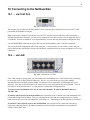
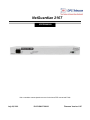
Fig. 10.1 NetGuardian Craft Port
The simplest way to connect to the NetGuardian is over a physical cable connection between your PC's COM
port and the NetGuardian's craft port.
Note: You must be connected via craft port to use the TTY interface, but you don't have to be connected to a
NetGuardian unit to use Edit216T. You only need a connection to the unit to read or write configuration files to
its NVRAM. You can use Edit216T on an unconnected PC to create and store NetGuardian configuration files.
Use the DB9M-DB9F download cable provided with your NetGuardian to make a craft port connection.
You can perform all configuration tasks via the craft port — but if you like, you can connect via the craft port
just to configure the NetGuardian's Private LAN IP address, and then do the rest of your configuration via a LAN
connection.
10.2 ... via LAN
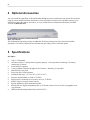
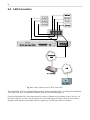
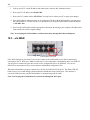
Fig. 10.2. NetGuardian LAN Link
Once LAN settings are provisioned, you can connect to the NetGuardian over a LAN connection by connecting
to one of the seven 10-BaseT Ethernet Hub ports. This is a very convenient way to provision multiple
NetGuardian units at multiple locations. Note: You don't have to be connected to a NetGuardian unit to use
Edit216T. You only need a connection to the unit to read or write configuration files to its NVRAM. You can
use Edit216T on an unconnected PC to create and store NetGuardian configuration files.
To connect to the NetGuardian via LAN, all you need is the unit's IP address (Default IP address is
192.168.1.100).
If you have physical access to the NetGuardian, the easiest thing to do is connect to the unit through the craft
port and then assign it an IP address. Then you can complete the rest of the unit configuration over a remote
LAN connection, if you want. For instructions, see Section 10.1, "Connecting to the NetGuardian via Craft Port."
If you DON'T have physical access to the NetGuardian, you can make a LAN connection to the unit by
temporarily changing your PC's IP address and subnet mask to match the NetGuardian's factory default IP
settings. Follow these steps: