1
8
VR WORX 2: Instructor Manual
LECTURETTE 2: THE QTVR OBJECT
Instructor’s Note: Turn flip chart to page #2.
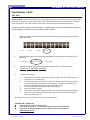
A QTVR Object lets you view a three-dimensional object, such as a cell phone, a statue, or a
computer from a variety of angles. It gives you the illusion that you are holding the object and are
manipulating it by rotating it. Here is an example of a QTVR object on the web.
Instructor’s Note: Display the web page for the OBJECT on the overhead.
To rotate an object, click on the image and drag the mouse horizontally left or right.
The object is made from a series of images that are stitched together in the QTVR software. Using
a manual or motorized rig to take the images from all angles of the object, and in sequence, yield
the best results.
The number of images shot in the vertical plane (up and down) of the object make up the number
of ROWS of the object.
The number of images shot in the horizontal plane (side to side) of the object make up the number
of COLUMNS of the object. Look at the illustration of rows and columns in your user manual.
Instructor’s Note: Allow a few seconds for the participants to locate the illustration and look it over.
If you don’t have access to a motorized rig, placing your object on a simple “lazy Susan” and
rotating it while the camera is stationary can yield a good object.
For objects, there is not as much concern with what type of lens you use and how many images you
must take. However many images you do take for one row however, remember to divide that it by
360 to get the number of degrees between each image.
The more pictures you take, the better quality of motion you will get when rotating your final
object. Keep in mind though that more images equals larger file size, so if your object was going
to the web, you would want to limit the number of images you took.
Instructor’s Note: Ask the users if there are any questions. Also, ask the following questions to them for
review.
QUESTIONS FOR REVIEW:
Q: Why do you suppose more images of the object is better than fewer?
A: Because having more shots will yield a much smoother motion when rotating the object.
There are more angles of the object that are covered.
File name: VRWorx_Instructor.pmd
Last modified: 06/20/02
Copyright Arizona Board of Regents, 2002
University of Arizona