1
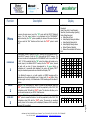
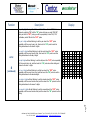
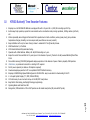
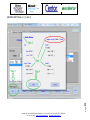
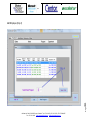
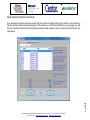
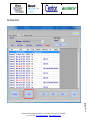
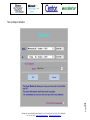
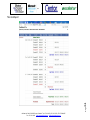
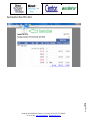
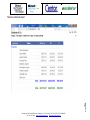
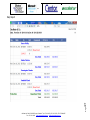
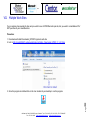
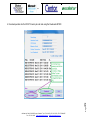
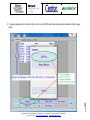
Ceres M7000 Time & Attendance System Installation & Operation Instructions: Table of Contents I. Minimum requirements: ..................................................................................................................................................... 2 II. Ceres M7000e Installation (Steps): ................................................................................................................................... 2 III. M7000 iButton® Time Recorder Operation and Setup Instructions ................................................................................. 3 III. Employee ID Keys & Accessories ................................................................................................................................ 11 IV. M7000 iButton® Time Recorder Features: ................................................................................................................... 12 V. Wall Mount Instructions ................................................................................................................................................ 13 VI. Ceres 7000mb Time & Attendance Program................................................................................................................ 17 Setup Screen ............................................................................................................................................................... 17 Add Work Shift (Steps 1, 2, 3 and 4) ........................................................................................................................... 18 Add Employees (Steps 1 & 2) ...................................................................................................................................... 19 Add Employee (Step 4) ................................................................................................................................................ 20 Assign Employee ID iButtons by download.................................................................................................................. 21 Recordings Screen ...................................................................................................................................................... 22 Time Card Report Selection......................................................................................................................................... 23 Time Card Report ........................................................................................................................................................ 24 Export Reports to Excel, PDF or Word ........................................................................................................................ 25 Total Hours Worked Report ......................................................................................................................................... 26 Daily Report ................................................................................................................................................................. 27 Page VIII. Trouble Shooting: ......................................................................................................................................................... 34 1 VII. Multiple Work Sites ...................................................................................................................................................... 28 Oscillator Ltd. Calle 76 # 50-22, Bogota, Colombia. Tel: +571 311-0274, +571 311-7974, +571 571 548-4957. Fax: +571 311-1349 www.centorguardclocks.com [email protected] I. Minimum requirements: Ceres M7000e runs on Windows XP, Windows Vista; Windows 7 and Windows 8. PC minimum requirements are: IBM or compatible PC Pentium or higher processor with 2 gigabytes in RAM (preferably with 4 gigabytes in RAM). An internet connection is required. II. Ceres M7000e Installation (Steps): 1. Ceres M7000e employs Install Shield® an intelligent installer that will automatically detect your OS, install all prerequisites and drivers. 2. Insert the Ceres M7000e CD Disk on your CD drive, an auto-run function will be displayed, select install or run program from your media. If the auto-run (auto play) is not displayed, browse CD to view contents and double click on setup.exe (Application). 3. Follow the installation Instructions. Oscillator Ltd. Calle 76 # 50-22, Bogota, Colombia. Tel: +571 311-0274, +571 311-7974, +571 571 548-4957. Fax: +571 311-1349 www.centorguardclocks.com [email protected] Page 5. Once the Ceres M7000e program and its communications drivers have been installed, you can run the program, to run the program double click on the icon on your desktop. Also a User’s Manual icon will appear in your desktop screen, double click on the icon to view the manual. 2 4. When prompted to do so Plug the RJ11 connector of the DS1402 RP3 cable into the DS9490R USB Blue Bridge and connect to a USB port of your PC. III. M7000 iButton® Time Recorder Operation and Setup Instructions Description: The M7000 is a battery operated, standalone, iButton® Time Recorder. It is operated through its “IN” and “OUT” head probes; these two probes enable access to its main menu, where the unit is setup and readied for operation. The probes are also used to punch IN and punch OUT and to transfer recordings to a PC. Its casing features a dual color luminous signaler and a buzzer. Page 3 For wall mounting instructions and description of all its features, please see the features section of this manual. To save power the display normally remains at sleep mode. The unit will activate its display only when an employee punches IN or OUT or when the main menu is accessed by the supervisor. Oscillator Ltd. Calle 76 # 50-22, Bogota, Colombia. Tel: +571 311-0274, +571 311-7974, +571 571 548-4957. Fax: +571 311-1349 www.centorguardclocks.com [email protected] M7000 TIME RECORDER MENU MAP DOWNLOAD NO YES SERIAL NO YES VIEW-REC NO YES CONNECT MEMORY SETUP NO YES EXIT NO YES SURE? NO YES DATE TIME NO YES DLS INI NO YES DLS END NO YES DLS HRS NO YES DEFAULT NO YES RESTORE NO YES SURE? NO YES SURE? NO YES SURE? NO YES SURE? NO YES SURE? NO YES SURE? NO YES SET DATE yy/MM/dd SET DATE yy/MM/dd SET TIME HH:mm:ss SET TIME HH:mm:ss SET TIME HH:mm:ss SET HRS HH:mm:ss Page 4 SET DATE yy/MM/dd EXIT NO YES Oscillator Ltd. Calle 76 # 50-22, Bogota, Colombia. Tel: +571 311-0274, +571 311-7974, +571 571 548-4957. Fax: +571 311-1349 www.centorguardclocks.com [email protected] Description Menu To access the main menu, touch the “IN” probe with the DS1977 iButton® memory. The first menu function to be displayed will be “DOWNLOAD”. Continue touching the “IN” probe repeatedly to review all the menu functions until you reach the “Exit” function and then touch the “OUT” probe to select “Exit”. DOWNLOAD To Download (transfer) employee IN /OUT punches from the Recorder M7000, to the DS1977 memory: Touch the “IN” probe with the DS1977 memory. The first menu function to be displayed will be “DOWNLOAD” with the condition “NO or YES”. If YES is selected (with the “IN” probe) the display will prompt you to connect (snap-in) the iButton DS1977 memory into the “OUT” probe, connect and wait until you hear 10 beeps (accompanied by 10 green blinks) as confirmation of a successful data download; the screen will display “WAIT” during the download process and once finished it will display “OK”. 1 Display Menu Contents: 1. Download 2. Serial (View Unit´s Serial Number). 3. View-Rec (View Recordings Quantity). 4. Setup (Setup Recorder). a. Setup Date & Time b. Setup Daylight Savings Initiation c. Setup Daylight Savings End d. Setup Daylight Savings Hours e. Default (Factory Defaults) f. Restore Previous Batch of Punches 5. Exit D N O O W N L O Y A E C M O E N M N O E R C Y T W A I O T K 0 0 0 0 0 0 0 0 If the iButton® memory is not well inserted, an ERROR message will be displayed and you will immediately hear 10 beeps (with 10 red blinks). Enter the menu again and retry. A full download of 4080 recordings will take about 3 minutes. 2 VIEW-REC 3 Touch the “IN” probe twice, the “SERIAL” function will be displayed, touch the “OUT” probe to access that function. You will be prompted by a Sure? NO / YES confirmation, select YES with the “OUT” probe. This function will allow you to view the serial number of your M7000 Time Recorder. Touch the “IN” 3 times, the “VIEW-REC” function will be displayed, touch the “OUT” probe to access that function. You will be prompted by a Sure? NO / YES confirmation, select YES with the “OUT” probe. The amount on recordings currently stored in the memory will be displayed (Maximum 4080 recordings, minimum 0001 recordings). 0 0 0 0 0 0 0 0 4 0 8 0 Page SERIAL D S 5 Function Oscillator Ltd. Calle 76 # 50-22, Bogota, Colombia. Tel: +571 311-0274, +571 311-7974, +571 571 548-4957. Fax: +571 311-1349 www.centorguardclocks.com [email protected] Function Description To enter the SETUP function: Touch the “IN” probe 4 times until you reach the SETUP function, touch the “OUT” probe to access that function. You will be prompted by a Sure? NO / YES confirmation, select YES with the “OUT” probe. Display N O S N U O R S E E ? T Y U E P S Y E S I Y M E E S Y E S Setup Date & Time: The option “DATETIME” will be displayed select yes with the “OUT” probe. You will be prompted by a Sure? NO / YES confirmation, select YES with the “OUT” probe. The year´s digits will start blinking; to set the year touch the “OUT” probe repeatedly until the correct year is set, then touch the “IN” probe to confirm the setting and advance to the month´s digits. SETUP The month´s digits will start blinking; to set the month touch the “OUT” probe repeatedly until the correct month is set, then touch the “IN” probe to confirm the setting and advance to the day´s digits. D N A O T E T 4 The day’s digits will start blinking; to set the day touch the “OUT” probe repeatedly until the correct day is set, and then touch the “IN” probe to confirm the setting and advance to the hour´s digits. S N U O R E ? y 1 y 2 / / M 0 M 1 / / d 3 d 1 H 1 H 6 : : m 3 m 5 : : s 0 s 0 The hour´s digits will start blinking; to set the hour touch the “OUT” probe repeatedly until the correct hour is set, and then touch the “IN” probe to confirm the setting and advance to the minutes digits. The minute´s digits will start blinking; to set the minutes touch the “OUT” probe repeatedly until the correct minute is set, and then touch the “IN” probe to confirm the setting and advance to the second´s digits. Page The displayed date format is yy/MM/dd (ISO 8601 international standard) and the displayed time format is HH:mm:ss (Military Format). The illustration depicted to the left is January 31/ 2012 at 16:35:00. 6 The second´s digits will start blinking; to set the seconds touch the “OUT” probe repeatedly until the correct minute is set, and then touch the “IN” probe to confirm the setting. Oscillator Ltd. Calle 76 # 50-22, Bogota, Colombia. Tel: +571 311-0274, +571 311-7974, +571 571 548-4957. Fax: +571 311-1349 www.centorguardclocks.com [email protected] Function Description Display Setup Daylight Savings Start Date and Start Time: On the SETUP Submenu advance by selecting “NO” with the “IN” probe until once you reach “DLS INI”, select yes with the “OUT” probe, you will be prompted by a Sure? NO / YES confirmation, select YES with the “OUT” probe. The year´s digits will start blinking; to set the year touch the “OUT” probe repeatedly until the correct year is set, then touch the “IN” probe to confirm setting and advance to the month´s digits. (continued) The hour´s digits will start blinking; to set the hour touch the “OUT” probe repeatedly until the correct hour is set, and then touch the “IN” probe to confirm setting and advance to the minutes digits. L O S I S N U O R y 1 y 2 / / M 0 H 0 H 2 : : m 0 E N Y I E S Y E S M 3 / / d 1 d 1 m 0 : : s 0 s 0 ? The minute´s digits will start blinking; to set the minutes touch the “OUT” probe repeatedly until the correct minute is set, and then touch the “IN” probe to confirm setting and advance to the second´s digits. The second´s digits will start blinking; to set the seconds touch the “OUT” probe repeatedly until the correct minute is set, and then touch the “IN” probe to confirm setting. 7 4 The day’s digits will start blinking; to set the day touch the “OUT” probe repeatedly until the correct day is set, and then touch the “IN” probe to confirm setting and advance to the hour´s digits. D N Page SETUP The month´s digits will start blinking; to set the month touch the “OUT” probe repeatedly until the correct month is set, then touch the “IN” probe to confirm setting and advance to the day´s digits Oscillator Ltd. Calle 76 # 50-22, Bogota, Colombia. Tel: +571 311-0274, +571 311-7974, +571 571 548-4957. Fax: +571 311-1349 www.centorguardclocks.com [email protected] Function Description Display Setup Daylight Savings End Date and End Time: On the SETUP Submenu advance by selecting “NO” with the “IN” probe until once you reach “DLS END”, select yes with the “OUT” probe, you will be prompted by a Sure? NO / YES confirmation, select YES with the “OUT” probe. The year´s digits will start blinking; to set the year touch the “OUT” probe repeatedly until the correct year is set, then touch the “IN” probe to confirm setting and advance to the month´s digits. (continued) The hour´s digits will start blinking; to set the hour touch the “OUT” probe repeatedly until the correct hour is set, and then touch the “IN” probe to confirm setting and advance to the minutes digits. S E S N U O R y 1 y 2 / / M 0 H 0 H 2 : : m 0 E N Y D E S Y E S M 3 / / d 1 d 1 m 0 : : s 0 s 0 ? The minute´s digits will start blinking; to set the minutes touch the “OUT” probe repeatedly until the correct minute is set, and then touch the “IN” probe to confirm setting and advance to the second´s digits. The second´s digits will start blinking; to set the seconds touch the “OUT” probe repeatedly until the correct minute is set, and then touch the “IN” probe to confirm setting. 8 4 The day’s digits will start blinking; to set the day touch the “OUT” probe repeatedly until the correct day is set, and then touch the “IN” probe to confirm setting and advance to the hour´s digits. L O Page SETUP The month´s digits will start blinking; to set the month touch the “OUT” probe repeatedly until the correct month is set, then touch the “IN” probe to confirm setting and advance to the day´s digits D N Oscillator Ltd. Calle 76 # 50-22, Bogota, Colombia. Tel: +571 311-0274, +571 311-7974, +571 571 548-4957. Fax: +571 311-1349 www.centorguardclocks.com [email protected] Function Description Display Setup Daylight Savings Hours: To set the quantity of hours the time will advance when the yearly Daylight Savings enters into effect. On the SETUP Submenu advance by selecting “NO” with the “IN” probe until once you reach “DLS HRS”, touch the “OUT” probe to access that function. You will be prompted by a Sure? NO / YES confirmation, select YES with the “OUT” probe. The hour´s digits will start blinking; to set the hour touch the “OUT” probe repeatedly until the correct hour is set, and then touch the “IN” probe to confirm setting and advance to the minutes digits. (continued) S H R Y S E S S N U O R Y E S H 0 H 2 : : m 0 m 0 : : s 0 s 0 D N E O F A U L Y T E S S S N U O R E ? Y E S R N E O S R Y E E S S N U O R Y E S E ? The second´s digits will start blinking; to set the seconds touch the “OUT” probe repeatedly until the correct minute is set, and then touch the “IN” probe to confirm setting. Factory Defaults: On the SETUP Submenu advance by selecting “NO” with the “IN” probe until once you reach “DEFAULTS”, touch the “OUT” probe to access that function. You will be prompted by a Sure? NO / YES confirmation, select YES with the “OUT” probe. This function will reset the DLS INI, DLS END and DLS functions to factory defaults. Restore Previous Batch of Recordings: On the SETUP Submenu advance by selecting “NO” with the “IN” probe until once you reach “RESTORE”, touch the “OUT” probe to access that function. You will be prompted by a Sure? NO / YES confirmation, select YES with the “OUT” probe. This function will allow you to restore to memory the previous batch of recordings. T E O ? 9 4 L O Page SETUP The minute´s digits will start blinking; to set the minutes touch the “OUT” probe repeatedly until the correct minute is set, and then touch the “IN” probe to confirm setting and advance to the second´s digits. D N Oscillator Ltd. Calle 76 # 50-22, Bogota, Colombia. Tel: +571 311-0274, +571 311-7974, +571 571 548-4957. Fax: +571 311-1349 www.centorguardclocks.com [email protected] EXIT 5 To Exit the Setup Submenu: On the SETUP Submenu advance by selecting “NO” with the “IN” probe until once you reach “Exit”, touch the “OUT” probe to access that function. To exit: On the main menu advance by selecting “NO” with the “IN” probe until once you reach “Exit”, touch the “OUT” probe to access that function. E N X O I T Y E S How to make employee punches on the M7000 Time Recorder: To make an IN punch touch the left probe with your Employee ID key. To make an OUT punch touch the right probe with your Employee ID key. How to download (transfer) employee punches from the M7000 Recorder to the DS1977 iButton memory: Enter the M7000 menu on the download function and connect your DS1977 memory to the M7000 recorder (see Menu Map). Page 10 How to download employee punches from DS1977 Memory to your PC: Connect your DS1977 memory and click on the “Download” function button on the Recordings module of your Ceres program. Oscillator Ltd. Calle 76 # 50-22, Bogota, Colombia. Tel: +571 311-0274, +571 311-7974, +571 571 548-4957. Fax: +571 311-1349 www.centorguardclocks.com [email protected] Employee ID Keys & Accessories Communications DS9490 USB Connector - Cable & ID Key FOB Holder Casing Security Key 11 Heavy Duty Nylon 66 Employee Badges Employee ID Key FOBs Page III. Oscillator Ltd. Calle 76 # 50-22, Bogota, Colombia. Tel: +571 311-0274, +571 311-7974, +571 571 548-4957. Fax: +571 311-1349 www.centorguardclocks.com [email protected] 3. 4. 5. 6. 7. 8. 9. 10. 11. 12. 13. 14. 15. 16. 17. 18. Employs low cost DS1990A-F5 iButtons as employee IDs with a 10 year life or 1,000,000 recordings per ID chip. Extra Heavy Duty operation, special for environments such as construction sites, mining operations, shifting outdoor job fronts, etc. Works impeccably where fingerprint terminals fail to operate due to harsh conditions, where grease, dust, grime, extreme temperature changes, humidity, corrosive vapors and power failures are ever present!). Easy installation with only 4 screws. Casing is closed - sealed with 4 Torx® Security Screws. Wall Mounted and / or Portable. 20% Glass Reinforced Polycarbonate Casing. Operates with 4 AAA batteries. Battery Life 160,000 Recordings or 1 year. Keeps the correct time and date for 10 years (even in the absence of power!), thanks to its self powered iButton® Real Time Clock. Non volatile memory (NVO RAM) safeguards employee punches in the absence of power. Memory capacity 4080 punches. Stand Alone, no permanent connection or cabling to PC required. No AC power required (no cables or AC adaptors required). Downloads employee punches to PC via a portable DS1977 iButton® memory. Employs a DS9490R High Speed USB bridge and a DS1402-RP3+ easy to use cable for downloading to the PC. 2 x 8 Liquid Crystal Display (YY / MM / DD HH:MM:SS). 10 function easy to use one touch menu, via the IN /OUT head probes. Easy Date & Time Setup, plus Daylight Savings programming. Signaling Buzzer and Dual Color LED. Recognition / Differentiation of IN or OUT punches via its double head probe (IN probe & OUT probe). 12 1. 2. M7000 iButton® Time Recorder Features: Page IV. Oscillator Ltd. Calle 76 # 50-22, Bogota, Colombia. Tel: +571 311-0274, +571 311-7974, +571 571 548-4957. Fax: +571 311-1349 www.centorguardclocks.com [email protected] Page 13 V. Wall Mount Instructions Oscillator Ltd. Calle 76 # 50-22, Bogota, Colombia. Tel: +571 311-0274, +571 311-7974, +571 571 548-4957. Fax: +571 311-1349 www.centorguardclocks.com [email protected] 14 Page Oscillator Ltd. Calle 76 # 50-22, Bogota, Colombia. Tel: +571 311-0274, +571 311-7974, +571 571 548-4957. Fax: +571 311-1349 www.centorguardclocks.com [email protected] 15 Page Oscillator Ltd. Calle 76 # 50-22, Bogota, Colombia. Tel: +571 311-0274, +571 311-7974, +571 571 548-4957. Fax: +571 311-1349 www.centorguardclocks.com [email protected] 16 Page Oscillator Ltd. Calle 76 # 50-22, Bogota, Colombia. Tel: +571 311-0274, +571 311-7974, +571 571 548-4957. Fax: +571 311-1349 www.centorguardclocks.com [email protected] VI. Ceres 7000mb Time & Attendance Program Page 17 Setup Screen Oscillator Ltd. Calle 76 # 50-22, Bogota, Colombia. Tel: +571 311-0274, +571 311-7974, +571 571 548-4957. Fax: +571 311-1349 www.centorguardclocks.com [email protected] Page 18 Add Work Shift (Steps 1, 2, 3 and 4) Oscillator Ltd. Calle 76 # 50-22, Bogota, Colombia. Tel: +571 311-0274, +571 311-7974, +571 571 548-4957. Fax: +571 311-1349 www.centorguardclocks.com [email protected] Page 19 Add Employees (Steps 1 & 2) Oscillator Ltd. Calle 76 # 50-22, Bogota, Colombia. Tel: +571 311-0274, +571 311-7974, +571 571 548-4957. Fax: +571 311-1349 www.centorguardclocks.com [email protected] Page 20 Add Employee (Step 4) Oscillator Ltd. Calle 76 # 50-22, Bogota, Colombia. Tel: +571 311-0274, +571 311-7974, +571 571 548-4957. Fax: +571 311-1349 www.centorguardclocks.com [email protected] Assign Employee ID iButtons by download Page 21 If you download through the Employees module (tab) the system will assign all the buttons that have been punched in the clock but have not been previously assigned. In other words you can first touch all iButtons you are going to use with the clock, download these through the employees tab and the assign employee names to these with the edit button. See image below. Oscillator Ltd. Calle 76 # 50-22, Bogota, Colombia. Tel: +571 311-0274, +571 311-7974, +571 571 548-4957. Fax: +571 311-1349 www.centorguardclocks.com [email protected] Page 22 Recordings Screen Oscillator Ltd. Calle 76 # 50-22, Bogota, Colombia. Tel: +571 311-0274, +571 311-7974, +571 571 548-4957. Fax: +571 311-1349 www.centorguardclocks.com [email protected] Page 23 Time Card Report Selection Oscillator Ltd. Calle 76 # 50-22, Bogota, Colombia. Tel: +571 311-0274, +571 311-7974, +571 571 548-4957. Fax: +571 311-1349 www.centorguardclocks.com [email protected] Page 24 Time Card Report Oscillator Ltd. Calle 76 # 50-22, Bogota, Colombia. Tel: +571 311-0274, +571 311-7974, +571 571 548-4957. Fax: +571 311-1349 www.centorguardclocks.com [email protected] Page 25 Export Reports to Excel, PDF or Word Oscillator Ltd. Calle 76 # 50-22, Bogota, Colombia. Tel: +571 311-0274, +571 311-7974, +571 571 548-4957. Fax: +571 311-1349 www.centorguardclocks.com [email protected] Page 26 Total Hours Worked Report Oscillator Ltd. Calle 76 # 50-22, Bogota, Colombia. Tel: +571 311-0274, +571 311-7974, +571 571 548-4957. Fax: +571 311-1349 www.centorguardclocks.com [email protected] Page 27 Daily Report Oscillator Ltd. Calle 76 # 50-22, Bogota, Colombia. Tel: +571 311-0274, +571 311-7974, +571 571 548-4957. Fax: +571 311-1349 www.centorguardclocks.com [email protected] VII. Multiple Work Sites If your company has several job sites and you wish to use a M7000 Recorder per site, but you want to consolidate all IN / OUT punches at your Head Quarters. Procedure: 1. Download and Install Downloader_M7000 Program at each site. 2. Link is: http://centor832647.centorguardclocks.com/Setup_Downloader_M7000_V_5-0-10.zip Page 28 3. Once the program is installed click on the Icon located at your desktop to run the program. Oscillator Ltd. Calle 76 # 50-22, Bogota, Colombia. Tel: +571 311-0274, +571 311-7974, +571 571 548-4957. Fax: +571 311-1349 www.centorguardclocks.com [email protected] Page 29 4. Download punches into the DS1977 memory at each site using the Downloader M7000 Oscillator Ltd. Calle 76 # 50-22, Bogota, Colombia. Tel: +571 311-0274, +571 311-7974, +571 571 548-4957. Fax: +571 311-1349 www.centorguardclocks.com [email protected] Page 30 5. To assign employees from all sites at HQ, run the Ceres M7000n and follow the procedure depicted on the 2 images below. Oscillator Ltd. Calle 76 # 50-22, Bogota, Colombia. Tel: +571 311-0274, +571 311-7974, +571 571 548-4957. Fax: +571 311-1349 www.centorguardclocks.com [email protected] 31 Page Oscillator Ltd. Calle 76 # 50-22, Bogota, Colombia. Tel: +571 311-0274, +571 311-7974, +571 571 548-4957. Fax: +571 311-1349 www.centorguardclocks.com [email protected] Page 32 6. Once all employees are assigned at your program in HQ, you will be able to receive and load IN/OUT punches from all your companies work sites (daily, weekly monthly, or when desired). Oscillator Ltd. Calle 76 # 50-22, Bogota, Colombia. Tel: +571 311-0274, +571 311-7974, +571 571 548-4957. Fax: +571 311-1349 www.centorguardclocks.com [email protected] 33 Page Oscillator Ltd. Calle 76 # 50-22, Bogota, Colombia. Tel: +571 311-0274, +571 311-7974, +571 571 548-4957. Fax: +571 311-1349 www.centorguardclocks.com [email protected] VIII. Trouble Shooting: 1. Problem: Automatic installation of drivers fails and program does not start: Solution Procedure: a. b. c. d. e. f. “Disconnect your P8000 download cradle from the USB port”, drivers must be installed first. Browse your Ceres M7000 CD and Click on the DS9490 Drivers directory. If your PC runs with a 32 bit Windows OS system, click on the DrvWin32 directory and double click on “dpinst”. If your PC runs with a 64 bit Windows OS system, click on the DrvWin64 directory and double click on “dpinst”. Plug the RJ11 connector of the P8000 into the DS9490R and connect to your PC. Run your Ceres M7000 Program. 2. Problem: An error message is displayed during downloading “Arithmetic operation resulted in an overflow” Cause: The Date on the M7000 Time Recorder was set with the wrong format switching (confusing) the Year for the Day of the month. Correct format: yy/MM/dd (Year/Month/Day). Wrong format: dd/MM/yy Error Example: The current (correct) date is 2011/10/08 (October 8, 2011) and is erroneously set as 08/10/11(2008/10/11). Oscillator Ltd. Calle 76 # 50-22, Bogota, Colombia. Tel: +571 311-0274, +571 311-7974, +571 571 548-4957. Fax: +571 311-1349 www.centorguardclocks.com [email protected] Page a. ON the M7000 menu command activate the “FACTORY DEFAULTS” function, this will reset “everything”. b. Set the correct Date & Time “SETUP DATETIME” (yy/MM/dd HH:mm:ss) c. Set the correct Date & Time for Daylight Savings Initiation: Menu command “SETUP DLS INI” (yy/MM/dd HH:mm:ss). d. Set the correct Date & Time for Daylight Savings End: Menu command “SETUP DLS END” (yy/MM/dd HH:mm:ss). e. Set the correct Quantity of hours, minutes and seconds to add (move forward): Menu command “SETUP DLS HRS” (HH:mm:ss) Note: If “SETUP DLS HRS” (HH:mm:ss) is set to 00:00:00 the Daylight Savings function will be disabled. f. Disconnect the batteries and wait 3 seconds, then reconnect batteries. g. Initialize (erase) DS1977 Memory with your Ceres program (on the Setup menu). h. Download Recordings from M7000 to DS1977 Memory. 34 Solution Procedure: i. Initialize (erase) DS1977 memory again. j. Uninstall Ceres M7000e and Erase the Directory C:\Oscillator\Ceres 7000 en k. Install your Ceres Program. Error Images. 3. Problem: If the Clock has the correct time and if by any chance the info on the DS1977 gets corrupted (happens rarely). Solution Procedure: Page Run the Ceres program. Connect the DS1977 memory to your PC. Erase your DS1977 memory by “initializing” it on the Setup Tab of the program menu. Go to the M7000 Recorder and enter the menu with your DS1977 memory, advance to the restore function (select yes), so all your punches are restored. e. Then download the contents of the M7000 terminal to the DS1977 memory (do not disconnect until process is complete (hear the beeps)). 35 a. b. c. d. Oscillator Ltd. Calle 76 # 50-22, Bogota, Colombia. Tel: +571 311-0274, +571 311-7974, +571 571 548-4957. Fax: +571 311-1349 www.centorguardclocks.com [email protected] 4. Unnecessary Punches filtering: Page 36 If an employee makes an IN punch but realizes he has made an error and immediately punches OUT to correct his error, the system (Ceres Program) will accept the last punch as valid and ignore the previous punch, therefore the OUT punch will show on the time card and the wrong IN punch will be discarded by Ceres. This filter time gap has a length of 2 minutes; in other words if an IN punch is made and 2 minutes after that an OUT punch is made, both punches will show on the time card. Oscillator Ltd. Calle 76 # 50-22, Bogota, Colombia. Tel: +571 311-0274, +571 311-7974, +571 571 548-4957. Fax: +571 311-1349 www.centorguardclocks.com [email protected]