1
User Manual
Configuration
Dualband Industrial Wireless LAN Access Point/Client
BAT54-Rail, BAT54-Rail FCC,
BAT54-F, BAT54-F FCC, BAT54-F X2
BAT54-F X2 FCC
BAT54-Rail/F..
Release 7.54 06/08
Technical Support
[email protected]
Windows®, Windows Vista™, Windows XP® and Microsoft® are registered trademarks of Microsoft, Corp. LCOS is registered trademarks of LANCOM Systems GmbH.
The naming of copyrighted trademarks in this manual, even when not specially indicated, should
not be taken to mean that these names may be considered as free in the sense of the trademark
and tradename protection law and hence that they may be freely used by anyone.
© 2008 Hirschmann Automation and Control GmbH
Manuals and software are protected by copyright. All rights reserved. The copying, reproduction,
translation, conversion into any electronic medium or machine scannable form is not permitted,
either in whole or in part. An exception is the preparation of a backup copy of the software for
your own use. For devices with embedded software, the end-user license agreement on the enclosed CD applies.
This product includes software developed by the OpenSSL Project for use in the OpenSSL Toolkit http://www.openssl.org/.
This product includes cryptographic software written by Eric Young ([email protected]).
This product includes software developed by the NetBSD Foundation, Inc. and its contributors.
The performance features described here are binding only if they have been expressly guaranteed in the contract. This publication has been created by Hirschmann Automation and Control
GmbH according to the best of our knowledge. Hirschmann reserves the right to change the contents of this manual without prior notice. Hirschmann can give no guarantee in respect of the
correctness or accuracy of the details in this publication.
Hirschmann can accept no responsibility for damages, resulting from the use of the network
components or the associated operating software. In addition, we refer to the conditions of use
specified in the license contract.
Printed in Germany (30.6.2008)
Hirschmann Automation and Control GmbH
Stuttgarter Straße 45-51
72654 Neckartenzlingen
Tel. +49 1805 141538
Contents
1 Preface
15
2 System design
19
2.1 Introduction
19
3 Wireless LAN – WLAN
21
3.1 What is a Wireless LAN?
3.1.1 Standardized radio transmission by IEEE
3.1.2 Operation modes of Wireless LANs and base stations
21
21
25
3.2 Development of WLAN security
3.2.1 Some basic concepts
3.2.2 WEP
3.2.3 WEPplus
3.2.4 EAP and 802.1x
3.2.5 TKIP and WPA
3.2.6 AES and 802.11i
3.2.7 Summary
33
33
35
37
37
40
42
44
3.3 Protecting the wireless network
3.3.1 LEPS—BAT Enhanced Passphrase Security
3.3.2 Standard WEP encryption
3.3.3 Background WLAN scanning
45
46
48
49
3.4 Configuration of WLAN parameters
3.4.1 WLAN security
3.4.2 General WLAN settings
3.4.3 WLAN routing (isolated mode)
3.4.4 The physical WLAN interfaces
3.4.5 The logical WLAN interfaces
3.4.6 Additional WLAN functions
52
53
62
63
64
78
82
3.5 Extended WLAN protocol filters
3.5.1 Protocol filter parameters
3.5.2 Procedure for filter test
3.5.3 Redirect function
3.5.4 DHCP address tracking
87
88
90
91
92
BAT54-Rail/F..
Release 7.54 06/08
3
3.6 Client mode
3.6.1 Basic configuration
3.6.2 Advanced configuration
3.6.3 The roaming table
93
94
98
100
3.7 IEEE 802.11i for point-to-point connections in the WLAN
101
3.7.1 Antenna alignment for P2P operations
102
3.7.2 Configuration
104
3.7.3 Access points in relay mode
107
3.7.4 Security for point-to-point connections
107
3.7.5 LEPS for P2P connections
108
3.7.6 Geometric dimensioning of outdoor wireless network links
109
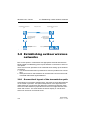
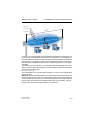
3.8 Establishing outdoor wireless networks
3.8.1 Geometrical layout of the transmission path
3.8.2 Antenna power
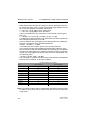
3.8.3 Emitted power and maximum distance
3.8.4 Transmission power reduction
112
112
114
117
117
3.9 Bandwidth limits in the WLAN
3.9.1 Operating as an access point
3.9.2 Operating as a Client
117
117
118
3.10 WLAN according to 802.11h
3.10.1 Standards
3.10.2 Radio channels in the 5 GHz band:
3.10.3 Frequency ranges for indoor and outdoor use
119
119
122
123
4 Configuration and management
4
125
4.1 Configuration tools and approaches
125
4.2 Configuration software
126
4.3 Searching and configuring devices
127
4.4 Configuration using different tools
4.4.1 LANconfig
4.4.2 WEBconfig
4.4.3 Telnet
4.4.4 TFTP
4.4.5 SNMP
4.4.6 Encrypted configuration with SSH access
4.4.7 SSH authentication
128
128
131
133
137
138
139
140
4.5 Working with configuration files
142
BAT54-Rail/F..
Release 7.54 06/08
4.6 New firmware with Hirschmann FirmSafe
4.6.1 This is how Hirschmann FirmSafe works
4.6.2 How to load new software
143
143
145
4.7 How to reset the device?
148
4.8 Managing administrators rights
4.8.1 Rights for the administrators
4.8.2 Administrators' access via TFTP and SNMP
4.8.3 Configuration of user rights
4.8.4 Limitation of the configuration commands
4.8.5 HTTP tunnel
150
150
151
153
155
156
4.9 Named loopback addresses
4.9.1 Loopback addresses with ICMP polling
4.9.2 Loopback addresses for time servers
4.9.3 Loopback addresses for SYSLOG clients
159
160
161
162
5 LANtools network management
165
5.1 Switch UI language
166
5.2 Project management with LANconfig
5.2.1 User-specific settings for LANconfig
5.2.2 Directory structure
5.2.3 Multithreading
5.2.4 Better overview in LANconfig with more columns
5.2.5 Manual and automatic searches for firmware updates
5.2.6 Password protection for SNMP read-only access.
5.2.7 Device-specific settings for communications protocols
5.2.8 LANconfig behavior at Windows startup
166
169
170
171
172
173
175
177
179
5.3 Scripting
5.3.1 Applications
5.3.2 Scripting function
5.3.3 Generating script files
5.3.4 Uploading configuration commands and script files
5.3.5 Multiple parallel script sessions
5.3.6 Scripting commands
5.3.7 WLAN configuration with the wizards in LANconfig
181
181
182
183
186
190
190
194
5.4 Group configuration with LANconfig
5.4.1 Create a group configuration
5.4.2 Update device configurations
5.4.3 Update group configurations
5.4.4 Using multiple group configurations
196
197
199
200
200
BAT54-Rail/F..
Release 7.54 06/08
5
5.5 Rollout Wizard
5.5.1 General settings in the Rollout Wizard
5.5.2 Variables
5.5.3 Actions to be executed by the Rollout Wizard
5.5.4 Actions for managing the Rollout Wizard
201
201
202
203
204
5.6 Display functions in LANmonitor
205
5.7 LANmonitor—know what's going on
208
5.7.1 Extended display options
209
5.7.2 Enquiry of the CPU and Memory utilization over SNMP
210
5.7.3 Monitor Internet connection
210
5.7.4 Tracing with LANmonitor
212
5.8 Visualization of larger WLANs
5.8.1 Start the WLANmonitor
5.8.2 Search for access points
5.8.3 Add access points
5.8.4 Organize access points
5.8.5 Rogue AP and rogue client detection with the
WLANmonitor
214
215
215
216
216
5.9 Messaging
222
6 Diagnosis
6
217
225
6.1 Trace information—for advanced users
6.1.1 How to start a trace
6.1.2 Overview of the keys
6.1.3 Overview of the parameters
6.1.4 Combination commands
6.1.5 Trace filters
6.1.6 Examples of traces
6.1.7 Recording traces
225
225
225
226
227
227
228
228
6.2 SYSLOG storage in the device
6.2.1 Activate SYSLOG module
6.2.2 Configuring the SYSLOG client
6.2.3 Read-out SYSLOG messages
229
230
230
231
6.3 The ping command
232
6.4 Monitoring the switch
233
6.5 Cable testing
234
BAT54-Rail/F..
Release 7.54 06/08
7 Security
237
7.1 Protection for the configuration
7.1.1 Password protection
7.1.2 Login barring
7.1.3 Restriction of the access rights on the configuration
237
237
239
240
7.2 The security checklist
244
8 Firewall
249
8.1 Threat analysis
8.1.1 The dangers
8.1.2 The ways of the perpetrators
8.1.3 The methods
8.1.4 The victims
249
249
250
250
251
8.2 What is a Firewall?
8.2.1 Tasks of a Firewall
8.2.2 Different types of Firewalls
252
252
253
8.3 The BAT Firewall
8.3.1 How the BAT Firewall inspects data packets
8.3.2 Special protocols
8.3.3 General settings of the Firewall
8.3.4 Parameters of Firewall rules
8.3.5 Alerting functions of the Firewall
8.3.6 Strategies for Firewall settings
8.3.7 Hints for setting the Firewall
8.3.8 Configuration of Firewall rules
8.3.9 Firewall diagnosis
8.3.10 Firewall limitations
259
259
262
264
268
274
279
281
285
295
301
8.4 Intrusion Detection
8.4.1 Examples for break-in attempts
8.4.2 Configuration of the IDS
302
302
303
8.5 Denial of Service
8.5.1 Examples of Denial of Service Attacks
8.5.2 Configuration of DoS blocking
8.5.3 Configuration of ping blocking and Stealth mode
304
304
307
309
9 Quality of Service
9.1 Why QoS?
BAT54-Rail/F..
Release 7.54 06/08
311
311
7
9.2 Which data packets to prefer?
9.2.1 Guaranteed minimum bandwidths
9.2.2 Limited maximum bandwidths
312
313
315
9.3 The queue concept
9.3.1 Queues in transmission direction
9.3.2 Queues for receiving direction
315
315
317
9.4 Reducing the packet length
318
9.5 QoS parameters for Voice over IP applications
320
9.6 QoS in sending or receiving direction
324
9.7 QoS configuration
9.7.1 Evaluating ToS and DiffServ fields
9.7.2 Defining minimum and maximum bandwidths
9.7.3 Adjusting transfer rates for interfaces
9.7.4 Sending and receiving direction
9.7.5 Reducing the packet length
325
325
328
329
331
331
9.8 QoS for WLANs (IEEE 802.11e)
333
10 Virtual LANs (VLANs)
8
335
10.1 What is a Virtual LAN?
335
10.2 This is how a VLAN works
10.2.1 Frame tagging
10.2.2 Conversion within the LAN interconnection
10.2.3 Application examples
335
336
337
338
10.3 Configuration of VLANs
10.3.1 The network table
10.3.2 The port table
10.3.3 Configuration with LANconfig
10.3.4 Configuration with WEBconfig or Telnet
340
341
341
342
344
10.4 Configurable VLAN Protocol ID
345
10.5 Configurable VLAN IDs
10.5.1 Different VLAN IDs per WLAN client
10.5.2 Special VLAN ID for DSLoL interfaces
346
346
346
10.6 VLAN tags on layer 2/3 in the Ethernet
10.6.1 Configuring VLAN tagging on layer 2/3
347
348
10.7 VLAN tags for DSL interfaces
349
10.8 VLAN Q-in-Q tagging
350
BAT54-Rail/F..
Release 7.54 06/08
11 Routing and WAN connections
353
11.1 General information
353
11.1.1 Bridges for standard protocols
353
11.1.2 What happens in the case of a request from the LAN?
354
11.2 IP routing
11.2.1 The IP routing table
11.2.2 Policy-based routing
11.2.3 Local routing
11.2.4 Dynamic routing with IP RIP
11.2.5 SYN/ACK speedup
355
355
358
361
362
365
11.3 Configuration of remote stations
11.3.1 Peer list
11.3.2 Layer list
366
366
368
11.4 IP masquerading
369
11.4.1 Simple masquerading
370
11.4.2 Inverse masquerading
372
11.4.3 Free translation of TCP/IP ports on masked connections
375
11.4.4 De-Militarized Zone (DMZ)
376
11.4.5 Unmasked Internet access for server in the DMZ
377
11.5 Demilitarized Zone (DMZ)
11.5.1 Assigning interfaces to the DMZ
11.5.2 Assigning network zones to the DMZ
11.5.3 Address check with DMZ and intranet interfaces
379
379
380
381
11.6 Advanced Routing and Forwarding
11.6.1 Introduction
11.6.2 Defining networks and assigning interfaces
382
382
386
BAT54-Rail/F..
Release 7.54 06/08
9
10
11.7 Changes in other services
11.7.1 DHCP server
11.7.2 DHCP relay server
11.7.3 NetBIOS proxy
11.7.4 RIP
11.7.5 Automatic generation of VPN rules
11.7.6 Firewall rules for certain local networks
11.7.7 Virtual routers
11.7.8 Default routes filter
11.7.9 Extended port forwarding
11.7.10 IPX router
11.7.11 Assigning logical interfaces to bridge groups
11.7.12 Remote bridge
11.7.13 PPPoE Servers
391
391
398
399
400
406
407
408
409
410
412
413
414
415
11.8 Load balancing
11.8.1 DSL port mapping
11.8.2 Direct DSL channel bundling
11.8.3 Dynamic load balancing
11.8.4 Static load balancing
11.8.5 Configuration of load balancing
415
417
420
420
421
422
11.9 N:N mapping
11.9.1 Application examples
11.9.2 Configuration
425
426
430
11.10 Establishing connection with PPP
11.10.1 The protocol
11.10.2 Everything o.k.? Checking the line with LCP
11.10.3 Assignment of IP addresses via PPP
11.10.4 Settings in the PPP list
434
434
436
437
438
11.11 DSL Connection with PPTP
439
11.12 Extended connection for flat rates—Keep-alive
440
11.13 Callback functions
11.13.1 Callback for Microsoft CBCP
11.13.2 Fast callback
11.13.3 Callback with RFC 1570 (PPP LCP extensions)
11.13.4 Overview of configuration of callback function
440
441
442
443
443
BAT54-Rail/F..
Release 7.54 06/08
11.14 serial interface
444
11.14.1 Introduction
444
11.14.2 System requirements
445
11.14.3 Installation
445
11.14.4 Set the serial interface to modem operation
446
11.14.5 Configuration of modem parameters
447
11.14.6 Direct entry of AT commands
449
11.14.7 Statistics
450
11.14.8 Trace output
450
11.14.9 Configuration of remote sites for V.24 WAN interfaces
450
11.14.10 Configuration of a backup connection on the serial interface
452
11.14.11 Contact assignment of BAT modem adapter kit
453
11.15 Manual definition of the MTU
11.15.1 Configuration
11.15.2 Statistics
453
454
454
11.16 WAN RIP
454
11.17 The rapid spanning tree protocol
11.17.1 Classic and rapid spanning tree
11.17.2 Improvements from rapid spanning tree
11.17.3 Configuring the Spanning Tree Protocol
11.17.4 Status reports via the Spanning Tree Protocol
456
457
457
458
461
12 More services
465
12.1 Automatic IP address administration with DHCP
12.1.1 The DHCP server
12.1.2 DHCP—'on', 'off', 'auto', 'client' or 'forwarding'?
12.1.3 How are the addresses assigned?
465
465
466
467
12.2 Vendor Class and User Class Identifier on the DHCP Client
472
12.3 DNS
12.3.1
12.3.2
12.3.3
12.3.4
12.3.5
473
473
474
475
478
479
What does a DNS server do?
DNS forwarding
Setting up the DNS server
URL blocking
Dynamic DNS
12.4 Accounting
BAT54-Rail/F..
Release 7.54 06/08
481
11
12.5 The SYSLOG module
12.5.1 Setting up the SYSLOG module
12.5.2 Example configuration with LANconfig
484
484
484
12.6 Time server for the local net
486
12.6.1 Configuration of the time server under LANconfig
487
12.6.2 Configuration of the time server with WEBconfig or Telnet
488
12.6.3 Configuring the NTP clients
488
12.7 Scheduled Events
12.7.1 Regular Execution of Commands
12.7.2 CRON jobs with time delay
12.7.3 Configuring the CRON job
491
491
492
493
12.8 PPPoE Servers
12.8.1 Introduction
12.8.2 Example application
12.8.3 Configuration
495
495
495
498
12.9 RADIUS
12.9.1 How RADIUS works
12.9.2 Configuration of RADIUS as authenticator or NAS
12.9.3 Configuring RADIUS as server
500
502
502
509
12.10 Extensions to the RADIUS server
12.10.1 New authentication method
12.10.2 EAP authentication
12.10.3 RADIUS forwarding
12.10.4 RADIUS server parameters
511
511
512
513
515
12.11 RADSEC
12.11.1 Configuring RADSEC for the client
12.11.2 Certificates for RADSEC
517
517
518
13 Appendix
519
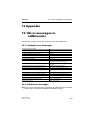
13.1 Error messages in LANmonitor
13.1.1 General error messages
13.1.2 VPN error messages
519
519
519
13.2 SNMP Traps
523
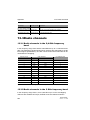
13.3 Radio channels
524
13.3.1 Radio channels in the 2,4 GHz frequency band
524
13.3.2 Radio channels in the 5 GHz frequency band
524
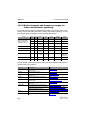
13.3.3 Radio channels and frequency ranges for Indoor and Outdoor operating
526
12
BAT54-Rail/F..
Release 7.54 06/08
13.4 RFCs supported
528
13.5 Glossary
529
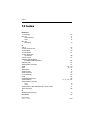
14 Index
BAT54-Rail/F..
Release 7.54 06/08
533
13
14
BAT54-Rail/F..
Release 7.54 06/08
Preface
1 Preface
U User manual installation and user manual configuration
The documentation of your device consists of two parts: The user manual installation and the user manual configuration.
D The hardware of the BAT devices is documented in the respective user
manual installation. Apart from a description of the specific feature set of
the different models, you find in the user manual installation information
about interfaces and display elements of the devices, as well as instructions for basic configuration by means of the wizards.
D You are now reading the user manual configuration. The user manual
configuration describes all functions and settings of the current version of
LCOS, the operating system of all BAT routers and BAT Router Access
Points. The user manual configuration refers to a certain software version,
but not to a special hardware.
It completes the user’s manual and describes topics in detail, which are
valid for several models simultaneously. These are for example:
D Systems design of the LCOS operating system
D Configuration
D Management
D Diagnosis
D Security
D Routing and WAN functions
D Firewall
D Quality of Service (QoS)
D Virtual Local Networks (VLAN)
D Wireless Networks
D Further server services (DHCP, DNS, charge management)
BAT54-Rail/F..
Release 7.54 06/08
15
Preface
U LCOS, the operating system of BAT devices
All BAT routers and BAT Router Access Points use the same operating system: LCOS. The operating system is not attackable from the outside, and
thus offers high security. The consistent use of LCOS ensures a comfortable
and constant operation of all BAT products. The extensive feature set is
available throughout all BAT products (provided respective support by hardware), and continuously receives further enhancements by free, regular software updates.
This user manual configuration applies to the following definitions of software, hardware and manufacturers:
D ’LCOS’ describes the device-independent operating system
D ’BAT’ stands as generic term for all BAT routers and BAT Router Access
Points
D ’Hirschmann’ stands as shortened form for the manufacturer, Hirschmann
Automation and Control GmbH, Germany
U Validity
The present user manual configuration applies to all BAT routers and BAT
Router Access Points with firmware version 7.54 or better.
The functions and settings described in this user manual configuration are
not supported by all models and/or all firmware versions.
Illustrations of devices, as well as screenshots always represent just examples, which need not necessarily correspond to the actual firmware version.
U Security settings
For a carefree use of your device, we recommend to carry out all security settings (e.g. Firewall, encryption, access protection, charge lock), which are not
already activated at the time of purchase of your device. The LANconfig wizard ’Check Security Settings’ will support you accomplishing this. Further information regarding this topic can be found in chapter ’Security’ → page 237.
We ask you additionally to inform you about technical developments and actual hints to your product on our Web page www.hirschmann.com, and to
download new software versions if necessary.
U This documentation was created by …
... several members of our staff from a variety of departments in order to ensure you the best possible support when using your BAT product.
16
BAT54-Rail/F..
Release 7.54 06/08
Preface
In case you encounter any errors, or just want to issue critics enhancements,
please do not hesitate to send an email directly to:
[email protected]
BAT54-Rail/F..
Release 7.54 06/08
17
Preface
18
BAT54-Rail/F..
Release 7.54 06/08
System design
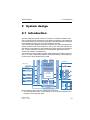
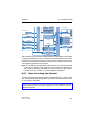
2.1 Introduction
2 System design
2.1 Introduction
Assignment via Switch
ISDN
IP-Redirect
IPX over PPTP/VPN
Configuration &
management:
WEBconfig, Telnet,
TFTP
IPX router
LANCAPI
Filter
DSL
IP router
Load Balancing
Filter
ADSL
IP masquerading
Assignment via Switch
Firewall / IDS / DoS / QoS
/ Policy Based Routing
DHCP client / PPP
DSLoL
LAN
Assignment via Switch
WLAN-1-1
to
WLAN-1-8
WLAN-2-1
to
WLAN-2-8
DMZ
Assignment over Switch
Switch
LAN
DSL
DSLoL
DMZ
Port-Mapping
WAN interfaces
IP module: NetBIOS, DNS,
DHCP server, RADIUS,
RIP, NTP, SNMP, SYSLOG, SMTP
Encryption:
802.11i/WPA/
VPN / PPTP
LAN interfaces
MAC/protocol filter
VPN services
BAT
RADIUS
user manage- client / server
ment
LAN bridge with “isolated mode”
Virtual LANs (VLAN)
N:N mapping
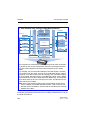
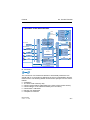
The BAT operating system LCOS is a collection of different software modules, the BAT devices themselves have different interfaces to the WAN and
LAN. Depending on the particular application, data packets flow through different modules on their way from one interface to another.
The following block diagram illustrates in abstract the general arrangement
of BAT interfaces and LCOS modules. In the course of this user manual configuration the descriptions of the individual functions will refer to this illustration to show important connections of the particular applications and to
deduce the resulting consequences.
The diagram can thus explain for which data streams the firewall comes into
play, or, in case of address translations (IP masquerading or N:N mapping),
at which place which addresses are valid.
Notes regarding the respective modules and interfaces:
D The IP router takes care of routing data on IP connections between the
interfaces from LAN and WAN.
BAT54-Rail/F..
Release 7.54 06/08
19
System design
2.1 Introduction
D With IP redirect requests in the LAN are redirected to a specific computer
D The firewall (with the services “Intrusion Detection”, “Denial of Service”
and “Quality of Service”) encloses the IP router like a shield. All connections via the IP router automatically flow through the firewall as well.
D BAT devices provide either a separate LAN interface or an integrated
switch with multiple LAN interfaces as interfaces to the LAN.
D BAT Router access points resp. BAT routers with wireless modules offer
additionally one or, depending on the respective model, also two wireless
interfaces for the connection of Wireless LANs. Depending on the model
every wireless interface can build up to eight different wireless networks
(“multi SSID”).
D A DMZ interface enables for some models a ’demilitarized zone’ (DMZ),
which is also physically separated within the LAN bridge from other LAN
interfaces.
D The LAN bridge provides a protocol filter that enables blocking of dedicated protocols on the LAN. Additionally, single LAN interfaces can be separated by the “isolated mode”. Due to VLAN functions, virtual LANs may
be installed in the LAN bridge, which permit the operating of several logical networks on a physical cabling.
D Applications can communicate with different IP modules (NetBIOS, DNS,
DHCP server, RADIUS, RIP, NTP, SNMP, SYSLOG, SMTP) either via
the IP router, or directly via the LAN bridge.
D The functions “IP masquerading” and “N:N mapping” provide suitable IP
address translations between private and public IP ranges, or also between multiple private networks.
D Provided according authorization, direct access to the configuration and
management services of the devices (WEBconfig, Telnet, TFTP) is provided from the LAN and also from the WAN side. These services are protected by filters and login barring, but do not require any processing by
the firewall. Nevertheless, a direct access from WAN to LAN (or vice versa) using the internal services as a bypass for the firewall is not possible.
D The IPX router and the LANCAPI access on the WAN side only the ISDN
interface. Both modules are independent from the firewall, which controls
only data traffic through the IP router.
D The VPN services (including PPTP) enable data encryption in the Internet
and thereby enable virtual private networks over public data connections.
D Depending on the specific model, either xDSL/Cable, ADSL or ISDN are
available as different WAN interfaces.
D The DSLoL interface (DSL over LAN) is no physical WAN interface, but
more a “virtual WAN interface”. With appropriate LCOS settings, it is possible to use on some models a LAN interface as an additional xDSL/Cable interface.
20
BAT54-Rail/F..
Release 7.54 06/08
Wireless LAN – WLAN
3.1 What is a Wireless LAN?
3 Wireless LAN – WLAN
3.1 What is a Wireless LAN?
Note: The following sections are a general description of the LCOS operating
system functions in wireless networks. The precise functions supported
by your device are described in its manual.
In this chapter we will show you briefly the technology of wireless networks.
In addition, we give you an overview of the various applications, functions
and abilities of your BAT Access Points and WLAN Router.
A Wireless LAN connects single terminals (e.g. PCs or notebooks) to a local
network (also LAN – Local Area Network). In contrast to a conventional LAN,
communication takes place via radio links rather than via network cables.
This is the reason why a Wireless LAN is also called a Wireless Local Area
Network (WLAN).
All functions of a cable-bound network are also available in a Wireless LAN:
access to files, servers, printers etc. is as possible as the connection of individual stations to an internal mail system or to the Internet access.
The advantages of Wireless LANs are obvious: notebooks and PCs can be
set up just where they are needed. Due to Wireless LANs, problems with
missing connections or structural alterations belong to the past.
3.1.1 Standardized radio transmission by IEEE
IEEE 802.11
BAT network products comply with the IEEE 802.11 standards. These standard’s family represents an extension to the already existing IEEE standards
for LANs, of which IEEE 802.3 for Ethernet is the most popular one. Within
the IEEE 802.11 family, different standards exist for the radio transmission in
different frequency ranges and with different speeds. BAT base stations and
WLAN client adapters support according to their respective type different
standards:
D IEEE 802.11a with up to 54 Mbps transfer rate in the 5 GHz band, up to
108 Mbps in turbo mode. (complement to standard)
D IEEE 802.11b with up to 11 Mbps transfer rate in the 2,4 GHz band
D IEEE 802.11g with up to 54 Mbps transfer rate in the 2,4 GHz band, up to
108 Mbps in turbo mode. (complement to standard)
BAT54-Rail/F..
Release 7.54 06/08
21
Wireless LAN – WLAN
3.1 What is a Wireless LAN?
U IEEE 802.11a: 54 Mbps
IEEE 802.11a describes the operation of Wireless LANs in the 5 GHz frequency band (5,15 GHz to 5,75 GHz), with up to 54 Mbps maximum transfer
rate. The real throughput depends however on the distance and/or on the
quality of the connection. With increasing distance and diminishing connecting quality, the transmission rate lowers to 48 Mbps, afterwards to 36 Mbps
etc., up to a minimum of 6 Mbps. The distance of transmission ranges from
up to 125 m in open expanses, in buildings typically up to 25 m. The IEEE
802.11a standard uses OFDM (Orthogonal Frequency Division Multiplexing)
as modulation scheme.
OFDM
In the 5 GHz frequency band, the OFDM modulation scheme is used for IEEE
802.11a. OFDM is a modulation scheme, which utilizes multiple independent
carrier frequencies for the signal transmission, and which modulates these
multiple carriers each with a reduced data transfer rate. Thus the OFDM
modulation scheme is very insensitive in particular to echoes and other impairments and enables high data transfer rates.
Turbo mode
In ’turbo mode’, BAT Wireless Router base stations are able to use simultaneously two radio channels and can so increase the transfer rate up to maximum 108 Mbps. The turbo mode can be used in conjunction with the IEEE
802.11a standard between BAT base stations and WLAN wireless network
cards. The increase of the transfer rate must be switched on in the base station, but can also reduce the transmitting power and the range of the radio
connection.
U IEEE 802.11b: 11 Mbps
IIEEE 802.11b describes the operation of local Wireless LANs in the ISM frequency band (Industrial, Scientific, Medical: 2.4 up to 2.483 GHz). The maximum transfer rate is up to 11 Mbps. The real through-put depends however
on the distance and/or on the quality of the connection. With increasing distance and diminishing connecting quality the transmission rate lowers to 5,5
Mbps, afterwards to 2 and finally to 1 Mbps. The range of the transmission
distances is between up to 150 m in open expanses and in buildings typically
up to 30 m. Due to different frequency bands in use, IEEE 802.11b is not
compatible to IEEE 802.11a.
22
BAT54-Rail/F..
Release 7.54 06/08
Wireless LAN – WLAN
3.1 What is a Wireless LAN?
DSSS
For shielding against interferences by other transmitters, which have possibly the same frequency band, the DSSS procedure (Direct Sequence Spread
Spectrum) is used for IEEE 802.11b in the 2,4 GHz frequency band. A transmitter normally uses only a very narrow range of the available frequency
band for transmission. If exactly this range is used by another transmitter, interferences in transmission would be the result. With the DSSS procedure
the transmitter uses a broader spread of the possible frequencies and becomes more insensitive to narrow-band disturbances then. This procedure is
also used in military range for increasing tap-proof security.
U IEEE 802.11g: 54 Mbps
The IEEE 802.11g standard works likewise with up to 54 Mbps data transmission rate in the 2,4 GHz ISM-frequency band. Contrary to IEEE 802.11b,
the OFDM modulation is used for IEEE 802.11g, like already introduced for
IEEE 802.11a. IEEE 802.11g contains a special compatibility mode that ensures a downward compatibility to the popular IEEE 802.11b standard . However, in this compatibility mode you encounter reduced transmission speeds.
Due to the different frequency bands, IEEE 802.11g can not be compatible
to IEEE 802.11a. The transmission distances of IEEE 802.11g products are
comparable with those of IEEE 802.11b products.
Turbo mode
With the 802.11g standard in 'turbo mode' the transfer rate can be increased
to a maximum of 108 Mbps, by using two radio channels. But as a 2.4 GHz
band uses less channels than the 5 GHz band, the turbo mode limits in this
case the options of channels.
U Transfer rates
The indicated transfer rates are always to be interpreted as gross data rates,
i.e. the entire protocol overhead - as for example the complex protocols to secure the radio transmission - is included in the indicated transfer rates. The
net data transfer rate can be thus lower than the indicated gross data rates,
typically over up to the half for all IEEE 802.11 standards mentioned above.
BAT54-Rail/F..
Release 7.54 06/08
23
Wireless LAN – WLAN
3.1 What is a Wireless LAN?
U Ranges
The actually obtained distances for radio transfers depend strongly on the individual environment. In particular influences of noise and obstacles have an
effect on the range. Decisive is an optimal placement of the radio stations
(both network adapters and base stations). For further increase of the transfer distance, we recommend the operation with additional antennas.
U IEEE standards
In order to guarantee a maximum of compatibility, Hirschmann Systems fully
complies with the industry standards of the IEEE1 described in the preceding
paragraph. For this reason, your BAT base station operates without problems and with reliably also with devices of other manufacturers.
Your BAT base station supports - according to the model type - the standards
IEEE 802.11g (downward-compatible to IEEE 802.11b), and/or IEEE
802.11a.
1.
Institute of Electrical and Electronic Engineers – International association, which established i.a. numerous
technology standards.
24
BAT54-Rail/F..
Release 7.54 06/08
Wireless LAN – WLAN
3.1 What is a Wireless LAN?
The operation of the integrated wireless card of your base station is only possible in one single frequency band, that is, either 2,4 GHz or 5 GHz. Thus a
simultaneous operation of IEEE 802.11g and IEEE 802.11a is not possible.
Since IEEE 802.11g is downward-compatible to IEEE 802.11b, an simultaneous operating of these two standards is possible, but with certain speed
constraints.
U Transfer rates in
compatibility mode
Please notice that the reached
data transfer rates depend on
the used 2,4 GHz mode. You
will achieve the highest transfer rates with a base station
operating in the 802.11g
mode. The transfer rate will go
down when starting the compatibility mode, even, if only
inactivated 802.11b stations
are near to your base station.
When these 802.11b stations
start to be activated in a wireless network with operating
compatibility mode, the actual
transfer rate will fall again.
That’s why you should only
activate the compatibility
mode, when you have really
operating 802.11b and
802.11g stations in your wireless network.
Note: Please notice that not all frequencies are permitted in each country!
You will find a table with the allotted frequencies and the permission regulations in the appendix.
3.1.2 Operation modes of Wireless LANs and base
stations
Wireless LAN technology and base stations in Wireless LANs are used in the
following operation modes:
BAT54-Rail/F..
Release 7.54 06/08
25
Wireless LAN – WLAN
3.1 What is a Wireless LAN?
D Simple direct connections between terminals without base station (ad-hoc
mode, only with 2.4 GHz)
D Larger Wireless LANs, connection to LANs with one or more base stations (infrastructure network)
D Connecting two LANs via a direct radio link (point-to-point mode, point-tomultipoint)
D Connecting of devices with Ethernet interface via base stations (client
mode)
D Extending an existing Ethernet network with WLAN (bridge mode)
D Multiple radio cells with one access point (Multi-SSID)
U The ad-hoc mode
When two terminals are equipped with compatible wireless interfaces, they
both can communicate directly via radio. This simplest use is the so-called
ad-hoc mode.
Only in IEEE 802.11b or IEEE 802.11g standard
In ad-hoc networks you connect two or more PCs with own wireless interfaces directly together for building a Wireless LAN.
This operation mode is generally called peer-to-peer network (spontaneous
network). PCs can immediately get in touch and exchange data.
U The infrastructure network
By use of one or more base stations (also called access point), a Wireless
LAN becomes more comfortable and more efficient. A Wireless LAN with one
or more base stations is referred to as an infrastructure network in Wireless
LAN terminology.
Note: In some devices the access point is built in, so called WLAN router.
26
BAT54-Rail/F..
Release 7.54 06/08
Wireless LAN – WLAN
3.1 What is a Wireless LAN?
Interesting applications arise for the Wireless LAN from the LAN connection
of base stations:
D Connecting the Wireless LAN to an existing LAN
D Extending the coverage of a Wireless LAN
Additionally, the use of a base station enables a central administration of the
Wireless LAN.
Connection to an existing LAN
An infrastructure network is ideally suitable as an extension to existing wired
LANs. For extension of a LAN in areas, where a wiring is not possible or uneconomical, the infrastructure network represents an ideal alternative.
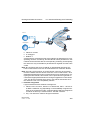
Wireless LAN
LAN
base station
Larger extension by roaming function
The area, in which mobile stations can get in touch with a base station, is
called radio cell.
If the range of a radio cell is not sufficient any longer to serve all mobile stations of a wireless network, several base stations can be brought in action. It
is possible to change from a radio cell into another one without interruption
of the network connection. The transmission of roaming information and data
between the base stations is enabled by the wired LAN connection.
BAT54-Rail/F..
Release 7.54 06/08
27
Wireless LAN – WLAN
3.1 What is a Wireless LAN?
Mobile station leaves radio cell A and …
… changes into radio
cell B.
connection via
LAN
workstation
radio cell A
radio cell B
In the example above, the roaming function of the mobile station enables the
access to the workstation in radio cell A also after changing into radio cell B.
After the radio cell change, the base station in radio cell B passes on the data
of the mobile station via LAN to the base station in radio cell A. From there,
they arrive via radio at the workstation in radio cell A. In this way, the connection between both devices remains existing at any time.
A Wireless LAN can consist of as many as desired radio cells. Thus the extension of a Wireless LAN is unlimited.
U Base station as router
The BAT Wireless Router base station possesses a WAN connector for all
current broadband modems with cable-bound Ethernet connection (DSL or
cable modem). In this operation mode, the base station offers all functions of
a complete IP and IPX router as well. The base station serves in this connection variant as gateway to the Internet. The router checks for all received data
packets whether they need to be transferred to another network or workstation. The router itself establishes the connections as required.
The integrated Stateful Inspection Firewall prevents effectively the penetration of undesired data traffic into the own network by permitting incoming data
only as reaction to outgoing data traffic. For accessing the Internet, the IP
masquerading function of the router hides all workstations of the LAN behind
a single public IP address. The real identities (IP addresses) of the individual
workstations remain concealed. Firewall filters of the router permit specific IP
addresses, protocols and ports to be blocked. With MAC address filters it is
also possible to specifically control the access of workstations in the LAN to
the IP routing function of the device.
28
BAT54-Rail/F..
Release 7.54 06/08
Wireless LAN – WLAN
3.1 What is a Wireless LAN?
WLAN
firewall
LAN
Internet
WAN
base station
DSL modem or any broadband
connection
U VPN pass-through
VPN technology (VPN=Virtual Private Network) is more and more frequently
in use to protect sensitive data. The BAT base station is able to route and
mask simultaneously the encrypted data between a VPN client of the WLAN
and another workstation of the cable-bound LAN. This “passing-through” of
VPN encrypted data is called in technical jargon “VPN pass-through”. Following are provided:
D PPTP pass through
D IPsec pass through
VPN client
VPN remote station
Note: The BAT base stations support VPN pass-through function for multiple
stations within a wireless network.
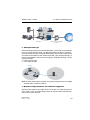
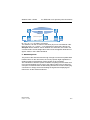
U Wireless bridge between two Ethernet segments
With two base stations, two LANs can be connected via a radio link (point-topoint mode). In this so-called bridge mode, all data is transferred automatically to the remote network.
BAT54-Rail/F..
Release 7.54 06/08
29
Wireless LAN – WLAN
3.1 What is a Wireless LAN?
By the use of narrow beam antennas, also larger distances can be bridged
securely. An additional increase of reach can be achieved by use of further
base stations, which operate in relay mode between two LAN segments.
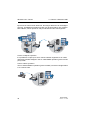
Point-to-multipoint operation
It is possible to couple up to seven remote network segments to an united
network by wireless bridges in the so-called P2MP operation (point-to-multipoint) mode.
Point-to-station operation
The so-called P2Station operation (point-to-station) connects a single station
is to a remote LAN.
30
BAT54-Rail/F..
Release 7.54 06/08
Wireless LAN – WLAN
3.1 What is a Wireless LAN?
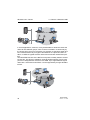
U Base station in client mode
For binding single devices with Ethernet interfaces to a Wireless LAN, BAT
Wireless base stations can be put into the so-called client mode, in which
they behave like a conventional Wireless LAN adapter and not like a base
station. Due to the client mode, it is also possible to integrate devices like
PCs or printers having only one Ethernet interface into a Wireless LAN.
base stations in
client mode
base stations in
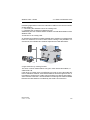
standard mode
Note: An Access Point in normal mode further clients can log on, but not in
client mode.
U Multiple radio cells with Multi-SSID
Conventionally, a wireless network card supports exactly one radio cell.
These radio cells are given a network name, known as the ‘SSID’ (Service
Set Identifier), that is entered into the access points and network cards during
configuration. Certain settings that apply to the radio cell can be defined under the SSID during the configuration of the access point. The settings include, for example, the data transfer speed and the first WEP key, which is
also used as passphrase for encryption with 802.11i and WPA. Those clients
that are programmed with the SSID can make use of the radio cell and work
with the parameters as defined. The access point treats all clients on an
equal basis
BAT54-Rail/F..
Release 7.54 06/08
31
Wireless LAN – WLAN
3.1 What is a Wireless LAN?
SSID='WLAN'
LAN
In some applications, however, it may be desirable to divide the clients the
radio cell into different groups, each of which is treated in a certain way by
the access point. It may be necessary, for example, to operate a public wireless network without any encryption simultaneous to a protected, 802.11i-,
WPA- or WEP-encrypted wireless network that excludes unauthorized parties.
The Multi-SSID function of the BAT access points is ideally suited to scenarios like this. This function enables a physical WLAN interface of an access
point to be assigned with more than one SSID. Up to eight different logical
radio cells—each with its own SSID—can be supported by a single WLAN interface.
SSID='PUBLIC'
SSID='CLOSED'
LAN
32
BAT54-Rail/F..
Release 7.54 06/08
Wireless LAN – WLAN
3.2 Development of WLAN security
3.2 Development of WLAN
security
The WLAN standards WPA and 802.11i are currently redeeming the reputation of WLAN security, an issue which has recently been under attack. The
processes incorporated into the original standard proved insufficient in practice. This lack led on the one hand to a series of proprietary extensions of the
standard, like "CKIP" from Cisco, or "KeyGuard" from Symbol Technologies,
and on the other hand to solutions which offered the required security on
higher protocol layers with tools like PPTP or IPSec. All these processes are
quite functional, but they introduce limitations, for instance those relative to
interoperability or data transmission rates.
In the standard 802.11i released in Summer, 2004, the IEEE Committee has
redefined the topic "WLAN and security" from the ground up. The result is a
set of standardized methods that enable the construction of secure and manufacturer-independent WLANs in line with current standards.
On the way from the original WEP of the 802.11 standard to 802.11i, a whole
series of concepts have arisen that have tended to increase confusion and
insecurity among the users. This chapter should help to explain the concepts
and the processes used, in chronological order of their development.
3.2.1 Some basic concepts
Even though one constantly hears the blanket term 'Security' when talking
about computer networks, it is still important for the coming exposition to differentiate a little more closely between the requirements it actually entails.
U Authentication
The first point in security is access security:
D Here, a protective mechanism is involved which allows access to the network only to authorized users.
D On the other hand, however, it must also be ensured that the client is connected to the precise desired access point, and not with some other access point with the same name which has been smuggled in by some
nefarious third party. Such an authentication can be provided, for example, using certificates or passwords.
BAT54-Rail/F..
Release 7.54 06/08
33
Wireless LAN – WLAN
3.2 Development of WLAN security
U Authenticity
Authenticity: Proof of the authorship of the data and the originality of the data
content; the process of establishing this proof is known as authentication.
U Integrity
Once access is provided, one would like to ensure that data packets reach
the receiver without any falsification, that is, that no-one can change the
packets or insert other data into the communication path. The manipulation
of data packets themselves cannot be prevented, but changed packets can
indeed be identified using suitable checksum processes, and then discarded.
U Confidentiality
Quite separate from access security is confidentiality, that is, unauthorized
third parties must not be able to read the data traffic. To this end, the data are
encrypted. This sort of encryption process is exemplified by DES, AES, RC4,
or Blowfish. Along with encryption, of course, there must also be a corresponding decryption on the receiving end, generally with the same key (a socalled symmetric encryption process). The problem naturally then arises,
how the sender can give the key to the receiver for the first time—a simple
transmission could very easily be read by a third party, who could then easily
decrypt the data traffic.
In the simplest case, this problem is left to the user, that is, one simply assumes that the user can make the key known at both ends of the connection.
In this case, one speaks of pre-shared keys, or 'PSK'.
More sophisticated processes come into play when the use of pre-shared
keys is impractical, for instance in an HTTP connection built over SSL—in
this case, the user can't retrieve a key from a remote web server quite so easily. In this case, so-called asymmetric encryption methods such as RSA can
be used, that is, to decrypt the data, a different key is used than the one used
to encrypt it, meaning that key pairs are used. Such methods are, however,
much slower than symmetric encryption methods, which leads to a twophase solution:
D The sender possesses an asymmetric key pair. It transmits the public part
of the key pair, i.e. the key for encryption, to the receiver as a certificate,
for example. Since this part of the key pair cannot be used for decryption,
there are no misgivings with regard to security.
34
BAT54-Rail/F..
Release 7.54 06/08
Wireless LAN – WLAN
3.2 Development of WLAN security
D The receiver selects any symmetrical key. This symmetrical key that is
used both for encryption and for decryption, must now be securely transmitted to the sender. It is encrypted with the sender's public key and returned to the sender. The only way that the symmetrical key can be
decrypted again is with the sender's private key. Potential eavesdroppers
observing the key exchange cannot decrypt this information, and consequently the transmission of the symmetrical key is secure.
This method can be used for the safe transmission of symmetrical keys via
the Internet. In the following sections, we will see these methods again,
sometimes in modified form.
3.2.2 WEP
WEP is an abbreviation for Wired Equivalent Privacy. The primary goal of
WEP is the confidentiality of data. In contrast to signals which are transmitted
over cables, radio waves spread out in all directions—even into the street in
front of the house and other places where they really aren't desired. The
problem of undesired interception is particularly obvious in wireless data
transmission, even though it can also arise in larger installations with wired
networks—however, access to cables is far more easily restricted than is the
case with radio waves.
During the development of the WLAN security standard, the IEEE Committee
did not intend to develop a "perfect" encryption method. Such high-security
encryption methods are, for instance, required and also used in electronic
banking—in this case, however, the applications themselves use high-quality
encryption methods, and it would be unnecessary to repeat this effort at the
radio transmission level. With the new security standards, only those applications which normally work without encryption in wired LANs should be provided with sufficient security against eavesdropping by unauthorized third
parties.
WEP is a symmetrical method of encryption and uses RC4 algorithm as its
basic encryption technology, a process already well-known in other areas
and considered highly secure. RC4 uses a key between 8 and 2048 bits in
length, which is used to generate a pseudo-random series of bytes using a
predetermined process. The data packet for encryption is then XOR'd byte
by byte with this byte stream. The receiver simply repeats this procedure with
the same key and in the same order to produce the original data packet
again.
BAT54-Rail/F..
Release 7.54 06/08
35
Wireless LAN – WLAN
3.2 Development of WLAN security
However, RC4 has one serious disadvantage: one may only use a particular
RC4 key once for a single packet, as two different packets that have been
coded with the same RC4 key potentially provide the basis to reproduce the
original data. As it would be impracticable for the user to enter a new code
key for every data packet, WEP combines this key with an additional internal
key, the initial vector (IV). This is automatically changed from packet to packet.
The IEEE standard originally foresaw a relatively short key length of 40 bits,
which was probably oriented towards the then-existing US export restrictions
on strong cryptography; this variant in combination with the 24 bits of the IV
is usually referred to as WEP64. Most WLAN cards today support a variant
in which the user can configure a 104-bit key, which results in a 128 bit long
RC4 key—correspondingly, this is often called WEP128. More seldom are
key lengths of 128 bits (WEP152) or 232 bits (WEP 256). In principle RC4
can work with key lengths of up to 2048 bits (WEP keys of up to 2024 bits),
although in practice key lengths reach a simple limit at which the user can
manage to enter the columns of digits without making a mistake.
The IEEE standard specifies that up to four different WEP keys can exist in
one WLAN. The sender encodes the number of the WEP key used in the encrypted packet along with the initial vector, so that the receiver can use the
appropriate key. The idea behind this was that old keys in a WLAN could
gradually be exchanged for new keys, in that stations which had not yet received the new key could still use an old key during a transition period.
One of the chief weakness of WEP is the length of the initial vector, which is
far too short. As mentioned previously, the repetition of a key with RC4 presents a significant security loophole which, with a length of just 24 bits, can
occur within just a few hours depending on the data rate. Since particular portions of the encrypted data packets can quickly offer conclusive information
about the key, an eavesdropper only needs to process a small amount of the
data traffic with specialized sniffer tools in order to crack the key. These
weaknesses unfortunately degraded WEP to an encryption scheme which at
best could be used to protect a home network against 'accidental eavesdroppers.'
36
BAT54-Rail/F..
Release 7.54 06/08
Wireless LAN – WLAN
3.2 Development of WLAN security
3.2.3 WEPplus
As explained in the previous section, the use of 'weak' IV values was the
problem which weakened the WEP process most. A first 'quick shot' to secure WLANs against this kind of program was the simple notion that the weak
IV values are known, and that they could simply be skipped during encryption—since the IV used is after all transmitted in the packet, this procedure
would be completely compatible with WLAN cards which didn't understand
this extension, dubbed WEPplus. A true improvement in security would naturally only result once all partners in the WLAN were using this method.
In a network equipped with WEPplus, a potential attacker again has the
chore of listening to the entire data traffic, waiting for IV repetitions—simply
waiting for the few packets with weak IVs is no longer an option. This raises
the bar for an attacker once again. Objectively speaking, WEPplus is a slight
improvement--it is suitable for home use, provided that the key of reconfigured often enough. For use in a professional environment, however, this is
not sufficient.
3.2.4 EAP and 802.1x
Obviously, an 'add-on' like WEPplus can't eliminate the basic problem of tooshort IVs, without changing the format of packets on the WLAN, thus rendering all existing WLAN cards incompatible. There is, however, a possibility of
solving several of our problems with one central change: no longer use the
formerly fixed WEP key, but to negotiate them dynamically instead. As the
process to be used for this purpose, the Extensible Authentication Protocol
has emerged. As the name suggests, the original purpose of EAP is authentication, that is, the regulated access to a WLAN—the possibility of installing
a valid WEP key for the next session is more or less a byproduct. Figure 2
shows the basic process of a session secured by EAP.
BAT54-Rail/F..
Release 7.54 06/08
37
Wireless LAN – WLAN
Client
3.2 Development of WLAN security
Access point
RADIUS server
WLAN registration
EAP/802.1x negotiation
sharing of Master Secret
session key
Normal data traffic
new session key
more normal data traffic
Figure 2: Schematic process of a WLAN session with EAP/802.1x
In the first phase, the client registers with the access point as usual, and enters the state in which it can now send and receive over the access point in
normal WEP or WEPplus—but not with EAP, because in this state the client
still doesn't have a key to secure its data traffic from eavesdropping. Instead,
the client is in an 'intermediate state' from the point of view of the access
point, in which only particular packets from the client are forwarded, and
these are only directed to an authentication server. These packets are the
EAÜ/802.1x mentioned previously. The access point packs these packets in
RADIUS queries and sends them on to the authentication server. The access
point converts the replies coming from the RADIUS server back into EAP
packets, and sends them back to the client.
38
BAT54-Rail/F..
Release 7.54 06/08
Wireless LAN – WLAN
3.2 Development of WLAN security
The access point is thus a sort of middle man between client and server. it
doesn't have to check the contents of these packets, it just has to check that
no other data traffic to or from the client can occur. Over this "tunnel" through
the access point, the client and server authenticate one another, that is, the
server checks the client's access privilege to the network, and the client
checks that it is talking to the right network. "Wild" access points set up by
hackers can be recognized in this way.
A whole series of authentication processes exist which can be used in this
tunnel. A current process (and one supported by Windows XP) is for instance
TLS, in which server and client exchange certificates; another is TTLS, in
which only the server supplies a certificate—the client is authenticated using
only a username and password.
After the authentication phase, a secure tunnel even without WEP encryption
has been set up, in which the access point is connected in the next step. For
this, the RADIUS server sends the so-called 'Master Secret', a session key
calculated during the negotiation, to the access point. The LAN behind the
access point is considered secure in this scenario, so that this transmission
can be performed in clear text.
With this session key, the access point now takes over the tunnel and can
use it to provide the actual WEP key to the client. Depending on the capabilities of the access point hardware, this can be a true session key (that is, a
WEP key which will only be used for data packets between the access point
and precisely this client), or a so-called group key, which the access point will
use for communication with multiple clients. Classical WEP hardware can
usually handle only group keys, these being the four mentioned in the chapter on WEP.
The particular advantage of this procedure is that the access point can regularly change the WEP key over the EAP tunnel, that is, it can perform a socalled rekeying. In this way, WEP keys can be replaced by new ones long
before they run the risk of being cracked due to IV collisions. A common 'use
time' for such WEP keys might be 5 minutes.
The disadvantage of the procedure is its complexity. The maintenance of the
central RADIUS server and the certificates stored there is generally only possible in large installations with a separate IT department—it is less suitable
for use in the home or in smaller companies. These practical hurdles have
thus limited EAP/802.1x to professional use so far—the home user must simply make do with WEPplus, or address security problems on the applications
level.
BAT54-Rail/F..
Release 7.54 06/08
39
Wireless LAN – WLAN
3.2 Development of WLAN security
3.2.5 TKIP and WPA
As clarified in the last section, the WEP algorithm is flawed and insecure in
principle; the measures taken so far were largely either 'quick fixes' with limited improvement, or so complicated that they were basically impractical for
home use or smaller installations.
After the problems with WEP became public knowledge, the IEEE began with
the development of the standard IEEE 802.11i. As an interim solution, the
WiFi Alliance defined the Wifi Protected Access (WPA) 'standard'. WPA uses
the following changes:
D TKIP and Michael as replacement for WEP
D A standardized handshake procedure between client and access point for
determination/transmission of the session key.
D A simplified procedure for deriving the Master Secret mentioned in the last
section, which can be performed without a RADIUS server.
D Negotiation of encryption procedure between access point and client.
U TKIP
TKIP stands for Temporal Key Integrity Protocol. As the name suggests, it
involves an intermediate solution for temporary use until a truly strong encryption procedure is introduced, but which deals with the problems of WEP,
never the less. A requirement of this method was compatibility with existing
WEP/RC4 hardware.
Encryption makes use of components familiar from WEP but benefits from
decisive improvements with the "Michael hash" from improved encryption
and the TKIP method for calculation of the RC4 key. Furthermore, the internally incremented IV transmitted in clear text in the packet is 48 bits long instead of 24--thus the problem with the repeating IV value is practically
excluded.
As a further detail, TKIP also mixes the MAC address of the sender into the
calculation of the key. This ensures that the use of identical IVs by different
senders cannot lead to identical RC4 keys and thus again to attack possibilities.
The Michael hash does not, however, represent a particularly tough cryptographic hurdle: if the attacker can break the TKIP key or get encrypted packets past the CRC check via modifications similar to those for WEP, then not
many barriers remain. For this reason, WPA defines countermeasures if a
WLAN card detects more than two Michael errors per minute: both the client
and the access point break data transfer off for one minute, afterwards renegotiating TKIP and Michael keys.
40
BAT54-Rail/F..
Release 7.54 06/08
Wireless LAN – WLAN
3.2 Development of WLAN security
U The key handshake
In the discussion of 802.1x it was already noted that EAP/802.1x provides a
possibility to inform the client at the outset of a session of the key valid for it.
WPA now places that on a standardized basis, and considers the sessionkey option offered by modern access points that, in addition to the four 'global' keys, assigns each registered client with a session key that is used exclusively with data packets to or from that client. The key handshake under
WPA involves first of all the exchange of the pairwise keys and then the
group keys.
After a successful group key handshake, the access point can release the client for normal data transfer. The access point is free to perform a rekeying
again during the session using the same type of packets. In principle, the client may also request rekeying from the access point.
WPA also takes the case of older WLAN hardware into account, in which the
access point does not support pairwise keys, but only group keys. The first
phase of the handshake in this case proceeds exactly as before, but doesn't
result in the installation of a pairwise key—the group key handshake simply
proceeds in clear text, but an encryption in the EAP packets themselves prevents an attacker from simply reading the keys.
U WPA with passphrase
The handshake described in the previous section runs strictly under WPA,
i.e. the user will never have to define any TKIP or Michael keys. In environments in which no RADIUS server is available to provide master secrets (for
instance in smaller companies or home networks), WPA therefore provides
the PSK method besides authentication using a RADIUS server; here, the
user must enter a passphrase of 8 to 32 characters on the access point and
on all stations, from which the master secret is calculated along with the SSID
used using a hash procedure. The master secret is therefore constant in such
a PSK network, although different TKIP keys still result.
In a PSK network—similar to classical WEP—both access security and confidentiality depend on the passphrase not being divulged to unauthorized
people. As long as this is the case, WPA-PSK provides significantly improved
security against break-ins and eavesdropping over any WEP variant. For
larger installations in which such a passphrase would have to be made
known to too large a user community for it to be kept secret, EAP/802.11i is
used in combination with the key handshake described here.
BAT54-Rail/F..
Release 7.54 06/08
41
Wireless LAN – WLAN
3.2 Development of WLAN security
U Negotiating the encryption method
Since the original WEP definition specified a fixed key length of 40 bits,
the registration of a client at an access point only had to communicate whether encryption should be used or not. Key lengths exceeding 40 bits require
that the key length is announced. WPA provides a mechanism with which client and access point can agree on the encryption and authentication procedures to be used. The following information is made available:
D The encryption method to be used for broadcasts in this network (also the
type of group key). Each client wanting to register in a WPA-WLAN must
support this procedure. Here, besides TKIP, WEP is also still allowed, in
order to support mixed WEP/WPA networks—in a pure WPA network,
TKIP will be selected.
D A list of encryption methods which the access point provides for the pairwise key—here, WEP is explicitly disallowed.
D A list of authentication methods a client may use to show itself to the
WLAN as authorized for access—possible methods are currently EAP/
802.1x or PSK.
As mentioned, the original WPA standard specifies only TKIP/Michael as an
improved encryption method. With the further development of the 802.11i
standard, the AES/CCM method described below was added. In a WPA network it is now possible for some clients to communicate with the access point
using TKIP, while other clients use AES.
3.2.6 AES and 802.11i
In mid-2004 the IEEE approved the long-awaited 802.11i standard that places the entire security concept of WLAN on a new basis. As mentioned in the
last section, WPA has already implemented a whole series of concepts from
802.11i—so in this section we will only describe the components which are
new compared to WPA.
U AES
The most obvious extension is the introduction of a new encryption process,
namely AES-CCM. As the name already hints, this encryption scheme is
based on DES's successor AES, in contrast to WEP and TKIP, which are
both based on RC4. Since only the newest generation of WLAN chips contain
AES hardware, 802.11i continues to define TKIP, but with the opposite prerequisites: any 802.11i-compliant hardware must support AES, while TKIP is
optional—in WPA that was exactly the other way around.
42
BAT54-Rail/F..
Release 7.54 06/08
Wireless LAN – WLAN
3.2 Development of WLAN security
The suffix CCM denotes the way in which AES is used in WLAN packets. The
process is actually quite complicated, for which reason CCM is only sensibly
implemented in hardware—software-based implementations are possible,
but would result in significant speed penalties due to the processors commonly used in access points.
In contrast to TKIP, AES only requires a 128-bit key, with which both the encryption and protection against undetected changes to packets is achieved.
Furthermore, CCM is fully symmetric, i.e. the same key is used in both communications directions—a standards compliant TKIP implementation, on the
other hand, requires the use of different Michael keys in the send and receive
directions, so that CCM is significantly simpler in use than TKIP.
Similar to TKIP, CCM uses a 48-bit Initial Vector in each packet—an IV repetition is impossible in practice. As in TKIP, the receiver notes the last IV
used and discards packets with an IV which is equal to or less than the comparison value.
U Pre-authentication and PMK caching
802.11i is intended to help with the use of WLAN for speech connections
(VoIP) in enterprise networks. Especially in connection with WLAN-based
wireless telephony, quick roaming (switching from one access point to another without lengthy interruptions) is of special significance. In telephone conversations, interruptions of 100 milliseconds are irritating, but the full
authentication process over 802.1x, including the subsequent key negotiation with the access point, can take significantly longer.
For this reason, the so-called PMK caching was introduced as a first measure. The PMK serves as the basis for key negotiation in an 802.1x authentication between client and access point. In VoIP environments it is possible
that a user moves back and forth among a relatively small number of access
points. Thus it may happen that a client switches back to an access point in
which it was already registered earlier. In this case it wouldn't be sensible to
repeat the entire 802.1x authentication again. For this reason, the access
point can provide the PMK with a code, the so-called PMKID, which it transmits to the client. Upon a new registration, the client uses the PMKID to ask
whether this PMK is still stored. If yes, the 802.1x phase can be skipped and
the connection is quickly restored. This optimization is unnecessary if the
PMK in a WLAN is calculated from a passphrase as this applies everywhere
and is known.
BAT54-Rail/F..
Release 7.54 06/08
43
Wireless LAN – WLAN
3.2 Development of WLAN security
A second measure allows for some acceleration even in the case of first-time
registration, but it requires a little care on the part of the client. The client must
already detect a degrading connection to the access point during operation
and select a new access point while it is still in communication with the old
access point. In this case it has the opportunity to perform the 802,1x negotiation with the new access point over the old one, which again reduces the
"dead time" by the time required for the 802.1x negotiation.
3.2.7 Summary
After the security loopholes in WEP encryption became public knowledge,
the presentation of short-term solutions such as WEPplus and the intermediate steps like WPA, the IEEE committee has now presented the new WLAN
security standard 802.11i. The TKIP procedure used by WPA is based on the
older RC4 algorithm, the foundation of WEP. AES is the first important and
conclusive step towards a truly secure encryption system. 802.11i/AES have
confined the practical and theoretical security loopholes in previous methods
to history.
The AES procedure provides security on a level that satisfies the Federal Information Standards (FIPS) 140-2 specifications that are required by many
public authorities.
Hirschmann equips its 54Mbps products with the Atheros chip set featuring
a hardware AES accelerator. This guarantees the highest possible level of
encryption without performance loss.
The user-friendly pre-shared key procedure (entry of a passphrase of 8-63
characters in length) makes 802.11i quick and easy for anybody to set up.
Professional infrastructures with a larger number of users can make use of
802.1x and RADIUS servers.
In combination with further options such as Multi-SSID and VLAN tagging, it
is possible to provide highly secure networks for multiple user groups and
with different levels of security.
D VLAN tagging is available as of LCOS version 3.32.
D Multi-SSID is available as of LCOS 3.42.
D Hirschmann provides the PSK procedure as of the LCOS version 3.50.
D 802.1x will be supported as of LCOS version 3.52.
44
BAT54-Rail/F..
Release 7.54 06/08
Wireless LAN – WLAN
3.3 Protecting the wireless network
3.3 Protecting the wireless
network
A wireless LAN does not, like conventional LAN, use cable as the transmitting medium for data transfer, but the air instead. As this medium is openly
available to any eavesdropper, the screening of the data in a WLAN is an important topic.
Depending on how critical WLAN security is for your data, you can take the
following steps to protect your wireless network:
V Activate the "Closed network function". This excludes all WLAN clients
using "Any" as the SSID, and those that do not know your network SSID.
(’Network settings’ → page 79)
V Do not use your access point's default SSID. Only take a name for your
SSID that cannot be guessed easily. The name of your company, for example, is not a particularly secure SSID. (’Network settings’ → page 79)
V If you know exactly which wireless network cards are permitted to access
your WLAN, you can enter the MAC addresses of these cards into the access control list, thus excluding all other cards from communications with
the access point. This reduces access to the WLAN only to those clients
with listed MAC addresses. (’Access Control List’ → page 54)
V Use encryption on the data transferred in the WLAN. Activate the strongest possible encryption available to you ((802.11i with AES, WPA or
WEP) and enter the appropriate keys or passphrases into the access
point and the WLAN clients (’Encryption settings’ → page 57 and ’WEP
group keys’ → page 60).
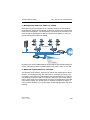
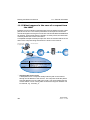
V Regularly change the WEP key. Also change the standard key (’Encryption settings’ → page 57) in the configuration. Alternatively, you can use
a cron job to automatically change the key every day, for example (’Regular Execution of Commands’ → page 491). The passphrases for 802.11i
or WPA do not have to be changed regularly as new keys are generated
for each connection anyway. This is not the only reason that the encryption with 802.11i/AES or WPA/TKIP is so much more secure that the now
aged WEP method.
V If the data is of a high security nature, you can further improve the WEP
encryption by additionally authenticating the client with the 802.1x method
(’IEEE 802.1x/EAP’ → page 83) or activate an additional encryption of the
WLAN connection as used for VPN tunnels (’IPSec over WLAN’
→ page 84). In special cases, a combination of these two mechanisms is
possible.
BAT54-Rail/F..
Release 7.54 06/08
45
Wireless LAN – WLAN
3.3 Protecting the wireless network
Note: Further information is available from our web site www.hirschmann.com under Support FAQ.
3.3.1 LEPS—BAT Enhanced Passphrase Security
U LEPS remedies the security issues presented by global
passphrases.
The modern encryption methods WPA and IEEE 802.11i provide data traffic
in the WLAN with far improved security from eavesdroppers than the older
WEP can. It is very easy to handle a passphrase as a central key; a RADIUS
server such as that for 802.1x installations is not required.
However, the use of WPA and IEEE 802.11i still has some weak spots:
D A passphrase applies globally for all WLAN clients
D The passphrase may fall into unauthorized hands if treated carelessly
D The "leaked" passphrase then offers any attacker free access to the wireless network
This means in practice that: Should the passphrase "go missing" or an employee with knowledge of the passphrase leaves the company, then the
passphrase in the access point really needs to be changed—in every WLAN
client, too. As this is not always possible, an improvement would be to have
an individual passphrase for each user in the WLAN instead of a global passphrase for all WLAN clients. In the case mentioned above, the situation of an
employee leaving the company requires merely his "personal" passphrase to
be deleted; all others remain valid and confidential.
With LEPS (LANCOM Enhanced Passphrase Security), there is an efficient
method that makes use of the simple configuration of IEEE 802.11i with
passphrase, but that avoids the potential security loopholes that come with
global passphrases.
LEPS uses an additional column in the ACL (access control list) to assign an
individual passphrase consisting of any 8 to 63 ASCII characters to each
MAC address. The connection to the access point and the subsequent encryption with IEEE 802.11i or WPA is only possible with the right combination
of passphrase and MAC address.
This combination makes the spoofing of the MAC addresses futile—and
LEPS thus shuts out a potential attack on the ACL. If WPA or IEEE 802.11i
is used for encryption, the MAC address can indeed be intercepted—but this
method never transmits the passphrase over wireless. This greatly increases
the difficulty of attacking the WLAN as the combination of MAC address and
passphrase requires both to be known before an encryption can be negotiated.
46
BAT54-Rail/F..
Release 7.54 06/08
Wireless LAN – WLAN
3.3 Protecting the wireless network
LEPS can be used both locally in the device and centrally managed with a
RADIUS server. LEPS works with all WLAN client adapters available on the
market without any modification. Full compatibility to third-party products is
assured as LEPS only involves configuration in the access point.
Note: An additional security aspect: LEPS can also be used to secure single
point-to-point (P2P) connections with an individual passphrase. Even if an
access point in a P2P installation is stolen and the passphrase and MAC
address become known, all other WLAN connections secured by LEPS
remain secure, particularly when the ACL is stored on a RADIUS server.
U Configuration
The configuration of LEPS merely involves the assignment of an individual
passphrase to the MAC address of each client that is approved for the
WLAN. To this end, the MAC filter is set to positive, i.e. the data from clients
entered here will be transmitted.
Note: The passphrases should consist of a random string at least 22 characters long, corresponding to a cryptographic strength of 128 bits.
LANconfig
When using LANconfig for the configuration, you will find the list of stations
approved for the WLAN in the configuration area 'WLAN Security' on the 'Stations' tab under the button Stations.
BAT54-Rail/F..
Release 7.54 06/08
47
Wireless LAN – WLAN
3.3 Protecting the wireless network
WEBconfig, Telnet or terminal program
Under WEBconfig, Telnet or a terminal program, you will find the access list
for the wireless network under the following paths:
Configuration tool
Menu/Table
WEBconfig
Expert configuration Setup WLAN Access-list
Terminal/Telnet
Setup/WLAN/Access-list
3.3.2 Standard WEP encryption
As of LCOS version 4.00, WEP128 encryption is activated for every unconfigured device as standard.
If your device has one or more WLAN interfaces, you can also carry out the
"wireless" configuration from a computer with a WLAN card. To use a WLAN
client to connect to a new BAT access point for wireless configuration, the
WLAN client must be programmed with the 13-character standard WEP key.
48
BAT54-Rail/F..
Release 7.54 06/08
Wireless LAN – WLAN
3.3 Protecting the wireless network
The standard WEP key consists of the first letter “L” followed by the LAN
MAC address of the access point in ASCII characters. The LAN MAC addresses of the BAT devices always begin with the character string “00A057”.
You will find the LAN MAC address on a sticker on the base of the device.
Only use the character string labelled as “MAC address” that starts with
“00A057”. The other addresses that may be found are not the LAN MAC address.
A device with the LAN MAC address “00A0570FB9BF” thus has a standard
WEP key of “L00A0570FB9BF”. This key is entered into the ‘Private WEP
settings’ of the device for each logical WLAN network as ‘Key 1’.
Note: To use a WLAN client to connect to a new (unconfigured) BAT access
point, the WEP128 encryption must be activated in the WLAN client and
the 13-character standard WEP key must be programmed in as described
above.
3.3.3 Background WLAN scanning
In order to identify other access points within the device's local radio range,
the BAT Wireless Router can record the beacons received (management
frames) and store them in the scan table. Since this recording occurs in the
background in addition to the access points' "normal" radio activity, it is called
a "background scan".
Background scanning is mainly used for the following tasks:
D Rogue AP detection
D Fast roaming for WLAN clients
U Rogue AP detection
WLAN devices that make unauthorized attempts at accessing a WLAN by
posing as an access point or client are called rogues. An example of rogue
APs are access points that a company's employees connect to the network
without the knowledge or permission of the system administrators, thereby
consciously or unconsciously making the network vulnerable to potential at-
BAT54-Rail/F..
Release 7.54 06/08
49
Wireless LAN – WLAN
3.3 Protecting the wireless network
tackers via unsecured WLAN access. Not quite as dangerous, but disruptive
all the same are access points that belong to third-party networks yet are
within the range of the local WLAN. If such devices also use the same SSID
and channel as the local AP (default settings), then local clients could attempt
to log on to external networks.
Unidentified access points within the range of the local network frequently
pose a possible threat and security gap. At the very least, they are a disturbance. Therefore, background scanning identifies rogue APs and helps to
decide whether further measures in securing the local network need to be introduced.
U Fast roaming for WLAN clients
However, the background scanning method can be used for objectives other
than rogue AP detection. A BAT Wireless Router in client mode that logs itself on to another access point can also use the roaming procedure in a mobile installation. This is the case, for example, when a BAT Wireless Router
used in an industrial application scenario is mounted to a forklift that navigates its way through multiple warehouses with separate access points. Under normal circumstances, the WLAN client would only log on to another
access point when the connection to the access point it had been using until
that moment was lost. With the background scanning function, the BAT
Wireless Router using the client mode can collect information about other
available access points in advance. Then the client is not switched to another
access point when the existing connection has been completely lost, but
rather when another access point within its range has a stronger signal.
U Evaluating the background scan
The information on the access points found can be viewed in the BAT
Wireless Router statistics. The WLANmonitor presents the scan results quite
conveniently and also offers additional functions such as access point grouping or automatic notification via e-mail whenever a new WLAN device appears.
Note: Further information can be found under ’Rogue AP and rogue client
detection with the WLANmonitor’ → page 217.
50
BAT54-Rail/F..
Release 7.54 06/08
Wireless LAN – WLAN
3.3 Protecting the wireless network
U Configuring the background scan
When configuring the background scan, a time period is defined in which all
available WLAN channels are to be scanned once for the receiving beacons.
Configuration tool
Call
LANconfig
WLAN interfaces Physical WLAN settings Radio
WEBconfig, Telnet
Expert configuration > Setup > Interfaces > WLAN > Radio settings
D Background scan interval [default: 0 seconds]
If a value is entered here, the BAT Wireless Router searches the frequencies in the active band that are currently not in use in cycles within this
interval in order to find available access points.
D The background scan function is usually deployed for rogue AP detection for the BAT Wireless Router in access point mode. Here, the scan
interval should be adjusted to correspond to the time span in which
unauthorized access points should be recognized, e.g. 1 hour.
D Conversely, for the BAT Wireless Router in client mode, the background scan function is generally used for improved mobile WLAN client roaming. In order to achieve fast roaming, the scan time is limited
here, for example, to 260 seconds.
BAT54-Rail/F..
Release 7.54 06/08
51
Wireless LAN – WLAN
3.4 Configuration of WLAN parameters
D When the background scan time is '0' the background scanning function is deactivated.
The background scan interval sets the time period between searches by a
Wireless Router or Access Point for third-party WLAN networks within range.
The time interval allows the entered value to be defined in milliseconds, seconds, minutes, hours or days.
Note: To avoid adverse effects on data transfer rates, the interval between
channel scans should be at least 20 seconds. Lesser values will be corrected to this minimum value automatically. For example, with 13 channels to scan in the 2.4GHz band, one scan of the full spectrum takes at
least 13 x 20s = 260 seconds.
Note: Background scanning can be limited to a lower number of channels
when indoor mode is activated. This allows roaming for the mobile BAT
Wireless Router in client mode to be improved even further.
3.4 Configuration of WLAN
parameters
Changes to the wireless network settings can be made at various points in
the configuration:
D Some parameters concern the physical WLAN interface. Some BAT models have one WLAN interface, others have the option of using a second
WLAN card as well. The settings for the physical WLAN interface apply to
all of the logical wireless networks supported by this card. These parameters include, for example, the transmitting power of the antenna and the
operating mode of the WLAN card (access point or client).
D Other parameters are related solely to the logical wireless network that is
supported by a physical interface. These include, for example, the SSID
or the activation of encryption, either 802.11i with AES or WPA with TKIP
or WEP.
D A third group of parameters affect the wireless network operation, but are
not significant only to WLANs. These include, for example, the protocol
filter in the LAN bridge.
52
BAT54-Rail/F..
Release 7.54 06/08
Wireless LAN – WLAN
3.4 Configuration of WLAN parameters
3.4.1 WLAN security
In this part of the configuration, you can place limitations on the communications available to the users in the wireless network. This is done by limiting
the data transfer between user groups according to individual stations or the
protocol being used. Further, the key for the WLAN encryption is set here.
U General settings
Communications between the WLAN clients
Depending on the application, it may be required that the WLAN clients connected to an access point can—or expressly cannot—communicate with other clients. You can centrally define the permissible communication for all
physical and logical networks, and consider the three following cases in doing so:
D Allow data traffic: This setting allows all WLAN clients to communicate
with other stations in their own and in other available wireless networks.
D Do not allow data traffic between stations that are logged on to this access
point: In this case, WLAN clients can only communicate with mobile stations located in other available wireless networks, but not with the stations
in their own WLAN.
D Do not allow data traffic: This last variant prevents all communications between the WLAN clients.
Roaming
In addition to controlling the communication between the clients, you can define whether the mobile stations in the wireless network can change to a
neighboring access point (roaming).
Monitor stations
In particular for public WLAN access points (public spots), the charging of usage fees requires the recognition of stations that are no longer active. Monitoring involves the access point regularly sending packets to logged-in
stations. If the stations do not answer these packets, then the charging systems recognizes the station as no longer active.
Configuration with LANconfig
For configuration with LANconfig you will find the general WLAN access settings under the configuration area 'WLAN Security' on the 'General' tab.
BAT54-Rail/F..
Release 7.54 06/08
53
Wireless LAN – WLAN
3.4 Configuration of WLAN parameters
Configuration with WEBconfig or Telnet
Under WEBconfig or Telnet you will find the general WLAN access settings
under the following paths:
Configuration tool
Menu/Table
WEBconfig
Expert configuration Setup WLAN Inter-stations traffic, monitor stations or IAAP protocol (for roaming)
Terminal/Telnet
cd /Setup/WLAN/Inter-station traffic, Monitor stations or IAAP protocol
(for roaming)
U Access Control List
With the Access Control List (ACL) you can permit or prevent the access to
your wireless LAN by individual clients. The decision is based on the MAC
address that is permanently programmed into wireless LAN adapters.
Configuration with LANconfig
For configuration with LANconfig you will find the general WLAN access settings under the configuration area 'WLAN Security' on the 'Stations' tab.
Check that the setting 'filter out data from the listed stations, transfer all other'
is activated. New stations that are to participate in your wireless network are
added with the button 'Stations'.
54
BAT54-Rail/F..
Release 7.54 06/08
Wireless LAN – WLAN
3.4 Configuration of WLAN parameters
Configuration with WEBconfig or Telnet
Under WEBconfig or Telnet you will find the Access Control List under the following paths:
Configuration tool
Menu/Table
WEBconfig
Expert configuration Setup WLAN Access list
Terminal/Telnet
cd /Setup/WLAN/Access-List
U Protocol filter
With the protocol filter you can influence the handling of certain protocols during transfer from the WLAN to the LAN.
Note: Packets from the WLAN for certain protocols/ports can be redirected
to special IP addresses in the LAN by the protocol filter. This function
known as "Redirect“ is described in detail in the section ’Redirect function’
→ page 82.
Configuration with LANconfig
For configuration with LANconfig you will find the protocol filter under the configuration area 'WLAN Security' on the 'Protocols' tab.
BAT54-Rail/F..
Release 7.54 06/08
55
Wireless LAN – WLAN
3.4 Configuration of WLAN parameters
Make an entry in the protocol list for each protocol that requires special handling. Enter the following values:
D A name of your choice for the filter entry
D Protocol number, e.g. '0800' for IP. If no protocol is entered, the filter will
be applied to all packets.
D Subprotocol, e.g. '6' for TCP. If no subprotocol is entered, the filter will be
applied to all packets of the entered protocol.
D Port start and port end, e.g. each '80' for HTTP. If no ports are entered,
then this filter will be applied to all ports of the appropriate protocol/subprotocol.
Note: Lists of the official protocol and port numbers are available in the Internet under www.iana.org.
D Action for the data packets:
D Let through
D Reject
D Redirect (and state the target address)
D List of interfaces that the filters apply to
D Redirect address when the 'Redirect' action is selected
56
BAT54-Rail/F..
Release 7.54 06/08
Wireless LAN – WLAN
3.4 Configuration of WLAN parameters
Example:
Name
Protocol
Subtype
Start port
End
port
Interface list
Action
Redirect IP
address
ARP
0806
0
0
0
WLAN-1-2
Let through
0.0.0.0
DHCP
0800
17
67
68
WLAN-1-2
Let through
0.0.0.0
TELNET 0800
6
23
23
WLAN-1-2
Redirect
192.168.11.5
ICMP
0800
1
0
0
WLAN-1-2
Let through
0.0.0.0
HTTP
0800
6
80
80
WLAN-1-2
Redirect
192.168.11.5
ARP, DHCP, ICMP will be let through, Telnet and HTTP will be redirected to
192.168.11.5, all other packets will be rejected.
Note: As soon as an entry is made in the protocol filter, all packets not matching the filter will be automatically rejected!
Configuration with WEBconfig or Telnet
Under WEBconfig or Telnet you will find the protocol filter under the following
paths:
Configuration tool
Menu/Table
WEBconfig
Expert configuration Setup LAN-Bridge Protocol table
Terminal/Telnet
cd /Setup/LAN-Bridge/Protocol-Table
U Encryption settings
Access points of the BAT range support the most up-to-date methods of encryption and security for data that is transferred via WLAN.
D The IEEE standard 802.11i/WPA stands for the highest degree of security
that is currently available for WLAN connections. This standards uses a
new encryption procedure (AES-CCM) which, in combination with other
methods, achieves levels of security equalled only by VPN connections
until now. When using AES-capable hardware the transmissions are
much faster than with comparable VPN security.
D WEP is also supported to ensure compatibility with older hardware. WEP
(Wired Equivalent Privacy) is the encryption method originally incorporated in the 802.11 standard for the encryption of data in wireless transmission. This method uses keys of 40 (WEP64), 104 (WEP128) or 128 bits
(WEP152) in length. A number of security loopholes in WEP have come
to light over time, and so the latest 802.11i/WPA methods should be used
wherever possible.
Note: Further information about the 802.11i and WPA standards are available under ’Development of WLAN security’ → page 33.
BAT54-Rail/F..
Release 7.54 06/08
57
Wireless LAN – WLAN
3.4 Configuration of WLAN parameters
The tab '802.11i/WEP' in the configuration area 'WLAN Security' is used for
setting the encryption parameters for each logical WLAN. Open the list with
the button for WPA or Private WEP settings.
Type of encryption
First of all, select the type of encryption for the individual logical WLAN interfaces:
D Yes—Access only for stations with encryption (recommended): In this
mode, only the WLAN clients with activated WEP and the correct key can
register with the access point.
D Yes—Access also for stations without encryption allowed: In this mode,
WLAN clients with activated WEP and WLAN clients (without WEP) can
register with this access point.
D No—No encryption
Method/
Key 1 length
Set the encryption method to be used here.
D 802.11i (WPA)-PSK – Encryption according to the 802.11i standard offers
the highest security. The 128-bit AES encryption used here offers security
equivalent to that of a VPN connection.
D WEP 152, WEP 128, WEP 64 – encryption according to the WEP standard with key lengths of 128, 104 or 40 bits respectively. This setting is
only to be recommended when the hardware used by the WLAN client
does not support the modern method.
D WEP 152-802.1x, WEP 128-802.1x, WEP 64-802.1x – encryption according to the WEP standard with key lengths of 128, 104 or 40 bits respectively, and with additional authentication via 802.1x/EAP. This setting is
also only to be recommended when the hardware used by the WLAN client does not support the 802.11i standard. The 802.1x/EAP authentication offers a higher level of security than WEP encryption alone, although
the necessity for a RADIUS server makes very high demands of the IT infrastructure.
Key 1/passphrase
In line with the encryption method activated, you can enter a special WEP
key for the respective logical WLAN interface or a passphrase when using
WPA-PSK:
D The passphrase, or the 'password' for the WPA-PSK method, is entered
as a string of at least 8 and up to 63 ASCII characters.
Note: Please be aware that the security of this encryption method depends
on the confidential treatment of this passphrase. Passphrases should not
be made public to larger circles of users.
58
BAT54-Rail/F..
Release 7.54 06/08
Wireless LAN – WLAN
3.4 Configuration of WLAN parameters
D The WEP key 1, that applies only to its respective logical WLAN interface,
can be entered in different ways depending on the key length. Rules of
the entry of the keys can be found in the description of the WEP group key
’Rules for entering WEP keys’ → page 62.
WPA session key type
If '802.11i (WPA)-PSK' has been entered as the encryption method, the procedure for generating a session or group key can be selected here:
D AES – the AES method will be used.
D TKIP – the TKIP method will be used.
D AES/TKIP – the AES method will be used. If the client hardware does not
support the AES method, TKIP will be used.
Authentication
If the encryption method was set as WEP encryption, two different methods
for the authentication of the WLAN client are available:
D The 'Open system' method does not use any authentication. The data
packets must be properly encrypted from the start to be accepted by the
access point.
D With the 'Shared key' method, the first data packet is transmitted unencrypted and must be sent back by the client correctly encrypted. This
method presents potential attackers with at least one data packet that is
unencrypted.
Default key
If WEP encryption is selected, the access point can select from four different
WEP keys for each logical WLAN interface:
D Three WEP keys for the physical interface
D An additional WEP key particular to each logical WLAN interface
The private WEP settings are used to set the additional key for each logical
WLAN interface (see 'Key 1/passphrase'). You should also select which of
the four keys is currently to be used for the encryption of the data (default
key). This setting can be used to change the key frequently, so increasing security.
Rules of the entry of the keys can be found in the description of the WEP
group key ’Rules for entering WEP keys’ → page 62.
Configuration with LANconfig
For configuration with LANconfig you will find the private WEP settings under
the configuration area 'WLAN Security' on the '802.11i/WEP' tab.
BAT54-Rail/F..
Release 7.54 06/08
59
Wireless LAN – WLAN
3.4 Configuration of WLAN parameters
Configuration with WEBconfig or Telnet
Under WEBconfig or Telnet you will find the individual key settings for logical
WLAN networks under the following paths:
Configuration tool
Menu/Table
WEBconfig
Expert configuration Setup Interfaces WLAN-Interfaces Encryption-Settings
Terminal/Telnet
cd /Setup/Interfaces/WLAN-Interfaces/
Encryption-Settings
U WEP group keys
Wired Equivalent Privacy (WEP) is an effective method for the encryption of
data for wireless transmission. The WEP method uses keys of 40 (WEP64),
104 (WEP128) or 128 bits (WEP152) in length. Each WLAN interface has
four WEP keys: a special key for each logical WLAN interface and three common group WEP keys for each physical WLAN interface.
Note: If 802.1x/EAP is in use and the 'dynamic key generation and transmission' is activated, the group keys from 802.1x/EAP will be used and are
consequently no longer available for WEP encryption.
60
BAT54-Rail/F..
Release 7.54 06/08
Wireless LAN – WLAN
3.4 Configuration of WLAN parameters
Rules of the entry of the keys can be found in the description of the WEP
group key ’Rules for entering WEP keys’ → page 62.
Configuration with LANconfig
The tab '802.11i/WEP' in the configuration area 'WLAN Security' is used for
setting the three WEP keys 2 to 4. Open the list with the button for WEP
Group Keys. These WEP keys apply to the physical WLAN interface and
thus globally to all of the associated logical WLAN interfaces.
Configuration with WEBconfig or Telnet
Under WEBconfig or Telnet you will find the group keys for the physical
WLAN interface under the following paths:
Configuration tool
Menu/Table
WEBconfig
Expert configuration Setup Interfaces WLAN-Interfaces GroupKeys
Terminal/Telnet
cd /Setup/Interfaces/WLAN-Interfaces/
Group-Keys
BAT54-Rail/F..
Release 7.54 06/08
61
Wireless LAN – WLAN
3.4 Configuration of WLAN parameters
U Rules for entering WEP keys
WEP keys can be entered as ASCII characters or in hexadecimal form. The
hexadecimal form begins with the characters '0x'. The keys have a length depending on the WEP method:
Method
ASCII
HEX
WEP 64
5 characters
Example: 'aR45Z'
10 characters
Example: '0x0A5C1B6D8E'
WEP 128
13 characters
26 characters
WEP 152
16 characters
32 characters
The ASCII character set includes the characters '0' to'9', 'a' to 'z', 'A' to 'Z' and
the following special characters:
! ” # $ % & ´ () * + , - ./ : ; < = > ? @ [ \ ] ^ _ ‘ { | } ~
The HEX form uses the numbers '0' to '9' and the letters 'A' to 'F' to display
each character as a character pair, which is why twice the number of characters is required to display a HEX key.
Select the length and the format (ASCII or HEX) of the key depending on the
best option available in the wireless network cards that register with your
WLAN. If the encryption in an access point is set to WEP 152, some clients
may not be able to log into the WLAN as their hardware does not support the
key length.
3.4.2 General WLAN settings
Country setting
Regulations for the operation of WLAN cards differ from country to country.
The use of some radio channels is prohibited in certain countries. To limit the
operation of the BAT access points to the parameters that are allowed in various countries, all physical WLAN interfaces can be set up for the country
where they are operated.
Configuration with LANconfig
For the configuration with LANconfig, the country settings can be found in the
configuration area 'Interfaces' on the tab 'Wireless LAN' in the group 'General':
62
BAT54-Rail/F..
Release 7.54 06/08
Wireless LAN – WLAN
3.4 Configuration of WLAN parameters
This group includes two other parameters in addition to the country setting:
ARP handling
D Mobile stations in the wireless network that are on standby do not answer
the ARP requests from other network stations reliably. If 'ARP handling' is
activated, the access point takes over this task and answers the ARP requests on behalf of stations that are on standby.
Broken link detection
D The 'Broken link detection' deactivates the WLAN card if the access point
loses contact to the LAN.
Configuration with WEBconfig or Telnet
Under WEBconfig or Telnet you will find the general WLAN parameters under the following paths:
Configuration tool
Menu/Table
WEBconfig
Expert-Configuration Setup WLAN
Terminal/Telnet
cd /Setup/WLAN
3.4.3 WLAN routing (isolated mode)
When set by default the data between LAN and WLAN is transmitted transparently. Thereby the data transmission between cabled and radio network
does not pass over the IP Router. This means, that the features firewall and
Quality of Service integrated in the IP router are not provided for transferring
data between WLAN and LAN. To use these options nevertheless, the
WLAN interface can be set to “isolated mode”, so the data is transferred deliberately over the IP router.
Note: So the IP router can transfer data between LAN and WLAN correctly,
both areas must have different IP address sections and the local routing
must be activated in the IP router settings.
BAT54-Rail/F..
Release 7.54 06/08
63
Wireless LAN – WLAN
3.4 Configuration of WLAN parameters
Configuration with LANconfig
When configuring with LANconfig you can find the WLAN routing in the configuration area 'Interfaces' on the tab 'LAN' in the section 'Ethernet switch settings':
Configuration with WEBconfig or Telnet
Under WEBconfig or Telnet you can find the WLAN routing as follows:
Configuration tool
Menu/Table
WEBconfig
Expert Configuration Setup LAN Isolated Mode
Terminal/Telnet
cd /Setup/LAN/Isolated Mode
3.4.4 The physical WLAN interfaces
U Setting up the WLAN card
Apart from the parameters common to all WLAN cards, there is a series of
settings to be made that are particular to each WLAN card of the access
point.
Configuration with LANconfig
For configuration with LANconfig you will find the settings for the WLAN card
under the configuration area 'Interfaces' on the 'Wireless LAN' tab. Open the
list of physical WLAN interfaces by clicking on the button Physical WLAN
settings.
64
BAT54-Rail/F..
Release 7.54 06/08
Wireless LAN – WLAN
3.4 Configuration of WLAN parameters
U WLAN card operation
Operation mode
BAT Wireless Router devices can be operated in two basic operation modes:
D As an access point, it forms the link between the WLAN clients and the
cabled LAN.
D In Client mode the device seeks another access point and attempts to
register with a wireless network. In this case the device serves to link a
cabled network device to another access point over a wireless connection.
Select the operation mode from the tab 'Operation'. If the WLAN interface is
not required, it can be completely deactivated.
BAT54-Rail/F..
Release 7.54 06/08
65
Wireless LAN – WLAN
3.4 Configuration of WLAN parameters
Configuration with WEBconfig or Telnet
Under WEBconfig or Telnet you can set the operation mode for the physical
WLAN interface under the following paths:
Configuration tool
Menu/Table
WEBconfig
Expert configuration Setup Interfaces WLAN-Interfaces Operation-Settings
Terminal/Telnet
cd /Setup/Interfaces/WLAN-Interfaces/
Operation-Settings
U Radio settings
Frequency band, Subband
When selecting the frequency band on the 'Radio' tab under the physical interface settings, you decide whether the WLAN card operates in the 2.4 GHz
or in the 5 GHz band (also see ’Standardized radio transmission by IEEE’
→ page 21), and thus the available radio channels.
In the 5 GHz band, a subband can also be selected which is linked to certain
radio channels and maximum transmission powers.
Note: In some countries, the use of the DFS method for automatic channel
selection is a legal requirement. Selecting the subband also defines the
radio channels that can be used for the automatic channel selection.
Channel number
D Automatic selection of 5 Ghz WLAN channels over DFS with a “blacklist”
and “whitelist”.
To avoid for instance disturbances through radar units and to achieve an
even distribution of the WLAN devices on the frequency band the DFS
method (dynamic frequency selection) selects a channel automatically.
After switching-on or booting the device perchancely selects one channel
out of a number of available channels (e.g. due to the country settings)
and checks if a radar signals or a different wireless LANs are already
working on this channel. This scanning procedure is repeated until a
channel without radar signals and as less networks as possible is found.
To assure that there are no radar signal, the selected channel is watched
for about 60 seconds. The data transfer can therefore possibly be disconnected for about 60 seconds while the device is scanning or searching for a new free channel.
To prevent the data transfer being interrupted whenever a new channel is
being selected, a BAT (LCOS version 5.00 and higher) executes the
scanning procedure before selecting a certain channel. Following information about the scanned channels is saved in an internal data base:
66
BAT54-Rail/F..
Release 7.54 06/08
Wireless LAN – WLAN
3.4 Configuration of WLAN parameters
D Has a radar signal been found on the channel?
D How many other networks have been found on the channel?
With the help of this data base a WLAN device can select a radar free
channel with the least number of networks. As soon as a channel has
been selected the data transfer can begin with no further waiting time.
D The “blacklist” in the data base saves the channels which are blocked
due to found radar signals. To keep the blacklist up to date every entry
is deleted automatically after 30 minutes.
D The “whitelist” contains the channels where no radar signals were
found. As long as no radar signals occur on a channel an entry remains valid for the next 24 hours. If a radar signal is found, then the
entry is directly deleted out of the list and saved in the blacklist.
The 60 second scanning procedure is only necessary under following circumstances:
D The device is switched on or a coldstart is done. In this case the data
base is empty, the device cannot select a channel out of the whitelist.
D If the device has been operating for 24 hours, the whitelist entries are
deleted. In this case the data base has to be refilled.
Note: To prevent the 60 second scanning procedure initiating to an unsuitable time, the time when the database is deleted can be adjusted with
WEBconfig or Telnet under the menu /setup/Interfaces/WLAN/RadioSettings. The cron commands can be used for defining the time, e.g.
'1,6,13' for a DFS scan at 1 a.m., 6 a.m. and 1 p.m, or '0-23/4' for a DFS
scan every four hours from 0 a.m. to 11 p.m.. Precondition is the correct
program time of the device.
Note: As of LCOS 7.20, the limitation requiring 5-GHz operations with DFS
to be interrupted for one minute every 24 hours (as required for outdoor
radio paths, for example) no longer applies. The connection can now be
operated for any length of time on the channel selected by the DFS algorithm until either a radar signal is detected or the radio cell is restarted
(e.g. by changing the device configuration, firmware upload, or restart).
The validity of the result of the one-minute scan is still limited to 24
hours. For this reason, restarting the radio cell or the detection of a
radar signal can cause a one-minute interruption if the last scan was
more than 24 hours ago, because the device is not aware of channels
identified as "free" and available for immediate use. As with earlier
versions of LCOS, the configuration item 'DFS rescan hours' makes it
possible to force the one-minute scan to take place at a time of day
when the wireless network is not being used.
BAT54-Rail/F..
Release 7.54 06/08
67
Wireless LAN – WLAN
3.4 Configuration of WLAN parameters
The radio channel selects a portion of the conceivable frequency band for
data transfer.
DFS 2 – ETSI 301 893 V1.3.1
The ETSI standard 301 893 version 1.3.1 is the latest set of regulations concerning the operation of 5 GHz wireless LANs. In the context of the wireless
LAN modules used in the BAT Wireless Routers and BAT Access Points, this
standard is also referred to as DFS 2.
This standard makes tougher demands on the radar detection patterns used
when operating 5 GHz WLANs. The standard applies to all devices brought
into circulation after April 01, 2008. Devices brought into circulation before
this date do not have to meet this standard. In particular devices with older
WLAN chips (two- or three-chip modules) do not have to meet this standard
and, as such, do not have to be upgraded.
Hirschmann supplies LCOS firmware of the versions 7.30 (for the current
Wireless Routers and Access Points) and 7.52 (for BAT Wireless L-310agn
and BAT Wireless L-305agn) with DFS 2 support. These firmware versions
have different threshold values for radar pattern recognition than with the
former DFS.
Danger: In principle the operator of the WLAN is responsible for maintaining
the new ETSI standards. For this reason Hirschmann recommends that
you perform an update to a firmware version with DFS 2 support.
Note: In the 2.4-GHz band, two separate wireless networks must be at least
three channels apart to avoid interference.
Compatibility mode
Two different wireless standards are based on the 2.4-GHz band: the
IEEE 802.11b standard with a transfer rate of up to 11 Mbps and the
IEEE 802.11g standard with up to 54 Mbps. When 2.4 GHz is selected as the
frequency band, the data transfer speed can be set as well.
Note: Please observe that clients supporting only the slower standards may
not be able to register with the WLAN if the speeds set here are higher.
The 802.11g/b compatibility mode offers the highest possible speeds and yet
also offers the 802.11b standard so that slower clients are not excluded. In
this mode, the WLAN card in the access point principally works with the faster
standard and falls back on the slower mode should a client of this type log
into the WLAN. In the '2Mbit compatible' mode, the access point supports
older 802.11b cards with a maximum transmission speed of 2 Mbps.
68
BAT54-Rail/F..
Release 7.54 06/08
Wireless LAN – WLAN
3.4 Configuration of WLAN parameters
Turbo mode
Using two neighboring, vacant channels for wireless transmissions can increase the transfer speeds up to 108 Mbps. Set this option for the 2.4-GHz
band by selecting the drop down list '2.4 GHz mode', for the 5-GHz band in
the appropriate list '5 GHz mode' below.
Antenna gain
Transmission power reduction
Where the transmission power of an antennae exceeds the levels permitted
in the country of operation, the power must be attenuated accordingly.
D The field 'Antenna gain' is for the gain of the antenna minus the actual cable loss. For an AirLancer Extender O-18a antenna with a gain of 18dBi
and a 4m cable with a loss of 1dB/m, the 'Antenna gain' would be entered
as 18 - 4 = 14. This value for true antenna gain is dynamically used to calculate and emit the maximum permissible power with regards to other parameters such as country, data rate and frequency band.
D In contrast to this, the entry in the field 'Tx power reduction' causes a static
reduction in the power by the value entered, and ignores the other parameters. Also see ’Establishing outdoor wireless networks’ → page 112.
Note: The transmission power reduction simply reduces the emitted power.
The reception sensitivity (reception antenna gain) remains unaffected.
This option is useful, for example, where large distances have to be
bridged by radio when using shorter cables. The reception antenna gain
can be increased without exceeding the legal limits on transmission power. This leads to an improvement in the maximum possible range and, in
particular, the highest possible data transfer rates.
BAT54-Rail/F..
Release 7.54 06/08
69
Wireless LAN – WLAN
3.4 Configuration of WLAN parameters
Access point density
The more access points there are in a given area, the more the reception areas of the antennae intersect. The setting 'Access point density' can be used
to reduce the reception sensitivity of the antenna.
Maximum distance
Large distances between transmitter and receiver give rise to increasing delays for the data packets. If a certain limit is exceeded, the responses to
transmitted packets no longer arrive within an acceptable time limit. The entry for maximum distance increases the wait time for the responses. This distance is converted into a delay which is acceptable for wireless
communications.
Configuration with WEBconfig or Telnet
Under WEBconfig or Telnet you will find the radio parameters under the following paths:
Configuration tool
Menu/Table
WEBconfig
Expert configuration Setup Interfaces WLAN-Interfaces RadioSettings
Terminal/Telnet
cd /Setup/Interfaces/WLAN-Interfaces/
Radio settings
U Point-to-point connections
Access points are not limited to communications with mobile clients; they can
also transfer data from one access point to another. On the 'Point-to-Point'
tab for the physical interface settings, you can allow the additional exchange
of data with other access points. You can select from:
70
BAT54-Rail/F..
Release 7.54 06/08
Wireless LAN – WLAN
3.4 Configuration of WLAN parameters
D Point-to-point 'Off': The access point only communicates with mobile clients
D Point-to-point 'On': The access point can communicate with other access
points and with mobile clients
D Point-to-point 'Exclusive': The access point only communicates with other
access points
The input fields are for the MAC addresses of the WLAN cards for the pointto-point connections (up to 7).
Note: Please observe that only the MAC addresses of the WLAN cards at the
other end of the connections are to be entered here! Not the access
point's own MAC address, and not the MAC addresses from any other interfaces that may be present in the access points.
Configuration with WEBconfig or Telnet
Under WEBconfig or Telnet you can set the settings for the point-to-point
connections under the following paths:
Configuration tool
Menu/Table
WEBconfig
Expert configuration Setup Interfaces WLAN-Interfaces InterpointSettings
Terminal/Telnet
cd /Setup/Interfaces/WLAN-Interfaces/
Interpoint-Settings
U Client mode
If the BAT Wireless Router device is operating as a client, the tab 'Client
mode' can be used for further settings that affect the behavior as a client.
BAT54-Rail/F..
Release 7.54 06/08
71
Wireless LAN – WLAN
3.4 Configuration of WLAN parameters
Network types
'Network types' controls whether the station can register only with infrastructure networks, or also with adhoc networks. Further information about these
network types can be found under ’The ad-hoc mode’ → page 26 and ’The
infrastructure network’ → page 26.
Create IBBS
If the station can establish an IBBS (Independent Basic Service Set), meaning an adhoc network, then the station can connect to other WLAN clients.
For the connection of devices with a client station, this is mostly unwanted or
not required.
Keep client connection alive
This option ensures that the client station keeps the connection to the access
point alive even when the connected devices do not send any data packets.
If this option is switched off, the client station will automatically log off from
the wireless network if no packets are transferred over the WLAN connection
within a given time.
Scan bands
This defines whether the client station scans just the 2.4 GHz, just the 5 GHz,
or all of the available bands for access points.
Preferred BSS-ID
If the client station is only supposed to log in on a certain access point, you
can enter the MAC address of the WLAN card from the access point.
72
BAT54-Rail/F..
Release 7.54 06/08
Wireless LAN – WLAN
3.4 Configuration of WLAN parameters
Address Adaption
In client mode the client station usually replaces the MAC addresses contained in the data packets of the connected devices with the own MAC address. The access point on the other side of the connection therefore only
"sees" the MAC address of the client station, but not the MAC address of the
connected computer or computers.
MAC-address of
the client station
Without MAC Address-Adaption
Server
Access Point
MAC-Adresse of
the computers
Client station
MAC-address of
the computer
With MAC Address-Adaption
Server
Access Point
MAC-Adresse of
the computer
Client station
In some installations it is required, that the MAC address of the computer and
not of the client station is transmitted. With the option Address-Adaption the
replacement of the MAC address by the client stations is prevented and the
data packets are transmitted with the original MAC address.
Note: The address-adaption only works if only one computer is connected
to the client station.
Client Bridge Support
With address-adaption (’Address Adaption’ → page 73) the MAC address of
only one connected device is visible to the access point. With a Client-Bridge
Support all MAC addresses of the stations in the LAN behind the client stations are transmitted transparently to the access point.
BAT54-Rail/F..
Release 7.54 06/08
73
Wireless LAN – WLAN
3.4 Configuration of WLAN parameters
Source: MAC address of
station 1 and client station
Target: MAC address of access point and server
Station 1
MAC address of
station 1
Source: MAC address of
station 2 and client station
Server
Access Point
Target: MAC address of
the access point and
server
MAC address of
station 2
client station
Station 2
In this operating mode not the usual MAC addresses for instance in client
mode are used (in this example for server, access points and client stations),
but in conformity to point-to-point connections four addresses (the MAC address of the station in LAN of the client station is additional). The fully transparent connection of a LAN to the client station allows transmitting data
packets in the WLAN and therefore works like TFTP downloads, which are
triggered over a broadcast.
The Client-Bridge mode has following advantages compared to other methods:
D Compared to the "normal" client mode the address encryption (masquerading) is not required.
D Compared to a point-to-point connection the entry of the MAC addresses
is not required. Additionally in the Client -Bridge mode more than six connections (with P2P limited) can be established.
Note: The Client-Bridge mode can only be used between two BAT devices.
Applying the Client-Bridge mode must also be activated in the settings for
the logical network of the access point.
Configuration with WEBconfig or Telnet
Under WEBconfig or Telnet you will find the settings for the client mode under
the following paths:
Configuration tool
Menu/Table
WEBconfig
Expert configuration Setup Interfaces WLAN-Interfaces Client-Settings
Terminal/Telnet
cd /Setup/Interfaces/WLAN-Interfaces/
Client-Settings
74
BAT54-Rail/F..
Release 7.54 06/08
Wireless LAN – WLAN
3.4 Configuration of WLAN parameters
U Authentication with EAP/802.1X for BAT Wireless Router in
client mode
In WLAN client operation mode, the BAT Wireless Router can authenticate
to another access point using EAP/802.1X. To activate the EAP/802.1X authentication in client mode, the client EAP method is selected as the encryption method for the first logical WLAN network.
Configuration tool
Call
LANconfig
Wireless LAN 802.11i/WEP WPA or private WEP settings Wireless network 1
WEBconfig, Telnet
Expert configuration > Setup > Interfaces > WLAN > Encryption > WLAN 1
D Client EAP method
Select the desired client EAP method here. Please observe that the
selected client EAP method must match the settings on the access point
that the BAT Wireless Router is attempting to log onto. The following values are available:
D
D
D
D
D
D
D
TLS
TTLS/PAP
TTLS/CHAP
TTLS/MSCHAP
TTLS/MSCHAPv2
TTLS/MD5
PEAP/MSCHAPv2
BAT54-Rail/F..
Release 7.54 06/08
75
Wireless LAN – WLAN
3.4 Configuration of WLAN parameters
Note: In addition to setting the client EAP method, also be sure to observe
the corresponding setting for the WLAN client operation mode!
The client EAP method setting has no function on logical WLAN networks
other than WLAN 1.
U Indoor function for WLAN channels
When selecting the frequency band (2.4 or 5 GHz), among other things, you
must determine the channels which may possibly be used for transmission.
From these possible channels, under automatic channel selection, a
Wireless Router selects a free channel, for example, in order to avoid interference with other radio signals.
In some countries, there are special regulations on the frequency bands and
channels which may be used for WLAN for indoor and outdoor operation. For
example, in France, not all available channels in the 2.4 GHz band may be
used in outdoor operation. In some countries the DFS procedure is required
for outdoor operation in the 5 GHz band in order to avoid interference from
radar systems.
With the option 'indoor-only' a BAT Wireless Router can be restricted exclusively to operation in closed buildings. This restriction on the other hand allows the channels to be managed more flexibly under automatic channel
selection.
Configuration tool
Call
LANconfig
WLAN interfaces General
WEBconfig, Telnet
Expert configuration > Setup > WLAN
D Indoor-only [default: off]
D In the 5 GHz band in ETSI countries, the channel selection is limited
to the channels 36, 40, 44 and 48 in the frequency range 5.15 to
76
BAT54-Rail/F..
Release 7.54 06/08
Wireless LAN – WLAN
3.4 Configuration of WLAN parameters
5.25 GHz. At the same time, the DFS function is turned off and the
mandatory interruption after 24 hours is no longer in effect. This
restriction reduces the risk of interruption due to false radar detections.
D In the 2.4 GHz band in France, the channels 8 to 13 are also permitted,
although these channels are permitted solely for indoor operation.
Note: Activating the indoor-only function can only be relied upon if the country in which the access point is being operated has been set.
Caution: Activating the indoor-only function is only permitted when the
access point and all connected clients are located in a closed space.
U Signal-quality display via LEDs
When setting up point-to-point connections or operating the device as a
WLAN client, the best possible positioning of the antennas is facilitated if the
signal strength can be recognized at different positions. The WLAN link LED
can be used for displaying the signal quality during the set-up phase. In the
corresponding operation mode, the WLAN link LED blinks faster the better
the reception quality in the respective antenna position is.
When configuring the WLAN link LED, the operation mode in which the LED
is to be used must be set.
Configuration tool
Call
LANconfig
WLAN interfaces Physical WLAN settings Operational
WEBconfig, Telnet
Expert configuration > Setup > Interfaces > WLAN > Operation
D Link LED function [default: number of connections]
D Number of connections: In this operation mode, the LED uses "inverse
flashing" in order to display the number of WLAN clients that are
logged on to this access point as clients. There is a short pause after
BAT54-Rail/F..
Release 7.54 06/08
77
Wireless LAN – WLAN
3.4 Configuration of WLAN parameters
the number of flashes for each client. Select this operation mode when
you are operating the BAT Wireless Router in access point mode.
D Client signal strength: In this operation mode, this LED displays the
signal strength of the access point with which the BAT Wireless Router
has registered itself as a client. The faster the LED blinks, the better
the signal. Select this operation mode only if you are operating the BAT
Wireless Router in client mode.
D P2P1 to P2P6 signal strength: In this operation mode, the LED displays the signal strength of respective P2P partner with which the BAT
Wireless Router forms a P2P path. The faster the LED blinks, the better the signal.
3.4.5 The logical WLAN interfaces
Every physical WLAN interface can support up to eight different logical wireless networks (Multi-SSID). Parameters can be defined specifically for each
of these networks, without the need of additional access points.
Configuration with LANconfig
For configuration with LANconfig you will find the settings for the logical
WLAN interface under the configuration area 'Interfaces' on the 'Wireless
LAN' tab. Open the list of logical WLAN interfaces by clicking on the button
Logical WLAN settings and select the required logical interface.
78
BAT54-Rail/F..
Release 7.54 06/08
Wireless LAN – WLAN
3.4 Configuration of WLAN parameters
U Network settings
Enablingf
The switch 'WLAN network enabled' enables the logical WLAN to be
switched on or off separately.
Set the SSID
Define an unambiguous SSID (network name) for each of the logical wireless
networks on the 'Network' tab for the logical interfaces. Only network cards
that have the same SSID can register with this wireless network.
Closed network mode
You can operate your wireless LAN either in public or private mode. A wireless LAN in public mode can be contacted by any mobile station in the area.
Your wireless LAN is put into private mode by activating the closed network
function. In this operation mode, mobile stations that do not know the network
name (SSID) are excluded from taking part in the wireless LAN.
Activate the closed network mode if you wish to prevent WLAN clients using
the SSID 'ANY' from registering with your network.
Enable MAC filter
In the MAC filter list (WLAN Security Stations Stations) the MAC addresses of the Clients are entered, which may connect to the access point.
With the switch 'MAC filter enabled' the MAC filter list for single logical networks can be switched off.
BAT54-Rail/F..
Release 7.54 06/08
79
Wireless LAN – WLAN
3.4 Configuration of WLAN parameters
Note: The MAC filter list is always required in logical networks, in which clients log in with an individual passphrase over LEPS. The Passphrase
used with LEPS must also be enterd in the MAC filter list. For the log in
with an individual Passphrase the MAC filter list is always considered,
even if the option is deactivated at this place.
Maximum count of clients
Here you can specify the number of clients, that can connect to the access
point. Further clients are rejected.
Client-Bridge-Support
Enable this option for an access point, if you have enabled the client-bridge
support in the WLAN client mode for a client station.
Note: The client-bridge mode can only be used between two BAT devices.
Configuration with WEBconfig or Telnet
Under WEBconfig or Telnet you can set the network settings for the logical
WLAN interface under the following paths:
Configuration tool
Menu/Table
WEBconfig
Expert configuration Setup Interfaces WLAN-Interfaces Network-Settings
Terminal/Telnet
cd /Setup/Interfaces/WLAN-Interfaces/
Network settings
U Transmission settings
Details for the data transfer over the logical interface are set on the 'Transmission' tab.
80
BAT54-Rail/F..
Release 7.54 06/08
Wireless LAN – WLAN
3.4 Configuration of WLAN parameters
Packet size
Smaller data packets cause fewer transmission errors than larger packets,
although the proportion of header information in the traffic increases, leading
to a drop in the effective network load. Increase the factory value only if your
wireless network is largely free from interference and very few transmission
errors occur. Reduce the value to reduce the occurrence of transmission errors.
Minimum and maximum transmit rate
The access point normally negotiates the data transmission speeds with the
connected WLAN clients continuously and dynamically. In doing this, the access point adjusts the transmission speeds to the reception conditions. As an
alternative, you can set fixed values for the minimum and maximum transmission speeds if you wish to prevent the dynamic speed adjustment.
Broadcast rate
The defined broadcast rate should allow the slowest clients to connect to the
WLAN even under poor reception conditions. A higher value should only be
set here if all clients are able to connect "faster".
RTS threshold
The RTS threshold prevents the occurrence of the "hidden station“ phenomenon.
Network coverage access point
쐃
쐃
Network coverage access point
쐇
쐋
쐋
Here, the three access points 쐃, 쐇, and 쐋 are positioned such that no direct
wireless connection between the two outer devices is possible. If 쐃 sends a
packet to 쐇, 쐋 is not aware of this as it is outside of 쐃's coverage area. 쐋
may also try, during the transmission from 쐃, to send a packet to 쐇 as well,
because 쐋 has no knowledge of the medium (in this case the wireless connection) being blocked. A collision results and neither of the transmissions
from 쐃 nor 쐋 to 쐇 will be successful. The RTS/CTS protocol is used to prevent collisions.
BAT54-Rail/F..
Release 7.54 06/08
81
Wireless LAN – WLAN
RTS signal from
3.4 Configuration of WLAN parameters
CTS signal from
쐃 to 쐇
쐃
쐇, can also be
received by 쐋
쐇
쐋
To this end, 쐃 precedes the actual transmission by sending an RTS packet
to 쐇, that 쐇 answers with a CTS. The CTS sent by 쐇 is now within "listening
distance" of 쐋, so that 쐋 can wait with its packet for 쐇. The RTS and CTS
signals each contain information about the time required for the transmission
that follows.
A collision between the very short RTS packets is improbable, although the
use of RTS/CTS leads to an increase in overhead. The use of this procedure
is only worthwhile where long data packets are being used and the risk of collision is higher. The RTS threshold is used to define the minimum packet
length for the use of RTS/CTS. The best value can be found using trial and
error tests on location.
Long preamble for 802.11b
Normally, the clients in 802.11b mode negotiate the length of the preamble
with the access point. "Long preamble" should only be set when the clients
require this setting to be fixed.
3.4.6 Additional WLAN functions
Apart from the different encryption methods 802.11i/AES, WPA/TKIP or
WEP and the closed network, a variety of other functions exist for securing
the operation of a wireless network. The Redirect function provides the convenient control over the connection of WLAN clients in changing environments. As this function has significance to other modules of the BAT LCOS,
the configuration parameters are to be found outside of the WLAN settings.
U Redirect function
Clients within wireless networks often have one main aspect in common: a
high degree of mobility. The clients are thus not always connected to the
same access point, but frequently change between access points and the related LANs.
82
BAT54-Rail/F..
Release 7.54 06/08
Wireless LAN – WLAN
3.4 Configuration of WLAN parameters
The redirect function assist the applications being used by the WLAN clients
to find the correct target computer in the LAN automatically. If a WLAN client's HTTP request from a certain logical wireless network should always be
directed to a certain server in the LAN, then a filter setting for the appropriate
protocol with the action "redirect" will be set up for the desired logical WLAN
interface.
10.0.0.99
Logical wireless network on
interface WLAN-1-2
HTTP request to
192.168.2.25
Redirect: HTTP from
WLAN 1-2 to 10.0.0.99
All requests with this protocol from this logical wireless network will automatically be redirected to the target server in the LAN. The returning data packets are sent to the senders' addresses and ports according to the entries in
the connection statistics, which ensures the trouble-free operation in both directions. Further information to the configuration of the protocol filter can be
found ’Protocol filter’ → page 55
U IEEE 802.1x/EAP
The international industry standard IEEE 802.1x and the Extensible
Authentication Protocol (EAP) enable access points to carry out reliable and
secure access checks. The access data can be managed centrally on a RADIUS server and can be called up by the access point on demand.
This technology also enables the secure transmission and the regular automatic changing of WEP keys. In this way, IEEE 802.1x improves the security
of WEP.
The IEEE-802.1x technology is already fully integrated in Windows XP. Client software exists for other operating systems.
BAT54-Rail/F..
Release 7.54 06/08
83
Wireless LAN – WLAN
3.4 Configuration of WLAN parameters
Configuration with LANconfig
For the configuration with LANconfig you will find the IEEE-802.1x settings in
the configuration area 'WLAN Security'. This is where you decide if you want
to activate IEEE-802.1x. If IEEE-802.1x is activated, a RADIUS server must
be defined for the IEEE-802.1x authentication.
Configuration with WEBconfig or Telnet
Under WEBconfig or Telnet you will find the settings for IEEE-802.1x under
the following paths:
Configuration tool
Menu/Table
WEBconfig
Expert configuration Setup IEEE802.1x Ports
Terminal/Telnet
cd /Setup/IEEE802.1x/Ports
U IPSec over WLAN
Only with the VPN Option. Not available with all BAT devices.
With the help of the IPSec-over-WLAN technology in addition to the security
measures described already, a wireless network for the exchange of especially sensitive data can be optimally secured. To this end, the BAT Wireless
Router access point is upgraded to a VPN gateway with the VPN Option. In
addition to the encryption per 802.11i, WPA or WEP, the BAT Wireless
Router now offers the possibility of encrypting wireless connections with an
IPSec-based VPN.
84
BAT54-Rail/F..
Release 7.54 06/08
Wireless LAN – WLAN
3.4 Configuration of WLAN parameters
U The beaconing table
Settings in the beaconing table influence the transmission of beacons by the
access point in AP mode. In part this can influence the roaming behavior of
clients, and in part this serves to optimize the MultiSSID mode for older
WLAN clients.
Configuration tool
Call
WEBconfig, Telnet
Expert Configuration > Setup > Interfaces > WLAN > Beaconing
D Beacon period
This value defines the time interval in Kµs between beacon transmission
(1 Kµs corresponds to 1024 microseconds and is a measurement unit of
the 802.11 standard. 1 Kµs is also known as a Timer Unit (TU)). Smaller
values result in a shorter beacon timeout period for the client and enable
quicker roaming in case of failure of an access point, but they also
increase the WLAN overhead.
D Default: 100
D DTIM period
This value defines the number of beacons which are collected before multicasts are broadcast. Higher values enable longer client sleep intervals,
but worsen the latency times.
D Default: 1
D Beacon order
Beacon order refers to the order in which beacons are sent to the various
WLAN networks. For example, if three logical WLAN networks are active
and the beacon period is 100 Kµs, then the beacons will be sent to the
three WLANs every 100 Kµs. Depending on the beacon order, the beacons are transmitted at times as follows:
D Cyclic: In this mode the access point transmits the first beacon transmission at 0 Kµs to WLAN-1, followed by WLAN-2 and WLAN-3. For
the second beacon transmission (100 Kµs) WLAN-2 is the first recipient, followed by WLAN-3 and then WLAN-1. For the third beacon
transmission (200 Kµs) the order is WLAN-3, WLAN-1, WLAN-2.
Thereafter the order starts at the beginning again.
D Staggered: In this mode, the beacons are not sent together at a particular time, rather they are divided across the available beacon periods.
Beginning at 0 Kµs, WLAN-1 only is sent; after 33.3 Kµs WLAN-2, after
BAT54-Rail/F..
Release 7.54 06/08
85
Wireless LAN – WLAN
3.4 Configuration of WLAN parameters
66.6 Kµs WLAN-3. At the start of a new beacon period, transmission
starts again with WLAN-1.
D Simple burst: In this mode the access point always transmits the beacons for the WLAN networks in the same order. The first beacon transmission (0 Kµs) is WLAN-1, WLAN-2 and WLAN-3; the second
transmission is in the same order, and so on.
D Default: Cyclic
Some older WLANs are unable to process the quick succession of beacons which occur with simple burst. Consequently these clients often recognize the first beacons only and can only associate with this network.
Staggered transmission of beacons produces better results but increases
load on the access point's processor. Cyclic transmission proves to be a
good compromise as all networks are transmitted first in turn.
U The transmission table
The transmission settings regulate variables such as the packet size for
WLAN communications and minimum and maximum transmission speeds.
Transmission properties can also be improved with the number of repetitions
for packet transmission:
Configuration tool
Call
WEBconfig, Telnet
Expert Configuration > Setup > Interfaces > WLAN > Transmission
D Hard retries
This value defines the number of times that the hardware should attempt
to send packets before a Tx error message is issued. Smaller values
mean that a packet which cannot be sent blocks the sender for less time.
D Default: 10
D Soft retries
If the hardware was unable to send a packet, the number of soft retries
defines how often the system repeats the attempt to transmit.
The total number of attempts is thus (soft retries + 1) * hard retries.
The advantage of using soft retries at the expense of hard retries is that
the rate-adaption algorithm immediately begins the next series of hard
retries with a lower datarate.
D Default: 0
86
BAT54-Rail/F..
Release 7.54 06/08
Wireless LAN – WLAN
3.5 Extended WLAN protocol filters
3.5 Extended WLAN protocol
filters
With the protocol filter you can influence the handling of certain protocols
during transfer from the WLAN to the LAN. The use of appropriate rules allows the definition of which data packets should be inspected, interfaces for
which the filter applies and which action should be performed on the data
packets.
Configuration
Follow the paths below for protocol filter configuration parameters:
Configuration tool
Menu/Table
LANconfig
WLAN security Protocols
WEBconfig
Expert configuration Setup LAN Bridge Protocol table
Terminal/Telnet
cd /Setup/LAN Bridge/Protocol table
BAT54-Rail/F..
Release 7.54 06/08
87
Wireless LAN – WLAN
3.5 Extended WLAN protocol filters
3.5.1 Protocol filter parameters
The protocol table can accommodate up to 128 entries. Create an entry in
the protocol list for each protocol that requires special handling. Enter the following values:
D Name: freely selectable name for the filter entry [maximum 16 characters]
D DHCP source MAC: Enabling of DHCP address tracking.
D Yes: The rule applies if the source MAC address of the packet is listed
in the table under Status > LAN Bridge Statistics > DHCP Table as
an address which obtained an IP address using DHCP.
D No: The rule applies if this is not the case.
D Irrelevant: The source MAC address is not considered.
Note: If DHCP address tracking is enabled, any IP addresses usually entered are disregarded. Please refer to ’DHCP address tracking’
→ page 92 for further information.
D Destination MAC address: The MAC address of the client to which the
packet is to be sent.
If no destination MAC address is entered, the filter is applied to all packets.
D Protocol: e.g. '0800' for IP.
If '0' is entered as the protocol, the filter applies to all packets.
D IP network and IP netmask: The IP address of the network mask to
which this filter applies. Only those IP packets whose source and destination IP addresses lie within this network are captured by the rule.
If no network is entered, the filter applies to all packets.
D Sub-protocol: e.g. '6' for TCP.
If '0' is entered as the sub-protocol, the filter applies to all packets of the
protocol entered.
D Start port and end port: e.g. both '80' for HTTP.
If '0' is entered as the start port, this filter will be applied to all ports of the
corresponding protocol/sub-protocol. If '0' is entered as the end port, the
start port becomes an end port.
Note: Lists of the official protocol and port numbers are available in the Internet under www.iana.org.
D Action: Action performed for the data packets captured using this rule:
D Pass: The packet is forwarded on without change.
D Drop: The complete packet is dropped.
88
BAT54-Rail/F..
Release 7.54 06/08
Wireless LAN – WLAN
3.5 Extended WLAN protocol filters
D Redirect: The packet is forwarded on, albeit with changed destination
IP address and target MAC address.
D Interface list: List of the interfaces to which the filter applies.
All of the LAN interfaces, DMZ interfaces, logical WLAN networks and
point-to-point connections in the WLAN may be entered as interfaces.
The following examples illustrate how interfaces are specified: 'LAN-1'
for the first LAN interface, 'WLAN-2-3' for the third logical WLAN network
on the second physical WLAN interface, 'P2P-1-2' for the second pointto-point connection on the first physical WLAN interface.
Groups of interfaces may be specified in the form 'WLAN-1-1~WLAN-16' (logical WLANs 1 to 6 on the first physical WLAN interface) or with a
wildcard as 'P2P-1-*' (all P2P connections on the first physical interface).
Note: Only filter rules with valid entries in the interface list are active. A rule
with no specification of the interfaces does not apply to all of them - it is
ignored instead.
D Redirect IP address: Destination IP address for the "Redirect" action
On redirection, the destination IP address of the packets is replaced by
the Redirect IP address entered here. Furthermore, the destination MAC
address is replaced by the MAC address determined using ARP for the
Redirect IP address.
Note: If ARP was unable to determine the destination MAC address, the
packet is dropped rather than redirected.
Example:
Name DHCP
source
MAC:
Destination MAC
address.
Prot. IP
IP net- Sub- Start
address work:
type port
End Interport face list
Action
Redirect
IP
address
ARP
irrelevant
00000000
0000
0806 0.0.0.0
0.0.0.0 0
0
0
WLAN1-2
Pass
0.0.0.0
DHCP irrelevant
00000000
0000
0800 0.0.0.0
0.0.0.0 17
67
68
WLAN1-2
Pass
0.0.0.0
TELNET
irrelevant
00000000
0000
0800 0.0.0.0
0.0.0.0 6
23
23
WLAN1-2
Redirect 192.168.1
1.5
ICMP
irrelevant
00000000
0000
0800 0.0.0.0
0.0.0.0 1
0
0
WLAN1-2
Pass
HTTP irrelevant
00000000
0000
0800 0.0.0.0
0.0.0.0 6
80
80
WLAN1-2
Redirect 192.168.1
1.5
0.0.0.0
ARP, DHCP, ICMP are allowed to pass, Telnet and HTTP are redirected to
192.168.11.5 and all other packets are rejected.
BAT54-Rail/F..
Release 7.54 06/08
89
Wireless LAN – WLAN
3.5 Extended WLAN protocol filters
3.5.2 Procedure for filter test
If no filter rules are defined for an interface, all packets from and destined to
it are transmitted without alteration. As soon as a filter rule has been defined
for an interface, all packets to be transferred via this interface are checked
prior to being processed.
V As a first step, the information required for checking is read out of the
packets:
V DHCP source MAC:
V Destination MAC address of the packet:
V Protocol, e.g. IPv4, IPX, ARP
V Sub-protocol, e.g. TCP, UDP or ICMP for IPv4 packets, ARP Request
or ARP Response for ARP packets
V IP address and network mask (source and destination) for IPv4 packets
V Source and destination port for IPv4 TCP or IPv4 UDP packets
V As a second step, this information is checked against the information from
the filter rules. All those rules in which the source or destination interface
is included in the interface list are considered. Checking of the rules for
the individual values is as follows:
V For DHCP source MAC, protocol and sub-protocol, the values read out
of the packets are checked for consistency with the values defined in
the rule.
V With IP addresses, the source and destination address of the packet
are checked to see whether they lie within the range formed by the IP
address and the network mask of the rule.
V Source and destination ports are checked to see whether they lie in the
range between start port and end port.
If none of the rule values specified (not filled by wildcards) agree with the
values read out of the packet, the rule is not considered applicable and is
disregarded. If several rules apply, the most accurate rule action is carried out. Parameters are more accurate the further down the list of
parameters they are or the further right they appear in the protocol table.
90
BAT54-Rail/F..
Release 7.54 06/08
Wireless LAN – WLAN
3.5 Extended WLAN protocol filters
Note: If rules are defined for an interface, but there is no match with one of
the rules for a packet from/for this interface, the default rule for this interface is used for the packet. The default rule is pre-configured for each interface with the 'drop' action but this is not visible in the protocol table. To
modify a default rule for an interface, a rule with the name 'default-drop' is
defined. Besides the interface naming, this rule can only contain wildcats
and the required action.
Checking of MAC addresses in packets sent over the respective interface takes on a different form to that with in-coming packets.
V With out-going packets, the source MAC address read out of the packet is checked against the destination MAC address entered in the rule.
V The destination MAC addresses read out of the packet are then
checked to see whether they are listed as currently active DHCP clients.
V Rules with the 'Redirect' action are ignored if they apply for an interface over which the packet is to be sent. Please refer to section ’Redirect function’ → page 82 for further information.
V In the third step, the action associated with the applicable rule is carried
out.
3.5.3 Redirect function
U The Redirect function
With the Redirect action, IPv4 packets can not only be transferred and
dropped, they can also be communicated specifically to a particular destination. As a general rule, the destination IP address of the packet is replaced
by the Redirect IP address entered. The destination MAC address of the
packet is replaced by the MAC address determined by ARP and associated
with the Redirect IP address.
In order for the redirected packets to find the correct sender on their "return
trip", a dynamic table is compiled with automatic filter rules that apply to packets leaving via this interface. This table can be viewed under Status > LAN
Bridge > Connection table. Rules in this table have a higher priority than other matching rules with the 'Transfer' or 'Drop' actions.
BAT54-Rail/F..
Release 7.54 06/08
91
Wireless LAN – WLAN
3.5 Extended WLAN protocol filters
U Example application
Clients within wireless networks often have one aspect in common: a high
degree of mobility. Consequently, clients are not necessarily always connected to the same access point, but frequently change between access points
and the related LANs.
The redirect function assists WLAN client applications to automatically find
the correct target computer in the LAN. If a WLAN client's HTTP request from
a particular logical wireless network is to be always directed to a particular
server in the LAN, a filter setting with the "Redirect" action is set up for the
appropriate protocol for the desired logical WLAN interface.
10.0.0.99
Logical wireless network on
interface WLAN-1-2
HTTP request to
192.168.2.25
Redirect: HTTP from
WLAN 1-2 to 10.0.0.99
All requests with this protocol from this logical wireless network are automatically redirected to the target server in the LAN. The returning data packets
are sent to the senders' addresses and ports according to the entries in the
connection statistics, ensuring trouble-free operation in both directions.
3.5.4 DHCP address tracking
DHCP address tracking keeps a record of which clients have received their
IP addresses using DHCP. The relevant information for an interface is automatically maintained in a table under Status > LAN Bridge Statistics > DHCP
Table. DHCP tracking is enabled on an interface if, for this interface, a minimum of one rule is defined where 'DHCP Source MAC' is set to 'Yes'.
92
BAT54-Rail/F..
Release 7.54 06/08
Wireless LAN – WLAN
3.6 Client mode
Note: The number of clients which may be connected to an interface via
DHCP can be configured in the Port table under Setup > LAN Bridge >
Port Data. Setting the entry to '0' means that any number of clients can
register at this interface via DHCP. If the maximum number of DHCP clients is exceeded by a further attempt to register, the oldest entry in the list
is deleted.
When checking data packets, IP addresses and the IP network mask defined
in the rule are not used. Consequently no check is made as to whether the
destination IP address of the packet lies within the range specified. Instead,
a check is made as to whether the source IP address of the packet matches
the IP address assigned to the client via DHCP. The connection of the two IP
addresses is made based on the source MAC address.
This check can be used to block clients which have received an IP address
via DHCP, but which actually use a different IP address (either intentionally
or inadvertently). A rule in which the DHCP Source MAC parameter is set to
'Yes' would not apply since the two addresses do not match. The packet
would instead be processed either by other rules or the default rule.
In order for DHCP tracking to work, at least two more rules must be set up for
this interface, rules which are not dependent on DHCP tracking. This is necessary since the required DHCP information is not exchanged until the end
of DHCP handshake. This is why packets due to be sent beforehand must be
allowed by rules which do not use DHCP tracking. These usually included
TCP/UDP packets on port 67 and 68 and ARP packets.
Note: If DHCP tracking is enabled on an interface, packets received on this
interface from HDCP servers are automatically dropped.
3.6 Client mode
To connect individual devices with an Ethernet interface into a wireless LAN,
BAT devices with a WLAN module can be switched to "client mode", whereupon they act as conventional wireless LAN adapters and not as access
points (AP). The use of client mode therefore allows devices fitted with only
an Ethernet interface, such as PCs and printers, to be integrated into a wireless LAN.
BAT54-Rail/F..
Release 7.54 06/08
93
Wireless LAN – WLAN
3.6 Client mode
WLAN device in
client mode
WLAN device in
AP mode
Note: Multiple WLAN clients can register with a WLAN device in AP mode,
which is not the case for a WLAN device in client mode.
3.6.1 Basic configuration
U Setting the operating mode
BAT Wireless Routers can be operated in two different operating modes:
D As an access point, it forms the link between WLAN clients and the cabled
LAN.
D In client mode, the device itself locates the connection to another access
point and attempts to register with a wireless network. In this case the device serves to link a cabled network device to an access point over a wireless connection.
Note: Some models can only operate in the WLAN client operating mode.
Setting of the operating mode on these devices is thus redundant.
V Client mode is enabled in the LANconfig 'Wireless LAN' configuration
area on the 'General' tab. The 'Interfaces' section allows you to select
from a list the physical WLAN settings for the desired WLAN interface.
Note: The devices have either one or more WLAN interfaces depending on
model.
V The WLAN interface is enabled from the 'Operation' tab. In addition, the
WLAN operating mode is set to 'Station (client mode)'.
94
BAT54-Rail/F..
Release 7.54 06/08
Wireless LAN – WLAN
3.6 Client mode
Note: A WLAN interface can only be set to one of the two operating modes.
Simultaneous operation of a WLAN interface as both access point and client is not supported.
Many models can not be operated as an access point. In this case the
WLAN operating mode is permanently set to 'Client'.
Under WEBconfig or Telnet the setting for the operating mode of the physical
WLAN interface can be found under the following paths:
Configuration tool
Menu/Table
WEBconfig
Expert configuration Setup Interfaces WLAN Operational settings
Terminal/Telnet
Setup/Interfaces/WLAN/
Operational settings
U Client settings
For BAT Wireless Routers in client mode, further settings/client behavior can
be configured from the 'Client mode' tab under the settings for the physical
interfaces.
V To edit the settings for client mode in LANconfig, go to the 'Client mode'
tab under the physical WLAN settings for the desired WLAN interface.
V In 'Scan bands', define whether the client station scans just the 2.4 GHz,
just the 5 GHz, or all of the available bands to locate an access point.
BAT54-Rail/F..
Release 7.54 06/08
95
Wireless LAN – WLAN
3.6 Client mode
Under WEBconfig or Telnet the settings for client mode can be found
under the following paths:
Configuration tool
Menu/Table
WEBconfig
Expert configuration Setup Interfaces WLAN Client modes
Terminal/Telnet
Setup/Interfaces/WLAN/
Client modes
U Radio settings
For the WLAN client to connect to an access point, it needs to use suitable
frequency bands/channels.
V To edit the radio settings in LANconfig, go to the 'Radio' tab under the
physical WLAN settings for the desired WLAN interface.
V Set the frequency band, the channels and the 2.4 GHz/5 GHz mode to
match the settings of the access point.
Note: Selection of the frequency band and channels is not necessary on
some models, such as those devices which support only one frequency
band.
Under WEBconfig or Telnet the settings for client mode can be found
under the following paths:
Configuration tool
Call
LANconfig
WLAN interfaces Physical WLAN settings Radio
WEBconfig, Telnet
Expert configuration > Setup > Interfaces > WLAN > Radio settings
U Set the SSID of the available networks
In the WLAN clients, the SSIDs of the networks to which the client stations
are to connect must be entered.
V To enter the SSIDs, change to the 'General' tab under LANconfig in the
'Wireless LAN' configuration area. In the 'Interfaces' section, select the
first WLAN interface from the list of logical WLAN settings.
96
BAT54-Rail/F..
Release 7.54 06/08
Wireless LAN – WLAN
3.6 Client mode
V Enable the WLAN network and enter the SSID of the network the client
station should log onto.
Under WEBconfig or Telnet the network settings for the logical WLAN
interfaces can be found under the following paths:
Configuration tool
Menu/Table
WEBconfig
Expert configuration Setup Interfaces WLAN Network
Terminal/Telnet
Setup/Interfaces/WLAN/
Network settings
U Encryption settings
For access to a WLAN, the appropriate encryption methods and key must be
set in the client station.
V To enter the key, change to the '802.11i/WEP' tab under LANconfig in the
'Wireless LAN' configuration area. From 'WPA / private WEP settings', select the first WLAN interface from the list of logical WLAN settings.
BAT54-Rail/F..
Release 7.54 06/08
97
Wireless LAN – WLAN
3.6 Client mode
V Enable encryption and match the encryption method to the settings for the
access point.
V In WLAN client operating mode, the BAT device can authenticate itself to
another access point using EAP/802.1X. For this, select the desired client
EAP method here. Note that the selected client EAP method must match
the settings of the access point that the BAT Wireless Router is attempting to log onto.
Under WEBconfig or Telnet the network settings for the logical WLAN
interfaces can be found under the following paths:
Configuration tool
Call
WEBconfig, Telnet
Expert configuration > Setup > Interfaces > WLAN > Encryption > WLAN
1
3.6.2 Advanced configuration
U Roaming
Roaming is defined as the transfer of a WLAN client to another access point
once the connection to the access point used so far can no longer be kept
alive. To allow roaming, at least one additional access point must be within
range of the client, it must provide a network with an identical SSID and
matching radio and encryption settings.
98
BAT54-Rail/F..
Release 7.54 06/08
Wireless LAN – WLAN
3.6 Client mode
Under normal circumstances the WLAN client would only log onto another
access point if the connection to the access point used up to that point was
lost completely (hard roaming). Soft roaming on the other hand enables the
client to use scan information to roam to the strongest access point. With the
background scanning function, the BAT device in client mode can gather information on other available access points prior to the connection being lost.
In this case the client is not switched to another access point once the existing connection has been lost completely, but rather when another access
point within its range has a stronger signal.
V To enable soft roaming, change to Setup > Interfaces > WLAN > Roaming
in WEBconfig or Telnet and select the physical WLAN interface.
V Enable soft roaming and, if required, set the other parameters (such as
threshold levels and signal level). Please refer to the reference handbook
for further information on these parameters.
V To configure background scanning in LANconfig, go to the 'Radio' tab under the physical WLAN settings for the desired WLAN interface.
V Enter the background scan interval as the time in which the BAT device
cyclically searches the currently unused frequencies of the active band for
available access points. To achieve fast roaming, the scan time is restricted to e.g. a minimum of 260 seconds (2.4 GHz) or 720 seconds (5 GHz).
BAT54-Rail/F..
Release 7.54 06/08
99
Wireless LAN – WLAN
3.6 Client mode
Under WEBconfig or Telnet the network settings for the logical WLAN
interfaces can be found under the following paths:
Configuration tool
Call
LANconfig
WLAN interfaces Physical WLAN settings Radio
WEBconfig, Telnet
Expert configuration > Setup > Interfaces > WLAN > Radio settings
3.6.3 The roaming table
The roaming table contains various threshold values which influence the precise control over the BAT Wireless Router's behavior when roaming in the
'Client' operating mode.
Configuration tool
Call
WEBconfig, Telnet
Expert Configuration > Setup > Interfaces > WLAN > Roaming
D Soft roaming
This option enables a client to use scan information to roam to the strongest access point (soft roaming). Roaming due to connection loss (hard
roaming) is unaffected by this. The roaming threshold values only take
effect when soft roaming is activated.
D Beacon miss threshold
This defines how many access-point beacons can be missed before an
associated client starts searching again.
Higher values will delay the recognition of an interrupted connection, so a
longer time period will pass before the connection is re-established.
The smaller the value set here, the sooner a potential interruption to the
connection will be recognized; the client can start searching for an alternative access point sooner.
D Default: 4
Note: Values which are too small may cause the client to detect lost connections more often than necessary.
D Roaming threshold
This value is the percentage difference in signal strength between access
points above which the client will switch to the stronger access point.
D Default: 15
100
BAT54-Rail/F..
Release 7.54 06/08
Wireless LAN – WLAN
3.7 IEEE 802.11i for point-to-point connections
Note: Other contexts require the value of signal strengths in dB. The following conversion applies:
64dB - 100%
32dB - 50%
0dB - 0%
D No roaming threshold
This threshold refers to the field strength in percent. Field strengths
exceeding the value set here are considered to be so good that no switching to another access point will take place.
D Default: 45
D Forced roaming threshold
This threshold refers to the field strength in percent. Field strengths below
the value set here are considered to be so poor that a switch to another
access point is required.
D Default: 12
D Connect threshold
This value defines field strength in percent defining the minimum that an
access point has to show for a client to attempt to associate with it.
D Default: 0
D Connect hold threshold
This threshold defines field strength in percent. A connection to an access
point with field strength below this value is considered as lost.
D Default: 0
3.7 IEEE 802.11i for point-topoint connections in the
WLAN
BAT Wireless access points serve not only as central stations within a wireless network, they can also operate in point-to-point mode to bridge longer
distances. For example, they can provide a secure connection between two
networks that are several kilometers apart—without direct cabling or expensive leased lines.
The behavior of an access point when exchanging data with other access
points is defined in the "Point-to-point operation mode".
BAT54-Rail/F..
Release 7.54 06/08
101
Wireless LAN – WLAN
3.7 IEEE 802.11i for point-to-point connections
D Off: The access point only communicates with mobile clients
D On: The access point can communicate with other access points and with
mobile clients
D Exclusive: The access point only communicates with other base stations
In the 5 GHz band, the automatic search for vacant WLAN channels can lead
to several simultaneous test transmissions from multiple access points, with
the result that they do not find each other. This stalemate situation can be
avoided with the appropriate "Channel selection scheme":
D Master: This access point takes over the leadership when selecting a free
WLAN channel.
D Slave: All other access points will search for a channel until they have
found a transmitting Master.
Thus it is recommended for the 5 GHz band that one central access point
should be configured as 'Master' and all other point-to-point partners should
be configured as 'Slave'. In the 2.4 GHz band, too, this setting simplifies the
establishment of point-to-point connections if the automatic channel search
is activated.
Note: It is imperative that the channel selection scheme is configured correctly if the point-to-point connections are to be encrypted with 802.11i/
WPA.
3.7.1 Antenna alignment for P2P operations
The precise alignment of the antennas is of considerable importance in establishing P2P connections. The more central the receiving antenna is located in the "ideal line" of the transmitting antenna, the better are the actual
performance and the effective bandwidth 쐃. If the receiving antenna is outside of this ideal area, however, significant losses in performance will be the
result 쐇.
The current signal quality over a P2P connection can be displayed on the device's LEDs or in the LANmonitor in order to help find the best possible alignment for the antennas. Right-clicking with the mouse on 'Point-to-point'
activates the option 'Adjusting Point-to-Point WLAN Antennas...'
102
BAT54-Rail/F..
Release 7.54 06/08
Wireless LAN – WLAN
3.7 IEEE 802.11i for point-to-point connections
Note: The 'Point-to-point' entry is only visible in the LANmonitor if the monitored device has at least one base station defined as a remote station for
a P2P connection (LANconfig: Wireless LAN General Physical
WLAN settings Point-to-Point).
In the dialog for setting up point-to-point connections, LANmonitor prompts
for the information required to establish the P2P connection:
D Is the P2P connection configured at both ends (remote base station defined with MAC address or station name)?
D Is the point-to-point mode of operation activated?
D Which access point is to be monitored? All of the base stations defined as
P2P remote stations in the device concerned can be selected here.
D Are both antennas approximately aligned? The basic P2P connection has
to be working before fine-tuning can be performed with the aid of
LANmonitor.
Once signal monitoring has commenced, the P2P dialog displays the absolute values for the current signal strength and the maximum value since starting the measurement. The development of the signal strength over time and
the maximum value are displayed in a diagram, too.
BAT54-Rail/F..
Release 7.54 06/08
103
Wireless LAN – WLAN
3.7 IEEE 802.11i for point-to-point connections
Initially only one of the two antennas should be adjusted until a maximum value is achieved. This first antenna is then fixed and the second antenna is
then adjusted to attain the best signal quality.
3.7.2 Configuration
In the configuration of point-to-point connections, entries have to be made for
the point-to-point operation mode, the channel selection scheme and the
MAC addresses of the remote sites.
Configuration with LANconfig
For configuration with LANconfig you will find the settings for P2P connections under the configuration area 'Interfaces' on the 'Wireless LAN' tab.
Note: The configuration of the P2P connections can also be carried out with
the WLAN Wizards in LANconfig.
V Click on the button Physical WLAN settings to open the corresponding
WLAN interface and select the tab for 'Point-to-Point'.
V Activate the suitable point-to-point operation mode here and set the channel selection scheme to either 'Master' or 'Slave'. If the peers of the P2P
connections are to be identified via their station names, then enter a
unique name for this WLAN station.
V Close the physical WLAN settings and open the list of Point-to-point
partners. For each of the maximum of six P2P connections, enter either
the MAC address of the WLAN card at the remote station or enter the
WLAN station's name (depending on the chosen method of identification).
104
BAT54-Rail/F..
Release 7.54 06/08
Wireless LAN – WLAN
3.7 IEEE 802.11i for point-to-point connections
Danger: Please observe that only the MAC addresses of the WLAN cards at
the other end of the connections are to be entered here! Not the access
point's own MAC address, and not the MAC addresses from any other interfaces that may be present in the access points.
You will find the WLAN MAC address on a sticker located under each of the
antenna connectors. Only use the string that is marked as the "WLAN MAC"
or "MAC-ID". The other addresses that may be found are not the WLAN MAC
address but the LAN MAC address.
Alternatively you will find the MAC addresses for the WLAN cards in the devices under WEBconfig, Telnet or a terminal program under the following
paths:
Configuration tool
Menu/Table
WEBconfig
Expert configuration Status WLAN-statistics Interface-statistics
Terminal/Telnet
Status/WLAN-statistics/Interface-statistics
Configuration with WEBconfig or Telnet
Under WEBconfig or Telnet you can set the settings for the point-to-point
connections under the following paths:
Configuration tool
Menu/Table
WEBconfig
Expert configuration Setup Interfaces WLAN-Interfaces Interpoint-Settings
Terminal/Telnet
cd /Setup/Interfaces/WLAN-Interfaces/
Interpoint-Settings
BAT54-Rail/F..
Release 7.54 06/08
105
Wireless LAN – WLAN
3.7 IEEE 802.11i for point-to-point connections
When configuring point-to-point connections, an alternative to the MAC addresses is to use the station names of the remote stations.
First of all the station name is entered into the point-to-point settings in the
Wireless Routers or Access Points.
D LANconfig: Wireless LAN General Physical WLAN settings Point to point
D WEBconfig: Setup Interfaces WLAN interpoint settings
Note: For models with multiple WLAN modules, the station name can be entered separately for each physical WLAN interface.
In the point-to-point configuration, select the identification by station name
and enter the name of the corresponding station.
D LANconfig: Wireless LAN General Point to point partners
D WEBconfig: Setup Interfaces WLAN interpoint peers
106
BAT54-Rail/F..
Release 7.54 06/08
Wireless LAN – WLAN
3.7 IEEE 802.11i for point-to-point connections
3.7.3 Access points in relay mode
Access points equipped with two wireless modules can be used to establish
wireless bridges across multiple stations. Each wireless module is configured
as a 'Master' and then 'Slave' in turn.
Note: The use of relay stations each equipped with two WLAN modules simultaneously solves the problem of the "hidden station", by which the
MAC addresses of the WLAN clients are not transferred over multiple stations.
3.7.4 Security for point-to-point connections
IEEE 802.11i can be used to attain a significant increase in the security of
WLAN point-to-point connections. All of the advantages of 802.11i such as
the simple configuration and the powerful encryption with AES are thus available for P2P mode, as are the improved security of the passphrase from the
BAT Enhance Passphrase Security (LEPS).
U Encryption with 802.11i/WPA
To activate the 802.11i encryption for a correctly configured P2P connection,
adjust the settings for the first logical WLAN network in the appropriate
WLAN interface (i.e. WLAN-1 if you are using the first WLAN card for the P2P
connection, WLAN-2 if you are using the second card, e.g. as with an access
point with two WLAN modules).
D Activate the 802.11i encryption.
D Select the method '802.11i (WPA)-PSK'.
BAT54-Rail/F..
Release 7.54 06/08
107
Wireless LAN – WLAN
3.7 IEEE 802.11i for point-to-point connections
D Enter the passphrase to be used.
Note: The passphrases should consist of a random string at least 22 characters long, corresponding to a cryptographic strength of 128 bits.
When set as P2P Master, the passphrase entered here will be used to check
the Slave's authorization to access. When set as P2P Slave, the access point
transfers this information to register with the remote site.
Configuration with LANconfig
For configuration with LANconfig you will find the encryption settings under
the configuration area 'Wireless LAN' on the '802.11i/WEP' tab.
Configuration with WEBconfig or Telnet
The encryption settings for the individual logical WLAN networks can be
found under WEBconfig or Telnet under the following paths:
Configuration tool
Menu/Table
WEBconfig
Expert configuration Setup Interfaces WLAN-Interfaces Encryption-Settings
Terminal/Telnet
/Setup/Interfaces/WLAN-Interfaces/Encryption-Settings
3.7.5 LEPS for P2P connections
A further gain in security can be attained by additionally using BAT Enhanced
Passphrase Security (LEPS) which involves the matching of MAC address
and passphrase.
108
BAT54-Rail/F..
Release 7.54 06/08
Wireless LAN – WLAN
3.7 IEEE 802.11i for point-to-point connections
LEPS can be used to secure single point-to-point (P2P) connections with an
individual passphrase. Even if an access point in a P2P installation is stolen
and the passphrase and MAC address become known, all other WLAN connections secured by LEPS remain secure, particularly when the ACL is
stored on a RADIUS server.
When using LANconfig for the configuration, you enter the passphrases of
the stations approved for the WLAN in the configuration area 'Wireless LAN'
on the 'Stations' tab under the button Stations.
Configuration with WEBconfig or Telnet
The access list for the matching of MAC addresses to the passphrases
(LEPS) can be found under WEBconfig or Telnet under the following paths:
Configuration tool
Menu/Table
WEBconfig
Expert configuration Setup WLAN-module Access-list
Terminal/Telnet
Setup/WLAN-module/Access-list
3.7.6 Geometric dimensioning of outdoor wireless
network links
The following basic questions must be answered when designing wireless
links:
D What antennas must be used for the desired application?
D How must the antennas be positioned to ensure a problem-free connection?
D What performance characteristics do the antennas need to ensure sufficient data throughput within the legal limits?
BAT54-Rail/F..
Release 7.54 06/08
109
Wireless LAN – WLAN
3.7 IEEE 802.11i for point-to-point connections
U Positioning the antennas
Antennas do not broadcast their signals linearly, but within an angle that depends on the model in question. The spherical expansion of the signal waves
results in amplification of or interference to the effective power output at certain intervals of the connection between the transmitter and receiver. The areas where the waves amplify or cancel themselves out are known as Fresnel
zones.
Radius R
Fresnel zone 3
Fresnel zone 2
Distance d
Fresnel zone 1
ANTENNA
ADMINISTRATION
WLAN Router
ANTENNA
OBSTRUCTION
ACCESS POINT
PRODUCTION
The Fresnel zone 1 must remain free from obstruction in order to ensure that
the maximum level of output from the transmitting antenna reaches the receiving antenna. Any obstructing element protruding into this zone will significantly impair the effective signal power. The object not only screens off a
portion of the Fresnel zone, but the resulting reflections also lead to a significant reduction in signal reception.
The radius (R) of Fresnel zone 1 is calculated with the following formula assuming that the signal wavelength (λ) and the distance between transmitter
and receiver (d) are known.
R = 0.5 * √ (λ * d)
The wavelength in the 2.4 GHz band is approx. 0.125 m, in the 5 GHz band
approx. 0.05 m.
Example: With a separating distance of 4 km between the two antennae, the
radius of Fresnel zone 1 in the 2.4-GHz band is 11 m, in the 5-GHz band 7 m.
To ensure that the Fresnel zone 1 remains unobstructed, the height of the antennas must exceed that of the highest obstruction by this radius. The full
height of the antenna mast (M) should be as depicted:
110
BAT54-Rail/F..
Release 7.54 06/08
Wireless LAN – WLAN
3.7 IEEE 802.11i for point-to-point connections
Fresnel zone 1
Radius R
ANTENNA
ANTENNA
Safety: 1m
Obstruction height H
ADMINISTRATION
OBSTRUCTION
WLAN Router
Earth's curvature E
WLAN Router
PRODUCTION
M = R + 1m + H + E (earth's curvature)
The allowance for the curvature of the earth (E) can be calculated at a distance (d) as E = d² * 0.0147 – i.e. at a distance of 8 km this is almost 1m
Example: With a distance of 8 km between the antennae, the result in the
2.4-GHz band is a mast height above the level of the highest obstruction of
approx. 13 m, in the 5-GHz band 9 m.
U Antenna power
The power of the antennas must be high enough to ensure acceptable data
transfer rates. On the other hand, the country-specific legal regulations regarding maximum transmission power should not be exceeded.
The calculation of effective power considers everything from the radio module in the transmitting access point to the radio module in the receiving access point. In between there are attenuating elements such as the cable, plug
connections or simply the air transmitting the signals and amplifying elements such as the external antennas.
BAT54-Rail/F..
Release 7.54 06/08
111
Wireless LAN – WLAN
Amplification with antenna
gain
3.8 Establishing outdoor wireless networks
Free-space loss
Amplification with antenna
gain
ANTENNA
ANTENNA
Loss through cable,
plugs and lightning
protection
Loss through cable, plugs and lightning protection
SA-5L
SA-5L
Output power of the radio module
ADMINISTRATION
WLAN Router
Input signal at the radio module
ACCESS POINT
PRODUCTION
3.8 Establishing outdoor wireless
networks
BAT access points in combination with appropriate external antennae are
ideally suited to establishing point-to-point wireless connections to other access points.
There are two main questions to be answered when setting up the wireless
connection:
D How should the antennae be positioned to ensure a problem-free connection?
D What performance characteristics do the antennae need to ensure sufficient data rates within legal limitations?
3.8.1 Geometrical layout of the transmission path
Antennae do not emit their signals linearly, but within an angle that depends
on the model in question. The spherical expansion of the signal waves is
characterized by constructive and destructive interference between these
waves at certain distances perpendicular to the line of sight between transmitter and receiver. The areas where the waves amplify or cancel themselves out are known as Fresnel zones.
112
BAT54-Rail/F..
Release 7.54 06/08
Wireless LAN – WLAN
3.8 Establishing outdoor wireless networks
Fresnel zone 3
Fresnel zone 2
Fresnel zone 1
Distance
d
Radius R
To ensure an optimal signal reception between transmitter and receiver, the
Fresnel zone 1 should remain free from any obstruction. Any disturbances
from elements protruding into this zone will significantly reduce the effective
signal power. The object not only screens off a portion of the Fresnel zone,
but the resulting reflections also lead to a significant reduction in the signal
reception.
The radius (R) of Fresnel zone 1 is calculated with the following formula assuming that the signal wavelength (λ) and the distance between transmitter
and receiver (d) are known.
R = 0.5 * √ (λ * d)
The wavelength in the 2.4-GHz band is approx. 0.125m, in the 5-GHz band
approx. 0.05 m.
Example: With a separating distance of 4 km between the two antennae, the
radius of Fresnel zone 1 in the 2.4-GHz band is 11 m, in the 5-GHz band 7 m.
To ensure that the Fresnel zone 1 remains unobstructed, the height of the antennae must exceed that of the highest obstruction by this radius. The full
height of the antenna mast (M) should be as depicted:
BAT54-Rail/F..
Release 7.54 06/08
113
Wireless LAN – WLAN
3.8 Establishing outdoor wireless networks
Fresnel zone 1
Radius R
Safety margin: 1m
Obstruction height H
Earth's curvature E
M = R + 1m + H + E (Earth's curvature)
The height of the Earth's curvature (E) is calculated from the distance (d) E
= d² * 0,0147 – even at a distance of 8 km that results in almost 1m!
Example: With a distance of 8 km between the antennae, the result in the
2.4-GHz band is a mast height above the level of the highest obstruction of
approx. 13 m, in the 5-GHz band 9 m.
3.8.2 Antenna power
The power of the antenna must be high enough to ensure acceptable data
transfer rates. On the other hand, the country's legal limitations on transmission power should not be exceeded.
The calculation of effective power considers everything from the radio module in the transmitting access point to the radio module in the receiving access point. In between there are attenuating elements such as the cable, plug
connections, and even the air, and amplifying elements such as the external
antennae.
Amplification with antenna
gain
Loss through cable, plugs and lightning protection
Output power of the radio module
114
Free-space loss
Amplification with antenna
gain
Loss through cable, plugs and
lightning protection
Input signal at the radio module
BAT54-Rail/F..
Release 7.54 06/08
Wireless LAN – WLAN
3.8 Establishing outdoor wireless networks
V The calculation of the power over the path begins at the transmitters's radio module. The radio module in the BAT access points in 802.11a mode
emits the following power levels depending on the channel used and the
data transmission rate:
Mbps
5.150 - 5.250 GHz
5.250 -5.350 GHz
5.470 -5.725 GHz
5.725 -5.850 GHz
6
17
17
17
17
9
17
17
17
17
12
17
17
17
17
18
17
17
17
17
24
17
17
17
17
36
14
14
14
14
48
13
13
13
13
54
12
12
12
12
72 (Turbo)
14
14
14
14
96 (Turbo)
13
13
13
13
108 (Turbo)
12
12
12
12
To achieve a data transmission rate of 24 Mbps the radio module emits a
power of 17 dBm.
Note: The data transmission rate is set according to the reception power. A
WLAN module has an input sensitivity equivalent to a power level of, for
example, -80dBm. If the received power falls below this level, then a lower
data rate can be switched in that corresponds with an improved sensitivity
with a lower level of power.
V Outdoor wireless connections are usually realised with external antennae
and extension cables together with lightning protection for safety. The
power loss from the cable is approx. 1 dB per metre. A cable 4 m long thus
reduces power by 4 dB, the lightning protection and the various plug connections also lead to the loss of a further 1 dB. Thus the power of the external antenna is:
17 dBm - 4 dB - 1 db = 12 dBm.
V The power received by the antenna is then amplified. An AirLancer Extender O-18a (with an emitting angle of 18°) supplies an antenna gain of
18 dBm. The total power output from the antenna is thus:
12 dBm + 18 dBm = 30 dBm.
Note: This power emission must be within the legal limits of the country
where the antenna is in operation!
BAT54-Rail/F..
Release 7.54 06/08
115
Wireless LAN – WLAN
3.8 Establishing outdoor wireless networks
V Radio transmission through air is subject to power attenuation from the
so-called "free-space loss" x, which is logarhythmically related to the distance d (in km) between transmitter and receiver.
x = 100 + 20 * log (d) [dB] in the 2.4-GHz band
x = 105 + 20 * log (d) [dB] in the 5-GHz band
A 802.11a transmission over a distance of 4 km results in a free-space
loss x of:
x = 105 dB + 20 * log (4) dB = 105 dB + 12 dB = 117 dB.
V A 10 dB safety margin is added to this attenuation so that the total loss for
this example can be taken as 127 dB.
V This loss between the transmitting and receiving antenna is subtracted
from the output power of the transmitting antenna:
30 dBm - 127 dBm = - 97 dBm.
This determines the reception power at the receiving antenna.
V The receiving end also has amplifying and attenuating elements. If the
same antenna is used as at the transmitter, the antenna gain is 18 dB and
the loss from cable (again 4m), lightning protection and plug connectors
is 5 dB. The radio signal thus arrives at the receiver's radio module with
the following power:
- 97 dBm + 18 dBi - 5 dB = -84 dBm.
V From the table for reception sensitivity of the radio module, the attainable
data rate can be read off, in this case 24 Mbps:
Reception sensitivity 802.11a [dBm]
Mbps
5.150 -5.725 GHz
5.725 -5.850 GHz
6
-90
-85
9
-89
-84
12
-88
-83
18
-87
-82
24
-85
-80
36
-81
-76
48
-76
-71
54
-73
-68
72 (Turbo)
-78
-73
96 (Turbo)
-73
-68
108 (Turbo)
-70
-65
Note: This values are the result of a calculation that includes a 'safety margin'
of 10dB. As every radio path is unique, these values can only serve as a
rough guide.
116
BAT54-Rail/F..
Release 7.54 06/08
Wireless LAN – WLAN
3.9 Bandwidth limits in the WLAN
3.8.3 Emitted power and maximum distance
Please refer to the „Hirschmann Antenna Guide“ (download from www.hirschmann-ac.com) for concrete antenna data.
3.8.4 Transmission power reduction
Every country has regulations concerning the permissible output power from
WLAN antennae, often with differences according to the WLAN standard or
divided according to indoor or outdoor use. The output power from external
antennae may not exceed these maximum power levels. The relevant power
level is the result of adding the radio module power and the antenna gain,
and subtracting the loss from cable, connectors and lightning protection.
Setting the transmission power reduction is described in the section ’Radio
settings’ → page 66.
3.9 Bandwidth limits in the WLAN
The bandwidths that are available can be limited so that they can be better
distributed among several participants in the WLAN. This bandwidth limit is
available for wireless ISPs, for example, who want to provide their customers
with a defined bandwidth.
Note: Unlike bandwidth management using QoS (Quality of Service), this
procedure does not allow a minimum bandwidth, but an exactly defined
maximum bandwidth instead. Even if more bandwidth were actually available due to low traffic from other network stations, only the bandwidth
specified here is provided to the user.
The settings differentiate between operating a device as an access point or
in client mode.
3.9.1 Operating as an access point
In the access point operating mode, the maximum permitted bandwidths can
be specified in Tx and Rx direction for the WLAN clients that register with the
access point. The values of the maximum Tx and Rx bandwidths are entered
in kbps in the MAC access list. A value of '0' indicates that there is no intention to restrict the bandwidth in this transmission direction. The bandwidth
that is actually provided is determined from the value that is entered here and
the value that is transmitted by the client.
BAT54-Rail/F..
Release 7.54 06/08
117
Wireless LAN – WLAN
3.9 Bandwidth limits in the WLAN
Note: The significance of the Rx and Tx values depends on the device's operating mode. In this case, as an access point, Rx stands for "Send data"
and Tx stands for "Receive data".
Configuration with LANconfig
The maximum bandwidths for the connected clients are entered in LANconfig
in the MAC access list in the 'WLAN Security' configuration area on the 'Stations' tab page.
Configuration with WEBconfig, Telnet or SSH
Under WEBconfig, Telnet or SSH client you will find the MAC access list under the following paths:
Configuration tool
Menu/Table
WEBconfig
Expert configuration Setup WLAN Access list
Terminal/Telnet
Setup/WLAN/Access List
3.9.2 Operating as a Client
If the device is operated as a WLAN client, the device can transmit its maximum bandwidth when it registers with the access point. The access point
then provides the actual maximum bandwidths with proprietary limits for this
client where necessary.
Note: The significance of the Rx and Tx values depends on the device's operating mode. In this case, as a client, Tx stands for "Send data" and Rx
stands for "Receive data".
118
BAT54-Rail/F..
Release 7.54 06/08
Wireless LAN – WLAN
3.10 WLAN according to 802.11h
Configuration with LANconfig
The maximum bandwidths for a device in client mode are entered in
LANconfig in the 'Interfaces' configuration area on the 'Wireless LAN' tab
page for the 'Physical WLAN Settings' on the 'Client Mode' tab page.
Configuration with WEBconfig, Telnet or SSH
Under WEBconfig, Telnet or SSH client you will find the client settings under
the following paths:
Configuration tool
Menu/Table
WEBconfig
Expert configuration Setup Interfaces WLAN Client modes
Terminal/Telnet
Setup/Interfaces/WLAN/Client Modes
3.10WLAN according to 802.11h
3.10.1 Standards
U IEEE standards
In November 2002, the 5 GHz band was released for private use in Germany,
and opened up the path for significantly faster WLAN connections according
to the IEEE 802.11a standard, which had already been available for a while.
The wider use of 5 GHz WLANs was, however, restricted by its exclusive use
in closed spaces and the relatively low transmission power.
BAT54-Rail/F..
Release 7.54 06/08
119
Wireless LAN – WLAN
3.10 WLAN according to 802.11h
With the 802.11h enhancement in September 2003, the private use of the
5 GHz band was finally possible even outside closed spaces. To protect military applications in the 5 GHz band, the DFS (Dynamic Frequency Selection) and TPC (Transmission Power Control) procedures were prescribed.
Moreover, the use of DFS and TPC can achieve significantly higher transmission powers (maximum 1000 mW) than the other standards that were previously valid.
U ETSI standards
ETSI adopted the first standard for controlling remote data transfers back in
1996 under the name of Hiperlan (High Performance Radio Local Area Networks). The first version (Hiperlan Type 1) was intended for use in the frequency range of 5.15 to 5.30 GHz with a transmission rate of 20 MBit/s. As
no manufacturers took up this standard, Hiperlan initially had no practical significance.
With the new version, Hiperlan Type 2, in 2000, ETSI introduced a WLAN solution that operates in the 5 GHz band similarly to IEEE 802.11a, and also
provides a gross data rate of 54 MBps. However, as the frequencies and the
OFMD modulation method that was also used for 802.11a overlapped, it was
necessary to adapt the standards between IEEE and ETSI to avoid disruptions to the systems.
U European harmonization
To standardize the use of the 5 GHz band in Europe, the European Commission issued the ETSI 301 893 standard on July 11, 2005. The member states
of the EU are obliged to implement this by October 31, 2005.
Instead of the three sub-bands described in the 802.11a/h standards (5150 5350 MHz, 5470 - 5725 MHz and 5725 - 5875 MHz for the UK), the
ETSI 301 893 standard regulates the three following areas with different
specifications:
D 5150 -5250 MHz
D 5250 -5350 MHz
D 5470 - 5725 MHz
The guidelines focus on preventive measures for avoiding disruptions to other systems that use the same frequency band. This includes radar equipment
that counts as "primary applications". The "secondary applications" such as
WLAN have to change the frequency as soon as a conflict is detected.
D Dynamic Frequency Selection – DFS
120
BAT54-Rail/F..
Release 7.54 06/08
Wireless LAN – WLAN
3.10 WLAN according to 802.11h
Dynamic Frequency Selection (DFS) was stipulated to prioritize primary
applications. DFS initially assumes that no channel is available in the
corresponding frequency band. The WLAN device selects an arbitrary
channel at the start and performs what is known as a Channel Availability
Check (CAC). Before sending to a channel for 60 seconds (Channel
Observation Time, COT), a check is run to see if a different device is
already working on this channel and the channel is therefore occupied. If
this is the case, then a different channel is checked by the CAC. If not,
then the WLAN device can perform the transmission operation.
Even during operation, a check is run to see if a primary application such
as a radar device is using this channel. This exploits the fact that radars
frequently work according to the rotation method, whereby a tightly bundled directional transmission signal is transmitted by a rotating antenna.
A remote receiver perceives the radar signal as a short pulse (radar
peak). If a device receives such a radar peak, then it initiates the transmission operation and monitors the channel for further pulses. If additional radar peaks occur during the COT, then a new channel is selected
automatically.
Such as check has to take place every 24 hours. This is why interrupting
the data transmission for 60 seconds is unavoidable.
DFS is stipulated for the frequency ranges of 5250 - 5350 MHz and from
5470 - 5725 MHz. It is optional for the frequency range of 5150 - 5250
MHz.
D Transmission Power Control – TPC
Dynamically adjusting the transmission power is intended to reduce
interference from radio technology.
Dynamically adjusting the transmission power facilitates the shared use
of the 5250-5350 MHz and 5470 - 5725 MHz frequency bands with satellite services. TPC should cause an average reduction in the transmission
power by at least 3 dB compared with the maximum permitted transmission power. TPC determines the minimum transmission power necessary to maintain the connection with the partner (such as an access
point). If TPC is not used within these frequency bands, then the highest
permissible average EIRP and the corresponding maximum EIRP density are reduced by 3 dB. This restriction does not apply to the frequency
range of 5150 - 5350 MHz.
Without DFS and TPC, a maximum of only 30 mW EIRP is permitted.
When DFS and TPC are used, a maximum 1000 mW EIRP is permitted
as the transmission power (compared with 100 mW with 802.11 b/g, 2.4
GHz, DFS and TPC are not possible here). The higher maximum transmission power not only compensates for the higher attenuation of 5 GHz
radio waves in air, it also makes noticeably longer ranges possible than
in the 2.4 GHz range.
BAT54-Rail/F..
Release 7.54 06/08
121
Wireless LAN – WLAN
3.10 WLAN according to 802.11h
U Differences from USA and Asia
The USA and Asia use different frequency bands and different maximum signal strengths to the European standard.
In the USA, three sub-bands, each 100 MHz wide, are used for wireless networks in the 5 GHz band. The "lower band" ranges from 5150 - 5250 MHz,
the "middle band" ranges from 5250 - 5350 MHz and the "upper band" ranges from 5725 - 5825 MHz. In the lower band, a maximum average EIRP of
50 mW is permitted; in the middle band this is 250 mW and 1 W in the upper
band.
In Japan, the use of the 5 GHz band is possible to a limited extent: only the
lower band of 5150 - 5250 MHz is released for private use.
3.10.2 Radio channels in the 5 GHz band:
In the usable frequency space of 5.13 to 5.805 GHz, up to 19 channels are
available in Europe, divided into frequency ranges to which different conditions of use can apply:
D 5150 -5250 MHz (channels 36, 40, 44 and 48)
D 5250 - 5350 MHz (channels 52, 56, 60 and 64)
D 5470 - 5725 MHz (channels 100, 104, 108, 112, 116, 120, 124, 128, 132,
136 and 140)
D 5725 - 5875 MHz (channels 147, 151, 155 and 167)
Note: Note that the frequency ranges and radio channels in the 5725 to 5875
MHz range can only be used in Great Britain.
The following overview shows which channels may be used in the different
regions.
Channel
Frequency
ETSI (EU)
FCC (US)
Japan
36
5.180 GHz
yes
yes
yes
40
5.200 GHz
yes
yes
yes
44
5.220 GHz
yes
yes
yes
48
5.240 GHz
yes
yes
yes
52
5.260 GHz
yes
yes
no
56
5.280 GHz
yes
yes
no
60
5.300 GHz
yes
yes
no
64
5.320 GHz
yes
yes
no
100
5.500 GHz
yes
no
no
104
5.520 GHz
yes
no
no
108
5.540 GHz
yes
no
no
112
5.560 GHz
yes
no
no
122
BAT54-Rail/F..
Release 7.54 06/08
Wireless LAN – WLAN
3.10 WLAN according to 802.11h
Channel
Frequency
ETSI (EU)
FCC (US)
Japan
116
5.580 GHz
yes
no
no
120
5.600 GHz
yes
no
no
124
5.620 GHz
yes
no
no
128
5.640 GHz
yes
no
no
132
5.660 GHz
yes
no
no
136
5.680 GHz
yes
no
no
140
5.700 GHz
yes
no
no
147
5.735 GHz
no
yes
no
151
5.755 GHz
no
yes
no
155
5.775 GHz
no
yes
no
167
5.835 GHz
no
yes
no
3.10.3 Frequency ranges for indoor and outdoor use
The use of the methods described in ETSI 301 893 for reducing mutual interference in the 5 GHz band (TPC and DFS) is not stipulated for all fields of
application. The following table gives information about the permitted use
and corresponding transmission powers within the EU:
Frequency
(GHz)
Transmissionpower
(mW/dBm)
Use
5,15-5,25
30/13
Indoor
5,15-5,25
60/14
Indoor
5,15-5,25
200/23
Indoor
5,25-5,35
200/23
Indoor
5,470-5,725
1000/30
Indoor/Outdoor
DFS
TPC
✔
✔
✔
✔
✔
✔
✔
Note: Other regulations may apply to use in other countries. Please refer to
the current wireless network regulations for the country in which you want
to operate a wireless LAN device, and make sure you configure the country in which you are operating the device in the WLAN settings.
BAT54-Rail/F..
Release 7.54 06/08
123
Wireless LAN – WLAN
124
3.10 WLAN according to 802.11h
BAT54-Rail/F..
Release 7.54 06/08
Configuration and management
4.1 Configuration tools and approaches
4 Configuration and management
This section will show you the methods and ways you can use to access the
device and specify further settings. You will find descriptions on the following
topics:
D Configuration tools
D Monitoring and diagnosis functions of the device and software
D Backup and restoration of entire configurations
D Installation of new firmware in the device
4.1 Configuration tools and
approaches
BAT are flexible devices that support a variety of tools (i.e. software) and approaches (in the form of communication options) for their configuration. First,
a look at the approaches.
You can connect to an BAT with three different access methods (according
to the connections available).
D Through the connected network (LAN as well as WAN—inband)
D Through the configuration interface (config interface) on the rear of the
router (also known as outband)
D Remote configuration via ISDN access or modem (analog or GSM with
BAT Modem Adapter Kit)
U What is the difference between these three possibilities?
On one hand, the availability: Configuration via outband is always available.
Inband configuration is not possible, however, in the event of a network fault.
Remote configuration is also dependent on an ISDN connection.
BAT54-Rail/F..
Release 7.54 06/08
125
Configuration and management
4.2 Configuration software
On the other hand, whether or not you will need additional hardware and software: The inband configuration requires one of the computers already available in the LAN or WAN, as well as only one suitable software, such as
LANconfig or WEBconfig (see following section). In addition to the configuration software, the outband configuration also requires a the computers with a
serial port. The preconditions are most extensive for ISDN remote configuration: In addition to an ISDN capable BAT, an ISDN card is needed in the configuration PC or alternatively, access via LANCAPI to an additional BAT that
is ISDN capable.
4.2 Configuration software
Situations in which the device is configured vary—as do the personal requirements and preferences of the person doing the configuration. BAT routers
thus feature a broad selection of configuration software:
D LANconfig – nearly all parameters of the BAT can be set quickly and with
ease using this menu-based application. Outband, inband and remote
configuration are supported, even for multiple devices simultaneously.
D WEBconfig – this software is permanently installed in the router. All that
is required on the workstation used for the configuration is a web browser.
WEBconfig is thus independent of operating systems. Inband and remote
configuration are supported.
D SNMP – device-independent programs for the management of IP networks are generally based on the SNMP protocol. It is possible to access
the BAT inband and via remote configuration using SNMP.
D Terminal program, Telnet – an BAT can be configured with a terminal
program via the config interface (e.g. HyperTerminal) or within an IP network (e.g. Telnet).
D TFTP – the file transfer protocol TFTP can also be used within IP networks (inband and remote configuration).
The following table shows, how you can use the configuration:
Configuration
software
LAN, WAN,
WLAN
(Inband)
Config Interface
(Outband)
ISDN remote
configuration
Analog dail-in (with BAT Modem
Adapter Kit)
LANconfig
Yes
Yes
Yes
Yes
WEBconfig
Yes
No
Yes
Yes
SNMP
Yes
No
Yes
Yes
126
BAT54-Rail/F..
Release 7.54 06/08
Configuration and management
Configuration
software
LAN, WAN,
WLAN
(Inband)
Config Interface
(Outband)
4.3 Searching and configuring devices
ISDN remote
configuration
Analog dail-in (with BAT Modem
Adapter Kit)
Terminal program
No
Yes
No
No
Telnet
Yes
No
No
No
TFTP
Yes
No
Yes
Yes
Note: Please note that all procedures access the same configuration data.
For example, if you change the settings in LANconfig, this will also have
a direct effect on the values under WEBconfig and Telnet.
Please observe the following hints when using a terminal program over the
serial interface:
V The models BAT54-F and BAT54-F X2 feature a reduced serial interface (Rx, TX, ground only), hence the hardware handshake has to be
deactivated.
V The BAT54-Rail featurees a fully-fledged serial interface which supports the hardware handshake of the terminal program.
Caution: If the hardware handshake is not well configured, some characters may get lost while transmitting script or configuration files resulting in a damaged device configuration.
In contrast, the firmware upload will work even with wrong configured
hardware handshake, because the X-Modem protocol ensures a secure data transmission.
4.3 Searching and configuring
devices
Note: Always switch on your device first before starting the PC for configuration.
A Router or an Access Point can be configured in the following ways (provided that the model is equipped with the according interface):
D Via the local network (LAN) 쐃.
D Via the wireless network (WLAN) 쐇, if the WLAN encryption (e.g. WEP)
of a device with a wireless interface and in the configuration PC has been
adjusted correctly and/or has been deactivated.
BAT54-Rail/F..
Release 7.54 06/08
127
Configuration and management
4.4 Configuration using different tools
D Via the serial configuration interface 쐋.
D Via a ISDN connection 쐏
ISDN
쐃
쐇
쐋
쐏
4.4 Configuration using different
tools
4.4.1
LANconfig
Start LANconfig by, for example, using the Windows Start menu: Start Programme Hirschmann BAT Hirschmann LANconfig. LANconfig
will now automatically search for devices on the local network. It will automatically launch the setup wizard if a device which has not yet been configured
is found on the local area network LANconfig.
Note: If the firewall is activated the LANconfig might not be able to find the
new device in the LAN. In this occasion deactivate the firewill whilst the
configuration.
Your BAT device is equipped with an extensive firewall and protects
your computer even if no further firewall is active.
128
BAT54-Rail/F..
Release 7.54 06/08
Configuration and management
4.4 Configuration using different tools
U Find new devices
Click on the Find button or call up the command with Device Find to initiate
a search for a new device manually. LANconfig will then prompt for a location
to search. You will only need to specify the local area network if using the inband solution, and then you're off.
Once LANconfig has finished its search, it displays a list of all the devices it
has found, together with their names and, perhaps a description, the IP address and its status
.
U The expanded range of functions for professionals
Two different display options can be selected for configuring the devices with
LANconfig:
D The 'Simple configuration display' mode only shows the settings required
under normal circumstances.
D The 'Complete configuration display' mode shows all available configuration options. Some of them should only be modified by experienced users.
Select the display mode in the View Options menu.
BAT54-Rail/F..
Release 7.54 06/08
129
Configuration and management
4.4 Configuration using different tools
Double-clicking the entry for the highlighted device and then clicking the
Configure button or the Device Configure option reads the device's current settings and displays the 'General' configuration selection.
U The integrated Help function
The remainder of the program's operation is self-explanatory or you can use
the online help. You can click on the 'Help' button top right in any window or
right-click on an unclear term at any time to call up context-sensitive help.
U Management of multiple devices
LANconfig supports multi device remote management. Simply select the desired devices, and LANconfig performs all actions for all selected devices
then, one after the other. The only requirement: The devices must be of the
same type.
In order to support an easy management, the devices can be grouped together. Therefore, ensure to enable ’Folder Tree’ in the View menu, and group
the devices by ’drag an drop’ into the desired folders.
Note: LANconfig shows only those parameters that are suitable for multi device configuration when more than one device is selected, e.g. MAC Access Control Lists for all BAT Wireless Access Points.
130
BAT54-Rail/F..
Release 7.54 06/08
Configuration and management
4.4.2
4.4 Configuration using different tools
WEBconfig
You can use any web browser, even text-based, for basic setup of the device.
The WEBconfig configuration application is integrated in the BAT. All you
need is a web browser in order to access WEBconfig.
U Functions with any web browser
WEBconfig offers setup wizards similar to LANconfig and has all you need
for easy configuration of the BAT—contrary to LANconfig but under all operating systems for which a web browser exists.
A LAN or WAN connection via TCP/IP must be established to use
WEBconfig. WEBconfig is accessed by any web browser via the IP address
of the BAT, via the name of the device (if previously assigned), or via any
name if the device has not been configured yet.
http://<IP address or device name>
U Secure with HTTPS
WEBconfig offers an encrypted transmission of the configuration data for secure (remote) management via HTTPS.
https://<IP address or device name>
Note: For maximum security, please ensure to have installed the latest version of your Internet browser. For Windows 2000, Hirschmann recommends to use the “High Encryption Pack” or at least Internet Explorer 5.5
with Service Pack 2 or above.
U Access to the device over WEBconfig
For the usage of WEBconfig the PC must be connected to the LAN or WAN
over TCP/IP. WEBconfig runs with the help of a web browser and accesses
the device either with the IP address of the BAT, with the name of the device
(if already assigned) or with a any desired name, in case the device has not
been configured yet.
The reaction of Routers and Access Points, as well as their accessibility for
configuration via web browser is dependent on whether a DHCP server and
a DNS server are already active in the LAN, and whether these two server
processes exchange the assignment of IP addresses to symbolic names
within the LAN between each other.
BAT54-Rail/F..
Release 7.54 06/08
131
Configuration and management
4.4 Configuration using different tools
After powered on, unconfigured BAT devices check first, whether a DHCP
server is already active in the LAN. Dependent on the situation, the device is
able to switch on its own DHCP server or, alternatively, to activate its DHCP
client mode. In this second operating mode, the device itself can obtain an IP
address from a DHCP server already existing in the LAN.
U Network without DHCP server
In a network without DHCP server, unconfigured BAT devices activate their
own DHCP server service after starting, and assign appropriate IP addresses
and gateway information to the other workstations within the LAN, provided
that the workstations are set to obtain their IP address automatically (autoDHCP). In this constellation, the device can be accessed with any web
browser from each PC with activated auto-DHCP function through the name
BAT or by its IP address 172.23.56.254.
If the configuration PC does not obtain its IP address from the BAT DHCP
server, figure out the current IP address of this PC (with Start Execute cmd and command ipconfig at the prompt under Windows 2000 or Windows
XP, with Start Execute cmd and the command winipcfg at the prompt
under Windows Me and Windows 9x, or with the command ifconfig on the
console under Linux). In this case, the BAT is reachable under the IP address
x.x.x.254 ( “x” stands for the first three blocks in the IP address of the configuration PC).
U Network with DHCP server
If a DHCP server is active in the LAN to assign IP addresses, an unconfigured BAT device will turn off its own DHCP server. It will change into DHCP
client mode and will obtain an IP address from the DHCP server of the LAN.
This IP address is not known at first. The accessibility of the device depends
on the name resolution:
If there is a DNS server for name resolution in the LAN, which interchanges
the assignment of IP addresses to names with the DHCP server, then the device can be accessed by the name “BAT <MAC address>” (e.g. “BAT00a057xxxxxx”)
132
BAT54-Rail/F..
Release 7.54 06/08
Configuration and management
4.4 Configuration using different tools
Note: The MAC address can be found on a label at the bottom of the device.
D If there is no DNS server in the LAN, or it is not linked to the DHCP server,
then the device can not be reached by the name. The following options
remain in this case:
D Figure out the DHCP-assigned IP address of the BAT by suitable tools
and contact the device directly with this IP address.
D Use LANconfig.
D Connect a PC with a terminal program via the serial configuration interface to the device.
4.4.3
Telnet
U Launching Telnet
Start configuration using Telnet, e.g. from the Windows command line with
the command:
C:\>telnet 10.0.0.1
Telnet will then establish a connection with the device using the IP address.
After entering the password (if you have set one to protect the configuration),
all configuration commands are available.
Note: Linux and Unix also provide Telnet over SSL encoded connections.
Depending on your distribution you might have to replace your version
with one that provides SSL. The encoded Telnet connection is started
with the command
C:\>telnet -z ssl 10.0.0.1 telnets
BAT54-Rail/F..
Release 7.54 06/08
133
Configuration and management
4.4 Configuration using different tools
U Change the language of the display.
The terminal can be set to English and German modes. The display language
of your BAT is set to English at the factory. In the remaining documentation,
all configuration commands will be provided in English. To change the display language to German, use the following commands:
Configuration tool
Run (when English is the selected language)
WEBconfig
Expert configuration Setup Config Language
Telnet
set /Setup/Config/Language German
U Terminating Telnet
To terminate the configuration using Telnet, e.g. from the Windows command line with the command:
C:\>exit
U The structure of the command line interface
The BAT command line interface is always structured as follows:
D Status
Contains all read-only statistics of the individual SW modules
D Setup
Contains all configurable parameters of all SW modules of the device
D Firmware
Contains all firmware-management relevant actions and tables
D Other
Contains dialling, boot, reset and upload actions
U Command line reference
Navigating the command line can be accomplished by DOS and UNIX style
commands as follows:
Note: For executing some commands Supervisor rights are required.
Command
Description
beginscript
Begins script mode. In this state following entered commands are not directly
transmitted into the configuration RAM of the BAT, but into the script memory of
the device (BAT ’Scripting’ → page 181).
cd [path]
Change the current directory. Certain abbreviations exists, e.g. ”cd ../..” can be
abbreviated to ”cd ...” etc.
del [name]
Delete the table entry with the index <name>
134
BAT54-Rail/F..
Release 7.54 06/08
Configuration and management
4.4 Configuration using different tools
Command
Description
default [-r] [path]
Resets single parameters, tables or hole indexes. Shows PATH on the directory of
the index, the option -r (recursive) must be entered.
dir [path]
list[path]
ls [path]
ll [path]
Display the contents of a directory.
The detached parameter „-a“ additionally to the contents of the request shows the
SNMP-ID. Thereby the output begins with the SNMP ID of the device, followed
by the SNMP ID of the present menu. In front of the single entries you can then
find the SNMP IDs of the subitems.
do [path] [parameters]
Execute the action [path] in the current directory. Additional parameters can be
entered.
echo <ARG>...
Display argument on the console
exit/quit/x
Close the console session
feature <code>
Unlock the feature with the specified feature code
flash Yes/No
The changes of the configuration with the commands in the command line are
written directly into the boot resistent Flash memory of the devices (flash yes). If
the update of the configuration is inhibited by the Flash (flash no), the changes
are only saved in the RAM and are deleted when booting (’flash Yes/No’
→ page 193).
history
Shows a list of the previously executed commands. With the command „!#“ the
command of the list with the number (#) is directly executed: For instance „!3“
specifies the third command of the list.
killscript
Deletes the not yet processed contents of a script session. The script session is
specified by it’s name ’Scripting’ → page 181
loadconfig
Load the configuration via TFTP client into the device
loadfirmware
Load firmware via TFTP client into the device
loadscript
Load script via TFTP client into the device
passwd
Change the passwords
passwd -n new [old]
Change Password (without prompt)
ping [IP address]
Issues an ICMP echo request to the specified IP address
readconfig
Display the complete configuration of the device in ”readconfig” syntax
readmib
Display SNMP Management Information Base
readscript [-n] [-d] [-c] [m] [path]
Display all commands and parameters, which are important for the configuration
of the BAT in present state (’Scripting’ → page 181).
repeat [VALUE] <command>
repeats command every VALUE seconds until terminated by new input
sleep [-u] Value[suffix]
Delays processing the configuration commands for a certain time or terminates
them at a certain time. As a suffix s, m, or h for seconds, minutes or hours, without
suffix the command works in milliseconds. With the option switch -u the sleep
command time of the form MM/DD/YYYY hh:mm:ss (english) or the form DD.MM.YYYY
hh:mm:ss (german) is used. The date as parameters is only accepted if the system time is set.
stop
stop ping
set [path] <value(s)>
Set a configuration item to the specified value. If the item is a table entry, multiple
values must be given (one for each table column). A ”*” as a value indicates that
the column in question should be left at its previous value.
set [path]
Show which values are allowed for a configuration item. If [path] is empty, this is
displayed for each item in the current directory.
setenv <NAME>
<VALUE>
Set environment variable
unsetenv <NAME>
Remove environment variable
getenv <NAME>
Read out environment variable (no newline)
BAT54-Rail/F..
Release 7.54 06/08
135
Configuration and management
4.4 Configuration using different tools
Command
Description
printenv
Dump environment variable
show <options>
Shows internal data. Run show ? for a list of available items, e.g. boot history,
firewall filter rules, vpn rules and memory usage
sysinfo
Shows basic system information
testmail
Sends an e-Mail. Parameter see 'testmail ?'
time
Set time (DD.MM.YYYY hh:mm:ss)
trace […]
Configures the trace output system for several modules, see ’How to start a
trace’ → page 225
who
List active sessions
writeconfig
Accept a new configuration in ”readconfig” syntax. All subsequent lines are interpreted as configuration values until two blank lines in a row are encountered
writeflash
Load new firmware via TFTP
!!
Repeat previous command
!<num>
Repeat command <num>
!<prefix>
Repeat last command beginning with <prefix>
#<blank>
Comment
D PATH:
D Qualifier for a menu or parameter separated by / or \
D .. stands for upper level
D . stands for current level
D VALUE:
D Possible input
D "" stands for an empty input
D NAME:
D Sequence of _ 0..9 A..Z
D first character must not be numeric
D case does not matter
D All commands and directory/item names may be abbreviated as long as
no ambiguity exists. For example, it is valid to shorten the ”sysinfo”
command to ”sys” or a ”cd Management” to ”c ma”. Not allowed would
be ”cd /s”, since that could mean either ”cd /Setup” or ”cd /Status”.
D Names with blanks in them must be enclosed in double quotes.
D Additionally, there is a command-specific help function available by calling functions with a question mark as the argument, i.e. entering “ping
?” displays the options for the built-in PING command.
D A complete listing of available commands for a particular device is available by entering ’?’ from the command line.
136
BAT54-Rail/F..
Release 7.54 06/08
Configuration and management
4.4 Configuration using different tools
4.4.4 TFTP
Certain functions cannot be run at all, or not satisfactorily, with Telnet. These
include all functions in which entire files are transferred, for example the uploading of firmware or the saving and restoration of configuration data. In this
case TFTP is used.
TFTP is available by default under the Windows 2000 and Windows NT operating systems. It permits the simple transfer of files with other devices
across the network.
The syntax of the TFTP call is dependent on the operating system. With Windows 2000 and Windows NT the syntax is:
tftp -i <IP address Host> [get|put] source [target]
Note: With numerous TFTP clients the ASCII format is preset. Therefore, for
the transfer of binary data (e.g. firmware) the binary transfer must usually
be explicitly selected.This example for Windows 2000 and Windows NT
shows you how to achieve this by using the '-i' parameter.
If the device is password protected, username and password needs to be inserted into the TFTP command. The file name is either made up of the master password and the command to be executed, or of the combined user
name and password separated by a colon, plus with the command as a suffix. Thus a command sent by TFTP resembles the following:
D <Master password><Command> or
D <User name>:<Password>@<Command>
Futher information concerning TFTP commands and user rights can be
foung in ’Rights for the administrators’ → page 150 and ’Access with TFTP’
→ page 152.
U Loading firmware, script or device configuration over TFTP
Instead of loading firmware or configuration files with LANconfig or WEBconfig onto a device, Telnet or SSH can directly load these files over a TFTP
server. Using a TFTP server simplifies the administration of regular firmware
and/or configuration updates in large installations.
For this purpose firmware files and configuration files are provided on a TFTP
server, which works similar to a FTP server but applies a different protocol.
The files on a TFTP server can be loaded with the following commands:
D LoadConfig
D LoadFirmware
D LoadScript
These commands can be used with following parameters:
D -s <server IP address or server name>
D -f <directory and file name>
In directory and file name the following variables are permitted:
BAT54-Rail/F..
Release 7.54 06/08
137
Configuration and management
4.4 Configuration using different tools
D %m - LAN MAC address (hexadecimal, no characters, no seperators)
D %s - serial number
D %n - device name
D %l - location
D %d - device type
Examples:
The following example shows how a firmware file named 'LC-18115.00.0019.upx' in the directory 'LCOS/500' from a server with the IP address
'192-168.2.200' is loaded onto the device:
D LoadFirmware -s 192-168.2.200 -f LCOS/500/LC-1811-5.00.0019.upx
The following example shows how a script matching to the MAC address
from a server with the IP address '192-168.2.200' is loaded onto the device:
D LoadScript -s 192-168.2.200 -f L%m.lcs
If the case that the parameters -s and/or -f are not entered, the device uses
standard values which are set under the directory /setup/config/TFTP-Client:
D Config-address
D Config-filename
D Firmware-address
D Firmware-filename
It is recommendable to use the standard values as long as the configuration
and firmware update is continually saved under the same name and directory. Using this procedure the current files can be loaded with the commands
LoadConfig and LoadFirmware.
4.4.5 SNMP
The Simple Network Management Protocol (SNMP V.1 as specified in RFC
1157) allows monitoring and configuration of the devices on a network from
a single central instance.
There are a number of configuration and management programs that run via
SNMP. Commercial examples are Tivoli, OpenView from Hewlett-Packard,
SunNet Manager and CiscoWorks. In addition, numerous programs also exist as freeware and shareware.
Your BAT can export a so-called device MIB file (Management Information
Base) for use in SNMP programs.
Configuration tool
Run
WEBconfig
Get Device SNMP MIB (in main menu)
TFTP
tftp 10.0.0.1 get readmib file1
138
BAT54-Rail/F..
Release 7.54 06/08
Configuration and management
4.4 Configuration using different tools
4.4.6 Encrypted configuration with SSH access
In addition to the option to configure a BAT with Telnet or a terminal program,
LCOS version 4.00 and later provides an additional option of access via SSH.
With a suitable SSH client such as PuTTy, you can set up an encrypted connection to the device and thus prevent the data being transferred during configuration from being intercepted within the network.
Start PuTTy (for example) and enter the BAT device's IP address as the host
name. Use the command prompt that follows to log in by entering your user
data.
Alternatively, you can use LANconfig under Tools Options Extras to enter your SSH client as an "external program“; then start the SSH access with
a right-mouseclick on the device and open WEBconfig/Console session Open SSH session.
BAT54-Rail/F..
Release 7.54 06/08
139
Configuration and management
4.4 Configuration using different tools
The configuration is carried out with the same commands as used under Telnet or other terminal program (’Command line reference’ → page 134).
4.4.7 SSH authentication
The SSH protocol generally allows two different authentication mechanisms:
D With user name and password
D With the help of a public key
In the public key method, a key pair is used that is made up of a private and
public key – a digital certificate. Detailed information about the keys mentioned here can be found under the section 'Digital certificates' in the chapter
on VPN in the user manual configuration. The private part of the key pair is
saved on the client (frequently protected with a password), the public part is
loaded into the BAT Router.
The BAT Router supports both RSA and DSS/DSA keys. RSA keys are
somewhat smaller, thereby allowing somewhat faster operation.
U Generating key pairs
The pairs consisting of public and private keys can be generated with the
help of OpenSource software OpenSSH, for example. The following command from a Linux operating system creates a key pair from the public part
'id_rsa.pub' and the private part 'id_rsa':
ssh-keygen -t rsa
140
BAT54-Rail/F..
Release 7.54 06/08
Configuration and management
4.4 Configuration using different tools
U Entering users into the public key
The public keys are generated in the following syntax:
<Encryption algorithm> <Public key> <User> [Further users]
In order to grant access to additional users with this key, the respective user
names are simply attached to the existing key file.
U Installing the private key on the SSH client
The private part of the key must be installed on the SSH client. Refer to the
documentation for information on the steps required for your SSH client.
U Load public key into the BAT Router
The public key(s) can be uploaded to the BAT Router using WEBconfig. For
this, select the entry Upload certificate or file on the WEBconfig start page.
In the following dialog, select the type of key ('SSH RSA key' or 'SSH DSA
key'), select the file and enter the password if required. Entering the Upload
command initiates the transfer to BAT.
U Configuring the authentication methods
The authentication methods permitted for SSH access can be set separately
for LAN, WAN and WLAN.
Configuration tool
Call
WEBconfig, Telnet
Expert configuration > Setup > Config > SSH authentication methods
D Methods
D All: Allows authentication using password and digital certificate.
D Password: Allows authentication with a password.
D Public key: Only allows authentication with a digital certificate.
U Certificate check on SSH access
When establishing the SSH connection, the client first asks the BAT Router
which authentication methods are permitted for this connection. If the public
key method is allowed, the client searches for private keys that have been
installed and transfers these with the user name to the BAT Router. When
the BAT Router finds an entry in the list that includes the user name that cor-
BAT54-Rail/F..
Release 7.54 06/08
141
Configuration and management
4.5 Working with configuration files
responds to its public SSH key, the SSH connection is permitted. If the client
does not have a suitable private key installed or if the BAT Router does not
have a corresponding entry with the user name or public key, the SSH client
can revert to authentication with user name/password – as long as this authentication method is permitted.
4.5 Working with configuration
files
The current configuration of an BAT can be saved as a file and reloaded in
the device (or in another device of the same type) if necessary.
Additionally, configuration files can be generated and edited offline for any
BAT device, firmware option and software version:
U Backup copies of configuration
With this function you can create backup copies of the configuration of your
BAT.
U Convenient series configuration
However, even when you are faced with the task of configuring several BAT
of the same type, you will come to appreciate the function for saving and restoring configurations. In this case you can save a great deal of work by first
importing identical parameters as a basic configuration and then only making
individual settings to the separate devices.
142
BAT54-Rail/F..
Release 7.54 06/08
Configuration and management4.6 New firmware with Hirschmann FirmSafe
U Running function
Configuration tool
Run
LANconfig
Device Configuration Management Save to File
Device Configuration Management Restore from File
Edit New Configuration File
Edit Edit Configuration File
Device Configuration Management Print ...
WEBconfig
Save Configuration Load Configuration (in main menu)
TFTP
tftp 10.0.0.1 get readconfig file1 tftp
10.0.0.1 put file1 writeconfig
4.6 New firmware with
Hirschmann FirmSafe
The software for devices from Hirschmann is constantly being further developed. We have fitted the devices with a flash ROM which makes child's play
of updating the operating software so that you can enjoy the benefits of new
features and functions. No need to change the EPROM, no need to open up
the case: simply load the new release and you're away.
4.6.1 This is how Hirschmann FirmSafe works
Hirschmann FirmSafe makes the installation of the new software safe: The
used firmware is not simply overwritten but saved additionally in the device
as a second firmware. Therewith your device is protected against the results
of a power blackout or a disconnection while installing the firmware.
Of the two firmware versions saved in the device only one can ever be active.
When loading a new firmware version the active firmware version is not overwritten. You can decide which firmware will be activated after the upload:
D 'Immediate': The first option is to load the new firmware and activate it immediately. The following situations can result:
D The new firmware is loaded successfully and works as desired. Then
all is well.
D The device no longer responds after loading the new firmware. If an
error occurs during the upload, the device automatically reactivates
the previous firmware version and reboots the device.
D 'Login': To avoid problems with faulty uploads there is the second option
with which the firmware is uploaded and also immediately booted.
BAT54-Rail/F..
Release 7.54 06/08
143
Configuration and management4.6 New firmware with Hirschmann FirmSafe
D In contrast to the first option, the device will wait for the adjusted firmsafe timeout (using WEBconfig in the menu Expert Configuration Firmware Timeout-firmsafe, using Telnet adjust with 'Firmware/
Timeout-firmsafe') until it is logged on over Telnet, a terminal program
or WEBconfig. Only if this login attempt is successful does the new
firmware remain active permanently.
D If the device no longer responds or it is impossible to log in, it automatically loads the previous firmware version and reboots the device with
it.
D 'Manual': With the third option you can define a time period during which
you want to test the new firmware yourself. The device will start with the
new firmware and wait for the preset period until the loaded firmware is
manually activated and therefore becomes permanently effective. Activate the new firmware using LANconfig with Device Firmware Management Activate Firmware running in Test Mode, using Telnet
under 'firmware/firmsafe table' with the command 'set # active' (# is the
position of the firmware in the firmsafe table). Using WEBconfig you can
find the firmsafe table under Expert Configuration Firmware.
The modus for the firmware upload can be adjusted using WEBconfig in the
menu Expert Configuration Firmware Mode-firmsafe, using Telnet
under 'firmware/timeout firmsafe'. Using LANconfig select the modus when
selecting the new firmware file.
Note: LIt is only possible to upload a second firmware, if the device has
enough memory for two firmware versions. Current firmware versions (in
occasion with additional software options) may use up more than half of
the available memory. In this case the configuration software notifies a
conflict and recommends the use of the “converter”.
This converter can be downloaded free of charge from the Hirschmann
website. With the converter the memory in the BAT is divided into a
larger area for the new firmware version and a smaller area for the existing version.
While uploading the new firmware a minimal version of the previous firmware is loaded into the smaller memory area. This version is used as a
safety copy with the following restrictions:
D The minimal version of the firmware only partly provides the LCOS
functions to restore the previous state or to load another firmware. Internet access is possible with this version.
D A BAT with an active minimal firmware can only be addressed over the
LAN, the WLAN or the outband interface. The remote configuration is
not possible, not even over ISDN.
144
BAT54-Rail/F..
Release 7.54 06/08
Configuration and management4.6 New firmware with Hirschmann FirmSafe
D The minimal firmware can not be configurated. Changes in the configuration over LANconfig, WEBconfig or Telnet are not saved in the device.
4.6.2 How to load new software
There are various ways of carrying out a firmware upload, all of which produce the same result:
D LANconfig
D WEBconfig
D Terminal program
D TFTP
All settings will remain unchanged by a firmware upload. All the same you
should save the configuration first for safety's sake (with Device Configuration Management Save to File if using LANconfig, for example). Before
uploading you should also save a version of the current firmware. If you do
not have the firmware as a file, you can download it from www.hirschmann.com.
If the newly installed release contains parameters which are not present in
the device's current firmware, the device will add the missing values using
the default settings.
U LANconfig
When using LANconfig, highlight the desired device in the selection list and
click on Device Firmware Upload, or click directly on the Firmware Upload button. Then select the directory in which the new version is located and
mark the corresponding file.
LANconfig then tells you the version number and the date of the firmware in
the description and offers to upload the file. The firmware you already have
installed will be replaced by the selected release by clicking Open.
You also have to decide whether the firmware should be permanently activated immediately after loading or set a testing period during which you will
activate the firmware yourself. To activate the firmware during the set test period, click on Edit Firmware Management . After upload, start the new
firmware in test mode.
BAT54-Rail/F..
Release 7.54 06/08
145
Configuration and management4.6 New firmware with Hirschmann FirmSafe
U WEBconfig
Start WEBconfig in your web browser. On the starting page, follow the Perform a Firmware Upload link. In the next window you can browse the folder
system to find the firmware file and click Start Upload to start the installation.
U Terminal program (e.g. Telix or Hyperterminal in Windows)
If using a terminal program, you should first select the 'set mode-firmsafe'
command on the 'Firmware' menu and select the mode in which you want the
new firmware to be loaded (immediately, login or manually). If desired, you
can also set the time period of the firmware test under 'set Timeout-firmsafe'.
Select the 'do Firmware-upload' command to prepare the router to receive
the upload. Now begin the upload procedure from your terminal program:
D If you are using Telix, click on the Upload button, specify 'XModem' for
the transfer and select the desired file for the upload.
D If you are using Hyperterminal, click on Transfer Send File, select the
file, specify 'XModem' as the protocol and start the transfer with OK.
Note: The firmware upload over a terminal program is only possible over a
serial configuration interface.
Please observe the following hints when using a terminal program over the
serial interface:
V The models BAT54-F and BAT54-F X2 feature a reduced serial interface (Rx, TX, ground only), hence the hardware handshake has to be
deactivated.
V The BAT54-Rail featurees a fully-fledged serial interface which supports the hardware handshake of the terminal program.
Caution: If the hardware handshake is not well configured, some characters may get lost while transmitting script or configuration files resulting in a damaged device configuration.
In contrast, the firmware upload will work even with wrong configured
hardware handshake, because the X-Modem protocol ensures a secure data transmission.
146
BAT54-Rail/F..
Release 7.54 06/08
Configuration and management4.6 New firmware with Hirschmann FirmSafe
U TFTP
TFTP can be used to install new firmware on BAT. This can be done with the
command (or target) writeflash. For example, to install new firmware in a
BAT with the IP address 10.0.0.1, enter the following command under Windows 2000 or Windows NT:
tftp -i 10.0.0.1 put Lc_16xxu.282 writeflash
U Firmware upload via the serial interface with configuration
reset
The serial interface can also be used to load firmware into the device. Entering the serial number instead of the configuration password results in the device configuration being reset to its ex-factory settings. In this way you can
re-open the device in the case that the configuration password is lost and the
reset button has been set to 'Ignore' or 'Boot only'.
V Use the serial configuration cable to connect the device to a computer.
V On the computer, start a terminal program such as Hyperterminal.
V Open a connection with the settings 115200bps, 8n1, hardware handshake (RTS/CTS).
V In the terminal program's welcome screen, press the Return key until the
request to enter the password appears.
V Enter the serial number that is displayed under the firmware version and
press Return again.
Please observe the following hints when using a terminal program over the
serial interface:
V The models BAT54-F and BAT54-F X2 feature a reduced serial interface (Rx, TX, ground only), hence the hardware handshake has to be
deactivated.
V The BAT54-Rail featurees a fully-fledged serial interface which supports the hardware handshake of the terminal program.
Caution: If the hardware handshake is not well configured, some characters may get lost while transmitting script or configuration files resulting in a damaged device configuration.
In contrast, the firmware upload will work even with wrong configured
hardware handshake, because the X-Modem protocol ensures a secure data transmission.
BAT54-Rail/F..
Release 7.54 06/08
147
Configuration and management
4.7 How to reset the device?
V The device now expects a firmware upload. To initiate this, in Hyperterminal you click on Transfer Send file and select X-Modem as the transfer
protocol.
Note: Uploading the firmware in this way completely deletes the configuration, which is returned to its ex-factory settings! Consequently, this option
should only be used if the configuration password is no longer available.
4.7 How to reset the device?
If you have to configure the device regardless of possible existing settings,
or if a connection to the device configuration failed, you can put back the device into the factory default state with a Reset. To do so, push the Reset button until the device LEDs will light up (approx. 5 seconds).
Reset switch (according to the model type on the
front or rear panel)
ETH4
ETH3
ETH2
Config(COM)
ETH1
Reset
WAN
ISDN
COM
Antenna Main
Note: After applying the reset, the device will start fresh with factory defaults.
All settings will be lost. Therefore, you should save the current configuration if possible before the reset!
148
BAT54-Rail/F..
Release 7.54 06/08
Configuration and management
4.7 How to reset the device?
Note: Please notice that also the WLAN encryption settings of the device will
get lost in case of a reset and the standard WEP key comes into effect
again. The wireless configuration of a device with WLAN interface will
only succeed after a reset, if the standard WEP key is programmed into
the WLAN adapter!
The reset button offers two basic functions—boot (restart) and reset (to the
factory settings)—which are called by pressing the button for different
lengths of time.
Some devices simply cannot be installed under lock and key. There is consequently a risk that the configuration will be deleted by someone pressing
the reset button too long. With the suitable setting, the behavior of the reset
button can be controlled accordingly.
Configuration tool
Call
WEBconfig, Telnet
Expert configuration > Setup > Config
D Reset button
This option controls the behavior of the reset button when it is pressed:
D Ignore: The button is ignored.
Note: Please observe the following notice: The settings 'Ignore' or 'Boot
only' makes it impossible to reset the configuration to the factory settings
using the reset button. If the password is lost for a device with this setting,
there is no way to access the configuration! In this case the serial communications interface can be used to upload a new firmware version to the
device-this resets the device to its factory settings, which results in the deletion of the former configuration. Instructions on firmware uploads via the
serial configuration interface are available here (→ page 147).
D Boot only: A press of the button prompts a restart, regardless of how
long the it is held down.
D Reset-or-boot (standard setting): Press the button briefly to restart the
device. Pressing the button for 5 seconds or longer restarts the device
and resets the configuration to its factory settings. All LEDs on the
device light up continuously. Once the switch is released the device
will restart with the restored factory settings.
Caution: This hard reset causes the device to start with the default factory settings; all previous settings are lost!
Caution: Note that resetting the device leads to a loss on the WLAN encryption settings within the device and that the default WEP key is active
again.
BAT54-Rail/F..
Release 7.54 06/08
149
Configuration and management
4.8 Managing administrators rights
4.8 Managing administrators
rights
Multiple administrators can be set up in the configuration of the BAT, each
with differing access rights. For a BAT, up to 16 different administrators can
be set up.
Note: Besides these administrators set up in the configuration, there is also
the "root" administrator with the main password for the device. This administrator always has full rights and cannot be deleted or renamed. To
log in as root administrator, enter the user name "root" in the login window
or leave this field empty.
As soon as a password is set for the "root" administrator in the device's configuration, then WEBconfig will display the button Login that starts the login
window. After entering the correct user name and password, the WEBconfig
main menu will appear. This menu only displays the options that are available
to the administrator who is currently logged in.
If more than one administrator is set up in the admin table, the main menu
features an additional button Change Administrator which allows other users to log in (with different rights, if applicable).
4.8.1 Rights for the administrators
Two different groups are differentiated regarding administrators' rights.
D Each administrator belongs to a certain group that has globally defined
rights assigned to it.
D Each administrator also has "function rights" that determine the personal
access to certain functions such as the Setup Wizards.
U Administrator groups
Description under
Telnet/Terminal
Description
under
LANconfig
Rights
Supervisor
All
Supervisor — member of all groups
Admin-RW
Limited
Local administrator with read and write access
Admin-RO
Read only
Local administrator with read access but no write access
None
None
No access to the configuration
D Supervisor: Has full access to the configuration
150
BAT54-Rail/F..
Release 7.54 06/08
Configuration and management
4.8 Managing administrators rights
D Local administrator with read and write access: Also has full access to the
configuration, although the following options are prohibited:
D Upload firmware onto the device
D Upload configuration onto the device
D Configuration with LANconfig
Note: Local administrators with write access can also edit the admin table.
However, a local administrator can only change or create entries for users
with the same or less rights than himself. It follows that a local administrator cannot create a supervisor access and assign himself those rights.
D Local administrator with read access: Can read the configuration with Telnet or a terminal program, but cannot change any values. The administrators can be assigned certain configuration options via their function rights.
D None: Cannot read the configuration. The administrators can be assigned
certain configuration options via their function rights.
U Function rights
Function rights can be used to grant the following options to users:
D Basic Settings Wizard
D Security Settings Wizard
D Internet Connection Wizard
D Selection of Internet Provider Wizard
D RAS Account Wizard
D LAN-LAN Connection Wizard
D Change time and date
D Search for further devices
D WLAN link test
D a/b Wizard
4.8.2 Administrators' access via TFTP and SNMP
The additional access possibilities for administrators are generally used for
configuring the device with Telnet, terminal programs or SSH access. However, the other administrators can also access the device via TFTP or SNMP.
U Access with LANconfig
A user with supervisor rights can login to LANconfig by entering his user data
into the Password field of the login window in the combination <Username>:<Password>.
BAT54-Rail/F..
Release 7.54 06/08
151
Configuration and management
4.8 Managing administrators rights
U Access with TFTP
In TFTP, the user name and password are coded in the source (TFTP read
request) or target file names (TFTP write request). The file name is either
made up of the master password and the command to be executed, or of the
combined user name and password separated by a colon, plus with the command as a suffix. Thus a command sent by TFTP resembles the following:
D <Master password><Command> or
D <Username>:<Password>@<Command>
Examples (the BAT has the address mybat.intern, the master password is
'RootPwd' and a user has been set up named 'LocalAdmin' with the password 'Admin'):
D Read the configuration from the device (supervisor only)
tftp mybat.intern GET RootPwdreadconfig mybat.lcf
D Write the configuration to the device (supervisor only)
tftp mybat.intern PUT mybat.lcf RootPwdwriteconfig
D Read out the device MIB (for the local administrator)
tftp mybat.intern GET localadmin:Adminreadmib
mybat.lcf mybat.mib
For the menus and available commands, the same limitations on rights apply
as with Telnet.
U Access with SNMP management systems
For the administration of networks with the help of SNMP tools such as HP
OpenView, the various levels of administrator access can be used for the
precise control of rights.
Under SNMP, user name and password are coded in the "community". Here,
the 'public' community can be selected or one of either the master password
or a combination of user name and password divided by a colon can be selected.
Note: The community 'public' corresponds with the rights of a local administrator with read-only access, as long as the SNMP read access without
password is enabled (’Password protection for SNMP read-only access.’
→ page 175). If this access is not allowed, then the 'public' community will
have access to no menus at all.
Otherwise, the same limitations on rights apply for the menus as with Telnet.
152
BAT54-Rail/F..
Release 7.54 06/08
Configuration and management
4.8 Managing administrators rights
4.8.3 Configuration of user rights
LANconfig
When using LANconfig for the configuration, you will find the list of administrators in the configuration area 'Management' on the 'Admin' tab under the
button Further administrators.
Enter the following values:
D Name for the new administrator with password.
D Access rights
D Function rights
Note: You can temporarily deactivate the entries without having to delete
them completely with the button 'Entry active'.
BAT54-Rail/F..
Release 7.54 06/08
153
Configuration and management
4.8 Managing administrators rights
WEBconfig, Telnet or terminal program
Under WEBconfig, Telnet or a terminal program, you will find the settings for
the serial interface under the following paths:
Configuration tool
Menu/Table
WEBconfig
Expert configuration Setup Config Admin.-table
Terminal/Telnet
Setup/Config/Admin.-table
The different user groups are represented by the following values:
Description
Rights
Supervisor
Supervisor — member of all groups
Admin-RW
Local administrator with read and write access
Admin-RO
Local administrator with read access but no write access
None
No access to the configuration
The different function rights are represented by the following hexadecimal
values:
Value
Rights
0x00000001
The user can run the Basic Configuration Wizard
0x00000002
The user can run the Security Wizard
0x00000004
The user can run the Internet Wizard
0x00000008
The user can run the Wizard for selecting Internet providers
0x00000010
The user can run the RAS Wizard
0x00000020
The user can run the LAN-LAN Coupling Wizard
0x00000040
The user can set the date and time (also applies for Telnet and TFTP)
0x00000080
The user can search for additional devices
0x00000100
The user can run the WLAN Link test (also applies for Telnet)
0x00000200
The user can run the a/b Wizard
The entry results from the sum of the first, second and third columns from the
right. If, for example, the user is to receive rights to use the "Security Wizard",
"Selection of Internet provider", "RAS Wizard", "Change time" and "WLAN
Link Test", then the resulting values are as follows:
D First column from the right: 2 (Security Wizard) + 8 (Selection of Internet
Provider) = "a" (hexadecimal)
D Second column from the right: 1 (RAS Wizard) + 4 (Change Time) = "5"
(hexadecimal)
D Third column from the right: 1 (WLAN-Linktest) = "1" (hexadecimal)
For this example, the function rights are entered with the value "0000015a".
154
BAT54-Rail/F..
Release 7.54 06/08
Configuration and management
4.8 Managing administrators rights
Said differently it is a disjunction of the hexadecimal values:
Description
Value
Security Wizard
0x00000002
Selection of Internet provider
0x00000008
RAS Wizard
0x00000010
Change time
0x00000040
WLAN Link Test
0x00000100
Disjunction
0x0000015a
U Examples:
The following command sets up a new user in the table who, as local administrator "Smith" with the password "BW46zG29", can select the Internet provider. The user will be activated immediately:
set Smith BW46zG29 yes Admin-RW 00000008
The following command extends the function rights such that user "Smith"
can also run the WLAN link test (the asterisks stand for the values which are
not to be changed):
set Smith * * * 00000108
4.8.4 Limitation of the configuration commands
The availability of commands when configuring the devices with Telnet or a
terminal program depends on the user's rights:
Command
activateimage
cfgreset
linktest
readconfig
writeconfig
writeflash
setenv
testmail
time
BAT54-Rail/F..
Release 7.54 06/08
Supervisor
Local administrator
✔
✔
✔
✔
✔
✔
✔
✔
✔
Remark
The 'linktest' command can also be executed
if the user possesses the function right to
carry out a WLAN link test
✔
✔
✔
The 'time' command can also be executed if
the user possesses the function right to set
the system time
155
Configuration and management
Command
unsetenv
delete/rm
readmib
WLA
set
Supervisor
✔
✔
✔
✔
✔
4.8 Managing administrators rights
Local administrator
Remark
✔
✔
✔
✔
✔
All other commands (such as 'cd', 'ls', 'trace', etc...) can be used by all users.
The user must possess at least write access to be able to operate commands
that cause changes to the system (e.g. 'do' or 'time').
Note: The commands listed above are not available in all LCOS versions or
BAT models.
4.8.5 HTTP tunnel
In some cases it can be useful to enable temporary HTTP access to a station
within a LAN. For example, if questions come up concerning network devices
such as a BAT VP-100, the Support department is best able to assist with direct access to the device in the customer's LAN. The standard method for accessing LAN devices via inverse masquerading (port forwarding) sometimes
requires a special configuration of the firewall—changes are made which, if
they are not deleted again afterwards, can represent a security risk.
As an alternative to permanent access which is based on port forwarding, a
temporary HTTP access can be set up that automatically closes again after
certain periods of inactivity. To this end, a support staff member requiring access to a device in the customer's network, for example, creates an "HTTP"
tunnel providing this access.
Note: This access only applies to the IP address that was the source of the
HTTP tunnel. Network access to devices released in this way is not transferable!
U Configuring the TCP/HTTP tunnel
The following parameters are available for configuring HTTP tunnel in BAT:
Configuration tool
Call
WEBconfig, Telnet
Expert configuration > Setup > HTTP
156
BAT54-Rail/F..
Release 7.54 06/08
Configuration and management
4.8 Managing administrators rights
D Max. tunnel connections
The maximum number of simultaneously active HTTP tunnels
D Values: Max. 255 tunnels.
D Default: 3 tunnels.
D Tunnel idle timeout
Life-expectancy of an inactive tunnel. After expiry of this time period the
tunnel closes automatically unless data transfer is actively taking place.
D Values: Max. 4294967295 seconds.
D Default: 300 seconds.
U Create the TCP/HTTP tunnel
V HTTP tunnels are set up on the start page of WEBconfig. In WEBconfig
log on to the BAT Router behind which the device to be released is located. If necessary obtain the required login data from the responsible administrator.
V In the area 'Extras', select the entry Create TCP/HTTP tunnel
BAT54-Rail/F..
Release 7.54 06/08
157
Configuration and management
4.8 Managing administrators rights
V Enter the name or IP address of the device that is to be temporarily available via HTTP.
V Select a port for the HTTP tunnel and, if applicable, enter the routing tag
of the IP network in which the device is located and confirm your entries
with Create.
V The dialog that follows displays a confirmation of the newly created tunnel
and provides a link to the device.
U Deleting the tunnel prematurely
The newly created HTTP tunnel is deleted automatically if the tunnel remains
inactive for the duration of the tunnel idle timeout. To delete the tunnel earlier,
click on Expert Configuration Status TCP-IP HTTP to access the list
of active tunnels and delete the one you no longer require.
Note: Although active TCP connections in this tunnel are not terminated immediately, no new connections can be established.
158
BAT54-Rail/F..
Release 7.54 06/08
Configuration and management
4.9 Named loopback addresses
4.9 Named loopback addresses
A BAT Router can be set with up to 16 loopback addresses with which it can
be addressed, for example for the management of large network structures.
To use the loopback addresses for certain networks (e.g. in the context of Advanced Routing and Forwarding), these addresses can be assigned with
routing tags. To simplify the identification in other configuration units, the
loopback addresses can be given freely definable names:
Configuration tool
Call
LANconfig
TCP/IP General Loopback addresses
WEBconfig, Telnet
Expert configuration > Setup > TCP-IP > Loopback list
D Name
A freely definable name for the loopback address.
D Values: Maximum 16 characters.
D Loopback address
Loopback address for the device
D Routing tag
Routing tag of the loopback address. Loopback addresses with the routing tag '0' (untagged) are visible to all networks. Loopback addresses with
a different routing tag are only visible to networks with the same routing
tag.
D Values: 0 to 65,535
D 0: Untagged
D Default: 0
BAT54-Rail/F..
Release 7.54 06/08
159
Configuration and management
4.9 Named loopback addresses
4.9.1 Loopback addresses with ICMP polling
Similar to LCP monitoring, ICMP polling transmits regular requests to a remote site. Ping commands are transmitted and the answers to them are monitored. Unlike LCP monitoring, the target site for ICMP pings can be freely
defined. Pinging a router in a remote network thus provides monitoring for the
entire connection and not just the section to the Internet provider.
A ping interval is defined for the remote site in the polling table. Further, for
the event that replies are missed, the number of retries before the transmission of a new LCP request is defined. Should the transmitter not receive any
reply to the retries, the target for the ping requests is classified as unavailable.
Up to four different IP addresses can be entered for each remote site that will
be checked in the remote network in parallel. Only if all of the IP addresses
are unavailable is the connection considered to have failed.
Note: With the ICMP polling, an entire connection can be monitored from end
to end.
Configuration tool
Menu/Table
LANconfig
Communication Remote Sites Polling Table
WEBconfig, Telnet Expert configuration > Setup > WAN > Polling table
D Peer
Name of the remote station which is to be checked with this entry.
D IP address 1 - 4
IP addresses for targeting with ICMP requests to check the remote site.
160
BAT54-Rail/F..
Release 7.54 06/08
Configuration and management
4.9 Named loopback addresses
Note: If no IP address is entered for a remote site that can be checked with
a ping, then the IP address of the DNS server that was determined during
the PPP negotiation will be checked instead.
D Ping interval
The time entered into the polling table defines the time interval between
ping requests. If the value "0" is entered, then the standard value of 30
seconds applies.
D Values: 0 to 65,535
D 0: Use default
D Default: 30 seconds
D Retries
If no reply to a ping is received then the remote site will be checked in
shorter intervals. The device then tries to reach the remote site once a
second. The number of retries defines how many times these attempts
are repeated. If the value "0" is entered, then the standard value of 5
retries applies.
D Values: 0 to 255
D 0: Use default
D Default: 5 retries
D Loopback address
Sender address sent with the ping; this is also the destination for the
answering ping. The following can be entered as the loopback address:
D Name of a defined IP network.
D 'INT' for the IP address in the first network with the setting 'Intranet'.
D 'DMZ' for the IP address in the first network with the setting 'DMZ'.
Note: If the list of IP networks or loopback addresses contains an entry
named 'DMZ' then the associated IP address will be used.
D Name of a loopback address.
D Any other IP address.
4.9.2 Loopback addresses for time servers
BAT Routers can retrieve time information from public time servers in the Internet (NTP server). The BAT can then be provided the time to all stations in
the local network. When defining the time server, the name or IP address of
the NTP server being queried by the BAT Router can be entered as well as
loopback addresses.
BAT54-Rail/F..
Release 7.54 06/08
161
Configuration and management
4.9 Named loopback addresses
Configuration tool
Menu/Table
LANconfig
Date & time Synchronization Time server
WEBconfig, Telnet Expert configuration > Setup > NTP > RQ address
D Name or address
Name or IP address of the NTP server. The BAT Router attempts to reach
the servers in the order that they are entered.
D Maximum 5 entries.
D Loopback address
Sender address sent with the NTP request; this is also the destination for
the NTP answer. The following can be entered as the loopback address:
D Name of a defined IP network.
D 'INT' for the IP address in the first network with the setting 'Intranet'.
D 'DMZ' for the IP address in the first network with the setting 'DMZ'.
Note: If the list of IP networks or loopback addresses contains an entry
named 'DMZ' then the associated IP address will be used.
D Name of a loopback address.
D Any other IP address.
4.9.3 Loopback addresses for SYSLOG clients
The SYSLOG module enables the logging of accesses to the BAT Router.
SYSLOG clients are set up to be able to receive the SYSLOG messages.
162
BAT54-Rail/F..
Release 7.54 06/08
Configuration and management
4.9 Named loopback addresses
Configuration tool
Menu/Table
LANconfig
Log & Trace SYSLOG SYSLOG clients
WEBconfig, Telnet Expert configuration > Setup > SYSLOG > SYSLOG table
D IP address
IP address of the SYSLOG client.
D Loopback address
Sender address entered into the SYSLOG message. No answer is
expected to a SYSLOG message. The following can be entered as the
loopback address:
D Name of a defined IP network.
D 'INT' for the IP address in the first network with the setting 'Intranet'.
D 'DMZ' for the IP address in the first network with the setting 'DMZ'.
Note: If the list of IP networks or loopback addresses contains an entry
named 'DMZ' then the associated IP address will be used.
D Name of a loopback address.
D Any other IP address.
D Source
D System: System messages (boot events, timer system, etc.)
D Logins: Messages concerning the user's login or logout during the
PPP negotiation, and any errors that occur during this.
D System time: Messages about changes to the system time
D Console logins: Messages about console logins (Telnet, Outband,
etc.), logouts and any errors that occurred during this.
BAT54-Rail/F..
Release 7.54 06/08
163
Configuration and management
4.9 Named loopback addresses
D Connections: Messages about establishment and termination of connections and any errors that occurred (display trace)
D Accounting: Accounting information stored after termination of a connection (user, online time, transfer volumes)
D Administration: Messages on changes to the configuration, remotely
executed commands, etc.
D Router: Regular statistics about the most frequently used services
(breakdown per port number) and messages about filtered packets,
routing errors, etc.
D Priority
D Alert: This is a collection of messages of interest to the administrator
(general SYSLOG priority: PANIC, ALERT, CRIT).
D Error: At this level all error messages which can occur under normal
conditions are communicated; no special attention is required by the
administrator, e.g. connection errors (general SYSLOG priority:
ERROR).
D Warning: This level communicates messages which do not compromise normal operating conditions (general SYSLOG priority: WARNING).
D Information: At this level, all messages are sent that have a purely
informational character (e.g. accounting) (general SYSLOG priority:
NOTICE, INFORM).
D Debug: Communication of all debug messages. Debug messages
generate large data volumes and can compromise the device's operation. For this reason they should be disabled for normal operations
and only used for trouble-shooting (general SYSLOG priority:
DEBUG).
164
BAT54-Rail/F..
Release 7.54 06/08
LANtools network management
5 LANtools network management
The LANtools (consisting of LANconfig and LANmonitor) are ideally suited to
configuring and monitoring BAT devices in complex application scenarios.
Multiple routers and/or wireless access points in a network can be administered from a central location, as can devices in remote networks—for example, when a service company maintains a device located with the customer.
Network management with the LANtools primarily involves the following
functions:
D Device configuration
D Management of configurations, i.e. save and restore the settings
D Carries out updates to the latest firmware versions
D Activates additional software options
D Monitors device status
D Connection monitoring (including VPN)
D Monitoring of firewall actions
BAT54-Rail/F..
Release 7.54 06/08
165
LANtools network management
5.1 Switch UI language
5.1 Switch UI language
The language for the LANconfig, LANmonitor or WLANmonitor graphical
user interface can be set to 'German' or 'English'.
Configuration tool
Call
LANconfig
Tools Options Extras
LANmonitor and
WLANmonitor
Tools Options General
5.2 Project management with
LANconfig
LANconfig facilitates the configuration of various devices within a project with
a range of functions that can be run on several devices at once. If the list in
LANconfig contains multiple devices, just click on the device of your choice
with the right mouse key to open a context menu offering the following actions:
166
BAT54-Rail/F..
Release 7.54 06/08
LANtools network management
5.2 Project management with LANconfig
D Configure: Opens up the LANconfig configuration dialog for the selected
device
D Check: Checks if the selected device can be contacted
D Firmware upload: Uploads firmware simultaneously to all selected devices
D Apply Script: Applies a configuration script to all selected devices
BAT54-Rail/F..
Release 7.54 06/08
167
LANtools network management
5.2 Project management with LANconfig
D Open Telnet session: Opens up multiple DOS windows and sets up a Telnet connection to each device
D Monitor device: Starts LANmonitor for the surveillance of the selected devices
D Set date/time: Sets the same time on all selected devices.
Note: When setting the time, please observe the functions of the BAT as
NTP client and NTP server (’Time server for the local net’ → page 486).
D Delete: Deletes the selected devices from the LANconfig list.
168
BAT54-Rail/F..
Release 7.54 06/08
LANtools network management
5.2 Project management with LANconfig
5.2.1 User-specific settings for LANconfig
The program settings for LANconfig are saved to the file 'lanconf.ini' located
in the program directory when the program is ended. This includes,
among others, the displayed devices, directory structure, selected language,
etc. When the program is started, LANconfig reads this ini file and restores
the previous status of the software. To save the ini file, the user needs a write
authorization to the program directory.
As an alternative to the .ini file in the program directory, the program settings
can be read from another source. The current user's user directory can be
chosen, or indeed any other lanconf.ini from any location:
D By selecting the user directory, users can save their personal settings
even if they don't have a write authorization for the program directory.
D Selecting an alternative storage location can be used, for example, to
transfer program settings to any other LANconfig installation, or to save
the program settings to a central location in the network for use by multiple users.
The parameters for configuration can be found under the following paths:
LANconfig: Options Application
D Use user-specific settings
Activates the use of the lanconf.ini file in the current user's directory
..\User\Application Files\BAT\LANconfig.
With this option activated, changes to the program settings are saved to
this ini file.
D Possible values: On/off
D Default: Off
BAT54-Rail/F..
Release 7.54 06/08
169
LANtools network management
5.2 Project management with LANconfig
Note: If this option is activated in parallel with the 'Use configuration file' option, then the file selected here will be used when the program starts and
changes made to the program settings are stored to it.
D Use configuration file
The activates the usage of the lanconf.ini from the given directory.
With this option activated, changes to the program settings are saved to
the ini file selected here.
D Possible values: On/off and selection of the settings file
D Default: Off
Note: The file you select must be a valid LANconfig settings file.
Caution: If neither of the two options is activated, the ini file from the program directory will be used instead.
5.2.2 Directory structure
LANconfig uses a directory structure for a clear overview when managing
multiple devices. Folders dedicated to projects or customers can be set up to
organize the relevant devices:
D Create a new folder by clicking on the parent directory with the right
mouse key and selecting "New Folder" from the context menu.
D Just use the mouse to drag and drop the devices into the appropriate folder. Devices can also be moved from one folder to another in this way.
Note: The arrangement of devices in folders effects only the display of the
devices within LANconfig. The organization of the folders has no influence
on the configuration of the devices.
170
BAT54-Rail/F..
Release 7.54 06/08
LANtools network management
5.2 Project management with LANconfig
Note: The directory structure in the left margin of the LANconfig window can
be switched on and off with the F6 function key or by using the menu View
Folder Tree.
5.2.3 Multithreading
The management of larger projects can be aided by simultaneously opening
up configuration windows for multiple devices to compare similarities and differences. LANconfig allows multiple configuration dialogs to be opened at the
same time ("multithreading"). After opening the configuration for a device,
simply open up further configurations from the device list in LANconfig. All of
the configurations can be processed in parallel.
BAT54-Rail/F..
Release 7.54 06/08
171
LANtools network management
5.2 Project management with LANconfig
Note: "Cut and paste" can be used to transfer content between the configuration windows via the Windows clipboard.
Multithreading allows changes to both the internal configurations of the available devices and to the configuration files. Each configuration is written separately to the file and to the device when the dialog is closed.
5.2.4 Better overview in LANconfig with more
columns
Even for large-scale projects, a better overview and quicker orientation are
facilitated in LANconfig by the columns featuring device-related details that
can be displayed or concealed according to your needs. Simply click on the
column header with the right-hand mouse button and use Select columns.
The menu item Arrange icons allows you to sort the items as you prefer.
172
BAT54-Rail/F..
Release 7.54 06/08
LANtools network management
5.2 Project management with LANconfig
The following details can be displayed in the various columns:
D Device name
D Description
D Address
D Device status
D Progress
D Device type
D Hardware release
D Serial number
D MAC address
D Firmware version (active)
D Firmsafe
D 1. Image version
D 2. Image version
5.2.5 Manual and automatic searches for firmware
updates
To make the update of BAT devices with new firmware as convenient as possible, the firmware files for the various BAT models and LCOS versions are,
ideally, saved to a central archive directory. The search for new versions of
the firmware in this directory can either be initiated manually or automatically
after starting LANconfig.
BAT54-Rail/F..
Release 7.54 06/08
173
LANtools network management
5.2 Project management with LANconfig
U Automatic search for firmware updates
The directory where LANconfig is to search for the updates is set under
Tools Options Extras. It is also possible to set up LANconfig to search
the firmware archive and to check if any of the devices found require an update. With this option activated, starting LANconfig automatically displays all
of the devices for which new updates are available.
U Manual search for firmware updates
To search manually for firmware updates, click with the right-hand mouse
key on a device marked in the list and select the following point from the context menu: Firmware management Check for firmware update. If you
wish to update several devices simultaneously, the entry Check for firmware updates is displayed directly in the context menu.
174
BAT54-Rail/F..
Release 7.54 06/08
LANtools network management
5.2 Project management with LANconfig
U View a full list of all firmware versions
If your search in the archive did not reveal a new firmware version, you can
alternatively view a full list of all of the firmware files that have been found.
You can, for example, switch back to an older version. LANconfig displays all
versions found for the marked devices, including the version currently active
in each device. For each device, you can select precisely one firmware version that will then be uploaded onto the device.
5.2.6 Password protection for SNMP read-only
access.
The read-only access to a BAT device via SNMP—for example with
LANmonitor--can be password protected. This uses the same user data as
with access to LANconfig. Password protection of SNMP access means that
the user data must be entered before information about the device status,
etc. can be accessed over SNMP.
BAT54-Rail/F..
Release 7.54 06/08
175
LANtools network management
5.2 Project management with LANconfig
LANmonitor
User information can be entered in LANmonitor separately for each device.
To do this, click with the right-hand mouse key on the required device, select
the Options point from the context menu and enter your user data.
Access rights in LANmonitor depend on the rights possessed by the user:
D A supervisor has full access to the information in LANmonitor and can execute actions such as closing a connection, among others.
D A local administrator also has full access to the information in LANmonitor
and can execute actions such as closing a connection, among others.
D A user with read-only rights can view the information in LANmonitor but
cannot take any actions such as closing a connection.
D A user without rights has no SNMP access to the device's information.
LANconfig
For configuration with LANconfig, you will find the switch for SNMP access in
the configuration area 'Management' on the 'General' tab.
176
BAT54-Rail/F..
Release 7.54 06/08
LANtools network management
5.2 Project management with LANconfig
WEBconfig, Telnet or terminal program
Under WEBconfig, Telnet or a terminal program, you will find the settings for
the SNMP read access under the following paths:
Configuration tool
Menu/Table
WEBconfig
Expert configuration Setup Config Password-required-for-SNMP-read-access
Terminal/Telnet
Setup/Config/Password-required-for-SNMP-read-access
5.2.7 Device-specific settings for communications
protocols
With LANconfig, all device actions are conducted using the TFTP protocol.
Since this protocol has disadvantages compared to other protocols when
transmitting large volumes of data, the protocols HTTPS and HTTP can also
be used as alternatives.
The use of the protocols can be set either globally for all devices managed
by a LANconfig or specifically for each individual device. The global settings
overwrite the specific settings here – therefore, in the specific device settings, only the settings allowed in the global configuration can take effect.
BAT54-Rail/F..
Release 7.54 06/08
177
LANtools network management
5.2 Project management with LANconfig
U Configuration of the global communication settings
When setting up the communications protocols, one must differentiate between the protocol that is used solely for checking the device and for other
operations such as a firmware upload, etc.:
Configuration tool
Call
LANconfig
Tools Options Communication
D HTTPS, HTTP, TFPT
When this is selected, the individual protocols are enabled for the operations firmware upload, configuration up/download, and script up/download. In these operations, LANconfig attempts to use these protocols in
the order HTTPS, HTTP and TFTP. If the transfer fails when using a
selected protocol, then the next protocol is automatically attempted.
D Prefer checks via TFTP
When checking the devices, only small amounts of data are transferred
with the system information. As such, device checks could be performed
using the TFTP protocol, particularly in the LAN. When this option is activated, the TFTP protocol is used to check the device first, regardless of
the previously set communications protocols. If the check via TFTP fails,
then the protocols HTTPS, HTTP and TFTP are attempted in that order.
Caution: The device-specific settings are subordinate to the global communications settings. This allows, for example, the use of a protocol to be
restricted centrally.
178
BAT54-Rail/F..
Release 7.54 06/08
LANtools network management
5.2 Project management with LANconfig
U Configuration of the specific communication settings
For configuring the specific communications settings, the properties dialog of
a device is opened via the context menu (right-click on mouse):
D HTTPS, HTTP, TFPT
Select the communications protocols as described in the global settings:
In the fields under the protocols, the port to be used can be entered using
the following default values:
D HTTPS: 443
D HTTP: 80
D TFTP: 69
D Prefer checks via TFTP
Preferred checking via TFTP as described in the global settings.
Caution: For all specific communications settings, the global settings are
considered to be superordinate. A protocol can therefore only be used for
operating a device when it is also activated in the global settings.
5.2.8 LANconfig behavior at Windows startup
LANconfig can be automatically started when the operating system starts.
BAT54-Rail/F..
Release 7.54 06/08
179
LANtools network management
5.2 Project management with LANconfig
U Configuring the behavior of LANconfig at startup
The following parameters are used to configure the startup behavior of
LANconfig:
Configuration tool
Call
LANconfig
Options Extras Application
D Windows system startup
D Start LANconfig never: LANconfig does not start automatically with the
operating system, and it has to be started manually.
D Start LANconfig always: LANconfig always starts automatically after
Windows starts successfully.
D Start LANconfig like last time: LANconfig starts in the program in the
same status as when Windows was shut down the last time: If
LANconfig was active then it will be started again; if inactive,
LANconfig will not be automatically restarted.
Note: When changing to a setting that enables LANconfig to be started automatically, an change is made to the operating system's registry. Personal firewalls on the computer or the operating system itself (Windows XP
or Windows VistaTM) may interpret this change as an attack and may issue a warning or even prevent the entry from being made. In order for
LANconfig's startup behavior to be controlled as desired, you can ignore
these warnings and allow the changes to be made.
180
BAT54-Rail/F..
Release 7.54 06/08
LANtools network management
5.3 Scripting
5.3 Scripting
Installations with multiple BAT devices often profit from the automatic execution of certain configuration tasks. The scripting function in BAT enables entire sets of commands for device configuration to be stored in a single file—
a script—for transfer to one or more devices in one step.
5.3.1 Applications
Scripting provides users with a powerful tool for the centralized configuration
of BAT devices, and thus a wide range of potential applications:
D Read-out device configurations in a form that is easy to read and save
The configuration files generated by LANconfig are not intended for processing with other tools; users will only get an overview of the complete
configuration from a print-out of the configuration file. The scripting functions can output the configuration as ASCII text to be saved as a text file.
D Edit the configuration with a simple text editor
If offline configuration with LANconfig is not possible or not desired, a
configuration file generated by scripting can be edited with a text editor
and then uploaded to the device again.
D Edit sections of the configuration
Instead of the entire configuration, smaller sections of it can be read out
from a device instead (e.g. just the firewall settings). Just as with complete configurations, sections can be edited and transferred to one or
more devices. This allows the particular settings in a device to be
uploaded to other models or devices with a different version of the firmware.
D Automized configuration updates
The centralized storage of configuration scripts in combination with
scheduled LCOS commands (cron jobs) can be used to keep vital sections of the configuration in multiple devices up to date, e.g. the encryption settings for a WLAN.
D Convenient roll-out for larger installations
The installation of multiple devices at different locations can be very easily controlled from a central location. Even employees without administrator rights can then set up the devices with a single command.
D Storage of configuration to volatile memory only
Scripting commands can store configuration changes in RAM only,
whereby storage of configuration information to the non-volatile flash
memory is prevented. This ensures that the configuration is available
only until the next system boot, so that in case of theft, for example, sensitive elements of the configuration cannot fall into the wrong hands.
BAT54-Rail/F..
Release 7.54 06/08
181
LANtools network management
5.3 Scripting
D Configuration changes in test mode
The same mechanism allows changes to the configuration in test mode.
A script triggers a time-delayed system boot; the intervening time period
can be used to change and test the device's configuration without risk.
Should the changes lead to a failure, the device automatically reboots
after the time delay and is reset to its original configuration.
Comparable to the FirmSafe function, this variation is a type of "ConfSafe". Changes to the configuration after a firmware update can, on
occasion, be impossible to edit in the case of a later downgrade to an
older firmware version. If, however, the configuration subsequent to the
firmware upgrade is stored in test mode only, then downgrading and subsequently re-booting the system will result in the restoration of the original firmware and its configuration.
5.3.2 Scripting function
Scripting involves the collective transmission of a series of configuration
commands to a BAT device just as if they were entered at a Telnet console
(or similar). There are two variants of the collective transfer of configuration
commands:
D The device is set to script mode by entering the command beginscript at
the console. In this mode, the commands are not executed individually but
are stored in an intermediate memory in the BAT. These commands are
only executed after the command exit has been entered.
D Alternatively, the configuration commands are written offline to a script file
(text file) and uploaded to the device as a complete script.
The configuration commands in the script file initially effect the configuration
that is stored in the device's RAM only. The flash mode then determines
whether or not the changes are to be made to the flash memory as well.
182
BAT54-Rail/F..
Release 7.54 06/08
LANtools network management
5.3 Scripting
D In Flash Yes mode (standard), the configuration commands are directly
written to the device's flash memory and are thus non-volatile (i.e. boot resistant). Since the flash mode is always ON with the other methods of
configuration (console without script, LANconfig or WEBconfig), the configuration changes are written first to the RAM memory and then immediately to the flash memory.
Configuration for
operating the
BAT
Script commands in
the script memory
script memory
Beginscript
EXIT
Configuration in
RAM (deleted
upon booting)
Flash ON
Configuration in
flash (not deleted
upon booting)
"Normal" configuration
via console, LANconfig
or WEBconfig
D In Flash No mode the data are written to RAM only and are thus available
only until the next boot.
D During the boot process, the device reads the configuration data from
the flash memory.
D The configuration in the RAM can be written to the flash memory at any
time with the command "Flash Yes".
While operating, BAT devices work with the information stored in the RAM
configuration. The script commands stored in the intermediate memory are,
just like the configuration in the flash memory, of no relevance to the real-time
operations of a BAT.
5.3.3 Generating script files
A script for a BAT configuration exists in the form of a conventional text file.
These include any necessary comments and of the all of the commands as
used e.g. with a Telnet console to set the configuration. There are two different ways to generate a script file:
D The script can be generated entirely with a text editor.
D The configuration, or a section of it, is read out of a device, stored as a
script file and then altered with a suitable text editor.
BAT54-Rail/F..
Release 7.54 06/08
183
LANtools network management
5.3 Scripting
U Read out the configuration via the console
V Log on to the console with Supervisor rights.
V Switch to the branch of the configuration tree that you wish to read out.
V At the command prompt, execute the command readscript. Observe the
optional command extensions (’Scripting commands’ → page 190).
V Using the Clipboard, copy and paste the required text section into a text
editor and adapt the script to your requirements.
U Via TFTP from the command line interface (DOS box)
The configuration commands can be read out directly from the command-line
interface via TFTP.
V To do this, open up a DOS box, for example.
V Enter the following command at the prompt:
C:\>tftp IP address get "PASSWORDreadscript path" script.lcs
D IP address is the address of the device containing the configuration
commands you wish to read out.
D PASSWORD is the appropriate password for the device.
D Path defines the branch of the configuration menu tree that is to be
read out. If no path is entered then the entire configuration will be read
out.
D script.lcs is the name of the script file in the current directory where the
commands will be written to.
Note: Please be aware that device passwords will be clearly visible as plain
text while entering this command!
U Via Hyperterminal
Terminal programs such as Hyperterminal provide an option of storing the
text displayed by the console directly to a text file. This method is especially
advantageous when dealing with larger configuration files as it avoids the potentially confusing method of using the Clipboard.
V Set up a connection to the device with Hyperterminal.
184
BAT54-Rail/F..
Release 7.54 06/08
LANtools network management
5.3 Scripting
V Select the menu item Transfer Capture Text and select the desired
storage location and file name for the script.
V At the command prompt, execute the command readscript. Observe the
optional command extensions (’Scripting commands’ → page 190).
V As soon as you have called up all of the required sections of the configuration, stop the recording with the menu item Transfer Capture Text Stop.
The configuration commands are now available as a script file and can be altered as required.
Please observe the following hints when using a terminal program over the
serial interface:
V The models BAT54-F and BAT54-F X2 feature a reduced serial interface (Rx, TX, ground only), hence the hardware handshake has to be
deactivated.
V The BAT54-Rail featurees a fully-fledged serial interface which supports the hardware handshake of the terminal program.
Caution: If the hardware handshake is not well configured, some characters may get lost while transmitting script or configuration files resulting in a damaged device configuration.
In contrast, the firmware upload will work even with wrong configured
hardware handshake, because the X-Modem protocol ensures a secure data transmission.
U Download script from device
Installations with multiple BAT devices often profit from the automatic execution of certain configuration tasks. The scripting function in BAT enables entire sets of commands for device configuration to be stored in a single file—
a script—for transfer to one or more devices in one step.
BAT54-Rail/F..
Release 7.54 06/08
185
LANtools network management
5.3 Scripting
Note: Detailed information about scripting can be found under the section
'scripting' in the chapter on Network Management with LANtools in the
user manual configuration.
In addition to manually setting a script and console read-outs, script files can
also be read out from a device with the help of LANconfig. For this, right click
on the corresponding entry in the device list and select the entry Configuration management Save script to file from the context menu. Select the
following options here:
D Numeric sections
Enable this option if you do not want the configuration sections in the
script to be displayed in cleartext (e.g. /setup/wlan/ppp), but numerically
(/2/2/5).
D Default parameters
Unless defined otherwise, the only parameters saved in a script are those
that deviate from the default values. Enable this option if the standard values should also be entered into the script.
D Column names
Unless defined otherwise, the fields of a table are initially entered as column names in the scripts and, thereafter, only the respective values are
inserted into the rows. Enable this option when every value in the table
should explicitly receive the description of the column in which it is
inserted.
D Comments
Activate this option when additional comments should be included in the
script file.
D Compact formatting
D Enable this option if spaces and tabs should be suppressed.
D Download only selected sections
Without further entries, the entire device configuration will always be
saved in the script. In contrast, entering the sections also makes it possible to save partial configurations. Enter the sections to which the script
should be transferred into this field, e.g. /setup/wlan.
5.3.4 Uploading configuration commands and
script files
There are two basic methods of uploading the script commands to the intermediate memory of the BAT:
186
BAT54-Rail/F..
Release 7.54 06/08
LANtools network management
5.3 Scripting
D The commands can be manually entered at a console in script mode (with
the command "beginscript"). In this way the commands are written directly
from the console to the intermediate memory. After all of the commands
are ready, they are processed by entering the command "exit" and are
then transferred to the RAM.
D The required command sequence can be saved to a text file. This text file
is then sent to the intermediate memory by using an appropriate tool
(LANconfig, terminal program, TFTP). If the necessary commands are included in the file, the transfer of the configuration to the RAM will be started automatically.
There are various ways to upload script files to BAT devices, the choice of
which depends upon the configuration tool that you prefer to use.
U Command input via console session (Telnet, SSH)
In a console session, a script can be uploaded to the device via the Clipboard:
V Open your script with any text editor and transfer the configuration commands to the Clipboard.
V Log on to the console with Supervisor rights.
V Start the script mode with the command beginscript.
V Paste the commands from the Clipboard following the script prompt
(script>). In Telnet, for example, with a right mouse-click on the upper
frame of the window.
V Entering the command exit executes of the configuration commands.
Note: If the command exit is already included in the commands after pasting, the execution of the configuration will be carried out automatically immediately after pasting!
BAT54-Rail/F..
Release 7.54 06/08
187
LANtools network management
5.3 Scripting
U Upload script with TFTP client
During a console session (e.g. via Telnet or SSH), TFTP commands can be
used to upload script files to the device directly from a TFTP server.
V Log on to the console with Supervisor rights.
V Enter the following command at the prompt:
>loadscript -s IP address -f script.lcs
D IP address is the address of the TFCTP server where the script file is
stored.
D script.lcs is the name of the script file on the TFTP server
U Upload script with LANconfig
LANconfig has the option to upload a script either to a single device or to multiple devices simultaneously.
V Click on a device with the right mouse key and use the context menu to
select the
entry Configuration Management Apply Script. If multiple devices
are marked, the entry Apply Script appears directly in the context menu.
V In the following dialog, select the required script file (*.lcs) for upload.
Note: The upload of the script starts automatically. Status and error messages are either displayed directly by LANconfig or the can be viewed in a
console session with the command show script.
U Upload script with Hyperterminal
A further way to upload scripts to a BAT is to use a terminal program such as
Hyperterminal as supplied with Windows.
V Set up a connection to the device with Hyperterminal.
188
BAT54-Rail/F..
Release 7.54 06/08
LANtools network management
5.3 Scripting
V Select the menu item Transfer Capture Text.
V Choose the required script file and start the transfer.
Following the successful completion of the transfer, the script is started automatically.
Please observe the following hints when using a terminal program over the
serial interface:
V The models BAT54-F and BAT54-F X2 feature a reduced serial interface (Rx, TX, ground only), hence the hardware handshake has to be
deactivated.
V The BAT54-Rail featurees a fully-fledged serial interface which supports the hardware handshake of the terminal program.
Caution: If the hardware handshake is not well configured, some characters may get lost while transmitting script or configuration files resulting in a damaged device configuration.
In contrast, the firmware upload will work even with wrong configured
hardware handshake, because the X-Modem protocol ensures a secure data transmission.
BAT54-Rail/F..
Release 7.54 06/08
189
LANtools network management
5.3 Scripting
5.3.5 Multiple parallel script sessions
The BAT can manage multiple simultaneous script sessions. Just as multiple
console sessions can be run simultaneously on a single device, different
scripts can also access the BAT at the same time. Parallel script sessions are
especially useful in the following scenarios:
D Script � initiates a time-delayed reboot of the device after 30 minutes, for
example. A second script � is active during the device's run time and
changes its configuration for test purposes; the flash mode is deactivated
for this. If the changes in configuration from script � make the device unattainable, then the restart prompted by script � 30 minutes later causes
these changes to be rejected.
D When using different scripts for partial configurations, multiple scripts can
started simultaneously, for example with cron jobs. The individual configuration tasks do not need to be delayed until the previous script has completed its processing.
5.3.6 Scripting commands
D readscript
In a console session, the command readscript generates a text dump of
all commands and parameters that are required for the configuration of
the BAT in its current state. In the simplest case, the BAT lists only commands that are relevant to those parameters that no longer have the factory settings.
Syntax: readscript [-n][-d][-c] [-m] [PATH]
Note: Supervisor rights are necessary to execute this command.
190
BAT54-Rail/F..
Release 7.54 06/08
LANtools network management
5.3 Scripting
Example: For a BAT that is set up only for Internet-by-call via ISDN, the
command readscript will produce the following console output (assuming
that there are no further restrictions):
From this example it is possible to recognize the behavior or the script
that was generated with the command readscript.
D First of all the parameters with values different from the default settings are displayed.
D The values in the tables are deleted (del *) and replaced with the current values in the configuration (add *).
D Only those table entries or values which cannot be left empty are directly changed with the Set command.
Note: The table lines or strings containing passwords are displayed in plain
text as this is the format required by the Telnet user interface.
BAT54-Rail/F..
Release 7.54 06/08
191
LANtools network management
5.3 Scripting
This script can be used to program other BATs with exactly the same
configuration as the original device.
As these scripts can be very long in some cases, it is possible to generate scripts that focus only on parts of the configuration. To do this, you
first change to the directory with the configuration that is to be recorded
(e.g. cd set/ip-router/firewall for the firewall settings) and then execute the readscript command. Alternatively, enter the path directly with
the readscript command as a path parameter (e.g. readscript set/iprouter/firewall). In both cases, only the firewall settings that have been
changed will be recorded in the script.
The following options can be used with the readscript command:
D -d (default): The commands for modifying parameters that are set to
the factory settings will be listed as well. These long scripts are useful
for transferring configurations between different types of devices or
between devices with different firmware versions as the factory settings can vary.
D -n (numeric): This suffix causes the paths to be output in the numeric
form of the SNMP description instead of plain text. This also facilitates
the transfer of scripts between devices with different firmware versions
as the path names may change but the SNMP tree generally does not.
D -c (comment): In combination with -d and -n, this parameter generates
additional comments which make the script easier to read. For the parameter -d, every command combination that sets a default value is
marked with # default value. With -n, each numeric path is supplemented with its plain text equivalent.
D -m (minimize): This parameter removes any gaps in the script, so
making it more compact.
D #
The # character followed by a space at the start of a line are the first
characters of a comment. Subsequent characters to the end of the line
will be ignored.
Note: The space after the # is obligatory.
D del *
This command deletes the table in the branch of the menu tree defined
with Path.
Syntax: del [PATH]*
D default
This command enables individual parameters, tables or entire menu
trees to be reset to their factory settings.
Syntax: default [-r] [PATH]
192
BAT54-Rail/F..
Release 7.54 06/08
LANtools network management
5.3 Scripting
This command returns the parameters addressed by the PATH to their
factory settings. If PATH indicates a branch of the menu tree, then the
option -r (recursive) must be entered.
Note: Supervisor rights are necessary to execute this command.
D beginscript
The command beginscript switches a console session into script mode.
In this state, commands entered are not transferred directly to the BAT's
configuration RAM but initially to the device's script memory. The commands will only be transferred to and started in the configuration RAM
via a script session by executing the command exit.
Note: Supervisor rights are necessary to execute this command.
D show script
The command show script displays the content of the most recently executed script and an overview of the currently running scripts. The names
displayed in this output can be used to interruption scripts early (’killscript’ → page 193).
Note: Supervisor rights are necessary to execute this command.
D killscript
The command killscript deletes the content of a script session that has
not yet been executed. The script session is selected by its name (’show
script’ → page 193).
Note: Supervisor rights are necessary to execute this command.
D flash Yes/No
BAT54-Rail/F..
Release 7.54 06/08
193
LANtools network management
5.3 Scripting
When configuring a device with scripts, any add-, set- or del- command
can lead to an (unintentional) update of the configuration in flash; to prevent this, the update to flash function can be deactivated. After concluding the configuration, this function can be activated again with flash Yes.
Changes in the RAM configuration are then written to flash. The status
flash Yes/No is stored globally.
Note: Supervisor rights are necessary to execute this command.
D sleep
The sleep command allows the processing of configuration commands to
be delayed for a certain time period or to be scheduled for a certain time.
Syntax: sleep [-u] value[suffix]
Permissible suffixes are s, m, or h for seconds, minutes, or hours; if no
suffix is defined, the units are milliseconds.
With the option switch -u, the sleep command accepts times in the format MM/DD/YYYY hh:mm:ss (English) or in the format TT.MM.JJJJ hh:mm:ss
(German).
Note: Times will only be accepted if the system time has been set.
The sleep function is useful for a time-delayed reboot when testing an
altered configuration or for a scheduled firmware update for large-scale
roll-outs with multiple devices.
5.3.7 WLAN configuration with the wizards in
LANconfig
Highly convenient installation wizards are available to help you with the configuration of BAT Access Points for your wireless LAN.
The settings include the general shared parameters and also the individual
settings for one or more logical wireless LAN networks (WLAN radio cells or
SSIDs).
194
BAT54-Rail/F..
Release 7.54 06/08
LANtools network management
5.3 Scripting
V Mark your BAT Access Point in the selection window in LANconfig. From
the command line, select Extras Setup Wizard.
V In the selection menu, select the Setup Wizard, Configure WLAN interface and confirm the selection with Continue.
V Make the settings as requested by the wizard and as described as follows.
U Country settings
Regulations for the operation of WLAN cards differ from country to country.
The use of some radio channels is prohibited in certain countries. To operate
the BAT Access Points while observing the regulations in various countries,
all physical WLAN interfaces can be set up for the country where they are operated.
U WLAN module operation
The WLAN modules can be operated in various operating modes:
D As a base station (Access Point mode), the device makes the link between WLAN clients and the cabled LAN. Parallel to this, point-to-point
connections are possible as well.
D In Managed Mode the Access Points also accept WLAN clients into the
network, although the clients then join a WLAN infrastructure that is configured by a central WLAN Controller. In this operating mode, no further
WLAN configuration is necessary as all WLAN parameters are provided
by the WLAN Controller.
D In client mode, the device itself locates the connection to another Access
Point and attempts to register with a wireless network. In this case the device serves, for example, to link a cabled network device to an Access
Point over a wireless connection. In this operating mode, parallel point-topoint connections are not possible.
For further information please refer to section → Client Mode.
BAT54-Rail/F..
Release 7.54 06/08
195
LANtools network management
5.4 Group configuration with LANconfig
U Physical WLAN settings
Along with the radio channels, the physical WLAN settings can also be used
to activate options such as the bundeling of WLAN packets (TX Burst), hardware compression, or the use of QoS compliant with 802.11e. You also control the settings for the diversity behavior here.
U Logical WLAN networks
Each WLAN module can support up to eight logical WLAN networks for mobile WLAN clients to register with. The following parameters have to be set
when configuring a logical WLAN network:
D The network name (SSID)
D Open or closed radio LAN
D Encryption settings
D MAC filter
D Client-bridge operation
D Filter settings
U Point-to-point settings
The configuration of P2P connections involves setting not only the operating
mode but also the station name that the Access Point can connect to. Also,
the role as "Master" or "Slave" is set here.
Along with the settings for the Access Point itself, also to be defined is the
remote site that the Access Point can contact via the P2P connection.
For further information please refer to section → Point-to-point connections.
5.4 Group configuration with
LANconfig
When managing multiple devices it can be very helpful to upload a selection
of configuration parameters into a group of devices at once, as opposed to
setting each and every parameter manually in the individual devices, e.g.
with identical client rights in WLAN access points. Importing complete configuration files is not a viable alternative since device-specific parameters such
as the IP address are uploaded as well. Group configuration with LANconfig
enables the easy import of partial configuration files and thus makes the simultaneous administration of multiple devices a reality.
196
BAT54-Rail/F..
Release 7.54 06/08
LANtools network management
5.4 Group configuration with LANconfig
The partial configuration files with the common parameters for a group of
BAT devices are, just like the full configuration files, stored on hard disk or on
a server. To aid the configuration of entire groups of devices, links to the partial configuration files are created under LANconfig to provide a convenient
connection between the device entries in LANconfig and these partial configuration files.
Note: Group configuration is supported only by BAT devices with a firmware
version LCOS 5.00 or higher.
LCOS version 5.00 initially support the group configuration of WLAN
devices. Later firmware versions will also support further types of
group configuration, such as the VPN parameters. Refer to the BAT
web site www.hirschmann.com for more information about the latest
firmware versions and the additional possibilities of group configuration.
5.4.1 Create a group configuration
A requirement for working with group configuration to the grouping of devices
within folders. These LANconfig folders contain those device entries which
are effectively managed by common partial configurations, and the group
configurations as links to the partial configuration files.
U Group configuration with a new partial configuration file
V Create a new folder and move the devices that are to be grouped into it
with the mouse.
V Then click on the folder with the right-hand mouse key and select the entry New group configuration... from the context menu. After selecting
the group type and the firmware version, the LANconfig configuration dialogue opens up with a reduced selection of configuration options.
BAT54-Rail/F..
Release 7.54 06/08
197
LANtools network management
5.4 Group configuration with LANconfig
V The parameters here should be set as required for the entire group. When
the configuration dialogue is closed, LANconfig will request that you save
the partial configuration file to a location of your choice.
Note: The group configuration then saves all parameters to a partial configuration file. Those parameters which were not changed are also set to the
standard values. Use the scripting function (’Scripting’ → page 181) to
read out non-standard settings from a device and transfer them to other
devices, if required.
V The link to the partial configuration file appears in the list of entries and
has the description 'Group Configuration'. The name of the group configuration can be changed via the Properties. To do this, click on the entry
with the right-hand mouse key and select Properties from the context
menu.
Note: The group configuration is a link to the partial configuration file. Please
note that changes to the partial configuration file will lead to changes in
that group configuration.
198
BAT54-Rail/F..
Release 7.54 06/08
LANtools network management
5.4 Group configuration with LANconfig
U Use an existing partial configuration file
There are cases where it is more effective to use a different folder structure
in LANconfig than that required for group configuration. Devices in locationspecific folders can indeed be set up with the same group configurations. To
avoid having to create the same partial configuration for every folder, links to
a common partial configuration file can be created in multiple folders.
V To use an existing partial configuration file for a group configuration, click
on the appropriate folder with the right-hand mouse key and select Add
group configuration... from the context menu.
V In the subsequent dialog, select the existing partial configuration file to
create a link to this file in the folder.
Note: Please note that changes to the partial configuration file will lead to
changes in that group configuration in various folders.
5.4.2 Update device configurations
By selecting or updating a folder, LANconfig checks the configuration of the
devices in this folder for agreement with the settings in the active group configuration. In case of discrepancy from the group configuration, the device
status informs that 'Group update recommended'.
To load the group configuration into the WLAN device, drag the group configuration entry onto the appropriate device entry. After successfully transferring the parameters, the device status will change to 'OK'.
Note: It is also possible to use the partial configuration for a device as a
group configuration. Simply drag the device entry onto the group configuration entry.
BAT54-Rail/F..
Release 7.54 06/08
199
LANtools network management
5.4 Group configuration with LANconfig
5.4.3 Update group configurations
Apart from manually changing the parameters in a group configuration, the
current configuration of a device can be used as the basis for a group configuration. One device is thus declared as "Master" for all other devices in the
same file.
To take over the values from a current device configuration for a group configuration, simply drag the entry for this device onto the desired group configuration. All of the parameters defined in the group configuration are then
overwritten by the values in the device configuration.
The next time that LANconfig checks the devices, it will find that the configurations in the other devices no longer agrees with the new group configuration; this will be displayed by the device status.
5.4.4 Using multiple group configurations
Multiple group configurations can be created within a single folder. Only one
of these group configurations may be active at a time since the device status
only relates to one group configuration. Active group configurations are indicated by a blue tick, inactive group configurations are indicated by a red
cross. To activate a group configuration, click on the entry with the right-hand
mouse key and select Active from the context menu. All other group configurations are then deactivated automatically.
Note: Different group configurations in one folder may not be linked to the
same partial configuration file.
200
BAT54-Rail/F..
Release 7.54 06/08
LANtools network management
5.5 Rollout Wizard
5.5 Rollout Wizard
In complex scenarios with multiple BAT devices at different locations, on-site
technicians may not be available to carry out the installation and configuration of a BAT. A large part of the configuration can be prepared at headquarters. All that has to be set up on-site are a few location-dependent
parameters. The Rollout Wizard allows non-expert, on-site employees to carry out these last-minute adjustments with the help of a browser. After running
the Rollout Wizard the device is either operational or it can independently retrieve the rest of its configuration from a central storage location.
The parameters for configuration can be found under the following paths:
WEBconfig: Expert-Configuration Setup HTTP Rollout-Wizard
5.5.1 General settings in the Rollout Wizard
D Operating
Switches the Rollout Wizard on or off. After being switched on the Wizard
appears directly on the WEBconfig start page.
D Possible values: On, off
D Default: Off
D Title
The name for the Rollout Wizard that appears on the start page of
WEBconfig.
D Possible values: Maximum 64 alphanumerical characters
D Default: Roll-out
BAT54-Rail/F..
Release 7.54 06/08
201
LANtools network management
5.5 Rollout Wizard
5.5.2 Variables
Maximum ten variables can be defined with Index, Ident, Title, Type, Min-Value, Max-Value and Default-Value.
D Index
Index for the variable. The Rollout Wizard displays the variables in
ascending order.
D Possible values: 1 to 232 - 1
D Default: 0
D Ident
Unique identifier of variables that are referenced during the execution of
actions. Identifiers are not required for fields that are not used by users to
enter their data (e.g. label).
D Possible values: Maximum 64 alphanumerical characters
D Default: blank
D Title
Name of the variable as displayed by the Rollout Wizard in WEBconfig.
D Possible values: Maximum 64 alphanumerical characters
D Default: blank
D Type
Name of the variable as displayed by the Rollout Wizard in WEBconfig.
D Possible values: Label, Integer, String, Password, Checkmark
D Label: Text that is displayed to provide explanations of the other variables. Min.-Value and Max.-Value are of no further significance for
these entries.
D Integer: Allows the entry of a positive integer number between 0 and
232 - 1. By entering the Min.-Value and Max.-Value, the range of
entries can be limited. Also, a default value can be defined. This
default value must be between the Min. and Max.-Values.
D String: Enables text to be entered. By entering the Min.-Value and
Max.-Value, the length of the string can be limited. Also, a default value
can be defined. This default text must be shorter than the maximum
length, otherwise it will be truncated.
D Password: splayed while being entered. Entering a password has to
be repeated. The Rollout Wizard will execute no actions if the passwords do not agree.
202
BAT54-Rail/F..
Release 7.54 06/08
LANtools network management
5.5 Rollout Wizard
D Checkmark: Simple option that can be switched on or off. Min.-Value
and Max.-Value are of no further significance for these entries. Checkmarks are activated as standard if the default value is not empty.
D Default: Label
D Min-Value
Minimum value for the current variable (if type = integer) or minimum number of characters (where type = String or Password).
D Possible values: 0 to 232 - 1
D Default: 0
D Max-Value
Maximum value for the current variable (if type = integer) or maximum
number of characters (where type = String or Password).
D Possible values: 0 to 232 - 1
D Default: 0
D Default value
Default value of the current variable.
D Possible values: Maximum 64 alphanumerical characters
D Default: blank
5.5.3 Actions to be executed by the Rollout Wizard
Max. 19 definitions of actions (with index and action) which are to be executed by the Rollout Wizard after the user data has been entered.
D Index
Index for the action. The Rollout Wizard executes the actions in ascending order.
D Possible values: 1 to 232 - 1
D Default: 0
D Action
Action to be executed by the Rollout Wizard after the user data has been
entered.
D Possible values: Similar to Cron commands, actions are entered in the
syntax [Protocol:]Argument. If no protocol is entered, 'exec.' is
applied.
D exec: Executes any command just as it is used in Telnet to configure
a BAT. The following example sets the name of the device to 'MyLANCOM':
BAT54-Rail/F..
Release 7.54 06/08
203
LANtools network management
5.5 Rollout Wizard
exec: set /setup/name MyLANCOM
D mailto: Enables an e-mail to be sent upon entry of the address, subject
and body text, for example:
mailto:[email protected]?subject=Rollout?body=LANCOM setup completed
Note: To make use of the mail function, an SMTP account must be set up in
the device.
D http and http: Enables a Web site to be accessed, for example to carry
out an action there.
<http:|http:>//[user[:pass]@]hostname[:port]/...
D Variables in the actions: When actions are executed, the values as
defined with the Rollout Wizard can be referenced. To this end, the
variable's identifier is used for the action with a leading percent character. The identifier must be enclosed by curly brackets if other alphanumeric characters are included in the action. The following example
sets the name of the device to the format 'Site (branch)', if the location
of the device is being queried as a variable with the identifier 'Location':
exec: set /setup/name %{Location}(Branch)
For variables of the type Integer or String, the value as entered by the
user is used. In the case of variables of the type Checkmark, '1'
(switched on) or '0' (switched off) is used.
Note: If the expression for the action contains spaces then the expression
must be enclosed by quotation marks.
D Default: blank
5.5.4 Actions for managing the Rollout Wizard
D Renumber variables
D Renumber actions
As explained above, variables and actions are displayed or processed in
the order of their index. Occasionally, variables/actions with neighboring
index numbers require a new entry to be entered between them. With this
action, the indices can automatically be renumbered with a certain interval
between them.
When being executed, the arguments can be defined with the start value
and increment. This action renumbers the entries starting with the start
value and continuing with the increment as chosen. If the start value and
204
BAT54-Rail/F..
Release 7.54 06/08
LANtools network management
5.6 Display functions in LANmonitor
increment are not defined, both are set automatically to 10. If no arguments are entered, the action renumbers the indices with 10, 20, 30, etc.
5.6 Display functions in
LANmonitor
LANmonitor supports the administration of the BAT applications by offering
a range of functions that simplify the surveillance of devices at widely dispersed locations. The overview of devices monitored by LANmonitor already
shows the most important information about the status of the devices:
The information that can be taken from the overview includes, among others,
details about active WAN connections, the five most recent firewall messages, the current VPN connections and system information about charges and
online times.
BAT54-Rail/F..
Release 7.54 06/08
205
LANtools network management
5.6 Display functions in LANmonitor
Right-clicking with the mouse on a device in LANmonitor opens up a context
menu with further information:
D VPN connections
The list of VPN connections is a log of the 100 most recent VPN connections. The detailed recorded information includes
D Name of the remote device
D Current status
D Last error message
D IP address of the gateway
D Encryption information
D Accounting information
The accounting information is a protocol of the connections from each
station in the LAN to remote sites in the WAN. The detailed information
recorded includes
206
BAT54-Rail/F..
Release 7.54 06/08
LANtools network management
5.6 Display functions in LANmonitor
D Name or IP address of the station
D Remote station used to establish the connection
D Type of connection, e.g. DSL or VPN
D Number of connections
D Data volume sent and received
D Online time
D Activity log
The activity log is a detailed list of the connections via WAN, WLAN,
VPN, LANCAPI and a/b port, and a list of firewall activities. The detailed
information recorded includes
D Date and time
D Source
D Message
D Firewall actions log
The firewall actions log lists the last 100 actions taken by the firewall.
The detailed information recorded includes
BAT54-Rail/F..
Release 7.54 06/08
207
LANtools network management
5.7 LANmonitor—know what's going on
D Time
D Source and destination address
D Protocol with source and destination port
D Activated filter rule and exceeded limit
D Action carried out
5.7 LANmonitor—know what's
going on
The LANmonitor includes a monitoring tool with which you can view the most
important information on the status of your routers on your monitor at any
time under Windows operating systems—of all of the BAT routers in the network.
Many of the internal messages generated by the devices are converted to
plain text, thereby helping you to troubleshoot.
Note: Explanations about the LANmonitor messages and helpful tips can be
found in the appendix under ’Error messages in LANmonitor’
→ page 519.
You can also use LANmonitor to monitor the traffic on the router's various interfaces to collect important information on the settings you can use to optimize data traffic.
In addition to the device statistics that can also be read out during a Telnet
or terminal session or using WEBconfig, a variety of other useful functions
are also available in LANmonitor, such as the enabling of an additional
charge limit.
208
BAT54-Rail/F..
Release 7.54 06/08
LANtools network management
5.7 LANmonitor—know what's going on
Note: With LANmonitor you can only monitor those devices that you can access via IP (local or remote). With this program you cannot access a router via the serial interface.
5.7.1 Extended display options
Under View Show Details you can activate and deactivate the following
display options:
D Error messages
D Diagnostic messages
D System information
Note: Many important details on the status of the BAT are not displayed until
the display of the system information is activated. These include, for example, the ports and the charge management. Therefore, we recommend
that interested users activate the display of the system information.
BAT54-Rail/F..
Release 7.54 06/08
209
LANtools network management
5.7 LANmonitor—know what's going on
5.7.2 Enquiry of the CPU and Memory utilization
over SNMP
The load on CPU and memory in the BAT can be queried with SNMP or displayed in LANmonitor.
5.7.3 Monitor Internet connection
To demonstrate the functions of LANmonitor we will first show you the types
of information LANmonitor provides about connections being established to
your Internet provider.
V To start LANmonitor, go to Start Programme Hirschmann BAT Hirschmann LANmonitor. Use File Add Device to set up a new device and in the following window, enter the IP address of the router that
you would like to monitor. If the configuration of the device is protected by
password, enter the password too.
Alternatively, you can select the device via the LANconfig and monitor it
using Device Monitor Device.
210
BAT54-Rail/F..
Release 7.54 06/08
LANtools network management
5.7 LANmonitor—know what's going on
V LANmonitor automatically creates a new entry in the device list and initially displays the status of the transfer channels. Start your Web browser
and enter any web page you like. LANmonitor now shows a connection
being established on one channel and the name of the remote site being
called. As soon as the connection is established, a plus sign against the
communication channel entry indicates that further information on this
channel is available. Click on the plus sign or double-click the appropriate
entry to open a tree structure in which you can view various information
.
In this example, you can determine from the PPP protocol information
the IP address assigned to your router by the provider for the duration of
the connection and the addresses transmitted for the DNS and NBNS
server.
Under the general information you can watch the transmission rates at
which data is currently being exchanged with the Internet.
V To break the connection manually, click on the active channel with the
right mouse button. You may be required to enter a configuration password.
V If you would like a log of the LANmonitor output in file form, select Device
Device Activities Logging and go to the 'Logging' tab. Open the dialog
for the settings for the activity protocol, click on Tools Options.
BAT54-Rail/F..
Release 7.54 06/08
211
LANtools network management
5.7 LANmonitor—know what's going on
On the 'Protocol' tab you can define whether the following activities
should be protocolled:
D WAN connections
D WLAN connections
D VPN connections
D LANCAPI connections
D a/b port connections
D Firewall actions
You can also specify whether LANmonitor should create a log file daily,
monthly, or on an ongoing basis.
5.7.4 Tracing with LANmonitor
Traces can be executed very easily with LANmonitor. Simply click on the entry for the device with the right-hand mouse key and select Traces from the
context menu.
212
BAT54-Rail/F..
Release 7.54 06/08
LANtools network management
5.7 LANmonitor—know what's going on
Note: Telnet-access to the device must be enabled to carry out trace requests with LANmonitor.
The trace function in LANmonitor exceeds the standard trace functions available from Telnet and offers greater convenience in the generation and analysis of traces. For example, the current trace configuration for activating the
necessary trace commands can be stored to a configuration file. An experienced service technician can set up a trace configuration and provide it to a
less experienced user for executing specialized trace requests for a device.
The trace results can also be stored in a file and returned to the technician
for analysis.
LANmonitor has the following buttons for operating the trace module:
Opens a pre-defined configuration for the trace command. This allows you to carry out trace commands precisely as required by the
service technician, for example.
Stores the current trace configuration to be passed on to a user.
Opens a file with trace results for viewing in the trace module.
Saves the current trace results to a file.
Clears the current display or trace results.
Starts outputting the trace results as produced by the current configuration and automatically switches to the trace-result display mode.
As soon as the trace results are returned, the other buttons are deactivated.
Stops the output of trace results.
Switches to the mode for configuring the trace output.
BAT54-Rail/F..
Release 7.54 06/08
213
LANtools network management
5.8 Visualization of larger WLANs
Switches to the mode for displaying the trace output.
5.8 Visualization of larger WLANs
With BAT WLANmonitor you can centrally monitor the status of a wireless
network( WLAN). It presents information about the entire network in general
and detailed information about individual access points and logged-in clients.
WLANmonitor can also collect access points into groups. These groups may
consist of access points gathered in buildings, departments, or at particular
locations. In particular with large WLAN infrastructures, this helps to keep an
overview of the entire network.
214
BAT54-Rail/F..
Release 7.54 06/08
LANtools network management
5.8 Visualization of larger WLANs
5.8.1 Start the WLANmonitor
WLANmonitor is a component of LANmonitor. Start WLANmonitor from
LANmonitor using the menu item Tools WLANmonitor, by using the corresponding button in the LANmonitor button bar or directly with Start Programme Hirschmann BAT Hirschmann WLANmonitor.
Alternatively, WLANmonitor can be started from the console with the command
[installation path]lanmon -wlan
5.8.2 Search for access points
After starting WLANmonitor, commence a search for available access points
via the menu item File Find access points. The access points found are
listed in the middle column. Also shown here is the main information for each
access point such as the name, number of registered clients, the frequency
band and channels being used.
D Name of the access point
D Number of the connected clients
D Used frequency band
D Used channel
D IP address of the access point
The right-hand column (client list) lists the clients that are logged in to the selected access point. The following information is shown for each client:
D Connection quality as a bar chart
D Identification: The name of the logged-in client in as far as this is entered
into the access list or a RADIUS server.
LANconfig: WLAN Security Stations Stations
Telnet: Setup/WLAN/Access-List
WEBconfig: Expert Configuration Setup WLAN Access-List
D Signal: Connection signal strength
D Access point: Name of the access point that the client is logged on to
D SSID: Identifier for the WLAN network
D Encryption: Type of encryption used for the wireless connection
D WPA version (WPA-1 or WPA-2)
D MAC address: Hardware address of the WLAN client
BAT54-Rail/F..
Release 7.54 06/08
215
LANtools network management
D
D
D
D
5.8 Visualization of larger WLANs
TX rate: Transmission data rate
RX rate: Reception data rate
Last event, e.g. 'Authentification successful', 'RADIUS successful'
IP addresss of the WLAN clients
5.8.3 Add access points
If an access point was not recognized automatically, it can be added to the
list manually with the menu item File Add access point. In the following
window, enter the IP address or the name of the access point, the administrator name, and the corresponding password.
5.8.4 Organize access points
The BAT WLANmonitor lets you organize all of the available access points in
a manner that is independent of their physical location. This helps to maintain
an overview of the network and is particularly useful when localizing problems. Further, WLAN information can be called up according to the groups.
You can group your access points according to their departments, locations
or applications (e.g. public hotspot), for example.
216
BAT54-Rail/F..
Release 7.54 06/08
LANtools network management
5.8 Visualization of larger WLANs
The groups are shown in the left column in WLANmonitor. Starting from the
top group 'WLANmonitor', you can use the menu item File Add group to
create new sub-groups and so build up a structure. Access points found during a search are assigned to the currently selected group in the group tree.
Access points that have been recognized already can be moved to the another group with drag and drop.
To aid the allocation of access points and clients, you can mark a device with
the mouse. The counterpart(s) will then be marked in the list as well:
D If an access point is marked in the access point list, all of the clients
logged in to this device will also be marked in the client list.
D If a client is marked in the client list, the access point that it is registered
with will be marked in the access point list.
5.8.5 Rogue AP and rogue client detection with the
WLANmonitor
WLAN devices that make unauthorized attempts at accessing a WLAN by
posing as an access point or client are called rogues.
D Rogue clients are computers equipped with WLAN adapters that are located within the range of a WLAN and attempt to log on to one of the access points, for example, in order to use the Internet connection or in
order to receive access to secured areas on the network.
BAT54-Rail/F..
Release 7.54 06/08
217
LANtools network management
5.8 Visualization of larger WLANs
D An example of rogue APs are access points that a company's employees
connect to the network without the knowledge or permission of the system
administrators, thereby consciously or unconsciously making the network
vulnerable to potential attackers via unsecured WLAN access. Not quite
as dangerous, but disruptive all the same are access points that belong
to third-party networks yet are within the range of the local WLAN. If such
devices also use the same SSID and channel as the local AP (default settings), then local clients could attempt to log on to external networks.
Unidentified access points within the range of the local network frequently
pose a possible threat and security gap. At the very least they are a disturbance, and so they need to be identified to decide whether further measures
in securing the local network need to be introduced. Information about the clients within range of your network is automatically stored to an internal table
in the BAT Wireless Router. Once activated, background scanning records
neighboring access points and records them to the scan table. WLANmonitor
presents this information visually. The access points and clients found can
be categorized in groups such as 'known', 'unknown' or 'rogue'.
Note: Further information can be found under ’Background WLAN scanning’
→ page 49.
U Rogue AP detection
The WLANmonitor sorts all of the access points found into predefined subgroups under 'Rogue AP Detection' while displaying the following information:
D Time of first and last detection
D BSSID, the MAC addresse of the AP for this WLAN network
D Network name
D Type of encryption used
D Frequency band used
D Radio channel used
D Use of 108Mbps mode
Note: To use rogue AP detection, background scanning has to be activated
in the BAT Wireless Router.
The WLANmonitor uses the following groups for sorting the APs that are
found:
D All APs: List of all scanned WLAN networks grouped as follows
D New APs: New unknown and unconfigured WLAN networks are automatically grouped here (APs displayed in yellow)
218
BAT54-Rail/F..
Release 7.54 06/08
LANtools network management
5.8 Visualization of larger WLANs
D Rogue APs: WLAN networks identified as rogue and in need of urgent observation (APs displayed in red)
D Unknown APs: WLAN networks which are to be further analyzed (APs
displayed in gray)
D Known APs: WLAN networks which are not a threat (APs displayed in
gray)
D Own APs: New affiliated WLAN networks from access points monitored
by WLANmonitor are automatically grouped here (APs displayed in
green)
The WLANs that have been found can be placed into a corresponding group
depending on their status. You can set up your own network groups within
the individual groups by using the context menu (right mouse button) (except
for the group 'All APs').
Note: If a parameter is changed on an AP, e.g. the security settings, then it
is displayed again as a newly discovered AP.
U Rogue client detection
The WLANmonitor presents all of the clients found into predefined subgroups
under 'Rogue Client Detection' while displaying the following information:
D Time of first and last detection
D MAC address of the client
D Network name
Note: No configuration of the BAT Wireless Router is necessary to make use
of rogue client detection.
BAT54-Rail/F..
Release 7.54 06/08
219
LANtools network management
5.8 Visualization of larger WLANs
The WLANmonitor uses the following groups for sorting the clients that are
found:
D All clients: List of all found clients grouped as follows (clients are colored
according to their group)
D New clients: New unknown clients are automatically grouped here (clients
displayed in yellow)
D Rogue clients: Clients identified as rogue and in need of urgent observation (clients displayed in red)
D Unknown clients: Clients which are to be further analyzed (clients displayed in gray)
D Known clients: Clients which are not a threat (clients displayed in gray)
D Own clients: New affiliated clients associated with access points monitored by WLAN monitor are automatically grouped here (APs displayed in
green)
The clients that have been found can be placed into a corresponding group
depending on their status. You can set up your own network groups within
the individual groups by using the context menu (right mouse button) (except
for the group 'All clients').
U Activating rogue-AP and rogue-client detection
The functions for rogue-AP and rogue-client detection can be switched on or
off in WLANmonitor.
Configuration tool
Call
WLANmonitor
Tools Options General
D Rogue AP detection activated
Activate this option if WLANmonitor is to display unknown or unconfigured
access points.
D Rogue client detection activated
Activate this option if WLANmonitor is to display unknown or unconfigured
clients.
220
BAT54-Rail/F..
Release 7.54 06/08
LANtools network management
5.8 Visualization of larger WLANs
U Configuring the alert function in the WLANmonitor
The WLANmonitor can inform the administrator automatically via e-mail
whenever an unknown or unconfigured access point is discovered.
Configuration tool
Call
WLANmonitor
Tools Options Alerts
D E-mail messaging
Activate this option if you would like the WLANmonitor to report unknown
or unconfigured access points via e-mail.
D Recipient e-mail addresses
Enter the e-mail address(es) of the administrators here that should be
informed in the event of rogue AP detection. Multiple e-mail addresses
should be separated by commas.
Note: In order to send e-mail alerts, the computer on which WLANmonitor is
running requires a standard e-mail client (MS Outlook Express or Mozilla
Thunderbird) that allows automatic mail transmission to be configured
and running.
BAT54-Rail/F..
Release 7.54 06/08
221
LANtools network management
5.9 Messaging
D Send a test e-mail
Some mail clients require a confirmation from the user before sending via
third-party applications. Test the alarm function with this button.
5.9 Messaging
The action table contains the following variables for control over messaging
when certain events occur in the BAT:
D %a
WAN IP address of the WAN connection relating to the action.
D %H
Host name of the WAN connection relating to the action.
D %h
as %h, except the hostname is in small letters
D %c
Connection name of the WAN connection relating to the action.
D %n
Device name
D %s
Device serial number
D %m
Device MAC address (as in Sysinfo)
D %t
Time and date in the format YYYY-MM-DD hh:mm:ss
U Example: Broken connection alert as an SMS to a mobile
telephone
The placeholder %t allows the current time of an event to be incorporated into
a message. For example, an alert about the interruption of an important VPN
connection can be sent by e-mail or as an SMS to a system administrator's
mobile telephone.
The following requirements have to be met for messaging:
D The status of the VPN connection must be monitored, for example by
means of "dead-peer-detection" (DPD).
222
BAT54-Rail/F..
Release 7.54 06/08
LANtools network management
5.9 Messaging
D The BAT has to be configured as an NTP client in order to have the current system time.
D An SMTP account must be set up for transmitting e-mails.
Once these requirements are fulfilled, messaging can be set up. This is done
with a new entry in the action table; e. g. with LANconfig under Communication General Action table.
Select the remote site for the relevant connection. As Condition select 'Broken' and enter the action as the transmission of an e-mail.
mailto:[email protected]?subject=VPN connection broken at %t?body=VPN connection to Subsidiary 1 was broken.
If the connection is broken, this action sends an e-mail to the administrator
with the time of the event in the subject line.
Note: If the mail is sent to an appropriate Mail2SMS gateway the alert can
be sent directly to a mobile telephone.
Note: For complex scenarios with several subsidiaries, each of the remote
sites is given a corresponding entry in the central BAT. For monitoring the
central device itself, an action is entered into a device at one of the subsidiaries. In this way the administrator receives an alert even if the VPN
gateway at the central location fails, which could potentially prevent any
messages from being transmitted.
BAT54-Rail/F..
Release 7.54 06/08
223
LANtools network management
5.9 Messaging
U Suppress messaging in case of re-connects with a DSL
connection
Some providers interrupt the DSL connection used for the VPN connections
once every 24 hours. To avoid informing the administrator of these regular
interruptions, messaging can be disabled at the time when the re-connect occurs.
First of all an action is required to force the re-connect to occur at a fixed time;
generally at night when the Internet connection is not in use. The entry defines, for example, 03:00h and the Internet connection is broken with the
command do other/manual/disconnect internet.
With two more cron commands set /setup/wan/action-table/1 yes/no the
corresponding entry in the action table is switched off three minutes before
03:00h and switched on again three minutes after 03:00h. The number 1 following the path to the action table is an index that stands for the first entry in
the table.
224
BAT54-Rail/F..
Release 7.54 06/08
Diagnosis
6.1 Trace information—for advanced users
6 Diagnosis
6.1 Trace information—for
advanced users
Trace outputs may be used to monitor the internal processes in the router
during or after configuration. One such trace can be used to display the individual steps involved in negotiating the PPP. Experienced users may interpret these outputs to trace any errors occurring in the establishment of a
connection. A particular advantage of this is: The errors being tracked may
stem from the configuration of your own router or that of the remote site.
Note: The trace outputs are slightly delayed after the actual event, but are
always in the correct sequence. This will not usually hamper interpretation
of the displays but should be taken into consideration if making precise
analyses.
6.1.1 How to start a trace
Trace output can be started in a Telnet session. Set up a Telnet connection
to your device. The command to call up a trace follows this syntax:
trace [code] [parameters]
The trace command, the code, the parameters and the combination commands are all separated from each other by spaces.
6.1.2 Overview of the keys
This code...
... in combination with the trace causes the following:
?
displays a help text
+
switches on a trace output
-
switches off a trace output
#
switches between different trace outputs (toggle)
no code
displays the current status of the trace
BAT54-Rail/F..
Release 7.54 06/08
225
Diagnosis
6.1 Trace information—for advanced users
6.1.3 Overview of the parameters
Note: The available traces depend individually on the particular model and
can be listed by entering trace with no arguments on the command line.
This parameter...
... brings up the following display for the trace:
Status
status messages for the connection
Error
error messages for the connection
IPX-router
IPX routing
PPP
PPP protocol negotiation
SAP
IPX Service Advertising Protocol
IPX-watchdog
IPX watchdog spoofing
SPX-watchdog
SPX watchdog spoofing
LCR
Least-Cost Router
Script
script processing
IPX-RIP
IPX Routing Information Protocol
Firewall
Firewall activities
RIP
IP Routing Information Protocol
ARP
Address Resolution Protocol
ICMP
Internet Control Message Protocol
IP masquerading
processes in the masquerading module
DHCP
Dynamic Host Configuration Protocol
NetBIOS
NetBIOS management
DNS
Domain Name Service Protocol
Packet dump
display of the first 64 bytes of a package in hexadecimal form
D-channel-dump
trace on the D channel of the connected ISDN bus
ATM-cell
spoofing at the ATM packet level
ATM-Error
ATM errors
ADSL
ADSL connections status
SMTP-Client
E-mail processing of the integrated mail client
Mail-Client
E-mail processing of the integrated mail client
SNTP
Simple Network Time Protocol information
NTP
Timeserver Trace
Connact
Messages from the activity protocol
Cron
cron table
RADIUS
RADIUS trace
Serial
Status of serial interface
USB
Status of USB interface
Load-Balancer
Load balancing information
VRRP
Information concerning Virtual Router Redundancy Protocol
Ethernet
Status of ethernet interface
226
BAT54-Rail/F..
Release 7.54 06/08
Diagnosis
6.1 Trace information—for advanced users
This parameter...
... brings up the following display for the trace:
VLAN
Information concerning virtual networks
IGMP
Information concerning Internet Group Management Protocol
WLAN
Information concerning wireless networks
IAPP
Trace for Inter Access Point Protocol, shows information concerning WLAN
roaming.
DFS
Trace for Dynamic Frequency Selection
Bridge
Information concerningWLAN bridge
EAP
Trace for EAP
Spgtree
Information concerning Spanning Tree Protokoll
LANAUTH
LAN authentication (e.g. Public Spot)
VPN-Status
IPSec and IKE negotiation
VPN-Packet
IPSec and IKE packets
6.1.4 Combination commands
This combination command... ... brings up the following display for the trace:
All
all trace outputs
Display
status and error outputs
Protocol
PPP outputs
TCP-IP
IP-Rt., IP-RIP, ICMP and ARP outputs
IPX-SPX
IPX-Rt., RIP, SAP, IPX-Wd., SPX-Wd., and NetBIOS outputs
Time
displays the system time in front of the actual trace output
Source
includes a display of the protocol that has initiated the output in front of the
trace
Any appended parameters are processed from left to right. This means that
it is possible to call a parameter and then restrict it.
6.1.5 Trace filters
Some traces, such as the IP router trace or the VPN trace, produce a large
number of outputs. The amount of output can become unmanageable. The
trace filters allow you to sift out the information that is important to you.
BAT54-Rail/F..
Release 7.54 06/08
227
Diagnosis
6.1 Trace information—for advanced users
A trace filter is activated by adding the parameter “@“ that induces the following filter description. In filter description uses of the following perators:
Operator
Beschreibung
(space)
OR:
The filter applies if one of the operator occurs in the trace output
+
AND:
The filter applies if the operator occurs in the trace output
-
Not:
The filter applies if the operator does not occur in the trace output
"
the output must match the search string exactly
An operator can be entered as any string of characters, such as the name of
a remote station, protocols or ports. The trace filter then processes the output
according to the operator rules, much like an Internet search engine. Examples of the application of filters can be seen under ’Examples of traces’
→ page 228.
6.1.6 Examples of traces
This code...
... in combination with the trace causes the following:
trace
displays all protocols that can generate outputs during the configuration,
and the status of each output (ON or OFF)
trace + all
switches on all trace outputs
trace - all
switches off all trace outputs
trace + protocol display
switches on the output for all connection protocols together with the status
and error messages
trace + all - icmp
switches on all trace outputs with the exception of the ICMP protocol
trace ppp
displays the status of the PPP
trace # ipx-rt display
toggles between the trace outputs for the IPX router and the display outputs
trace + ip-router @ GEGENSTELLE-A GEGENSTELLE-B
switches on all trace outputs for IP routers related to remote site A or B
trace + ip-router @+GEGENSTELLE-A -ICMP
switches on all trace outputs for IP routers related to remote site A or B
that do not use ICMP
trace + ip-router @ GEGENSTELLE-A GEGENSTELLE-B
+ICMP
switches on all trace outputs for IP routers related to remote site A or B
that use ICMP
trace + ip-router @+TCP +"port: switches on all trace outputs from the IP router wiht TCP/IP and port 80.
80"
“port: 80” is in quotes so that the space is recognised as a part of the
string.
6.1.7 Recording traces
Traces can be conveniently recorded under Windows (e.g. as an aid to Support), and we recommend you do this as follows:
228
BAT54-Rail/F..
Release 7.54 06/08
Diagnosis
6.2 SYSLOG storage in the device
Start the program HyperTerminal under Start Programs Accessories
Communications Hyper Terminal. Enter a name of your choice when
prompted to do so.
In the window 'Connect to' use the pulldown menu 'Connect using' and select
the entry 'TCP/IP'. As 'Host address' enter the local/official IPaddress or the
FQDN of the device. After confirmation, HyperTerminal dipslays a request to
log in. Enter the configuration password .
You record the traces by clicking on Transmit Capture text. Enter the path
of the directory where the text file is to be saved. Now change back to the
dialog window and enter the required trace command.
To stop the trace, click on the HyperTerminal menus Transmit Stop text
capture.
6.2 SYSLOG storage in the
device
SYSLOG protocols the activities of a BAT device. To extend the output of the
SYSLOG information over an appropriate SYSLOG client, the 100 most recent SYSLOG messages are stored in the device's RAM. This means that
the SYSLOG messages can be viewed directly on the device to help with diagnosis.
BAT54-Rail/F..
Release 7.54 06/08
229
Diagnosis
6.2 SYSLOG storage in the device
6.2.1 Activate SYSLOG module
The SYSLOG module must first be activated for the protocol to be recorded.
Additionally an appropriate SYSLOG client must be configured (’Configuring
the SYSLOG client’ → page 230).
LANconfig
For configuration with LANconfig you will find the SYSLOG module under the
configuration area 'Log & Trace' on the 'SYSLOG' tab.
WEBconfig, Telnet or terminal program
Under WEBconfig, Telnet or a terminal program, you will find the SYSLOG
module under the following paths:
Configuration tool
Call/Table
WEBconfig
Expert-Configuration Setup SYSLOG
Terminal/Telnet
/Setup/SYSLOG
6.2.2 Configuring the SYSLOG client
The SYSLOG module can write different messages to the memory in the device. If there are messages that you do not require (e.g. debug and information messages), you can reduce the scope of the messages by entering a
local loopback address of you BAT device in the IP area 127.x.x.x (e.g.
127.0.0.1) as the SYSLOG client; for this client, you then activate only certain
sources and/ or priorities.
LANconfig
For configuration with LANconfig you can open the list of SYSLOG clients under the configuration area 'Log & Trace' on the 'SYSLOG' tab using the SYSLOG clients button.
230
BAT54-Rail/F..
Release 7.54 06/08
Diagnosis
6.2 SYSLOG storage in the device
WEBconfig, Telnet or terminal program
Under WEBconfig, Telnet or a terminal program, you will find the list of SYSLOG clients under the following paths:
Configuration tool
Call/Table
WEBconfig
Expert-Configuration Setup SYSLOG Table-SYSLOG
Terminal/Telnet
/Setup/SYSLOG/Table-SYSLOG
6.2.3 Read-out SYSLOG messages
To read the SYSLOG messages, access the statistics under WEBconfig or
Telnet. The SYSLOG output can be accessed under Status TCP-IP-statistics Syslog-statistics:
BAT54-Rail/F..
Release 7.54 06/08
231
Diagnosis
6.3 The ping command
6.3 The ping command
With the ping command in Telnet or in a terminal connection an „ICMP Echo
Request“ is sent to the addressed host. As long as the recipient provides the
protocol and the request is not filtered by the firewall, the addressed host answers with an „ICMP Echo Reply“. In case the host is not available, the last
router before the host answers with „Network unreachable“ or „Host unreachable“.
The syntax of the ping commando is:
D ping [-fnqr] [-s n] [-i n] [-c n] [-a a.b.c.d] hostaddress
The meaning of the optional parameters are listed in the following table:
Parameter
Meaning
-a a.b.c.d
Sets the sender address of the ping (standard: IP Adresse of the router)
-a INT
Sets the intranet address of the router as sender address
-a DMZ
Sets the DMZ address of the router as sender address
- a LBx
Sets one of the 16 Loopback addresses as sender address. Valid for x are the hexadecimal values 0-f
-f
flood ping: Sends many ping signals in a small amount of time. Can be used e. g. to test
the broadband of the network. ATTENTION: flood ping can easily be interpretated as a
DoS attack.
-n
Sends the computer name back zu the given IP address
-q
Ping command does not give an output on the panel
-r
Change to traceroute mode: every interstation passed by the data package is listed
-s n
Sets the package size to n Byte (max. 1472)
-i n
Time between the packages in seconds
232
BAT54-Rail/F..
Release 7.54 06/08
Diagnosis
6.4 Monitoring the switch
Parameter
Meaning
-c n
Send n ping signals
hostaddress
Address or hostname of the recipient
stop /
<RETURN>
Entering “stop” or pressing the RETURN button terminates the ping command
6.4 Monitoring the switch
The data transmission over the switch of the devices only takes place on the
port the target computer is attached to. Therefore the connections on the other ports are not visible.
BAT54-Rail/F..
Release 7.54 06/08
233
Diagnosis
6.5 Cable testing
For monitoring data traffic between ports, the ports must be set to monitor
mode. In this state all data is issued, that is transmitted over the switch of the
devices between stations of the LAN and WAN.
LANconfig
For the configuration with LANconfig open the Ethernet switch settings in the
configuration area 'Interfaces' on the register 'LAN' with the button Ethernet
Ports.
WEBconfig, Telnet or terminal program
Under WEBconfig or Telnet resp. a terminal program you can find the ethernet switch settings with the following directories.
Configuration tool
Directory/Table
WEBconfig
Expert Configuration Setup Interfaces Ethernet-Ports
Terminal/Telnet
/Setup/Interfaces/Ethernet-Ports
6.5 Cable testing
A cabling defect might have occurred, if no data is transmitted over LAN or
WAN connection, although the configuration of the devices does not show
any discernible errors.
234
BAT54-Rail/F..
Release 7.54 06/08
Diagnosis
6.5 Cable testing
You can test the cabling with the built-in cable tester of your BAT. Change
under WEBconfig to menu item Expert configuration Status EthernetPorts Cable test. Enter here the name of the interface to be tested (e.g.
“DSL1” or “LAN-1”). Pay attention to the correct spelling of the interfaces.
Start the test for the specified interface by clicking on Execute.
Change then to menu item Expert configuration Status EthernetPorts Cable test results. The results of the cable test for the individual interfaces are show up in a list.
The following results can occur:
D OK: Cable plugged in correctly, line ok.
D open with distance “0m”: No cable plugged in or interruption within less
than 10 meters distance.
D open with indication of distance: Cable is plugged in, but defect at the indicated distance.
D Impedance error: The pair of cables is not terminated with the correct impedance at the other end.
BAT54-Rail/F..
Release 7.54 06/08
235
Diagnosis
236
6.5 Cable testing
BAT54-Rail/F..
Release 7.54 06/08
Security
7.1 Protection for the configuration
7 Security
You certainly would not like any outsider to have easy access to or to be able
to modify the data on your computer. Therefore this chapter covers an important topic: safety. The description of the security settings is divided into the
following sections:
D Protection for the configuration
D Password protection
D Login barring
D Access verification
D Securing ISDN access
At the end of the chapter you will find the most important security settings as
a checklist. It ensures that your BAT is excellently protected.
Note: Some further LCOS features to enhance the data security are described in separate chapters:
D ’Firewall’ → page 249
D ’IP masquerading’ → page 369
D ’Virtual LANs (VLANs)’ → page 335
7.1 Protection for the
configuration
A number of important parameters for the exchange of data are established
in the configuration of the device. These include the security of your network,
monitoring of costs and the authorizations for the individual network users.
Needless to say, the parameters that you have set should not be modified by
unauthorized persons. The BAT thus offers a variety of options to protect the
configuration.
7.1.1 Password protection
The simplest option for the protection of the configuration is the establishment of a password.
BAT54-Rail/F..
Release 7.54 06/08
237
Security
7.1 Protection for the configuration
Note: As long as a password hasn't been set, anyone can change the configuration of the device. For example, your Internet account information
could be stolen, or the device could be reconfigured in a way that the protection-mechanisms could by bypassed.
Note: Note: If a password has not been set, the Power LED flashes, until the
devices have been configured correctly.
U Tips for proper use of passwords
We would like to give you a few tips here for using passwords:
D Keep a password as secret as possible.
Never write down a password. For example, the following are popular but
completely unsuitable: Notebooks, wallets and text files in computers. It
sounds trivial, but it can't be repeated often enough: don't tell anyone your
password. The most secure systems surrender to talkativeness.
D Only transmit passwords in a secure manner.
A selected password must be reported to the other side. To do this, select
the most secure method possible. Avoid: Non-secure e-mail, letter, or fax.
Informing people one-on-one is preferable. The maximum security is
achieved when you personally enter the password at both ends.
D Select a secure password.
Use random strings of letters and numbers. Passwords from common language usage are not secure. Special characters such as '&“?#-*+_:;,!°'
make it difficult for potential attackers to guess your password and increase the security of the password.
Note: Capital and small letters are distinguished in the configuration password.
D Never use a password twice.
If you use the same password for several purposes, you reduce its security effect. If the other end is not secure, you also endanger all other connections for which you use this password at once.
D Change the password regularly.
Passwords should be changed as frequently as possible. This requires effort, however considerably increases the security of the password.
D Change the password immediately if you suspect someone else
knows it.
If an employee with access to a password leaves the company, it is high
time to change this password. A password should also always be
changed when there is the slightest suspicion of a leak.
238
BAT54-Rail/F..
Release 7.54 06/08
Security
7.1 Protection for the configuration
If you comply with these simple rules, you will achieve the highest possible
degree of security.
U Entering the password
You will find the box to enter the password in LANconfig in the configuration
area 'Management' on the 'Admin' tab. Under WEBconfig you run the wizard
Security Settings. In a terminal or Telnet session you set or change the
password with the command passwd.
Configuration tool
Run
LANconfig
Management Admin Main device password
WEBconfig
Security settings
Terminal/Telnet
passwd
U Protecting the SNMP access
At the same time you should also protect the SNMP read access with a password. For SNMP the general configuration password is used.
Configuration tool
Run
LANconfig
Management Admin Password required for SNMP read
permission
WEBconfig
Expert Configuration Setup SNMP Passwordrequired-for-SNMP-read-access
Terminal/Telnet
setup/SNMP/password-required
7.1.2 Login barring
The configuration in the BAT is protected against “brute force attacks“ by barring logins. A brute-force attack is the attempt by an unauthorized person to
crack a password to gain access to a network, a computer or another device.
To achieve this, a computer can, for example, go through all the possible
combinations of letters and numbers until the right password is found.
As a measure of protection against such attacks, the maximum allowed number of unsuccessful attempts to login can be set. If this limit is reached, access will be barred for a certain length of time.
If barring is activated on one port all other ports are automatically barred too.
The following entries are available in the configuration tools to configure login
barring:
D Lock configuration after (Login-errors)
BAT54-Rail/F..
Release 7.54 06/08
239
Security
7.1 Protection for the configuration
D Lock configuration for (Lock-minutes)
Configuration tool
Run
LANconfig
Management Admin
WEBconfig
Expert Configuration Setup Config
Terminal/Telnet
Setup/Config
7.1.3 Restriction of the access rights on the
configuration
Access to the internal functions of the devices can be restricted separately
for each access method as follows:
D ISDN administrative account
D LAN
D Wireless LAN (WLAN)
D WAN e.g. ISDN, DSL or ADSL)
For network-based configuration access further restrictions can be made,
e.g. that solely specified IP addresses or dedicated LANCAPI clients are allowed to do so. Additionally, all following internal functions are separately selectable.
D LANconfig (TFTP)
D WEBconfig (HTTP, HTTPS)
D SNMP
D Terminal/Telnet
Note: The use of the internal functions with a WAN interface of devices with
VPN can be restricted merely for the VPN connection.
U Restrictions on the ISDN administrative account
As long as no MSN-configuration is entered a non-configured BAT accepts
the calls on all MSNs. As soon as the first change in the configuration ist
saved the device only accepts calls on the configuration MSN.
Note: If no configuration MSN ist entered when configuring the first time, the
remote configuration ist switched off and the device ist protected from the
access over the ISDN line.
V Change to the register card 'Admin' in the 'Management' configuration area:
240
BAT54-Rail/F..
Release 7.54 06/08
Security
7.1 Protection for the configuration
V Enter as call number within 'Device configuration' a call number of your
connection, which is not used for other purposes.
Enter alternatively the following instruction:
set /setup/config/farconfig-(EAZ-MSN) 123456
Note: The ISDN administrative account is excluded as only configuration
method from in the following described restrictions of network access
methods. I.e. all on the Admin MSN incoming connections are not limited
by the access restrictions of remote networks.
Note: If you want to completely switch off the ISDN remote management,
leave the field with Admin MSN empty.
BAT54-Rail/F..
Release 7.54 06/08
241
Security
7.1 Protection for the configuration
U Limit the network configuration access
The access to the internal functions can be controlled separately for accesses from the local or from remote networks - for all configuration services separately. The configuration access can generally be permitted or forbidden, a
pure read access or - if your model is equipped with VPN - also can be permitted only over VPN.
Note: If you want to remove the network access to the router over the WAN
completely, set the configuration access from distant nets for all methods
to 'denied'.
You can reach the configuration of the access-list of WEBconfig or Telnet
with the following runs:
Configuration tool
Run
WEBconfig
Expert Configuration Setup Config Access-list
Terminal/Telnet
/Setup/Config-Modul/access-list
242
BAT54-Rail/F..
Release 7.54 06/08
Security
7.1 Protection for the configuration
U Restriction of the network configuration access to certain
IP addresses
With a special filter list the access to the internal functions of the devices can
be limited to certain IP addresses. The configuration dialog with the access
rights from local or distant networks can be opened with the Button Access
stations.
By default, this table does not contain entries. Thus the device can be accessed over TCP/IP from computers with arbitrary IP addresses. With the
first entry of a IP address (as well as the associated net mask) the filter is activated, and solely the IP addresses contained in this entry are entitled to use
the internal functions then. With further entries, the number of the entitled
ones can be extended. The filter entries can designate both individual computers and whole networks.
With WEBconfig for Telnet you reach the configuration of the access list with
the following runs:
Configuration tool
Run
WEBconfig
Expert Configuration Setup / TCP-IP
Access-list
Terminal/Telnet
/setup/TCP-IP/access-list
BAT54-Rail/F..
Release 7.54 06/08
243
Security
7.2 The security checklist
7.2 The security checklist
In the following checklist you will find an overview of the most important security functions. That way you can be quite sure not to have overlooked anything important during the security configuration of your BAT.
U Have you assigned a password for the configuration?
The simplest option for the protection of the configuration is the establishment of a password. As long as a password hasn't been set, anyone
can change the configuration of the device. The box for entering the
password is located in LANconfig in the 'Management' configuration area
on the 'Security' tab. It is particularly advisable to assign a password to
the configuration if you want to allow remote configuration.
U Have you permitted remote configuration?
If you do not require remote configuration, then deactivate it. If you
require remote configuration, then be sure to assign a password protection for the configuration (see previous section). The field for deactivating
the remote configuration is also contained in LANconfig in the 'Management' configuration area on the 'Security' tab. Under 'Access Rights'
'From remote networks' select for all configuration types 'denied'.
U Have you permitted the configuration of wireless
networks?
If you do not require the configuration from wireless networks switch it
off. The field for switching off the configuration from wireless networks
you can also find in LANconfig in the 'Management' configuration area on
the 'Security' tab. Under 'Access Rights' 'From the wireless LAN' select
for all configuration types 'denied'.
U Have you assigned a password to the SNMP
configuration?
Also protect the SNMP configuration with a password. The field for protection of the SNMP configuration with a password is also contained in
LANconfig in the 'Management' configuration area on the 'Security' tab.
244
BAT54-Rail/F..
Release 7.54 06/08
Security
7.2 The security checklist
U Have you allowed remote access?
If you do not require remote access, deactivate call acceptance by deactivating a call acceptance 'by number' and leaving the number list blank
in LANconfig in the 'Communication' configuration area on the 'Call
accepting' tab.
U Have you activated the callback options for remote
access and is CLI activated?
When a call is placed over an ISDN line, the caller's number is normally
sent over the D channel before a connection is even made (CLI – Calling
Line Identifier). Access to your own network is granted if the call number
appears in the number list, or the caller is called back if the callback
option is activated (this callback via the D channel is not supported by
the Windows Dial-Up Network). If the BAT is set to provide security using
the telephone number, any calls from remote stations with unknown
numbers are denied access.
U Have you activated the Firewall?
The Stateful Inspection Firewall of the BAT ensures that your local network cannot be attacked from the outside . The Firewall can be enabled
in LANconfig under ’Firewall/QoS’ on the register card ’General’.
U Do you make use of a ’Deny All’ Firewall strategy?
For maximum security and control you prevent at first any data transfer
through the Firewall. Only those connections, which are explicitly desired
have to allowed by the a dedicated Firewall rule then. Thus ’Trojans’ and
certain Email viruses loose their communication way back. The Firewall
rules are summarized in LANconfig under ’Firewall/Qos’ on the register
card ’Rules’.
BAT54-Rail/F..
Release 7.54 06/08
245
Security
7.2 The security checklist
U Have you activated the IP masquerading?
IP masquerading is the hiding place for all local computers for connection to the Internet. Only the router module of the unit and its IP address
are visible on the Internet. The IP address can be fixed or assigned
dynamically by the provider. The computers in the LAN then use the
router as a gateway so that they themselves cannot be detected. The
router separates Internet and intranet, as if by a wall. The use of IP masquerading is set individually for each route in the routing table. The routing table can be found in the LANconfig in the 'IP router' configuration
section on the 'Routing' tab.
U Have you excluded certain stations from access to the
router?
Access to the internal functions of the devices can be restricted using a
special filter list. Internal functions in this case are configuration sessions
via LANconfig, WEBconfig, Telnet or TFTP. This table is empty by default
and so access to the router can therefore be obtained by TCP/IP using
Telnet or TFTP from computers with any IP address. The filter is activated when the first IP address with its associated network mask is
entered and from that point on only those IP addresses contained in this
initial entry will be permitted to use the internal functions. The circle of
authorized users can be expanded by inputting further entries. The filter
entries can describe both individual computers and whole networks. The
access list can be found in LANconfig in the 'TCP/IP' configuration section on the 'General' tab.
U Is your saved BAT configuration stored in a safe place?
Protect the saved configurations against unauthorized access in a safe
place. A saved configuration could otherwise be loaded in another
device by an unauthorized person, enabling, for example, the use of your
Internet connections at your expense.
246
BAT54-Rail/F..
Release 7.54 06/08
Security
7.2 The security checklist
U Have you encoded the radio network and secured it with
an ACL?
With 802.11i, WPA or WEP you can encode your data in the radio network with different kinds of encoding methods as for AES, TKIP or WEP.
Hirschmann recommends the most secure encoding with 802.11i and
AES. If the used WLAN client adapter does not provide these, use the
TKIP or at least WEP. Make sure that your device when using the encoding function has at least one passphrase or WEP key entered. To check
the WEP settings select in the LANconfig in the configuration area 'Management' on the tab 'Interfaces' under 'Wireless LAN' the wireless LAN
interface you would like to configure.
With the Access Control List (ACL) you allow or prohibit the access of
single radio LAN clients to your radio LAN. The access is regulated over
the static MAC address of the wireless client adapter. To check the
Access Control List select in LANconfig in the configuration area 'WLAN
Security' the tab 'Stations'.
U Have you configured 802.1x or IPsec over WLAN for
especially sensitive data transfer?
For more security when transmitting sensitive data over your wireless
LAN you can use the IEEE 802.1x technology. To check or activate the
IEEE 802.1x settings select in the LANconfig the configuration area
'WLAN Security' the tab 'IEEE 802.1x'.
If your base station provides VPN you can alternatively to IEEE 802.1x
select IPsec over WLAN to protect your data between radio networks
and local networks in a VPN tunnel.
U Have you activated the mechanism that protects your
configuration if the device is stolen?
That confidential information about RAS access, LAN coupling or VPN
connections could fall into the wrong hands if the device is stolen. The
device's configuration can be protected by various means; for example, it
will cease to function if there is an interruption to the power supply, or if
the device is switched on in another location.
D The scripting function can store the entire configuration in RAM only
so that restarting the device will cause the configuration to be deleted.
The configuration is not written to the non-volatile flash memory. A loss
of power because the device has been relocated will cause the entire
configuration to be deleted. (’Scripting’ → page 181).
BAT54-Rail/F..
Release 7.54 06/08
247
Security
248
7.2 The security checklist
BAT54-Rail/F..
Release 7.54 06/08
Firewall
8.1 Threat analysis
8 Firewall
For most companies and many private users a work without the Internet is no
longer conceivable. E-mail and web are indispensable for communication
and information search. But each connection of the workstations from the
own, local network to the Internet represents however a potential danger: Unauthorized users can try to see your data via this Internet connection, to modify it or to manipulate your PCs.
Therefore this chapter covers an important topic: the firewall as defensive
measure against unauthorized access. Besides a brief introduction to the
topic of Internet security, we show you which protection a BAT is able to offer
you by right configuration and how to make the needed specific settings.
8.1 Threat analysis
To plan and to realize suitable measures to guarantee security, it is advisable
to know first all possible sources of danger:
D Which imminent dangers exist for the own LAN resp. the own data?
D Which are the ways intruders take for the access to your network?
Note: We denote the intrusion into protected networks in the following as “attack” according to the general usage, and the intruder thus as “attacker”.
8.1.1 The dangers
The dangers in the Internet arise in principle from completely different motives. On the one hand the perpetrators try to enrich themselves personally
or to damage the victims systematically. By the ever increasing know-how of
the perpetrators, the “hacking” became already a kind of sports, in which
young people often measure who takes at first the hurdles of Internet security.
Regardless of the individual motivation, the intention of the perpetrators
mostly leads to the following aims:
D Inspect confidential information such as trade secrets, access information, passwords for bank accounts etc.
D Use of LAN workstations for purposes of the attackers, e. g. for the distribution of own contents, attacks to third workstations etc.
D Modify data of LAN workstations, e. g. to obtain even further ways for access.
BAT54-Rail/F..
Release 7.54 06/08
249
Firewall
8.1 Threat analysis
D Destroy data on the workstations of the LAN.
D Paralyze workstations of the LAN or the connection to the Internet.
Note: We restrict ourselves in this section to the attacks of local networks
(LAN) resp. to workstations and servers in such LANs.
8.1.2 The ways of the perpetrators
In order to undertake their objectives, the perpetrators need at first a way to
access your PCs and data. In principle, the following ways are open as long
as they are neither blocked nor protected:
D Via the central Internet connection, e. g. via routers.
D Via decentral connections to the Internet, e. g. modems of single PCs or
mobile phones on notebooks.
D Via wireless networks operating as a supplement to wired networks.
Note: In this chapter we only deal with the ways via the central Internet connection, via the router.
Note: For hints on the protection of wireless networks, please refer to the respective chapters of this user manual configuration resp. of the appropriate device documentation.
8.1.3 The methods
Normally strangers have of course no access to your local area network or to
the workstations belonging to it. Without the appropriate access data or passwords nobody can thus access the protected area. If spying out of these access data is not possible, the attackers will try another way to achieve their
goals.
A fundamental starting point is to smuggle data on one of the allowed ways
for data exchange into the network, which opens from the inside the access
for the attacker. Small programs can be transferred on a computer by appendices in e-mails or active contents on web pages, e.g., in order to lead afterwards to a crash. The program uses the crash to install a new administrator
on the computer, which can then be used from distance for further actions in
the LAN.
If the access via e-mail or www is not possible, the attacker can also look out
for certain services of servers in the LAN, which are useful for his purposes.
Because services of the servers are identified over certain ports of the TCP/
IP protocol, the search for open ports is also called “port scanning”. On the
occasion, the attacker starts an inquiry for particular services with a certain
program, either generally from the Internet, or, only on certain networks and
unprotected workstations, which in turn will give the according answer.
250
BAT54-Rail/F..
Release 7.54 06/08
Firewall
8.1 Threat analysis
A third possibility is to access an existing data connection and use it as a
free-rider. The attacker observes here the Internet connection of the victim
and analyses the connections. Then he uses e. g. an active FTP connection
to smuggle his own data packets into the protected LAN.
A variant of this method is the “man-in-the-middle” attack. The attacker observes here first the communication of two workstations, and gets then in between.
8.1.4 The victims
The question about the degree of exposure for an attack influences to a considerable degree the expenditure one wants to or must meet for defending.
In order to assess whether your network would be particularly interesting for
an attacker as a potential victim, you can consult the following criteria:
D Particularly endangered are networks of common known enterprises or
institutions, where valuable information is suspected. Such information
would be e.g. the results of research departments, which are gladly seen
by industrial spies. Or, on the other hand, bank servers, on which big
money is distributed.
D Secondly, also networks of smaller organizations are endangered, which
perhaps are only interesting to special groups. On the workstations of tax
consultants, lawyers or doctors do slumber certainly some information
quite interesting for third persons.
D Last but not least also workstations and networks are victims of attackers,
which obviously offers no use for the attackers. Just the “script kiddies”
testing out their possibilities by youthful ambition are sometimes just
searching for defenceless victims in order to practise for higher tasks.
The attack against an unprotected, apparently not interesting workstation
of a private person can also serve the purpose to prepare a basis for further attacks against the real destination in a second step. The workstation of “no interest” becomes source of attacks in a second step, and he
attacker can disguise his identity.
All things considered, we can resume that the statistical probability for an attack to the network of a global player of the industry may be higher than to a
midget network of the home office. But probably it is only a matter of time that
a defenceless workstation installed in the Internet will - perhaps even accidentally - become the victim of attacks.
BAT54-Rail/F..
Release 7.54 06/08
251
Firewall
8.2 What is a Firewall?
8.2 What is a Firewall?
The term “Firewall” is interpreted very differently. We want to define at this
point the meaning of “Firewall” within the boundaries of this user manual configuration.
A Firewall is a compilation of components, which monitors at a central
place the data exchange between two networks. Mostly the Firewall monitors the data exchange between an internal, local network (LAN), and an
external network like the Internet.
The Firewall can consist of hard and/or software components:
D In pure hardware systems the Firewall software often runs on a proprietary operating system.
D The Firewall software can also run on a conventional workstation, which
is dedicated to this task under Linux, Unix or Windows.
D As a third and frequently used alternative, the Firewall software runs directly within the router, which connects the LAN to the Internet.
In the following sections we only look at the Firewall in a router.
Note: The functions “Intrusion Detection” and “DoS protection“ are part of the
content of a Firewall in some applications. The BAT contains these functions also, but they are realised as separate modules beside the Firewall.
Further information can be found in the section ’Intrusion Detection’
→ page 302 and ’Denial of Service’ → page 304.
8.2.1 Tasks of a Firewall
U Checking data packets
How does the Firewall supervises the data traffic? The Firewall works in principle like a door keeper for data packets: Each packet will be checked, whether it may pass the door of the network (Firewall) in the desired direction or
not. For such a checking different criteria are used, in common language of
Firewalls called “rules” or “guidelines”. Depending on the kind of information,
which are used for creation of the rules and which are checked during the operation of the Firewall, one distinguishes different types of Firewalls.
252
BAT54-Rail/F..
Release 7.54 06/08
Firewall
8.2 What is a Firewall?
Above all, the aspect of the “central” positioning is very Important: Only when
the entire data traffic between “inside” and “outside” goes through the Firewall, it can fulfil its task reliably under any circumstances. Each alternative
way can reduce or even turn off the security of the Firewall. This central position of the Firewall simplifies by the way also the maintenance: One Firewall
as common passage between two networks is certainly easier to maintain
than a “Personal Firewall” on each of the workstations belonging to the LAN.
Note: In principle, Firewalls operate at the interconnection between two or
more networks. For the following explanation, we only look as example at
the passage between a local network of a company and the Internet.
These explanations can be transferred however in a general manner also
to other network constellations, e.g. for the protection of a subnetwork of
the personnel department of a company against the remaining network
users.
U Logging and alerting
An important function of the Firewall is beside the checking of data packets
and the right reaction to the results of this checking also the logging of all actions triggered by the Firewall. By analyzing these protocols, the administrator can draw conclusions from the occurred attacks and on the basis of this
information he can, if necessary, go on to improve the configuration of the
Firewall.
But sometimes, logging alone comes too late. Often, an immediate intervention of the administrator can prevent a major danger. That is why Firewalls
have mostly an alerting function, by which the Firewall notifies the administrator e.g. by e-mail.
8.2.2 Different types of Firewalls
During the last years, the operating principles of Firewalls have more and
more evolved. Under the generic term “Firewall”, a whole range of different
technical concepts is offered to protect the LAN. Here we introduce the most
important ones.
U Packet filters
One speaks about a packet filter-based Firewall, if the router only checks the
details in the header of the data packets and decides on the basis of this information, whether the packet may pass or not. The following details belong
to the analyzed information:
D IP address of source and destination
D Transfer protocol (TCP, UDP or ICMP)
BAT54-Rail/F..
Release 7.54 06/08
253
Firewall
8.2 What is a Firewall?
D Port numbers of source and destination
D MAC address
The rules defined in a packet filter-orientated Firewall determine e.g., whether the packets may pass on by a special IP address range into the local network, or whether packets should be filtered for special services (i.e. with
special port numbers). By these measures, the communication with certain
workstations, entire networks or via special services can be reduced or even
prevented. Besides, the rules are combinable, so that e.g. only workstations
with special IP addresses get access to the Internet via the TCP port 80,
while this services remains blocked for all other workstations.
The configuration of packet filtering Firewalls is quite simple, and the list with
the permitted or forbidden packets can be extended very easily. Because
also the performance requirements of a packet filter can be address with
quite little means, the packet filters are often directly implemented in routers,
which operate as interface between the networks anyway.
An unfavorable effect on the packet filters is, that the list of rules becomes
uncomfortable after a while. Besides, for some services the connection ports
are negotiated dynamically. To enable communication then, the administrator has to leave open all possibly used ports, which is contrary to the basic
orientation of most security concepts.
One example for a process, which is quite problematical for simple packet filters, is the establishing of a FTP connection from a workstation of the own
LAN to a FTP server in the Internet. By the generally used active FTP, the
client (of the protected LAN) sends an inquiry from a port of the upper range
(>1023) to port 21 of the server. The client informs the server, over which port
it is expecting the connection. The server will establish as a result from its
port 20 a connection to the desired port of the client.
Source port 4321
Destination port 4322
Client
Destination port
21
Source port 20
Server
To enable this process, the administrator of the packet filter must open all
ports for incoming connections, because he does not know in advance for
which port the client will inquire the FTP connection. An alternative is to use
passive FTP. Thereby, the client establishes the connection itself to the server over a particular port, which was told to the server before. This process is,
however, not supported by all clients/servers.
254
BAT54-Rail/F..
Release 7.54 06/08
Firewall
8.2 What is a Firewall?
If we furthermore compare the Firewall with a porter, this door keeper only
checks, whether he knows or not the courier with the packet at the door. If
the courier is known and came ever into the building before, he has the permission to go in without hindrance and without being checked also for all following orders up to the workplace of the addressee.
U Stateful Packet Inspection
Stateful Packet Inspection (SPI), or briefly Stateful Inspection, enhances the
packet filter approach by checking further connection state information. Beside the more static table with the permitted ports and address ranges, a dynamic table will be kept up in this variant, in which information about the
connection state of the individual connections is held. This dynamic table enables to first block all endangered ports, and to selectively open only if required a port for a permitted connection (adjusted by source and destination
address). The opening of ports is always made from the protected network to
the unprotected one, that means mostly from LAN to WAN (Internet). Data
packets that do not belong to one of the tracked session of the connection
state table will be automatically discarded
U Stateful Inspection: direction-dependent checking
The filter sets of a Stateful Inspection Firewall are - contrary to classical
port filter Firewalls - dependent on their direction. Connections can only be
established from source to their destination point. The other direction
would require an explicit filter entry as well. Once a connection has been
established, only the data packets belonging to this connection will be
transmitted - in both directions, of course. So you can block in a reliable
way all traffic not belonging to a known session, not coming from the local
network.
Additionally, the Stateful Inspection is able to track from the connection set
up, whether additional channels are negotiated for data exchange or not.
Some protocols like e.g. FTP (for data transfer), T.120, H.225, H.245 and
H.323 (for netmeeting or IP telephony), PPTP (for VPN tunnels) or IRC (for
chatting) signalize when establishing the connection from the LAN to the Internet by a particular used source port whether they are negotiating further
ports with the remote station. The Stateful Inspection dynamically adds also
these additional ports into the connection state list, of course limited to the
particular source and destination addresses only.
BAT54-Rail/F..
Release 7.54 06/08
255
Firewall
8.2 What is a Firewall?
Let’s have once again a look at the FTP download example. When starting
the FTP session, the client establishes a connection from source port '4321'
to the destination port '21' of the server. The Stateful Inspection allows this
first set up, as long as FTP is allowed from local workstations to the outside.
In the dynamic connection state table, the Firewall enters source and destination and the respective port. Simultaneously, the Stateful Inspection can
inspect the control information, sent to port 21 of the server. These control
signals indicate that the client requires a connection of the server from its port
20 to port 4322 of the client. The Firewall also enters these values into the
dynamic table, because the connection to the LAN has been initiated from
the client. Afterwards, the server can send so the desired data to the client.
Source IP
Dest. IP
Sc. port
Dst. port
10.0.0.1
80.190.240.17
4321
21
80.190.240.17
10.0.0.1
20
4322
outgoing connection
permitted incoming connection
unauthorized incoming
connection
Dest. port 4322
Source port 20
IP: 80.146.204.15
But if another workstation from the Internet tries to use the just opened port
4322 of the LAN to file itself data from its port 20 on the protected client, the
Firewall will stop this try, because the IP address of the attacker does not fit
to the permitted connection!
Note: After the successful data transfer, the entries disappear automatically
from the dynamic table and the ports will be closed again.
Moreover, a Firewall with Stateful Inspection is mostly able to re-assemble
the received data packets, that means to buffer the individual parts and to assemble them again to an complete packet. Therefore, complete IP packets
can be checked by the Firewall, rather than individual parts only.
256
BAT54-Rail/F..
Release 7.54 06/08
Firewall
8.2 What is a Firewall?
This porter is making a definite better job. When somebody in this company
orders a courier, he must also inform the porter that he is expecting a courier,
when he will be arriving and what information should be found on the delivery
note. Only when this information matches the logbook entries of the porter,
the courier may pass. If the courier brings not only one packet, but rather two,
only the one with the correct delivery note will pass. Likewise, a second courier demanding access to the employee will be rejected, too.
U Application Gateway
By checking of contents on application level, Application Gateways increase
the address checking of the packet filters and the connection monitoring of
the Stateful Packet Inspection. The Application Gateway runs mostly on a
separate workstation, because of the high demands to the hardware performance. This workstation is between the local network and the Internet. Seen
from both directions, this workstation is the only possibility to exchange data
with the respective other network. There doesn’t exist any direct connection
between these two networks, but just to the Application Gateway.
Internet
Application gateway
Local network
The Application Gateway is thus a kind of proxy for each of the two networks.
Another term for this constellation is the “dualhomed gateway”, because this
workstation is so to speak at home in two networks.
For each application to be allowed through this gateway, an own service will
be set up, e.g. SMTP for mail, HTTP for surfing the Internet or FTP for data
downloads.
BAT54-Rail/F..
Release 7.54 06/08
257
Firewall
8.2 What is a Firewall?
Mail
SMTP
HTTP
FTP
Local network
This service accepts data received by either one of the two sides and depicts
it to the respective other side. What seems to be at first sight a needless mirroring of existing data, is on closer examination the far-reaching concept of
Application Gateways: It never exists a direct connection e.g. between a client of the local network and a server of the Internet. The LAN workstations
only see the proxy, the workstations of the Internet likewise. This physical
separation of LAN and WAN, makes it quite difficult for attackers to intrude
into the protected network.
Applied to the porter example, the packet will be left at the gate, the courier
is not allowed to enter the company premises. The porter takes the packet,
will open it after checking address and delivery note and will control also the
content. When the packet has taken these hurdles successfully, then the
company internal courier will bring it himself to the addressee of the company. He became proxy of the courier on company premises. The other way
around, all employees, wanting to send a packet, have to inform the porter,
which has to collect the packet at the workstation place and which will hand
over the packet to the ordered courier at the gate.
Note: Functions of Application Gateways are not supported by the BAT,
mainly because of the high hardware demands.
258
BAT54-Rail/F..
Release 7.54 06/08
Firewall
8.3 The BAT Firewall
8.3 The BAT Firewall
After general explanations concerning the dangers of the Internet and the
tasks and types of Firewalls, this chapter describes special functions of the
BAT Firewall and concrete configurations.
For BAT devices with VoIP functions that were already integrated or added
in with a software option, the ports required for voice connections are activated automatically.
8.3.1 How the BAT Firewall inspects data packets
The Firewall filters only those data packets out of the entire data stream running through the IP router of the BAT, for which a special treatment has been
defined.
BAT54-Rail/F..
Release 7.54 06/08
259
Firewall
8.3 The BAT Firewall
WAN interfaces
ISDN
IP-Redirect
IPX over PPTP/
VPN
Configuration &
management:
WEBconfig, Telnet,
TFTP
LAN / Switch
WLAN-11
to
WLAN-21
to
DMZ
Filter
DSL
IP router
Filter
ADSL
IP masquerading
connection via LAN/
Firewall / IDS / DoS /
QoS
DHCP client / PPP
DSLoL
LAN interfaces
IP module: NetBIOS, DNS,
DHCP server, RADIUS,
RIP, NTP, SNMP, SYSLOG, SMTP
Encryption:
802.11i/WPA/
VPN / PPTP
RADIUS
client / server
MAC/protocol filter
VPN services
BAT
user management
LAN bridge with “isolated mode”
Virtual LANs (VLAN)
N:N mapping
U The Firewall only checks routed data packets!
IPX router
LANCAPI
The Firewall only checks data packets routed by the IP router of the BAT.
In general, these are the data packets, which are exchanged between
one of the WAN interfaces and the internal networks (LAN, WLAN,
DMZ).
For example, the communication between LAN and WLAN is normally
not carried out by the router, as long as the LAN bridge allows a direct
exchange. Thus the Firewall rules do not apply here. The same applies
to the so-called “internal services” of the BAT like Telnet, TFTP, SNMP
and the web server for the configuration with WEBconfig. The data packets of these services do not run through the router, and therefore aren’t
influenced by the Firewall.
Note: Due to the positioning behind the masquerading module (seen
from the WAN), the Firewall operates with the “real” internal IP addresses of the LAN stations, and not with the outside known Internet
address of the BAT.
The BAT Firewall uses several lists for checking data packets, which are automatically generated from Firewall rules, resulting Firewall actions or by active data connections:
260
BAT54-Rail/F..
Release 7.54 06/08
Firewall
8.3 The BAT Firewall
D Host block list
D Port block list
D Connection list
D Filter list
When a data packet should be routed via the IP router, the Firewall uses the
lists as follows:
V The first check is, whether the packet was coming from a workstation belonging to the host block list. If the sender is blocked, the packet will be
discarded.
V If the sender is not blocked in this list, the port block list will be checked,
if the used port/protocol combination on the destination PC is closed. In
this case the packet will be discarded.
V If sender and destination are not blocked in the first two lists, then it will
be checked whether a connection entry exists for this packet in the connection list. If such an entry exists, then the packet will be handled as
noted in this list.
V If no entry has been found for the packet, then the filter list will be
searched, whether a suitable entry exists and the action indicated in this
list will be carried out. If the action intends to accept the packet, then an
entry is made in the connection list, as well as for any further actions.
Host blocked?
Port blocked?
VPN / PPTP
RADIUS
client / server
IP module: NetBIOS, DNS,
DHCP server, RADIUS,
RIP, NTP, SNMP, SYSLOG, SMTP
ISDN
IPX over PPTP/
VPN
BAT54-Rail/F..
Release 7.54 06/08
LAN bridge with “isolated mode”
Virtual LANs (VLAN)
IP-Redirect
Configuration &
management:
WEBconfig, Telnet,
TFTP
LAN / Switch
WLAN-1-1
to
WLAN-1-8
WLAN-21
to
WLAN-2DMZ
Filter
DSL
IP router
Filter
ADSL
IP masquerading
DSLoL
DHCP client / PPP
WAN interfaces
connection via LAN/
LAN interfaces
Encryption:
802.11i/WPA/
VPN services
BAT
user management
MAC/protocol filter
N:N mapping
Active connection?
IPX router
LANCAPI
261
Firewall
8.3 The BAT Firewall
Note: If no explicit Firewall rule exists for a data packet, the packet will be
accepted (’Allow-All’). That grants a backward-compatibility for existing
installations. For maximum protection by the Stateful Inspection, please
note the section ’Set-up of an explicit "Deny All" strategy’ → page 283.
The four lists obtain their information as follows:
D In the host block list are all those stations listed, which are blocked for a
certain time because of a Firewall action. The list is dynamic, new entries
can be added continuously with appropriate actions of the Firewall. Entries automatically disappear after exceeding the timeout.
D In the port block list those protocols and services are filed, which are
blocked for a certain time because of a Firewall action. This list is likewise
a dynamic one, new entries can be added continuously with the appropriate Firewall actions. Entries automatically disappear after exceeding the
timeout.
D For each established connection an entry is made in the connection list,
if the checked packet has been accepted by the filter list. In the connection list is noted from which source to which destination, over which protocol and which port a connection is actually allowed. The list contains in
addition, how long an entry will stay in the list and which Firewall rule is
responsible for the entry. This list is very dynamic and permanently “moving”.
D The filter list is made of the Firewall rules. The containing filters are static
and only changed when Firewall rules are added, edited or deleted.
Thus all lists, which are consulted by the Firewall to check data packets, finally base on the Firewall rules (’Parameters of Firewall rules’ → page 268).
8.3.2 Special protocols
One important point during the connection tracking is the treatment of protocols that dynamically negotiate ports and/or addresses, over which further
communication is done. Examples of these kinds of protocols are FTP, H.323
or also many UDP-based protocols. Thereby it is necessary that further connections must be opened, additionally to the first connection. See also ’Different types of Firewalls’ → page 253.
262
BAT54-Rail/F..
Release 7.54 06/08
Firewall
8.3 The BAT Firewall
U UDP connections
UDP is actually a stateless protocol, nevertheless one can speak regarding
UDP-based protocols also of a (only short term) connection, since UDP
mostly carries Request/Response based protocols, with which a client directs its requests to a well known port of a server (e.g. 53 for DNS), which in
turn sends its responds to the source port selected by the client:
Client port
Connection
Server port
12345
Request
53
12345
Response
53
However, if the server wants to send larger sets of data (e.g. TFTP) and
would not like or can not differentiate on the well known port between requests and acknowledges, then it sends the response packets to the source
port of the sender of the original request, but uses as its own source port a
free port, on which it reacts now only to those packets, which belong to the
data communication:
Client port
Connection
Server port
12345
Request
12345
Response
54321
12345
Ack/Data
54321
12345
Data/Ack
54321
69
While the data communication takes place now over the ports 12345 and
54321, the server on the well-known port (69) can accept further requests. If
the BAT pursues a "Deny All" strategy, the answer packets of an entry of the
port filter Firewall, which permits only a connection to port 69 of the server,
would simply be discarded. In order to prevent this, when creating the entry
in the connection state database, the destination port of the connection is
kept free at first, and set only with the arrival of the first answer packet,
whereby both possible cases of an UDP connection are covered.
BAT54-Rail/F..
Release 7.54 06/08
263
Firewall
8.3 The BAT Firewall
U TCP connections
TCP connections cannot be tracked only by examination of the ports. With
some protocols (e.g. FTP, PPTP or H.323) examinations of the utilizable data
are necessary to open all later negotiated connections, and to accept only
those packets belonging really to the connections. This corresponds to a simplified version of IP masquerading, but without addresses or ports to be remapped here. It is sufficient to pursue the negotiation to open appropriate
ports, and link them with the main connection, so that these ports are closed
likewise with the closing of the main connection, and traffic on the secondary
connection keeping open also the main connection.
U ICMP connections
For ICMP two cases must be differentiated: The ICMP request/reply connections, like to be used with "ping", and the ICMP error messages, which can
be received as an answer to any IP packet.
ICMP request/reply connections can be clearly assigned to the identifier
used by the initiator, i.e. in the status database an entry will be provided with
the sending of an ICMP request, which lets through only ICMP replies with
the correct identifier. All other ICMP replies will get discarded silently.
In ICMP error messages, the IP header and the first 8 bytes of the IP packet
(on behalf UDP or TCP headers) can be found within the ICMP packet. With
the help of this information, the receipt of an ICMP error message triggers automatically the search for the accessory entry in the status database. The
packet passes only if such an entry exists, otherwise it is discarded silently.
Additionally, potentially dangerous ICMP error messages (redirect route) are
filtered out.
U Connections of other protocols
For all other protocols no related connections can be followed up, i.e. with
them only a connection between involved hosts can occur in the status database. These can be initiated also only from one side, unless, in the port filter
Firewall exists a dedicated entry for the "opposite direction".
8.3.3 General settings of the Firewall
Apart from individual Firewall rules, which ensure the entries in the filter, connection and block lists, some settings apply generally to the Firewall:
D Firewall/QoS enabled
D Administrator email (→ Page 265)
D Fragments (→ Page 265)
264
BAT54-Rail/F..
Release 7.54 06/08
Firewall
D
D
D
D
8.3 The BAT Firewall
Re-establishing of the session (→ Page 265)
Ping blocking (→ Page 266)
Stealth mode(→ Page 267)
Mask authentication port (→ Page 267)
U Firewall/QoS enabled
This option switches on or off the entire Firewall, including Quality of Service
functions.
Note: Please notice that the N:N mapping functions (’N:N mapping’
→ page 425) are only active when the Firewall has been switched on!
U Administrator email
One of the actions a Firewall can trigger is alerting of an network administrator via email. The “administrator email” is the email account, to which the
alerting mails are sent to.
U Fragments
Some attacks from the Internet try to outsmart the Firewall by fragmented
packets (packets split into several small units). One of the main features of a
Stateful Inspection like in the BAT is the ability to re-assemble fragmented
packets in order to check afterwards the entire IP packet.
You can centrally adjust the desired behavior of the Firewall. The following
options are available:
D Filter: Fragmented packets are directly discarded by the Firewall.
D Route: Fragmented packets are passed on without any further checking
by the Firewall, as long as permitted by valid filter settings.
D Re-assemble: Fragmented packets are buffered and re-assembled to
complete IP packets. The re-assembled packets will then be checked and
treated according to the valid filter settings.
U Session recovery
The Firewall enters all actual permitted connections into the connection list.
Entries disappear automatically from the connection list after a certain time
(timeout), when no data has been transmitted over this connection any more
re-triggering the timeout.
BAT54-Rail/F..
Release 7.54 06/08
265
Firewall
8.3 The BAT Firewall
Sometimes connections are ended according to the general TCP aging settings, before data packets requested by an inquiry have been received by the
remote station. In this case perhaps an entry for a permitted connection still
exists in the connection list, but the connection itself is no more existing.
The parameter “Session recovery” determines the behavior of the Firewall for
packets that indicate a former connection:
D Always denied: The Firewall re-establishes the session under no circumstances and discards the packet.
D Denied for default route: The Firewall re-establishes the session only if
the packet wasn’t received via the default route (e.g. Internet).
D Denied for WAN: The Firewall re-establishes the session only if the packet wasn’t received over one of the WAN interfaces.
D Always allowed: The Firewall re-establishes the connection in principle
if the packet belongs to a former connection of the connection list.
U Ping blocking
One - not undisputed - method to increase security is hiding the router. Based
loosely on the method: “Who doesn’t see me neither tries to attack me...”.
Many attacks begin with the searching for workstations and/or open ports by
actual harmless inquiries, e. g. with the help of the “ping” command or with a
portscan. Each answer to these inquiries, even the answer “I’m not here” indicates to the attacker that he has found a potential destination. Because
anybody who answers must be existing, too. In order to prevent this conclusion, the BAT is able to suppress the answers to these inquiries.
In order to achieve this, the BAT can be instructed not to answer ICMP echo
requests any more. At the same time TTL-exceeded messages of a "trace
route" are also suppressed, so that the BAT cannot be found, neither by
"ping" nor by "trace route".
Possible settings are:
D Off: ICMP answers are not blocked.
D Always: ICMP answers are always blocked.
D WAN only: ICMP answers are blocked on all WAN connections.
D Default route only: ICMP answers are blocked on default route (usually
Internet).
266
BAT54-Rail/F..
Release 7.54 06/08
Firewall
8.3 The BAT Firewall
U TCP Stealth mode
Apart from ICMP messages, also the behavior in case of TCP and UDP connections gives information on the existence or non-existence of the addressed workstation. Depending on the surrounding network it can be useful
to simply reject TCP and UDP packets instead of answering with a TCP RESET resp. an ICMP message (port unreachable), if no listener for the respective port exists. The desired behavior can be adjusted in the BAT.
Note: If ports without listener are hidden, this generates a problem on
masked connections, since the "authenticate" - resp. "ident" service does
no longer function properly (resp. do no longer correctly reject). The appropriate port can so be treated separately (’Mask authentication port’
→ page 267).
Possible settings are:
D Off: All ports are closed and TCP packets are answered with a TCP reset.
D Always: All ports are hidden and TCP packets are silently discarded.
D WAN only: On the WAN side all ports are hidden and on the LAN side
closed.
D Default route only: Ports are hidden on the default route (usually Internet) and closed on all other routes.
U Mask authentication port
When TCP or UDP ports are hidden, inquiries of mail servers to authenticate
users can no more be answered correctly. Inquiries of the servers run into a
timeout, and delivery of mails will be considerably delayed.
Also when the TCP Stealth mode is activated, the Firewall detects the intention of a station in the LAN to establish a connection to a mail server. As a
result, the needed port will be opened for a short time (20 seconds) solely for
the authentication inquiry.
This behavior of the Firewall in TCP Stealth mode can be suppressed specifically with the parameter “Always mask authentication port, too“.
Note: The activation of the option “Mask authentication port“ can lead to considerable delays for the dispatch and receipt of e. g. emails or news!
A mail or a news server, which requests any additional information from the
user with the help of this service, runs first into a disturbing timeout, before it
begins to deliver the mails. This service needs thus its own switch to hide
and/or to hold it “conformingly”.
The problem thereby is however that a setting, which hides all ports, but rejects the ident port is unreasonable - alone by the fact that rejecting the ident
port would make the BAT visible.
BAT54-Rail/F..
Release 7.54 06/08
267
Firewall
8.3 The BAT Firewall
The BAT offers now the possibility to reject ident inquiries only by mail and
news servers, and to discard those of all other PCs. For this, the ident inquiries of the respective servers are rejected for a short time (20 seconds) when
a mail (SMTP, POP3 IMAP2) or a news server (NNTP) is calling up.
When the timeout is exceeded, the port will be hidden again.
8.3.4 Parameters of Firewall rules
In this section we describe the components of Firewall rules and the available
options to set up the different parameters.
Note: Information regarding definition of Firewall rules with the different kinds
of configuration tools (LANconfig, WEBconfig or Telnet) can be found in
chapter ’Configuration of Firewall rules’ → page 285.
U Components of a Firewall rule
A Firewall rule is at first defined by its name and some further options:
D On/Off switch: Is the rule active for the Firewall?
D Priority: Which is the priority of the rule? (→ Page 268)
D Observe further rules: Should further Firewall rules be observed when
this rule applies to a data packet? (→ Page 269)
D Create VPN rule: Is this Firewall rule also used to create a VPN rule?
(→ Page 269)
D Routing Tag: When applying the routing tag further information about for
instance the used service or protocol can be used for selecting the target
route. With this so called policy based routing a much better control of the
routing behaviour is possible (’Policy-based routing’ → page 358).
U Priority
When setting up the filter list of the Firewall rules, the BAT will automatically
sort the entries. Thereby the “grade of detail“ will be considered: All specified
rules are observed at first, after that the general ones (e. g. Deny All).
If after the automatic sorting the desired behavior of the Firewall does not turn
out, it is possible to change the priority manually. The higher the priority of
the Firewall rule, the earlier it will be placed in the according filter list.
Note: For complex rule types please check the filter list as described in section ’Firewall diagnosis’ → page 295.
268
BAT54-Rail/F..
Release 7.54 06/08
Firewall
8.3 The BAT Firewall
U Observe further rules
There are requirements to a Firewall, which cannot be covered by a single
rule. If the Firewall is used to limit the Internet traffic of different departments
(in own IP subnetworks), individual rules cannot e.g. illustrate the common
upper limit at the same time. If to everyone of e.g. three departments should
be granted a bandwidth of maximal 512 kbps, but the entire data rate of the
three departments should not exceed a limit of 1024 kbps, then a multi-level
checking of the data packets must be installed:
D In a first step it will be checked, if the actual data rate of the individual department does not exceed the limit of 512 kbps.
D In a second step it will be checked, if the data rate of all departments together does not exceed the overall limit of 1024 kbps.
Normally the list of the Firewall rules is applied sequentially to a received data
packet. If a rule applies, the appropriate action will be carried out. The checking by the Firewall is terminated then, and no further rules will be applied to
the packet.
In order to reach a two-stage or multi-level checking of a data packet, the
“Observe further rules option“ will be activated for the rules. If a Firewall rule
with activated observation of further rules applies to a data packet, the appropriate action will be carried out at first, but then the checking in the Firewall
will continue. If one of the further rules applies also to this data packet, the
action being defined in this rule will also be carried out. If also for this following rule the observe further rules option is activated, the checking will be continued until
D either a rule applies to the packet, for which observe further rules is not
activated.
D or the list of the Firewall rules has been completely worked through without applying a further rule to the packet.
To realize this aforementioned scenario it is necessary to install for each subnetwork a Firewall rule that rejects from a data rate of 512 kbps up additional
packets of the protocols FTP and HTTP. For these rules the observe further
rules option will be activated. Defined in an additional rule for all stations of
the LAN, all packets will be rejected which exceed the 1024 kbps limit.
U VPN rules
A VPN rule can receive its information about source and destination network
from Firewall rules.
By activating the option “This rule is used to create VPN rules” for a Firewall
rule, you determine that a VPN rule will be derived from this Firewall rule.
Apart from this basic information, a Firewall rule answers the question when
and/or on what it should apply to and which actions should be executed:
BAT54-Rail/F..
Release 7.54 06/08
269
Firewall
8.3 The BAT Firewall
D Stations / Service: To which stations/networks and services/protocols
does the rule refer to? (→ Page 271)
D Conditions: Is the effectiveness of the rule reduced by other conditions?
(→ Page 272)
D Trigger: On exceeding of which threshold shall the rule being triggered?
(→ Page 272)
D Action: What should happen to the data packets when the condition applies and the limit is reached? (→ Page 273)
D Further measures: Should further measures be initiated apart from the
packet action? (→ Page 273)
D Quality of Service (QoS): Are data packets of certain applications or with
the corresponding markings transferred preferentially by assurance of
special Quality of Services? (→ Page 274)
Note: Condition, limit, packet action and other measures form together a socalled “action set”. Each Firewall rule can contain a number of action sets.
If the same trigger is used for several action sets, the sequence of action
sets can be adjusted.
In section ’How the BAT Firewall inspects data packets’ → page 259 we have
already described that in the end the lists for checking data packets are created from Firewall rules. Thus the extension of the block diagram looks like
as follows:
270
BAT54-Rail/F..
Release 7.54 06/08
Firewall
8.3 The BAT Firewall
U Structure of the Firewall rules
ConnecFirewall rule
Host?
Port?
Connection?
Condition
Limit/trigPacket ac-
VPN / PPTP
IP module: NetBIOS, DNS,
DHCP server, RADIUS,
RIP, NTP, SNMP, SYSLOG, SMTP
ISDN
LAN bridge with “isolated mode”
Virtual LANs (VLAN)
IP-Redirect
IPX over PPTP/
VPN
Configuration &
management:
WEBconfig, Telnet,
TFTP
LAN / Switch
WLAN-11
to
WLAN-21
to
DMZ
Filter
DSL
IP router
Filter
ADSL
IP masquerading
DSLoL
DHCP client / PPP
WAN interfaces
connection via LAN/
QoS
LAN interfaces
Encryption:
802.11i/WPA/
VPN services
RADIUS
client / server
MAC/protocol filter
N:N mapping
Other
BAT
user management
IPX router
LANCAPI
U Connection
The connection of a Firewall rule defines to which data packets the rule
should refer to. A connection is defined by its source, its destination and the
used services. The following details can be used to specify the source or destination:
D All stations
D The entire local network (LAN)
D Certain remote stations (described by the name of the remote site list)
D Certain stations of the LAN described by the host name)
D Certain MAC1 addresses
D Ranges of IP addresses
D Complete IP networks
BAT54-Rail/F..
Release 7.54 06/08
271
Firewall
8.3 The BAT Firewall
You can only operate with host names, when your BAT is able to transform
the names into IP addresses. For that purpose the BAT must have learned
the names via DHCP or NetBIOS, or the assignment must be entered statically in the DNS or IP routing table. An entry in the IP routing table can therefore assign a name to a whole network.
Note: If the source or the destination for a Firewall rule has not been determined at greater detail, the rule applies generally to data packets “from all
stations” resp. “to all stations”.
The service is determined by the combination of an IP protocol with respective source and/or destination port. For frequently used services (www, mail,
etc.) the appropriate combinations are already predefined in the BAT, others
can be compiled additionally as required.
U Condition
The effectiveness of a Firewall rule is also reduced with additional conditions.
The following conditions are available:
D Only packets with certain ToS and/or DiffServ markings.
D Only, if the connection does not yet exist.
D Only for default route (Internet).
D Only for VPN routes.
U Limit / Trigger
The limit or trigger describes a quantified threshold value that must be exceeded on the defined connection before the filter action gets executed for a
data packet. A limit is composed by the following parameters:
D Unit (kbit, kbyte or packets)
D Amount, that means data rate or number.
D Reference value (per second, per minute, per hour or absolute)
1.
MAC is the abbreviation for Media Access Control and it is the crucial factor for communication inside of a LAN.
Every network device has its own MAC address. MAC addresses are worldwide unique, similar to serial numbers.
MAC addresses allow distinguishing between the PCs in order to give or withdraw them dedicated rights on an
IP level. MAC addresses can be found on most networking devices in a hexadecimal form (e.g.
00:A0:57:01:02:03).
272
BAT54-Rail/F..
Release 7.54 06/08
Firewall
8.3 The BAT Firewall
Additionally, you can adjust for the limit whether it refers to a logical connection or to all connections together, which exist between the defined destination and source stations via the corresponding services. Thus it is controlled
whether the filter takes effect, if e.g. all HTTP connections of the users in the
LAN exceed the limit in sum, or whether it is sufficient that only one of the
parallel established HTTP connections exceeds the threshold value.
For absolute values it is additionally possible to specify whether the counter
belonging to it will be reset to zero when the limit has been reached.
Note: In any case, data will be transferred if a limit has not been reached yet!
With a trigger value of zero a rule becomes immediately active, as soon
as data packets arrive for transmission on the specified connection.
U Packet action
✔
The Firewall has three possibilities to treat a filtered packet:
D Transmit: The packet will be transferred normally.
D Drop: The packet will be discarded silently.
D Reject: The packet will be rejected, the addressee receives an appropriate message via ICMP.
U Further measures
The Firewall does not only serve to discard or accept the filtered data packets, but it can also take additional measures when a data packet has been
registered by the filter. The measures here are divided into the fields “protocolling/notification” and “prevent further attacks”:
D Send a Syslog message: Sends a message via the SYSLOG module to
a SYSLOG client, as defined in configuration field “Log & Trace”.
D Send an email message: Sends an email message to the administrator,
using the account specified in the configuration field “Log & Trace”.
D SNMP/LANmonitor: Sends a SNMP trap, that will be analyzed e. g. by
LANmonitor.
Note: Each of these three message measures leads automatically to an entry in the Firewall event table.
D Disconnect: Cuts the connection, over which the filtered packet has been
received.
BAT54-Rail/F..
Release 7.54 06/08
273
Firewall
8.3 The BAT Firewall
Note: On the occasion, the physical connection will be cut off (e. g. the Internet connection), not only the logical connection between the two involved
PCs!
D Lock source address: Blocks the IP address from that the filtered packet
has been received for a given time.
D Lock target port: Blocks the destination port to that the filtered packet
has been sent for a given time.
U Quality of Service (QoS)
Apart from the restrictions for the transfer of data packets, the Firewall can
also concede a “special treatment” to certain applications. QoS settings use
features of the Firewall to specifically identify data packets of certain connections or services.
Note: For further information about QoS and the appropriate configuration
please see chapter ’Quality of Service’ → page 311.
8.3.5 Alerting functions of the Firewall
This paragraph describes the Firewall alerts in detail that are sent on security-relevant events. The following message types are available:
D
Email notification
D
SYSLOG report
D
SNMP trap
Alerts are triggered either separately by the intrusion detection system, by
the denial of service protection or by arbitrary trigger conditions specified in
the Firewall. The specific parameters for the different alerting types such as
the relevant email account can be set at the following places:
Configuration tool
Run
LANconfig
Log & Trace SMTP Account SNMP SYSLOG
WEBconfig
Expert Configuration Setup SMTP SNMP Module SYSLOG Module
Terminal/Telnet
/Setup/SMTP resp. SNMP Module or SYSLOG Module
An example:
Let us assume a filter named 'BLOCKHTTP', which blocks all access to a
HTTP server 192.168.200.10. In case some station would try to access the
server nevertheless, the filter would block any traffic from and to this station,
and inform the administrator via SYSLOG also.
274
BAT54-Rail/F..
Release 7.54 06/08
Firewall
8.3 The BAT Firewall
U SYSLOG notifications
If the Firewall drops an appropriate packet, a SYSLOG notification is created
(see ’Setting up the SYSLOG module’ → page 484) as follows:
PACKET_ALERT: Dst: 192.168.200.10:80 {}, Src: 10.0.0.37:4353 {} (TCP):
port filter
Ports are printed only for port-based protocols. Station names are printed, if
the BAT can resolve them directly (without external DNS request).
If the SYSLOG flag is set for a filter entry (%s action), then this notification
becomes more detailed. Then the filter name, the exceeded limit and the filter
action carried out are printed also. For the example above this should read
as:
PACKET_ALERT: Dst: 192.168.200.10:80 {}, Src: 10.0.0.37:4353 {} (TCP):
port filter
PACKET_INFO:
matched filter: BLOCKHTTP
exceeded limit: more than 0 packets transmitted or received on a connection
actions: drop; block source address for 1 minutes; send syslog message;
U Notification by email
If the email system of the BAT is activated, then you can use the comfortable
notification by email. The device sends an email to the administrator as soon
as the firewall executes the appropriate action:
FROM: [email protected]
TO: [email protected]
SUBJECT: packet filtered
Date: 9/24/2002 15:06:46
The packet below
Src: 10.0.0.37:4353 {cs2} Dst: 192.168.200.10:80 {ntserver} (TCP)
45 00 00 2c ed 50 40 00 80 06 7a a3 0a 00 00 25 | E..,.P@. ..z....%
c0 a8 c8 0a 11 01 00 50 00 77 5e d4 00 00 00 00 | .......P .w^.....
60 02 20 00 74 b2 00 00 02 04 05 b4 | `. .t... ....
matched this filter rule: BLOCKHTTP
and exceeded this limit: more than 0 packets transmitted or received on
a connection
because of this the actions below were performed:
drop
block source address for 1 minutes
send syslog message
send SNMP trap
send email to administrator
BAT54-Rail/F..
Release 7.54 06/08
275
Firewall
8.3 The BAT Firewall
Sending the email from the BAT to the administrator only works if the right
email address is entered. Under LANconfig you can enter the email address
in the configuration area 'Firewall/QoS' under the tab 'General' .
Under WEBconfig or Telnet you can find the administrator email address as
follows:
Configuration tool
Call
WEBconfig
Expert Configuration Setup IP Router Firewall
Terminal/Telnet
/Setup/IP-Router/Firewall
To send an email an the required settings must be entered under LANconfig
in the configuration area 'Log & Trace' under the tab 'SMTP Account'.
276
BAT54-Rail/F..
Release 7.54 06/08
Firewall
8.3 The BAT Firewall
Under WEBconfig or Telnet the SMTP settings can be reached as follows:
Configurations tool
Run
WEBconfig
Expert Configuration Setup SMTP
Terminal/Telnet
/Setup/SMTP
U Notification by SNMP trap
If as notification method dispatching SNMP traps was activated (see also
’SNMP’ → page 138), then the first line of the logging table is sent away as
enterprise specific trap 26. This trap contains additionally the system descriptor and the system name from the MIB-2.
For the example the following trap is thus produced:
SNMP: SNMPv1; community = public; SNMPv1 Trap; Length = 443 (0x1BB)
SNMP: Message type = SNMPv1
SNMP: Version = 1 (0x0)
SNMP: Community = public
SNMP: PDU type = SNMPv1 Trap
SNMP: Enterprise = 1.3.6.1.4.1.2356.400.1.6021
SNMP: Agent IP address = 10.0.0.43
SNMP: Generic trap = enterpriseSpecific (6)
BAT54-Rail/F..
Release 7.54 06/08
277
Firewall
8.3 The BAT Firewall
SNMP: Specific trap = 26 (0x1A)
SNMP: Time stamp = 1442 (0x5A2)
System descriptor
SNMP: OID = 1.3.6.1.2.1.1.1.0 1.
SNMP: String Value = BAT54-Rail 2.80.0001 / 23.09.2002 8699.000.036
Device string
SNMP: OID = 1.3.6.1.2.1.1.5.0 2. System-Name
SNMP: String Value = BAT54-Rail
Time stamp
SNMP: OID = 1.3.6.1.4.1.2356.400.1.6021.1.10.26.1.2.1 3.
SNMP: String Value = 9/23/2002 17:56:57
Source address
SNMP: OID = 1.3.6.1.4.1.2356.400.1.6021.1.10.26.1.3.1 3.
SNMP: IP Address = 10.0.0.37
Destination address
SNMP: OID = 1.3.6.1.4.1.2356.400.1.6021.1.10.26.1.4.1 4.
SNMP: IP Address = 192.168.200.10
Protocol (6 = TCP)
SNMP: OID = 1.3.6.1.4.1.2356.400.1.6021.1.10.26.1.5.1 5.
SNMP: Integer Value = 6 (0x6) TCP
Source port
SNMP: OID = 1.3.6.1.4.1.2356.400.1.6021.1.10.26.1.6.1 6.
SNMP: Integer Value = 4353 (0x1101)
Destination port (80 = HTTP)
SNMP: OID = 1.3.6.1.4.1.2356.400.1.6021.1.10.26.1.7.1 7.
SNMP: Integer Value = 80 (0x50)
Name of the filter rule
SNMP: OID = 1.3.6.1.4.1.2356.400.1.6021.1.10.26.1.8.1 8.
SNMP: String Value = BLOCKHTTP
Note: This trap and all different in the BAT generated traps are sent to all
manually configured trap receivers, just like to each registered
LANmonitor, which can evaluate this and possibly all other traps.
278
BAT54-Rail/F..
Release 7.54 06/08
Firewall
8.3 The BAT Firewall
8.3.6 Strategies for Firewall settings
Firewalls are the interface between networks, and they restrict to a smaller
or larger extent an unhindered data exchange. Thus Firewalls have opposite
objectives than networks, although they are a part of them: networks should
connect workstations, Firewalls should prevent the connection.
This contradiction shows the dilemma of the responsible administrators who
have developed subsequently different strategies to solve this problem.
U Allow All
The Allow All strategy favours unhindered communication of the employees
compared over security. Any communication is allowed at first, the LAN is still
open for attackers. The LAN becomes gradually more secured by configuration of the administrator, by settings of more and more new rules, which restrict or prevent parts of communication.
U Deny All
The Deny All strategy proceeds at first according to the method “Block all!”.
The Firewall blocks completely the communication between the protected
network and the rest of the world. In a second step, the administrator opens
address ranges or ports, which are necessary e.g. for daily communication
with the Internet.
This approach ensures superior security for the LAN security compared to
the Allow All strategy, but may lead especially in its initial stages to difficulties
for the users. After activation of the Deny All strategy, some things just may
behave differently than before, some stations may not reached any more etc.
U Firewall with DMZ
The demilitarized zone (DMZ) is a special range of the local network, which
is shielded by a Firewall both against the Internet and against the normal
LAN. All stations or servers that should be accessible from the unsecured
network (Internet) should be placed into this network. These include for example own FTP and web servers.
The Firewall protects at first the DMZ against attacks from the Internet. Additionally, the Firewall protects also the LAN against the DMZ. To do so, the
Firewall is configured in this way that only the following accesses are possible:
D Stations from the Internet can access to the servers in the DMZ, but no
access from the Internet to the LAN is possible.
BAT54-Rail/F..
Release 7.54 06/08
279
Firewall
8.3 The BAT Firewall
D The stations of the LAN can access the Internet, as well as servers in the
DMZ.
D Servers of the DMZ have no access to the stations of the LAN. That guarantees that no “cracked” server of the DMZ becomes a security risk for
the LAN.
DMZ
Local network
FTP server
Web server
Internet
Some BAT models support this structure by a separate LAN interface only
used for the DMZ. Looking at the path of data through the BAT, then the function of the Firewall for shielding the LAN against the DMZ becomes visible.
280
BAT54-Rail/F..
Release 7.54 06/08
8.3 The BAT Firewall
VPN / PPTP
IP module: NetBIOS, DNS,
DHCP server, RADIUS,
RIP, NTP, SNMP, SYSLOG, SMTP
ISDN
LAN bridge with “isolated mode”
Virtual LANs (VLAN)
IP-Redirect
IPX over PPTP/VPN
Configuration &
management:
WEBconfig, Telnet,
TFTP
LAN / Switch
WLAN-1-1
to
WLAN-1-8
WLAN-2-1
to
WLAN-2-8
DMZ
Filter
DSL
IP router
Filter
ADSL
IP masquerading
DSLoL
DHCP client / PPP
WAN interfaces
connection via LAN/
LAN interfaces
Encryption:
802.11i/WPA/
VPN services
BAT
RADIUS
user manage- client / server
ment
MAC/protocol filter
N:N mapping
Firewall
IPX router
LANCAPI
A direct data exchange between LAN and DMZ via LAN bridge is not possible
if a dedicated DMZ port is used. The path from LAN to DMZ and vice versa
is therefore only possible through the router, and thus also only through the
Firewall! This shields the LAN against inquiries from the DMZ, similar to the
LAN against inquiries from the Internet.
Note: The shielding of the DMZ against the Internet on one side and the LAN
on the other is solved in many network structures with two separate Firewalls. When using a BAT with DMZ port, only one device for this setup is
needed, which e.g. results in a clearly simplified configuration.
8.3.7 Hints for setting the Firewall
The BAT Firewall is an extremely flexible and powerful tool. In order to help
you to creating individual Firewall rules, you'll find in the following some hints
for your specific application
For BAT devices with VoIP functions that were already integrated or added
in with a software option, the ports required for voice connections are activated automatically.
BAT54-Rail/F..
Release 7.54 06/08
281
Firewall
8.3 The BAT Firewall
U The default settings of the Firewall
On delivery there is exactly one entry in the Firewall rule table: “WINS”. This
rule prevents unwanted connection set-ups on the default route (gen. to the
Internet) by the NetBIOS protocol. Windows networks send inquiries in regular intervals into the network to find out if known stations are still available.
This leads in case of a time-based account of a network coupling to unwanted connection set-ups.
Note: The BAT can prevent this by the integrated NetBIOS proxy also for network couplings, by pretending an answer for the concerned resource, until
a real access takes place.
U Security by NAT and Stateful Inspection
If no further Firewall rule will be entered, the local area network is protected
by the interaction of Network Address Translation and Stateful Inspection:
Only connections from the local area network produce an entry in the NAT
table, whereupon the BAT opens a communication port. The Stateful Inspection supervises communication via this port: Only packets, which belong exactly to this connection may communicate via this port. For accesses from
the outside to the local network results thus an implicit "Deny All" strategy.
U Transmitting firewall rules with scripts
With the help of scripts firewall rules can easily be transmitted to device
and software (’Scripting’ → page 181). Example scripts are saved in the
BAT KnowledgeBase under www.hirschmann.com/support.
Note: If you operate a web server in your LAN, that has been permitted access to this service from the outside (see ’IP masquerading’ → page 369),
stations from the Internet can establish from the outside connections to
this server. The inverse masquerading has priority over the Firewall in this
case, as long as no explicit "Deny All" rule has been set.
282
BAT54-Rail/F..
Release 7.54 06/08
Firewall
8.3 The BAT Firewall
U Set-up of an explicit "Deny All" strategy
For maximum protection and optimum control of the data traffic it is recommended to prevent first any data transfer by the Firewall. Then only the necessary functions and communication paths are allowed selectively. This
offers e.g. protection against so-called "Trojans" and/or e-mail viruses, which
set up actively an outgoing connection on certain ports.
U Deny All: The most important Firewall rule!
The Deny All rule is by far the most important rule to protect local networks.
By this rule the Firewall operates according to the principle: “All actions,
which are not explicitly allowed, remain forbidden!“ Only by this strategy
the administrator can be sure not to have “forgotten” an access method,
because only those accesses exist, which have been opened explicitly by
himself.
We recommend to set up the Deny All rule before connecting the LAN via
a BAT to the Internet. Then you can analyse in the logging table (to start e.
g. via LANmonitor), which connection attempts have been blocked by the
Firewall. With the help of this information the Firewall and the “Allow rules“
can be gradually extended.
Some typical applications are shown in the following.
Note: All filters described here can be installed very comfortably with the
Firewall wizard, and if necessary be further refined with e.g. LANconfig.
D Example configuration “Basic Internet”
Rule name
Source
Destination
Action
Service
(target port)
ALLOW_HTTP
Local network
All stations
transmit
HTTP, HTTPS
ALLOW_FTP
Local network
All stations
transmit
FTP
ALLOW_EMAIL
Local network
All stations
transmit
MAIL, NEWS
ALLOW_DNS_FOR
WARDING
IP address of LANOM
(or: Local network)
transmit
transmit
DNS
DENY_ALL
All stations
reject
reject
ANY
BAT54-Rail/F..
Release 7.54 06/08
283
Firewall
8.3 The BAT Firewall
D If you want to permit a VPN dial-in to a BAT acting as VPN gateway, then
you need a Firewall rule allowing incoming communication from the client
to the local network:
Rule
Source
Destination
Action
Service
ALLOW_VPN_DIAL_IN
remote site name
Local network
transmit
ANY
D In case a VPN is not terminated by the BAT itself (e.g. a VPN Client in the
local area network, or BAT as Firewall in front of an additional VPN gateway), you'd have to allow IPSec and/or PPTP (for the "IPSec over PPTP"
of the VPN Client) ports additionally:
Rule
Source
Destination
Action
Service
(target port)
ALLOW_VPN
VPN Client
VPN Server
transmit
IPSEC, PPTP
D For ISDN or V.110 dial-in (e.g. by HSCSD mobile phone) you have to allow the particular remote site (see also ’Configuration of remote stations’
→ page 366):
Rule
Source
Destination
Action
Service
ALLOW_DIAL_IN
remote site name
Local network
transmit
ANY
D For a network coupling you permit additionally the communication between the involved networks:
Rule
Source
Destination
Action
Service
ALLOW_LAN1_TO_LAN2
LAN1
LAN2
transmit
ANY
ALLOW_LAN2_TO_LAN1
LAN2
LAN1
transmit
ANY
D If you operate e.g. an own web server, you selectively allow access to the
server:
Rule
Source
Destination
Action
Service
(target port)
ALLOW_WEBSERVER
ANY
Webserver
transmit
HTTP, HTTPS
D For diagnostic purposes it is helpful to allow ICMP protocols (e.g. ping):
Rule
Source
Destination
Action
Service
ALLOW_PING
Local network
ANY
transmit
ICMP
284
BAT54-Rail/F..
Release 7.54 06/08
Firewall
8.3 The BAT Firewall
These rules can now be refined as needed - e.g. by the indication of minimum
and maximum bandwidths for the server access, or by a finer restriction on
certain services, stations or remote sites.
Note: The BAT automatically sorts Firewall rules when creating the filter list.
Thereby, the rules are sorted into the filter list on the basis of their level of
detail. First all specific rules are considered, afterwards the general ones
(e.g. Deny All). Examine the filter list in case of complex rule sets, as described in the following section.
8.3.8 Configuration of Firewall rules
U Firewall wizard
The fastest method to configure the Firewall is provided by the Firewall wizard in LANconfig:
BAT54-Rail/F..
Release 7.54 06/08
285
Firewall
8.3 The BAT Firewall
U LANconfig
The filters can be installed very comfortably with LANconfig. Starting from the
general register card "Firewall / QoS / Rules", you reach after "Add" or "Edit"
the dialogue to define the Firewall rules:
Within the dialogue for the definition of filter rules, the following options can
be found on different index cards:
D General: Here the name of the Firewall rule is specified, as well as if further rules should be considered after this rule matched, and whether a
VPN rule should be derived from this rule.
286
BAT54-Rail/F..
Release 7.54 06/08
Firewall
8.3 The BAT Firewall
D The option 'Observe further rules ...' can be used to create complex
functions ensuring e.g. certain bandwidths with QoS (’Connection’
→ page 271)
D The option 'This rule is used to create VPN rules' enables to utilize the
information about source and destination networks of this rule also to
define VPN networks.
D Actions: Here the Firewall actions are defined, consisting of condition,
trigger, packet action and further measures.
D QoS: Here you can assign minimum bandwidths for data packets specified by according Firewall rules (see also ’Defining minimum and maximum bandwidths’ → page 328).
BAT54-Rail/F..
Release 7.54 06/08
287
Firewall
8.3 The BAT Firewall
D Stations: Here the stations – as sender or addressee of the packets – are
specified, for which the filter rule shall match.
D Services: Here the IP protocols, source and destination ports are specified for which the filter rule shall apply. For example, it can be specified
here that only access to web pages and emails shall be permissible.
288
BAT54-Rail/F..
Release 7.54 06/08
Firewall
8.3 The BAT Firewall
U WEBconfig, Telnet
Under WEBconfig or Telnet the Firewall rules are configured in the following
menus and lists:
Configuration tool
Run
WEBconfig
Expert Configuration / Setup / IP Router Module/ Firewall: Rule Table, Object
Table, Actions Table
Terminal/Telnet
Setup / IP Router Module/ Firewall / Rule Table, Object Table, Actions Table
There is a special syntax in LCOS for the description of the Firewall rules.
This syntax allows to describe also complex relations for checking and treatment of data packets within the Firewall just with a few characters.
Rules are defined in the rule table. Pre-defined objects can be saved in two
additional tables in order to prevent entering frequently used objects each
time again in LCOS syntax:
D The action table contains Firewall actions
D The object table contains stations and services
Note: Objects from these tables can be used for rule definition, but this is not
a must. They simply facilitate the use of frequently used objects.
BAT54-Rail/F..
Release 7.54 06/08
289
Firewall
8.3 The BAT Firewall
Rule table
The rule table combines different information to a Firewall rule. The rule contains the protocol to be filtered, the source, the destination as well as the Firewall action to be executed. For each Firewall rule there is an additional on/
off-switch, a priority, the option for a linkage with other rules and an activation
of the rule for VPN connections. General information concerning these parameters can be found in section ’Parameters of Firewall rules’ → page 268.
The definition of the Firewall rules can be composed of entries of the object
table for protocols, services, stations (→ Page 290), and of entries of the action table for Firewall actions(→ Page 292). It can also contain direct descriptions in the appropriate LCOS syntax (e. g. %P6 for TCP).
Note: For direct entering of rule parameters in LCOS syntax, the same guidelines apply as described in the following sections for protocols, source and
destination, as well as for Firewall actions.
Object table
The object table defines elements and objects that apply to the rule table of
the Firewall. Objects can be:
D Single PCs (MAC or IP address, host name)
D Entire networks
D Protocols
D Services (ports or port ranges, e. g. HTTP, Mail&News, FTP, ...)
290
BAT54-Rail/F..
Release 7.54 06/08
Firewall
8.3 The BAT Firewall
Any combination of these elements is possible. Furthermore, objects can be
defined hierarchically. So one can first define objects for TCP and UDP protocols, then objects for e.g. FTP (= TCP + ports 20 and 21), HTTP (= TCP +
port 80) and DNS (= TCP, UDP + port 53). All these single objects can be
assembled subsequently into a new object, which contains all previously defined single objects then.
Stations and services can be described according to the following rules in the
object table:
Description
Object ID
Local network
%L
Remote stations
%H
Examples and notes
Name must be in DSL /ISDN /PPTP or VPN
remote site list
Host name
%D
Note advice for host names (→ Page 272)
MAC address
%E
00:A0:57:01:02:03
IP address
%A
%A10.0.0.1, 10.0.0.2;
%A0 (all addresses)
Netmask
%M
%M255.255.255.0
Protocol (TCP/UDP/ICMP etc.)
%P
%P6 (for TCP)
Service (port)
%S
%S20-25 (for ports 20 to 25)
Equal identifier can generate comma-separated lists as for example host
lists/address lists (%A10.0.0.1, 10.0.0.2), or hyphen-separated ranges like
port ranges (%S20-25). The occurrence of a "0" or an empty string represents the ’any’ object.
Note: When configuring via console (Telnet or terminal program), the combined parameters (port, destination, source) must be embraced with inverted commas (character ").
BAT54-Rail/F..
Release 7.54 06/08
291
Firewall
8.3 The BAT Firewall
Action table
As described above, a Firewall action consists of condition, limit, packet action and further measures. In the action table Firewall actions are composed
as any combination of the following elements:
D Conditions
Condition
Description
Connect filter
The filter is active when no physical connection to the packet des- @c
tination exists.
Object ID
DiffServ filter
The filter is active when the packet contains the indicated Differentiated Services Code Point (DSCP) (’Evaluating ToS and DiffServ fields’ → page 325.
Internet filter
The filter is active when the packet is received or will be transmit- @i
ted via default route.
VPN filter
The filter is active when the packet is received or will be transmit- @v
ted via VPN connection.
@d (plus DSCP)
If no further actions are specified in a “connect” or “Internet” filter, then
implicitly a combination of these filters with the “reject” action is
assumed.
D Limits/Trigger
Each Firewall action can be tied together with a limit, whose excess
leads to the triggering of the action. Also, several limits for a filter thereby
can build action chains.
Limit objects are generally introduced by %L, followed by:
D Reference: per connection (c) or globally (g)
D Kind: Data rate (d), number of packets (p) or packet rate (b)
D Value of the limit
D Further parameters (e. g. period and quantity)
The following limitations are available:
Limit
Description
Object ID
Data (abs)
Absolute number of kilobytes on the connection after which the action is executed.
%lcd
Data (rel)
Number of kilobytes/second, minute, hour on the connection after which the
action is executed.
%lcds
%lcdm
%lcdh
Packet (abs) Absolute number of packets on the connection after which the action is executed. %lcp
Packet (rel)
Number of packets/second, minute, hour on the connection after which the action %lcps
is executed.
%lcpm
%lcph
Global data
(abs)
Global data (abs): Absolute number of kilobytes received from the destination
station or sent to it, after which the action is executed.
292
%lgd
BAT54-Rail/F..
Release 7.54 06/08
Firewall
8.3 The BAT Firewall
Limit
Description
Global data
(rel)
Number of kilobytes/second, minute or hour received from the destination station %lgds
or sent to it, after which the action is executed.
%lgdm
%lgdh
Object ID
Global
Absolute number of packets received from the destination station or sent to it,
packet (abs) after which the action is executed.
%lgp
Global
packet (rel)
Number of packets/second, minute or hour received from the destination station %lgps
or sent to it, after which the action is executed.
%lgpm
%lgph
Receive
option
Limit restriction to the direction of reception (this affects in the context with above %lgdsr
limitations). In the ID object column, examples are indicated.
%lcdsr
Transmit
option
Limit restriction to the sending direction (this affects in the context with above lim- %lgdst
itations). In the ID object column, examples are indicated.
%lcdst
Note: If an action is given without any associated limit, then implicitly a packet limit is assumed that is immediately exceeded with the first packet.
D Packet action
Packet action
Description
Object ID
Accept
The packet will be accepted.
%a
Reject
The packet will be rejected with the corresponding error message.
%r
Drop
The packet will be discarded silently.
%d
These packet actions can be combined arbitrarily. If you choose absurd
or ambiguous actions (e. g.: Accept + Drop), then the more secured
action will be taken (here: “Drop”).
D Further measures
Measure
Description
Object ID
Syslog
Gives a detailed notification via SYSLOG.
%s
Mail
Sends an email to the administrator.
%m
SNMP
Sends a SNMP trap.
%n
Close port
Closes the destination port for a given time.
%p
Deny host
Locks out the sender address for a given time.
%h
Disconnect
Disconnects the connection to the remote site from which the packet
was received or sent.
%t
Zero limit
Resets the limit counter to 0 again upon exceeding of the trigger thresh- %z
old.
Fragmentation
Forces a fragmentation of all packets not matching to the rule.
BAT54-Rail/F..
Release 7.54 06/08
%f
293
Firewall
8.3 The BAT Firewall
If the "close port" action is executed, an entry in a block list is made, by
which all packets, which are sent at the respective computer and port,
get rejected. For the "close port" object a timeout can be given in seconds, minutes or hours, which is inserted directly behind the object ID.
This time value is composed of the designator of the time unit (h, m, s for
hour, minute and second), and the actual time. Thus e.g. %pm10 closes
a port for 10 minutes. If no time unit is provided, then implicitly "minutes"
apply (and thus %p10 is equivalent to %pm10).
If the "Deny host" action is executed, then the sender of the packet is
registered in a block list. Starting from this moment, all packets received
from the blocked server will be rejected. Also the "Deny host" object can
be provided with a time-out, which is formed similarly to the "CLOSE
port" option.
If you want to limit e.g. the permissible data rate for a connection to 8 kbps
and to lock out the aggressor committing a flooding attempt, and furthermore
send at the same time an email to the administrator, then the description of
the object for the action reads as follows:
D This description permits traffic (%a) at the beginning. A simple %a at the
beginning of the description is equivalent to a %lp0%a (= accept, if the
limit was exceeded on zero packets, i.e. with the first packet).
D If over the current connection now 8 kbit (%lcds8) is transferred in one second, then all further packets - up to the expiration of the second - will be
silently discarded (%d), thus automatically creating a Traffic Shaping.
D If 100 packets for the server (destination address of the connection) arrive
(%lgbs100) in one second, then the remote host (source address) is locked
for 10 minutes (%h10), and an email is sent to the administrator (%m) .
Similar to the address and service objects of the object table, action objects
can be provided with a name, and can arbitrarily be combined recursively,
whereby the maximum recursion depth is limited to 16. In addition, they can
be entered directly into the action field of the rule table.
294
BAT54-Rail/F..
Release 7.54 06/08
Firewall
8.3 The BAT Firewall
When building the actual filter table, action objects get minimized similarly to
the address and service objects to the smallest necessary number, i.e. multiple definitions of an action get eliminated, and contradictory actions are
turned into the "safest". Thus e.g. %a (accept) and %d (drop) becomes only
%d, and %r (reject) and %d becomes %r.
8.3.9 Firewall diagnosis
All events, conditions and connections of the Firewall can be logged and
monitored in detail.
The most comfortable inspection is accomplished by displaying the logging
table (see below) with LANmonitor. LANmonitor displays under ’Firewall’ the
last five events, that were triggered either by a Firewall rule, the DoS, or the
IDS system with activated ’SNMP/LANmonitor’ option.
A new window with the complete logging table opens by clicking the right
mouse button in the Firewall Event Log context menu. (→ Page 295).
All lists and tables described in this section can be found under the following
menu options:
Configuration tool
Run
WEBconfig
Expert Configuration Status IP-Router-Statistics
Terminal/Telnet
/Status/IP-Router-Statistics
U The Firewall table
If an event occurred that had to be logged in either way, i.e. a log action was
specified with the receipt of a packet, or a report by e-mail, Syslog or SNMP
was generated, then this event is held in the logging table.
BAT54-Rail/F..
Release 7.54 06/08
295
Firewall
8.3 The BAT Firewall
If you call up the logging table via LANmonitor, it looks like the following depiction:
If you call up the logging table via WEBconfig, it looks like the following depiction:
The table contains the following values:
Element
Element meaning
Idx.
Current index (so that the table can be polled also via SNMP)
System time
System time in UTC codification (will be transformed on displaying of the table into clear
text)
Src address
Source address of the filtered packet
Dst address
Destination address of the filtered packet
Prot.
Protocol (TCP, UDP etc.) of the filtered packet
Src-p
Source port of the filtered packet (only with port-related protocols)
Dst-p
Destination port of the filtered packet (only with port-related protocols)
Filter-Rule
Name of the rule, which has raised the entry.
296
BAT54-Rail/F..
Release 7.54 06/08
Firewall
8.3 The BAT Firewall
Element
Element meaning
Limit
Bit field, which describes the crossed limit, which has filtered the packet. The following
values are defined at present:
0x01 Absolute number
0x02 Number per second
0x04 Number per minute
0x08 Number per hour
0x10 Global limit
0x20 Byte limit (if not set, it concerns a packet-related limit)
0x40 Limit applies only in receiving direction
0x80 limit applies only in transmission direction
Threshold
Exceeded limit value of the trigger limit
Action
Bit field, which specifies all implemented actions. At present the following values are
defined:
0x00000001 Accept
0x00000100 Reject
0x00000200 Connect filter
0x00000400 Internet- (Default route-) filter
0x00000800 Drop
0x00001000 Disconnect
0x00004000 Block source address
0x00020000 Block destination address and port
0x20000000 Send SYSLOG notification
0x40000000 Send SNMP trap
0x80000000 Send email
Note: All Firewall actions are likewise displayed within the IP router trace
(’How to start a trace’ → page 225). Furthermore, some BAT models have
a Firewall LED, which signals each filtered packet.
U The filter list
The filter list allows to examine filters generated by rules defined in the action,
object and rule table.
Note: Please note that manually entered filter rules do not generate a fault
indication and also no error message. If you configure filters manually,
you should in each case examine on the basis of the filter list whether the
desired filters were generated or not.
On Telnet level, the content of the filter list can be displayed with the command show filter:
BAT54-Rail/F..
Release 7.54 06/08
297
Firewall
8.3 The BAT Firewall
Under WEBconfig the filter list has the following structure:
The individual fields in the filter list have the following meaning:
Entry
Description
Idx.
Current index
Prot
Protocol to be filtered, e.g. 6 for TCP or 17 for UDP.
Src MAC
Ethernet source address of the packet to be filtered or 000000000000, if the filter should apply
to all packets.
Src
address
Source IP address or 0.0.0.0, if the filter should apply to all packets.
Source
mask
Source network mask, which determinates the source network together with the source IP
address, or 0.0.0.0, if the filter should apply to packets from all networks.
Q start
Start source port of the packets to be filtered.
298
BAT54-Rail/F..
Release 7.54 06/08
Firewall
8.3 The BAT Firewall
Entry
Description
Q end
End source port of the packets to be filtered. Makes up the port range together with the start
source port, in which the filter takes effect. If start and end port are 0, then the filter is valid for
all source ports.
Dst MAC
Ethernet destination address of the packet to be filtered or 000000000000, if the filter should
apply to all packets.
Dst
address
Destination address or 0.0.0.0, if the filter should apply to all packets.
Dst mask
Destination network mask, which determinates the destination network together with the destination IP address, or 0.0.0.0, if the filter should apply to packets to all networks.
Z start
Start destination port of the packets to be filtered.
Z end
Destination port of the packets to be filtered. Makes up the port range together with the start
destination port, in which the filter takes effect. If start and end port are 0, so the filter is valid for
all destination ports.
Action
Into this column, the "main action" is unveiled as a text, which will be executed when the first
limit has been exceeded. The first limit can be also an implicit limit, e.g. if only one limit for the
restriction of the throughput was configured. Then an implicit limit - linked with an "accept"
action - is inserted. In this case, "accept" is unveiled as main action.
You can see the complete actions under the command show filter.
Linked
Indicates whether it concerns a "first Match" rule (linked = no). Only with linked rules in the
case of applying of this rule, also further rules are evaluated.
Prio
Priority of the rule having generated the entry.
U The connection list
The connection table files source address, destination address, protocol,
source port, destination port, etc. of a connection, as well as possible actions.
This table is sorted according to source address, destination address, protocol, source port and destination port of the packet, which caused the entry in
the table.
Under WEBconfig the filter list has the following structure:
BAT54-Rail/F..
Release 7.54 06/08
299
Firewall
8.3 The BAT Firewall
The table contains the following elements:
Element
Element meaning
Src addr.
Source address of the connection
Dst addr.
Destination address of the connection
Protocol
Used protocol (TCP/UDP etc.). The protocol is decimally indicated.
Src port
Source port of the connection. The port is only indicated with port-related protocols (TCP/UDP)
or protocols, which own a comparable field (ICMP/GRE).
Dst port
Destination port of the connection (with UDP connections, this one is occupied only with the
first answer).
Timeout
Each entry ages out with the time of this table, thus the table does not overflow with "died" connections.
Flags
In the flags the condition of the connection and further (internal) information are stored in a bit
field.(→ Page 300)
As conditions the following values are possible: new, establish, open, closing, closed,
rejected (corresponding to the TCP flags: SYN, SYN ACK, ACK, FIN, FIN ACK and RST).
UDP connections know the conditions new, open and closing (the last one only, if the UDP
connection is linked with a condition-afflicted control path. This is e.g. the case with protocol
H.323.).
Src route
Name of the remote station, over which the first packet has been received.
Dst route
Name of the remote station, where the first packet will be sent to.
Filter rule
Name of the rule, which has generated the entry (determines also the actions to be executed),
when a suitable packet is received.
Meaning of the flags of the connection list
Flag
Flag meaning
00000001
TCP: SYN sent
00000002
TCP: SYN/ACK received
00000004
TCP: waiting for ACK of the server
00000008
all: open connection
00000010
TCP: FIN received
00000020
TCP: FIN sent
00000040
TCP: RST sent or received
00000080
TCP: session will be re-established
00000100
FTP: passive FTP connection will be established
00000400
H.323: belonging to T.120 connection
00000800
connection via loopback interface
00001000
checking concatenated rules
00002000
rule is catenated
00010000
destination is on "local route"
00020000
destination is on default route
00040000
destination is on VPN route
00080000
physical connection is not established
00100000
source is on default route
300
BAT54-Rail/F..
Release 7.54 06/08
Firewall
8.3 The BAT Firewall
Flag
Flag meaning
00200000
source is on VPN route
00800000
no route for destination
01000000
contains global actions with condition
U Port block list
Address, protocol and port of a destination station are filed in the port block
list, if blocking of the destination port on the destination station was selected
as a filter’s packet action. This table is likewise a sorted semi-dynamic table.
Sorting is done according to address, protocol and port. The table contains
the following elements:
Element
Element meaning
Address
Address of the station, to which the blocking should apply.
Protocol
Used protocol (TCP/UDP etc.) The protocol is decimally indicated.
Port
Port to close at the station. If the respective protocol is not port related, then the entire protocol
for this station becomes closed.
Timeout
Duration of the blocking in minutes.
Filter rule
Name of the rule, which has produced the entry (determines also the actions to be executed),
when a suitable packet is received.
U Host block list
The address of a station is filed in the host block list, if blocking of the sender
was selected in a filter’s packet action. This table is a sender address sorted
semi-dynamic table and contains the following elements:
Element
Element meaning
Address
Address of the station, to which the blocking should apply.
Timeout
Duration of the blocking in minutes.
Filter rule
Name of the rule, which has generated the entry (determines also the actions to be executed),
when a suitable packet is received.
8.3.10 Firewall limitations
Apart from understanding the functioning of Firewalls, it is also very important
to discern their limitations and to extend them if necessary. The Firewall does
not protect against malicious contents coming through the permitted ways
into your local network. It is true that certain effects of some viruses and
worms are stopped, because communication is blocked via the required
ports, but no Firewall alone is a comprehensive protection against viruses.
BAT54-Rail/F..
Release 7.54 06/08
301
Firewall
8.4 Intrusion Detection
Also monitoring of sensitive data in the Internet is not be prevented by a Firewall. If data once reaches the unsecured net beyond the Firewall, then it is
exposed to well-known dangers. Despite using a Firewall, any confidential information such as contracts, passwords, development information etc.
should be transmitted only over protected connections, i.e. by using suitable
data encryption and VPN connections.
8.4 Intrusion Detection
A Firewall has the task to examine data traffic across borders between networks, and to reject those packets, which do not have a permission for transmission. Beside attempts to access directly a computer in the protected
network, there are also attacks against the Firewall itself, or attempts to outwit a Firewall with falsified data packets.
Such break-in attempts are recognized, repelled and logged by the Intrusion
Detection system (IDS). Thereby it can be selected between logging within
the device, email notification, SNMP traps or SYSLOG alarms. IDS checks
the data traffic for certain properties and detects in this way also new attacks
proceeding with conspicuous patterns.
8.4.1 Examples for break-in attempts
Typical break-in attempts are falsified sender addresses ("IP Spoofing") and
port scans, as well as the abuse of special protocols such as e.g. FTP in order to open a port on the attacked computer and the Firewall in front of it.
U IP Spoofing
With IP Spoofing the sender of a packet poses itself as another computer.
This happens either in order to trick the Firewall, which trusts packets from
the own network more than packets from untrusted networks, or in order to
hide the author of an attack (e.g. Smurf).
The BAT Firewall protects itself against spoofing by route examination, i.e. it
examines, whether a packet was allowed to be received over a certain interface at all, from which it was received.
302
BAT54-Rail/F..
Release 7.54 06/08
Firewall
8.4 Intrusion Detection
U Portscan Detection
The Intrusion Detection system tries to recognize Portscans, to report and to
react suitably on the attack. This happens similarly to the recognition of a
’SYN Flooding’ attack (see ’SYN Flooding’ → page 304): The "half-open"
connections are counted also here, whereby a TCP RESET, which is sent by
the scanned computer, leaves a "half-open" connection open again.
If a certain number of half-open connections between the scanned and the
scanning computer exist, then this is reported as a port scan.
Likewise, the receipt of empty UDP packets is interpreted as an attempted
port scan.
8.4.2 Configuration of the IDS
LANconfig
Parameters of the Intrusion Detection System are set in LANconfig in the
configuration tool 'Firewall/QoS' on index card 'IDS':
Apart from the maximum number of port inquiries, fragment action and the
possible registration mechanisms, also these reactions are possible:
D The connection will be cut off.
BAT54-Rail/F..
Release 7.54 06/08
303
Firewall
8.5 Denial of Service
D The sender address will be blocked for an adjustable period of time.
D The destination port of the scan will be blocked for an adjustable period
of time.
WEBconfig, Telnet
The behavior of the Intrusion Detection Systems can be configured here under WEBconfig or Telnet:
Configuration tool
Run
WEBconfig
Expert Configuration: Setup/IP Router Module/Firewall
Terminal/Telnet
Setup/IP Router Module/Firewall
8.5 Denial of Service
Attacks from the Internet can be break-in attempts, as well as attacks aiming
to block the accessibility and functionality of individual services. Therefore a
BAT is equipped with appropriate protective mechanisms, which recognize
well-known hacker attacks and which guarantee functionality.
8.5.1 Examples of Denial of Service Attacks
Denial of service attacks do profit from fundamental weaknesses of TCP/IP
protocols, as well as from incorrect implementations of TCP/IP protocol
stacks. Attacks, which profit from fundamental weaknesses are e.g. SYN
Flood and Smurf. Attacks aiming at incorrect implementations are all attacks,
which operate with incorrectly fragmented packets (e.g. Teardrop), or which
work with falsified sender addresses (e. g. Land). In the following some of
these attacks are described, their effects and possible countermeasures.
U SYN Flooding
SYN Flooding means that the aggressor sends in short distances TCP packets with set SYN flag and with constantly changing source ports on open
ports of its victim. The attacked computer establishes as a result a TCP connection, replies to the aggressor a packet with set SYN and ACK flags and
waits now in vain for the confirmation of the connection establishment. Hundreds of "half-open" TCP connections are staying thereby, and just consume
resources (e.g. memory) of the attacked computer. This procedure can go
that far that the victim can accept no more TCP connection or crashes due to
the lack of memory.
304
BAT54-Rail/F..
Release 7.54 06/08
Firewall
8.5 Denial of Service
An appropriate countermeasure of a Firewall is to supervise the number of
"half-open" TCP connections, which exists between two stations and to limit
it. That means, if further TCP connections between these workstations were
established, these connections would be blocked by the Firewall.
U Smurf
The Smurf attack works in two stages and paralyzes two networks at once.
In the first step a Ping (ICMP echo Request) packet with a falsified sender
address is sent to the broadcast address of the first network, whereupon all
workstations in this network answer with an ICMP echo Reply to the falsified
sender address, which is located in the second network. If the rate of incoming echo requests is high enough, as well as the number of answering workstations, then the entire incoming traffic of the second network is blocked
during the attack and, moreover, the owner of the falsified address cannot receive normal data any more during the attack. If the falsified sender address
is the broadcast address of the second network, also all workstations are
blocked in this network, too.
In this case the DoS recognition of the BAT blocks passing packets, which
are addressed to the local broadcast address.
U LAND
The land attack is a TCP packet that is sent with set SYN flag and falsified
sender address to the victim workstation. The bottom line is that the falsified
sender address is equal to the address of the victim. With an unfortunate implementation of TCP, the victim interprets the sent SYN-ACK again as SYN,
and a new SYN-ACK is sent. This leads to a continuous loop, which lets the
workstation freeze.
In a more up to date variant, the loopback address “127.0.0.1” is taken as
sender address, but not the address of the attacked workstation. Sense of
this deception is to outwit personal firewalls, which react in fact to the classical variant (sender address = destination address), but which pass through
the new form without hindrance. This variant is also recognized and blocked
by a BAT.
U Ping of Death
The Ping of Death belongs to those attacks, which use errors when fragmented packets are reassembled. This functions as follows:
BAT54-Rail/F..
Release 7.54 06/08
305
Firewall
8.5 Denial of Service
In the IP header there is a field "fragment offset" that indicates in which place
the received fragment is to be assembled into the resulting IP packet. This
field is 13 bits long and gives the offset in 8 byte steps, and can form an offset
from 0 to 65528. With a MTU on the Ethernet of 1500 bytes, an IP packet can
be made up to 65528 + 1500 - 20 = 67008 bytes. This can lead to an overrun
of internal counters or to buffer overruns, and thus it can provoke the possibility to the aggressor of implementing own code on the victim workstation.
In this case, the Firewall offers two possibilities:
Either, the Firewall reassembles the entire incoming packet and examines its
integrity, or solely the fragment which goes beyond the maximum packet size
is rejected. In the first case, the Firewall itself can become the victim when its
implementation was incorrect. In the second case "half" reassembled packets accumulate at the victim, which are only rejected after a certain time,
whereby a new Denial of Service attack can result thereby if the memory of
the victim is exhausted.
U Teardrop
The Teardrop attack works with overlapping fragments. After the first fragment another one is sent, which overlaps completely within the first one, i.e.
the end of the second fragment is located before the end of the first. If - due
to the indolence of the IP stack programmer - it is simply counted "new end"
- "old end" when determining the number of bytes to copy for the reassembly,
then a negative value results, resp. a very large positive value, by which during the copy operation parts of the memory of the victim are overwritten and
thereupon the workstation crashes.
The Firewall has again two possibilities:
Either the Firewall reassembles and rejects if necessary the entire packet, or
it holds only minimum offset and maximum end of the packet and rejects all
fragments, whose offset or end fall into this range. In the first case the implementation within the Firewall must be correct, so that the Firewall does not
become the victim itself. In the other case "half" reassembled packets accumulate again at the victim.
306
BAT54-Rail/F..
Release 7.54 06/08
Firewall
8.5 Denial of Service
U Bonk/Fragrouter
Bonk is a variant of the Teardrop attack, which targets not at crashing the attacked computer, but to trick simple port filter Firewalls, which accept also
fragmented packets and thus to penetrate into the network being protected.
During this attack, the UDP or TCP Header of the first fragment is overwritten
by skillful choice of the fragment offset. Thereby, simple port filter Firewalls
accept the first packet and the appropriate fragments while overwriting the
first packet's header by the second fragment. Thus suddenly a permissible
packet is created, which rather actually should be blocked by the Firewall.
Concerning this occurrence, the Firewall can itself either reassemble or filter
only the wrong fragment (and all following), leading to the problems already
indicated by either one of the other solutions above.
Note: By default installation all items are configured as "secure", i.e. maximal
100 permissible half-open connections by different workstations (see
SYN Flooding), at most 50 half-open connections of a single computer
(see Portscan) of fragmented packets to be reassembled.
8.5.2 Configuration of DoS blocking
LANconfig
Parameters against DoS attacks are set in the LANconfig in the configuration
tool 'Firewall/QoS' on the register card 'DoS':
BAT54-Rail/F..
Release 7.54 06/08
307
Firewall
8.5 Denial of Service
Note: In order to drastically reduce the susceptibility of the network for DoS
attacks in advance, packets from distant networks may be only accepted,
if either a connection has been initiated from the internal network, or the
incoming packets have been accepted by an explicit filter entry (source:
distant network, destination: local area network). This measure already
blocks a multitude of attacks.
For all permitted accesses explicitly connection state, source addresses and
correctness of fragments are tracked in a BAT. This happens for incoming
and for outgoing packets, since an attack could be started also from within
the local area network.
This part is configured centrally in order not to open a gate for DoS attacks
by incorrect configuration of the Firewall. Apart from specifying the maximum
number of half-open connections, fragment action and possible notification
mechanisms, also these more extensive possibilities of reaction exist:
D The connection will be cut off.
D The sender address will be blocked for an adjustable period of time.
D The destination port of the scan will be blocked for an adjustable period
of time.
308
BAT54-Rail/F..
Release 7.54 06/08
Firewall
8.5 Denial of Service
WEBconfig, Telnet
The behavior of the DoS detection and blocking can be configured here under WEBconfig or Telnet:
Configuration tool
Run
WEBconfig
Expert Configuration: Setup/IP Router Module/Firewall
Terminal/Telnet
Setup/IP Router Module/Firewall
However, always active are the following protection mechanisms:
D Address examination (against IP Spoofing)
D Blocking of broadcasts into local area network (against Smurf and Co).
8.5.3 Configuration of ping blocking and Stealth
mode
LANconfig
Parameters for ping blocking and Stealth mode can be set with LANconfig
under 'Firewall/QoS' on register card 'General':
BAT54-Rail/F..
Release 7.54 06/08
309
Firewall
8.5 Denial of Service
WEBconfig, Telnet
With WEBconfig or Telnet the suppression of responses can be configured
here:
Configuration tool
Run
WEBconfig
Expert Configuration: Setup/IP Router Module/Firewall
Terminal/Telnet
Setup/IP Router Module/Firewall
310
BAT54-Rail/F..
Release 7.54 06/08
Quality of Service
9.1 Why QoS?
9 Quality of Service
This chapter dedicates itself to quality: Under the generic term Quality of Service (short: QoS) those LCOS functions are summarized, which are concerned with the guarantee of certain service availabilities.
9.1 Why QoS?
The main objective of Quality of Service is to transfer certain data packets either particularly safe or as immediately as possible:
D It may happen during a data transfer that data packets are not delivered
to the addressee. But for some applications it is very important that all
sent packets really do arrive. An e-mail, for example, divided into several
small data packets, can only be assembled together again, when all parts
have arrived completely. Whether one or an other packet arrives with little
time delay does not make any difference. These applications often count
on the connection-orientated Transmission Control Protocol (TCP). This
protocol ensures that data will be transferred correctly and chronologically
via the net. It automatically adjusts the sending rate downwards if the confirmation of sent data packets is outstanding for longer times, and also
takes care of repeated transmission in case of packet losses.
D In other applications, e.g. telephony via the Internet (Voice-over-IP,
VoIP), it is - differently to the case above - very important that the data
packets arrive at the addressee with only little time delay. But it really
doesn’t matter if once a data packet gets lost in this case. The participant
at the other end of the connection will understand the caller, even if small
parts of the speech got lost. This application aims at the fastest sending
of data packets as possible. The connectionless User Datagram Protocol
(UDP) is often used for this kind of application. Also this protocol has very
little administrative overhead. But chronological delivery of packets is not
guaranteed, data packets are simply sent out. Because no confirmation
receipt exists, lost packets never get delivered again.
BAT54-Rail/F..
Release 7.54 06/08
311
Quality of Service
9.2 Which data packets to prefer?
9.2 Which data packets to
prefer?
The necessity of a QoS concept results only from the fact that the available
bandwidth is not always sufficient for transferring all pending data packets reliably and on time. Load peaks result easily from running simultaneously
large FTP downloads, while exchanging e-mails and using IP telephones
over the data line. In order to meet also in these situations the demands of
the desired data transfer, certain data packets must be treated preferentially.
It is necessary for this, that at first a BAT recognizes which data packets
should be preferred at all.
There are two possibilities to signal the need for a preferential treatment of
data packets in the BAT:
D The application, as e.g. the software of certain IP telephones, is itself able
to mark the data packets appropriately. This marking, the “tag”, is set within the header of the IP packets. The two different variants of this marking
“ToS” and “DiffServ” can simply described assume the following states:
D ToS “Low Delay“
D ToS “High Reliability“
D DiffServ “Expedited Forwarding“
D DiffServ “Assured Forwarding“
Note: The IP header bits of the ToS resp. DiffServ field are copied in case of
a VPN route also into the enclosing IP header of the IPSec VPN packet.
Thus QoS is available also for VPN routes over the Internet, as long as
your provider treats according packets preferentially also in the WAN.
D When the application itself has no possibility to mark the data packets appropriately, the BAT can ensure the correct treatment. For this, it uses the
existing functions of the firewall, which can classify e.g. data packets according to subnets or services (applications). Due to these functions it is
e. g. possible to treat individually data packets of a FTP connection or
those of a certain department (in a separate subnet).
For treatment of data packets classified by the firewall the following two
possibilities can be chosen:
D Guaranteed minimum bandwidth
D Limited maximum bandwidth
312
BAT54-Rail/F..
Release 7.54 06/08
Quality of Service
9.2 Which data packets to prefer?
U What is DiffServ?
DiffServ stands for “Differentiated Services” and is a quite recent model to
signal the priority of data packets. DiffServ is based on the known Type-ofService (ToS) field and uses the same byte within the IP header.
ToS is using the first three bits to describe the priorities (precedence) 0 to 7,
as well as four further bits (the ToS bits) to optimize the data stream (e.g.
“Low Delay” and “High Reliability”). This model is rather inflexible, and this is
why it has been used quite rarely in the past.
The DiffServ model uses the first 6 bits to make distinctions of different classes. Up to 64 gradings are thus possible (Differentiated Services Code Point,
DSCP) which enable a finer priorisation of the data stream:
D To ensure downward compatibility with ToS implementations, the previous precedence levels can be depicted with the “Class Selectors” (CS0 to
CS7). Thereby, the level “CS0” denotes so-called “Best Effort” (BE) and
stands for usual transfer of data packets without special treatment.
D The “Assured Forwarding” classes are used for a secured transfer of data
packets. The first digit of the AF class describes each the priority of the
transfer (1 to 4), the second digit the “drop probability“ (1 to 3). Packets
with AFxx marking are transferred in a secured way, and thus not
dropped.
Finally, the class “Expedited Forwarding” marks those packets, that shall be
transferred preferentially, before all other packets.
Code
point
DSCP
bits
CS0
(BE)
Dec.
Code
point
DSCP
bits
Dec.
Code
point
DSCP
bits
Dec.
000000 0
AF11
001010 10
AF33
011110
30
CS1
001000 8
AF12
001100 12
AF41
100010 34
CS2
010000 16
AF13
001110 14
AF42
100100 36
CS3
011000 24
AF21
010010 18
AF43
100110 38
CS4
100000 32
AF22
010100 20
EF
101110 46
CS5
101000 40
AF23
010110 22
CS6
110000 48
AF31
011010 26
CS7
111000 56
AF32
011100 28
9.2.1 Guaranteed minimum bandwidths
Hereby you give priority to enterprise-critical applications, e.g. Voice-over-IP
(VoIP) PBX systems or certain user groups.
BAT54-Rail/F..
Release 7.54 06/08
313
Quality of Service
9.2 Which data packets to prefer?
For BAT devices with VoIP functions that were already integrated or added
in with a software option, the QoS settings for SIP calls are defined automatically.
U Full dynamic bandwidth management for sending
Concerning the sending direction, the bandwidth management takes place
dynamically. This means that e.g. a guaranteed minimum bandwidth is only
available, as long as the corresponding data transfer really exists.
An example:
For the transmission of VoIP data of an appropriate VoIP gateway, a bandwidth of 256 Kbps is to be guaranteed always. Thereby, each individual VoIP
connection consumes 32 Kbps.
As long as nobody telephones, the entire bandwidth is at the disposal to other
services. Per adjacent VoIP connection 32 Kbps less is available to other applications, until 8 VoIP connections are active. As soon as a VoIP connection
is terminated, the corresponding bandwidth is available again to all other applications.
Note: For correct functioning of this mechanism, the sum of the configured
minimum bandwidth must not exceed the effectively available transmission bandwidth.
U Dynamic bandwidth management also for reception
For receiving bandwidth control, packets can be buffered and only belatedly
confirmed. Thus TCP/IP connections regulate themselves automatically on a
smaller bandwidth.
Each WAN interface is assigned a maximum reception bandwidth. This
bandwidth will be accordingly degraded by every QoS rule that guarantees a
minimum bandwidth of reception on this interface.
D If the QoS rule has been defined connection-related, the reserved bandwidth will be unblocked immediately after releasing the connection and
the maximum available bandwidth will increase accordingly on the WAN
interface.
D If the QoS rule has been defined globally, then the reserved bandwidth
will be unblocked only after the ending of the last connection.
314
BAT54-Rail/F..
Release 7.54 06/08
Quality of Service
9.3 The queue concept
9.2.2 Limited maximum bandwidths
Hereby you limit e.g. the entire or connection-related maximum bandwidth for
server accesses.
An example:
You operate both a Web server and a local network on a shared Internet access.
To prevent that your productive network (LAN) is paralyzed by many Internet
accesses to your Web server, all server accesses are limited to half of the
available bandwidth. Furthermore, in order to guarantee that your server services are available equally to many users at the same time, a certain maximum bandwidth per each server connection is set.
U Combination possible
Minimum and maximum bandwidths can be used together in combination.
Thus the available bandwidth can be distributed accordingly depending on
your requirements, e.g. on certain user groups or applications.
9.3 The queue concept
9.3.1 Queues in transmission direction
Quality of Service requirements are realized in LCOS by using different
queues for the data packets. For the transmission side, the following queues
are utilized:
D Urgent queue I
This queue is always processed at first before all others. The following
data packets are handled here:
D Packets with ToS “Low Delay“
D Packets with DiffServ “Expedited Forwarding“
D All packets that have been assigned a certain minimum bandwidth, as
long as the guaranteed minimum bandwidth is not exceeded.
D TCP control packets can be likewise dispatched by this queue preferentially (see ’SYN/ACK speedup’ → page 365).
D Urgent queue II
This is for all packets that have been assigned a guaranteed minimum
bandwidth, but whose connection has exceeded this minimum bandwidth.
BAT54-Rail/F..
Release 7.54 06/08
315
Quality of Service
9.3 The queue concept
As long as the interval for the minimum bandwidth is not exceeded (i.e.
up to the end of the current second), all packets in this queue are treated
without further special priority. All packets of this queue, of the "secured
queue" and the "standard queue" share now the existing bandwidth. The
packets are taken in order from the queues when sending in exactly the
same sequence, in which they have been placed into these queues. If
the interval runs off, all blocks, which are at this time still in the "Urgent
queue II" up to the exceeding of the in each case assigned minimum
bandwidth, are placed again into the "Urgent queue I". The rest remains
in the "Urgent queue II".
With this procedure it is guaranteed that prioritized connections do not
crush the remaining data traffic.
D Secured queue
This queue does not have a separate priority. However, packets in this
queue are never dropped (transmission guaranteed).
D Packets with ToS “High Reliability“
D Packets with DiffServ “Assured Forwarding“
D Standard queue
The standard queue contains all not classified data traffic. Packets in this
queue are dropped at first when packets cannot be delivered fast
enough.
The queue concept can, however, only work out when a “traffic congestion“
of data packets has been accumulated at the interface from LAN to the WAN.
Such a congestion is created when the interface within the BAT can submit
fewer data to the WAN than data are delivered in peak periods from the LAN.
This is e.g. the case, if the interface to the WAN is an integrated ADSL interface with comparatively low transmission speed (“upstream”). The integrated
ADSL modem automatically reports back to the BAT how many data packets
it is still able to receive, and thus brakes the data stream already within the
router. As a result, the queues will automatically fill up.
n x 64 kBps
54 MBps
100 MBps
64 KBit/s
128
KBps
Internet
Queues
316
BAT54-Rail/F..
Release 7.54 06/08
Quality of Service
9.3 The queue concept
Different is the case, if an Ethernet interface represents the connection to the
WAN. From the BAT’s point of view, the connection to the Internet via an external broadband modem looks like an Ethernet segment. On the distance
from the BAT to the DSL modem, data will be transferred with full LAN speed
of 10 or 100 Mbps. Because of an equal input and output speed, no natural
congestion will be produced then. Furthermore, the Ethernet between the
BAT and the broadband modem does not report anything about the capacity
of the connection. The consequence: a congestion will only be happen within
the broadband modem. But because no queues are deployed therein, surplus data will be lost. Thus a prioritization of “preferred” data is not possible!
n x 64 kBps
100 MBps
54 MBps
100 MBps
128 KBps
Internet
dropped data
To solve this problem, the transfer rate of the BAT’s WAN interface will be
reduced artificially. This interface will thereby be adjusted to the transfer rate
that is available for the actual data transport towards the WAN. For a standard DSL connection, the DSL interface is thus adjusted in the BAT to the
appropriate upstream rate (e.g. 128 kbps).
Data rates indicated by providers are mostly likely net rates. The gross
data rate, which is available for the interface is a little bit higher than the net
data rate guaranteed by the provider. If you know the gross data rate of
your provider, you can enter this value for the interface and slightly increase in this way the data throughput. However, with entering the net data
rate you play safe in any case!
9.3.2 Queues for receiving direction
Apart from the data transfer rate in transmission direction, the same consideration applies also to the receiving direction. Due to its 10 or 100 Mbps Ethernet interface, the BAT’s WAN interface is fed by clearly fewer data from the
broadband modem than would actually be receivable. All data packets received on the WAN interface are transferred to the LAN with equal rights.
BAT54-Rail/F..
Release 7.54 06/08
317
Quality of Service
9.4 Reducing the packet length
In order to be able to prioritize incoming data as well, thus an artificial “brake”
must be added also in this direction. Like already incorporated for the upstream direction, the data transfer rate of the interface is therefore adapted
to the provider’s offer in the downstream direction. For a standard DSL connection thus e.g. a downstream rate of 768 kbps applies. Again, the gross
data rate can be entered here, if known.
Reducing the receiving bandwidth makes possible to treat received data
packets suitably. Preferred data packets will be directly passed on to the LAN
up to the guaranteed minimum bandwidth, all remaining data packets are
running into congestion. This congestion produces generally a delayed confirmation of the packets. For a TCP connection, the sending server will react
to this delay by reducing its sending frequency and adapting itself to the available bandwidth.
The following queues operate on the receiving side:
D Deferred Acknowledge Queue
Each WAN interface contains additionally a QoS reception queue, which
takes up those packets that should be „slowed down“. The storage
period of each individual packet depends on its length and on the actual
permitted reception bandwidth on the receiving side. Packets with a minimum reception bandwidth assigned by a QoS rule are passing through
without any further delay, as long as the minimum bandwidth is not
exceeded.
D Standard reception queue
All packets that do not need special treatment because of an active QoS
rule on the receiving side end up here. Packets of this queue are directly
passed on resp. confirmed without consideration of maximum bandwidths.
9.4 Reducing the packet length
The preferential treatment of data packets belonging to important applications can be endangered - depending on the situation - by very long data
packets of other applications. This is the case e.g. when IP telephony and a
FTP data transfer are simultaneously active on the WAN connection.
318
BAT54-Rail/F..
Release 7.54 06/08
Quality of Service
9.4 Reducing the packet length
The FTP transfer uses quite large data packets of 1500 byte, whereas, the
Voice over IP connection sends packets of e.g. 24 byte net in relatively short
intervals. If FTP packets are in the sending queue of the BAT just at the moment when a VoIP packet is to be transferred, then the VoIP packet can only
be sent after the line is free again. Depending on the transfer rate of the connection, this may cause a noticeable delay of the speech transmission.
This annoying behavior can be compensated if all data packets, which are
not belonging to the connection preferred by QoS, do not exceed a certain
packet length. While doing so, the data packets of the FTP connection will be
divided into such small sections that the time-critical VoIP connection is able
to deliver the packets without noticeable delay within the required time slots.
A resulting delay has no disadvantageous effect to the TCP-secured FTP
transfer.
BAT54-Rail/F..
Release 7.54 06/08
319
Quality of Service
9.5 QoS parameters for Voice over IP applica-
Two different procedures exist to influence the packet length:
D The BAT can inform the peers of a data connection that they should only
send data packets up to a certain length. Thereby, an appropriate PMTU
(Path Maximum Transmission Unit) is enforced on the sending side. This
procedure is called PMTU reduction”.
The PMTU reduction can be used for sending as well as for receiving
direction. For the sending direction, the data source of the own LAN is
adjusted with the PMTU reduction to a smaller packet size, for the
receiving direction the data source of the WAN, e.g. web or FTP servers
in the Internet.
Provided that the data connection already exists when the VoIP connection is started, the senders regulate packet lengths very quickly to the
permitted value. When setting up new data connections while a VoIP
connection is already established, the maximum permitted packet length
is negotiated directly during the connection phase.
Note: The reduced packet length on the data connection still remains also
after terminating the VoIP connection, as long as the sender checks the
PMTU value again.
D The BAT is able to split packets to be sent above an adjustable maximum
size (e.g. 256 byte) into smaller units itself. But such a procedure called
”fragmentation” is not supported by all servers of the Internet, because
dealing with fragmented packets is considered as a security risk, and
therefore is turned off by many servers. That’s why disturbances can occur e.g. while downloading or while transmitting web pages.
Thus, this procedure is recommended only for connections without
involving unknown servers, e.g. for a direct connection of branches to
their head office via VPN connection, over which the Internet traffic is not
running simultaneously.
9.5 QoS parameters for Voice
over IP applications
An important task when configuring VoIP systems is to guarantee a sufficient
voice quality. Two factors considerably influence the voice quality of a VoIP
connection: The voice delay on its way from sender to addressee, as well as
the loss of data packets, which do not arrive or do not arrive in time at the
addressee. The “International Telecommunications Union” (ITU) has examined in extensive tests, what human beings perceive as sufficient voice quality, and has published as the result in the ITU G.114 recommendation.
320
BAT54-Rail/F..
Release 7.54 06/08
Quality of Service
9.5 QoS parameters for Voice over IP applica-
For BAT devices with VoIP functions that were already integrated or added
in with a software option, the QoS settings for SIP calls are defined automatically.
Packet loss
Jitter
20 %
10 %
10 ms
5%
100 ms
150 ms
300 ms
Delay
In case of a delay of not more than 100 ms, and a packet loss of less than
5%, the quality is felt like a “normal” telephone connection. In case of more
than 150 ms delay and less than 10% packet loss, the telephone user perceives still a very good quality. Up to 300 ms and 20%, some listeners feel
this quality like still suitable, beyond that the connection is considered as no
more suitable for voice transmission.
Apart from the average delay time, also a variation in this delay is perceived
by the human ear. Delay differences of the voice information from sender to
addressee (jitter) are still tolerated up to 10 ms, and values beyond considered as irritating.
Accordingly, a VoIP connection should be configured such that the criteria for
good speech quality are met: Packet loss up to 10%, delay up to 150 ms and
jitter up to 10ms.
D Jitter can be removed in the receiving station by an appropriate buffer. In
this buffer (jitter buffer) the packets are stored intermediately, and passed
on at a constant rate to the addressee. By this intermediate buffering, the
delay variations due to individual transmission times of the individual
packets can be removed.
D The delay is influenced by several components:
BAT54-Rail/F..
Release 7.54 06/08
321
Quality of Service
9.5 QoS parameters for Voice over IP applica-
D Time of processing (packeting, coding and compression by the sender
and the addressee), duration of handing over the packet from application to the interface (serialization), and the time for transmitting via the
WAN distance (propagation) contribute to the fixed part of delay.
D The variable part is determined by the jitter resp. by the setting of the
jitter buffer.
These two parts together compose a delay, which should ideally not
exceed 150 ms.
Delay < 150 ms!
Processing
Processing
Serialization
Propagation
D Apart from the general loss by network transmission, the packet loss is
significantly influenced by the jitter buffer. If packets arrive with a larger
delay than it can be balanced by the jitter buffer, the packets will be discarded and will increase the packet loss. The larger the jitter buffer, the
smaller is the loss. Conversely, the entire delay will increase with the jitter
buffer size. That means for configuration, that the jitter buffer should be
selected as small as the quality can be considered still as sufficient.
In detail, delay is determined especially by the codec used, the resulting
packet size and the available bandwidth:
In comparison: satellite quality
Processing
Serialization
Propagation
Jitter buffer
150ms
D The time for processing is determined by the used codec. For a sampling
time of 20 ms, exactly each 20 ms a new packet is generated. Times for
compression can mostly be neglected.
322
BAT54-Rail/F..
Release 7.54 06/08
Quality of Service
9.5 QoS parameters for Voice over IP applica-
D The time for handing over the packet to the interface is defined by the quotient of packet size and available bandwidth:
Packet size in bytes
1
64
128
256
512
1024
1500
56 Kbps
0,14
9
18
36
73
146
215
64 Kbps
0,13
8
16
32
64
128
187
128 Kbps
0,06
4
8
16
32
64
93
256 Kbps
0,03
2
4
8
16
32
47
512 Kbps
0,016
1
2
4
8
16
23
768 Kbps
0,010
0,6
1,3
2,6
5
11
16
1536 Kbps
0,005
0,3
0,6
1,3
3
5
8
A 512 byte packet of an FTP connection occupies the line at 128 Kbps
upstream for at least 32 ms.
Besides, the packets of the VoIP connection are often much larger than
the pure net payload. The additional headers of the IP and Ethernet
packets, as well eventual IPsec headers have to be added as well. The
net load results from the product of net data rate and sampling time of
the used codec. For all codecs, each 40 bytes UDP header and at least
20 bytes for the IPSec header must be added (RTP and IPSec headers
can be larger, depending on the configuration).
The following table is an overview of bit rates for various VoIP codecs for
voice connections over VPN:
VoIP codec Packets/s
Voice payload
IP payload
IPSec payload
kbps
Bytes
kbps
Bytes
kbps
Bytes
G.729
30ms
33,3
8
30
32
70
36
136
G.726
30ms
33,3
32
120
42,7
160
62
232
G.711
30ms
33,3
64
240
74,7
280
92
344
G.711
20ms
50
64
160
80,0
200
106
264
G.722
20ms
50
64
160
80,0
200
106
264
D IP payload: Voice payload + 40 byte header (12 byte RTP; 8 byte UDP;
20 byte IP header)
D IPSec payload: IP paket + padding + 2 byte (padding length & next
header) = multiple of the IPSec initialization vector
BAT54-Rail/F..
Release 7.54 06/08
323
Quality of Service
9.6 QoS in sending or receiving direction
Caution: The values in the table apply to the use of AES. With other encryption methods the resulting package may vary on a minor degree.
Note: Further information on bandwidth requirements for Voice over IP with
IPSec is available in the BAT techpaper Performance Analysis of BAT
Routers.
D The time for transmission via Internet depends on the distance (about 1
ms per 200 km), and on the thereby passed routers (about 1 ms per hop).
This time can be approximated by the half average ping time to the remote station.
D The jitter buffer can be adjusted directly at many IP telephones, e.g. as
fixed number of packets, which should be used for buffering. The telephones load then up to 50% of the adjusted packets and begin afterwards
to replay. The jitter buffer correspond therefore to half of the entered packets multiplied with the sampling time of the codec.
D Conclusion: The total delay is composed as follows for the according
bandwidth, a ping time of 100 ms to the remote station and a jitter buffer
of 4 packets for both codecs in this example:
Codec
Processing
Serialization
Propagation
Jitter buffer
Sum
G.723.1
30 ms
32 ms
50 ms
60 ms
172 ms
G.711
20 ms
32 ms
50 ms
40 ms
142 ms
The transfer time of the packets to the interface (serialization) assumes a
PMTU of 512 bytes on a 128 Kbps connection. Therefore, for slower
interfaces or other codecs it is eventually necessary to adjust jitter buffers and/or PMTU values.
Note: Please notice that the bandwidths are required in the sending and receiving direction, as well as just for one single connection.
9.6 QoS in sending or receiving
direction
For controlling data transfer by means of QoS one can select whether the according rule applies to the sending or to the receiving direction. But which direction refers to sending and receiving for a given a data transfer depends on
the particular point of view. The following two variants apply:
D The direction corresponds to the logical connection setup
D The direction corresponds to the physical data transfer over the appropriate interface
324
BAT54-Rail/F..
Release 7.54 06/08
Quality of Service
9.7 QoS configuration
The differences are unveiled by looking at a FTP transfer. A client of the LAN
is connected to the Internet through a BAT.
D During an active FTP session, the client sends by the PORT command
the information to the server, on which port the DATA connection is expected. As the result, the server establishes the connection to the client
and sends the data in the same direction. In this case, the logical connection as well as the real data stream over the interface go from the server
to the client, and the BAT takes both as the receiving direction.
D Different is the case of a passive FTP session. Here the client itself establishes the connection to the server. The logical connection setup thus is
from client to server, but the data transmission over the physical interface
flows in the reverse direction from server to client.
With standard settings, a BAT assumes the sending or receiving direction depending on the logical connection setup. Because such a point of view may
not be easy to follow in certain application scenarios, the point of view can
alternatively be changed to the flow of the physical data stream.
Note: The differentiation between sending and receiving direction applies
only to the installation of maximum bandwidths. For a guaranteed minimum bandwidth, as well as for fragmentation and PMTU reduction always
the physical data transfer via the respective interface applies as the direction!
9.7 QoS configuration
9.7.1 Evaluating ToS and DiffServ fields
U ToS or DiffServ?
LANconfig
For configuration with LANconfig, select the configuration field 'IP router'. Adjust on index card 'General' whether the 'Type of service field' or alternatively
the 'DiffServ field' is to be observed for prioritization of data packets. When
both options are turned off, the ToS/DiffServ field will be ignored.
BAT54-Rail/F..
Release 7.54 06/08
325
Quality of Service
9.7 QoS configuration
WEBconfig, Telnet
For configuration with WEBconfig or Telnet, your decision for the evaluation
of the ToS or DiffServ fields are entered at the following places:
Configuration tool
Run
WEBconfig
Setup/IP router/Routing method
Telnet
Setup/IP router/Routing method
Feature settings for routing method values are the following:
D Standard: The ToS/DiffServ field is ignored.
D TOS: The ToS/DiffServ field is considered as ToS field, the bits “Low delay” and “High reliability” will be evaluated.
D DiffServ: The ToS/DiffServ field is interpreted as DiffServ field and evaluated as follows:
DSCP code points
Kind of transmission
CSx (including CS0 = BE)
normal transmission
AFxx
secured transmission
EF
preferred transmission
U DiffServ in Firewall rules
The code points from the DiffServ field can be evaluated by Firewall rules for
further control of QoS parameters such as minimum bandwidth or PMTU reduction.
LANconfig
The parameters for evaluating the DiffServ fields are adjusted when defining
the QoS rule in LANconfig:
326
BAT54-Rail/F..
Release 7.54 06/08
Quality of Service
9.7 QoS configuration
According to your selection of the DSCP type (BE, CS, AF, EF) the valid values can be adjusted in additional drop down lists. Alternatively, the DSCP
decimal value can be entered directly. A table listing valid values can be
found under ’What is DiffServ?’ → page 313.
WEBconfig, Telnet
For configuration with WEBconfig or Telnet, the parameters are entered at
the following places into a new Firewall rule:
Configuration tool
Run
WEBconfig
Setup/IP router/Firewall/Rule list
Telnet
Setup/IP router/Firewall/Rule list
The Firewall rule is extended by condition “@d” and the DSCP (Differentiated
Services Code Point). The code point can either be indicated with its name
(CS0 - CS7, AF11 to AF 43, EF or BE) or its decimal resp. hexadecimal depiction. “Expedited Forwarding” can therefore be indicated as “@dEF”,
“@d46” or “@d0x2e”. Furthermore, collective names (CSx resp. AFxx) are
possible.
Examples:
D %Lcds0 @dAFxx %A: Accept (secured transmission) on DiffServ “AF”,
limit “0”
D %Qcds32 @dEF: Minimum bandwidth for DiffServ “EF” of 32 kbps
BAT54-Rail/F..
Release 7.54 06/08
327
Quality of Service
9.7 QoS configuration
D %Fprw256 @dEF: PMTU reduction for reception for DiffServ “EF” to 256
bytes
These examples reserve a desired bandwidth for Voice over IP phone calls.
The first element “%Lcds0 @dAFxx %A“ accepts DSCP “AFxx” marked
packets of signalling calls. Voice data marked with “EF” is transferred preferentially by the entry “%Qcds32 @dEF“, and a bandwidth of 32 Kbps is guaranteed thereby as well. In parallel, the PMTU is reduced to 256 byte by
“%Fprw256 @dEF“, which enables ensuring the required bandwidth in receiving direction at all.
Note: Further information about defining Firewall rules can be found in chapter ’Firewall’ → page 249.
9.7.2 Defining minimum and maximum bandwidths
LANconfig
A minimum bandwidth for certain applications is defined in LANconfig by a
Firewall rule according to the following conditions:
D The rule does not need an action, because QoS rules always implicitly assume “transfer” as action.
D The guaranteed bandwidth is defined on index card 'QoS'.
D The option 'Action only for default route' limits the rule to those packets, which are sent or received via default route.
328
BAT54-Rail/F..
Release 7.54 06/08
Quality of Service
9.7 QoS configuration
D The option 'Action only for VPN route' limits the rule to those packets,
which are sent or received via VPN tunnel.
D The option 'Forced' defines a static reservation of bandwidth. Bandwidth reserved in this way cannot be used for any other connections,
even while the preferred connection is inactive.
D The option 'Per connection' resp. 'Globally' specifies, whether the minimum bandwidth set here is valid for each single connection corresponding to this rule (’per connection’), or, if this should be the upper
limit for the sum of all connections together (’globally’).
D Like for other Firewall rules, index cards 'Stations' and 'Services' determine for which stations in the LAN / WAN and for which protocols this rule
applies.
WEBconfig, Telnet
For configuration with WEBconfig or Telnet, the minimum resp. maximum
bandwidths are entered into a new Firewall rule at the following places:
Configuration tool
Run
WEBconfig
Setup/IP router/Firewall/Rule list
Telnet
Setup/IP router/Firewall/Rule list
A required minimum bandwidth is introduced by “%Q”. Here it is implicitly assumed that the respective rule is an “Accept” action, and that the packets will
thus be transmitted.
A maximum bandwidth is simply defined by a limit rule, which discards by a
“Drop” action all packets, which exceed the defined bandwidth.
Examples:
D %Qcds32: Minimum bandwidth of 32 kbps for each connection
D %Lgds256 %d: Maximum bandwidth of 256 kbps for all connections (globally)
Note: Further information about defining Firewall rules can be found in chapter ’Firewall’ → page 249.
9.7.3 Adjusting transfer rates for interfaces
Note: Devices with built-in ADSL/SDSL modem resp. with an ISDN adapter
make these settings independently for the respective interface. For a BAT
model with Ethernet and ISDN interface, these settings have to be made
solely for the Ethernet interface.
BAT54-Rail/F..
Release 7.54 06/08
329
Quality of Service
9.7 QoS configuration
LANconfig
Data rate restrictions for Ethernet, DSL and DSLoL interfaces are entered in
LANconfig under configuration field 'Interfaces' on index card 'WAN' within
the settings for the different WAN interfaces:
D An Ethernet WAN (DSL/cable) interface can be switched off completely in
this dialogue.
D As upstream and downstream rate the gross data rates are entered,
which are usually a little bit higher than the net data rates indicated by the
provider as the guaranteed data rate (see also ’The queue concept’
→ page 315).
D The “external overhead” considers information added to the packets during the data transfer. Concerning applications with small data packets
(e.g. Voice over IP), this extra overhead is quite noticeable. Examples for
the external overhead:
Transfer
External overhead
Note
PPPoEoA
36 bytes
additional headers, loss by not completely used ATM cells
PPTP
24 bytes
additional headers, loss by not completely used ATM cells
IPoA (LLC)
22 bytes
additional headers, loss by not completely used ATM cells
IPoA (VC-MUX)
18 bytes
additional headers, loss by not completely used ATM cells
Cable modem
0
direct transfer of Ethernet packets
WEBconfig, Telnet
Under WEBconfig or Telnet the restrictions of data transfer rates for Ethernet, DSL and DSLoL interfaces are entered at the following places:
Configuration tool
Run
WEBconfig
Setup/Interfaces/DSL Interfaces
Telnet
Setup/Interfaces/DSL Interfaces
Note: Only upstream and downstream rates are indicated by Kbps, external
overhead in bytes/packet.
330
BAT54-Rail/F..
Release 7.54 06/08
Quality of Service
9.7 QoS configuration
9.7.4 Sending and receiving direction
LANconfig
The interpretation of the data transfer direction can be adjusted in LANconfig
when defining the QoS rule:
WEBconfig, Telnet
For configuration with WEBconfig or Telnet, the interpretation of the data
transfer direction is specified at the following places in a new Firewall rule by
parameters “R” for receive, “T” for transmit (send) and “W” for reference to
the WAN interface:
Configuration tool
Run
WEBconfig
Setup/IP router/Firewall/Rule list
Telnet
Setup/IP router/Firewall/Rule list
A restriction of data transfer to 16 Kbps in sending direction applying to the
physical WAN interface is e.g. made by the following Firewall rule:
D %Lcdstw16%d
9.7.5 Reducing the packet length
The length reduction of the data packets is defined by a Firewall rule according to the following conditions:
BAT54-Rail/F..
Release 7.54 06/08
331
Quality of Service
9.7 QoS configuration
D The reduction refers to all packets, which will be sent to the interface and
which do not correspond to the rule.
D Not packets of certain protocols are reduced, rather than all packets globally on that interface
For BAT devices with VoIP functions that were already integrated or added
in with a software option, fragmentation and PMTU reduction can be set
separately for SIP calls.
LANconfig
The length reduction of the data packets is set in LANconfig when defining
the QoS rule:
WEBconfig, Telnet
For configuration with WEBconfig or Telnet, the reduction is entered at the
following places in a new Firewall rule by parameter “P” for PMTU reduction
(Path MTU, MTU = Maximum Transmission Unit) and “F” for the fragment
size:
Configuration tool
Run
WEBconfig
Setup/IP router/Firewall/Rule list
Telnet
Setup/IP router/Firewall/Rule list
332
BAT54-Rail/F..
Release 7.54 06/08
Quality of Service
9.8 QoS for WLANs (IEEE 802.11e)
Note: PMTU reduction and fragmentation refer always to the physical connection. Indicating parameter “W” for WAN sending direction is not required here and hence will be ignored if existing.
The following example shows a setting for Voice over IP telephony:
Rule
Source
VOIP
IP addresses of IP tele- IP addresses of IP tele- %Qcds32 %Prt256
phones in the LAN, all phones in the LAN, all
ports
ports
Destination
Action
Protocol
UDP
This rule defines the minimum bandwidth for sending and receiving to 32
Kbps, forces and reduces the PMTU while sending and receiving to packets
of 256 byte size. For the TCP connection, the maximum segment size of the
local workstation is determined to 216, so that the server will send packets of
maximum 256 byte (reduction of the PMTU in sending and receiving direction).
9.8 QoS for WLANs (IEEE
802.11e)
With the extension to the 802.11 standard, 802.11e, Quality of Service can
be provided for transfers via WLAN. Among others, 802.11e supports the prioritization of certain data-packet types. This extension is an important basis
for the use of voice applications in WLANs (Voice over WLAN, VoWLAN).
The WiFi alliance certifies products that support Quality of Service according
to 802.11e, and refer to WMM (WiFi Multimedia, formerly known as WME or
Wireless Multimedia Extension). WMM defines four categories (voice, video,
best effort and background) which make up separate queues to be used for
prioritization.
The 802.11e standard sets priorities by referring to the VLAN tags or, in the
absence of these, by the DiffServ fields of IP packets. Delay times (jitter) are
kept below 2 milliseconds, a magnitude which is inaudible to the human ear.
802.11e controls access to the transfer medium with EDCF, the Enhanced
Distributed Coordination Function.
Note: Priorities can only be set if the WLAN client and the access point both
support 802.11e or WMM, and also if the applications are able to mark the
data packets with the corresponding priorities.
BAT54-Rail/F..
Release 7.54 06/08
333
Quality of Service
9.8 QoS for WLANs (IEEE 802.11e)
A BAT access point can activate 802.11e for each of its physical WLAN networks separately.
Configuration tool
Call
LANconfig
Interfaces Wireless LAN Physical WLAN settings Performance
WEBconfig, Telnet
Expert-Configuration > Setup > Interfaces > WLAN > Performance
334
BAT54-Rail/F..
Release 7.54 06/08
Virtual LANs (VLANs)
10.1 What is a Virtual LAN?
10 Virtual LANs (VLANs)
10.1What is a Virtual LAN?
The increasing availability of inexpensive layer 2 switches enables the setup
of LANs much larger than in the past. Until now, smaller parts of a network
had been combined with hubs. These individual segments (collision domains) had been united via routers to larger sections. Since a router represents always a border between two LANs, several LANs with own IP address
ranges arose by this structure.
By using switches, it is possible to combine much more stations to one large
LAN. By the specific control of data on the individual ports, the available
bandwidth can be utilized much better than by using hubs, and the configuration and maintenance of routers within the network can omitted.
But also a network structure based on switches has disadvantages:
D Broadcasts are sent like hubs over the entire LAN, even if the respective
data packets are only important for a certain segment of the LAN. A sufficient number of network stations can thus lead to a clear reduction of the
available bandwidth in the LAN.
D The entire data traffic on the physical LAN is “public”. Even if single segments are using different IP address ranges, each station of the LAN is
theoretically able to tap data traffic from all logical networks on the Ethernet segment. The protection of individual LAN segments with Firewalls or
routers increases again the requirements to network administration.
One possibility to resolve these problems are virtual LANs (VLANs), as described in IEEE 802.1p/q. By this concept, several virtual LANs are defined
on a physical LAN, which do not obstruct each other, and which also do not
receive or tap data traffic of the respective other VLANs on the physical Ethernet segment.
10.2This is how a VLAN works
By defining VLANs on a LAN the following goals should be achieved:
D Data traffic of certain logical units should be shielded against other network users.
D Broadcast traffic should also be reduced to logical units, not bearing a
burden on the entire LAN.
BAT54-Rail/F..
Release 7.54 06/08
335
Virtual LANs (VLANs)
10.2 This is how a VLAN works
D Data traffic of certain logical units should be transmitted with a specific priority compared to other network users.
An example to clarify: A switch is connected to a hub within a LAN, which
connects four stations from the marketing department to the network. One
server and two stations of the accounting department are directly connected
to the switch. The last section is the base station of a wireless network, where
four WLAN clients reside from the sales department.
The stations from marketing and sales should be able to communicate with
each other. Additionally, they should be able to access the server. The accounting department needs also access to the server, but should otherwise
be shielded against the other stations.
LAN segment
marketing
Server
WLAN
sales
Accounting stations
Hub
WLAN
base station
Switch
10.2.1 Frame tagging
In order to shield or, if necessary, to priorities data traffic of a virtual LAN
against the other network users, data packets must have an additional feature (a “tag”). That’s why the respective process is also called “frame tagging”.
Frame tagging must be realized such that the following requirements are fulfilled:
D Data packets with and without frame tagging must be able to exist in parallel on a physical LAN.
D Stations and switches in a LAN, which do not support VLAN technology,
must ignore the data packets with frame tagging and/or treat them as
“normal” data packets.
The tagging is realized by an additional field within the MAC frame. This field
contains two important information for the virtual LAN:
336
BAT54-Rail/F..
Release 7.54 06/08
Virtual LANs (VLANs)
10.2 This is how a VLAN works
D VLAN ID: A unique number describes the virtual LAN. This ID defines the
belonging of data packets a logical (virtual) LAN. With this 12 bit value it
is possible to define up to 4094 different VLANs (VLAN IDs “0” and “4095”
are reserved resp. inadmissible).
Note: VLAN ID “1” is used by many devices as the Default VLAN ID. Concerning unconfigured devices, all ports belong to this Default VLAN. However, this assignment can also be changed by configuration. (’The port
table’ → page 341).
D Priority: The priority of a VLAN-tagged data packet is indicated by a 3 bit
value. “0” represents the lowest priority, “7” the highest one. Data packets
without VLAN tag are treated with priority “0”.
This additional field makes the MAC frames longer than actually allowed.
These “overlong” packets can only be recognized and evaluated by VLANcapable stations and switches. Frame tagging incidentally leads to the desired behavior for network users without VLAN support:
D Switches without VLAN support simply pass on these data packets and
ignore the additional fields within the MAC frame.
D Stations without VLAN support are not able to recognize the protocol type
due to the inserted VLAN tag and discard the packets silently.
Note: Older switches in the LAN are perhaps not able to pass on correctly
the overlong frames between the individual ports and will reject the
tagged packets.
10.2.2 Conversion within the LAN interconnection
Certain stations shall be grouped to logical units by virtual LANs. But the stations themselves are usually neither able to generate the required VLAN
tags, nor able to handle them.
Data traffic between network users always runs over different interfaces of
the distributors in the LAN. These distributors (switches, base stations) have
got the task to insert VLAN tags according to the desired application into the
data packets, to evaluate them and, if necessary, to remove them again. Because logical units are each connected to different interfaces of the distributors, the rules for generating and processing of the VLAN tags are assigned
to the single interfaces.
Coming back again to the first example:
BAT54-Rail/F..
Release 7.54 06/08
337
Virtual LANs (VLANs)
10.2 This is how a VLAN works
Data packet without VLAN tag
LAN segment marketing
Data packet without VLAN tag
WLAN
sales
Data packet with VLAN ID=3
A workstation from the marketing sends a data packet to a workstation of the
sales department. The marketing hub passes the packet simply on to the
switch. The switch receives the packet at its port no. 1, and recognizes that
this port belongs to a VLAN with the VLAN ID “3”. It inserts an additional field
into the MAC frame with the appropriate VLAN tag, and issues the packet
only on ports (2 and 5), which also belong to VLAN 3. The base station of the
sales department will receive the packet on its LAN interface. By its settings,
the base station can recognize that the WLAN interface belongs also to
VLAN 3. It will remove the VLAN tag from the MAC frame, and issues the
packet again on the wireless interface. The WLAN client can handle the
packet then, which has a “usual” length again, like each other data packet
without VLAN tagging.
10.2.3 Application examples
Main application of virtual LANs is to install different logical networks on a
physical Ethernet segment, whose data traffic is protected against the other
logical networks.
The following sections present examples for the operation of virtual LANs on
behalf of this background.
338
BAT54-Rail/F..
Release 7.54 06/08
Virtual LANs (VLANs)
10.2 This is how a VLAN works
U Management and user traffic on a LAN
Several hot spots are installed on an university campus, so that students
equipped with notebooks and WLAN cards have access to the Internet and
to the server of the library. The hot spots are connected to the university LAN.
Via this LAN the administrators also access the base stations to carry out
several management tasks via SNMP.
Data traffic without
VLAN tag
VLAN ID=3
By setting up a virtual LAN between the base stations and the administrator’s
switch, management data is shielded against all “public” traffic on the LAN.
U Different organizations on one LAN
The flexibility of the modern world of work raises new challenges for administrators concerning planning and maintenance of network structures. The
occupation of the rooms by leaseholders changes permanently in public office buildings, and also inside of a company, teams are often newly assembled. In both cases, the individual units must have an independent, protected
LAN. But this task is very burdensome to realize by hardware changes, or
even not at all, because e.g. only one single central cabling exists in the office
building.
BAT54-Rail/F..
Release 7.54 06/08
339
Virtual LANs (VLANs)
10.3 Configuration of VLANs
Company
A, sales
Company A,
accounts dep.
VLAN ID=5
VLAN ID=3
VLAN ID=3, 5
VLAN ID=11
Comp. A, administrate.
Comp. B
central network cabling
VLAN ID=3, 5, 11
Virtual LANs enable to perform this task in a very smart way. Also when departments or companies change at a later time inside of the building, the network structure can be easily adjusted.
All network users in this example use the central Ethernet, which is, like the
connected devices, supervised by a service provider. Company A has three
departments on two floors. The sales department can communicate with the
administration department via VLAN ID 3, the accounts department with the
administration via VLAN ID 5. The networks of accounts department and
sales do not see each other. Company B is also shielded by VLAN ID 11
against all other networks, only the service provider can access all devices
for maintenance purposes.
10.3Configuration of VLANs
Note: VLAN technology functions are presently only supported by BAT
Router devices.
340
BAT54-Rail/F..
Release 7.54 06/08
Virtual LANs (VLANs)
10.3 Configuration of VLANs
The configuration of BAT Router devices within the VLAN realm has to perform two important tasks:
D Defining virtual LANs and assigning them a name, a VLAN ID and the affected interfaces.
D Defining for the interfaces how to proceed with data packets with or without VLAN tags.
10.3.1 The network table
In the network table are those virtual LANs defined, in which the BAT should
participate. The table contains 32 entries at maximum with the following information:
D Name: The VLAN name serves only as a description during configuration.
This name is used at no other place.
D VLAN ID: This number marks the VLAN unambiguously. Possible values
range from 1 to 4094.
D Port list: All BAT interfaces belonging to the VLAN are entered into this
list. As ports can be entered:
D “LAN-n” for all Ethernet ports of the device.
D “WLAN-n” for point-to-station WLAN ports.
D “P2P-n” for point-to-point WLAN ports.
Given a device with a LAN interface and a WLAN port, e.g. ports “LAN-1”
and “WLAN-1” can be entered. In case of port ranges, the individual
ports must be separated by a tilde: “P2P-1~P2P-4”.
Note: The available ports can be found in the port table (→ Seite 341).
Example for a network table:
Name
VLAN ID
Default
1
Port list
LAN-1, WLAN-1, WLAN-2
Sales
2
LAN-1, WLAN-1
Marketing
3
LAN-1, WLAN-2
10.3.2 The port table
The port table configures the individual ports of the device for use by the
VLAN. The table has got an entry for each port of the device with the following values:
D Port: Name of the port, not editable.
BAT54-Rail/F..
Release 7.54 06/08
341
Virtual LANs (VLANs)
10.3 Configuration of VLANs
D Use tagging: This option indicates, whether data packets should be
tagged on this port. The tagging refers only to data packets sent over this
port.
D Allow untagged frames: This option indicates, whether untagged data
packets are passed on, which have been received on this port.
D Allow all VLANs: This option indicates, if tagged data packets with any
VLAN IDs should be accepted even if the port itself is not belonging to the
same VLAN ID.
D Default ID: This VLAN ID has two functions:
D Untagged packets received on this port are provided with this VLAN
ID.
D If tagging for sent packets is switched on, this VLAN ID will not be assigned to the packets. If a packet with this VLAN ID is received, it will
be passed on without this ID, although tagging has been switched on.
Example for a port table:
Port
Use
tagging
Allow
untagged frames
Allow
all VLANs
Default ID
LAN-1
On
On
On
1
WLAN-1
Off
On
Off
1
WLAN-2
Off
On
Off
1
P2P-1
Off
On
Off
1
P2P-2
Off
On
Off
1
P2P-3
Off
On
Off
1
P2P-4
Off
On
Off
1
P2P-5
Off
On
Off
1
P2P-6
Off
On
Off
1
10.3.3 Configuration with LANconfig
Parameters for virtual networks can be set with LANconfig under 'Interfaces'
on the register card 'VLAN'. The definition of the used virtual networks can
be accessed via the button VLAN table:
342
BAT54-Rail/F..
Release 7.54 06/08
Virtual LANs (VLANs)
10.3 Configuration of VLANs
The button Port table opens a drop down list where a VLAN port can be selected for editing:
BAT54-Rail/F..
Release 7.54 06/08
343
Virtual LANs (VLANs)
10.3 Configuration of VLANs
10.3.4 Configuration with WEBconfig or Telnet
Under WEBconfig or Telnet the tables for configuring the VLANs can be
found via the following paths:
Configuration tool
Menu/table
WEBconfig
Expert Configuration Setup LAN Management VLAN Configuration
Terminal/Telnet
cd /Setup/LAN Management/VLAN Configuration
The VLAN configuration shows up under WEBconfig as follows
:
344
BAT54-Rail/F..
Release 7.54 06/08
Virtual LANs (VLANs)
10.4 Configurable VLAN Protocol ID
10.4Configurable VLAN Protocol
ID
When transmitting VLAN tagged networks via provider networks that use
VLAN themselves, providers sometimes use special VLAN tagging IDs. In order to set VLAN transmission on the BAT to accommodate this, the Ethernet2
type of the VLAN tag can be set as a 16-bit hexadecimal value as 'tag value'
under Setup/LAN Bridge/VLAN or in LANconfig in the configuration area under
'Interfaces' using the 'VLAN' tab in the field 'VLAN tag'. The default is '8100'
(802.1p/q VLAN tagging) other typical values for VLAN tagging could be
'9100' or '9901'.
BAT54-Rail/F..
Release 7.54 06/08
345
Virtual LANs (VLANs)
10.5 Configurable VLAN IDs
10.5Configurable VLAN IDs
10.5.1 Different VLAN IDs per WLAN client
VLANs are usually connected to a LAN interface on the BAT. Therefore, all
packets that pass through this interface receive the same VLAN ID when the
VLAN module is enabled. However, in some cases, administrators will want
to assign different WLAN users to different VLANs.
This can be accomplished by assigning a special VLAN ID to each MAC address under Setup/WLAN/Access List. The client-specific VLAN ID can take
on values from 0 to 4094. The default value of '0' stands for an unspecified
VLAN ID. In such a case, the client will be assigned to the VLAN port of the
logical WLAN.
The following requirements must be met in order to ensure successful clientspecific VLAN assignment:
D VLAN operation must be enabled.
D The VLAN IDs that are to be assigned to the individual clients must be included in the VLAN network table.
D The LAN interfaces and all WLAN interfaces that are used by the clients
must be assigned to the corresponding VLAN.
10.5.2 Special VLAN ID for DSLoL interfaces
In order to better separate the data traffic on a DLSoL interface from other
traffic, 'VLAN ID' can be set up for the DSLoL interface under Setup/Interfaces/DSLoL or in LANconfig in the configuration area 'Interfaces' using the
'WAN' tab under the interface settings for the DSLoL interface.
346
BAT54-Rail/F..
Release 7.54 06/08
Virtual LANs (VLANs)
10.6 VLAN tags on layer 2/3 in the Ethernet
10.6VLAN tags on layer 2/3 in the
Ethernet
VLAN tags enable a simple form of QoS control even when using switches
that cannot evaluate IP headers. The IEEE 802.1p standard defines a priority
tag in the VLAN header with a length of 3 bits, which correspond to the first
3 bits of the DSCP fields (Differentiated Services Code Point - DiffServ) and/
or the precedence in the TOS field (Type of Service). The processing of
VLAN tagged packets requires that packets in the receive direction are regarded differently to packets in the send direction.
D Upon receipt of a tagged Ethernet packet, it may be processed in one of
three ways:
D The VLAN tag is ignored.
D The VLAN tag is always copied to the DiffServ or TOS field.
D The VLAN tag is copied to the DiffServ or TOS field if this is not marked
already, i.e. the precedence is '000'.
D When a packet is transmitted over Ethernet, the VLAN tag can be set depending on the precedence. This should only happen if the recipient of
the tag can understand it, i.e. tagged packets can be received. Tags are
thus only set for packets which are sent to addresses from which the BAT
already received tagged packets.
Note: When a tagged packet is received, the tag is saved to the associated
entry in the connection list. If a packet is to be sent with a precedence setting, then the VLAN ID recorded earlier is entered into the packet together
with the precedence to form a VLAN tag. Where a connection causes other connections to be opened, e.g. with FTP or H.323, then the tag is inherited to the new entries.
BAT54-Rail/F..
Release 7.54 06/08
347
Virtual LANs (VLANs)
10.6 VLAN tags on layer 2/3 in the Ethernet
10.6.1 Configuring VLAN tagging on layer 2/3
Configuring VLAN tagging on layer 2/3 involves the definition of the general
routing settings and the behavior upon receipt and transmission of tagged
packets.
Configuration tool
Call
LANconfig
IP Router General
WEBconfig, Telnet
Expert Configuration > Setup > IP-Router > Routing-Method
D Routing method
D Normal: TOS/DiffServ field is ignored.
D Type-Of-Service: The TOS/DiffServ field is regarded as a TOS field;
the bits 'low delay' and 'high reliability' will be evaluated.
D DiffServ: The TOS/DiffServ field is regarded as a DiffServ field. After
evaluating the precedence, packets with the code points 'AFxx' are
saved and packets with the code points 'EF' receive preferential treatment. All other packets are transmitted as normal.
D Layer2-Layer3 tagging
The setting for Layer2-Layer3 tagging regulates the behavior when a
data packet is received.
D Off: VLAN tags are ignored.
D On: Priority bits in the VLAN tag are always copied to the precedence
of the DSCP.
D Automatic: Priority bits in the VLAN tag are only copied to the DSCP
precedence if this is '000'.
348
BAT54-Rail/F..
Release 7.54 06/08
Virtual LANs (VLANs)
10.7 VLAN tags for DSL interfaces
D Layer2-Layer3 tagging
The setting for Layer3-Layer2 tagging regulates the behavior when a
data packet is transmitted.
D Off: VLAN tags are not generated.
D On: VLAN tags with priority bits originating from the DSCP precedence
will be generated if the recipient has sent at least one tagged packet.
10.7VLAN tags for DSL interfaces
Some DSL networks use VLAN tags in the same way as they are used in local networks to differentiate between logical networks on shared transmission media. The BAT Router can process these VLAN tags correctly if a
VLAN ID is defined for each DSL remote site.
Configuration tool
Call
LANconfig
Communication Remote sites Remote sites (DSL)
WEBconfig, Telnet
Expert Configuration > Setup > WAN > DSL Broadband Peers
D VLAN ID
ID used to explicitly identify the VLAN over the DSL connection.
D Default: 0
With VLAN ID '0' only untagged packets are accepted; with any other
VLAN ID only packets with the corresponding tag are accepted.
BAT54-Rail/F..
Release 7.54 06/08
349
Virtual LANs (VLANs)
10.8 VLAN Q-in-Q tagging
10.8VLAN Q-in-Q tagging
VLANs compliant with IEEE302.1q are generally used to connect multiple
networks that share a common physical medium but which are to be kept
separate from one another. In some cases VLANs are operated on public
networks that are operated by providers in order to keep the various company networks separate. Consequently VLAN tags may be used both in the
LAN and over the WAN path—VLAN tagged LAN packets therefore require
an additional VLAN tag for transmission over WAN. For control over VLAN
tagging, the actions performed by each port can be defined separately.
Configuration tool
Call
LANconfig
Interfaces VLAN Port table
WEBconfig, Telnet
Expert configuration > Setup > VLAN > Port table
D Tagging mode
Controls the processing and assignment of VLAN tags at this port.
D Never: Outbound packets are not given a VLAN tag at this port. Incoming packets are treated as though they have no VLAN tag. If incoming
packets have a VLAN tag, it is ignored and treated as though it were
part of the packet's payload. Incoming packets are always assigned to
the VLAN defined for this port.
D Unconditional: Outgoing packets at this port are always assigned with
a VLAN tag, irrespective of whether they belong to the VLAN defined
for this port or not. Incoming packets must have a VLAN tag, otherwise
they will be dropped.
D Mixed: Allows mixed operation of packets with and without VLAN tags
at the port. Packets without a VLAN tag are assigned to the VLAN
defined for this port. Outgoing packets are given a VLAN tag unless
they belong to the VLAN defined for this port.
D Ingress-mixed: Arriving (ingress) packets may or may not have a
VLAN tag; outbound (egress) packets are never given a VLAN tag.
D Default: Ingress mixed
350
BAT54-Rail/F..
Release 7.54 06/08
Virtual LANs (VLANs)
10.8 VLAN Q-in-Q tagging
D Allow all VLANs (allows packets from other VLANs to enter this port)
This option defines whether tagged data packets with any VLAN ID should
be accepted, even if the port is not a "member" of this VLAN.
D Values: On, off
D Default: On
D Port VLAN ID
This port ID has two functions:
D Untagged packets received at this port in 'Mixed' or 'Ingress-mixed'
mode are assigned to this VLAN, as are all ingress packets received
in 'Never' mode.
D In the 'Mixed' mode, this value determines whether outgoing packets
receive a VLAN tag or not: Packets assigned to the VLAN defined for
this port are given no VLAN tag; all others are given a VLAN tag.
D Values: 1 to 4094
D Default: 1
BAT54-Rail/F..
Release 7.54 06/08
351
Virtual LANs (VLANs)
352
10.8 VLAN Q-in-Q tagging
BAT54-Rail/F..
Release 7.54 06/08
Routing and WAN connections
11.1 General information
11 Routing and WAN connections
This chapter describes the most important protocols and configuration entries used for WAN connections. It also shows ways to optimize WAN connections.
11.1General information
WAN connections are used for the following applications.
D Internet access
D LAN to LAN coupling
D Remote access
11.1.1 Bridges for standard protocols
WAN connections differ from direct connections (for example, via the
LANCAPI) in that the data in the WAN are transmitted via standardized network protocols also used in the LAN. Direct connections, on the other hand,
operate with proprietary processes that have been specially developed for
point-to-point connections.
Via WAN connections a LAN is extended, and with direct connections only
one individual PC establishes a connection to another PC. WAN connections
form a kind of bridge for the communication between networks (or for connecting individual computers to the LAN).
U Which protocols are used for WAN connections?
WAN connections over highspeed ports (e.g. DSL connections) use the IP
standard for transmitting packets. Devices with an ISDN interface provide beside IP additionally IPX.
U Close cooperation with router modules
Characteristic of WAN connections is the close cooperation with the router
modules in the BAT. The router modules (IP and IPX) take care of connecting
LAN and WAN. They make use of the WAN modules to fulfil requests from
PCs within the LAN for external resources.
BAT54-Rail/F..
Release 7.54 06/08
353
Routing and WAN connections
11.1 General information
11.1.2 What happens in the case of a request from
the LAN?
Initially the router modules only determine the remote station to which a data
packet is to be sent. The various parameters for all required connections
must be arranged so that a given connection can be selected and established
as required. These parameters are stored in a variety of lists, the interaction
of which permits the correct connections.
A simplified example will clarify this process. Here we assume that the IP address of the computer being searched for is known in the Internet.
Data packet with
IP target address
Internet user's PC
DSL/ISDN/
ADSL
Internet
BAT
Provider
IP routing tab.
IP address Î remote station name
peer list
Remote station Îinterface, connection
parameters (ISDN: telephone number), communications layer
PPP-list
Terminal Î user name and password
V Selecting the correct route
A data packet from a computer initially finds the path to the Internet
through the IP address of the receiver. The computer sends the packet
with this address over the LAN to the router. The router determines the
remote station in its IP routing table via which the target IP address can
be reached, e.g. 'Provider_A'.
354
BAT54-Rail/F..
Release 7.54 06/08
Routing and WAN connections
11.2 IP routing
V Connection data for the remote station
Using these names, the router checks the names list and finds the necessary connection data for provider A. Included in these connection data
are, for instance, the WAN interface (DSL, ISDN) through which the provider is connected to, protocol information, or the necessary number for
an ISDN call connection. The router also obtains the user name and password required for login from the PPP list.
V Establishing the WAN connection
The router can then establish a connection to provider via a WAN interface. It authenticates itself with a user name and password.
V Transmission of data packets
As soon as the connection is established, the router can send the data
packet to the Internet.
11.2IP routing
An IP router works between networks which use TCP/IP as the network protocol. This only allows data transmissions to destination addresses entered
in the routing table. This section explains the structure of the IP routing table
of an Hirschmann router, as well as the additional functions available to support IP routing.
11.2.1 The IP routing table
The IP routing table is used to tell the router which remote station (which other router or computer) it should send the data for particular IP addresses or
IP address ranges to. This type of entry is also known as a “route“ since it is
used to describe the path of the data packet. This procedure is also called
“static routing” since you make these entries yourself and they remain unchanged until you either change or delete them yourself. Naturally, “dynamic
routing” also exists. The routers use the routes in this way to exchange data
between themselves and continually update it automatically. The IP router
looks at the static and the dynamic routing table when the IP RIP is activated.
BAT54-Rail/F..
Release 7.54 06/08
355
Routing and WAN connections
11.2 IP routing
You also use the IP routing table to tell the router the length of this route's
path so that it can select the most suitable route in conjunction with IP RIP
where there are several routes to the same destination. The default setting
for the distance to another router is 2, i.e. the router can be reached directly.
All devices which can be reached locally, such as other routers in the same
LAN or workstation computers connected via proxy ARP are entered with the
distance 0. The “quality level” of this route will be reduced if the entry addressed has a higher distance (up to 14). “Unfavorable” routes like this will
only be used if no other route to the remote station in question can be found.
U Configuration of the routing table
Configuration tool
Run
LANconfig
IP router Routing Routing table
WEBconfig
Expert Configuration Setup IP-router IP-routing-table
Terminal/Telnet
cd /setup/IP-router/IP-routing-table
An IP routing table can, for example, look like this:
IP address
Router
Distance
Masquerading
Active
192.168.120. 255.255.255 0
0
.0
Netmask
Routing-Tag
MAIN
2
Off
yes
192.168.125. 255.255.255 0
0
.0
NODE1
3
Off
yes
192.168.130. 255.255.255 0
0
.0
191.168.140.1 0
23
Off
yes
What do the various entries on the list mean?
D IP addresses and netmasks
This is the address of the destination network to which data packets may
be sent and its associated network mask. The router uses the network
mask and the destination IP address of the incoming data packets to
check whether the packet belongs to the destination network in question.
The route with the IP address '255.255.255.255' and the network mask
'0.0.0.0' is the default route. All data packets that cannot be routed by
other routing entries are sent over this route.
D Routing Tag
With the routing tag the selection of the target route can be controlled
more easily. Therefore not only the target IP adress for the selection of
the route is detected but also other information, which is joined to the
data packets by the firewall. With the routing tag “0” the routing entry is
valid for all packets.
D Router
356
BAT54-Rail/F..
Release 7.54 06/08
Routing and WAN connections
11.2 IP routing
The router transmits the appropriate data packets to the IP address and
network mask to this remote station.
D If the remote station is a router in another network or an individual
workstation computer the name of the remote station.
D If the router on the network cannot address the remote station itself,
then the IP address of another router which knows the path to the destination network is entered.
The router name indicates what should happen with the data packets
that match the IP address and network mask.
D Routes with the entry '0.0.0.0' identify exclusion routes. Data packets
for this “zero route“ are rejected and are not routed any further. That
way routes which are forbidden on the Internet (private address spaces, e.g. '10.0.0.0'), for example, are excluded from transmission.
D If an IP address is input as router name, this is a locally available router, which is responsible for transfer of the relevant data packets.
D Distance
Number of routers between your own and the destination router. This
value is often equated with the cost of the transmission and used to distinguish between inexpensive and expensive call paths for wide-area
connections. The distance values entered are propagated as follows:
D All networks which can be reached while a connection exists to a destination network are propagated with a distance of 1.
D All non-connected networks are propagated with the distance entered
in the routing table (but with a minimum distance of 2) as long as a free
transmitting channel is still available.
D The remaining networks are propagated with a distance of 16
(= unreachable) if there are no longer any channels available.
D Remote stations connected using proxy ARP are an exception to this.
These “proxy hosts“ are not propagated at all.
D Masquerading
Use the 'Masquerade' option in the routing table to inform the router
which IP addresses to use when transferring packets from local networks.
For further information see the section ’IP masquerading’ → page 369.
BAT54-Rail/F..
Release 7.54 06/08
357
Routing and WAN connections
11.2 IP routing
11.2.2 Policy-based routing
Policy-based routing does not rely exclusively upon the destination IP address to define the destination route (meaning the remote device that is to be
used to transfer the data). Further information can be used-such as the service or the protocol used, sender addresses or the destination for the data
packets-for the selection of the destination route. Policy-based routing can
be used to achieve a significantly finer-grained routing behavior, such as in
the following application scenarios:
D The LAN's entire Internet traffic is diverted to a proxy without entering the
proxy address into the browsers. As the users do not notice the proxy
routing, the scenario is named "transparent" proxy.
Data packet with destination address and IP
routing tag '1'
Tag: 0
Netmask Rt-Tag
Data packet routed to the Internet
Data packet with destination address and IP
routing tag '0'
Extract of IP routing table
IP address
Firewall rule
Source: Proxy
Destination: all
Port: 80
Action: Transfer
Firewall rule
Data packet with
target address in
Internet
Source: local Network
Destination: all
Port: 80
Action: Transfer
Tag: 1
Router
255.255.255.255 0.0.0.0
1
Proxy
255.255.255.255 0.0.0.0
0
Internet
D With load balancing, the data traffic for selected protocols is diverted over
a certain DSL port that uses an additional external ADSL modem.
D A server in the local network is only supposed to be accessible from the
WAN via a fixed IP address; this is routed via a certain WAN interface.
D VPN traffic is forwarded to a VPN tunnel with dynamic end points by using
the routing tag '0'; the company's remaining Internet traffic is diverted to
another firewall by means of another suitable routing tag.
Suitable entries can be made in the firewall to select channels according to
information other than just the destination IP address. These entries are supplemented with a special routing tag that is used to control the channel selection with the routing table. For example, a rule adds the routing tag '2' to
the entire data traffic for a local group of computers (defined by an IP address
range). Alternatively, certain protocols receive a different supplementary
routing tag.
The diagram demonstrates the application of policy-routing with load balancing:
358
BAT54-Rail/F..
Release 7.54 06/08
Routing and WAN connections
11.2 IP routing
Data packet with
Firewall rules
IP destination address
Data packet with IP destination address, IP routing tag and DSL port
Data packet with IP destination address, IP routing
tag
IP router
IP rout- IP address Î Routing tag
ing table Î Remote station
peer list
Remote station Î DSL
port, connection parameters, communication layer
D When establishing a connection, the firewall initially checks if the packets
for transmission fit to a rule which contains a routing tag. The routing tag
is entered into the data packet.
D The IP routing table combines the routing tag and destination IP address
to determine the appropriate remote station. The IP routing table is processed from top down in the usual fashion.
D If an entry is found corresponding to the network, then the second step is
to check the routing tag. The required remote station can be found with
the help of the appropriate routing tag.
Note: If the routing tag has a value of "0" (default) then the routing entry applies to all packets.
D Internal services implicitly use the default tag. If the user wishes to direct
the default route through a VPN tunnel with a dynamic tunnel endpoint,
for example, then the VPN module uses the default route with the routing
tag "0" as standard.
To direct the default route through the VPN tunnel anyway, create a second default route with routing tag "1" and the VPN remote station as
router names. With the appropriate firewall rule you can transfer all services from all source stations to all destination stations with routing tag
"1".
D Routing tags and RIP: The routing tag is also transmitted in RIP packets
for processing upon reception, so that, for example, the change in distances in the proper route can be changed.
BAT54-Rail/F..
Release 7.54 06/08
359
Routing and WAN connections
11.2 IP routing
U Routing tags for VPN and PPTP connections
Routing tags are used on the BAT in order to evaluate criteria relevant to the
selection of the target route in addition to the IP address. In general, routing
tags are added to the data packets using special firewall rules. However, in
some cases, it is desirable to assign the tags directly.
D Routing tags for VPN connections
The VPN name list can be used to enter the routing tag for every VPN connection. The routing tag is used in order to determine the route to the remote
gateway (default '0').
In addition, every gateway can be assigned a specific routing tag in the gateway table. The tag 0 has a special function in this table: If the tag is set at 0
on a gateway, then the tag from the VPN name list table is used.
The VPN routing tag parameters can be found under Setup/VPN/VPN Peers
or Setup/VPN/Additional Gateways and under LANconfig in the configuration
area 'VPN' on the 'General' tab by clicking on 'Connection List' and 'Other remote gateways' in the list.
D Routing tags for PPTP connections
In the PPTP table, a routing tag can be entered in addition to the IP address
of the PPTP server. Using this routing tag, two or more DSL modems that use
a single IP address can be operated on different DSL ports.
Peer
IP Address
Rtg tag
Port
SH time
PEER01
10.0.0.138
1
1723
9999
PEER02
10.0.0.138
2
1723
9999
In the IP routing table, two appropriately tagged routes are required:
IP address
IP netmask
Rtg tag
Peer or IP
distance
Masquerading
10.0.0.138
255.255.255.25
5
2
PEER02 PPTP
0
No
10.0.0.138
255.255.255.25
5
1
PEER01 PPTP
0
No
192.168.0.0
255.255.0.0
0
0.0.0.0
0
No
172.16.0.0
255.240.0.0
0
0.0.0.0
0
No
10.0.0.0
255.0.0.0
0
0.0.0.0
0
No
224.0.0.0
224.0.0.0
0
0.0.0.0
0
No
255.255.255.255
0.0.0.0
0
PEER LB
0
yes
360
BAT54-Rail/F..
Release 7.54 06/08
Routing and WAN connections
11.2 IP routing
Using these settings and the corresponding entry in the load balancing table,
load balancing can be performed that would also work in Austria.
Peer
Bundle Peer 1
Bundle Peer 2
PEER LB
PEER01
PEER02
Bundle Peer 3
11.2.3 Local routing
You know the following behavior of a workstation within a local network: The
computer searches for a router to assist with transmitting a data packet to an
IP address which is not on its own LAN. This router is normally introduced to
the operating system with an entry as standard router or standard gateway.
It is often only possible to enter one default router which is supposed to be
able to reach all the IP addresses which are unknown to the workstation computer if there are several routers in a network. Occasionally, however, this default router cannot reach the destination network itself but does know another
router which can find this destination.
U How can you assist the workstation computer now?
By default, the router sends the computer a response with the address of the
router which knows the route to the destination network (this response is
known as an ICMP redirect). The workstation computer then accepts this address and sends the data packet straight to the other router.
Certain computers, however, do not know how to handle ICMP redirects. To
ensure that the data packets reach their destination anyway, use local routing. In this way you instruct the router itself in your device to send the data
packet to other routers. In addition, in this case no more ICMP redirects will
be sent. The setting is made under:
Configuration tool
Run
LANconfig
IP router General Forward packets within the local network
WEBconfig
Expert Configuration Setup IP-router Loc.-routing
Terminal/Telnet
set /setup/IP-router/Loc. routing on
Local routing can be very helpful in isolated cases, however, it should also
only be used in isolated cases. For local routing leads to a doubling of all data
packets to the desired target network. The data is first sent to the default router and is then sent on from here to the router which is actually responsible in
the local network.
BAT54-Rail/F..
Release 7.54 06/08
361
Routing and WAN connections
11.2 IP routing
11.2.4 Dynamic routing with IP RIP
In addition to the static routing table, Hirschmann routers also have a dynamic routing table. Unlike the static table, you do not fill this out yourself, but
leave it to be dealt with by the router itself. It uses the Routing Information
Protocol (RIP) for this purpose. All devices that support RIP use this protocol
to exchange information on the available routes.
U What information is propagated by IP RIP?
A router uses the IP RIP information to inform the other routers in the network
of the routes it finds in its own static table. The following entries are ignored
in this process:
D Rejected routes with the '0.0.0.0' router setting.
D Routes referring to other routers in the local network.
D Routes linking individual computers to the LAN by proxy ARP.
Although the entries in the static routing table are set manually, this information changes according to the connection status of the router and so do the
RIP packets transmitted.
D If the router has established a connection to a remote station, it propagates all the networks which can be reached via this route in the RIPs with
the distance '1'. Other routers in the LAN are thus informed by these
means that a connection to the remote station has been established on
this router which they can use. The establishment of additional connections by routers with dial-up connections can be prevented, thus reducing
connection costs.
D If this router cannot establish a further connection to another remote station, all other routes are propagated with the distance '16' in the RIPs. The
'16' stands for “This route is not available at the moment”. A router may
be prevented from establishing a connection in addition to the present one
may be due to one of the following causes:
D Another connection has already been established on all the other
channels (also via the LANCAPI).
D Y connections for the S0 port have been explicitly excluded in the interface table.
D The existing connection is using all B channels (channel bundling).
D The existing connection is a leased-line connection. Only a few ISDN
providers enable a dial-up connection to be established on the second
B channel in addition to a permanent connection on the first B channel.
362
BAT54-Rail/F..
Release 7.54 06/08
Routing and WAN connections
11.2 IP routing
U Which information does the router take from received IP
RIP packets?
When the router receives such IP RIP packets, it incorporates them in its dynamic routing table, which looks something like this:
IP address
IP netmask
Time
Distance
Router
192.168.120.0
255.255.255.0
1
2
192.168.110.1
192.168.130.0
255.255.255.0
5
3
192.168.110.2
192.168.140.0
255.255.255.0
1
5
192.168.110.3
U What do the entries mean?
IP address and network mask identify the destination network, the distance
shows the number of routers between the transmitter and receiver, the last
column shows which router has revealed this route. This leaves the 'Time'.
The dynamic table thus shows how old the relevant route is. The value in this
column acts as a multiplier for the intervals at which the RIP packets arrive.
A '1', therefore, stands for 30 seconds, a '5' for about 2.5 minutes and so on.
New information arriving about a route is, of course, designated as directly
reachable and is given the time setting '1'. The value in this column is automatically incremented when the corresponding amount of time has elapsed.
The distance is set to '16' after 3.5 minutes (route not reachable) and the
route is deleted after 5.5 minutes.
Now if the router receives an IP RIP packet, it must decide whether or not to
incorporate the route contained into its dynamic table. This is done as follows:
D The route is incorporated if it is not yet listed in the table (as long as there
is enough space in the table).
D The route exists in the table with a time of '5' or '6'. The new route is then
used if it indicates the same or a better distance.
D The route exists in the table with a time of '7' to '10' and thus has the distance '16'. The new route will always be used.
D The route exists in the table. The new route comes from the same router
which notified this route, but has a worse distance than the previous entry.
If a device notifies the degradation of its own static routing table in this
way (e.g. releasing a connection increases the distance from 1 to 2, see
below), the router will believe this and include the poorer entry in its dynamic table.
Note: RIP packets from the WAN will be ignored and will be rejected immediately. RIP packets from the LAN will be evaluated and will not be propagated in the LAN.
BAT54-Rail/F..
Release 7.54 06/08
363
Routing and WAN connections
11.2 IP routing
U The interaction of static and dynamic tables
The router uses the static and dynamic tables to calculate the actual IP routing table it uses to determine the path for data packets. In doing so, it includes the routes from the dynamic table which it does not know itself or
which indicate a shorter distance than its own (static) route with the routes
from its own static table.
U Scaling with IP RIP
If you use several routers in a local network with IP RIP, you can represent
the routers outwardly as one large router. This procedure is also known as
“scaling”. As a result of the constant exchange of information between the
routers, such a router theoretically has no limits to the transmission options
available to it.
U Configuration of IP-RIP function
Configuration tool
Menu/table
LANconfig
IP router General RIP options
WEBconfig
Expert Configuration Setup IP-router RIP-config
Terminal/Telnet
setup/IP-router/RIP-config
D In the field 'RIP support' (or 'RIP type') the following selection is possible:
D 'off': IP-RIP is not used (default).
D 'RIP-1': RIP-1 and RIP-2 packets are received but only RIP-1 packets
are sent.
D 'RIP-1 compatible': RIP-1 and RIP-2 packets are received. RIP-2
packets are sent as an IP broadcast.
D 'RIP-2': Similar to 'RIP-1 compatible', except that all RIP packets are
sent to the IP multicast address 224.0.0.9.
D The entry under 'RIP-1 mask' (or 'R1 mask') can be set to the following
values:
364
BAT54-Rail/F..
Release 7.54 06/08
Routing and WAN connections
11.2 IP routing
D 'class' (default): The network mask used in the RIP packet is derived
directly from the IP address class, i.e. the following network masks are
used for the network classes:
Class A
255.0.0.0
Class B
255.255.0.0
Class C
255.255.255.0
D 'address': The network mask is derived from the first bit that is set in
the IP address entered. This and all high-order bits within the network
mask are set. Thus, for example, the address 127.128.128.64 yields
the IP network mask 255.255.255.192.
D 'class + address': The network mask is formed from the IP address
class and a part attached after the address procedure. Thus, the
above-mentioned address and the network mask 255.255.0.0 yield the
IP network mask 255.128.0.0.
Note: Routers with RIP capabilities dispatch the RIP packets approximately
every 30 seconds.The router is only set up to send and receive RIPs if it
has a unique IP address.The IP RIP module is deselected in the default
setting using the IP address xxx.xxx.xxx.254.
11.2.5 SYN/ACK speedup
The SYN/ACK speedup method is used to accelerate IP data traffic. With
SYN/ACK speedup IP check characters (SYN for synchronization and ACK
for acknowledge) a given preference within the transmission buffer over simple data packets. This prevents the situation that check characters remain in
the transmission queue for a longer time and the remote station stop sending
data as a result.
The greatest effect occurs with SYN/ACK speedup with fast connections (e.
g. ADSL) when data quantities are simultaneously transferred in both directions at high speed.
The SYN/ACK speedup is activated at the factory.
BAT54-Rail/F..
Release 7.54 06/08
365
Routing and WAN connections
11.3 Configuration of remote stations
U Switching off in case of problems
Due to the preferred handling of individual packets, the original packet order
is changed. Although TCP/IP does not ensure a certain packet order, problems may result in a few isolated applications. This only concerns applications that assume a certain order that differs from the protocol standard. In
this case the SYN/ACK speedup can be deactivated:
Configuration tool
Menu/table
LANconfig
IP router General Pass on TCP SYN and ACK packets preferentially
WEBconfig
Expert Configuration Setup IP-router Routing-method SYN/ACK-speedup
Terminal/Telnet
cd /setup/IP-router/routingmethod set SYN/ACK-speedup OFF
11.3Configuration of remote
stations
Remote stations are configured in two tables:
D In the peer list(s) all information is set that applies individually to only one
remote station.
D Parameters for the lower protocol levels (below IP or IPX) are defined in
the communication layer table.
Note: The configuration of the authentication (protocol, user name, password) is not covered in this section.Information on authentication is contained in the section ’Establishing connection with PPP’ → page 434.
11.3.1 Peer list
The available remote stations are created in the peer list with a suitable name
and additional parameters. For every WAN interface exists a separate peer
list. The peer list reached as follows:
Configuration tool
Menu/table
LANconfig
Communication Remote sites Remote Sites (DSL)
WEBconfig
Expert configuration Setup WAN DSL-Broadband-Peers
Terminal/Telnet
cd /Setup/WAN
set DSL-Broadband-Peers[...]
set Dialup-Peers
366
BAT54-Rail/F..
Release 7.54 06/08
Routing and WAN connections
11.3 Configuration of remote stations
For the remote stations following parameters are required:
Peer list
Parameter
Meaning
DSL
Name
With this name the remote stations are identified in the router modules.
As soon as the router module has detected the remote station (using the
IP address of the destination), the connection parameters are located in
the peer list.
Short hold
This time indicates how long the connection is kept if no data is being
transmitted anymore.
If zero is entered, the connection does not terminate automatically. If
9999 seconds are entered a broken off connection is rebuild automatically. (see ’Extended connection for flat rates—Keep-alive’
→ page 440)
Access
concentrator
The Access concentrator (AC) is a server, which can be accessed by the
remote station. If several ADSL providers are listed, select the provider
that is responsible for the remote station (using the name of the AC).
The value for the AC is advised to you by your provider. If no value is
entered for the AC, every AC is accepted that provides the demanded
service.
Service
Enter the service you would like to use from your provider. The service
can be e.g. internet surfing or even video downstream.
The value for the service is advised to you by your provider. If no value is
entered, every Service is accepted that is provided by the AC.
Layer name
Select the layer name for the connection. The configuration of this layer
is described in the following section.
VPI
Virtual Path Identifier.
VCI
Virtual Channel Identifier. The value for VCI and VPI are advised to you
by your provider. Standard values for the combination of VPI and VCI
are:
0/35, 0/38, 1/32, 8/35, 8/48.
Name
See DSL-Broadband-Peers
Phonenumber
A Phonenumber is only then required, if the remote station must be
called. This field can remain empty if only incoming calls should be
accepted. Several phonenumbers for the same remote station can be
entered in the RoundRobin list.
DialupPeers
Short hold
See DSL-Broadband-Peers
Short hold 2
The second B channel is cut down, if it is not used for the set duration.
Layer name
See DSL-Broadband-Peers
Callback
The automatic callback provides a secure connection and decreases the
costs for the caller. Further information can be found in the next section
’Callback functions’ → page 440.
Note: Please note following points when editing the peer list:
D If two identical peer lists (e.g. DSL-Broadband-Peers list and DialupPeers list) are entered, the BAT when connecting to the remote station
uses the “faster” interface. The other interface is then used as a backup.
D If nor the access concentrator neither the service is specified the router connects to the first AC that answers the query.
BAT54-Rail/F..
Release 7.54 06/08
367
Routing and WAN connections
11.3 Configuration of remote stations
In the occasion of a DSLoL interface the same entries as for the DSL interface are valid. The entries are made in the Broadband-Peers list.
11.3.2 Layer list
With a layer, a collection of protocol settings are defined, which should be
used when connecting to specific remote stations. The list of the communication layers can be found under:
Configuration tool
List
LANconfig
Communication General Communication layers
WEBconfig
Expert Configuration Setup WAN Layer-list
Terminal/Telnet
cd /setup/WAN
module/ set layer-list [...]
In the communication layer list the common protocol combinations are already predefined. Changes or additions should only be made when remote
stations are incompatible to the existing layers. The possible options are contained in the following list.
Note: Please note that the parameters located in BAT depend upon the functionality of the unit. It is possible that your unit does not offer all of the options described here.
Parameter
Meaning
Layer name The layer is selected in the peer list under this name.
Encapsula- Additional encapsulations can be set for data packets.
tion
'Transpar- No additional encapsulations.
ent'
'Ethernet'
Encapsulation in the form of ethernet frames.
'LLC-MUX' Multiplexing via ATM with LLC/SNAP encapsulation according to RFC 2684. Several protocols can be transmitted over the same VC (Virtual Channel).
'VC-MUX'
Layer-3
368
Multiplexing with ATM by establishing additional VCs according to RFC 2684.
The following options are available for the switching layer or network layer:
'Transparent'
No additional header is inserted.
'PPP'
The connection is established according to the PPP protocol (in the synchronous
mode, i.e. bit-oriented). The configuration data are taken from the PPP table.
'AsyncPPP'
Like 'PPP', only the asynchronous mode is used. This means that PPP functions
character-oriented.
'... with
script'
All options can be run with their own script if desired. The script is specified in the
script list.
'DHCP'
Assignment of the network parameters via DHCP.
BAT54-Rail/F..
Release 7.54 06/08
Routing and WAN connections
11.4 IP masquerading
Parameter
Meaning
Layer-2
In this field the upper section of the security layer (Data Link Layer) is configured. The following options are available:
'Transpar- No additional header is inserted.
ent'
'PPPoE'
Encapsulation of the PPP protocol information in ethernet frames.
'PPPoE'
The PPP negotiation runs via Ethernet. The PPP packets are encapsulated in
Ethernet frames for this purpose. This process is frequently used for DSL connections.
Options
Here you can activate the compression of the data to be transmitted and the bundling of channels. The selected option only becomes active when it is supported by both the ports used and
the selected Layer-2 and Layer-3 protocols.
Layer-1
In this field the lower section of the security layer (Data Link Layer) is configured. The following options are available:
'AAL-5'
ATM adaptation layer
'ETH-10'
Transparent Ethernet as per IEEE 802.3.
'HDLC'
Securing and synchronization of the data transfer as per HDLC (in the 7 or 8-bit
mode).
'V.110'
Transmission as per V.110 with a maximum of 38,400 bps.
Modem
Modem transmission (requires Fax Modem option)
11.4IP masquerading
One of today's most common tasks for routers is connecting the numerous
workstation computers in a LAN to the network of all networks, the Internet.
Everyone should have the potential to access, for example, the WWW from
his workstation and be able to fetch bang up-to-date information for his work.
´
So that not every single computer with it's IP address in known on the entire
internet “IP masquerading” is used to hide all computers located in an intranet. IP masquerading demands two points from a router: On the one hand a
valid IP address in the local network, on the other hand a valid and public IP
address in the internet (static or assigned by the provider).
Because these two addresses are not allowed to exist in one logical net, the
router must have two IP addresses:
D the intranet IP address to communicate with computers in the LAN
D the public IP address to communicate with remote stations in the Internet
The computers in the LAN use the router as a gateway but are recognizable
themselves. The router divides the intranet from the internet.
BAT54-Rail/F..
Release 7.54 06/08
369
Routing and WAN connections
11.4 IP masquerading
11.4.1 Simple masquerading
U How does IP masquerading work?
Masquerading makes use of a characteristic of TCP/IP data transmission,
which is to use port numbers for destination and source as well as the source
and destination addresses. When the router receives a data packet for transfer it now notes the IP address and the sender's port in an internal table. It
then gives the packet its unique IP address and a new port number, which
could be any number. It also enters this new port on the table and forwards
the packet with the new information.
Source: 10.0.0.100
Target: 80.123.123.123
Source: 80.146.74.146, Port 3456
Target: 80.123.123.123
IP: 10.0.0.100
internal IP: 10.0.0.1
Internet
public IP: 80.146.74.146
Source IP
Port
10.0.0.100
3456
The response to this new packet is now sent to the IP address of the router
with the new sender port number. The entry in the internal table allows the
router to assign this response to the original sender again.
370
BAT54-Rail/F..
Release 7.54 06/08
Routing and WAN connections
11.4 IP masquerading
Source: 80.123.123.123
Target: 10.0.0.100
Source: 80.123.123.123
Target: 80.146.74.146, Port 3456
Internet
IP: 10.0.0.100
internal IP: 10.0.0.1
public IP: 80.146.74.146
Source IP
Port
10.0.0.100
3456
U Which protocols can be transmitted using IP
masquerading?
IP masquerading for all IP protocols that are based on TCP, UDP, or ICMP
and communicate exclusively through ports. One example of this type of uncomplicated protocol is the one the World Wide Web is based on: HTTP.
Individual IP protocols do use TCP or UDP, but do not, however communicate exclusively through ports. This type of protocol calls for a corresponding
special procedure for IP masquerading. Among the group of protocols supported by IP masquerading in the BAT are:
D FTP (using the standard ports)
D H.323 (to the same extent as used by Microsoft Netmeeting)
D PPTP
D IPSec
D IRC
BAT54-Rail/F..
Release 7.54 06/08
371
Routing and WAN connections
11.4 IP masquerading
U Configuration of IP masquerading
The use of IP masquerading is set individually for each route in the routing
table. The routing table can be reached as follows:
Configuration tool
Run
LANconfig
IP router Routing Routing table
WEBconfig
Expert Configuration Setup IP-router
IP-routing-table
Terminal/Telnet
/setup/IP-router/IP-routing-table
11.4.2 Inverse masquerading
(simple masquerading has the effect, that all IP addresses in the local network are masked behind the IP address of the router. But when using simple
masquerading if a certain computer on the LAN is supposed to be available
for stations on the internet (e.g. FTP server) the IP address of the FTP server
is not visible either. A connection to this FTP server from the internet in not
possible.
To enable the access to such a server (’exposed host’) in the LAN, the IP address of the FTP server must be entered with all services that are also supposed to be available from outside the LAN. If a computer sends a packet
from the Internet to, for example, an FTP server on the LAN , from the point
of view of this computer the router appears to be the FTP server. The router
reads the IP address of the FTP server in the LAN from the entry in the service table. The packet is forwarded to this computer. All packets that come
from the FTP server in the LAN (answers from the server) are hidden behind
the IP address of the router.
372
BAT54-Rail/F..
Release 7.54 06/08
Routing and WAN connections
11.4 IP masquerading
Source: 80.123.123.123
Target: 80.146.74.146, Port 21
Internet
IP: 10.0.0.10
Ports
Target IP
20 to 21
10.0.0.10
The only small difference is that:
D Access to a service (port) in the intranet from outside must be defined in
advance by specifying a port number. The destination port is specified
with the intranet address of, for example, the FTP server, in a service table to achieve this.
D When accessing the Internet from the LAN, on the other hand, the router
itself makes the entry in the port and IP address information table.
Note: The table concerned can hold up to 2048 entries, that is it allows 2048
simultaneous transmissions between the masked and the unmasked
network.
After a specified period of time, the router, however, assumes that the
entry is no longer required and deletes it automatically from the table.
U Configuration of the inverse masquerading
The service table for setting inverse masquerading can be reached in
LANconfig in the configuration area 'IP Router' on the tab 'Masq.'.
BAT54-Rail/F..
Release 7.54 06/08
373
Routing and WAN connections
11.4 IP masquerading
Under WEBconfig or Telnet the parameters for setting inverse masquerading
can be found as follows.
Configuration tool
Run
WEBconfig
Expert Configuration Setup IP-router Masquerading Service-table
Terminal/Telnet
/setup/IP-router/masquerading/
service-table
Note: Stateful Inspection and inverse masquerading: If in the Masquerading module a port is exposed (i.e. all packets received on this port
should be forwarded to a server in the local area network), then this requires with a Deny All Firewall strategy an additional entry in the Stateful
Inspection Firewall, which enables the access of all stations to the respective server.
374
BAT54-Rail/F..
Release 7.54 06/08
Routing and WAN connections
11.4 IP masquerading
11.4.3 Free translation of TCP/IP ports on masked
connections
If IP masquerading is used over a connection, the IP address of the computer
in the local network is hidden behind the IP address of the router. So that individual computers in a LAN can still be contacted, inverse masquerading is
used whereby an incoming port range in the service table is assigned to a
particular IP address in the LAN.
On occasion it is desirable for the "exposed" host not to be contacted over
this standard port, e.g. when security reasons demand the use of another
port. In this case it is not only necessary to map the ports to an IP address,
but to translate between ports as well. Another example of port mapping is
the translation of multiple WAN ports to one common port in the LAN, but to
different IP addresses (N-IP mapping).
The configuration of port mapping involves the assignment of a port or port
range (start port to end port) to an IP address from the LAN as the target and
the port (map port) to be used in the LAN.
Note: If "0" is entered for the map port, the ports used in the LAN will be the
same as those used in the WAN. If a port range is to be mapped, then the
map port identifies the first LAN port to be used. For example, mapping
the port range '1200' to '1205' to the internal map port '1000' means that
the ports 1000 to 1005 will be used for data transfer in the LAN.
Note: Port mapping is static, meaning that two ports or port ranges cannot
be mapped to the same map port of a target computer in the LAN. The
same port mapping can be used for different target computers.
LANconfig
When using LANconfig for the configuration, you will find the service list in
the configuration area 'IP Router' on the 'Masq.' tab under the button Service
list.
BAT54-Rail/F..
Release 7.54 06/08
375
Routing and WAN connections
11.4 IP masquerading
WEBconfig, Telnet or terminal program
Under WEBconfig, Telnet or a terminal program, you will find the service list
for the wireless network under the following paths:
Configuration tool
Menu/Table
WEBconfig
Expert configuration Setup IP-router Masquerading Service-table
Terminal/Telnet
Setup/IP-router/Masquerading/Service-table
11.4.4 De-Militarized Zone (DMZ)
Locally the router can manage two different IP address sections: the intranet
(LAN) and the 'De-Militarized Zone' (DMZ). The DMZ has it's own area, which
is used for reachable servers in the internet.
376
BAT54-Rail/F..
Release 7.54 06/08
Routing and WAN connections
11.4 IP masquerading
Intranet
(LAN)
LAN-IP:
10.0.0.1
public IP:
80.146.74.146
DMZ-IP:
192.168.2.1
DMZ
The option Masq. in the Service list informs the router, if the local intranet or
DMZ addresses should be hidden behind the IP address of the router:
D IP Masquerading switched off: No masquerading is performed. This
variation is for internet accesses with several static IP addresses (enter
under DMZ IP address and DMZ netmask) to link only servers to the internet or e.g. to link two intranet subnets via VPN.
D masking Intranet and DMZ (default): This setting has the effect, that all
local addresses are masked. Additionally to the Intranet (LAN) a second
local net with private addresses can be linked to the Internet.
D masking Intranet only: This setting is especially for the internet access
with several static IP addresses. The difference to the case 'IP Masquerading switched off' is that besides the DMZ the intranet address section
with masked private IP addresses is available in the LAN.
The DMZ and the intranet addresses of the BAT are set as follows:
Configuration tool
Run
LANconfig
TCP/IP General
WEBconfig
Expert Configuration Setup TCP-IP
Terminal/Telnet
/setup/TCP-IP
11.4.5 Unmasked Internet access for server in the
DMZ
While the inverse masquerading described in the proceeding paragraph allows to expose at least one service of each type (e.g. one Web, Mail and FTP
server), this method is bound to some restrictions.
BAT54-Rail/F..
Release 7.54 06/08
377
Routing and WAN connections
11.4 IP masquerading
D The masquerading module must support and ’understand’ the particular
server service of the ’exposed host’. For instance, several VoIP servers
use proprietary, non-standard ports for extended signalling. Thus such
server could be used on unmasked connections solely.
D From a security point of view, it must be considered that the ’exposed
host’ resides within the LAN. When the host is under control of an attacker, it could be misused as a starting point for further attacks against machines in the local network.
Note: In order to prevent attacks from a cracked server to the local network,
some BAT provide a dedicated DMZ interface or are able to separate their
LAN ports on Ethernet level by hardware.
U Two local networks - operating servers in a DMZ
This feature requires an Internet access with multiple static IP addresses.
Please contact you ISP for an appropriate offer.
Example: You are assigned the IP network address 123.45.67.0 with the netmask 255.255.255.248 by your provider. Then you can assign the IP addresses as follows:
DMZ IP
address
Meaning/use
123.45.67.0 network address
123.45.67.1 BAT as a gateway for the Intranet
123.45.67.2 Device in the LAN which is to receive unmasked access to the Internet, e.g. web server connected at the DMZ port
123.45.67.3 broadcast address
All computers and devices in the Intranet have no public IP address, and
therefore appear with the IP address of the BAT (123.45.67.1) on the Internet.
U Separation of Intranet and DMZ
Note: Although Intranet and DMZ may be already separated on a Ethernet
level by distinct interfaces, an appropriate Firewall rules must be set up in
any case so that the DMZ is being separated from the LAN on the IP level
as well.
Thereby, the server service shall be available from the Internet and from
the Intranet, but any IP traffic from the DMZ towards the Intranet must be
prohibited. For the above example, this reads as follows:
D With a ’Allow All’ strategy (default): Deny access from 123.45.67.2 to “All
stations in local network“
378
BAT54-Rail/F..
Release 7.54 06/08
Routing and WAN connections
11.5 Demilitarized Zone (DMZ)
D With a ’Deny All’ strategy (see ’Set-up of an explicit "Deny All" strategy’
→ page 283): Allow access from "All stations in local network" to
123.45.67.2
11.5Demilitarized Zone (DMZ)
A demilitarized zone (DMZ) makes certain routers in a network accessible
from the Internet. These computers in the DMZ are generally used to offer
Internet services such as e-mail or similar services. The rest of the network
should of course be unaccessible for attackers on the Internet.
In order to allow this architecture, data traffic between the three zones Internet, DMZ and LAN must be analyzed by a firewall. The firewall's tasks can
also be consolidated in a single device (router). For this, the router needs
three interfaces that can be monitored separately from each other by the firewall:
D LAN interface
D WAN interface
D DMZ interface
11.5.1 Assigning interfaces to the DMZ
To configure the DMZ the corresponding interface is defined as the DMZ interface.
Configuration with LANconfig
Ethernet ports are defined in LANconfig in the configuration area 'Interfaces'
on the 'LAN' tab under 'Ethernet ports'.
BAT54-Rail/F..
Release 7.54 06/08
379
Routing and WAN connections
11.5 Demilitarized Zone (DMZ)
Configuration with WEBconfig, Telnet or SSH
Under WEBconfig, Telnet or SSH client you will find the settings for the Ethernet ports under the following paths:
Configuration tool
Menu/Table
WEBconfig
Expert Configuration Setup Interfaces LAN
Terminal/Telnet
Setup/Interfaces/LAN
11.5.2 Assigning network zones to the DMZ
Various network zones (address ranges) are assigned to the DMZ and the
LAN using the address settings. Depending on availability, WLAN interfaces
can also be selected.
Configuration with LANconfig
Addresses can be defined in LANconfig in the configuration area 'TCP/IP' on
the 'General' tab.
Configuration with WEBconfig, Telnet or SSH
Under WEBconfig, Telnet or SSH client you will find the settings for the Ethernet ports under the following paths:
Configuration tool
Menu/Table
WEBconfig
Expert configuration Setup TCP-IP
Terminal/Telnet
Setup/TCP-IP
380
BAT54-Rail/F..
Release 7.54 06/08
Routing and WAN connections
11.5 Demilitarized Zone (DMZ)
11.5.3 Address check with DMZ and intranet
interfaces
To shield the DMZ (demilitarized zone) and the Intranet from unauthorized
attacks, you can activate an additional address check for each interface using the firewall's Intrusion Detection System (IDS).
The relevant buttons are called 'DMZ check' or 'Intranet check' and can have
the values 'loose' or 'strict':
D If the button is set to 'loose', then every source address is accepted if the
BAT is addressed directly.
D If the switch is set to 'strict', then a return route has to be explicitly available so that no IDS alarm is triggered. This is usually the case if the data
packet contains a sender address to which the relevant interface can also
route data. Sender addresses from other networks to which the interface
cannot route, or sender addresses from its own address range therefore
lead to an IDS alarm.
Note: For all devices, the default is 'loose'. The default is set to 'strict' for BAT
7011 VPN only, as a more precise address check has already already
been used for this device.
Configuration with LANconfig
You will find the button for activating the DMZ and Intranet address check in
LANconfig in the 'TCP-IP' configuration area on the 'General' tab page.
BAT54-Rail/F..
Release 7.54 06/08
381
Routing and WAN connections
11.6 Advanced Routing and Forwarding
Configuration with WEBconfig, Telnet or SSH
Under WEBconfig, Telnet or SSH client you will find the settings for activating
the DMZ and Intranet address check under the following paths:
Configuration tool
Menu/Table
WEBconfig
Expert configuration Setup TCP-IP
Terminal/Telnet
Setup/TCP-IP
11.6Advanced Routing and
Forwarding
11.6.1 Introduction
Up until LCOS version 6.30, BAT Routers supported two local networks only:
The intranet and the DMZ. For some applications, however, it may be desirable to realize more than one intranet and one DMZ with a BAT Router, for
example to provide multiple IP networks with Internet access via a central
router. As of LCOS version 7.00, BAT Routers support up to 64 different IP
networks, depending on the model.
Various scenarios are possible when realizing multiple IP networks:
D One network per interface.
D Multiple networks per interface.
D Multiple VLANs per interface; one or more networks per VLAN (which corresponds with a combination of the first two scenarios).
The realization of these scenarios is facilitated by Advanced Routing and
Forwarding (ARF), which provides very flexible options in the definition of IP
networks and the assignment of these networks to the interfaces. The diagram below illustrates the network/interface assignment at various levels.
The configuration options applied here are described in the following chapters.
382
BAT54-Rail/F..
Release 7.54 06/08
logical
Interfaces
WLAN-1
WLAN-2
LAN -2
LAN -3
LAN -4
IP networks
LAN-1,
VLAN-ID
Network 1
LAN-1,
VLAN-ID
LAN-4,
VLAN-ID
LAN-4,
VLAN-ID
WLAN-1-1
VLAN-ID
10
WLAN-1-1
to
P2P-1-6
WLAN-2-1
to
P2P-2-6
Logical interfaces with VLAN tags,
bridge groups
Virtual LANs (VLAN)
ETH-4
LAN -1
LAN bridge
ETH-3
Multi-SSID, P2P
ETH-2
Ethernet port mapping
Physical interfaces
ETH-1
11.6 Advanced Routing and Forwarding
P2P-1-6
WLAN-2-1
VLAN-ID
19
Advanced routing and forwarding
Routing and WAN connections
P2P-2-6
BRG-1
BRG-8
Network 64
The assignment of IP networks to interfaces proceeds as follows:
D The various models have different numbers of physical interfaces, i.e.
Ethernet ports or WLAN modules.
D The logical interface(s) is/are assigned to the physical interface:
D For the Ethernet ports, Ethernet port mapping assigns the physical
ETH-1 to ETH-4 to the logical LAN-1 to LAN-4.
Note: For some but not all models, the number of logical LAN interfaces corresponds to the number of physically available Ethernet ports.
D In the case of the WLAN modules, the establishment of point-to-point
connections (P2P) and/or the use of Multi-SSID can mean that multiple WLAN interfaces are assigned to each physical WLAN module:
Per module this may be up to eight WLAN networks and up to six P2P
connections.
D These logical interfaces are further specified and grouped in the next
stage:
BAT54-Rail/F..
Release 7.54 06/08
383
Routing and WAN connections
11.6 Advanced Routing and Forwarding
D For devices supporting VLAN, multiple VLANs can be defined for each
logical interface simply by using VLAN-IDs. Although the data traffic
for the various VLANs flows via a common logical interface, the VLANID ensures that the different VLANs remain strictly separated. From
the perspective of the BAT Router the VLANs are completely separate
interfaces, meaning that a single logical interface becomes multiple
logical interfaces for the BAT Router, and each of these interfaces can
be addressed individually.
D For devices with WLAN modules, the individual logical interfaces can
be grouped together. This is handled by the LAN bridge which regulates data transfer between the LAN and WLAN interfaces. The formation of bridge groups (BRG) allows multiple logical interfaces to be
addresses at once and they appear as a single interface to the BAT
Router—in effect achieving the opposite of the VLAN method.
D In the final stage, the ARF forms a connection between the logical interfaces with VLAN tags and the bridge groups on the one side, and the IP
networks on the other. For this reason, an IP network is configured with a
reference to a logical network (with VLAN-ID, if applicable) or to a bridge
group. Furthermore, for each IP network an interface tag can be set, with
which the IP network can be separated from other networks without having to use firewall rules.
The definition of routing tags for IP networks as described above is one of the
main advantages of Advanced Routing and Forwarding. This option allows
"virtual routers" to be realized. By using the interface tag, a virtual router uses
only a part of the routing table for an IP network, and in this way controls the
routing specifically for that one IP network. This method allows, for example,
several default routes to be defined in the routing table, each of which is given a routing tag. Virtual routers in the IP networks use the tags to select the
default route which applies to the IP network with the appropriate interface
tag. The separation of IP networks via virtual routers even permits multiple IP
networks with one and the same address range to be operated in parallel in
just one BAT Router without problem.
For example: Within an office building, a number of companies have to be
connected to the Internet via a central BAT Router, even though each of
these companies has its own Internet provider. All of the companies want to
use the popular IP network '10.0.0.0' with the netmask '255.255.255.0'. To
implement these requirements, each company is given an IP network
'10.0.0.0/255.255.255.0' with a unique name and a unique interface tag. In
the routing table, a default route with the corresponding routing tag is created
384
BAT54-Rail/F..
Release 7.54 06/08
Routing and WAN connections
11.6 Advanced Routing and Forwarding
for each Internet provider. This allows the clients in the different company
networks, all of which use the same IP addresses, to access the Internet via
their own provider. Employing VLANs enables logical networks to be separated from one another even though they use the same physical medium
(Ethernet).
U The differences between routing tags and interface tags
Routing tags as assigned by the firewall and interface tags as defined by
the IP networks have a great deal in common, but also some important differences:
D The router interprets both tags in the same way. Packets with the interface tag '2' are valid for routes with the routing tag set to '2' in the routing
table (and all routes with the default route tag '0'). The same routes apply for packets which the firewall has assigned with the routing tag '2'.
Thus the interface tag is used in the same way as a routing tag.
D Interface tags have the additional ability to delimit the visibility (or accessibility) between different networks:
D In principle, only networks with the same interface tag are "visible" to
one another and thus able to interconnect.
D Networks with the interface tag '0' have a special significance; they
are in effect supervisor networks. The networks can see all of the
other networks and can connect to them. Networks with an interface
tag not equal to '0' cannot make connections to supervisor networks,
however.
D Networks of the type 'DMZ' are visible to all other networks, independent of any interface tags—this is useful as the DMZ often hosts
public servers such as web servers, etc. The DMZ networks themselves can only see networks with the same interface tag (and any
other DMZ networks, of course).
D 'DMZ' type networks with the interface tag '0' are a special case: As
"supervisor networks" they can see all other networks, and they are
also visible to all other networks.
BAT54-Rail/F..
Release 7.54 06/08
385
Routing and WAN connections
11.6 Advanced Routing and Forwarding
IP network:
Company A
10.0.0.0/255.255.255.0
Interface tag 1
Provider A
Provider B
IP network:
Company B
10.0.0.0/255.255.255.0
Interface tag 2
Routing table
IP address
Netmask
Interface tag
Routers
255.255.255.255
0.0.0.0
1
Provider A
255.255.255.255
0.0.0.0
2
Provider B
Note: For cases which do not allow IP addresses to be uniquely assigned by
interface tag, the Advanced Routing and Forwarding can be supported by
firewall rules. In the above example, this would be the case if each of the
networks were to support a public web or mail server, all of which use the
same IP address.
11.6.2 Defining networks and assigning interfaces
When defining a network, the first setting is for the IP-address range which is
to be valid for a certain local interface on the BAT Router. "Local interfaces"
are logical interfaces which are assigned either to a physical Ethernet port
(LAN) or a wireless port (WLAN). To realize the scenarios outlined above, it
is possible for several networks to be active on one interface: Conversely, a
network can also be active on multiple interfaces (via bridge groups or with
the interface assignment 'Any').
386
BAT54-Rail/F..
Release 7.54 06/08
Routing and WAN connections
11.6 Advanced Routing and Forwarding
The networks are defined in a table. A unique name for the networks is set
along with definitions for the address range and interface assignment. The
network name allows the identification of networks in other modules (DHCP
server, RIP, NetBIOS, etc.) and to enable control over which services are
available in which networks.
Configuration tool
Call
LANconfig
TCP/IP General IP networks
WEBconfig, Telnet
Expert configuration > Setup > TCP-IP > Network list
D Network name
Unique name (16 characters) for referencing the network from other modules (DHCP server, RIP, NetBIOS, etc.).
D By default the networks 'Intranet' and 'DMZ' are preset.
Note: If a network is deleted or renamed, all references to this network have
to be corrected (e.g. DHCP, RIP, NetBIOS).
D IP address
BAT Router's IP address in this network
D Netmask
Corresponding netmask.
D Network type
The type of network decides the the masking of IP addresses if packets
are received over the corresponding interface. Intranets are often
masked; the private IP addresses used in this network are translated into
the BAT Router's public IP address at the transition to the Internet. In a
DMZ, fixed public IP addresses are often used as no masking takes place.
For each remote station, the IP routing table can be used to set whether
BAT54-Rail/F..
Release 7.54 06/08
387
Routing and WAN connections
11.6 Advanced Routing and Forwarding
masking should take place for the intranet area only or for the DMZ as
well.
Apart from masking, network type also influences the automatic generation of VPN rules. These rules are automatically generated for intranets
only, and not for 'DMZ' type networks.
Networks can be marked as 'Intranet' or as 'DMZ' to enable control over
these options.
D Disabled: The network is disabled.
D Intranet: The network is an intranet.
D DMZ: The network is a DMZ.
Note: Networks of the type 'DMZ' are visible to all other networks, independent of any interface tags—this is useful as the DMZ often hosts public
servers such as web servers, etc. The DMZ networks themselves can
only see networks with the same interface tag (and any other DMZ networks, of course).
D VLAN ID
VLAN ID for the network.
Several separate networks can be operated over a single logical interface. Each network is assigned with its own VLAN-ID. The physical interface of the BAT Router for data streams from networks with different
VLAN-IDs as one; these streams are separated for their virtual networks
by a VLAN-capable switch.
For each network marked by a VLAN ID, the BAT Router has an IP
address in that network so that it can be access via IP. The VLAN-ID
ensures the correct assignment of IP networks and VLANs.
Note: In certain cases the BAT Router does not need an IP address, such
when a VLAN is only used as a bridge between WLAN and LAN. On occasion it can even be undesirable for the BAT Router to be accessible
within this VLAN.
For example: A central BAT Router provides connectivity to an access
point with three logical WLANs for intranet, guest access and Voice over
IP. The intranet remains untagged, the guest access is given VLAN ID 1
and VoIP is given VLAN ID 2. Based on the VLAN IDs, the central router
permits users in the intranet to access the Internet and via VPN to the
headquarters; visitors in the guest WLAN only have access to the Internet.
388
BAT54-Rail/F..
Release 7.54 06/08
Routing and WAN connections
Internet
11.6 Advanced Routing and Forwarding
WLAN "Intranet"
VLAN ID 0 (untagged)
WLAN "Guest"
VLAN-ID 1
VPN headquar-
WLAN "VoIP"
VLAN-ID 2
D Values: 0 to 4094
D 0: Untagged
D Default: 0
A packet with a VLAN tag arriving at the interface is assigned to its corresponding network. Conversely, the BAT Router sends packets from this
network via the interface with the corresponding VLAN tag. Consequently
the network is only accessible for packets which originate from the same
VLAN.
Note: By configuring the wrong VLAN-ID, an administrator who does not
have access to that VLAN can lock him/herself out of the BAT Router!
Note: Up until LCOS version 6.30, a BAT Router could only be accessed
from the network with the "device VLAN-ID". From LCOS version 7.00 a
dedicated network with its own VLAN-ID can be set up exclusively for configuring the BAT Router; this network can be protected from general access with an appropriate firewall rule. During an upgrade to LCOS version
7.00, any device VLAN-IDs which were in use will be entered into all of
the networks. This is for compatibility reasons.
D Interface assignment
Logical interface that this network is assigned to.
D Values: LAN-1 to LAN-4, WLAN-1-1 to WLAN-2-8, P2P-1-1 to P2P-26, BRG-1 to BRG-8, any (depending on the availability of logical interfaces in the respective model). A logical interface which is assigned to
a network in this way is referred to as a "bonded" interface.
D Any: The network is valid for all logical interfaces.
BAT54-Rail/F..
Release 7.54 06/08
389
Routing and WAN connections
11.6 Advanced Routing and Forwarding
D Default: Any
Note: Using the bridge groups (’Assigning logical interfaces to bridge groups’
→ page 413) is an important aspect of network security. Many applications demand that an intranet is valid for several logical interfaces, for example so that clients in the LAN and in the WLAN can communicate with
one another easily; only certain logical interfaces are reserved for the
DMZ. By grouping certain logical interfaces (e.g. LAN-1 to LAN-3 and all
WLANs) to a bridge group and assigning the intranet to this group, the
network for the DMZ (LAN-4) can be kept separate from the intranet.
Bridge groups are only available on devices with a WLAN module.
To bond several networks to one logical interface, the corresponding
number of entries are added (with different network names and different
IP addresses or netmasks) and all of these are assigned to the same
interface.
Note: Loopback addresses are not defined with the IP network's table, but in
a separate table instead (’Named loopback addresses’ → page 159). The
routing tag defined at the same time controls which networks can "see"
the loopback address.
D Source check
This option determines how to react to a packet received over this interface.
D Loose: All source addresses are accepted if the BAT Router itself is
being addressed; no return route has to be available.
D Strict: A return route has to be explicitly available; otherwise an IDS
alarm is triggered.
D Interface tag
All packets received at the interface are marked with this interface tag.
This tag enables the separation of routes which are valid for this network
even without explicit firewall rules. This tag also has an influence on the
routes propagated by RIP and on the hosts and groups visible to the NetBIOS proxy. The interface tag also influences automatic VPN rule generation: If a routing tag is defined for a VPN route, then automatic VPN rules
are only generated for IP networks with the same interface tag. The network type must also be set to 'Intranet'.
D Values: 0 to 65,535
D Default: 0
D Particular values: 0 (untagged).
390
BAT54-Rail/F..
Release 7.54 06/08
Routing and WAN connections
11.7 Changes in other services
Note: Untagged networks with the interface tag '0' can see all other networks. Tagged networks, on the other hand, can only see networks with
the same interface tag.
Networks of the type 'DMZ' are visible to all other networks—irrespective
of the interface tag being used. Because the networks generally host webservers, for example, any limitation on accessibility would be senseless.
D Comment
Comment on the defined network (64 characters)
11.7Changes in other services
A change of network definition influences a number of internal services in the
BAT Router, such as the DHCP server, RIP, NetBIOS proxy, etc., because
these services have to behave differently at the various interfaces. For example, the DHCP server has to be able to distribute addresses suitable for the
network, or the NetBOIS proxy is not to be active in the DMZ. For this reason
these services have to be configurated separately for each network.
11.7.1 DHCP server
The DHCP server in the BAT Router can assign the necessary address information such as IP addresses, netmask, gateway or name server to the clients in the network. The BAT Router can also operate as a DHCP relay agent
and as a DHCP relay server.
D As a DHCP relay agent the BAT Router forwards DHCP requests to another DHCP server.
D As DHCP relay server the BAT Router processes DHCP requests forwarded from DHCP relay agents.
BAT54-Rail/F..
Release 7.54 06/08
391
Routing and WAN connections
11.7 Changes in other services
U Activating the DHCP server for an interface
The DHCP server can be separately activated or deactivated for each logical
interface.
Configuration tool
Call
LANconfig
TCP/IP DHCP Port table
WEBconfig, Telnet
Expert configuration > Setup > DHCP > Ports
392
BAT54-Rail/F..
Release 7.54 06/08
Routing and WAN connections
11.7 Changes in other services
U Configuring DHCP networks
DHCP settings can be made for any IP network which has been defined already:
Configuration tool
Call
LANconfig
TCP/IP DHCP DHCP networks
WEBconfig, Telnet
Expert configuration > Setup > DHCP > Network list
D Network name
The name of the network which the DHCP server settings apply to.
D DHCP server operating
DHCP server operating mode in this network. Depending on the operating
mode, the DHCP server can enable/disable itself. The DHCP statistics
show whether the DHCP server is enabled.
D No: DHCP server is permanently switched off.
BAT54-Rail/F..
Release 7.54 06/08
393
Routing and WAN connections
11.7 Changes in other services
D Automatic: With this setting, the device regularly searches the local
network for other DHCP servers. The LAN-Rx/Tx LED flashes briefly
when this search is in progress.
If another DHCP server is discovered the device switches its own
DHCP server off. If the BAT Router is not configured with an IP
address, then it switches into DHCP client mode and queries the LAN
DHCP server for an IP address. This prevents unconfigured devices
being introduced to the network from unintentionally assigning
addresses.
If no other DHCP server is discovered the device switches its own
DHCP server on. If another DHCP server is activated later, then the
DHCP server in the BAT Router will be deactivated.
D 'Yes': DHCP server is permanently switched on. When this value is
entered the server configuration (validity of the address pool) is
checked.
If the configuration is correct then the device starts operating as a
DHCP server in the network.
Errors in the configuration (e.g. invalid pool limits) will cause the
DHCP server to be deactivated.
Note: Only use this setting if you are certain that no other DHCP server is
active in the LAN.
D 'Client mode': The DHCP server is deactivated, the device behaves as
a DHCP client and obtains its address from another DHCP server in
the LAN.
Note: Only use this setting if you are certain that another DHCP server is in
the LAN and actively assigning IP addresses.
D 'Relay requests': The DHCP server is active and receives requests
from DHCP clients in the LAN. The device does not respond to
requests, but forwards them to a central DHCP server elsewhere in the
network (DHCP relay agent mode).
D Default: Automatic.
D Broadcast bit check
This setting decides whether the broadcast bit from clients is to be
checked. If the bit is not checked then all DHCP messages are sent as
broadcasts.
D Default: Off.
394
BAT54-Rail/F..
Release 7.54 06/08
Routing and WAN connections
11.7 Changes in other services
U Addresses for DHCP clients
The start and end addresses define the address pool which is available to the
clients.
When a client is activated in the network and requests an IP address by DHCP, the device with an activated DHCP server will offer to issue an address.
This address is selected from the pool of valid IP addresses. A computer
which received an IP address in the past requests this address again and,
assuming the DHCP server has not assigned this number to another computer in the meantime, it will attempt to issue this address again.
The DHCP server also checks the LAN to confirm that the selected address
is free. Once the address is confirmed as unique, then it is assigned to the
requesting computer.
Note: The factory settings include the IP networks 'Intranet' and 'DMZ', although there are no settings for IP addresses and netmasks. The device
is in a special operating mode. It then uses the IP address '172.23.56.254'
and the address pool '172.23.56.253' for assigning IP addresses to the
network.
D Start address
The first IP address in the pool available to the clients. If no address is
entered here the DHCP takes the first available IP address from the network (as determined by network address and netmask).
D Default: 0.0.0.0
D End address
The last IP address in the pool available to the clients. If no address is
entered here the DHCP takes the last available IP address from the network (as determined by network address and netmask).
D Default: 0.0.0.0
D Netmask
Corresponding netmask for the address pool available to the clients. If no
address is entered here the DHCP server uses the netmask from the corresponding network.
D Default: 0.0.0.0
D Broadcast
As a rule broadcast packets in a local network have an address which
results from the valid IP addresses and the netmask. In special cases
(e.g. when using subnets for a selection of workstations) it may be necessary to use a different broadcast address. In this case the broadcast
address is entered into the DHCP module.
BAT54-Rail/F..
Release 7.54 06/08
395
Routing and WAN connections
11.7 Changes in other services
Note: We recommend that only experienced network specialists change the
pre-setting for the broadcast address. Errors in the configuration here can
lead to costly connections being established!
D Default: 0.0.0.0 (broadcast address is determined automatically).
D Standard gateway
As standard, the BAT Router issues its own IP address as the gateway
address to computers making requests. If necessary the IP address of
another gateway can be entered here.
D Default: 0.0.0.0 (the IP address of the BAT Router in this network is
taken as the gateway).
U Name server addresses
The addresses for the name servers for this network are defined here.
D DNS default
IP address of the DNS name server for the forwarding of DNS requests.
D Default: 0.0.0.0
The IP address of the BAT Router in this network is communicated as
the DNS server if the DNS server is activated for this network.
The the DNS server is not active for this network, then the IP address
in the global TCP/IP settings is communicated as the DNS server.
D DNS backup
IP address of the backup DNS name server for the forwarding of DNS
requests, in the event that the first nameserver should fail.
D Default: 0.0.0.0
The IP address from the global TCP/IP settings is communicated as
the backup DNS server.
D NBNS default
IP address of the NetBIOS name server for the forwarding of NetBIOS
requests.
D Default: 0.0.0.0
The IP address of the BAT Router in this network is communicated as
the NBNS server if the NetBIOS proxy is activated for this network.
The the NetBIOS proxy is not active for this network, then the IP
address in the global TCP/IP settings is communicated as the NBNS
server.
D NBNS backup
IP address of the backup NBNS name server for the forwarding of NBNS
requests, in the event that the first nameserver should fail.
396
BAT54-Rail/F..
Release 7.54 06/08
Routing and WAN connections
11.7 Changes in other services
D Default: 0.0.0.0
The IP address from the global TCP/IP settings is communicated as
the backup NBNS server.
U Forwarding DHCP requests
D Server address
This is where the IP address for the superordinate DHCP server is
entered when the mode 'Relay requests' is selected.
D Caching of server responses
This option allows the responses from the superordinate DHCP server to
be stored in the BAT Router. Subsequent requests can then be answered
by the BAT Router itself.
This option is useful if the superordinate DHCP server can only be
reached via a connection which incurs costs.
D Adaption of server responses to the local network
This option allows the responses from the superordinate DHCP server to
be adapted to the local network. When activated, the BAT Router adapts
the responses from the superordinate DHCP server by replacing the following entries with its own address (or local configured addresses):
D Gateway
D Netmask
D Broadcast address
D DNS server
D NBNS server
D Server ID
This option is worthwhile if the superordinate DHCP server does not permit the separate configuration for DHCP clients in another network.
U Multiple networks at one interface
With the configuration of IP and DHCP networks, multiple networks with different DHCP settings can be active at a logical interface. In this case, the
DHCP settings for the first suitable network are applied. A prioritization of networks may be necessary here.
BAT54-Rail/F..
Release 7.54 06/08
397
Routing and WAN connections
11.7 Changes in other services
11.7.2 DHCP relay server
A BAT Router is not limited to forwarding DHCP requests to superordinate
DHCP servers; it can also function as a central DHCP server (DHCP relay
server).
In order for a BAT Router to be provided as a DHCP relay server to other networks, the relay agent IP address (GI address) is entered as the network
name in the table of IP networks.
If the same network is being used by several relay agents (e.g. multiple access points are forwarding requests to a central DHCP server) then the GI
address can also be abbreviated with a "*". If for example clients in the remote network '10.1.1.0/255.255.255.0' are to be assigned with addresses
and several relay agents are available in this network, all of which use the
BAT Router as superordinate DHCP server, then the assignment of IP addresses and standard gateway to the clients can take place as follows:
Caution: To operate as DHCP relay server, it is imperative that the address pool and the netmask are given.
U DNS resolution of names learned via DHCP
The DNS server considers the interface tags when resolving names learned
via DHCP, i.e. the only names to be resolved are those which were learned
from a network with the same interface tag as the requesting computer. If the
request arrives from an untagged network, then all names are resolved, including those that were learned via tagged networks. Similarly, all names that
were learned from untagged networks are visible for tagged networks.
Names learned from relay agents are handled as though they were learned
from an untagged network, i.e. these names are visible to all networks.
398
BAT54-Rail/F..
Release 7.54 06/08
Routing and WAN connections
11.7 Changes in other services
11.7.3 NetBIOS proxy
For security reasons, the behavior of the NetBIOS proxy has to be adjusted
to the relevant networks, for example because it normally is not to be active
within the DMZ. For this reason, the NetBIOS proxy can be configured separately for each network.
Configuration tool
Call
LANconfig
NetBIOS General NetBIOS networks
WEBconfig, Telnet
Expert configuration > Setup > NetBIOS > Networks
D Network name
Name of the network that the NetBIOS proxy is to be activated for.
D NetBIOS proxy operating for the network
This option defines if the NetBIOS proxy is active for the selected network
or not.
D Workgroup
The workgroup or domain used by the network clients. With multiple workgroups, mentioning one workgroup suffices.
Note: In the default setting 'Intranet' and 'DMZ' are entered into this table; the
NetBIOS proxy is activated for the intranet and deactivated for the DMZ.
As soon as a network has an interface tag, then the only names (hosts and
groups) visible from this network are those in a network with the same tag, or
which are accessible via a suitably tagged (with the same tag) WAN route.
An untagged network sees all names. Similarly, all names learned from untagged networks are visible to all networks.
The DNS server considers the interface tags when resolving names, i.e. the
only names resolved by DNS are those learned from a network with the same
tag. The special role played by untagged networks applies here too.
The workgroup/domain enables networks to be scanned for NetBIOS names
when a device is started. The workgroup is different for every network and
has to be defined everywhere. In networks without domains, the name of the
largest workgroup should be defined here.
BAT54-Rail/F..
Release 7.54 06/08
399
Routing and WAN connections
11.7 Changes in other services
11.7.4 RIP
Similar to the NetBIOS proxy, the local network structure should generally
not be propagated by RIP in the DMZ. Apart from that it is sometimes desirable to propagate routes to a network, but not to learn routes from that network (e.g. in the WAN). For this reason, the RIP function can be configured
separately for each network.
Configuration tool
Call
LANconfig
IP router General RIP networks
WEBconfig, Telnet
Expert Configuration > Setup > IP-Router > RIP > LAN Sites
D Network name
Name of the network that the RIP support is to be activated for.
D RIP support
RIP type for propagating own routes. Values:
D Off: No routes are propagated.
D RIP-1: Routes are propagated with RIP-1 packets.
D RIP-1 compatible: Routes are propagated in RIP-1-compatible packets (RIP-2 packets as broadcast).
D RIP-2: Routes are propagated with RIP-2 packets.
D RIP accept (from these networks)
This option defines if RIP routes are to be learned in this network.
D Propagate to other networks
This option defines whether the associated network is to be propagated
to other networks.
D Default routing tag
The standard routing tag for this interface. Routes with a routing tag set
with the interface tag are propagated by the interface with the tag configured here. Routes that are received at the interface with the standard rout-
400
BAT54-Rail/F..
Release 7.54 06/08
Routing and WAN connections
11.7 Changes in other services
ing tag (configured here) are written to the RIP table with the interface's
tag.
Unmarked routes (tag '0') are not propagated over this interface unless
the interface itself is marked with tag '0'.
Note: The default routing tag in the list of RIP networks is different to that in
the WAN-RIP list. In the WAN, all routes set with the standard tag (0) are
propagated into the WAN with the tag configured there. In the LAN, on the
other hand, routes with the interface tag are propagated with the tag set
here. Similarly, routes with the tag configured here which are received at
the interface are internally given the interface tag. Furthermore if the interface tag is set, those routes set with the default tag (0) are not propagated.
D Routing tag list
Comma-separated list (max. 33 characters) of routing tags which are to
be accepted at the interface. If the list is empty all tags are accepted. If at
least one entry is in the list, then only the tags in this list are accepted. Furthermore, the only routes to be propagated are those with the tags given
here. This also considers any translation via the standard routing tag.
Caution: The routing tag list in the table of RIP networks corresponds to
the one in the WAN-RIP table, with the one difference that a translation
via the standard routing tag is considered. This means for example that,
in the case of an interface tag '1' and the standard routing tag '0', the tag
'0' has to be included in the routing tag list because it is internally changed
to tag '1' when it is received. Conversely, the internal tag '1' is changed to
the external tag '0' on transmission.
The measure is necessary so that a virtualized router can also work
with routers which do not have tagging support.
The default setting has 'Intranet' and 'DMZ' in the table, whereby RIP is
deactivated for these entries.
U Timer settings
The Routing Information Protocol (RIP) regularly provides neighboring routers with updates on the available networks and the associated metrics
(hops). RIP uses various timers to control the exchange of routing information.
D WEBconfig: Setup IP-router RIP Parameters
D Update interval
The time between two regular updates. A random value of +/- 5 seconds
is always added to this value.
D Possible values: 0 to 99 seconds.
BAT54-Rail/F..
Release 7.54 06/08
401
Routing and WAN connections
11.7 Changes in other services
D Default: 30
D Holddown interval
The Holddown interval defines how many update intervals pass before a
route from router A which is no longer being propagated is replaced by an
inferior route from router B.
Until the holddown interval expires, the BAT will only accept a route from
the same router that propagated the original route. Within this time period,
the BAT only accepts a route from another router if it is better than the
former route.
D Possible values: 0 to 99 as multiples of the update interval
D Default: 4
D Invalidate interval
The invalidate interval defines the number of update intervals before a
route is marked as invalid (unavailable) when it stops being propagated
by the router that originally reported it.
If the BAT learns of an equivalent or better route from another router within
this time period, then this will be used instead.
D Possible values: 0 to 99 as multiples of the update interval
D Default: 6
D Flush interval
If a route in a router is not updated before the flush interval expires, then
the route is deleted from the dynamic routing table.
D Possible values: 0 to 99 as multiples of the update interval
D Default: 10
Note: Please note that changes to the timing may accelerate route propagation, but network load will increase at the same time.
U Triggered update in the LAN
With a triggered update, changes to the metrics are immediately reported to
the neighboring router. The system does not wait until the next regular update. An update delay stops faulty configurations from causing excessive update messages.
D Update delay
The update delay starts as soon as the routing table, or parts of it, are
propagated. As long as this delay is running, new routing information is
accepted and entered into the table but it is not reported any further. The
router actively reports its current entries only after expiry of this delay.
402
BAT54-Rail/F..
Release 7.54 06/08
Routing and WAN connections
11.7 Changes in other services
The value set here sets the upper limit for the delay—the actual delay is
a random value between one second and the value set here.
D Possible values: 0 to 99 seconds.
D Default: 5
U Triggered update in the WAN
Other than in the LAN, WAN bandwidth limitations may make regular updates every 30 seconds undesirable. For this reason, RFC 2091 requires
that routes are transmitted to the WAN once only when the connection is established. After this, updates only are transmitted.
Because updates are explicitly requested here, broadcasts or multicasts are
not to be used for delivering RIP messages. Instead, the the subsidiary device must be statically configured with the IP address of the next available
router at the central location. Due to these requests, the central router knows
which subsidiary routers it has received update requests from; it then sends
any messages on route changes directly to the subsidiary device.
The WAN-RIP table has been extended for configuring the triggered update
in the WAN.
D RFC 2091
This setting defines whether updates should be carried out in line with
RFC 2091.
D Possible values: Yes/No
D Default: No
D Gateway
IP address for the next available router.
D Possible values: Valid IP address
D Default: 0.0.0.0
D Special values: If 0.0.0.0 is entered, the gateway address is determined from PPP negotiation.
Note: In a router at the central location, RFC 2091 can be switched off and
the gateway can remain on 0.0.0.0 because the central location always
observes the requests from the subsidiaries.
Note: The BAT automatically reverts to standard RIP if the indicated gateway
does not support RFC 2091.
BAT54-Rail/F..
Release 7.54 06/08
403
Routing and WAN connections
11.7 Changes in other services
U Poisoned reverse
Poisoned reverse prevents routing loops from forming. An update is sent
back to the router that propagated the route to inform it that the network is
unreachable at the associated interface.
However, this has a significant disadvantage over WAN connections: The
central location transmits a high number of routes which would then suffer
from route poisoning, so leading to a heavy load on the available bandwidth.
For this reason, poisoned reverse can be manually activated for every LAN/
WAN interface.
The LAN and WAN RIP tables have been extended for the configuration of
poisoned reverse.
D Poisoned reverse
The use of poisoned reverse can be set here.
D Possible values: Yes/No
D Default: No
U Static routes for constant propagation
Routers use RIP to propagate not only dynamic routes but statically configured routes as well. Some of these static routes may not be constantly available, for example when an Internet connection or dial-up access is
temporarily unavailable.
For a static route, the setting for "Active" in the routing table defines whether
it should be propagated constantly or only when it is actually reachable.
WEBconfig: Setup IP router IP routing table
D Active
Indicates the route's status.
D Possible values:
Yes: Route is active and propagated constantly.
No: Route is inactive and is not propagated.
Semi: Route is active and is only propagated when it is reachable.
D Default: Yes
U Extended filter options
Until now routes learned from RIP could only be filtered by their routing tag.
However, it is desirable to be able to filter routes by their network address as
well. For example, "only learn routes within the network 192.168.0.0/
255.255.0.0".
404
BAT54-Rail/F..
Release 7.54 06/08
Routing and WAN connections
11.7 Changes in other services
Initially the filters are defined in a central table; these can then used by entries in the LAN and WAN RIP table.
WEBconfig: Setup IP-router RIP Filter
D Name
Name of the filter.
D Possible values: 18 alphanumerical characters.
D Examples: LAN#1, LAN#2, WAN1, etc.
Note: The hash symbol # can be used to combine multiple entries into a single filter. Taken together the entries LAN#1 and LAN#2 make up a filter
"LAN" that can be called from the RIP table.
D Filter
Comma-separated list of networks that are to be accepted (+) or rejected
(-).
D Example of an accepted network: +10.0.0.0/255.0.0.0
D Example of an unaccepted network: -192.168.0.0/255.255.0.0
D Possible values: 64 characters from ,+-/0123456789.
Note: The plus-sign for accepted networks is optional.
Filters defined in the filter table can be referenced in the columns for RX filter
and TX filter in the LAN RIP and WAN RIP tables. RX defines the networks
from which routes can be learned or blocked, and TX defines the networks to
which propagation should be allowed or blocked.
Caution: Filtering by routing tags is unaffected, i.e. if a tag for a route indicates that it is not to be learned or propagated, then this cannot be
forced by means of the filter table.
U Global RIP parameters
U Maximum hop count
In some scenarios it may be desirable to use a larger maximum hop count
than that intended by RIP (16). This value can be adapted with the parameter
Max Hopcount.
D WEBconfig: Setup IP-router RIP Parameters
D Max hop count
Sets the maximum number of permissible hops.
D Possible values: 16 to 99
D Default: 16
BAT54-Rail/F..
Release 7.54 06/08
405
Routing and WAN connections
11.7 Changes in other services
Note: If a different hop count is to be used, then all devices in the network
have to use the same max. hop count figure—also in the case of RIP over
WAN connections.
U Number of routes propagated in a packet
The number of routes propagated in one packet is specified by RFC as 25.
This is because fragmentation is (just) avoided with this number (it must be
possible to transmit unfragmented UDP packets with 512 bytes). As a packet
with an MTU of 1500 bytes could be used to propagate up to 90 routes, it is
possible to configure the number of routes propagated in a packet.
D Routes per frame
The number of routes that can be propagated in a single packet.
D Possible values: 1 to 90
D Default: 25
11.7.5 Automatic generation of VPN rules
When using multiple local networks, the automatic generation of VPN rules
also has to be set up very precisely for each network. The definition of networks with automatically generated VPN rules uses the interface tag which
is given for every network. This tag enables the allocation of local network to
VPN route: Every packet received at a local interface is marked with the interface tag and forwarded along a route with the same tag or with the default
tag (0).
For automatic VPN rule generation, all networks are taken up that
D Have the tag '0' or
D Fulfill the two conditions as follow:
D The network has the same interface tag as the IP-routing-table entry
for the VPN connection (not to be confused with the routing tag for the
remote gateway).
D The network is of the type 'Intranet'.
Note: VPN rules for a DMZ also have to be manually created just as for networks with an interface tag which does not fit to the routing tag of the VPN
route.
406
BAT54-Rail/F..
Release 7.54 06/08
Routing and WAN connections
11.7 Changes in other services
11.7.6 Firewall rules for certain local networks
For defining source or destination objects with WEBconfig or Telnet, the firewall has the key %L for addressing the local network. All networks on all logical local interfaces (Intranet and DMZ) belong to this local network. By
extending the key (%Lintranet, dmz), individual or multiple networks can be
addressed. On the one hand, this includes the addresses of the networks into
the rule; on the other hand, the rule only takes effect when the source addresses are correct and when the source interface of the received packet fits.
If a network of this type is defined as the target network, then the packet will
be forwarded precisely to the given interface.
Under LANconfig too, firewall rules can also be limited to certain networks as
source or destination:
Configuration tool
Call
LANconfig
Firewall/QoS Rules Stations
WEBconfig, Telnet
Expert Configuration > Setup > IP-Router > Firewall > Rules
Example: Two local networks, "COMPANY" and "HOME" are to be billed
separately and so they use two Internet access accounts ("INTERNET-BIZ"
and "INTERNET-HOME"). Both networks have web servers which are to be
accessible from the Internet. This scenario is covered by the following rules:
Name
Source
Target
HTTP-COMPANY TCP
Protocol
%Hinternet-biz
%Lcompany %S80
%a
HTTP-PRIV
%Hinternet-home
%Lhome %S80
%a
TCP
Action
INET-COMPANY
ANY
%Lcompany
%Hinternet-biz
%a
INET-PRIV
ANY
%Lhome
%Hinternet-home
%a
BAT54-Rail/F..
Release 7.54 06/08
407
Routing and WAN connections
11.7 Changes in other services
D The rule HTTP-COMPANY forces all incoming HTTP connections arriving
via the "INTERNET-BIZ" connection for the company network to be directed over the interface "COMPANY".
D Correspondingly, the rule HTTP-PRIV forces incoming HTTP packets arriving over the connection "INTERNET-HOME" to be forwarded to the interface "HOME".
D For outgoing connections, the rule INET-COMPANY forwards outgoing
packets from the company network to the connection "INTERNET-BIZ".
D Similarly the rule INET-PRIV forces the the remote site "INTERNETHOME" to be used for all packets which are received from the home network.
The networks for the connections INTERNET-BIZ and INTERNET-HOME
are defined by entries in the routing table.
11.7.7 Virtual routers
With interface-dependent filtering in combination with policy-based routing,
virtual routers can be defined for every interface.
Example:
Two separate IP networks are used by the Development and Sales departments. Both networks are connected to different switch ports although they
use the same network '10.1.1.0/255.255.255.0'. Sales should be able to enter the Internet only, whereas Development should also have access to a
partner company's network ('192.168.1.0/255.255.255.0').
The result is the following routing table (where the Development dept. has tag
2, Sales has tag 1):
IP address
IP netmask
Peer or IP
distance
Masquerading Active
192.168.1.0
255.255.255.0 2
Rtg tag
PARTNER
0
no
yes
192.168.0.0
255.255.0.0
0
0.0.0.0
0
no
yes
255.255.255.25 0.0.0.0
5
2
INTERNET
2
yes
yes
255.255.255.25 0.0.0.0
5
1
INTERNET
2
yes
yes
If Development and Sales were in IP networks with different address ranges,
then it would be no problem to assign the routing tags with firewall rules.
Since both departments are in the same IP network, the only available method of assignment is with network names.
408
BAT54-Rail/F..
Release 7.54 06/08
Routing and WAN connections
11.7 Changes in other services
Tag assignment can be carried out directly in the network definition:
Network name
IP address Netmask
Interface
Source check
Type
Rtg-Tag
DEVELOPMENT
10.1.1.1
255.255.255 0
.0
VLAN ID
LAN -1
strict
Intranet
2
SALES
10.1.1.1
255.255.255 0
.0
LAN -2
strict
Intranet
1
Alternatively the assignment of tags can be carried out with a combination of
network definitions and firewall rules. The networks are defined as follows:
Network name
IP address Netmask
Interface
Source check
Type
Rtg-Tag
DEVELOPMENT
10.1.1.1
255.255.255 0
.0
VLAN ID
LAN -1
strict
Intranet
0
SALES
10.1.1.1
255.255.255 0
.0
LAN -2
strict
Intranet
0
Routing tags can be used to define the following firewall rules:
Name
Protocol
Source
Target
Action
Linked
Prio
DEVELOPMENT
ANY
%Ldevelopment
ANYHOST
%a
yes
255
(...)
2
Rtg tag
SALES
ANY
%Lsales
ANYHOST
%a
yes
255
1
Important for these rules is the maximum priority (255) so that these rules are
always checked first. Since filtering is still possible by services, the option
"Linked" has to be set in the firewall rule.
11.7.8 Default routes filter
It is possible for firewall rules to take effect only if the sender or receiver can
be accessed over the default route. Because the function of the virtual router
is based on checks of the interface tags, not only the untagged default routes
but also routes other than "default routes" have to be included.
D When a packet is received at a WAN interface, then the WAN interface
is considered by the firewall to be a default route if either a tagged or an
untagged default route refers to this WAN interface.
D If a packet is received at a LAN interface and is to be routed to a WAN
interface, then this WAN interface is considered to be a default route if either the untagged default route or if a default route tagged with the interface tag refers to this WAN interface.
BAT54-Rail/F..
Release 7.54 06/08
409
Routing and WAN connections
11.7 Changes in other services
The first point influences behavior during ping blocking and also the stealth
mode as all tagged default routes are affected. In LCOS prior to version 7.00,
a WAN interface could be pinged as long as just one tagged default route referred to it and under Ping-Block the item 'default route only' was selected.
The same applies to the stealth mode.
Both points affect the behavior of session recovery. With LCOS version 6.30,
session recovery was allowed for all tagged routes as long as the item Deny
Session Recovery was restricted to the 'default route'. From LCOS version
7.00, this is prohibited even if the point mentioned above is satisfied.
Similarly, the default-router filters now take effect even if the default route is
in the LAN. Here it applies that the filter takes effect when
D A packet was received over a tagged LAN interface and is to be sent over
a default route tagged with the interface, or
D A packet from another router was received at a tagged LAN interface and
there is a default route with the interface tag to the packet's source address, or
D A packet was received from the WAN and is to be sent to the LAN via a
default route with any tag
11.7.9 Extended port forwarding
The use of virtual routers when using port forwarding demands an exact selection of the remote station.
Configuration tool
Call
LANconfig
IP Router Masq. Port forwarding table
WEBconfig, Telnet
Expert Configuration > Setup > IP-Router > 1-N-NAT > Service table
D Start port
D-port from (start port)
410
BAT54-Rail/F..
Release 7.54 06/08
Routing and WAN connections
11.7 Changes in other services
D End port
D-port to (end port)
D Peer
Remote station which applies for this entry. If no peer is entered then the
entry applies to all peers.
D Intranet address
Internet address that a packet within the port range is forwarded to.
D Map port
Port used for forwarding the packet.
D Protocol
Protocol which applies for this entry.
D Values: TCP, UDP TCP+UDP
D Default: TCP+UDP
D WAN address
WAN address which applies for this entry. If the device has more than one
static IP address, then this allows port forwarding to be limited to certain
connections.
D Values: Valid IP address
D Default: 0.0.0.0
D Particular values: With the IP address 0.0.0.0 the address assigned to
the connection will be used automatically.
D Entry active
Switches the entry on or off.
D Comment
Comment on the defined entry (64 characters)
BAT54-Rail/F..
Release 7.54 06/08
411
Routing and WAN connections
11.7 Changes in other services
11.7.10IPX router
The IPX router can only handle a LAN, and so this has to be assigned explicitly by entering the interface and the VLAN-ID.
Configuration tool
Call
LANconfig
IPX/SPX router General
WEBconfig, Telnet
Expert Configuration > Setup > IPX Router > LAN
D Network
Netware network number of the local network.
D Default: 00000000
The setting '00000000' means that the network number is determined
automatically as long as a Novell server exists in the network.
D Binding
The Ethernet packet format for the local network.
D Automatic: Sets the packet format automatically if possible.
D II
D 802.3
D 802.2
D SNAP
D Interface assignment
Logical interface that this network is assigned to.
D Values: LAN-1 to LAN-n, WLAN-1-1 to WLAN-2-8, P2P-1-1 to P2P-26, BRG-1 to BRG-8, any (depending on the availability of logical interfaces in the respective model). A logical interface which is assigned to
a network in this way is referred to as a "bonded" interface.
D Any: The network is valid for all logical interfaces.
412
BAT54-Rail/F..
Release 7.54 06/08
Routing and WAN connections
11.7 Changes in other services
D Default: Any
Note: Binding to all logical interfaces with the setting 'any' is only possible for
devices with a LAN bridge.
D VLAN ID
ID of the VLAN with the active IPX router.
D Default: 0
11.7.11Assigning logical interfaces to bridge
groups
Particular properties of the logical interfaces are defined in the port table.
Configuration tool
Call
LANconfig
Interfaces Spanning Tree
WEBconfig, Telnet
Expert Configuration > Setup > LAN Bridge > Port Data
D Active
This option activates or deactivates the logical interface.
D Bridge group
Assigns the logical interface to a bridge group to enable bridging from/to
this logical interface via the LAN bridge. If assigned to a common bridge
group, several logical interfaces can be addressed at once and they
appear to the BAT Router to be a single interface. This can then be used
for Advanced Routing and Forwarding, for example.
D Values: BRG-1 to BRG-8, none
D Default: BRG-1
D Special significance: If the interface is removed from all bridge groups
by setting 'none', then there is no communication between the LAN
and WLAN via the LAN bridge (isolated mode). With this setting, LAN/
WLAN data transfers over this interface are only possible via the
router.
BAT54-Rail/F..
Release 7.54 06/08
413
Routing and WAN connections
11.7 Changes in other services
Note: A requirement for data transfer from/to a logical interface via the LAN
bridge is the deactivation of the global "isolated mode" which applies to
the whole of the LAN bridge. Furthermore, the logical interface must be
assigned to a bridge group. With the setting 'none', no transfers can be
made via the LAN bridge.
D Priority
Sets the priority for the logical interface where the spanning-tree protocol
is being used. Where multiple connections are available, the interface
with the highest priority is used. The smaller the value, the higher the priority. If priorities are the same then the interface with lower transmission
fees is chosen or, alternatively, the interface which is highest in the table.
D Values: 0 to 255
D Default: 128
D DHCP limit
D Number of clients which can be handled by DHCP. If the limit is
exceeded, the oldest entry is dropped. This feature can be used in
combination with the protocol filer table to limit access to just one logical interface.
D Values: 0 to 255
D Special significance: A limit of '0' means there is no limit.
11.7.12Remote bridge
The remote bridge couples two remote networks as if they were physically
connected. They are completely independent of the employed network protocols.
Configuration tool
Call
LANconfig
Bridge General
WEBconfig, Telnet
Expert Configuration > Setup > Bridge
414
BAT54-Rail/F..
Release 7.54 06/08
Routing and WAN connections
11.8 Load balancing
D Remote site:
Name of the remote site which the remote bridge is connected to
D Bridge aging
The time lapse between learning a MAC address and deleting it again
D Interface assignment
Logical interface that this remote bridge is assigned to.
D Values: LAN-1 to LAN-n (depending on the availability of logical interfaces in the model in question).
Note: WLANs cannot be selected during interface assignment because the
WAN bridge is only available in devices without WLAN. For this reason,
the interface assignment "Any" is not possible.
D VLAN ID
ID of the VLAN with the active remote bridge.
D Default: 0
11.7.13PPPoE Servers
The PPPoE server can be separately activated or deactivated for each logical interface:
Configuration tool
Call
WEBconfig, Telnet
Expert Configuration > Setup > PPPoE Server > Ports
11.8Load balancing
Despite the ever increasing bandwidth of DSL connections, they remain the
communications bottle-neck. In some cases it can be advisable to combine
multiple DSL connections. There are a number of possibilities to realize this,
some of which need active support from the Internet provider:
D DSL channel bundling (Multilink-PPPoE – MLPPPoE)
The availability of direct bundling depends on the Internet provider's
product range. If available, the user has access to the sum of the bandwidths of all of the bundled channels. Multilink-PPPoE can also be used
for bundling PPP connections.
BAT54-Rail/F..
Release 7.54 06/08
415
Routing and WAN connections
11.8 Load balancing
Note: This version of channel bundling provides bandwidths that are a multiple of the smallest bundled channel. This means that it is especially efficient when channels are all of the same bandwidth. The direct bundling of
different bandwidths means that the channels with the higher data rates
suffer from a loss in effective bandwidth.
When bundling MLPPPoE for DSL channels behaves in the same way
as the well known MLPPP for ISDN channel bundling.
One TCP connection divided between two DSL
External ADSL
modem
D Load balancing
Load balancing involves the dynamic division of TCP connections
between independent DSL connections. The user has access to the sum
of the bandwidths of the bundled channels, but the individual TCP connections are limited to the bandwidth offered by the DSL connection allocated to it.
Two TCP connections divided
between two DSL ports
External ADSL
modem
Note: Unlike direct channel bundling, load balancing offers the true sum of
all bundled bandwidths. This version is thus highly effective for combining
different bandwidths.
416
BAT54-Rail/F..
Release 7.54 06/08
Routing and WAN connections
11.8 Load balancing
11.8.1 DSL port mapping
A basic requirement for DSL channel bundling is the support of more than
one DSL interface per device. This means that one or more external DSL modems are connected to the switch of a BAT router.
U Allocation of switch ports to the DSL ports
Depending on the mode, devices with an integrated switch can enable some
of the LAN ports to be used as additional WAN ports for connecting to external DSL modems. These ports are listed in the interface table as separate
DSL interfaces (DSL-1, DSL-2, etc.). The DSL ports are activated as DSL interfaces in teh WAN interfaces list, configured with the up- and downstream
rates and allocated to the switch ports in the LAN interfaces list (example:
BAT Wireless 1811DSL):
Port
Allocation
Connectors
MDI mode
Private mode
LAN -1
LAN -1
Auto
Auto
No
LAN -2
LAN -1
Auto
Auto
No
LAN -3
LAN -1
Auto
Auto
No
LAN -4
LAN -1
Auto
Auto
No
WAN
DSL-1
Auto
Auto
No
D The column 'Port' contains the description of the associated port as
marked on the back cover of the device.
D The utilization of the port is listed In the column 'Allocation':
D None: The port is deactivated
D LAN-1: The port is allocated to the LAN
D DSL-1, DSL-2, ... : The port is allocated to one of the DSL interfaces
D Monitor: The port is a monitor port, i.e. everything received at the other
ports is output via this port. A packet sniffer such as Ethereal can be
connected to this port, for example.
BAT54-Rail/F..
Release 7.54 06/08
417
Routing and WAN connections
11.8 Load balancing
The allocation of DSL ports to the Ethernet ports can be chosen freely. An
effective solution is to allocate the DSL ports in the reverse order to the ports
at the switch (for example: BAT Wireless 1811 DSL):
Antenna Aux
AC12V
LAN4
쐃
LAN3
LAN2
LAN1
WAN
10/100Mbit/s
쐇
쐋
쐏
쐄
ISDN S0
Config(COM)
Reset
Antenna Main
쐃 LAN4 DSL-2
쐇 LAN3 DSL-3
쐋 LAN2 DSL-4
쐏 LAN1 LAN-1: This port remains reserved for the LAN.
쐄 WAN DSL-1: (dedicated WAN port for the device)
If the device is equipped with more than one DSL port, the DSL port to be
used is entered in the DSL-Broadband-Peers list:
D If no port is defined (or port "0"), the BAT selects the port after the one
chosen for the connection's communication layer.
D If Layer-1 is set with 'AAL-5', then the ADSL interface is chosen.
D If Layer-1 is set with 'ETH', then the first DSL port (i.e. DSL-1) is chosen.
D If a particular port is defined (not "0"), then it will be used for the connection.
Note: Observe that the communication layer set for the connection over this
port in Layer 1 is set to 'ETH'.
D To enable channel bundling via multiple DSL interfaces, the appropriate
ports are entered into the peer list for the remote station (as a commaseparated port list '1,2,3' or as a port range '1-3'). With a port list, the bundled channels will be established in the given order; only in case of error
will the channels be tested in ascending order. With a port range, the
channels are always established in ascending order.
D In the list of Ethernet ports, the ports must be switched to DSL port.
D In the layer used for the connection, a bundling method has to be activated that is also supported at the remote site.
418
BAT54-Rail/F..
Release 7.54 06/08
Routing and WAN connections
11.8 Load balancing
D To configure channel bundling for an internal ADSL interface, the
ADSL port '0' is entered into the list of ports at the top of the list (e.g.
'0,1,2,3' as port list or '0-3' as port range). In the remote device, the
communications layer must be set to Layer 1 'AAL-5'.
Note: An entry in the peer list can contain various ports (e.g. ADSL and Ethernet), but it can only reference one communications layer in which just
one layer-1 protocol can be defined. For bundled communications over
ADSL and Ethernet ports, however, two different layer-1 protocols are required. For this reason, layer 1 is set to 'AAL-5' in these cases. As only
one ADSL interface can exist in the devices, all of the interfaces bundled
into this are automatically changed to layer 1 with 'ETH' for Ethernet DSL
ports. This automatic change of the layer can only succeed if the ADSL
interface is the first one to be selected for bundled connections.
D For devices with a built-in ADSL modem and an additional Ethernet interface (DSL or DSLoL), it is clear which ports are used for bundling.
In this case it is not necessary to enter the ports into the peer list.
These devices always internally assume a port list '0,1' so that the internal ADSL interface is the first one to be used for bundling.
Note: For Multi-PPPoE (’Direct DSL channel bundling’ → page 420), multiple PPPoE connections share one physical DSL connection. With MultiDSL, several PPPoE connection are divided between the available DSL
interfaces. The maximum possible number of parallel connections is limited to 8 channels.
U Allocation of MAC addresses to the DSL ports
If a BAT uses switch ports to gain access to multiple DSL(WAN) interfaces,
an appropriate number of MAC addresses must be used to differentiate the
DSL ports. As there are cases where the required MAC address depends
upon the remote station which, for example, uses the MAC address to determine the DSL access charge, the MAC addresses are defined for the logical
DSL remote stations and not for the physical DSL ports.
The following options are available for setting the MAC address:
D Global: Global system MAC address
D Local: The unique, locally managed MAC address is calculated from the
global address
D User defined: A MAC address that can be freely defined by the user
Note: Every DSL connection contains its own MAC address. If two remote
stations are configured with identical MAC addresses, the first connection
uses the configured MAC address. For the second connection a "locally
managed", unambiguous MAC address will be calculated from the userdefined MAC address.
BAT54-Rail/F..
Release 7.54 06/08
419
Routing and WAN connections
11.8 Load balancing
When using channel bundling, the configured MAC address is used
for the first connection, for all other bundle connections the locally
managed MAC addresses based on the user-defined MAC address
will be calculated.
If one of your connections is charged via the MAC address, configure
this MAC address for the separately charged connection only. For all
other connections you should use another address.
11.8.2 Direct DSL channel bundling
For the bundling of DSL connections, the DSL ports to be used are entered
into the DSL-Broadband-Peers list. Only the number of DSL ports is entered,
separated by commas if multiple ports are used (1,2,4) or as a range (1-4).
All that is required for PPPoE bundling is to activate bundling in the relevant
layer and to use the port list to assign the relevant ports.
11.8.3 Dynamic load balancing
If the Internet provider does not directly support bundling, then multiple normal DSL connections can be coupled with a load balancer. First of all, the
DSL accesses are set up for the necessary DSL ports. These are then coupled with a load-balancing table. This list assigns a virtual balancing connection (the connection that is entered into the routing table) to the other real
DSL connections (bundle connections). Depending on the number of available DSL ports, several bundle connections can be assigned to one balancing connection.
Note: The balancing connection is entered as a "virtual" connection. No access data or similar has to be entered for this connection. The entry merely serves as a "distributor" which uses the load-balancing table to assign
several "real" bundled connections to an entry in the routing table.
Note: DSL bundling is a static bundling. Any additional channels are not
opened or closed according to the demand from data transfer volumes.
With load balancing, decisions about the routing of data packets can no longer be made simply based on the IP addresses because the individual bundled DSL connections all have different IP addresses. Thus load balancing
also considers the information in the firewall connection list. This list has an
entry for every established TCP connection, and for load balancing the list is
supplemented with information about the DSL port used.
420
BAT54-Rail/F..
Release 7.54 06/08
Routing and WAN connections
11.8 Load balancing
U Connection establishment
A request for data transmission to a balancing remote station initially prompts
the first bundle connection from the load balancing table to be established.
Further progress depends upon the success of this connection establishment:
D If the connection is successfully established, the first step is the assignment of all pending TCP connections to this channel. Subsequently, all of
the configured bundle connections will successively be established. As
soon as at least two bundle connections are active, new TCP connections
will be divided among the active bundle connections.
D Should establishment of the bundling connection fail, then attempts will be
made to establish other bundle connections one after the other. As soon
as one of the bundle connections is established, all of the pending TCP
connections will be directed to this channel.
U Spreading the data load
Two basic methods are available for balancing the data load:
D If the channel's bandwidth is known, then the connections will be assigned to the channel with the lowest workload (in percent).
D If the bandwidth is not known, then a differentiation is made according to
the type of connection required; a TCP connection; or VPN or PPTP connections from the BAT.
D If a TCP connection requests a channel, then the one with the lowest
absolute workload will be chosen.
D If a VPN or PPTP connection requests a channel, then the connections will be equally spread between all available channels.
Note: For the most effective use of load balancing, the bandwidth should be
entered into the list of WAN interfaces under LANconfig in the configuration area 'Interface' on the 'WAN' tab under the button Interface settings
(Telnet: /Setup/Interfaces/DSL, WEBconfig: Expert configuration Setup Interfaces DSL).
11.8.4 Static load balancing
Apart from the dynamic choice of connection outlined in the previous section,
there are possible scenarios where certain TCP connections should always
make use of the same DSL connection. Two cases are to be considered
here:
BAT54-Rail/F..
Release 7.54 06/08
421
Routing and WAN connections
11.8 Load balancing
D A server with a fixed IP address can only be contacted via a dedicated
connection. All that is required for the selection here is the destination IP
address.
D A server uses a protocol that requires a control channel and other channels for data transfer (e.g. FTP, H.323, PPTP). In establishing the data
channels, servers accept only the same IP address as that used by the
control channel.
U Destination-based channel selection
Destination-based channel selection is handled by an entry in the routing table that directly uses one of the bundle connections to reach the destination
instead of using the virtual balancing connection.
U Policy-based routing
Suitable entries can be made in the firewall to select channels according to
the destination port or the source address. These entries are supplemented
with a special routing tag that is used to control the channel selection with the
routing table (’Policy-based routing’ → page 358).
11.8.5 Configuration of load balancing
Note: For the following configurations we assume that the remote devices
are already set up with all necessary access data.
U Direct channel bundling via PPPoE
The following method is for the configuration of channel bundling via PPPoE:
V Assign the DSL ports to the required Ethernet ports, in LANconfig via Interfaces LAN Ethernet-Ports.
Telnet: /Setup/Interfaces/Ethernet-ports
WEBconfig: Expert configuration Setup Interfaces Ethernet
ports
V Activate the additional DSL interfaces in LANconfig via Interfaces WAN
Interface settings. Enter the data rates for up- and downstream.
Telnet: /Setup/Interfaces/DSL
WEBconfig: Expert configuration Setup Interfaces DSL
422
BAT54-Rail/F..
Release 7.54 06/08
Routing and WAN connections
11.8 Load balancing
V For the required remote station, enter the DSL ports that are to be used
in LANconfig via Communication Remote sites Remote sites
(DSL).
Telnet: /Setup/WAN/DSL-broadband-peers
WEBconfig: Expert configuration Setup WAN DSL-broadbandpeers
V Actitivate channel bundling for the relevant layers in LANconfig via Communication General Communication layers.
Telnet: /Setup/WAN/Layer
WEBconfig: Expert configuration Setup WAN Layer
U Dynamic load balancing with multiple DSL connections
The first step in setting up dynamic load balancing is to define the Internet
accesses, e.g. 'INET1' and 'INET2', with the aid of the LANconfig Wizard.
V To distribute Internet traffic across different DSL interfaces, the individual
remote stations are assigned to different DSL ports in LANconfig under
Communication Remote sites Remote sites (DSL).
Telnet: /Setup/WAN/DSL-broadband-peers
WEBconfig: Expert configuration Setup WAN DSL-broadbandpeers
BAT54-Rail/F..
Release 7.54 06/08
423
Routing and WAN connections
11.8 Load balancing
V The two DSL remotes are the assigned to a new virtual remote site 'INTERNET' in the load balancing list in LANconfig via IP router Routing
Load balancing.
Telnet: /Setup/IP-router/Load-balancer
WEBconfig: Expert configuration Setup IP router Load balancer
V The virtual remote site is entered into the routing table as the router for
the default route in LANconfig via IP router Routing Routing table.
Telnet: /Setup/IP-router/IP-routing-table
WEBconfig: Expert configuration Setup IP router IP routing table
Note: The virtual remote site 'INTERNET' is now to be used for Internet access. When data are routed over this connection, the load balancing table
will cause the "real" DSL connections to be established and the data will
be transmitted over the selected DSL ports.
V Routing tags can be used for the application-dependent direction of data
traffic to specific DSL ports. If, for example, outgoing e-mail traffic is to be
routed over a certain DSL interface with a certain IP address, then the appropriate firewall rule must be created that transmits e-mail data traffic
from all local stations to the mail server and sets the routing tag to '1'; do
this with LANconfig via Firewall/QoS Rules.
Telnet: /Setup/IP-router/Firewall/Rules
WEBconfig: Expert configuration Setup IP router Firewall
Rules.
424
BAT54-Rail/F..
Release 7.54 06/08
Routing and WAN connections
11.9 N:N mapping
11.9N:N mapping
Network Address Translation (NAT) can be used for several different matters:
D for better utilizing the IP4 addresses ever becoming scarcer
D for coupling of networks with same (private) address ranges
D for producing unique addresses for network management
In the first application the so-called N:1 NAT, also known as IP masquerading
(’IP masquerading’ → page 369) is used. All addresses (“N”) of the local network are mapped to only one (“1”) public address. This clear assignment of
data streams to the respective internal PCs is generally made available by
the ports of the TCP and UDP protocols. That’s why this is also called NAT/
PAT (Network Address Translation/Port Address Translation).
Due to the dynamic assignment of ports, N:1 masquerading enables only
those connections, which have been initiated by the internal network. Exception: an internal IP address is statically exposed on a certain port, e.g. to
make a LAN server accessible from the outside. This process is called “inverse masquerading” (’Inverse masquerading’ → page 372).
A N:N mapping is used for network couplings with identical address ranges.
This transforms unambiguously multiple addresses (“N”) of the local network
to multiple (“N”) addresses of another network. Thereby, an address conflict
can be resolved.
Rules for this address translation are defined in a static table in the BAT.
Thereby new addresses are assigned to single stations, parts of the network,
or the entire LAN, by which the stations can contact other networks then.
BAT54-Rail/F..
Release 7.54 06/08
425
Routing and WAN connections
11.9 N:N mapping
Some protocols (FTP, H.323) exchange parameters during their protocol negotiation, which can have influence on the address translation for the N:N
mapping. For a correct functioning of the address translation, the connection
information of these protocols are tracked appropriately by functions of the
firewall in a dynamic table, and are additionally considered to the entries of
the static table.
Note: The address translation is made “outbound”, i.e. the source address is
translated for outgoing data packets and the destination address for incoming data packets, as long as the addresses are located within the defined translation range. An “inbound” address mapping, whereby the
source address is translated (instead of the destination address), needs
to be realized by an appropriate “outbound” address translation on the remote side.
11.9.1 Application examples
The following typical applications are described in this section:
D Coupling of private networks utilizing the same address range
D Central remote monitoring by service providers
U Network coupling
An often appearing scenario is the coupling of two company networks which
internally use the same address range (e. g. 10.0.0.x). This is often the case,
when one company should get access to one (or more) server(s) of the other
one:
Network of firm A:
10.0.0.x
N:N mapping to 192.168.2.x
Network of firm B:
10.0.0.x
N:N mapping to 192.168.1.x
Gateway
Gateway
VPN tunnel
Target: 192.168.2.1
426
Server_A1: 10.0.0.1
Server_B1: 10.0.0.1
Server_A2: 10.0.0.2
Server_B2: 10.0.0.2
BAT54-Rail/F..
Release 7.54 06/08
Routing and WAN connections
11.9 N:N mapping
In this example network servers of company A and B should have access
over a VPN tunnel to the respective other network. All stations of the LAN
should have access to the server of the remote network. For the time being,
there is no access possible to the other network, because both networks use
the same address range. If one station of the network of company A wants to
access server 1 of company B, the addressee (with an address from the
10.0.0.x network) will be searched within the own local network, and the inquiry even does not reach the gateway.
With the help of N:N mapping, all addresses of the LAN can be translated to
a new address range for the coupling with the other network. The network of
company A e. g. will be translated to 192.168.1.x, the network of company B
to 192.168.2.x. Under these new addresses the two LANs are now reachable
for the respective other network. The station from the network of company A
is now addressing server 1 of company B under the address 192.168.2.1.
The addressee does not reside any more within the own network, the inquiry
is now passed on to the gateway, and the routing to the other network is
working as desired.
U Remote monitoring and remote control of networks
Remote maintenance and control of networks become more and more importance because of the possibilities given by VPN. With the use of the nearly
ubiquitous broadband Internet connections, the administrator of such management scenarios is no longer dependent of the different data communication technologies or expensive leased lines.
BAT54-Rail/F..
Release 7.54 06/08
427
Routing and WAN connections
11.9 N:N mapping
Customer B, office 1:
Gateway, e.g. Customer A, office 1:
10.1.2.1
10.1.2.x, 255.255.255.0
10.1.2.x, 255.255.255.0
Customer A, headquarters:
Customer B, headquarters:
10.1.x.x, 255.255.0.0
10.1.x.x, 255.255.0.0
Gateway
VP
N
tu
nn
el
VPN tunnel
Customer A, office 2:
10.1.3.x, 255.255.255.0
10.1.3.x, 255.255.255.0
Hot Spot, e.g.
172.16.10.11
Internet
Gateway
Customer C:
172.16.10.x, 255.255.255.0
Customer B, office 2:
Customer D:
172.16.10.x,
255.255.255.0
Gateway
Gateway, e.g.
80.123.123.123 (public)
and 172.16.10.11 (intern)
Service provider:
172.16.10.x,
255.255.255.0
In this example, a service provider monitors the networks of different clients
out of a central control. For this purpose, the SNMP-capable devices should
send the respective traps of important events automatically to the SNMP trap
addressee (e. g. LANmonitor) of the network of the service provider. So the
LAN administrator of the service provider has an up-to-date view of the state
of the devices at any time.
The individual networks can be structured very differently: Clients A and B integrate their branches with own networks via VPN connections to their LAN,
client C operates a network with several public WLAN base stations as hot
spots, and client D has got an additional router for ISDN dial-up accesses in
his LAN.
Note: The networks of client A and B use different address ranges in the respective head office and the connected branches. A standard network
coupling via VPN is therefore possible between these networks.
In order to avoid the effort to building up its own VPN tunnel to each individual
subnetwork of the clients A and B, the service provider makes only one VPN
connection to the head office, and uses the existing VPN lines between head
office and branches for communication with the branches.
428
BAT54-Rail/F..
Release 7.54 06/08
Routing and WAN connections
11.9 N:N mapping
Traps from the networks report to the service provider whether e. g. a VPN
tunnel has been build up or cut, if an user has been tried to log in three times
with a wrong password, if an user has been applied for a hot spot, or if somewhere a LAN cable has been pulled out of a switch.
Note: A complete list of all SNMP traps supported by BAT can be found in
the appendix of this user manual configuration (’SNMP Traps’
→ page 523).
Routing of these different networks reaches very fast its limiting factors, if two
or more clients use same address ranges. Additionally, if some clients use
the same address range as the service provider as well, further address conflicts are added. In this example, one of the hot spots of client C has got the
same address as the gateway of the service provider.
There are two different variants to resolve these address conflicts:
Loopback:
decentralized
1:1 mapping
D In the decentralized variant, alternative IP addresses for communicating
with the SNMP addressee are assigned to each of the monitored devices
by means of an 1:1 mapping. This address is in technical language also
known as “loopback address”, the method accordingly as “loopback
method”.
Note: The loopback addresses are valid only for communication with certain
remote stations on the connections belonging to them. Thus a BAT is not
generally accessible via this IP address.
Alternative:
central
N:N mapping
D Even more appealing is the solution of a central mapping: instead of configuring each single gateway in the branch networks, the administrator
configures solely one central address translation in the gateway of the
head office. On this occasion, also all subnetworks located “behind” the
head office are supplied with the needed new IP addresses.
In this example, the administrator of the service provider selects 10.2.x.x as
central address translation for the network of client B, so that both networks
with actual same address range looks like two different networks for the gateway of the service provider.
The administrator selects the address ranges 192.168.2.x and 192.168.3.x
for client C and D, so that the addresses of these networks do differ from the
own network of the service provider.
BAT54-Rail/F..
Release 7.54 06/08
429
Routing and WAN connections
11.9 N:N mapping
In order to enable the gateway of the provider to monitor the networks of clients C and D, the administrator sets up an address translation to 192.168.1.x
also for the own network.
11.9.2 Configuration
U Setting up address translation
Configuration of N:N mapping succeeds with only few information. Since a
LAN can be coupled with several other networks via N:N, different destinations can have also different address translations for a source IP range. The
NAT table can contain 64 entries at maximum, including the following information:
D Index: Unambiguous index of the entry.
D Source address: IP address of the workstation or network that should get
an alternative IP address.
D Source mask: Netmask of source range.
D Remote station: Name of the remote station over that the remote network is reachable.
D New network address: IP address or address range that should be used
for the translation.
For the new network address, the same netmask will be used as the source
address already uses. For assignment of source and mapping addresses the
following hints apply:
D Source and mapping can be assigned arbitrarily for the translation of single addresses. Thus, for example, it is possible to assign the mapping address 192.168.1.88 to a LAN server with the IP address 10.1.1.99.
D For translation of entire address ranges, the station-related part of the IP
address will be taken directly, only appended to the network-related part
of the mapping address. Therefore, in an assignment of 10.0.0.0/
255.255.255.0 to 192.168.1.0, a server of the LAN with IP address
10.1.1.99 will get assigned the mapping address 192.168.1.99.
Note: The address range for translation must be at minimum as large as the
source address range.
Note: Please notice that the N:N mapping functions are only effective when
the firewall has been activated. (’Firewall/QoS enabled’ → page 265)!
430
BAT54-Rail/F..
Release 7.54 06/08
Routing and WAN connections
11.9 N:N mapping
U Additional configuration hints
By setting up address translation in the NAT table, the networks and workstations become only visible under another address at first in the higher network compound. But for a seamless routing of data between the networks
some further settings are still necessary:
D Entries in the routing tables for packets with new addresses to find the
way to their destination.
D DNS forwarding entries, in order that inquiries about certain devices in the
respective other networks can be resolved into mapped IP addresses
(’DNS forwarding’ → page 474).
D The firewall rules of the gateways must be adjusted such that (if necessary) authorized stations resp. networks from the outside are permitted to
set up connections.
D VPN rules for loopback addresses in order to transmit the newly assigned
IP addresses through an according VPN tunnel.
Note: The IP address translation takes place in the BAT between firewall and
IP router on one hand, and the VPN module on the other hand. All rules
related to the own network use therefore the “unmapped” original addresses. The entries of the remote network use the “mapped” addresses
of the remote side, valid on the VPN connection.
BAT54-Rail/F..
Release 7.54 06/08
431
Routing and WAN connections
11.9 N:N mapping
Target address
WAN interfaces
ISDN
IP-Redirect
IPX over PPTP/VPN
Configuration &
management:
WEBconfig, Telnet,
TFTP
LAN / Switch
WLAN-1-1
to
WLAN-1-8
WLAN-2-1
to
WLAN-2-8
DMZ
Filter
DSL
IP router
Filter
ADSL
IP masquerading
connection via LAN/
Firewall / IDS / DoS / QoS
DHCP client / PPP
DSLoL
IP module: NetBIOS, DNS,
DHCP server, RADIUS,
RIP, NTP, SNMP, SYSLOG, SMTP
Encryption:
802.11i/WPA/
VPN / PPTP
LAN interfaces
MAC/protocol filter
VPN services
BAT
RADIUS
user manage- client / server
ment
LAN bridge with “isolated mode”
Virtual LANs (VLAN)
N:N mapping
Source address
IPX router
LANCAPI
U Configuration with different tools
LANconfig
With LANconfig you adjust the address translation for the configuration range
’IP router’ on register card 'N:N-Mapping':
432
BAT54-Rail/F..
Release 7.54 06/08
Routing and WAN connections
11.9 N:N mapping
WEBconfig, Telnet
Under WEBconfig and Telnet you find the NAT table for configuration of N:N
mapping at the following positions of the menu tree:
Configuration tool
Run
WEBconfig
Expert configuration / Setup / IP router / NAT table
Terminal/Telnet
Setup / IP router / NAT table
When starting a new entry under WEBconfig, the NAT table shows up as follows:
BAT54-Rail/F..
Release 7.54 06/08
433
Routing and WAN connections
11.10 Establishing connection with PPP
11.10Establishing connection
with PPP
Hirschmann routers also support the point-to-point protocol (PPP). PPP is a
generic term for a whole series of WAN protocols which enable the interaction of routers made by different manufacturers since this protocol is supported by practically all manufacturers.
Due to the increasing importance of this protocol family and the fact that PPP
is not associated with any specific operating mode of the routers, we will be
introducing the functions of the devices associated with the PPP here in a
separate section.
11.10.1The protocol
U What is PPP?
The point-to-point protocol was developed specifically for network connections via serial channels and has asserted itself as the standard for connections between routers. It implements the following functions:
D Password protection according to PAP, CHAP or MS CHAP
D Callback functions
D Negotiation of the network protocol to be used over the connection established (IP or IPX, for example). Included in this are any parameters necessary for these protocols, for example IP addresses. This process is
carried out using IPCP (IP Control Protocol).
434
BAT54-Rail/F..
Release 7.54 06/08
Routing and WAN connections
11.10 Establishing connection with PPP
D Negotiation of the connection parameters, e.g. the MTU (Maximum
Transmission Unit, ’Manual definition of the MTU’ → page 453).
D Verification of the connection through the LCP (Link Control Protocol)
D Combining several ISDN or DSL channels (MultiLink PPP resp. MultiLink
PPPoE)
PPP is the standard used by router connections for communication between
devices or the WAN connection software of different manufacturers. Connection parameters are negotiated and a common denominator is agreed using
standardized control protocols (e.g. LCP, IPCP, CCP) which are contained in
PPP, in order to ensure successful data transfer where possible.
U What is PPP used for?
It is best to use the point-to-point protocol in the following applications:
D for reasons of compatibility when communicating with external routers, for
example
D remote access from remote workstations with ISDN cards
D Internet access (when sending addresses)
The PPP which is implemented by BAT can be used synchronously or asynchronously not only via a transparent HDLC connection, but also via an X.75
connection.
U The phases of PPP negotiation
Establishment of a connection using PPP always begins with a negotiation of
the parameters to be used for the connection. This negotiation is carried out
in four phases which should be understood for the sake of configuration and
troubleshooting.
D Establish phase
Once a connection has been made at the data communication level,
negotiation of the connection parameters begins through the LCP.
This ascertains whether the remote site is also ready to use PPP, and the
packet sizes and authentication protocol (PAP, CHAP, MS-CHAP or
none) are determined. The LCP then switches to the opened state.
D Authenticate phase
Passwords will then be exchanged, if necessary. The password will only
be sent once if PAP is being used for the authentication process. An
encrypted password will be sent periodically at adjustable intervals if
CHAP or MS CHAP is being used.
Perhaps a callback is also negotiated in this phase via CBCP (Callback
Control Protocol).
D Network phase
BAT, supports the protocols IPCP and IPXCP.
BAT54-Rail/F..
Release 7.54 06/08
435
Routing and WAN connections
11.10 Establishing connection with PPP
After the password has been successfully transmitted, the IPCP and/or
IPXCP network layer can be established.
IP and/or IPS packets can be transferred from the router modules to the
opened line if the negotiation of parameters is successful for at least one
of the network layers.
D Terminate phase
In the final phase the line is cleared, when the logical connections for all
protocols are cleared.
U PPP negotiation in the BAT
The progress of a PPP negotiation is logged in the devices' PPP statistics
and the protocol packets listed in detail there can be used for checking purposes in the event of an error.
The PPP trace outputs offer a further method of analysis. You can use the
command
trace + ppp
to begin output of the PPP protocol frames exchanged during a terminal session. You can perform a detailed analysis once the connection has been broken if this terminal session has been logged in a log file.
11.10.2Everything o.k.? Checking the line with LCP
The devices involved in the establishment of a connection through PPP negotiate a common behavior during data transfer. For example, they first decide whether a connection can be made at all using the security procedure,
names and passwords specified.
The reliability of the line can be constantly monitored using the LCP once the
connection has been established. This is achieved within the protocol by the
LCP echo request and the associated LCP echo reply. The LCP echo request is a query in the form of a data packet which is transferred to the remote
station along with the data. The connection is reliable and stable if a valid response to this request for information is returned (LCP echo reply). This request is repeated at defined intervals so that the connection can be
continually monitored.
What happens when there is no reply? First a few retries will be initiated to
exclude the possibility of any short-term line interference. The line will be
dropped and an alternative route sought if all the retries remain unanswered.
If, for example, the high-speed connection refuses to work, an existing ISDN
port can open the way to the Internet as a backup.
Note: During remote access of individual workstations with Windows operating systems, we recommend switching off the regular LCP requests since
these operating systems do not reply to LCP echo requests.
436
BAT54-Rail/F..
Release 7.54 06/08
Routing and WAN connections
11.10 Establishing connection with PPP
Note: The LCP request behavior is configured in the PPP list for each individual connection. The intervals at which LCP requests should be made
are set by the entries in the 'Time' and 'Retr.' fields, along with the number
of retries that should be initiated without a response before the line can be
considered faulty. LCP requests can be switched off entirely by setting the
time at '0' and the retries at '0'.
11.10.3Assignment of IP addresses via PPP
In order to connect computers using TCP/IP as the network protocol, all participating computers require a valid and unique IP address. If a remote station
does not have its own IP address (such as the individual workstation of a
telecomputer), the BAT assigns it an IP address for the duration of the connection, enabling communications to take place.
This type of address assignment is carried out during PPP negotiation and
implemented only for connections via WAN. In contrast, the assignment of
addresses via DHCP is (normally) used within a local network.
Note: Assignment of an IP address will only be possible if the BAT can identify the remote station by its call number or name when the call arrives, i.e.
the authentication process has been successful.
U Examples
D Remote access
Address assignment is made possible by a special entry in the IP routing
table. 255.255.255.255 is specified as the network mask as the IP
address to be assigned to the remote site in the 'Router-name' field. In
this case, the router name is the name, with which the remote site must
identify itself to the BAT.
In addition to the IP address, the addresses of the DNS and NBNS servers (Domain Name Server and NetBIOS Name Server) including the
backup server from the entries in the TCP/IP module are transmitted to
the remote station during this configuration.
So that everything functions properly, the remote site must also be
adjusted in such a way that it can obtain the IP address and the name
server from the BAT. This can be accomplished with Windows dial-up
networking through the settings in the 'TCP settings' under 'IP address'
and 'DNS configuration'. This is where the options 'IP address assigned
by server' and 'Specify name server addresses' are activated.
D Internet access
BAT54-Rail/F..
Release 7.54 06/08
437
Routing and WAN connections
11.10 Establishing connection with PPP
If Internet access for a local network is realized via the BAT, the assignment of IP addresses can occur in a reverse manner. Configurations are
possible in which the BAT does not have a valid IP address in the Internet and is assigned one by the Internet provider for the duration of the
connection. In addition to the IP address, the BAT also receives information via the DNS server of the provider during the PPP negotiation.
In the local network, the BAT is only known by its internal valid intranet
address. All workstations in the local network can then access the same
Internet account and also reach e.g. the DNS server.
Windows users are able to view the assigned addresses via LANmonitor. In
addition to the name of the remote station, the current IP address as well as
the addresses of DNS and NBNS servers can be found there. Options such
as channel bundling or the duration of the connection are also displayed.
11.10.4Settings in the PPP list
You can specify a custom definition of the PPP negotiation for each of the
remote sites that contact your net.
Configuration tool
List
LANconfig
Communication Protocols PPP list
WEBconfig
Expert Configuration Setup WAN PPP-list
Terminal/Telnet
cd /setup/WAN
set PPP-list [...]
The PPP list may have up to 64 entries and contain the following values:
In this column of
the PPP list...
...enter the following values:
Remote site
(device name)
Name the remote site uses to identify itself to your router.
User name
The name with which your router logs onto the remote site. The device name of your
router is used if nothing is specified here.
Password
Password transferred by your router to the remote site
(if demanded).
An asterisk (*) in the list indicates that an entry is present.
Auth.
Security method used on the PPP connection ('PAP', 'CHAP' or 'none'). Your own router
demands that the remote site observes this procedure. Not the other way round.
This means that 'PAP', 'CHAP' security is not useful when connecting to Internet service
providers, who may not wish to provide a password. Select 'none' as the security
attribute for connections such as these.
438
BAT54-Rail/F..
Release 7.54 06/08
Routing and WAN connections
11.11 DSL Connection with PPTP
In this column of
the PPP list...
...enter the following values:
Time
Time between two checks of the connection with LCP (see the following section). This is
specified in multiples of 10 seconds
(i.e. 2 for 20 seconds, for instance).
The value is simultaneously the time between two verifications of the connection to
CHAP. Enter this time in minutes.
The time must be set to '0' for remote sites using a Windows operating system.
Retr.
Number of retries for the check attempt. You can eliminate the effect of short-term line
interference by selecting multiple retries. The connection will only be dropped if all
attempts are unsuccessful. The time interval between two retries is 1/10 of the time
interval between two checks.
Simultaneously the number of the “Configure requests“ that the router maximum sends
before it assumes a line error and clears the connection itself.
Conf, Fail, Term
These parameters are used to affect the way in which PPP is implemented. The parameters are defined in RFC 1661 and are not described in greater detail here. You will find
troubleshooting instructions in this RFC in connection with the router's PPP statistics if
you are unable to establish any PPP connections.
The default settings should generally suffice.
These parameters can only be modified via LANconfig, SNMP or TFTP!
11.11DSL Connection with PPTP
Some DSL providers enable dial-in over PPTP (Point-to-Point Tunneling
Protocol) instead of PPPoE. PPTP is an extension of PPP, partly developed
by Microsoft.
With PPTP it is possible to build up a “tunnel” over IP nets to a remote station.
A tunnel is a logical shield connection, that protects the transferred data from
unauthorized access. For this purpose the encoding algorithm RC4 is used.
U Configuration of PPTP
As soon as the internet access over PPTP is selected the BAT enquires all
needed PPTP parameters with the Internet Access Wizard. Additionally to
the entries for PPPoE access the IP address of the gateway must be specified. A PPTP gateway is often a DSL modem. Detailed information is available from your DSL provider.
The PPTP list for editing the configuration can be reached as follows:
Configuration tool
List
LANconfig
Communication Protocols PPTP list
WEBconfig
Expert Configuration Setup WAN PPTP-Peers
Terminal/Telnet
cd /Setup/WAN/set PPTP-Peers [...]
The PPTP configuration consists of three parameters:
D 'Remote site'—the entry from the DSL-Broadband-Peers list.
BAT54-Rail/F..
Release 7.54 06/08
439
Routing and WAN connections
11.12 Extended connection for flat rates—
D 'IP address'—IP address of the PPTP gateway, often the address of the
DSL modem.
D 'Port'—IP port the PPTP protocol runs on. For conformity with the protocol
standard enter the port '1.723'.
11.12Extended connection for flat
rates—Keep-alive
The term flat rate is used to refer to all-inclusive connection rates that are not
billed according to connection times, but instead as a flat fee for fixed periods. With flat rates, there is no longer any reason to disconnect. On the contrary: New e-mails should be reported directly to the PC, the home workplace
is to be continuously connected to the company network and users want to
be able to reach friends and colleagues via Internet messenger services
(ICQ etc.) without interruption. This means it is desirable to continuously
maintain connections.
With the BAT the Keep-alive function ensures that connections are always
established when the remote station has disconnected them.
U Configuration of Keep-alive function
The keep alive procedure is configured in the peer list.
If the holding time is set to 0 seconds, a connection is not actively disconnected by the BAT. The automatic disconnection of connections over which no
data has been transmitted for a longer time is deactivated with a holding time
of 0 seconds then. However, connections interrupted by the remote site are
not automatically re-established with this setting.
With a holding time of 9,999 seconds the connection is always re-established
after any disconnection. Additionally, the connection is re-established after a
reboot of the device (’auto reconnect’).
11.13Callback functions
The BAT supports automatic callback via its ISDN port.
440
BAT54-Rail/F..
Release 7.54 06/08
Routing and WAN connections
11.13 Callback functions
In addition to callback via the D channel, the CBCP (Callback Control
Protocol) specified by Microsoft and callback via PPP as per RFC 1570 (PPP
LCP extensions) are also offered. There is also the option of a particularly
fast callback using a process. PCs with Windows operating system can be
called back only via the CBCP.
11.13.1Callback for Microsoft CBCP
With Microsoft CBCP, the callback number can be determined in various
ways.
D The party called does not call back.
D The party called allows the caller to specify the callback number itself.
D The party called knows the callback numbers and only calls these back.
Via CBCP, it is possible to establish connection to the BAT from a PC with
Windows operating system and also to be called back by this PC. Three possible settings are selected in the remote sites list via the callback entry as well
as the calling number entry.
U No callback
For this setting, the callback entry must be set to 'off' when configuring via
WEBconfig or in the console.
U Callback number specified by caller
For this setting the callback entry must be set to 'Call back the remote site
after name verification' (or must have the value 'Name' in WEBconfig or in the
console). In the peer list no telephone number may be specified.
BAT54-Rail/F..
Release 7.54 06/08
441
Routing and WAN connections
11.13 Callback functions
After the Authentication an input window appears on the caller's screen in
Windows that requests the ISDN telephone number of the PC.
U The calling number is determined in the BAT
For this setting the callback entry must be set to 'Call back the remote site
after name verification' (or must be set to the value 'Name' in WEBconfig or
in the console). In the peer list one telephone number must be specified.
Some Windows versions (especially Windows 98) prompt the user to confirm
the callback to the telephone number stored in the BAT ('Administrator Specified') with an input window. Other Windows versions only inform the user that
the PC is waiting for the callback from the BAT.
The callback to a Windows workstation occurs approx. 15 seconds after the
first connection has been dropped. This time setting cannot be decreased
since it is a Windows default setting.
11.13.2Fast callback
This fast process is ideal if two BAT are to communicate with one another via
callback.
D The caller who may wish to be called back can activate the function 'Wait
for callback from remote site' in the peer list (or 'Looser' when configuring
via WEBconfig, terminal program or Telnet).
D The callback party selects 'Call back the remote site (fast procedure)' in
the peer list and enters the calling number ('fast' when configuring via
WEBconfig, terminal program or Telnet).
Note: For fast callback using this method, the number list for answering calls
must be kept up to date at both ends.
442
BAT54-Rail/F..
Release 7.54 06/08
Routing and WAN connections
11.13 Callback functions
11.13.3Callback with RFC 1570 (PPP LCP
extensions)
The callback as per 1570 is the standard method for calling back routers of
other manufacturers. This protocol extension describes five possibilities for
requesting a callback. All versions are recognized by BAT. All versions will
be processed in the same way, however:
The BAT drops the connection after authenticating the remote station and
then calls back the station a few seconds later.
U Configuration
For callback as per PPP you select the option 'Call back the remote site' in
LANconfig or 'Auto' with configuration via WEBconfig, terminal program or
Telnet.
Note: For callback as per PPP the number list for answering calls in the BAT
must be up to date.
11.13.4Overview of configuration of callback
function
The following options are available in the peer list under WEBconfig and terminal program/telnet for the callback function:
With this
entry ...
... you set up the callback in this manner:
'Off'
No callback occurs.
'Auto' (not for
Windows operating systems,
see below)
The remote station will be called back if so specified in the peer list. At first, the call is
denied and as soon as the channel is clear again, it is called back (duration is approx. 8
seconds). If the remote station is not found in the numerical list, it is first accepted as the
DEFAULT remote station, and the callback is negotiated during the protocol negotiation. A
charge of one unit is incurred for this.
'Name'
Before a callback occurs, a protocol negotiation is always carried out even when the
remote station was found in the numerical list (e.g. for computers with Windows having
direct dialing on the device). Here only minor charges result.
'fast'
When the remote station is found in the numerical list, a quick callback is carried out, i.e.,
the BAT sends a special signal to the remote station and calls back immediately when the
channel is clear again. After approx. 2 seconds, the connection is established. If the
remote station does not take back the call immediately after the signal, then after two seconds the situation reverts back to normal callback procedures (duration is once again
approx. 8 seconds). This process is only available for DSS1 connections.
'Looser'
Use the 'Looser' option when a callback is expected from the remote station. This setting
carries out two functions simultaneously. On the one hand, it ensures that a custom connection setup is taken back when there is an incoming call from the called remote station,
and on the other hand, the function is activated with this setting to be able to react to the
rapid callback procedure. In other words, in order to be able to use rapid callback, the
caller must be in the 'Looser' mode while the party being called must discontinue callback
with 'fast'.
BAT54-Rail/F..
Release 7.54 06/08
443
Routing and WAN connections
11.14 serial interface
Note: The setting 'Name' offers the greatest security when an entry is made
into the number list as well as the PPP list. The setting 'fast' offers the fastest callback method between two Hirschmann routers.
Note: With Windows remote stations, the 'Name' setting must be selected.
11.14serial interface
Note: This section refers only to devices with a serial configuration interface.
11.14.1Introduction
Internationally, analog telephone connections are just as common in the
business world as the predominant ISDN connections in Germany. The operation of international networks thus places particular demands on remote
maintenance options and for high-availability of the gateways and thus requires different interfaces than the ISDN common in Germany. Apart from
conventional analog telephone lines, mobile telephone networks such as
GSM or GPRS may, in certain cases, represent the only way of providing remote maintenance without broadband or other cabled access.
In response to these requirements, most models with a serial interface can
be extended with an additional WAN interface with the use of analog modems, GSM or GPRS. The following functions are available with a suitable
modem in combination with the Modem Adapter Kit:
D Internet access via modem with all of the router functions such as firewall,
automatic connection establishment and termination, etc.
D Remote maintenance (e.g. dial-in to international sites)
D Backup connection (e.g. high-availability through GSM/GPRS modem
connection)
444
BAT54-Rail/F..
Release 7.54 06/08
Routing and WAN connections
11.14 serial interface
Internet provider
Headquarters
DSL
VPN
DSL
Modem (analogue)
analogue phone line
GSM/
GPRS
Modem (GSM/GPRS)
11.14.2System requirements
The following are required to set up a backup connection over the serial interface:
D BAT with serial configuration interface and support for BAT modem adapter kit.
D LANconfig or alternatively a web browser or Telnet
D Serial configuration cable (supplied with the device)
D Analog modem, Hayes compatible, with access to a suitable analog telephone connection
D BAT modem adapter kit to connect the modem over the serial configuration cable
11.14.3Installation
The installation simply involves the connection of the modem with the BAT
Modem Adapter Kit with the serial configuration interface of the BAT.
Note: Please do not use any other adapters than the original BAT Modem
Adapter Kit! The contact assignment of the BAT Modem Adapter Kit differs from other commercial adapters like “null modem cables” or the like.
The use of uncompliant accessories will cause serious damage on the
BAT and/or the modem. For further details please refer to the ’Contact assignment of BAT modem adapter kit’ → page 453.
BAT54-Rail/F..
Release 7.54 06/08
445
Routing and WAN connections
11.14 serial interface
11.14.4Set the serial interface to modem operation
The operation of the serial interface requires the operating mode and bitrate
to be set.
D Operating mode [default: outband]
D Outband: In this mode, the serial interface is only used for configuration with a terminal program.
D Modem: In the 'Modem' setting, the device attempts to find a modem
connected to the serial interface. If this is successful then the modem
can be used as an additional WAN interface. If a computer running a
terminal program is detected, then the device automatically switches
the interface into outband mode.
D Interlink: Direct connection between two BAT devices
D Bitrate [default: 115,200 bps.]
Set the maximum bitrate supported by your modem. The serial interfaces
of BAT devices support data rates of 19,200 bps, 38,400 bps, 57,600 bps
up to a maximum of 115,200 bps.
Configuration with LANconfig
The settings for the serial interface as a WAN interface can be found in the
LANconfig configuration area 'Interfaces'. Select the 'V.24 interface' with the
'Interface settings' button on the 'WAN' tab.
446
BAT54-Rail/F..
Release 7.54 06/08
Routing and WAN connections
11.14 serial interface
Configuration with WEBconfig or Telnet
Under WEBconfig or Telnet you will find the settings for the serial interface
under the following paths:
Configuration tool
Menu/Table
WEBconfig
Expert Configuration Setup Interfaces V24-Interface
Terminal/Telnet
Setup/Interfaces/V24-Interface
Note: As long as the BAT is set to modem mode, a terminal program operating over the serial interface will display the AT commands that the BAT
device transmits while attempting to identify a connected modem. In the
terminal program, press the return key repeatedly until the modem identification is interrupted and start the configuration session.
11.14.5Configuration of modem parameters
The operation of a modem at the serial interface requires the following settings:
D Request modem ID [Default: ATI6]
D Reset command [default: AT&F]
D Initialize command [default: ATL0M1X1S0=0]
D L0: Loudspeaker quiet
D M1: Loadspeaker on while connecting
D X1: Operation at an extension
D S0=0: Disable auto answering
Deactivate modem echo [default: ATE0]
AT polling cycle time [Default: 1 in seconds]
AT polling count [Default: 5]
Ring count [Default: 1]
Initialize answer command
Answer command [Default: ATA]
Initialize dial command
Dial command [default: ATDT]
Escape sequence to terminate data phase resp. to return to command
phase [Default: +++]
D Hold time after escape sequence [Default: 1000 in milli seconds]
D Disconnect: command to hang up during data phase [Default: ATH]
D
D
D
D
D
D
D
D
D
BAT54-Rail/F..
Release 7.54 06/08
447
Routing and WAN connections
11.14 serial interface
Note: The modem parameters are set with values that should suit most modems. Thus changes are generally not necessary. Refer to the documentation for your modem for settings that vary from these.
U Setting up a GPRS backup connection
If the connection is to use a GPRS-capable modem at the serial interface,
you will need the APN name and the dial-up telephone number. The following init-strings for the configuration apply to T-Mobile and Vodafone:
D T-Mobile
D Init-string: L0X1M1S0=0+CGDCONT=1, “IP”, “internet.t-d1.de”
D Dial-up number: *99#
D Vodafone
D Init-string: L0X1M1S0=0+CGDCONT=1, “IP”, “web.vodafone.de”
D Dial-up number: *99# or *99***1#
Configuration with LANconfig
The modem parameters can be found in the LANconfig configuration area
'Interfaces' on the 'WAN' and 'Modem' tab.
448
BAT54-Rail/F..
Release 7.54 06/08
Routing and WAN connections
11.14 serial interface
Configuration with WEBconfig or Telnet
Under WEBconfig or Telnet you will find the modem parameters under the
following paths:
Configuration tool
Menu/Table
WEBconfig
Expert Configuration Setup Interfaces Modem-Parameters
Terminal/Telnet
Setup/Interfaces/Modem-parameters
U Entering special characters in the console
For a GPRS dial-up, the initialisation strings require the entry of inverted
commas and equal signs. Certain special characters can be correspondingly marked with a leading backslash:
D *
D "
D =
D space
D Example: +cgdcont\=1,\”IP\”,\”internet.t-d1.de\”
As an alternative, the entire command sequence can be enclosed within inverted commas. In this case, those inverted commas which are inside the
surrounding inverted commas must be preceded by a backslash.
D Example: ”+cgdcont=1,\”IP\”,\”internet.t-d1.de\””
11.14.6Direct entry of AT commands
The command
D sendserial "AT..."
allows you to use Telnet to send a character string directly to a modem that
is connected to the BAT. This function allows you to send any AT commands
to the modem.
Note: Sending AT commands ist possible in the internal modem state 'idle'
or 'Modem ready' only. The responses can be found in the serial trace
(’Trace output’ → page 450).
BAT54-Rail/F..
Release 7.54 06/08
449
Routing and WAN connections
11.14 serial interface
11.14.7Statistics
Statistics about activities of the serial interface can be accessed with a terminal program or Telnet under:
Status/Modem Status
The statistics show the following states:
D the type of modem identified
D the status of its last connection, e.g. the transfer rate, the transfer protocol
used or the error-detection method used
D internal state of modem management, e.g.
D device detection
D interface deactivated
D modem initialization
D modem ready
D connection establishment
D modem in data mode
These messages may be very helpful for debugging purposes.
11.14.8Trace output
The command
D trace + serial
allows you to start the trace output for the serial interface in a Telnet session
when a BAT has a modem connected. The output shows all messages exchanged up until the establishment of data transfer between the modem and
the BAT.
11.14.9Configuration of remote sites for V.24 WAN
interfaces
To establish a connection to a remote station via the modem connected to
the serial interface, a corresponding entry in the remote site list (ISDN/serial)
must be generated. The remote sites list (ISDN/serial contains the following
information:
D Name: Name of the remote device
D Telephone number: Telephone number that reaches the remote site. The
field can be left empty if calls are to be received only.
450
BAT54-Rail/F..
Release 7.54 06/08
Routing and WAN connections
11.14 serial interface
D Hold time: This time defines how long a connection is kept active even if
no more data is being transferred. If a zero is entered, the connection will
not be interrupted automatically. A hold time of "9999" means that the
connection is permanently held open. If it is interrupted, then the connection will be actively opened up again. This behavior is known as keep
alive.
D 2. Hold time: Is ignored.
D Layer name: The layer 'V.24_DEF' is selected for the connection over the
serial WAN interface. The layer is preset and does not need further configuration. The layer 'V.24_DEF' uses the following settings:
D Encapsulation: Transparent
D Layer 3: APPP (asynchronous PPP)
D Layer 2: Transparent
D Options: none
D Layer 1: SERIAL (shows that the serial interface is being used for connections via the layer 'V.24_DEF')
The remote site list with the remote sites for the modem at the serial interface
can be found under the following paths:
Configuration tool
Menu/Table
LANconfig
Communication Remote sites Name list (ISDN)
WEBconfig
Expert configuration Setup WAN Dialup-Peers
Terminal/Telnet
Setup/WAN/Dialup-Peers
BAT54-Rail/F..
Release 7.54 06/08
451
Routing and WAN connections
11.14 serial interface
Once an entry in the remote site list has been generated for the WAN interface, this remote station can be used just like any other for routing and WAN
connections.
11.14.10Configuration of a backup connection on
the serial interface
The configuration of a backup connection via a modem at the serial interface
requires first of all an entry in the Dialup-Peers list so that the required remote
site can be reached. The following entries will also be required for the configuration of the BAT:
D Entry in the backup table
In the backup table, generate an entry for the remote site that is to be
used for the backup connection. This remote site is to be allocated to the
remote site that is to be called by the modem at the serial interface.
The backup table is to be found under the following paths:
Configuration tool
Menu/Table
LANconfig
Communication Call Management Backup Table
WEBconfig
Expert configuration Setup WAN Backup table
Terminal/Telnet
Setup/WAN/Backup-table
D Entry in the polling table
If the link to the remote station that is to be backed up cannot be checked
by LCP polling (with PPP only) then an additional entry in the polling
table is required. This involves assigning the remote site with an IP
address that can be regularly tested with a ping command. The IP
address should typically be a computer directly at the opposite end of the
connection being tested, e.g. a DNS server in your provider's network.
The polling table is to be found under the following paths:
Configuration tool
Menu/Table
LANconfig
Communication Remote Sites Polling Table
WEBconfig
Expert configuration Setup WAN Polling table
Terminal/Telnet
Setup/WAN/Polling-table
452
BAT54-Rail/F..
Release 7.54 06/08
Routing and WAN connections
11.15 Manual definition of the MTU
11.14.11Contact assignment of BAT modem
adapter kit
Contact assignment for BAT interlink or modem connection:
Device signal
sub-d 9 plug
Device or modem signal
sub-d 9 plug
TxD
3
RxD
2
RxD
2
TxD
3
RTS
7
CTS
8
CTS
8
RTS
7
DTR
4
DCD
1
DCD
1
DTR
4
GND
5
GND
5
11.15Manual definition of the
MTU
Many Internet providers operate their own backbone; however, their customers dial in to the network over the access nodes provided by third-party telecommunications providers. The two-stage dial-in procedure can lead to
problems with the realized data rate:
D When dialing into the nodes of Deutsche Telekom, for example, a BAT
negotiates a permissible maximum transmission unit (MTU), which defines the greatest possible size of unfragmented data packet. This MTU
is then observed by the BAT.
D When the data packets are forwarded to the actual provider, an additional
header is added which increases the size of the data packets again. For
the data packets to meet with the permitted size, they must now be fragmented into smaller units. This additional fragmentation can cause losses
in the data-transfer speeds.
This problem can be avoided by entering a fixed MTU for each remote site.
BAT54-Rail/F..
Release 7.54 06/08
453
Routing and WAN connections
11.16 WAN RIP
11.15.1Configuration
WEBconfig, Telnet or terminal program
Under WEBconfig, Telnet or a terminal program, you will find the MTU list for
a maximum of 16 entries under the following paths:
Configuration tool
Menu/Table
WEBconfig
Expert configuration Setup WAN MTU list
Terminal/Telnet
Setup/WAN/MTU-list
The table contains the following entries:
D Device name: Name of the remote device. It can be a physical or a virtual
(PPTP/VPN) remote station
D MTU: MTU to be used for the connection
11.15.2Statistics
Under Status WAN-statistics you will find the MTU statistics recorded for
all current connections. The table is partially dynamic and begins with 16 entries. Like the MTU list under Setup WAN it contains two columns with the
remote name and the MTU.
Remote site
MTU
Remark
INET
1200
The INET remote site is the Internet connection and a forced MTU of 1200 bytes.
MULTI
1492
MULTI is a PPPoE connection, for which the MTU was negotiated (and is consequently 1492 bytes).
TESTVPN
1100
TESTVPN is a VPN connection established via the Internet. An assumed overhead of 100 bytes is taken for VPN connections, and consequently the MTU
here is 1100 bytes.
TESTVPNPPTP
1060
TESTVPN-PPTP is a PPTP connection established over the VPN connection
TESTVPN. The overhead for PPTP connections is 40 bytes, and consequently
the MTU here is 1060 bytes.
Note: MTU lists and MTU statistics are only available for devices with a DSL
or ADSL interface.
11.16WAN RIP
In order for routes learned from RIP to be broadcast across the WAN, the respective remote stations can be entered into the WAN RIP table. The WAN
RIP table contains the following values:
454
BAT54-Rail/F..
Release 7.54 06/08
Routing and WAN connections
11.16 WAN RIP
D Remote site: The name of the remote station is listed in the 'Remote site'
column:
D RIP type: The column RIP type details the RIP version with which the local routes are propagated
D RIP accept: The column RIP accept lists whether RIP from the WAN is to
be accepted. The RIP type must be set for this.
D Masquerade: The column Masquerade lists whether or not masquerading is performed on the connection and how it is carried out. This entry
makes it possible to start WAN RIP even in an empty routing table. The
following values are possible:
D Auto: The masquerade type is taken from the routing table (value: 0).
If there is no routing entry for the remote station, then masquerading
is not performed.
D On: All connections are masqueraded (value: 1).
D Intranet: IP masquerading is used for connections from the intranet,
connections from the DMZ pass through transparently (value: 2).
D Default tag: The column Default tag lists the valid "Default touting tag" for
the WAN connection. All untagged routes are tagged with this tag when
sent on the WAN.
D Routing tags list: The column Routing tags list details a comma-separated list of the tags that are accepted on the interface. If this list is empty,
then all tags are accepted. If at least one tag is in the list, then only the
tags in this list are accepted. When sending tagged routes on the WAN,
only routes with valid tags are propagated.
All learned routes from the WAN are treated internally as untagged
routes and propagated on the LAN with the default tag (0). In the WAN,
they are propagated with the tag with which they were learned.
Configuration with LANconfig
The WAN RIP table can be found in the LANconfig in the configuration area
'IP router' on the 'General' tab.
BAT54-Rail/F..
Release 7.54 06/08
455
Routing and WAN connections
11.17 The rapid spanning tree protocol
Configuration with WEBconfig, Telnet or SSH
Under WEBconfig, Telnet or SSH client you will find the WAN RIP table under
the following paths:
Configuration tool
Menu/Table
WEBconfig
Expert Configuration Setup IP router RIP WAN sites
Terminal/Telnet
Setup/IP router/RIP/WAN sites
11.17The rapid spanning tree
protocol
In networks with many switches and bridges, many physical connections can
exist between two stations that are connected to the network. These redundant data paths are desirable because they can offer alternative paths to the
desired destination in case individual network paths fail. On the other hand,
these multiple connections can also lead to loops or cause network stations
to receive multiple frames. Both occurrences negatively impact free data traffic performance in the network.
The Spanning Tree Protocol (STP) enables an analysis of the network at the
layer 2 level and, as such, offers solutions for intelligent path selection between two network stations below the routing layer. By discovering redundant paths between network stations, STP builds a unique structure in which
loops and double packets can be avoided. To this end, so-called Bridge Protocol Data Units (BPDUs) are sent as a multicast to a specific MAC address.
The BPDUs allow redundant paths to be discovered as well as the distance
and the data rate available on this connection. Using these values, the Spanning Tree Protocol calculates a priority (also called route or path costs) with
which the various connections are to be treated. The low-priority connections
are disabled and are therefore no longer available for clients. Through the reduction of non-redundant connections between the clients, the protocol
builds a tree which unambiguously defines all of the connections that arise
from a central switch (root bridge).
The BPDUs are sent regularly in the network in order to check the availability
of the connections. If a connection fails, then the network analysis is triggered
again; the possible paths and the corresponding priorities are redefined.
After initialization all ports are initially in the "blocking" state in which only BPDUs are exchanged. The ports subsequently switch to the states of "listening" and then "learning" before reaching "forwarding" which allows payload
data to be exchanged via the ports.
456
BAT54-Rail/F..
Release 7.54 06/08
Routing and WAN connections
11.17 The rapid spanning tree protocol
11.17.1Classic and rapid spanning tree
The early version of the spanning-tree protocol compliant with IEEE 802.1D,
here referred to as classic spanning tree, had the problem that changes to
topology after a connection failure were implemented very slowly: Depending
on the complexity of the network, the classic spanning tree takes between 20
seconds and a minute to establish new routes. For many network services a
failure of this length of time is unacceptable.
The spanning tree protocol was improved and published as the "Rapid Spanning Tree Protocol" (RSTP), initially as the IEE 802.1t/w standard and later
as a part of the newly published IEEE 802.1D. Even though the classic spanning tree protocol was thus withdrawn, it continues to be supported by LCOS.
11.17.2Improvements from rapid spanning tree
As mentioned above, the primary aim of RSTP is to accelerate the activation
of network paths once an active connection has failed. RSTP achieves this
by dispensing with the states "blocking" and "listening" to reduce the time required to update the network paths to just a few seconds. In case of a network path failure, not all of the links are blocked until the new topology has
been calculated; instead, only the failed connections are unavailable for use.
RSTP also enables the administrator to configure information on network topology.
D A bridge port can be defined as an edge port. An edge port is the only
bridge port leading to the connected LAN segment, i.e. no other bridges
are connected to the LAN segment, but workstations or servers only, for
example. As these ports cannot lead to loops, they change immediately
into the forwarding state without waiting for the network topology to be determined. However, RSTP continues to monitor these ports. Should BPDUs be unexpectedly received at an edge port due to another bridge
being connected to the LAN, the ports automatically return to their normal
state.
D A bridge port can also operate as a point-to-point link. In this case the port
is directly connected with an additional bridge. Since no additional stations can occur between the two bridges, the switch into the forwarding
state can take place faster.
In the ideal case, RSTP immediately resorts to familiar alternative network
paths in case of connection failure.
BAT54-Rail/F..
Release 7.54 06/08
457
Routing and WAN connections
11.17 The rapid spanning tree protocol
11.17.3Configuring the Spanning Tree Protocol
The following parameters are available for configuring RSTP or STP functionality in BAT:
Configuration tool
Call
LANconfig
Interfaces Span. Tree
WEBconfig, Telnet
Expert Configuration > Setup > LAN Bridge > Spanning Tree
U General parameters
D Spanning tree operating
When Spanning Tree is turned off, a BAT does not send any Spanning
Tree packets and passes received packets along instead of processing
them itself.
D Protocol version
D Classic: Uses the classical STP to determine network topology.
D Rapid: Uses the RSTP method to determine network topology.
458
BAT54-Rail/F..
Release 7.54 06/08
Routing and WAN connections
11.17 The rapid spanning tree protocol
Note: RSTP is compatible with STP. Network components which only support classical STP continue to be supported where RSTP is operational.
D Default: Classic
D Path Cost Computation
D Classic: Uses the classical STP method to compute path costs.
D Rapid: Uses the RSTP method to compute path costs.
D Default: Classic
D Bridge priority
Defines the priority of the bridge in the LAN. This can influence which
bridge should preferably be made root bridge by the Spanning Tree Protocol.
D Values: 0 to 65535, where a higher value means a lower priority.
D Default: 32.768
Note: So as to maintain compatibility with RSTP, this value should only be
adjusted in steps of 4096 owing to the fact that RSTP uses the lower 12bits of this 16-bit value for other purposes.
D Maximum Age
This value defines the time (in seconds) after which a bridge drops messages received through Spanning Tree as 'outdated'. This parameter
defines how quickly the Spanning Tree algorithm reacts to changes, for
example due to failed bridges.
D Values: 0 to 65535.
D Default: 20
D Hello Time
This parameter defines (in seconds) in which intervals a device selected
to be the root bridge sends Spanning Tree information into the LAN.
D Default: 2
D Forward-Delay
This time (in seconds) determines how much time must pass at a minimum before a Spanning Tree port can change the status (listening, learning, forwarding).
D Default: 6
Note: When using RSTP the forwarding delay often has no effect because
RSTP has suitable mechanisms of its own to prompt a rapid switching into
the forwarding state.
BAT54-Rail/F..
Release 7.54 06/08
459
Routing and WAN connections
11.17 The rapid spanning tree protocol
Note: Modifying any of these three time values is only recommended for
those with exact knowledge of the Spanning Tree protocol. An adjustment
can be useful in order to optimize reaction times after topology changes
or to achieve stable performance in networks with many 'bridge hops'.
D Transmit-Hold-Count
Number of BPDUs which can be transmitted by RSTP before a one second pause commences.
D Default: 6
Note: When using classical STP the transmit-hold count has no effect.
U Port Table
The port table can be used to set the following values separately for all available ports (LAN, wireless LAN, point-to-point connections).
D Mark as edge port
Marks the port as an edge port which is not connected to any further
bridges but to workstations or servers only. Edge ports switch immediately
into the forwarding state.
D Default: Off
Note: Edge ports continue to be monitored by RSTP. If a port of this type receives BPDUs, then its status as an edge port is removed.
D Priority
Defines the priority of the port. In the case of multiple network paths with
identical path costs, the priority value decides which port is used. If priority
values are identical then the port to be taken is the first in the list.
D Values: 0 to 255, where a higher value means a lower priority.
D Default: 128
Note: So as to maintain compatibility with RSTP, this value may only be adjusted in steps of 16 owing to the fact that RSTP uses only the upper 4bits of this 16-bit value.
D Path-Cost-Override
This parameter controls the priority of paths with equal value. The value
set here is used to make the selection instead of the computed path costs.
D Particular values: 0 switches path-cost override off.
D Default: 0
460
BAT54-Rail/F..
Release 7.54 06/08
Routing and WAN connections
11.17 The rapid spanning tree protocol
11.17.4Status reports via the Spanning Tree
Protocol
The current STP values can be viewed via Telnet in the LAN Bridge Status.
Configuration tool
Call
WEBconfig, Telnet
Expert Configuration > Status > LAN Bridge > Spanning Tree
U General status information
D Bridge ID
This is the ID for the device that is being used by the Spanning Tree algorithm. It is composed of the user-defined priority (upper 16 bits) and the
device MAC address (lower 48 bits).
D Root Bridge
The ID for the device that is currently elected root bridge.
D Root Port
The port that can be used to reach the root bridge from this device. If the
device itself is the root bridge, it is displayed with the special value '255'.
D Root Path Cost
The path costs of all hops added together in order to reach the root bridge
from this device.
D Protocol version
The protocol version currently set for determining network topology.
D Path Cost Computation
The protocol version currently set for computing path cost.
D Bridge Priority
Current setting for bridge priority.
U Information in the port table
The port table can be used to inspect the following values for all available
ports (LAN, wireless LAN, point-to-point connections).
D Priority
The priority of this port taken from the port configuration
D State
The current status of the port:
BAT54-Rail/F..
Release 7.54 06/08
461
Routing and WAN connections
11.17 The rapid spanning tree protocol
D Disabled: no packets can be sent or received through this port. This
occurs when the port has either been disabled manually or when it has
a negative link status.
D Listening: Intermediate state on the way to enabling. Only Spanning
Tree packets are listened to, data packets are ignored and are also not
forwarded to this port.
D Learning: Further intermediate state. As opposed to 'listening' additional MAC addresses from data packets entering this port are learned
but data packets are still not forwarded.
D Forwarding: the port is completely active, data packets are received
and forwarded in both directions.
D Blocking: Spanning Tree has identified this port to be redundant and
disabled it for data traffic.
D Root
The ID for the root bridge that can be reached through this port.
D Bridge
This is the ID for the bridge through which the root bridge can be reached.
D Costs
This value defines the 'costs' for this port. The value is determined by the
port technology (Ethernet, WLAN, etc.) and the bandwidth. Examples of
values used are:
Transfer technology
Costs of Classic Spanning Tree Costs of Rapid Spanning Tree
Ethernet 10 MBit
100
2000000
Ethernet 100 MBit
19
200000
Ethernet 1000 MBit
4
200000
WLAN 2 MBit
500
12500000
WLAN 11 MBit
140
4000000
WLAN 54 MBit
35
900000
WLAN 108 MBit
25
450000
Note: If path costs for a port were manually entered, then the configured value appears in this column.
U Information in the RSTP port statistics
The RSTP port table can be used to inspect the following values for all available ports (LAN, wireless LAN, point-to-point connections).
462
BAT54-Rail/F..
Release 7.54 06/08
Routing and WAN connections
11.17 The rapid spanning tree protocol
D Role
Root or Non-root bridge
D Learning
Port in learning state.
D Forwarding
Port in forwarding state.
D Edge port
Port defined as an edge port.
D Protocol version
Classic or Rapid
D Costs
Setting for this port's cost
BAT54-Rail/F..
Release 7.54 06/08
463
Routing and WAN connections
464
11.17 The rapid spanning tree protocol
BAT54-Rail/F..
Release 7.54 06/08
More services
12.1 Automatic IP address administration with
12 More services
An BAT offers a number of services for the PCs in the LAN. These are central
functions that can be used by workstation computers. They are in particular:
D Automatic address administration with DHCP
D Name management of computers and networks with DNS
D Logging of network traffic with SYSLOG
D Recording of charges
D Office communications functions with LANCAPI
D Time server
12.1Automatic IP address
administration with DHCP
In order to operate smoothly in a TCP/IP network, all the devices in a local
network must have unique IP addresses.
They also need the addresses of DNS-servers and NBNS-servers as well as
that of a default gateway through which the data packets are to be routed
from addresses that are not available locally.
In a smaller network, it is still conceivable that these addresses could be entered manually in all the computers in the network. In a larger network with
many workstation computers, however, this would simply be too enormous
of a task.
In such situations, the DHCP (Dynamic Host Configuration Protocol) is the
ideal solution. Using this protocol, a DHCP server in a TCP/IP-based LAN
can dynamically assign the necessary addresses to the individual stations.
The BAT devices have a build in DHCP server, which assigns the IP addresses in the LAN. If a DHCP server already exists in the local network, the device
in DHCP client mode can alternatively get the required address information
from the other DHCP server.
12.1.1 The DHCP server
As a DHCP server, the BAT can administer the IP addresses in its TCP/IP
network. In doing so, it passes the following parameters to the workstation
computers:
D IP-address
BAT54-Rail/F..
Release 7.54 06/08
465
More services
12.1 Automatic IP address administration with
D network mask
D broadcast address
D standard gateway
D DNS server
D NBNS server
D period of validity for the parameters assigned
The DHCP server takes the IP addresses either from a freely defined address pool or determines the addresses automatically from its own IP address (or intranet address).
In DHCP mode, a completely unconfigured device can even automatically
assign IP addresses to itself and the computers in the network.
In the simplest case, all that is required is to connect the new device to a network without other DHCP servers and switch it on. The DHCP server then interacts with LANconfig using a wizard and handles all of the address
assignments in the local network itself.
12.1.2 DHCP—'on', 'off', 'auto', 'client' or
'forwarding'?
The DHCP server can be set to five different states:
D 'on': The DHCP server is permanently active. The configuration of the
server (validity of the address pool) is checked when this value is entered.
D When correctly configured, the device will be available to the network
as a DHCP server.
D In the event of an incorrect configuration (e.g. invalid pool limits), the
DHCP server is disabled and switches to the 'off' state.
Note: Only use this setting if assured, that no further DHCP server is active
in the LAN.
D 'off': The DHCP server is permanently disabled.
D 'auto': In this mode, after switching it on, the device automatically looks for
other DHCP servers within the local network. This search can be recognized by the LAN-Rx/Tx LED flashing.
D If at least on other DHCP server is found, the device switches it’s own
DHCP server off, changes to the DHCP client mode, and obtains the
IP address from the DHCP server in the LAN. This prevents the unconfigured device from assigning addresses not in the local network when
switched on.
466
BAT54-Rail/F..
Release 7.54 06/08
More services
12.1 Automatic IP address administration with
D The device then enables its own DHCP server if no other DHCP servers are found. If at a later point of time a further DHCP server is
switched on in the LAN, the device automatically changes back into
the DHCP client mode.
D 'client': The DHCP server is switched off, the device acts like a DHCP client and obtains the address information from a different DHCP server in
the LAN.
Note: Only use this setting if assured, that a further DHCP server is active in
the LAN and takes over the assigned IP address information.
D 'forwarding': The DHCP server is active and the device accepts the requests from the DHCP clients in the local network. The device does not
respond to these requests itself, but forwards them to a central DHCP
server.
Whether the DHCP server is active or not can be seen in the DHCP statistics.
The default setting for this condition is 'auto'.
12.1.3 How are the addresses assigned?
U IP address assignment
Before the DHCP server can assign IP addresses to the computers in the
network, it first needs to know which addresses are available for assignment.
Three options exist for determining the available selection of addresses:
D The IP address can be taken from the address pool selected (start address pool to end address pool). Any valid addresses in the local network
can be entered here.
BAT54-Rail/F..
Release 7.54 06/08
467
More services
12.1 Automatic IP address administration with
D If '0.0.0.0' is entered instead, the DHCP server automatically determines
the particular addresses (start or end) from the IP or intranet address settings in the 'TCP-IP-module' using the following procedure:
D If only the Intranet address or only the DMZ address is entered, the
start or end of the pool is determined by means of the associated network mask.
D If both addresses have been specified, the Intranet address has priority for determining the pool.
From the address used (Intranet or DMZ address) and the associated
network mask, the DHCP server determines the first and last possible IP
address in the local network as a start or end address for the address
pool.
D If the router has neither an Intranet address nor an DMZ address, the device has gone into a special operating mode. It then uses the IP address
'172.23.56.254' for itself and the address pool '172.23.56.x' for the assignment of IP addresses in the network.
468
BAT54-Rail/F..
Release 7.54 06/08
More services
12.1 Automatic IP address administration with
If only one computer in the network is started up that is requesting an IP address via DHCP with its network settings, a device with an activated DHCP
module will offer this computer an address assignment. A valid address is
taken from the pool as an IP address. If the computer was assigned an IP
address at some point in the past, it requests this same address and the
DHCP server attempts to reassign it this address if it has not already been
assigned to another computer.
The DHCP server also checks whether the address selected is still available
in the local network. As soon as the uniqueness of an address has been established, the requesting computer is assigned the address found.
U Netmask assignment
The network mask is assigned in the same way as the address. If a network
mask is entered in the DHCP module, this mask is used for the assignment.
Otherwise, the network mask from the TCP/IP module is used. The order is
the same as during the assignment of the addresses.
U Broadcast address assignment
Normally, an address yielded from the valid IP addresses and the network
mask is used for broadcast packets in the local network. In special cases,
however (e.g. when using subnetworks for some of the workstation computers), it may be necessary to use a different broadcast address. In this case,
the broadcast address to be used is entered in the DHCP module.
Note: The default setting for the broadcast address should be changed by
experienced network specialists only. Incorrect configuration of this section can result in the undesired establishment of connections subject to
connect charges!
U Standard gateway assignment
The device always assigns the requesting computer its own IP address as a
gateway address.
If necessary, this assignment can be overwritten with the settings on the
workstation computer.
U DNS and NBNS assignment
This assignment is based on the associated entries in the 'TCP/IP-module'.
BAT54-Rail/F..
Release 7.54 06/08
469
More services
12.1 Automatic IP address administration with
If no server is specified in the relevant fields, the router passes its own IP address as a DNS address. This address is determined as described under 'IP
address assignment'. The router then uses DNS-forwarding (also see 'DNSforwarding'), to resolve DNS or NBNS requests from the host.
U Period of validity for an assignment
The addresses assigned to the computer are valid only for a limited period of
time. Once this period of validity has expired, the computer can no longer use
these addresses. In order for the computer to keep from constantly losing its
addresses (above all its IP address), it applies for an extension ahead of time
that it is generally sure to be granted. The computer loses its address only if
it is switched off when the period of validity expires.
For each request, a host can ask for a specific period of validity. However, a
DHCP server can also assign the host a period of validity that differs from
what it requested. The DHCP module provides two settings for influencing
the period of validity:
D Maximum lease time in minutes
Here you can enter the maximum period of validity that the DHCP server
assigns a host.
If a host requests a validity that exceeds the maximum length, this will
nevertheless be the maximum available validity!
The default setting is 6000 minutes (approx. 4 days).
D Default lease time in minutes
Here you can enter the period of validity that is assigned if the host
makes no request. The default setting is 500 minutes (approx. 8 hours).
U Precedence for the DHCP server—request assignment
In the default configuration, almost all the settings in the Windows network
environment are selected in such a way that the necessary parameters are
requested via DHCP. Check the settings by clicking Start Settings Control Panel Network. Select the TCP/IP entry for your network adapter and
open Properties.
Check the various tabs for special entries, such as for the IP address or the
standard gateway. If you would like all of the values to be assigned by the
DHCP server, simply delete the corresponding entries.
On the 'WINS configuration' tab, the 'Use DHCP for WINS Resolution' option
must also be selected if you want to use Windows networks over IP with
name resolution using NBNS servers. In this case, the DHCP server must
also have an NBNS entry.
470
BAT54-Rail/F..
Release 7.54 06/08
More services
12.1 Automatic IP address administration with
U Priority for computer—overwriting an assignment
If a computer uses parameters other than those assigned to it (e.g. a different
default gateway), these parameters must be set directly on the workstation
computer. The computer then ignores the corresponding parameters assigned to it by the DHCP server.
Under Windows 98, this is accomplished through the properties of the Network Neighborhood.
Click Start / Settings / Control Panel / Network. Select the 'TCP/IP' entry
for your network adapter and open Properties.
You can now enter the desired values by selecting the various tabs.
U Checking of IP addresses in the LAN
Configuration tool
Run/Table
WEBconfig
Expert Configuration Setup / DHCP
Table-DHCP
Terminal/Telnet
setup/DHCP/table-DHCP
The DHCP table provides a list of the IP addresses in the LAN. This table
contains the assigned or used IP address, the MAC address, the validity, the
name of the computer (if available) and the type of address assignment.
The 'Type' field specifies how the address was assigned. This field can assume the following values:
D 'new'
The computer has made its initial request. The DHCP server verifies the
uniqueness of the address that is to be assigned to the computer.
D 'unknown'
While verifying uniqueness, it was determined that the address has already been assigned to another computer. Unfortunately, the DHCP server has no means of obtaining additional information on this computer.
D 'static'
A computer has informed the DHCP server that it has a fixed IP address.
This address can no longer be used.
D 'dynamic'
The DHCP server assigned the computer an address.
BAT54-Rail/F..
Release 7.54 06/08
471
More services
12.2 Vendor Class and User Class Identifier on
12.2Vendor Class and User Class
Identifier on the DHCP Client
The DHCP client in BAT can insert additional information in the DHCP request sent, which simplify request recognition within the network.
D The vendor class identifier (DHCP option 60) shows the device type. The
vendor class ID is always transmitted.
D The user class identifier (DHCP option 77) displays a user-defined string,
which can be entered under Setup/DHCP or in LANconfig in the configuration area under 'TCP/IP' on the 'DHCP' tab in the 'User Class ID' field (default: empty). The user class ID is only transmitted when the user has
configured a value.
472
BAT54-Rail/F..
Release 7.54 06/08
More services
12.3 DNS
12.3DNS
The domain name service (DNS) is responsible in TCP/IP networks for associating computer names and/or network (domains) and IP addresses. This
service is required for Internet communications, to return the correct IP address for a request such as 'www.hirschmann.com' for example. However,
it's also useful to be able to clearly associate IP addresses to computer
names within a local network or in a LAN interconnection.
12.3.1 What does a DNS server do?
The names used in DNS server requests are made up of several parts: one
part consists of the actual name of the host or service to be addressed; another part specifies the domain. Specifying the domain is optional within a local network. These names could thus be 'www.domain.com' or
'ftp.domain.com', for example.
If there is no DNS server in the local network, all locally unknown names will
be searched for using the default route. By using a DNS server, it's possible
to immediately go to the correct remote station for all of the names with
known IP addresses. In principle, the DNS server can be a separate computer in the network. However, the following reasons speak for locating the DNS
server directly in the BAT:
D BAT can automatically distribute IP addresses for the computers in the local network when in DHCP server mode. In other words, the DHCP server
already knows the names and IP addresses of all of the computers in its
own network that were assigned IP addresses via DHCP. With the dynamic address assignments of a DHCP server, an external DNS server
might have difficulties in keeping the associations between the names
and IP addresses current.
D When routing Microsoft Networks via NetBIOS, the BAT also knows the
computer names and IP addresses in the other connected NetBIOS networks. In addition, computers with fixed IP addresses can also enter
themselves in the NetBIOS table and thus be known by their names and
addresses.
D The DNS server in the BAT can also be used as an extremely convenient
filter mechanism. Requests for domains can be prohibited throughout the
LAN, for subnetworks, or even for individual computers—simply by specifying the domain name.
BAT54-Rail/F..
Release 7.54 06/08
473
More services
12.3 DNS
U How does the DNS server react to the request?
When processing requests for specific names, the DNS server takes advantage of all of the information available to it:
D First, the DNS server checks whether access to the name is not prohibited
by the filter list. If that is the case, an error message is returned to the requesting computer stating that access to the address has been denied.
D Next, it searches in its own static DNS table for suitable entries.
D If the address cannot be found in the DNS table, it searches the dynamic
DHCP table. The use of DHCP information can be disabled if required.
D If no information on the name can be located in the previous tables, the
DNS server then searches the lists of the NetBIOS module. The use of
the NetBIOS information can also be disabled if necessary.
D Finally, the DNS server checks whether the request to another DNS server is to be forwarded to another DNS server via a WAN interface (special
DNS forwarding via the DNS destination table).
If the requested name cannot be found in any of the information sources
available to it, the DNS server sends the request to another server—that of
the Internet provider, for example—using the general DNS forwarding mechanism, or returns an error message to the requesting computer.
12.3.2 DNS forwarding
If it cannot serve the request from its own DNS tables, the DNS server forwards the request to other DNS servers. This process is called DNS forwarding.
Here a distinction is made between
D special DNS forwarding
Requests for certain name areas are forwarded to certain DNS servers.
D general DNS forwarding
All other names not specified in detail are forwarded to the “higherlevel” DNS server.
U Special DNS forwarding
With “special DNS forwarding” name areas can be defined for the resolution
of which specified DNS server are addressed.
A typical application for special DNS forwarding results for a home workstation: The user wants to be able to connect to the company intranet and directly to the Internet at the same time. The requests sent into the intranet must
be routed to the company DNS server, and all other requests to the DNS
server of the provider.
474
BAT54-Rail/F..
Release 7.54 06/08
More services
12.3 DNS
U General DNS forwarding
All DNS requests that cannot be resolved in another way are forwarded to a
DNS server. This DNS server is determined according to the following rules:
D Initially the router checks whether a DNS server has been entered in its
own settings. If it is successful there, it obtains the desired information
from this server. Up to two higher-level DNS servers can be specified.
LANconfig
TCP/IP Addresses Primary DNS / Secondary DNS
WEBconfig
Expert Configuration Setup TCP-IP DNS-default DNS-backup
Terminal/Telnet
/setup/TCP-IP/DNS-default
/setup/TCP-IP/DNS-backup
D If no DNS server is entered in the router, it will attempt to reach a DNS
server over a PPP connection (e.g. from the Internet provider) to get the
IP address assigned to the name from there. This can only succeed if the
address of a DNS server is sent to the router during PPP negotiation.
D The default route is established and the DNS server searched for there if
no connection exists.
This procedure does not require you to have any knowledge of the DNS server address. Entering the Intranet address of your router as the DNS server
for the workstation computers is sufficient to enable you obtain the name assignment. This procedure also automatically updates the address of the DNS
server. Your local network always receives the most current information even
if, for example, the provider sending the address changes the name of his
DNS server or you change to another provider.
12.3.3 Setting up the DNS server
The settings for the DNS server are contained in the following menu or list:
Configuration tool
Run/Table
LANconfig
TCP/IP DNS
WEBconfig
Expert Configuration Setup DNS
Terminal/Telnet
cd /setup/DNS
Proceed as follows to set the DNS server:
V Switch the DNS server on.
WEBconfig
… Operating
Terminal/Telnet
set operating on
BAT54-Rail/F..
Release 7.54 06/08
475
More services
12.3 DNS
V Enter the domain in which the DNS server is located. The DNS server
uses this domain to determine whether the requested name is located in
the LAN. Entering the domain is optional.
WEBconfig
… Domain
Terminal/Telnet
set domain yourdomain.com
V Specify whether information from the DHCP server and the NetBIOS
module should be used.
WEBconfig
… DHCP-usage
… NetBIOS-usage
Terminal/Telnet
set DHCP-usage yes
set NetBIOS-usage yes
Activated DNS server
in the TCP IP configuration
V The main task of the DNS server is to distinguish requests for names in
the Internet from those for other remote stations. Therefore, enter all computers in the Host names table,
D for which you know the name and IP address,
D that are not located in your own LAN,
D that are not on the Internet and
D that are accessible via the router.
476
BAT54-Rail/F..
Release 7.54 06/08
More services
12.3 DNS
With the following commands you add stations to the Host names table:
LANconfig
TCP/IP DNS Host names Add
WEBconfig
… DNS-table Add
Terminal/Telnet
cd setup/DNS/DNStable set mail.yourdomain.com 10.0.0.99
For example, if would like to access the mail server at your headquarters
(name: mail.yourdomain.com, IP: 10.0.0.99) via the router from a branch
office, enter:
Stating the domain is optional but recommended.
When you now start your mail program, it will probably automatically look
for the server 'mail.yourdomain.com'. The DNS server thereupon returns
the IP address '10.0.0.99'. The mail program will then look for that IP
address. With the proper entries in the IP routing table and peer list, a
connection is automatically established to the network in the headquarters, and finally to the mail server.
V To resolve entire name areas of another DNS server, add a forwarding
entry consisting of a name area and remote station:
LANconfig
TCP/IP DNS Forwarding Add
WEBconfig
… DNS destination table Add
Terminal/Telnet
cd setup/DNS/
DNS-destination- table set *.intern COMPANY
When entering the name areas, the wildcards '?' (for individual characters) and '*' (for multiple characters) may be used.
To reroute all domains with the ending '.intern' to a DNS server in the
LAN of the remote station 'COMPANY', create the following entry:
BAT54-Rail/F..
Release 7.54 06/08
477
More services
12.3 DNS
Note: The DNS server may either be specified by the remote site name (for
automatic setting via PPP), or by an explicit IP address of the according
name server.
12.3.4 URL blocking
V Finally, one can restrict access to certain names or domains with the filter
list.
To block the domain (in this case the web server) 'www.offlimits.com' for
all computers in the LAN, the following commands and entries are
required:
LANconfig
TCP/IP DNS Filter DNS filter... Add
WEBconfig
… Filter-list Add
Terminal/Telnet
cd setup/DNS/filter-list
set 001 www.blocked.com 0.0.0.0 0.0.0.0
The index '001' in the console command can be selected as desired and
is used only for clarity.
Note: When entering the domains, the wildcards '?' (represents exactly one
character) and '*' (for any number of characters) are permitted.
To only block the access of a certain computer (e.g. with IP 10.0.0.123)
to COM domains, enter the following values:
In the console mode the command is:
set 002 *.com 10.0.0.123 255.255.255.255
Note: The hit list in the DNS statistics contains the 64 most frequently requested names and provides a good basis for setting up the filter list.
478
BAT54-Rail/F..
Release 7.54 06/08
More services
12.3 DNS
If your LAN uses subnetting, you can also apply filters to individual
departments by carefully selecting the IP addresses and subnet masks.
The IP address '0.0.0.0' stands for all computers in the network, and the
subnet mask '0.0.0.0' for all networks.
12.3.5 Dynamic DNS
Systems with dynamic IP addresses become accessible over the WAN - for
example over the Internet - via so-called Dynamic DNS service providers,
e.g. www.dynDNS.org.
Thereby a BAT becomes available under a certain DNS-resolvable name
(FQDN -’fully qualified Domain Name’, for example "http://mybat.dynDNS.org").
The advantage is obvious: If you want to accomplish e.g. remote maintenance for a remote site without ISDN available (e.g. over WEBconfig/HTTPS), or to connect with the VPN Client to a branch office with dynamic IP
address, then you just need to know the appropriate Dynamic DNS name.
U How to deposit the current IP address at the Dynamic DNS
server?
All Dynamic DNS provider support a set of client programs, which can determine the current assigned WAN IP address of a BAT via different methods
햲, and transfer this address - in case of a change - to their respective Dynamic DNS server 햳.
server at DynDNS provider
PC with DynDNS client program
BAT
햲
Internet
햳
The current WAN IP address of a BAT can be picked under the following address:
http://<address of Device>/config/1/6/8/3/
BAT54-Rail/F..
Release 7.54 06/08
479
More services
12.3 DNS
Alternatively the BAT can directly transmit the present WAN IP to the
DynDNS provider.
server at DynDNS provider
BAT
Internet
The required settings can be changed comfortably with the Setup Wizard:
480
BAT54-Rail/F..
Release 7.54 06/08
More services
12.4 Accounting
12.4Accounting
Information on connections between clients in the local network and various
remote stations is saved in the accounting table with entries for the connection time and the transferred data volume. Using accounting snapshots, accounting data can be regularly saved at specific times for later evaluation.
BAT54-Rail/F..
Release 7.54 06/08
481
More services
12.4 Accounting
U Configuring accounting
When configuring accounting, the general parameters must be defined:
Configuration tool
Call
LANconfig
Management Costs
WEBconfig, Telnet
Expert configuration > Setup > Accounting
D Collect accounting information
D Turn accounting on or off.
D Store accounting information in flash ROM
D Turn accounting data in flash memory on or off. Accounting data saved
to flash will not be lost in the event of a power outage.
D Discriminator
Selection of the feature according to which the accounting data are to be
gathered:
D MAC address: The data are collected according to the client's MAC
address.
D IP address: The data are collected according to the client's IP address.
Caution: When varying IP addresses are in use, e.g. when using a DHCP
server, the option 'IP address' can lead to inaccurate accounting data. In
this case, it may not be possible to accurately assign the data to users.
Conversely, with this setting, data can be separated from clients that are
behind another router and therefore appear with the same MAC address
as the router in the accounting list.
482
BAT54-Rail/F..
Release 7.54 06/08
More services
12.4 Accounting
D Sort according to
Select here whether the data should be sorted in the accounting table
according to connection times or data volume.
U Snapshot configuration
When configuring the snapshot, the interval is set in which the accounting
data are temporarily saved into a snapshot:
Configuration tool
Call
LANconfig
Management Costs Accounting Snapshot
WEBconfig, Telnet
Expert configuration > Setup > Accounting > Time snapshot
Caution: The snapshot function can only be used when the device is set
with the correct system time.
D Accounting snapshot active
D Turn intermediate storage of accounting data on or off.
D Interval
D Daily, weekly or monthly
D Day of month
The day of the month on which caching will take place: Only relevant if the
interval is 'monthly'.
D Day of week
The weekday on which caching will take place. Only relevant if the interval
is 'weekly'.
D Hour
The hour on which caching will take place:
D '0' to '23'
BAT54-Rail/F..
Release 7.54 06/08
483
More services
12.5 The SYSLOG module
D Minute
The minute in which caching will take place:
D '0' to '59'
12.5The SYSLOG module
The SYSLOG module gives the option of recording accesses to the BAT.
This function is of particular interest to system administrators, because it allows a full history of all activities to be kept.
To be able to receive the SYSLOG messages, you will need an appropriate
SYSLOG client or daemon. In UNIX/Linux the SYSLOG daemon, which is installed by default, generally does the recording. It reports either directly
through the console or writes the protocol to a SYSLOG file.
In Linux the file /etc/syslog.conf directs which facilities (this expression will be
explained later) should be written to which log file. Check in the configuration
of the daemon whether network connections are explicitly monitored.
Windows does not have any corresponding system functions. You will need
special software that fulfills the function of a SYSLOG daemon.
12.5.1 Setting up the SYSLOG module
Configuration tool
Run/Table
LANconfig
Management Log & Trace
WEBconfig
Expert Configuration Setup SYSLOG
Terminal/Telnet
cd /setup/SYSLOG
12.5.2 Example configuration with LANconfig
U Create SYSLOG client
V
V
V
V
Start LANconfig. Under 'Management', select the 'Log & Trace' tab.
Turn the module on and click SYSLOG clients.
In the next window click Add....
First enter the IP address of the SYSLOG client, and then set the sources
and priorities.
484
BAT54-Rail/F..
Release 7.54 06/08
More services
12.5 The SYSLOG module
SYSLOG comes from the UNIX world, in which specified sources are
predefined. BAT assigns its own internal sources to these predefined
SYSLOG sources, the so-called “facilities”.
The following table provides an overview of the significance of all news
sources that can be set in the BAT. The last column of the table also
shows the alignment between the internal sources of the BAT and the
SYSLOG facilities.
Source
Meaning
System
system messages (boot processes, timer system etc.)
Facility
KERNEL
Login
messages regarding login and logout of a user during the PPP negotiation and errors occurring during this process
AUTH
System time
messages regarding changes to the system time
CRON
Console
login
messages regarding console logins (Telnet, outband, etc.), logouts and
errors occurring during this process
AUTHPRIV
Connections
messages regarding establishing and releasing connections and errors
occurring during this process (display trace)
LOCAL0
Accounting
accounting information after release of a connection (user, online time,
transfer volume)
LOCAL1
Administration
messages regarding configuration changes, remotely executed commands etc.
LOCAL2
Router
regular statistics on the most frequently used services (sorted by port
numbers) and messages regarding filtered packets, routing errors etc.
LOCAL3
BAT54-Rail/F..
Release 7.54 06/08
485
More services
12.6 Time server for the local net
The eight priority stages defined initially in the SYSLOG are reduced to
five stages in the BAT. The following table shows the relationship of
alarm level, significance and SYSLOG priorities.
Priority
Meaning
SYSLOG priority
Alert
All messages requiring the attention of the administrator are collected
under this heading.
PANIC, ALERT,
CRIT
Error
All error messages that can occur during normal operation without requir- ERROR
ing administrative intervention are sent to this level (e.g. connection
errors).
Warning
Error messages that do not affect normal operation of the device are sent WARNING
to this level.
Information
All messages that are purely informative in character are sent to this level NOTICE,
(e.g. accounting information).
INFORM
Debug
Transfer of all debug messages. Debug messages generate a high data DEBUG
volume and interfere with the normal operation of the device. They should
therefore be disabled during normal operation and should only be activated for troubleshooting.
V After you have set all the parameters, confirm the entries with OK. The
SYSLOG client is then entered with its parameters into the SYSLOG table.
U Facilities
All messages from BAT can be assigned to a facility with the Facility mapping button and then are written to a special log file by the SYSLOG client
with no additional input.
Example
All facilities are set to 'local7'. Under Linux in the file /etc/syslog.conf the entry
local7.* /var/log/bat.log
writes all outputs of the BAT to the file /var/log/bat.log.
12.6Time server for the local net
BAT routers can apply exact information of time either over ISDN or over
public time servers on the internet (NTP-Server with ’Open Access’ policy).
The BAT can then provide the detected time for all stations in the local network.
486
BAT54-Rail/F..
Release 7.54 06/08
More services
12.6 Time server for the local net
12.6.1 Configuration of the time server under
LANconfig
To provide the current time in the local network your BAT has to regularly apply the time from a time server. For this so called real time clock click in the
configuration area 'Date & time' on the tab 'Synchronization'. Under 'NTP settings' open the list of time servers by clicking on the button Time Server ....
With the button Add... you can extend the list.
With these settings only the BAT applies the time from public time servers.
To provide the real time for the remaining device enable the local time server
under the tab 'Time Server'. Furthermore activate the broadcast mode and
enter the broadcast interval.
BAT54-Rail/F..
Release 7.54 06/08
487
More services
12.6 Time server for the local net
12.6.2 Configuration of the time server with
WEBconfig or Telnet
When configuring with WEBconfig or Telnet you can find the required parameters in the following areas:
Configuration tool
Run
WEBconfig
Expert Configuration Setup NTP
Terminal/Telnet
cd /Setup/NTP-Modul
12.6.3 Configuring the NTP clients
The NTP clients must be configured so that they use the time information
from the BAT. Not all operating systems provide an integrated NTP client:
Windows XP does so, for other Windows operating systems a separate NTP
client is required, Linux distributions have to be installed with NTP.
The settings of date and time in a XP system can be opened with a double
click on the time at the bottom left, where you can select the server for synchronization.
488
BAT54-Rail/F..
Release 7.54 06/08
More services
12.6 Time server for the local net
U Configuring daylight-saving time change according to UTC
BAT devices work internally with the coordinated world time (UTC). For protocol displays and time-related settings (e.g. cron jobs), the local time is taken as calculated from the defined time zone. To take local daylight-saving
time into account, settings can be configured according to requirements.
Configuration tool
Call
LANconfig
Date & time General
WEBconfig, Telnet
Expert configuration > Setup > Time > Daylight-saving time
D Daylight-saving time
D Off: The system time will not be adjusted to daylight-saving time.
BAT54-Rail/F..
Release 7.54 06/08
489
More services
12.6 Time server for the local net
D On: As long as this option is enabled, one hour is added statically to
the current system time (comprised of UTC and time zone).
D Automatic (EU, USA, Russia): In this setting, the daylight-saving time
change is performed automatically in conformance with the time zone
of the device's location.
D Automatic (user-defined): If the device is located in an area that is not
listed here, then the daylight-saving time change options can be manually defined by the user.
U User-defined daylight-saving time change
User-defined values can be set for the beginning and the end of the automatic daylight-saving time change.
Configuration tool
Call
LANconfig
Date & time General Daylight-saving time
WEBconfig, Telnet
Expert configuration > Setup > Time > DST clock changes
D Index
D First, second, third, fourth, last, second to last, third to last, fourth to
last: The time change will take place on this recurring day of the month.
D Day of week
D Monday to Sunday: The day on which the change will take place.
D Month
D January to December: The month on which the change will take place.
D Hour
D 0 to 23: The hour in which the change will take place.
D Minute
D 0 to 59: The minute in which the change will take place.
490
BAT54-Rail/F..
Release 7.54 06/08
More services
12.7 Scheduled Events
D Time type
D Local standard time or UTC: Defines the time zone the data refers to.
Caution: In the last hour of daylight-saving time or the first hour that follows in standard time, it is possible for time entries to be ambiguous. If the
time is acquired via ISDN or set manually during this time, then it is always
assumed that the time entry is in daylight-saving time.
12.7Scheduled Events
12.7.1 Regular Execution of Commands
This feature is intended to allow the device to execute predefined commands
in a telnet-like environment, at times defined by the user. The functionality is
equivalent to the UNIX cron service. Subject of execution can be any BAT
command line command. Therefore, the full feature set of all BAT devices
can be controlled by this facility.
Application examples:
D scheduled connection
Many leased lines disconnect automatically after 24 hours of continuous
operation. This enforced disconnection can have some unwanted sideeffects for example if it happens to an unsuitable time during the day,
because e.g. the VPN tunnel is disconnected and the IP address of the
BAT is changed. To control the disconnecting time a manual disconnection can be set e.g. at midnight, so it can not happen at an unsuitable
time.
As a second example devices with a distributed network with only
dynamic IP addresses can build up a connection at a certain time to a
VPN gateway, so that data can be transferred safely. This way a protected access is even possible without an ISDN connection.
D time-dependant firewall or QoS rules
The firewall and QoS rules are at first temporally constant. But it can be
useful to make variable settings for different daytimes or weekdays. At e.
g. off-hours or weekends different priorities for guaranteed bandwidths
can be set than at business hours.
D regular firmware or configuration updates
BAT54-Rail/F..
Release 7.54 06/08
491
More services
12.7 Scheduled Events
Time-controlled rules do not only provide the settings of particular values, it is even possible to switch to a whole different configuration. This
possibility allows you to pool a whole string of settings and change them
all at once with one command. Therefore changing the configuration of
the device with completely different values at the weekend and switching
back on monday mornings can be done with just one command.
Additionally the regular update of the newest firmware from one single
source is adjustable.
D Email messages
With the time-controlled rules you have the option that the BAT informs
the administrator by email not only about specific firewall events, but
even to set times. The email can e.g. inform about building up an internet
connection successfully after an enforced disconnection or after booting
the device because of a restart.
D time-dependant interfaces
The time dependant use of interfaces for a set duration is also provided
by the time-controlled rules. Therewith e.g. a WLAN interface can permit
the wireless access to the network only at certain times.
D Deleting certain tables
It can be useful to delete the content of some tables in LCOS regularly. If
your internet access for example has a monthly limited transfer volume,
you can delete your accounting table monthly to have a survey of the
present transferred data volume.
12.7.2 CRON jobs with time delay
CRON jobs are used to carry out recurring tasks on a BAT automatically at
certain times. If the installation features a large number of active devices, all
of which are subjected to the same CRON job at the same time (e.g. updating
a configuration by script), unpleasant side effects can result if, for example,
all devices try to establish a VPN connection at once. To avoid these effects,
the CRON jobs can be set with a random delay time between 0 and 59 minutes.
492
BAT54-Rail/F..
Release 7.54 06/08
More services
12.7 Scheduled Events
12.7.3 Configuring the CRON job
The following parameters are available in the BAT for configuring CRON
jobs:
Configuration tool
Call
LANconfig
Date & time General CRON table
WEBconfig, Telnet
Expert configuration > Setup > Config > CRON table
D Entry active
Activates or deactivates the entry.
D Default: Active
D Time base
The 'Time base' field determines whether time control is based on real
time or on the device's operating time.
D Real time: These rules evaluate all time/date information.
D Operation time: These rules only evaluate the minutes and hours since
the last time the device was started.
D Default: Real time
BAT54-Rail/F..
Release 7.54 06/08
493
More services
D
D
D
D
D
12.7 Scheduled Events
Minutes
Hours
Week days
Month days
Months
The values 'minutes' to 'months' define the times when a command is to
be executed. With no value entered, it is not included in the controlling.
For each parameter, a comma-separated list of values can be entered, or
alternatively a range of minimum and maximum values.
The syntax of the 'Week day' field corresponds with the usual CRON interpretation:
D 0: Sunday
D 1: Monday
D 2: Tuesday
D 3: Wednesday
D 4: Thursday
D 5: Friday
D 6: Saturday
D Command
The command to be executed or a comma-separated list of commands.
Any BAT command-line function can be executed.
D Owner
An administrator defined in the device can be designated as owner of the
CRON job. If an owner is defined, then the CRON job commands will be
executed with the rights of the owner.
D Default: root
D Variation
This parameter specifies the maximum delay in minutes for the start of the
CRON job after the set start time. The actual delay time is determined randomly and lies between 0 and the time entered here.
D Default: 0
D Values: 0 to 65535 seconds.
D Particular values: With the variation set to zero the CRON job will be
executed at the set time.
494
BAT54-Rail/F..
Release 7.54 06/08
More services
12.8 PPPoE Servers
Note: Real-time based rules can only be executed if the device has a time
from a relevant source, e.g. via NTP.
12.8PPPoE Servers
12.8.1 Introduction
In accordance with the widespread availability of DSL, PPPoE clients have
now been widely integrated into all operating systems. These can be used to
"log on to the network" as well as to manage access rights to services such
as the Internet, e-mail or remote stations.
U PPPoE can only be used on a network segment.
As it is what is known as a "Layer 2" technology, PPPoE can only be used
within a network segment, i.e. it cannot be used across IP subnets. The
PPPoE connection cannot be established across network segment limits,
such as via a router.
After a user logs on to the LAN (e.g. username: 'Purchasing', password:
'secret') using a specified PPPoE logon, further rights can be regulated via
the firewall. This enters the PPPoE user name as a 'remote station' in the
firewall. With a deny all rule, and a PPPoE rule in the following format, user
Anyone can be permitted to use the Internet with Web and FTP:
D Source: Anyone
D Target: All stations
D Services: WWW, FTP
12.8.2 Example application
All employees in the 'Purchasing' department must first authenticate themselves to the BAT using PPoE (IP routing, PAP check) in order to access the
Internet.
Constraint: The BAT can be accessed directly by the users in the LAN as a
router, firewall and gateway, i.e. there are no other routers in between them.
The computers in Purchasing are assigned with an IP address from a certain
address range (e.g. 192.168.100.200 to 192.168.100.254) from the list of addresses for dial-in connections (LANconfig TCP/IP Addresses).
Note: The BAT itself is in a different IP address range!
BAT54-Rail/F..
Release 7.54 06/08
495
More services
12.8 PPPoE Servers
To prevent users from bypassing the authentication, a DENY ALL rule is defined in the firewall to stop local connections from being established.
The user 'Purchasing' is then entered into the PPP list (LANconfig Communication Protocols) without a user name but with a password which is to be
used by all staff members in the department, and authentication (encrypted)
is set up as CHAP. Both IP routing and NetBIOS (Windows Networking) are
to be activated for this PPP user:
Along with the activation of the PPPoE server (LANconfig Communication
General), further limitations (e.g. permissible MAC addresses) can also be
defined in the PPPoE server. The example uses the existing entry 'DEFAULT' with the MAC address '00.00.00.00.00.00', thereby permitting all
MAC addresses.
496
BAT54-Rail/F..
Release 7.54 06/08
More services
12.8 PPPoE Servers
The firewall (LANconfig Firewall/QoS Rules) can be used to control
which services are available to the employees in Purchasing (e.g. release of
HTTP and EMAIL only).
BAT54-Rail/F..
Release 7.54 06/08
497
More services
12.8 PPPoE Servers
12.8.3 Configuration
Configuration with LANconfig
The settings for the PPPoE server can be found in LANconfig in the configuration area 'Communication' on the 'General' tab.
498
BAT54-Rail/F..
Release 7.54 06/08
More services
12.8 PPPoE Servers
Configuration with WEBconfig, Telnet or SSH
Under WEBconfig, Telnet or SSH client you will find the settings for the PPPoE server under the following paths:
Configuration tool
Menu/Table
WEBconfig
Expert configuration Setup PPPoE server
Terminal/Telnet
Setup/PPPoE servers
D Operating: The 'Operating' button switches the server on or off. The default value is 'Off'.
D Service: The name of the service offered is entered under 'Service'. This
enables a PPPoE client to select a certain PPPoE server that is entered
for the client.
D Session limit: The 'Session limit' specifies how often a client can be
logged on simultaneously with the same MAC address. Once the limit has
been reached, the server no longer responds to the client queries that are
received. Default value is '1', maximum value '99'. A Session limit of '0'
stands for an unlimited number of sessions.
BAT54-Rail/F..
Release 7.54 06/08
499
More services
12.9 RADIUS
D Name list: Different parameters (such as shorthold time and MAC address) can be assigned to users in the name list:
Note: A MAC address of '000000000000' means that the user may log on
with any MAC address. If a MAC address is entered, then the PPP negotiation is terminated if the user logs on from a different MAC address. The
user's shorthold time is set after the logon. If no entry exists, then the time
belonging to user 'DEFAULT' is used.
In addition to this table, an entry has to be made in the PPP table in
which the password, the rights (IP, IPX,NetBIOS) and other PPP parameters (LCP polling) are entered. The user can therefore also be authenticated using a RADIUS server.
12.9RADIUS
RADIUS stands for "Remote Authentication Dial-In User Service“ and is referred to as a "triple-A" protocol. The three "A"s stand for
D Authentication
D Authorization
D Accounting (billing)
This protocol allow you to grant users access to a network, to assign them
certain rights and to track their actions. Where necessary, the RADIUS server can also be used in the billing of user services such as WLAN hot spots.
For every action performed by the user, the RADIUS server can run an authorization procedure releasing or blocking access to network resources on
a per user basis.
3 different devices are required for RADIUS to work.
D Client: This is a device (PC, notebook etc.) from which the user wishes to
dial in to the network.
D Authenticator: A network component positioned between network and client and which forwards on the authorization. This task can be performed
by an BAT Access Point for example. The authenticator is referred to as
the Network Access Server (NAS).
RADIUS server
Client
Authenticator
500
BAT54-Rail/F..
Release 7.54 06/08
More services
12.9 RADIUS
D Authentication server: RADIUS server on which user data is configured.
This is usually located within the same network for which it issues access
authorizations. It is accessible to the client via the authenticator. Some
scenarios may also allow the use of a BAT access point for this task.
Client
Authenticator
Client
Authenticator
RADIUS server
Client
Authenticator
The authenticator has no initial information on the clients wanting to register.
This is all stored in a database on the RADIUS server. The registration information the RADIUS server needs for the authentication process is stored in
the database there and can vary from network to network. The authenticator
has just the one task, that of transferring the information between the client
and the RADIUS server.
Access to a RADIUS server can be configured in several ways:
D Using PPP when dialing into a network (see ’Dial-in using PPP and RADIUS’ → page 505)
D Via WLAN (see ’Dial-in using WLAN and RADIUS’ → page 507)
D Via the 802.1x protocol (see ’Dial-in using 802.1x and RADIUS’
→ page 508)
BAT54-Rail/F..
Release 7.54 06/08
501
More services
12.9 RADIUS
12.9.1 How RADIUS works
The authentication process of a client using the authenticator on a RADIUS
server can vary in complexity and is implementation dependent. In a simplified application, the client sends its registration data to the RADIUS server
via the authenticator and receives back either an "Accept“ or a "Reject“.
User ID
Accept
� User ID
Accept
In more complicated applications, the RADIUS server can request additional
registration data using what is known as a "Challenge“. The handshake sequence looks something like this:
Identity?
User ID
User ID
Challenge
Challenge
Login data
Login data
Session key
Global key
12.9.2 Configuration of RADIUS as authenticator or
NAS
The RADIUS protocol is supported by BAT devices in a range of different applications. For each of these cases there is a specific set of parameters which
may be configured independently of other applications. There are also general parameters which need to be configured for each of these applications.
Not all devices support all applications.
502
BAT54-Rail/F..
Release 7.54 06/08
More services
12.9 RADIUS
U General settings
General settings apply to all RADIUS applications. Default values have been
selected such that they need not usually be changed.
Configuration tool
Call
LANconfig
Communication RADIUS
WEBconfig, Telnet
Expert configuration > Setup > RADIUS module
D Timeout [default: 5.000]
This value specifies how many milliseconds should elapse before retrying RADIUS authentication.
Note: With PPP authentication using RADIUS, please note that the device
dialing accepts the RADIUS timeout configured here.
D Retries [default: 3]
This value specifies how many authentication attempts are made in total
before a Reject is issued.
BAT54-Rail/F..
Release 7.54 06/08
503
More services
12.9 RADIUS
U RADIUS accounting
Accounting for a logical WLAN network can be enabled from a RADIUS server by enabling the "RADIUS Accounting" option in the logical WLAN settings
for the network.
Configuration tool
Call
LANconfig
Interfaces Wireless LAN Logical WLAN settings
WEBconfig, Telnet
Expert configuration > Setup > RADIUS module
504
BAT54-Rail/F..
Release 7.54 06/08
More services
12.9 RADIUS
U Dial-in using PPP and RADIUS
When dialing-in using the PPP protocol (Point-to-Point protocol), RADIUS
can be used to check client access authorizations. A client can dial-in to the
network from anywhere. The resulting data transmission between client and
authenticator is encrypted.
Configuration tool
Call
LANconfig
Communication RADIUS
WEBconfig, Telnet
Expert configuration > Setup > WAN > RADIUS
D Radius server [default: disabled]
When authenticating using RADIUS, the user administration and authentication tasks are passed on to a RADIUS server.
D Disabled: The functionality of RADIUS is disabled and no requests are
forwarded to the RADIUS server.
D Enabled: The functionality of RADIUS is enabled and requests may be
forwarded to the configured RADIUS server. Depending on the setting,
other sources may be used for the authentication process (e.g. PPP
list).
D Exclusive: RADIUS functionality is enabled and the authentication process is run exclusively by RADIUS.
The appropriate RADIUS server must be configured to use the functionality of RADIUS. All user data, such as user name and password, is
entered on the RADIUS server.
D Server IP address
Specify here the IP address of your RADIUS server from which users are
managed centrally.
BAT54-Rail/F..
Release 7.54 06/08
505
More services
12.9 RADIUS
D Server port [default: 1.812]
Specify here the port used for communication to your RADIUS server.
D Key (shared secret)
Specify here the key to be used for coding data. The key must also be
configured on the RADIUS server.
D PPP mode [default: disabled]
A RADIUS server may be used for the authentication process when dialing-in using PPP.
D Disabled: PPP clients are not authenticated using RADIUS. They are
checked exclusively using the PPP list.
D Enabled: RADIUS authentication for PPP clients is enabled. User data
supplied by clients is first checked using the PPP list. If no matching
entry is found in the PPP list, the client is checked by the RADIUS
server. Authentication is successful if the PPP list checkor RADIUS
server check returns as positive.
D Exclusive: RADIUS authentication for PPP clients is enabled. User
data supplied by clients is checked exclusively by the RADIUS server.
In this mode, it is just the advanced settings of the PPP list for the user
which are interpreted (e.g. check for PAP/CHAP – or the allowed protocols IP, IPX and/or NetBIOS).
D CLIP mode [default: disabled]
A RADIUS server may be used for control of a return call when dialing-in
using PPP.
D Disabled: The return call function is not controlled by RADIUS. Only
those entries in the name list are used.
D Enabled: The RADIUS function for the return call is enabled. Telephone numbers reported by clients are first checked using the name
list. If no matching entry is found in the name list, the telephone number is checked by the RADIUS server. If the name list check or
RADIUS server check returns as positive, a return call can be established.
Note: If the telephone number communicated is in the name list, but no return call is active there, RADIUS ceases checking.
D Exclusive: The RADIUS function for the return call is enabled. User
data reported by clients is checked exclusively by the RADIUS server.
In order to use the return call control from RADIUS, a user must be set
up on the RADIUS server for each telephone number to be authenticated. The user name corresponds to the telephone number and the
user password is the CLIP password specified here.
506
BAT54-Rail/F..
Release 7.54 06/08
More services
12.9 RADIUS
D CLIP password
Password for return call control.
Note: The generic values for retry and timeout must also be configured (see
’Configuration of RADIUS as authenticator or NAS’ → page 502). They
are under PPP on the same page as PPP parameters.
U Dial-in using WLAN and RADIUS
When using a RADIUS server for the authentication of WLAN clients, the RADIUS server uses the MAC address to check client authorizations.
Configuration tool
Call
LANconfig
WLAN Security Stations
WEBconfig, Telnet
Expert configuration > Setup > WLAN > RADIUS access check
Note: To use the RADIUS functionality for WLAN clients, the option "Transfer
data from the listed stations, authenticate all others via RADIUS or filter
them out“ must be selected for the "Filter stations" parameter.
BAT54-Rail/F..
Release 7.54 06/08
507
More services
12.9 RADIUS
D Server IP address
Specify here the IP address of your RADIUS server from which users are
managed centrally.
D Server port [default: 1.812]
Specify here the port used for communication to your RADIUS server.
D Key (shared secret)
Specify here the key to be used for coding data. The key must also be
configured on the RADIUS server.
D Backup server IP address [default: 1.812]
Specify here the IP address of your backup RADIUS server from which
users are managed centrally.
D Backup server port
Specify here the port used for communication to your backup RADIUS
server.
D Backup key
Specify here the key to be used for coding data. The key must also be
configured on the backup RADIUS server.
Note: The generic values for retry and timeout must also be configured (see
’Configuration of RADIUS as authenticator or NAS’ → page 502).
U Dial-in using 802.1x and RADIUS
WLAN clients can use the 802.1x protocol for network registration. The BAT
access point can use this protocol to forward the registration to the RADIUS
server. The MAC address is used for user identification.
Note: Please refer to ’EAP and 802.1x’ → page 37 for further information on
the 802.1 x protocol.
Configuration tool
Call
LANconfig
WLAN Security IEEE 802.1X RADIUS server
WEBconfig, Telnet
Expert configuration -->Setup -->IEEE802.1x > Radius server
508
BAT54-Rail/F..
Release 7.54 06/08
More services
12.9 RADIUS
D Name
In this table, each RADIUS server needs a unique name. The name
'DEFAULT' is reserved for all WLAN networks that use an authentication
process in line with IEEE 802.1x and that have not specified their own
RADIUS server.
By using the name defined in the 'Key 1/passphrase' field, each WLAN
network using authentication in line with IEEE 802.1x can be assigned its
own RADIUS server.
D Server IP address
Specify here the IP address of your RADIUS server from which users are
managed centrally.
D Server port
Specify here the port used for communication to your RADIUS server.
D Key (shared secret)
Specify here the key to be used for coding data. The key must also be
configured on the RADIUS server.
D Backup server
Name of the backup server from the list of RADIUS servers configured
so far.
Note: The generic values for retry and timeout must also be configured (see
’Configuration of RADIUS as authenticator or NAS’ → page 502).
WLAN clients must be entered as follows on the RADIUS server:
The user name is the MAC address in the format AABBCC-DDEEFF.
The password for all users is identical to the key (shared secret) for
the RADIUS server.
12.9.3 Configuring RADIUS as server
In addition to its function as RADIUS authenticator or NAS, an BAT access
point can also operate as a RADIUS server. When in this mode, information
in the device on users authorized to register is made available to other access points in Authenticator mode.
BAT54-Rail/F..
Release 7.54 06/08
509
More services
12.9 RADIUS
U RADIUS server parameters
When configuring the RADIUS server, a definition is needed of which authenticator can access the RADIUS server, the password required for this access,
and the open port that is to be used to communicate with the RADIUS server.
The authentication port applies globally for all authenticators.
Configuration tool
Call
LANconfig
WLAN security RADIUS
WEBconfig, Telnet
Expert configuration > Setup > Radius > Server
D Authentication port [default: 0]
Specify here the port used by the authenticators to communicate with the
RADIUS server in the BAT access point. Port '1812' is normally used.
Port '0' disables the RADIUS server.
In addition to the port, 16 authenticators that are allowed to communicate
with the RADIUS server may be entered here. Entries are made in the corresponding table and with the following parameters:
D IP address
IP address of the authenticator which may communicate with the
RADIUS server in the BAT access point.
D Secret
Password required by the authenticator for access to the RADIUS server
in the BAT access point.
Note: In addition to the configuration of the RADIUS server, the client information source must also be defined ’WLAN access list as a basis for RADIUS information’ → page 510.
U WLAN access list as a basis for RADIUS information
512 WLAN clients, all able to register with the BAT access point, may be entered in the access list. When operating in RADIUS server mode, this list can
also be used to check on RADIUS clients wanting to register at other access
points. In an installation having several access points, client access authorizations can be maintained centrally.
Configuration tool
Call
LANconfig
WLAN security RADIUS
WEBconfig, Telnet
Expert configuration > Setup > WLAN > RADIUS access check
510
BAT54-Rail/F..
Release 7.54 06/08
More services
12.10 Extensions to the RADIUS server
D Provide server database [default: yes]
This parameter specifies whether the WLAN access list is to be used as
an information source for the RADIUS server in the BAT access point.
The WLAN access list contains the user name in the form of the MAC
address and the password ('WPA passphrase'). In addition to this access
data, the access list provides information such as bandwidth restriction
and association to a specific VLAN.
D Recheck cycle [default: 0]
Once a WLAN client is logged on after authentication by RADIUS, it
remains active until it logs off itself or is logged off by the RADIUS server.
By specifying a recheck cycle [minutes], the RADIUS server can regularly check whether the WLAN clients logged in are still in the access list.
If a WLAN client is removed from the access list, it remains logged in to
the WLAN up to the point when the recheck cycle runs again.
Note: A recheck cycle of '0' disables regular checking. WLAN clients remain
logged in until they log themselves out.
12.10Extensions to the RADIUS
server
12.10.1New authentication method
Up to version 6.30 the LCOS RADIUS server supported PAP as an authentication method only, i.e. the RADIUS client (henceforth referred to as the
NAS, Network Access Server) passed on the user name and password and
the server responded with an access accept or access reject. This is just one
of a range of authentication methods which can be processed by RADIUS.
With LCOS version the RADIUS server in the BAT supports additional methods of authentication:
D PAP: The NAS passes the user name and password. The RADIUS server
searches its data sets for an entry matching the user name, compares the
password, and responds with a RADIUS accept or RADIUS reject.
D CHAP: The NAS passes the user name, the CHAP challenge and characteristics of the password (but not the password itself). The RADIUS
server searches its data sets for an entry matching the user name; it uses
the associated password and the CHAP challenge from the NAS to compute the CHAP response. If this computed response and the answer sent
by the client via the NAS correspond, then the RADIUS server sends a
RADIUS accept; otherwise it sends a RADIUS reject.
BAT54-Rail/F..
Release 7.54 06/08
511
More services
12.10 Extensions to the RADIUS server
D MS-CHAP: The NAS passes the user name, the MS-CHAP challenge and
the MS-CHAP password characteristics. The method continues in the
same way as CHAP, although the responses are computed with the MSCHAP algorithm (RFC 2433).
D MS-CHAPv2: The NAS passes the user name, the MS-CHAP challenge
and the MS-CHAPv2 response. The method continues in the same way
as CHAP and MS-CHAP, although the responses are computed with the
MS-CHAPv2 algorithm (RFC 2759). Furthermore the RADIUS server
transmits an MS-CHAPv2 confirmation once the authentication was successful. This confirmation contains the server's response to the client's
challenge, so enabling a mutual authentication.
D EAP: The NAS passes the user name and an EAP message. Unlike the
methods outlined above, EAP is not stateless, i.e. in addition to sending
an access accept or access reject, the RADIUS server issues its own
challenge before authentication is completed. EAP itself is a modular authentication protocol that accommodates various methods of authentication.
12.10.2EAP authentication
EAP is not a specific authentication mechanism, it is more like a framework
for various authentication methods. The LCOS RADIUS server supports a
range of EAP methods:
D EAP/MD5, defined in RFC 2284. EAP/MD5 is a simple challenge/response protocol. It does not cater for mutual authentication nor does it offer a dynamic key such as those required for 802.1x authentication in
wireless networks (WLANs). Thus it is only used for the authentication of
non-wireless clients or as a tunneled method as a part of TTLS.
D EAP/MSCHAPv2, defined in draft-kamath-pppext-eap-mschapv2-01.txt.
As opposed to EAD/MD5, EAP/MSCHAPv2 does supports mutual authentication but does not support dynamic keys, making it just as prone to
dictionary attacks as EAP/MD5. This method is usually used within PEAP
tunnels.
D EAP/TLS, defined in RFC2716. The use of EAP/TLS requires the use of
a root certificate, a device certificate and a private key in the device. EAP/
TLS provides outstanding security and the dynamic keys necessary for
wireless connections; its implementation is complex, however, because
each individual client requires a certificate and a private key.
Note: Please note that the TLS implementation in LCOS does not support
certificate chains or certificate revocation lists (CRLs).
512
BAT54-Rail/F..
Release 7.54 06/08
More services
12.10 Extensions to the RADIUS server
D EAP/TTLS, defined in draft-ietf-pppext-eap-ttls-05.txt. TTLS is based on
TLS; it does not make use of client certificates and it utilizes the existing
TLS tunnel to authenticate the client. The LCOS RADIUS server supports
the following TTLS methods:
D PAP
D CHAP
D MSCHAP
D MSCHAPv2
D EAP, preferably EAP/MD5
D EAP/PEAPv0, defined in draft-kamath-pppext-peapv0-00.txt. Similar to
TTLS, PEAP is based on TLS and works with an EAP negotiation inside
the TLS tunnel.
Note: Please note that although PEAP enables the use of any authentication
method, the LCOS RADIUS server only supports MSCHAPv2 for tunneling.
At this time, authentication methods cannot be suppressed. The EAP supplicant and the RADIUS server negotiate the EAP method with the standard
EAP mechanism. Clients requesting a non-EAP method will be rejected by
the RADIUS server.
12.10.3RADIUS forwarding
In the case of multi-layer EAP protocols such as TTLS or PEAP, the actual
"internal" authentication can be carried out by a separate RADIUS server.
Thus an existing RADIUS server can continue to be operated to provide user
tables, even though it is not EAP(/TLS) capable itself. In this situation the
TLS/TTLS/PEAP tunnel is managed from the LCOS RADIUS server.
The configuration of multi-layer protocols of this type is an element of a general method for the forwarding of RADIUS requests, whereby a LCOS RADIUS server can also be used as a RADIUS proxy. The concept of "realms" is
the basis for request forwarding and the proxy function. A realm is a character string which defines the validity of a range of user accounts. Once defined, the realm is a suffix to the user name separated by an @ character as
follows:
user@realm
The realm can be seen as a pointer to the RADIUS server where the user
account is managed. The realm is removed from the string prior to the search
of the RADIUS server's user table. Realms allow entire networks which are
mutually trustworthy to work with common RADIUS servers located in partner networks, and to authenticate users who move between these networks.
BAT54-Rail/F..
Release 7.54 06/08
513
More services
12.10 Extensions to the RADIUS server
The LCOS RADIUS server stores any connected RADIUS servers along with
their associated realms in a forwarding table. The realm is searched for in this
table in connection with the communicated user name. If no entry is found,
the request is answered with an access reject. An empty realm is treated as
a local request, i.e. the LCOS RADIUS server searches its own user tables
and generates its response accordingly.
To support the processing of realms the LCOS RADIUS server uses two special realms:
D Default realm: This realm is used where a realm is communicated for
which no specific forwarding server has been defined. Importantly, a corresponding entry for the default realm itself must be present in the forwarding table.
D Empty realm: This realm is used when no realm is communicated, but the
user name only.
In the default state the forwarding table has no entries, i.e. the default and
empty realms are empty. This means that all requests are treated as local requests and any realms which are communicated are ignored. To operate the
LCOS RADIUS server purely as a forwarding server or RADIUS proxy, the
default and empty realms must be set to a value that corresponds with a server defined in the forwarding table.
Please note that the forwarding of RADIUS requests does not alter the user
name. No realm is added, changed or removed. The next server may not be
the last one in the forwarding chain, and the realm information may be required by that server to ensure that forwarding is carried out correctly. Only
the active RADIUS server which processes the request resolves the realm
from the user name, and only then is a search made of the table containing
the user accounts. Accordingly the LCOS RADIUS server resolves the realm
from the user name for processing requests locally.
The processing of tunneled EAP requests using TTLS and PEAP makes use
of a special EAP tunnel server, which is also in the form of a realm. Here you
select a realm that will not conflict with other realms. If no EAP tunnel server
is defined then the LCOS RADIUS server forwards the request to itself,
meaning that both the internal and the external EAP authentications are handled by the LCOS RADIUS server itself.
514
BAT54-Rail/F..
Release 7.54 06/08
More services
12.10 Extensions to the RADIUS server
12.10.4RADIUS server parameters
For the configuration of the RADIUS server, the clients which are permitted
to access the RADIUS server are defined (including password), as is the
UDP port which the clients can use to communicate with the RADIUS server.
The authentication port applies globally for all clients.
Configuration tool
Call
WEBconfig, Telnet
Expert configuration > Setup > Radius > Server
U Global settings for the RADIUS server
D Authentication port [default: 0]
Specify here the port used by the authenticators to communicate with the
RADIUS server in the BAT access point. Port '1812' is normally used.
D Port '0' disables the RADIUS server.
D Default realm
This realm is used if the user name is supplied with an unknown realm
that is not in the list of forwarding servers.
D Empty realm
This realm is used when the user name supplied does not contain a
realm.
U RADIUS clients
The client table can contain up to 16 clients that can communicate with the
RADIUS server.
D IP address
Enter the IP address of the client that may communicate with the
RADIUS server in the BAT access point.
D Secret
Password required by the client for access to the RADIUS server in the
BAT access point.
Note: In addition to the configuration of the RADIUS server, the user information source must also be defined .
BAT54-Rail/F..
Release 7.54 06/08
515
More services
12.10 Extensions to the RADIUS server
U RADIUS user
Up to 64 users can be entered into the user table, and these can be authenticated by the RADIUS server without reference to other databases. This
user table is used for local requests to the RADIUS server, i.e. for requests
with user name but no realm.
D User name
User name.
D Password
User password.
D Limit auth. methods
This option allows you to place limitations on the authentication methods
permitted for the user.
D Values: PAP, CHAP, MSCHAP, MSCHAPv2, EAP, All
D Default: All
U Forwarding server
The table of forwarding servers contains up to 16 realms with the associated
forwarding destinations.
D Realm
Character string identifying the forwarding destination.
D IP address
IP address of the RADIUS server to which the request is to be forwarded.
D Port
Open port for communications with the forwarding server.
D Secret
Password required for accessing the forwarding server.
D Backup
Alternative forwarding server in case the first forwarding server is not
available.
U EAP options for the RADIUS server
D EAP tunnel server
This realm refers to the entry in the table of the forwarding server that is
to be used for tunneled TTLS or PEAP requests.
516
BAT54-Rail/F..
Release 7.54 06/08
More services
12.11 RADSEC
D TLS check username
TLS authenticates the client via certificate only. If this option is activated,
the RADIUS server additionally checks if the username in the certificate
is contained in the RADIUS user table.
12.11RADSEC
RADIUS has become established as the standard for server-based authentication, authorization and billing. RADIUS is now being used for applications
outside of its original design purpose, for example in combination with EAP/
802.1x, and a number of deficits have become apparent:
D RADIUS operates via UDP and thus offers no native procedure for packet-loss detection. Although this is no problem in a LAN environment, it is
becoming increasingly important over WAN connections or on the Internet.
D RADIUS is equipped only with simple procedures for authentication by
means of a "shared secret" and a low level of confidentiality.
RADSEC is an alternative protocol that transmits RADIUS packets through a
TLS-encrypted tunnel. TLS is based on TCP, thus providing a proven mechanism for monitoring packet loss. Furthermore, TLS is highly secure and it
features a method of mutual authentication by means of X.509 certificates.
12.11.1Configuring RADSEC for the client
U BAT as a RADIUS client
To function as a RADIUS client, a BAT is set up to use RADIUS via UDP or
RADSEC via TCP with TLS. Additionally the port to be used has to be set.
1812 for authentication with RADIUS, 1813 for billing with RADIUS and 2083
for RADSEC.
These settings are made at all locations where a BAT is configured as a RADIUS client.
WEBconfig: Setup WAN RADIUS
WEBconfig: Setup WLAN RADIUS-access-check
WEBconfig: Setup WLAN RADIUS-accounting
WEBconfig: Setup Public-spot-module Provider-table
WEBconfig: Setup IEEE802.1x RADIUS-server
BAT54-Rail/F..
Release 7.54 06/08
517
More services
12.11 RADSEC
U BAT as a RADIUS server
If a BAT operates as a RADIUS server, the RADSEC port for receiving logins
can be set up. In addition to that, the protocol to be used (RADIUS, RADSEC
or all) can be set for each of the RADIUS clients in the client list. This allows,
for example, RADIUS to be used for LAN-based clients and the more robust
RADSEC via TCP to be used for registrations arriving over the Internet.
12.11.2Certificates for RADSEC
Separate X.509 certificates are required for TLS encryption of the RADSEC
connection. The individual certificates (root certificate, devices certificate and
private key) can be uploaded to the device individually or as a PKCS#12 container.
WEBconfig: Upload certificate or file
518
BAT54-Rail/F..
Release 7.54 06/08
Appendix
13.1 Error messages in LANmonitor
13 Appendix
13.1Error messages in
LANmonitor
It is possible to read out VPN error messages over the LANmonitor.
13.1.1 General error messages
Connection attempt cancelled
Connection establishment failed (D-channel layer 1)
Bus activation failed
Connection establishment failed (D-channel layer 2)
no UA on SABME
Connection establishment failed (Layer 1)
a/b ports
Connection establishment failed (Layer 2)
a/b ports
ISDN line error (Layer 1)
Cable not connected
Connection aborted (layer 2)
X.75 / V.110
Local error
Required resource not available -> ISDN problem; boot telecommunications system
PP login at remote site - PAP rejected
Remote device can only handle PAP, but CHAP
is required
PPP login from remote site - timeout (PPP-PAP RX)
Remote did not send PAP request
PPP login at remote site - timeout (PPP-PAP TX)
Remote did not respond to PAP request
PPP login from remote site - CHAP rejected
a CHAP reject was received after a CHAP challenge
PPP login from remote site - timeout (PPP-CHAP RX)
Remote did not send CHAP response
PPP login at remote site - timeout (PPP-CHAP TX)
Remote did not respond to CHAP response
Time limit exceeded
exactly like fee limit... .
Connection establishment failed (Layer 1)
no HDLC flags found
Connection establishment failed (Layer 2)
X.75 / V.110 not working
DSL line error (Layer 1)
Cable not connected
13.1.2 VPN error messages
Note: For correct evaluation of error messages for VPN connections, at least
LCOS version 3.22 must be installed on both BAT devices.
BAT54-Rail/F..
Release 7.54 06/08
519
Appendix
13.1 Error messages in LANmonitor
A VPN connection is always either an outgoing or an incoming connection.
To make searching for the error faster and more efficient, the error messages
are different for the initiator and the responder. The initiator is the remote device which initiates the connection. The responder is the device which receives the connection. After the error message is read out, look in the
appropriate menu item on the corresponding remote.
Example:
For the error message 'IKE or IPSec establishment timeout (Initiator)', no direct error can be determined. The responder, however, has determined an
error like 'No proposal matched (Responder, IPSec)', which it send to an
SNMP client (LANmonitor) using an SNMP trap. Using this error message,
the corresponding parameter in the configuration can be checked and
changed if necessary. Thus is it always necessary to verify the error messages on both sides.
Message
Initiator
Responder
License exceeded - no more VPN
tunnels available (Responder,
IKE)
x
x
The maximum number of possible VPN channels has been reached.
No route to remote gateway
x
x
The router to the remote gateway could not be
found. Please check the public IP address or the
DynDNS name of the remote device.
Dynamic VPN - no PPP table
entry matched
x
Dynamic VPN - no PPP table
entry matched
IKE or IPSec establishment timeout
x
In dynamic VPN, the outgoing call could not be
authenticated with the PPP data sent. Please
check the PPP username and PPP password on
both sides under "Configure --> Communication
--> Protocols --> PPP list --> Remote site".
x
The incoming call cannot be authenticated with
the PPP data received. Please check the PPP
username and PPP password on both sides
under "Configure --> Communication --> Protocols --> PPP list --> Remote site".
x
A time limit was reached. The router on the
remote side is no longer responding. Please
check the VPN error message in the LANmonitor
on the remote device.
Line polling to remote gateway
failed
The LCP polling failed. Please check on the
remote device whether ping blocking is enabled
in the firewall menu under "Configure --> Firewall --> General --> Ping blocking"
No entry in polling table and keep
alive in configured
The holding time of the VPN tunnel under "Configure --> VPN --> Connection list --> Names" is
set to Short hold (9999 sec.). However, the
required ICMP polling is missing. Please add
them under "Configure --> Communication -->
Remote Sites --> Polling Table". As remote site,
enter the VPN remote device, for the IP address
enter an IP address from the LAN at the remote
site.
Dynamic VPN - predefined
charge limit exceeded
520
x
The fee limit under "Configure --> Costs --> Fees
- Limit (ISDN)" was reached. Please reboot the
device.
BAT54-Rail/F..
Release 7.54 06/08
Appendix
Message
13.1 Error messages in LANmonitor
Initiator
Responder
Dynamic VPN - preset time limit
exceeded
x
The time limit under "Configure --> Costs -->
Time limit (ISDN)" was reached. Please reboot
the device.
Dynamic VPN - no ISDN call
number for negotiator channel
x
The ISDN call number for the remote device for
dynamic VPN is missing. Please enter the call
number under "Configure --> Communication -->
Remote sites --> Name list (ISDN) --> Name".
Dynamic VPN - Multiple connections on ISDN interface for negotiator channel not allowed
While establishing multiple ISDN connections, a
limit was reached. Please check under "Configure --> Management --> Interfaces --> Interface
Settings --> ISDN --> Max. outgoing calls".
Predefined charging limit
exceeded
x
The fee limit under "Configure --> Management -> Costs --> Charge limit (ISDN)" was reached.
Indicated by a synchronized blinking of the
Power LED.
Predefined time limit exceeded
x
The time limit under "Configure --> Management
--> Costs --> Time Limit (ISDN)" was reached.
Indicated by a synchronized blinking of the
Power LED.
No IP address for PPTP server
x
The IP address of the PPTP selected has not
been entered. Enter the IP address under "Configure --> Communication --> Protocols -->
PPTP list". Also see .
Exchange type mismatch (Main or
Aggressive mode)
No proposal matched
x (IKE)
The exchange type does not match that of the
remote device. Please check the value under
"Configure --> VPN --> Connection list --> Edit
VPN remote site entry --> IKE Exchange"
The IKE proposals do not match. -- > Check
VPN rules
x (IKE)
No proposal matched
x (IKE)
The IKE proposals do not match. -- > Check
VPN rules
IKE group mismatch
x (IKE)
Please check the IKE groups on both sides
under "Configure --> VPN --> Connection
parameters --> VPN remote site identification -->
IKE Group"
Life type unsupported (other than
Kbytes or seconds?)
x (IKE)
The value for the lifetime is not supported.
Please use a life type in "sec = seconds" or "kb =
kilobytes". Check this entry under "Configure -->
VPN --> Parameters --> Lifetime"
Lifetime mismatched
x (IKE)
The lifetime specified does not match that of the
remote device. Check this entry under "Configure --> VPN --> Parameters --> Lifetime"
ID type value unsupported (other
than IP network, domain, or
email)
x (IKE)
False entry of identity. Please correct your entry
under "Configure --> VPN --> IKE --> IKE key"
ID type mismatch (e.g. IP network, domain, or email)
x (IKE)
The two sites are using different identities. Compare the identification at both sites under "Configure --> VPN --> IKE --> IKE key"
No rule matched ID - unknown
connection or wrong ID (e.g.
remote gateway definition)
x (IKE)
The incoming VPN connection could not be
assigned to a remote device.
IKE key mismatch
IKE key mismatch
BAT54-Rail/F..
Release 7.54 06/08
Please compare the preshared keys under
"Configure --> VPN --> IKE --> IKE key"
x (IKE)
x (IKE)
Please compare the preshared keys under
"Configure --> VPN --> IKE --> IKE key"
521
Appendix
Message
Out of memory
13.1 Error messages in LANmonitor
Initiator
Responder
The number of VPN connections has overloaded
the device's memory. To maintain the stability of
the device, no further VPN connections should
be established.
x (IKE)
Out of memory
x (IKE)
The number of VPN connections has overloaded
the device's memory. To maintain the stability of
the device, no further VPN connections should
be established.
No rule matched IDs - unknown
connection or wrong ID (e.g. IP
network definition)
x (IKE)
The incoming VPN connection could not be
assigned to a remote device. Please check the
following parameters: ID type does not match
(see this document), incorrect network definition,
VPN rules do not match (see VPN RULES).
x (IPsec)
The devices cannot agree on a matching proposal. Please check the settings under "Configure --> VPN --> IKE --> IKE Proposals" and
under "Configure --> VPN --> IPSec parameters
--> IPSec proposal lists".
No proposal matched
IPSec PFS group mismatch
522
x (IPsec)
Please check the PFS (Perfect Forward
Sequence) under "Configure --> VPN --> Connection parameters --> VPN remote identification --> PFS Group"
BAT54-Rail/F..
Release 7.54 06/08
Appendix
13.2 SNMP Traps
13.2SNMP Traps
MIB2 Traps
Explanation
coldstart
Device was restarted by switching power off and on.
warmstart
LCOS was restarted, for instance by a software reboot
authentication failed
(= console login failed)
Login failed during access to the configuration
Enterprise specific Traps
Explanation
Firmware upload started
Firmware upload was started
Configuration upload
started
The reading of the firmware or configuration was started
Upload succeeded
The reading of the firmware or configuration was successful
Upload failed (timeout)
The reading of the firmware or configuration failed: maximum time was
exceeded
Upload failed (incomplete) The reading of the firmware or configuration failed: incomplete configuration
Upload failed (bad device) The reading of the firmware or configuration failed: wrong device
Configuration download
started
Output of the configuration was started
Download succeeded
Output of the configuration was successful
Console login
Login to configuration successful
Console logout
Logout from configuration was successful
Firewall trap
Information about a firewall event
Connection status
WAN connection status
VPN Connection status
Status of VPN connection
WAN-Ethernet UP/DOWN WAN interface available or not available
WLAN traps
Operating mode
Explanation
WLAN Scan started
Access point or
client
The WLAN station has started a scan for free radio channels
Started WLAN BSS ID
Access point
The WLAN station has created a new radio cell
Joined WLAN BSS ID
Client
The WLAN station has found a radio cell
Authenticated WLAN sta- Access point
tion
The authentication of a client WLAN station was successful
Deauthenticated WLAN
station
The client WLAN station has signed off
Access point
Associated WLAN station Access point
Client WLAN station connected
Reassociated WLAN station
Client WLAN station has reconnected, was previously signed
in to another access point
Access point
RADIUS access check for Access point
WLAN station succeeded
Checking of RADIUS access to the WLAN station was successful
RADIUS access check for Access point
WLAN station failed
Checking of RADIUS access to the WLAN station was
unsuccessful
BAT54-Rail/F..
Release 7.54 06/08
523
Appendix
WLAN traps
13.3 Radio channels
Operating mode
Explanation
Disassociated WLAN sta- Access point
tion due to station request
WLAN station was signed off due to a request from the station
Rejected association from Access point
WLAN station
The sign on of the WLAN station was rejected
WLAN card hung, resetting
WLAN card stopped, reset
Access point or
client
13.3Radio channels
13.3.1 Radio channels in the 2,4 GHz frequency
band
In the frequency range from 2400 to 2483 MHz are up to 13 channels available. The following overview shows which channels are supported by the different regions (EU/WORLD). The last column shows which channels can be
used without overlapping.
Frequency range
2400–2500 MHz
no overlapping with
Channel No.
EU (ETSI)
WORLD (ETSI + FCC)
1
2412
2412
6, 11
2
2417
2417
7
3
2422
2422
8
4
2427
2427
9
5
2432
2432
10
6
2437
2437
1, 11
7
2442
2442
2
8
2447
2447
3
9
2452
2452
4
10
2457
2457
5
11
2462
2462
1, 6
12
2467
–
–
13
2472
–
–
Bold values indicate the default setting of the BAT radio adapters when utilized in a base station.
13.3.2 Radio channels in the 5 GHz frequency band
In the frequency range from 5,13 to 5,805 GHz up to 19 non-overlapping
channels are available in Europe, defined as the sub-bands as follows:
524
BAT54-Rail/F..
Release 7.54 06/08
Appendix
13.3 Radio channels
D Band 1: 5150 - 5350 MHz (channels 36, 40, 44, 48, 52, 56, 60 and 64)
D Band 2: 5470 - 5725 MHz (channels 100, 104, 108, 112, 116, 120, 124,
128, 132, 136 and 140)
D Band 3: 5725 - 5875 MHz (channels 147, 151, 155, 167)
Note: Please note that frequency ranges an radio channels in band 3 are reserved for operation in UK only!
The following overview shows which channels are allowed in different regions.
Frequency
ETSI (EU)
FCC (US)
36
5,180 GHz
yes
yes
40
5,200 GHz
yes
yes
44
5,220 GHz
yes
yes
48
5,240 GHz
yes
yes
52
5,260 GHz
yes
yes
56
5,280 GHz
yes
yes
60
5,300 GHz
yes
yes
64
5,320 GHz
yes
yes
100
5,500 GHz
yes
no
104
5,520 GHz
yes
no
108
5,540 GHz
yes
no
112
5,560 GHz
yes
no
116
5,580 GHz
yes
no
120
5,600 GHz
yes
no
124
5,620 GHz
yes
no
128
5,640 GHz
yes
no
132
5,660 GHz
yes
no
136
5,680 GHz
yes
no
140
5,700 GHz
yes
no
147
5,735 GHz
no
yes
151
5,755 GHz
no
yes
155
5,775 GHz
no
yes
167
5,835 GHz
no
yes
Band 3 (UK only)
Band 2
Band 1
Channel No.
BAT54-Rail/F..
Release 7.54 06/08
525
Appendix
13.3 Radio channels
13.3.3 Radio channels and frequency ranges for
Indoor and Outdoor operating
In several countries specific regulations are valid concerning the use of frequency ranges and radio channels for indoor and outdoor operating. The following table gives information on the permitted application:
Country
Band
(GHz)
Sub
band
Frequency
Germany, Austria, Switzerland, Netherlands,
Belgium, Luxembourg,
Italy, Malta, France
2,4
1
2,4-2,4835
1-13
5
1
5,15-5,35
36-64
2
5,4705,725
100-140
106-130
UK
2,4
1
2,4-2,4835
1-13
5
1
5,15-5,35
36-64
2
5,4705,725
100-140
3
5,7255,585
147, 151,
155, 167
2,4
1
2,4-2,4835
1-13
5
1
5,15-5,35
36-64
Czechia
Channels
Turbo
channels
Emitted
power (dBm)
Indoor/
Outdoor
6
100/20
I+O
42-58
200/23
I
1000/30
I+O
6
100/20
I+O
42-58
200/23
I
106-130
1000/30
I+O
–
2000/33,1
(only fixed
WLAN outdoor
installations!)
6
100/20
I+O
42-58
200/23
I
Further details to the restrictions for the use of wlan adapters within the EU
can be found in the internet:
Country
Organization
Link
Belgium
Institut Belge des Postes et Telecommunications (BIPT)
www.bipt.be
Denmark
National Telecom Agency
www.tst.dk
Germany
Regulierungsbehörde für Telekommunikation und Post
www.regtp.de
Finland
Finnish Communications Regulatory
Authority (FICORA)
www.ficora.fi
France
Autorité de Régulation des Télécommunications (ART)
www.art-telecom.fr
Greece
National Telecommunications Commission (EET)
www.eett.gr
Great Britain
Office of Telecommunications (Oftel)
www.oftel.gov.uk
www.postcomm.gov.uk/
www.open.gov.uk/radiocom
www.comreg.ie
Postal Services Commission (Postcomm)
Radiocommunications Agency
Ireland
Commission for Communications Regulation (ComReg)
Iceland
Post and Telecom Administration (PTA)
526
www.pta.is
BAT54-Rail/F..
Release 7.54 06/08
Appendix
13.3 Radio channels
Country
Organization
Link
Italy
L'Autorità per le garanzie nelle communicazioni (AGC)
www.agcom.it
Latvia
Telecommunication State Inspection
Liechtenstein
Amt für Kommunikation (AK)
www.vei.lv
www.ak.li
www.rrt.lt/
www.etat.lu/ILT
Lithuania
Radio Administration
Luxembourg
Institut Luxembourgeois des Télécommunications (ILT)
Netherlands
Onafhankelijke Post en Telecommunicatie Autoriteit (OPTA)
www.opta.nl
Agentschap Telecom
www.agentschap-telecom.nl
www.ez.nl
www.npt.no
Ministerie Economische Zaken
Norway
Norwegian Post and Telecommunications
Authority (NPT)
Austria
Rundfunk und Telekom RegulierungsGmbH
www.rtr.at
Bundesministerium für Verkehr, Innovation und Technologie
www.bmvit.gv.at
Poland
Urzad Regulacji Telekomunikacji (URT)
Portugal
Autoridad Nacional De Comunicaçòes
(ICP-Anacom)
www.urt.gov.pl
www.anacom.pt
Sweden
National Post and Telecom Agency
Switzerland
Bundesamt für Kommunikation
Slowenia
Agencija za telekomunikacije, radiodifuzijo
in pošto
Spain
Comision del Mercado de las Telecomunicaciones (CMT)
www.cmt.es
Czechia
Czech Telecommunication Office
Hungary
Communication Authority (HIF)
www.ctu.cz
www.hif.hu
www.pts.se
www.bakom.ch
www.atrp.si
Note: Please inform yourself about the current radio regulations of the country you want to operate a Wireless LAN device.
BAT54-Rail/F..
Release 7.54 06/08
527
Appendix
13.4 RFCs supported
13.4RFCs supported
RFC
Title
1058
Routing Information Protocol
1331
The Point-to-Point Protocol (PPP) for the Transmission of Multi-protocol Datagrams over Pointto-Point Links
1334
PPP Authentication Protocols
1389
RIP Version 2 MIB Extensions
1483
Multiprotocol Encapsulation over ATM Adaptation Layer 5
1542
Clarifications and Extensions for the Bootstrap Protocol
1552
The PPP Internetworking Packet Exchange Control Protocol (IPXCP)
1577
Classical IP and ARP over ATM
1631
The IP Network Address Translator (NAT)
1877
PPP Internet Protocol Control Protocol Extensions for Name Server Addresses
1974
PPP Stack LZS Compression Protocol
2284
Extensible Authentication Protocol
2104
HMAC: Keyed-Hashing for Message Authentication
2131
Dynamic Host Configuration Protocol
2132
DHCP Options and BOOTP Vendor Extensions
2225
Classical IP and ARP over ATM
2364
PPP Over AAL5
2401
Security Architecture for the Internet Protocol
2402
IP Authentication Header
2403
The Use of HMAC-MD5-96 within ESP and AH
2404
The Use of HMAC-SHA-1-96 within ESP and AH
2405
The ESP DES-CBC Cipher Algorithm With Explicit IV
2406
IP Encapsulating Security Payload (ESP)
2407
The Internet IP Security Domain of Interpretation for ISAKMP
2408
Internet Security Association and Key Management Protocol (ISAKMP)
2409
The Internet Key Exchange (IKE)
2410
The NULL Encryption Algorithm and Its Use With IPsec
2412
The OAKLEY Key Determination Protocol
2451
The ESP CBC-Mode Cipher Algorithms
2516
A Method for Transmitting PPP Over Ethernet (PPPoE)
2684
Multiprotocol Encapsulation over ATM Adaptation Layer 5
3280
Internet X.509 Public Key Infrastructure Certificate and Certificate Revocation List (CRL) Profile
528
BAT54-Rail/F..
Release 7.54 06/08
Appendix
13.5 Glossary
13.5Glossary
802.11
Wireless LAN specification of the IEEE; data rate up to 2 Mbps; in 2.4 GHz ISM band;
FHSS and DSSS; infrared spectrum communications also planned
802.11a
Extension to 802.11; data rate up to 54 Mbit/s; in 5 GHz band; OFDM
802.11b
Extension to 802.11; data rate up to 11 Mbit/s; in 2.4 GHz band; high market penetration;
DSSS/CCK
802.11g
Extension to 802.11; data rate up to 54 Mbit/s; in 2.4 GHz band; OFDM and DSSS
802.11h
802.11a customization, data rate up to 54 Mbit/s; in 5 GHz band; in area of transmission
power and frequency management; for use in Europe; OFDM
802.11i
Future 802.11 extension with additional security features
802.1x
Specification of a port-based authentication mechanism from the IEEE
AES
Advanced Encryption Standard
Access point
Base station in a wireless LAN; independent LAN-WLAN bridge; connects stations of a
LAN (local network) with a WLAN (wireless network) in a point-to-multipoint mode; connects two networks over a wireless network in point-to-point mode
Access router
Active network component for connection of a local network to the Internet or a company
network
ADSL
Asymmetrical Digital Subscriber Line - transmission process for high-speed data transmission over normal telephone lines. With ADSL, transmissions (downstream) of up to 6
Mbps can be implemented over normal telephone lines; for bidirectional transmission
there is a second frequency band with transmission speeds of up to 640 kbps (upstream)
- hence the name "asymmetric".
Bandwidth
Data rate with which a user can surf the Internet; the higher the bandwidth, the faster the
connection
Broadband
Service which provides high bandwidth; e.g.: DSL or WLAN
Bridge
Transport protocol-independent, transparent network component; transmits all packets
which are identified as "not local" and only understands the difference between "local"
and "remote". Works on Layer 2 of the OSI model
Broadcast
Broadcasts are packets to all stations of a local network; bridges transmit broadcasts;
routers do not transmit broadcasts
BSS
Basic Service Set
CAPI
Common ISDN Application Programming Interface - CAPI is a standard for control of
ISDN adapters
CCK
Code Complementary Keying; type of modulation used by DSSS
Client
Any computer equipped with a wireless LAN adapter (wireless LAN card), which uses
services provided by other participants in the wireless network
CSMA/CA
Carrier Sense Multiple Access with Collision Avoidance; access procedure to the radio
channel used under 802.11
CRC
Cyclic Redundancy Check; process for detecting bit errors
Data throughput Speed at which you can surf on the Internet; depends on the bandwidth and the number
of users
DHCP
Dynamic Host Configuration Protocol
DNS
Domain Name Service - computers communicate with computers in remote networks
using IP addresses; DNS servers translate names into IP addresses; without DNS servers, you would have to remember all IP addresses and couldn't work with names (e.g.
www.hirschmann.com)
BAT54-Rail/F..
Release 7.54 06/08
529
Appendix
13.5 Glossary
Domain
area of network closed to outside; => Intranet
Download /
Downstream
Download / downstream denotes the direction of dataflow in a WAN. Downstream is the
direction from the head end or Internet to the participant connected to the network.
DS
Distribution System
DSL
Digital Subscriber Line - DSL procedures include all procedures for digital-broadband use
of telephone lines, such as ADSL, HDSL, SDSL, VDSL and so on, which are also called
xDSL.
DSSS
Direct Sequence Spread Spectrum; code multiplex -- band spreading process
Dynamic DNS
IPsec-VPN implementation which allows the transparent connection of local networks
into a VPN solution, even when their routers work with dynamic addresses (dial-up)
EAP
Extensible Authentication Protocol
EAP-MD5
EAP variant which uses password for one-sided authentication
EAP-TLS
EAP Transport Layer Security; EAP variant which uses certificates for mutual authentication
EAP-TTLS
EAP Tunneled Transport Layer Security; EAP variant which uses certificates for mutual
authentication
EIRP
Effective Isotropic Radiated Power
ESS
Extended Service Set
ESSID
Extended Service Set Identity; “network name" of the wireless LAN
Ethernet
Strand or star-formed physical transport medium; all stations can send simultaneously;
collisions are detected and corrected through the network protocol
FHSS
Frequency Hopping Spread Spectrum; frequency skipping band spread procedure
Firewall
Protective mechanism for an Intranet against attacks from outside
Frequency
Number of oscillations per second (given in Hertz; 1 Hz = 1 oscillation per second; GHz =
Gigahertz = 1 billion Hertz or oscillations per second)
FTP
File Transfer Protocol enables data transfer between different systems and simple file
manipulation; FTP is based on the TCP transmission protocol
Frequency band Contiguous frequency range which has the same transmission properties
Radio frequency Every radio application uses globally regulated radio frequencies
Gateway
Network component which provides access to other network components on a layer of
the => OSI model. Packets which do not go to a local partner are sent to the gateway.
The gateway takes care of communication with remote networks.
Hub
Network component; distributor; collector; also used to translate from one connection
type to another
HotSpot
Locally limited wireless network with a base station with Internet access; public wireless
Internet access
IAPP roaming
Roaming between the cells of a wireless network using IAPP (Inter Access Point Protocol)
IBSS
Independent Basic Service Set
IDS
Intrusion Detection System -- earliest possible detection of attacks on the network
IEEE
Institute of Electrical and Electronics Engineers, New York - www.ieee.org
IP
Internet Protocol
IP masquerading
Combination of PAT (Port Address Translation) and NAT (Network Address Translation)
from Hirschmann process used for connection of an intranet (multiple workstations) to the
Internet over a single IP address; simultaneously, the internal computers are protected
from attacks from outside
IPSec
Internet Protocol Security
530
BAT54-Rail/F..
Release 7.54 06/08
Appendix
13.5 Glossary
IP Quality of
Service
These functions give precedence to enterprise-critical applications, particular services, or
user groups
ISDN
Integrated Services Digital Network -- fast connection; two independent channels; higher
transmission rates than analog (up to 128 Kbit/s); uses the old analog lines; comfort features (call forwarding, callback on busy, etc.); supports both analog and digital services
ISM frequency
band
Industrial-Scientific-Medical, license-free frequency bands which can be used for industrial, scientific, and medical purposes.
ISP
Internet Service Provider -- service provider with a connection to the Internet (backbone)
who provides connection points for end customers
LCOS
LANCOM Operating System - uniform operating system for BAT products
LAN
Local Area Network - local network limited to one site
LANcapi
Virtual CAPI which is provided over the network; with LANcapi, which is implemented in
all BAT routers with ISDN interfaces, a PC connected to the LAN can use ISDN telematic
services
LANconfig
Software for configuration of BAT devices under Windows
LANtools
Diverse, user-friendly set of tools for the management and monitoring of BAT products
and systems
MAC
Media Access Control; radio access protocol on ISO Layer 2 data link; it defines packet
format, packet addressing, and error detection
MAC address
Serial number of a network component which is assigned by the manufacturer
Mbit
Megabit: standard unit for the specification of data quantities in the context of bandwidths
MIC
Message Integrity Check, cryptographic integrity protection mechanism
NetBIOS
Network Basic Input/Output System. Non-routable network protocol for local networks
developed by IBM and later taken over by Microsoft.
NTBA
Network Termination Basic Adaptor . The NTBA (network termination adapter) is responsible in an ISDN base connection for the translation of the connection created by the telephone company to the S0 bus.
OFDM
Orthogonal Frequency Divison Multiplex
PEAP
Protected EAP, EAP variant for mutual authentication
PKI
Public Key Infrastructure
PPP
Point to Point Protocol: network protocol for connections between two computers. PPP is
based on TCP/IP.
PPTP
Point to Point Tunneling Protocol: Network protocol for the construction of virtual private
networks over the Internet.
Point-to-Multipoint (WLAN)
Multiple WLAN stations log into a base station and constitute a common network with the
wired stations
Point-to-Point
(WLAN)
Two base stations connect two wired networks over WLAN; point-to-point operation
enables coupling of networks even across streets without cables
QoS
Quality of Service (see also IP Quality of Service)
RADIUS
Remote Authentication Dial-In User Service; authentication and monitoring protocol on
the application level for authentication, integrity protection, and accounting for network
access
RC4
Streaming cipher process by Ron Rivest, "Ron's Code"
RFC
Request for Comments
Router
Intelligent network components; comparable with a post office, which can determine from
the logical destination address of a packet which next network component should transmit the packet; knows the overall topology of the network
BAT54-Rail/F..
Release 7.54 06/08
531
Appendix
13.5 Glossary
SDSL
Single Line Digital Subscriber Line - downstream and upstream with 2.048 Mbit/s (twostrand wire)
Server
Computer which provides services over the network (e.g. files, news, email, WWW
pages)
SINA
Secure Inter-Network Architecture
SMTP
Simple Mail Transfer Protocol - SMTP protocol is the Internet standard for distribution of
electronic mail; the protocol is based on the TCP protocol
SNMPv3
Simple Network Management Protocol Version 3
SSID
Service Set Identity; “network name" of the wireless LAN
SSL
Secure Socket Layer
Splitter
The splitter is comparable with an audio frequency filter; in an ADSL connection, the splitter separates the ISDN signals from the DSL signals; the ISDN signals go to the NTBA
and the DSL signals go to the DSL modem
Switch
A central distributor in a star-shaped network; each station has the entire bandwidth
available; if a station fails, the rest of the network is not affected; is used for collision prevention; increases the overall throughput of the network; switches are cascadable
TAE
Telephone connection unit used in Germany. Plug for the connection of analog devices
like a telephone or modem into the telephone network.
TCP/IP
Transmission Control Protocol/Internet Protocol; family of protocols (ARP, ICMP, IP, UDP,
TCP, HTTP, FTP, TFTP) used mainly in the Internet, although it is making headway in
intranets as well
TKIP
Temporal Key Integrity
TLS
Transport Layer Security
TPC
Transmission Power Control
Upload/
Upstream
Upload / upstream denotes the direction of dataflow in a WAN; upstream is the direction
from the node connected to the network to the head end/Internet
Chaining
Concatenation of bit sequences
VPN
Virtual Private Network - a VPN is a network consisting of virtual connections over which
non-public or company internal data can be transmitted securely, even if public network
infrastructures are used
WAN
Wide Area Network - network connection over long distances (e.g. over ISDN with a BAT
router)
WECA
Wireless Ethernet Compatibility Alliance; alliance of manufacturers of wireless LAN components based on IEEE 802.11; renamed the WiFi Alliance
WEBconfig
Web-based configuration interface for BAT devices.
WEP
Wired Equivalent Privacy
WiFi
Wireless Fidelity; marketing concept generated by the WECA
WiFi-Alliance
Alliance of manufacturers of wireless LAN components based on IEEE 802.11; formerly
the WECA
WLAN
Wireless Local Area Network - local radio network
WPA
WiFi Protected Access; name for security mechanisms beyond IEEE 802.11; generated
by the WiFi Alliance
WISP
Wireless Internet Service Provider
xDSL
xDSL stands for the family of Digital Subscriber Line technologies
XOR
Logical operation "exclusive OR"
532
BAT54-Rail/F..
Release 7.54 06/08
Index
14 Index
Numerics
1:1 mapping
802.11i
PMK caching
VoIP
802.11x
Rekeying
A
AAL-5
Access Control List
Access point
Access points
Access protection
via TCP/IP
Access router
Address administration
IP address administration
Address pool
Administrator’s access
ADSL
AES
AES-CCM
Antenna gain
Antenna power
AT commands
ATM
ATM adaptation layer
Authentication
Authentication process
TLS
TTLS
Authentication with EAP/802.1X in client mode
Auto reconnect
B
Background scanning
Bandwidth
BAT54-Rail/F..
Release 7.54 06/08
429
33
43
43
39
369
54
529
215
240
529
465
467
151
226, 529
34, 529
42
69
111
449
226
369
33, 37, 438, 442
39
39
75
440
49
529
533
Index
Blowfish
Bonk
Bridge
Broadband
Broadcast
Brute force
BSS
C
Callback
according to RFC 1570
for Microsoft CBCP
Callback procedure
fast callback
Capability
CAPI
CCK
Chaining
Client
Client mode
Collision domain
Command line interface
Command line reference
Computer names
Configuration
procedure
SNMP
Configuration files
Configuration interface
configuration updates
CRC
CRON
service
CSMA/CA
D
D channel
Data throughput
Denial of Service Attacks
Bonk
Fragrouter
LAND
534
34
307
529
529
529
239
529
443
441
442
473
529
529
532
529
31, 71, 93, 95
335
134
134
473
439
125
138
142
125
181
529
491
529
226
529
307
307
305
BAT54-Rail/F..
Release 7.54 06/08
Index
Ping of Death
Smurf
SYN Flooding
Teardrop
Denial of Service attacks
DES
Device-name
DHCP
broadcast address
DHCP server
DNS and NBNS server
for WINS resolution
network mask
period of validity
standard gateway
Differentiated Services –
see DiffServ
Differentiated Services Code Point –
see DSCP
DiffServ
Assured Forwarding
Best Effort
Class Selector
Expedited Forwarding
IPSec
Distance of a route
DMZ
IP address assignment
DNS
available information
DNS forwarding
DNS server
DNS-table
Dynamic DNS
filter mechanism
Domain
deny access
Domain name service (DNS)
DNS
Download
Downstream
BAT54-Rail/F..
Release 7.54 06/08
305
305
304
306
304
34
438
226, 368, 465, 529
469
465, 466, 473
469
470
469
470
469
312,
226,
465,
473,
312, 313
312, 313
313
313
313, 315
312
357
378
468
473, 529
474
474
469, 473
477, 478
479
473
478, 530
478
473
530
530
535
Index
rate
DS
DSCP
DSL
DSSS
Dynamic DNS
Dynamic Host Configuration
Protocol (DHCP)
Dynamic routing
E
EAP
Process of a session secured by EAP
RADIUS server
EAP/802.1x
Master Secret
EAP-MD5
EAP-TLS
EAP-TTLS
EIRP
E-mail virus
Encapsulation
Encryption
asymmetric
symmetric
Encryption methods
AES-CCM
End address
Enterprise specific Traps
ESS
ESSID
ETH-10
Ethernet
Exclusion routes
Exposed host
Extensible Authentication Protocol
F
Fail
FHSS
Firewall
FirmSafe
536
318
530
313
530
23, 530
479, 530
465
355
37, 530
37
38
39, 517
39
530
530
530
530
283
368
34
34
34
42
467
523
530
530
369
530
357
378
37, 83
439
530
28, 291, 530
143
BAT54-Rail/F..
Release 7.54 06/08
Index
Firmware
Firmware updates
Firmware-upload
with LANconfig
with terminal program
with TFTP
with WEBconfig
Flash No mode
Flash ROM memory
Flash Yes mode
Flat rate
Fragrouter
Frame tagging
Frequency
Frequency band
Fresnel zone
FTP
active FTP
data transfer
download
passive FTP
TCP-secured transfer
137
173
145
145
146
147
146
183
143
183
440
307
336
530
530
110
530
325
318
312
325
319
G
Gateway
GPRS backup connection
Gross data rate
Group configuration
465, 530
448
317
196
H
HDLC
Hidden station
Host
Host name table
HotSpot
HTTPS
Hub
369
81
473
476
530
131
530
I
IAPP roaming
IBBS
IBSS
530
72
530
BAT54-Rail/F..
Release 7.54 06/08
537
Index
ICMP
ICMP polling
IDS
IEEE
IEEE 802.11
IEEE 802.11a
IEEE 802.11b
IEEE 802.11e
IEEE 802.11g
IEEE 802.11i
IEEE 802.1p
IEEE 802.1p/q
IEEE 802.1x/EAP
IEEE 802.3
Inband
Configuration via Inband
with Telnet
Indoor function
Install software
Internet
Internet access
Intranet
IP address assignment
Intrusion Detection
IP-Spoofing
Inverse masquerading
IP
IP address
IP broadcast
IP header
IP masquerading
simple masquerading
IP multicast
IP Quality of Service
IP routing
standard router
IP routing table
IP Spoofing
IP telephony
IPSec
IPSec over WLAN
538
284
160
530
530
529
22
22
333
23
101
347
335
83
369
125, 126
126
133
76
143
369
437
468
302
302
372, 425
530
211, 425, 437
364
312
28, 226, 369, 425, 530
372
364
531
361
355
302
318
33, 530
84
BAT54-Rail/F..
Release 7.54 06/08
Index
ISDN
ISM frequency band
ISP
531
531
531
K
Keep-Alive
440
L
LAN
Different organisations on one LAN
logical
physical
LANcapi
LANconfig
Columns for display
Download script
Management of multiple devices
LAND
LANmonitor
Accounting information
Activity log
Display options
Firewall actions log
Monitor Internet connection
System information
Traces
VPN connections
LANtools
Layer-2
Layer-2-switch
Layer-3
LCOS
LCP echo
reply
request
LLC-MUX
Logging table
Logical LAN
Logical sending direction
Logical wireless networks
Login
Login barring
BAT54-Rail/F..
Release 7.54 06/08
531
339
337
336
531
126, 128, 145, 166, 531
172
185
130
305
205, 208
206
207
209
207
210
209
212
206
531
369
335
368
16, 531
436
436
368
295
337
324
52
143, 239
239
539
Index
Loopback address
M
MAC
MAC address
MAC address filter
MAC frame
Mail server
Masked connections
Maximum bandwidth
Mbit
Memory utilization
MIB2
MIC
Microsoft Network
Minimum bandwidth
Reception
Sending
MLPPPoE
Modem
Monitoring
MS-CHAP
MTU
Multi SSID
Multilink PPP (MLPPP)
Multi-PPPoE
Multithreading
N
N:N mapping
Central mapping
Configuration
Decentralized mapping
DNS forwarding
Firewall
Loopback address
NAT table
Network coupling via VPN
Routing table
VPN rule
NAT
NBNS server
540
429
531
49, 531
28
337
477
375
312, 315
531
210
523
531
470
312, 313, 315
314
314
415
369
208
434, 435
453
31, 78
435
415
171
425
429
430
429
431
431
431
430
427
431
431
425
465, 470
BAT54-Rail/F..
Release 7.54 06/08
Index
Net data rate
NetBIOS
NetBIOS networks
NetBIOS proxy
Network Address Translation
Network coupling
Network management
Network names
NTBA
NTP
clients
server
NTP server
O
OFDM
Outband
configuration via Outband
Overhead
P
Packet dump
Partial configuration
Passphrase Security
passwd
Password
Password protection
PEAP
Period of validity
Physical LAN
Physical sending direction
Physical WLAN interface
Ping
Ping blocking
ping command
Ping of Death
PKI
PMTU reduction
Point-to-Multipoint (WLAN)
Point-to-Point (WLAN)
Point-to-Point connection
Point-to-Point Tunneling
BAT54-Rail/F..
Release 7.54 06/08
23, 317
226, 473, 531
473
282
425
426
165
473
531
488
486
161
22, 531
125
126
311
226
197
46
239
210, 237, 438
175
531
466, 470
336
324
52
284
266
232
305
531
320
531
531
101
541
Index
Protocol (PPTP)
Port
Port Address Translation
PPP
callback functions
checking the line with LCP
IP address assignment
LCP Extensions
PPPoE
PPTP
Precedence
Preshared key
Private WEP settings
Project management
Protection
for the configuration
Protocol filter
PSK
Q
QoS
Direction of data transfer
VLAN tag
QoS –
→ Quality of Service
Quality of Service
802.11e
Queues
Secured queue
Standard queue
Urgent queue I
Urgent queue II
R
Radio cell
Radio frequency
RADIUS
WLAN access list
RADIUS server
RADSEC
Range
RC4
542
439
373
425
211, 368, 531
440
436
437
443
369
33, 439, 531
313
34
58
166
237
55
34
319, 531
324
333
311
333
315
316
316
315
315
27
530
38, 517, 531
511
84, 510, 515
517
24, 27
34, 531
BAT54-Rail/F..
Release 7.54 06/08
Index
Redirect
Remote access
Remote configuration
Remote control
Remote maintenance
with N:N mapping
Remote-ID
Repetitions
Reset switch
RFC
RFCs
RIP
Roaming
Rogue AP detection
Rogue client detection
Roll-out
Router
Router-name
RSA
RTS threshold
RTS/CTS protocol
RX rate
S
Scheduled Events
Scripting
commands
SDSL
Security
checklist
settings
Security settings
Serial port
Server
Signal-quality display via LEDs
SINA
SMTP
Smurf
SNMP
SNMP Trap
SNMP-ID
BAT54-Rail/F..
Release 7.54 06/08
55, 82, 91
437
125, 126
426
427
438
439
149
531
528
226
49
49, 217
217
181
28, 531
356
34
81
81
216
491
181
190
532
237
244
16
239
126
532
77
532
532
305
138, 210
428, 523
135
543
Index
SNMPv3
Splitter
SSH access
SSH authentication
SSID
SSL
Start address
Stateful Inspection
Static routing
Switch
SYN Flooding
SYN/ACK speedup
SYSLOG
T
TAE
TCP
TCP control packets
TCP Stealth mode
TCP/IP
TCP/IP networks
TCP-Stealth-Modus
Teardrop
Telnet
Ausgabe der SNMP-ID
Temporal Key Integrity Protocol
Term
Terminal program
TFTP
Time
Time server
TKIP
TLS
ToS
High Reliability
IPSec
Low Delay
Priority
TPC
Trace
examples
544
532
532
139
140
215, 532
532
467
28
355
532
304
365
229, 484
532
311
315
267
355, 532
473
267
306
135
40
439
145
137
439
486
532
517, 532
312, 313
312
312
312, 315
313
532
228
BAT54-Rail/F..
Release 7.54 06/08
Index
keys and parameters
outputs
starting
Trace configuration
Traces
Transfer rates
Transmission rates
Trojans
Troubleshooting
TX rate
Type-of-Service –
see ToS
U
UDP
Upload
Upstream
Upstream rate
User name
V
V.110
VC-MUX
Virtual LAN
VLAN
Allow all VLANs
Allow untagged frames
Configuration
Connection of WLAN stations
Conversion in the interfaces
Default ID
Default-VLAN ID
ID
Layer 2 tagging
Management of LAN traffic
Network table
Port
Port list
Port table
Priority
Shielding of SNMP traffic
Use of a central cabling
BAT54-Rail/F..
Release 7.54 06/08
225
225
225
213
212
23
211
283
208
216
311
143, 532
532
317
438
369
368
335
335
342
342
341
339
337
342
337
337
347
339
341
341
341
341
337
339
339
545
Index
Use tagging
VLAN D
VLAN ID
Voice over WLAN
Voice-over-IP
VoIP
VoIP –
see Voice-over-IP
VoWLAN
VPN
Client
Gateway
Network coupling with N:N mapping
Remote maintenance via N:N mapping
W
WAN
WAN-layer
WEBconfig
HTTPS
WECA
WEP
Explanation of the process
Private WEP settings
RC4
Sniffer tools
WEP group keys
WEP encryption
WEP key
dynamic
WEPplus
Limits
WiFi
Wi-Fi Alliance
WiFi Alliance
Wi-Fi Multimedia
WiFi Protected Access
Wildcards
WINS Address
Wired Equivalent Privacy
Wireless LAN
546
342
341
337
333
311, 313
378
333
532
284
284
427
427
532
368
126, 131, 145, 532
131
532
57, 60, 532
35
57
35
36
61
48
37
37
37
532
333
532
333
40
478
470
35
BAT54-Rail/F..
Release 7.54 06/08
Index
Ad-hoc
operation modes
Wireless bridge
Wireless LANs
Infrastructure network
Wireless Multimedia Extension
WISP
WLAN
Access point density
ACL
ad-hoc mode
ARP handling
Authentication with EAP/802.1X in client mode
Background scanning
Bands scanned
bridge mode
Broken link detection
Channel number
Client mode
client mode
Client-Bridge-Unterstützung
Closed network mode
Compatibility mode
Country setting
DFS method
Frequency band
IBBS
Indoor function
infrastructure network
IPSec over WLAN
Keep client connection alive
Maximum distance
Multi-SSID
Network settings
Network types
Operation mode
Point-to-point connections
Point-to-Point mode
Protocol filter
Protocol filters
Radio settings
BAT54-Rail/F..
Release 7.54 06/08
26
25
29
26
333
532
532
70
54
26
63
75
49
95
26
63
66
95
26, 71
73
79
68
62
66
66
72
76
26
84
72
70
26
79
72
65
70
26
55
87
66
547
Index
Redirect
Roaming
Rogue AP detection
Rogue client detection
Scan bands
Signal-quality display via LEDs
Subband
Transmission power reduction
Turbo mode
WEP group keys
WLAN interface
logical
physical
WLAN security
802.11i
802.1x
AES
EAP
Sniffer tools
TKIP
WEP
WEPplus
WPA
WLANmonitor
Rogue client detection
WPA
Group Key
Handshake procedure
Key handshake
Master Secret
Michael
Pairwise Key
Passphrase
Rekeying
TKIP
X
X.509 certificate
xDSL
XOR
548
82, 91
49
49, 217
217
72
77
66
69
69
60
78
64
33
42
37
42
37
36
40
35
37
40
214
217
33, 40, 532
41
40
41
40
40
41
41
41
40
517
532
532
BAT54-Rail/F..
Release 7.54 06/08