1
Table of contents
1. Introduction ............................................................................................ 4
2. Accessing the bulk update manager tool ................................................. 5
2.1. User access requirements ...................................................................................... 5
2.2. System Requirements ........................................................................................... 5
2.3. Locating the bulk update manager tool ................................................................... 5
3. Overview of the bulk update manager tool .............................................. 7
4. Setting the filters for creating a products set .......................................... 9
4.1. General principles................................................................................................. 9
4.2. Types of query building control ............................................................................ 10
4.2.1. Date controls .................................................................................................. 10
4.2.2. Simple list ...................................................................................................... 10
4.2.3. Compound search fields ................................................................................... 11
4.2.4. Free text compound controls ............................................................................. 13
4.2.5. The preview field ............................................................................................. 13
4.2.6. List of filter fields available ............................................................................... 15
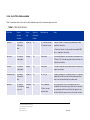
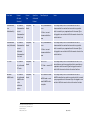
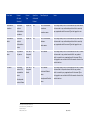
Table 1.
Filter fields reference .................................................................................. 15
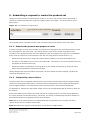
5. Submitting a request to create the product set ..................................... 20
5.1.1. Examine the preview and prepare a count .......................................................... 20
5.1.2. Temporarily remove filters ................................................................................ 20
5.1.3. Making a request to create the product set ......................................................... 21
6. Monitor the progress of pending requests ............................................. 22
7. Manage completed product set requests ............................................... 24
8. Bulk Update operations ......................................................................... 25
8.1. General Principles ............................................................................................... 25
8.2. General Layout of screen ..................................................................................... 26
8.3. Conditions screen section .................................................................................... 27
8.4. Steps to create a condition .................................................................................. 29
8.5. Changes screen section ....................................................................................... 29
8.6. Steps to create a change ..................................................................................... 31
8.7. Adding/Removing Action sets ............................................................................... 32
8.8. Confirming generation of Bulk Update ................................................................... 33
8.9. Confirming & validating the submission of Bulk Update via EVWEB ........................... 33
8.9.1. General Layout of screens ................................................................................ 33
8.9.2. Steps to confirm and submit message via EVWEB ................................................ 35
8.10. Practical Examples ............................................................................................ 36
8.10.1. Example 1: User wishes to invalidate medicinal products: ................................... 36
8.10.2. Example 2: User wishes to perform an interim phase update............................... 40
8.10.3. Example 3: Modifying a current value for a repeatable section............................. 42
8.10.4. Example 4: Adding and removing simple repeatable sections .............................. 42
8.10.5. Example 5: Replacing the value in non-repeatable fields ..................................... 43
eXtended EudraVigilance Medicinal
Product Dictionary (XEVMPD) Bulk
Update Manager
EMA/623491/2014
Page 2/59