1
English
English
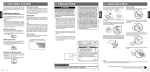
Functions of Buttons
VX402E/VZ402E
Owner’s Manual
[Power/SRC] Button
• Press this button to turn the unit power on.
• Press this button to select a source.
• Press and hold this button for more than 2 seconds to turn the power off.
[VOL -], [VOL +] Buttons
• Use these buttons to decrease/increase the volume.
[OPEN] [CLOSE] Button (VZ402E)
• Use this button to open/close operation panel.
RESET Button
• Press this button to reset the unit.
SENSOR
• Receiver for the remote control unit (operating range: 30 degree in all directions).
MIC
• Internal microphone for use during Bluetooth phone calls. Sensitivity can be adjusted from the
Settings menu.
7