1
5 Patient Index
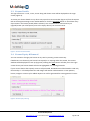
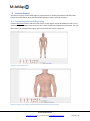
Following login, the Patient Index screen will be displayed as shown in Figure 9 (a Test Patient is
included in MoleTrac for teaching purposes). The Patient Index is where you can view all registered
patients, add new patients or edit current patient information.
Figure 9: Patient index screen – Initial start-up.
5.1 New Patients
To add patients into the system, enter their name and date of birth (MoleTrac will verify the date in
the grey field immediately adjacent). As this information is entered, all similar patients will be listed
so you can check to see if the patient already exists in the system. Once you have verified that the
patient is new to the system, click the Add button to display the Add New Patient screen (Figure 10).
*Note: Patient files cannot be deleted, but information can be edited at a later date.
© 2013 MoleMap NZ Ltd
www.MoleTrac.com ● +64 9 520 8220 ● [email protected]
Page 11 of 27