1
17
English
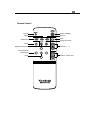
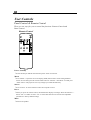
Enter
4 Press “Enter” to confirm your selection.
Four Directional Select Keys
4 Use
Volume
or
to select items. Use
or
to make adjustments for your selection.
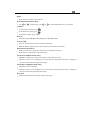
4 To increase the volume, press
4 To decrease the volume, press
4 To mute the volume, press “Mute”
Resync
4 Automatically synchronizes the projector to the input source.
Freeze/CLR
4 Press the “Freeze/CLR” button to still the screen image.
4When the OSD is displayed, press the “Freeze/CLR” button to exit the OSD.
PIP (Picture in Picture)
4 Display a video source image on a small screen. (Computer mode only).
Please refer to “Page 20” for more information.
Zoom In (Computer mode only)
4 Magnifies an image up to a factor of 32 times on the projection screen.
4 When the “Zoom” icon is displayed, you can use the four directional select keys to change the
vertical or horizontal positioning of the image.
Zoom Out (Computer mode only)
4 Diminishes the zoom in image.
4 When the “Zoom” icon is displayed, you can use the four directional select keys to change the
vertical or horizontal positioning of the image.
Keystone
4 Adjusts image distortion caused by tilting the projector.