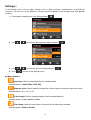
1
iOS: Video Player
Android: Video Player
Download Videos
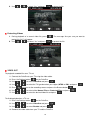
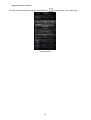
1. Tap the information next to the thumbnail image of the desired video. The file function bar will
appear below the video file.
File function bar
2. From the file function bar, tap the download icon
.
For iOS: The file will be downloaded to the Camera Roll of the iOS device.
For Android: The file will be downloaded to the /sdcard/DrivePro folder of the Android device.
Note: You can edit the default download path of your Android device in Settings.
Delete Videos
1. Tap the information next to the thumbnail image of the desired video. The file function bar will
appear below the video file.
2. From the file function bar, tap the delete icon
.
3. Tap OK to delete the file.
View Video Information
1. Tap the information next to the thumbnail image of the desired video. The file function bar will
23