1
AxiCal
Preferences
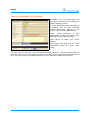
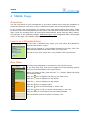
Click [Preferences] in the left side of the screen to edit your personal settings. The
preferences screen will be shown in a popup window of your web browser.
In order to edit your own preferences, the option
"Use custom settings" must be checked. When this
option is unchecked, AxiCal will apply the general
preferences as set up by the administrator.
Language settings:
▪
Language: Choose your language. Note that
the language settings of the login screen may
differ from your personal language setting.
General settings:
▪
Show popup messages: Choose whether or not
you want to see a confirmation following some
actions like adding a booking.
Date/time format:
▪
Date format: Select a format.
▪
Week starts on: Select Monday or Sunday.
▪
Time format: Select 12 or 24 hours.
These settings are primarily intended to choose
between European and American formats.
Color settings:
▪
Select color scheme: This description is selfexplanatory. After you've selected a color
scheme, the RGB values will be updated in the
remaining fields.
The remaining fields expect you to enter an RGB
value in a 6-digit hexadecimal representation.
Alternatively you can click the
icon to open a
popup window with a color picker.
Click the
icon to display an example of your
color choices.
Click the
icon to save your settings.
Just close the popup window if you don't want to save the changes.
User Manual
21