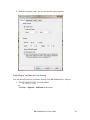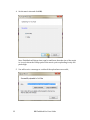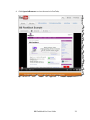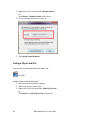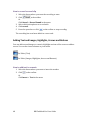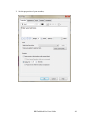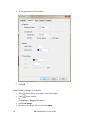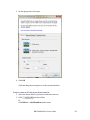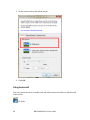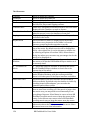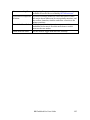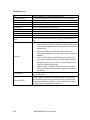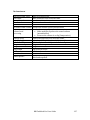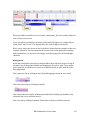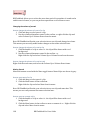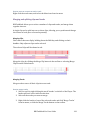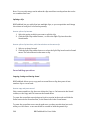
1
BB FlashBack v3 User Manual and How-To Guide © Blueberry Software 2 BB FlashBack Pro User Guide Contents Section 1 ................................................................................................................................. 8 Quick Start Guide ................................................................................................................. 9 Recording a movie .............................................................................................................................. 9 How to make your first recording ................................................................................................................ 9 Editing your movie .......................................................................................................................... 12 The toolbar ............................................................................................................................................................ 13 Editing frames ...................................................................................................................................................... 15 Annotating the movie....................................................................................................................................... 17 Using zoom/pan, cropping and autoscroll ............................................................................................ 23 Publishing your movie ................................................................................................................... 25 Exporting your movie ...................................................................................................................................... 26 Uploading to YouTube for easy sharing ................................................................................................. 29 Section 2 ............................................................................................................................... 34 How To Guides .................................................................................................................... 35 Working with Frames..................................................................................................................... 35 How to delete frames: ...................................................................................................................................... 35 How to insert frames:....................................................................................................................................... 35 Tracks and Clips ............................................................................................................................... 36 How to select a clip: .......................................................................................................................................... 36 How to select multiple clips:......................................................................................................................... 36 How to select a section of a clip:................................................................................................................. 36 How to move a clip: ........................................................................................................................................... 36 How to select or de-select a track:............................................................................................................. 37 How to select multiple tracks: ..................................................................................................................... 37 Changing Volume and Muting ..................................................................................................... 37 How to mute a track: ........................................................................................................................................ 37 How to change the volume of a track: ..................................................................................................... 38 How to mute a clip:............................................................................................................................................ 38 How to change the volume of a clip:......................................................................................................... 38 Deleting Sound.................................................................................................................................. 39 How to delete a whole clip: ........................................................................................................................... 39 How to delete a section of a clip: ................................................................................................................ 39 How to delete sound and frames at the same time: ......................................................................... 39 How to delete a track........................................................................................................................................ 40 Inserting Silence............................................................................................................................... 40 How to add silence to a clip .......................................................................................................................... 40 How to insert silence and frames together:.......................................................................................... 42 Editing Sound and Video Together ............................................................................................ 44 How to edit sound without affecting video: ......................................................................................... 44 How to edit sound and affect the video: ................................................................................................. 44 Removing Background Noise ...................................................................................................... 45 How to remove noise from a clip ............................................................................................................... 45 Fading a Clip In and Out................................................................................................................. 46 How to fade a clip in and out ........................................................................................................................ 46 Adding Sound .................................................................................................................................... 47 How to add an existing sound file: ............................................................................................................ 47 BB FlashBack Pro User Guide 3 How to record a sound clip ........................................................................................................................... 48 Adding Text and Images, Highlights, Arrows and Buttons ............................................... 48 How to add text to a movie............................................................................................................................ 48 How to add an image to a movie ................................................................................................................ 50 How to add a highlight to your movie ..................................................................................................... 51 How to insert an arrow ................................................................................................................................... 53 How to add a button ......................................................................................................................................... 54 Tips for better performance recording ................................................................................... 57 How to change the recorder settings ....................................................................................................... 57 Saving your recordings as Flash ................................................................................................. 59 How to export as Flash .................................................................................................................................... 59 Creating Pan and Zoom Effects ................................................................................................... 61 How to zoom in.................................................................................................................................................... 61 How to pan, while zoomed in....................................................................................................................... 62 How to zoom out from a previous zoom in........................................................................................... 63 Using Autoscroll ............................................................................................................................... 64 How to add a cropping rectangle ............................................................................................................... 65 How to remove a cropping rectangle ....................................................................................................... 65 How to add an autoscroll................................................................................................................................ 65 How to remove an autoscroll ....................................................................................................................... 65 Recording from the Webcam ....................................................................................................... 65 How to record the webcam whilst you record the screen ............................................................ 66 How to record the webcam only ................................................................................................................ 67 How to insert a WebCam recording.......................................................................................................... 69 How to edit the WebCam recording ......................................................................................................... 69 How to move or resize the WebCam recording.................................................................................. 69 Adding Watermarks........................................................................................................................ 70 How to add a watermark ................................................................................................................................ 70 Inserting A Video File ..................................................................................................................... 70 How to insert video ........................................................................................................................................... 71 Scheduled Recording ...................................................................................................................... 72 How to schedule a recording........................................................................................................................ 72 Cursor Highlighting......................................................................................................................... 73 How to highlight the cursor .......................................................................................................................... 74 Section 3 ............................................................................................................................... 76 Introducing BB FlashBack Pro Edition ........................................................................ 77 Contacting Blueberry ....................................................................................................... 78 System Requirements ...................................................................................................... 79 Software Requirements ................................................................................................................. 79 Hardware Requirements .............................................................................................................. 79 Buying BB FlashBack ........................................................................................................ 80 Buying a licence................................................................................................................................ 80 Problems with licence keys.......................................................................................................... 81 I purchased online, but I didn't receive the email containing licence keys.......................... 81 I'm having problems entering the key into BB FlashBack ............................................................ 81 Other help with key related problems .................................................................................................... 81 Resellers.............................................................................................................................................. 81 4 BB FlashBack Pro User Guide Getting Started ................................................................................................................... 82 BB FlashBack Basics ....................................................................................................................... 82 The Recorder ........................................................................................................................................................ 82 The Player .............................................................................................................................................................. 82 To get started........................................................................................................................................................ 83 Recording movies ............................................................................................................................ 84 To view the movie .............................................................................................................................................. 84 Playing back movies ....................................................................................................................... 85 From The Welcome Window........................................................................................................................ 85 Playing a movie from Recorder................................................................................................................... 85 Sharing movies ................................................................................................................................. 86 Uploading to a Video Hosting Site ............................................................................................................. 86 Exporting Movies................................................................................................................................................ 86 Using BB FlashBack ........................................................................................................... 89 Recorder Windows.......................................................................................................................... 89 The Recorder Main Window......................................................................................................................... 89 The Recorder main menu............................................................................................................................... 90 The movie file sub-menu ................................................................................................................................ 92 The Recorder Options window ................................................................................................................ 94 Adding a Marker while recording .......................................................................................................... 95 Using Recorder when it is minimized...................................................................................................... 96 Recorder Features ........................................................................................................................... 97 About Recorder features ................................................................................................................................ 97 Recording windows and regions ................................................................................................................ 98 Recording multi monitor systems ............................................................................................................. 99 Windows display options ........................................................................................................................... 99 Capturing Keystrokes.....................................................................................................................................101 Limiting the movie file size .........................................................................................................................102 Defining and using hotkeys .....................................................................................................................103 Customising delays..........................................................................................................................................103 Recording Webcam Video............................................................................................................................103 Record modes and performance ..............................................................................................................105 Troubleshooting video recording ............................................................................................................106 Recording Sound...............................................................................................................................................108 Troubleshooting Sound Recording .........................................................................................................109 Scheduled Recording ......................................................................................................................................113 The Player ........................................................................................................................................ 114 The Player window..........................................................................................................................................114 The Timeline and Frame bar ......................................................................................................................116 Webcam / Picture-in-Picture Video .......................................................................................................118 The Player Toolbars ........................................................................................................................................119 The Player Main Menu ...................................................................................................................................121 Viewing key presses........................................................................................................................................132 Other Player Features ....................................................................................................................................135 Converting AVI files to FlashBack movies ...........................................................................................136 Command-line options ..................................................................................................................................137 Editing Movies................................................................................................................................. 138 About editing movies......................................................................................................................................138 Working with frames......................................................................................................................................138 BB FlashBack Pro User Guide 5 Annotating Movies ...........................................................................................................................................143 Zoom-Pan Effects..............................................................................................................................................152 Cropping and Autoscrolling ........................................................................................................................154 The Mouse Cursor ............................................................................................................................................155 Removing Inactive Sections ........................................................................................................................159 Using Markers in movies ..............................................................................................................................160 Inserting Video Files .......................................................................................................................................161 Pauses.....................................................................................................................................................................161 Start and End Titles .........................................................................................................................................162 Displaying Invisible Keystrokes ...............................................................................................................163 Exporting movies ........................................................................................................................... 164 File formats..........................................................................................................................................................164 Comparison of Export formats ..................................................................................................................166 Exporting to Flash format ............................................................................................................................167 Exporting to QuickTime (H264) ...............................................................................................................179 Exporting to Windows Media Video (WMV) ......................................................................................181 Exporting to AVI format................................................................................................................................183 About AVI codecs..............................................................................................................................................184 Exporting to MPEG4........................................................................................................................................185 Exporting to standalone EXE......................................................................................................................186 Exporting to MS PowerPoint ......................................................................................................................187 Sound export options .....................................................................................................................................187 Batch Exporting .............................................................................................................................................188 Uploading Movies .......................................................................................................................... 189 How to Upload a Movie .................................................................................................................................189 Uploading to FTP and FileCopy.................................................................................................................190 Creating upload profiles ...............................................................................................................................191 Working with Sound ..................................................................................................................... 192 Adding and Recording Sound into a Movie.........................................................................................192 The Sound Options Window .......................................................................................................................193 Sound Synchronisation Problems ........................................................................................................194 Changing the Volume of a Track or Clip ...............................................................................................194 Removing Noise ................................................................................................................................................195 Fading Sounds In or Out ...............................................................................................................................195 Volume Level Processing..............................................................................................................................195 Editing Sound .....................................................................................................................................................196 Merging and Splitting Clips and Tracks ................................................................................................199 Sound Editing Operations ............................................................................................................................200 More About Selecting Sound and Frames............................................................................................202 Using BB FlashBack from the Command Line...................................................................... 203 Support .............................................................................................................................. 205 Contacting Support........................................................................................................................ 205 Troubleshooting FAQ ................................................................................................................... 205 When I installed and when I run Recorder, I see a warning about ASUS software. ......205 My system runs extremely slowly when recording........................................................................205 When recording I see an error message referring to the BB Capture Driver. ..................205 I'm trying to record a DVD or video clip, but it fails or the results are poor. ....................206 What affects the file size of my final movie file? ..............................................................................206 6 BB FlashBack Pro User Guide When I replay my movie graphics or text are not displayed correctly or missing altogether. ............................................................................................................................................................206 I cannot hear any sound when replaying my movie. .....................................................................206 My licence key is not accepted by the program................................................................................207 My FBR movie file will not open in the Player. .................................................................................207 I've exported my movie to an AVI file. This plays fine on my PC but not in other computers. ...........................................................................................................................................................207 When I export to any format, I get a 'created by' image in the top right corner. Will this appear when I buy a licence? .....................................................................................................................207 I've exported my movie to Flash but the SWF file appears distorted or low quality. ...208 I record with sound, but when I play back the movie, the sound and video become more and more out of sync..........................................................................................................................208 Reporting Problems...................................................................................................................... 209 How to report a problem to Blueberry .................................................................................................209 Checking for Updates to BB FlashBack .................................................................................. 210 How to check for updates to BB FlashBack: .......................................................................................210 Automatic check for updates......................................................................................................................210 BB FlashBack Pro User Guide 7 Section 1 Quick Start Guide. 8 BB FlashBack Pro User Guide Quick Start Guide Follow this guide to record, edit and publish your first BB FlashBack movie in three simple steps. Recording A Movie First you need to make a recording which you can edit and publish. How to make your first recording Here, you will use BB FlashBack Recorder to record a movie which you can then edit in BB FlashBack Player. 1. Open the BB FlashBack Pro 3 Recorder from the windows start menu. 2. On the welcome screen, click Record a new movie; BB FlashBack Pro User Guide 9 3. Set the recording options and click the record button; 10 BB FlashBack Pro User Guide 4. In the options, the Record: Region was selected, so set the size and position of the region and click Record; 5. Click the stop button to end recording; BB FlashBack Pro User Guide 11 6. Click Save and follow the steps to save the recording; Editing Your Movie First, open BB FlashBack Pro 3 Player and then open the movie you have recorded; 12 BB FlashBack Pro User Guide The toolbar Use the toolbar to edit the movie. An overview of the whole toolbar is shown below. The toolbar buttons are grouped into sections according to their function. The top left of the toolbar gives quick access to saving and publishing options. The middle of the top row of buttons provides shortcuts to objects that you can insert into a movie. Click to edit the properties of any object which has been inserted into the movie. Click to delete any object from the movie. Click to insert a textbox. Click Click Click Click to insert an image. to highlight a section of your screen. to add a button. to insert an arrow. Click Click Click Click to insert another movie. to set a marker. to insert a watermark. to pause a section of the movie. BB FlashBack Pro User Guide 13 The top right of the toolbar gives quick access to effects. Click Click Click Click to delete an existing zoom or pan. to set a cropping rectangle. Click Click to add start and end titles to the movie. to switch the effects on whilst you edit the movie. to add a highlight to the mouse cursor. to insert or edit a zoom or pan. The middle left part of the toolbar gives you the option to play a short section of the movie, or jump to a different part. The middle right part of the toolbar allows you to change the viewing options. The bottom left of the toolbar gives quick access to basic editing options. 14 Click Click Click Click to undo or redo previous steps. to delete. to crop the movie to a selected area. to insert. BB FlashBack Pro User Guide The bottom right of the toolbar is for sound editing operations. Click to add a new sound track. Click Click Click Click to add a new sound. to record a new sound. to adjust the volume levels or mute a track or clip. to apply a fade in or fade out to a clip. Click Click Click to split a sound clip. to merge sound clips. to merge sound tracks. Click Click Click to copy sound. to cut sound. to paste a copied or cut sound. Click adjust or mute the master volume. The playback bar gives easy access to playing the movie at various speeds, skipping forward and back or going directly to a different part of the movie. Editing frames The framebar gives easy access to edit any individual frame or groups of frames in the movie. You can insert and delete frames, and you can crop a movie down to specific frames. BB FlashBack Pro User Guide 15 How to delete frames: 1. Select the first or last frame to be deleted. 2. Drag the mouse across the frame bar to select additional frames. 3. Press the delete key on the keyboard. Or Click on the toolbar. Or Click Edit -> Delete Frame(s)… in the menu. 4. Click OK. How to insert frames: 1. Select the point where you wish to insert the frames. 2. Click on the toolbar. Or Click Edit -> Insert Frame(s)… in the menu. 3. Enter the number of frames you wish to insert. 4. Click OK. How to crop a movie: 1. Select the frame where you want to movie to begin. 2. Click and drag across the framebar until you reach the frame where you want the movie to end. 3. Click on the toolbar. Or Click Edit -> Crop Frame(s)… in the menu. 4. Click OK to confirm the edit; 16 BB FlashBack Pro User Guide Annotating the movie You can add text, images and other objects to a movie. How to add text to a movie: 1. Select the frame where you want to insert the textbox. 2. Click on the toolbar. Or Click Insert -> Text in the menu. 3. Set the properties of your textbox; BB FlashBack Pro User Guide 17 4. Set the appearance of the textbox; 18 BB FlashBack Pro User Guide 5. You can create and edit styles to use with textboxes throughout a movie; BB FlashBack Pro User Guide 19 6. When you are creating a textbox, you can set the size and position. Alternatively, once the textbox has been created, you can click and drag in the view screen to manually resize and move it; 20 BB FlashBack Pro User Guide 7. You can create a transition to fade the textbox in and out; 8. Click OK to insert the textbox. How to add an image to a movie: 1. Select the frame where you want to insert the image. 2. Click on the toolbar. Or Click Insert -> Image in the menu. BB FlashBack Pro User Guide 21 3. Click Load Image; 4. Browse to the image, select it and click Open. 22 BB FlashBack Pro User Guide 5. Set the properties of your image; Set the size and position of where it will appear in the movie from the Position tab. Add a fade in or fade out, using the Transitions tab; 6. Click OK to insert the image. You can also insert highlights, buttons, arrows and other objects into the movie in a similar way. Using zoom/pan, cropping and autoscroll You can create zoom and pan effects in a movie. You can also crop a large movie to a smaller section and use the autoscroll effect to follow the mouse, missing none of the action. BB FlashBack Pro User Guide 23 How to zoom or pan: 1. Select the frame where you want to add the zoom or pan. 2. Click on the toolbar. Or Click Effects -> Add ZoomPan in the menu. 3. Set the properties of the zoom; Select Custom Area to zoom to a particular region of the movie. Select Whole Movie to zoom back to show the entire movie if you previously added a zoom-in. The transition speed sets how quickly the zoom or pan will appear on screen. 4. Click OK to insert the zoom effect. Click and drag to re-size the zoom/pan. 24 BB FlashBack Pro User Guide Please note, the zoom will remain in the movie until the end, or another zoom effect is created. How to crop a movie and use the autoscroll: 1. First, add a cropping rectangle to the movie: Click on the toolbar. Or Click Effects -> Set Cropping Rectangle in the menu. 2. Then add the autoscroll effect: Click Effects. 3. Go to the Autoscroll Cropping Rectangle submenu. 4. Click Mouse In Centre. Or Click Mouse Near Centre. The cropping rectangle can be resized in the view screen. When you export the movie, only the area within the cropping rectangle will be exported. The cropping rectangle will follow the mouse cursor as it moves across the screen when the autoscroll is set. If zoom and pan effects are being used, a zoom in or pan will only show sections within the cropping rectangle. Publishing Your Movie When you have finished editing the movie, it can be exported in a variety of formats and can be uploaded to YouTube. BB FlashBack Pro User Guide 25 Exporting your movie Here I will demonstrate how to export the movie to Flash. 1. Click on the toolbar. Or Click File -> Export in the menu. 2. Select the Flash export format; 3. Click OK. 26 BB FlashBack Pro User Guide 4. Set the Flash Export Options. 5. Click Export. 6. Choose where to save the exported files and click Save. Three files are exported and you can choose view the export once completed. To view the movie in a web browser, ensure that you open the .html file that has been exported. BB FlashBack Pro User Guide 27 Please note, each export format comes with different options to include in the export. For example, you may choose to export the movie to AVI (which can be opened and edited again in FlashBack). 1. When exporting to AVI, you need to select the Codec; 28 BB FlashBack Pro User Guide 2. After selecting the Codec, you can set the AVI export options; Uploading to YouTube for easy sharing You can upload a movie to YouTube, directly from BB Flashback Pro 3 Player. 1. Click on the toolbar. Or Click File -> Upload -> YouTube in the menu. BB FlashBack Pro User Guide 29 2. Type in your username and password and click OK; 30 BB FlashBack Pro User Guide 3. Complete the movie details and click OK; BB FlashBack Pro User Guide 31 4. Set the movie size and click OK; Note: FlashBack will show sizes equal to and lower than the size of the movie i.e. it won't show the 1080p option if the movie you're uploading is only 400 pixels high. 5. You will receive a message to confirm if the upload was successful; 32 BB FlashBack Pro User Guide 6. Click Open in Browser to view the movie in YouTube; BB FlashBack Pro User Guide 33 Section 2 How To Guides 34 BB FlashBack Pro User Guide How To Guides Working with Frames You can add and delete frames from a section of your movie. This allows you to add new sections to your movie or remove any sections you no longer need. See Video How to delete frames: 1. Select the first or last frame to be deleted. 2. Drag the mouse across the frame bar to select additional frames. 3. Press the delete key on the keyboard. Or Click on the toolbar. Or Click Edit -> Delete Frame(s)… in the menu. 4. Click OK. How to insert frames: 1. Select the point where you wish to insert the frames. 2. Click on the toolbar. Or Click Edit -> Insert Frame(s)… in the menu. 3. Enter the number of frames you wish to insert. 4. Click OK. BB FlashBack Pro User Guide 35 Tracks and Clips A clip is a piece of sound which can be edited and moved independently of any other clip. A track is series of one or more clips and can be edited to change every clip it contains. See Video How to select a clip: 1. Click the handle of the clip; How to select multiple clips: 1. Click the handle of the clip; 2. Hold the shift key on the keyboard 3. Click the handle above each additional track. How to select a section of a clip: 1. Click and drag to highlight the section; How to move a clip: 1. Click and drag the handle to the left or right; 36 BB FlashBack Pro User Guide How to select or de-select a track: 1. Click on the track header; A pink highlight indicates it is selected. How to select multiple tracks: 1. Click on each individual track header; A pink highlight indicates which tracks are selected. Changing Volume and Muting You can change the volume of a track, or mute it. You can also change the volume of a clip and mute it. See Video How to mute a track: 1. Select the track you want to change. 2. Right-click on the track header; 3. Click Mute Track. BB FlashBack Pro User Guide 37 How to change the volume of a track: 1. Select the track you want to change. 2. Right-click on the track header; 3. Click Volume Up or Volume Down How to mute a section of sound: 1. Select the track you want to change. 2. Click and drag to highlight the section you want to mute; 3. Click on the toolbar. Or Click Sound -> Mute Sound Selection in the menu. How to change the volume of a section of sound: 1. Select the track you want to change. 2. Click and drag to highlight the section you want to change; 3. Click on the toolbar. Or Click Sound -> Increase Sound Volume or Decrease Sound Volume in the menu. 38 BB FlashBack Pro User Guide Deleting Sound You can delete an entire track or clip or part of a clip from a movie. See Video How to delete a whole clip: 1. Select the track you want to change. 2. Click on the handle of the clip. 3. Right-click on the clip. 4. Click Delete Clip. 5. Click Yes. How to delete a section of a clip: 1. Select the track you want to change. 2. Click and drag to highlight the section you want to delete; 3. Right-click on the selection. 4. Click Delete Selection. 5. Choose to shift the remaining sound to the left or leave it where it is and click OK. How to delete sound and frames at the same time: 1. Select the track you want to change. 2. Click and drag to highlight the section you want to delete; BB FlashBack Pro User Guide 39 3. Press the delete key on the keyboard. Or Click on the toolbar. Or Click Edit -> Delete Frame(s)… in the menu. 4. Select which tracks you want to edit and click OK. 5. Choose to shift the remaining sound to the left or leave it where it is and click OK. How to delete a track 1. Select the track you want to delete. 2. Right-click on the track header. 3. Click Delete. 4. Click Yes. Inserting Silence You can insert silence into a clip with or without inserting additional frames. See Video How to add silence to a clip 1. Select the track you want to change. 2. Click on the point where you want to insert silence. 3. Right-click and select Insert Silence. 40 BB FlashBack Pro User Guide 4. Choose how much silence you want to insert; 5. Choose how to shift the sound to the right; 6. Click OK. BB FlashBack Pro User Guide 41 How to insert silence and frames together: 1. Select the track you want to change. 2. Select the framebar header. 3. Click on the point where you want to insert silence. 4. Click on the toolbar. Or Click Edit -> Insert Frame(s)… in the menu. 5. Tick any additional tracks you want to edit; 6. Click OK. 42 BB FlashBack Pro User Guide 7. Choose how much silence you want to insert; 8. Choose how to shift the sound to the right; 9. Click OK. BB FlashBack Pro User Guide 43 Editing Sound and Video Together A sound clip can be edited without the edit affecting the video frames. A sound clip can also be edited with the same edit applying to the video frames. See Video How to edit sound without affecting video: 1. Ensure the sound track(s) you want to edit are selected and the Frame header is not; 2. Proceed with the edit. How to edit sound and affect the video: 1. Ensure that the Frame header is selected along with the sound track(s) you want to edit; 2. Proceed with the edit. 44 BB FlashBack Pro User Guide When using toolbar or menu functions to perform an edit, you can choose to include or exclude any track(s) from the edit in the following pop up box; Removing Background Noise You can remove background noise from a sound clip or an entire track. See Video How to remove noise from a clip 1. Select the track you want to change. 2. Click on the handle of the clip. BB FlashBack Pro User Guide 45 3. Right-click on the clip and select Remove Noise. Or Click Sound -> Remove Noise in the menu. 4. Set the strength of the noise removal; 5. Click Apply Noise Removal. Fading a Clip In and Out You can fade a sound clip in and also fade it out. See Video How to fade a clip in and out 1. Select the track you want to change. 2. Select the clip you want to edit. 3. Right-click on the clip and select Fade Clip In/Out. Or Click Sound -> Fade Clip In/Out in the menu. 46 BB FlashBack Pro User Guide 4. Set the duration of the fade in and/or fade out. 5. Click OK. The fade in and out is displayed as a greyed out section on the sound clip; Adding Sound There are two ways to add sound to a video. You can add an existing sound file to your movie, or record sound from a microphone. See Video How to add an existing sound file: 1. Select the frame where you want to insert the sound file. 2. Click on the toolbar. Or Click Insert -> Sound in the menu. 3. Browse to the file, select it and click the Open button. 4. Click OK. The sound file has now been added as a new track. BB FlashBack Pro User Guide 47 How to record a sound clip 1. Select the frame where you want the recording to start. 2. Click on the toolbar. Or Click Sound -> Record Sound in the menu. 3. Select which microphone to record with 4. Click record. 5. Press the space bar or click on the toolbar to stop recording. The recording has now been added as a new track. Adding Text and Images, Highlights, Arrows and Buttons You can add text and images to a movie, highlight sections of the screen or add an arrow. You can also insert a button to your movie. See Video (Text) See Video (Images, Highlights, Arrows and Buttons) How to add text to a movie 1. Select the frame where you want to insert the textbox. 2. Click on the toolbar. Or Click Insert -> Text in the menu. 48 BB FlashBack Pro User Guide 3. Set the properties of your textbox; BB FlashBack Pro User Guide 49 4. Set the appearance of the textbox; 5. Click OK. How to add an image to a movie 1. Select the frame where you want to insert the image. 2. Click on the toolbar. Or Click Insert -> Image in the menu. 3. Click Load Image. 4. Browse to the image, select it and click Open. 50 BB FlashBack Pro User Guide 5. Set the properties of your image; 6. Click OK. How to add a highlight to your movie 1. Select the frame where you want to insert the highlight. 2. Click on the toolbar. Or Click Insert -> Highlight in the menu. BB FlashBack Pro User Guide 51 3. Set the properties of the highlight; 4. Click OK. 52 BB FlashBack Pro User Guide How to insert an arrow 1. Select the frame where you want to insert the arrow. 2. Click on the toolbar. Or Click Insert -> Arrow in the menu. 3. Set the properties of the arrow; BB FlashBack Pro User Guide 53 4. Set the appearance of the arrow; 5. Click OK. How to add a button 1. Select the frame where you want to insert the button. 2. Click on the toolbar. Or Click Insert -> Button in the menu. 54 BB FlashBack Pro User Guide 3. Set the properties of the button; BB FlashBack Pro User Guide 55 4. Set the appearance of the button; 5. Click OK. 56 BB FlashBack Pro User Guide Tips For Better Performance Recording You can improve your screen recordings by changing the recorder settings. You can increase the frame rate of the recording and change the recording type. See Video How to change the recorder settings 1. From the BB FlashBack recorder, click Tools -> Options in the menu and click Record Mode / Performance. Or From the BB FlashBack player, click Tools -> Recording Options in the menu and click Record Mode / Performance. BB FlashBack Pro User Guide 57 2. Change the recorder settings; 3. Click OK. For further guidance, please see the article at: http://www.bbsoftware.co.uk/BBFlashBack/Support/UserGuides/recording video.aspx 58 BB FlashBack Pro User Guide Saving Your Recordings As Flash You can export your movie as a Flash file or other types of video formats. See Video How to export as Flash 1. Click on the toolbar. Or Click File -> Export in the menu. 2. Select the Flash option; 3. Click OK. BB FlashBack Pro User Guide 59 4. Select or change the Flash Export Options. 5. Click Export. 6. Choose where to save the exported files and click Save. Three files are exported and you can choose view the export once completed. To view the movie in a web browser, ensure that you open the .html file that has been exported. 60 BB FlashBack Pro User Guide Creating Pan and Zoom Effects You can zoom into a movie. Whilst the movie is zoomed in, you can add a pan effect or zoom out. See Video How to zoom in 1. Select the frame where you want to add the zoom in. 2. Click on the toolbar. Or Click Effects -> Add ZoomPan in the menu. 3. Set the properties of the zoom; BB FlashBack Pro User Guide 61 Set the size and position of the zoom; 4. Click OK. How to pan, while zoomed in 1. Select the frame where you want to add the pan. 2. Click on the toolbar. Or Click Effects -> Add ZoomPan in the menu. 62 BB FlashBack Pro User Guide 3. Set the properties of the pan; 4. Click OK. Click and drag the zoom/pan to set the pan destination. How to zoom out from a previous zoom in 1. Select the frame where you want to add the zoom out. 2. Click on the toolbar. Or Click Effects -> Add ZoomPan in the menu. BB FlashBack Pro User Guide 63 3. Set the zoom to show the whole movie; 4. Click OK. Using Autoscroll You can crop the movie to a smaller size and add an autoscroll effect to still show all of the action. See Video 64 BB FlashBack Pro User Guide How to add a cropping rectangle 1. Click on the toolbar. Or Click Effects -> Set Cropping Rectangle in the menu. How to remove a cropping rectangle 1. Click on the toolbar. Or Click Effects -> Set Cropping Rectangle in the menu. How to add an autoscroll 1. Click Effects. 2. Go to the Autoscroll Cropping Rectangle submenu. 3. Click Mouse In Centre. Or Click Mouse Near Centre. How to remove an autoscroll 1. Click Effects. 2. Go to the Autoscroll Cropping Rectangle submenu. 3. Click None. Recording From Webcam You can record a webcam whilst you record the screen or record only the webcam. See Video BB FlashBack Pro User Guide 65 How to record the webcam whilst you record the screen 1. From the BB FlashBack recorder, tick Record Webcam. Or From the BB FlashBack recorder, click Tools -> Options in the menu, then click Webcam, tick Capture Video From Webcam and click OK. Or From the BB FlashBack player, click Tools -> Recording Options in the menu, then click Webcam, tick Capture Video From Webcam and click OK. 2. Select the webcam to record with; 3. Click 66 . BB FlashBack Pro User Guide Please note, if you tick Show Webcam Window While Recording it will display the webcam video on screen while recording. The webcam video will be part of the recording and cannot be moved and resized in BB FlashBack player. How to record the webcam only 1. From the BB FlashBack recorder, click Tools -> Options in the menu, then click Webcam and tick Capture Video From Webcam. Or From the BB FlashBack player, click Tools -> Recording Options in the menu, then click Webcam and tick Capture Video From Webcam. 2. Tick Record Only From Webcam And Not The Screen; 3. Click OK. BB FlashBack Pro User Guide 67 4. Select the webcam to record with; 5. Click . Note: The 'Record webcam only' function will create an FLV file instead of an FBR file. 68 BB FlashBack Pro User Guide How to insert a WebCam recording 1. Select the frame where you want to insert the WebCam recording. 2. Click Insert -> WebCam / Picture-In-Picture Video in the menu. 3. Click From FLV Video File. Or Click From AVI, WMV Video File. 4. Browse to the recording, select it and click Open. How to edit the WebCam recording 1. Select only the WebCam track header and click Or Double-click the WebCam image in the movie. 2. Set the WebCam video properties; on the toolbar. 3. Click OK. How to move or resize the WebCam recording 1. Click and drag to move and resize the WebCam recording. BB FlashBack Pro User Guide 69 Adding Watermarks You can add a watermark to on a movie. See Video How to add a watermark 1. Click on the toolbar. Or Click Insert -> Watermark in the menu. 2. Click Load Image. 3. Browse to the image, select it and click Open. 4. Set the properties of the watermark; 5. Click OK. Inserting a Video File You can insert video files into your movie. 70 BB FlashBack Pro User Guide See Video How to insert video 1. Select the frame where you want to insert the video. 2. Click in the toolbar. Or Click Insert -> Video File in the menu. 3. Browse to the video file, select it and click Open. 4. Set the position and padding for the video: 5. Click OK. BB FlashBack Pro User Guide 71 Scheduled Recording You can schedule a recording for a specific time, or for when a specific application is opened. See Video How to schedule a recording 1. From the BB FlashBack recorder, click Tools -> Options in the menu, then click Scheduling. Or From the BB FlashBack player, click Tools -> Recording Options in the menu, then click Scheduling. 2. Tick Use Scheduling For The Next Recording. 72 BB FlashBack Pro User Guide 3. Set the scheduling properties; 4. Click OK. 5. Click . 6. Click OK. Cursor Highlighting You can highlight the cursor and any mouse clicks in the movie. See Video BB FlashBack Pro User Guide 73 How to highlight the cursor 1. Click on the toolbar. Or Click Effects -> Highlight Cursor in the menu. 2. Set the highlight properties; 3. Click OK. 74 BB FlashBack Pro User Guide BB FlashBack Pro User Guide 75 Section 3 User Guide 76 BB FlashBack Pro User Guide Introducing BB FlashBack Pro Edition BB FlashBack is a screen recorder - it makes movies of what you see on your PC screen. Easy Recording With only a few clicks of the mouse, BB FlashBack can record everything that happens on your Windows desktop. It can also record PC sounds or a commentary if you have a microphone. If you have a webcam connected to your PC, BB FlashBack can record from it to produce 'picture in picture' movies. Powerful Editing Features BB FlashBack comes with a powerful editor application that you can use to add annotations and sound to your movie Easy Upload to Video Sharing Websites BB FlashBack makes it easy to share your movies by giving you easy upload to some of the most popular video hosting sites: YouTube, Blip.tv, Viddler and Revver. Publish to Popular Formats Movies can be exported to Flash, QuickTime (H264), Windows Media Video (WMV), AVI, MS PowerPoint or standalone EXE format. They can be viewed by virtually anyone with a PC or Internet Browser. BB FlashBack Pro User Guide 77 Contacting Blueberry Blueberry has years of experience in offering both custom software development and IT consultancy to clients that require a rare combination of technical expertise and an understanding of how this can address their business needs. For more information about Blueberry and its products, go to our website: www.bbsoftware.co.uk For pre-sales and product support in your region: 1. Go to the Support menu - in the Help menu in Player, and main menu in Recorder. 2. Select the "Support for BB FlashBack" item and use the contact details shown. 78 BB FlashBack Pro User Guide System Requirements Software Requirements BB FlashBack runs on Windows 2000, XP, 2003, Vista, 7 and 2008. 32 and 64 bit versions supported. However Windows 2008 Server R2 does not support playback of recordings. The capture driver (not required for recording, but may give better performance on older PCs) is certified for 32 and 64 bit versions of XP and Vista. It has been tested but not certified on Windows 2000 and 2003. DirectX 7.0 is required to play back movies. If you see a warning message regarding your version of DirectX when you try to view a movie, you should browse to http://www.microsoft.com/directx and download the latest version of the DirectX runtime for your Operating System. Windows 2000 users need to apply a hotfix to Windows before BB FlashBack will run. Go to http://support.microsoft.com/kb/816542 and click 'View and Request Hotfix Downloads' near the top of the page to request the hotfix from Microsoft. Export to Windows Media Video (WMV) Windows Media Player 9 or newer needs to be installed in order to export to WMV format. Export to QuickTime QuickTime 7 or newer needs to be installed in order to export to QuickTime format. Export to MS PowerPoint MS Office 2000 or newer (including PowerPoint) must be installed in order to export to PowerPoint format. Hardware Requirements Processor speed: 500Mhz minimum, 1Ghz recommended Memory: 256MB RAM minimum, 512MB RAM recommended Display: Super VGA (800x600) or higher resolution Graphics card: 8MB video memory required, 64MB and above recommended BB FlashBack Pro User Guide 79 Buying BB FlashBack To continue to use all the features of BB FlashBack beyond the 30 day evaluation period, you must purchase a licence key. You can do this either online or by phone. Buying a licence 1. Start BB FlashBack If you haven't already entered a licence key, you will see a window that gives you the option to "Buy BB FlashBack". Select that option. Or, use the menu item "Buy BB FlashBack Pro" in the Help menu in Player or the main menu in Recorder. 2. Buy a licence When the online store page opens in your web browser, follow the instructions to buy a licence key. It will be emailed to the address you register with, so make sure this is your real email address. 3. Type the key into BB FlashBack When you receive the key, you need to enter it into BB FlashBack. There are two ways to do this. If you've not already entered a licence key, you will see a window that gives you the option to "Enter Your Licence Key". Select this option and enter the key and owner name into the window that appears next. The owner name is case sensitive. Select the "Enter / View Your Licence Key" item from the Help menu in the Player or the main menu in the Recorder. Enter the key and owner name into the window that appears next. The owner name is case sensitive. Once you've entered the licence, it takes effect immediately. Note: This process can be performed from either Player or Recorder. Entering the key once from either application licences BB FlashBack as a whole – the process does not need to be performed twice. 80 BB FlashBack Pro User Guide Problems with licence keys I purchased online, but I didn't receive the email containing licence keys When you register with Blueberry, it is essential that you provide a valid email address. We need this address to send you your registration licence keys to activate the product. If you purchased BB FlashBack directly from Blueberry (not from a reseller), your licence keys are always available for viewing on our website. Login at http://www.bbsoftware.co.uk, then click the 'Your Account' button in the Welcome box on the right-hand side of the page. You will see a page showing details of your account. Now click “View licence keys you’ve already purchased” at the top of the page. Also please note that despite our best efforts to prevent it, our mails may be caught by anti-spam software you are running. If you are expecting licence key information from Blueberry and it hasn't arrived, be sure to check your junk mail folder. I'm having problems entering the key into BB FlashBack To enter the licence key in BB FlashBack, start either the Player or Recorder program and select the 'Enter / View Licence Key' item from the Help menu in Player or the main menu in Recorder. In the next window, enter the Licence Key and Owner Name exactly as they appear in the email from Blueberry, or on our web site, and click OK. We advise that you cut and paste the Licence Key and Owner Name values into the relevant fields, to eliminate typing errors. Other help with key related problems If you are still having difficulty receiving or entering your licence key, please email [email protected] or contact your reseller with details of the problem. Resellers We have registered resellers in countries across the globe. If you prefer to use a reseller rather than buying from Blueberry direct, go to our online resellers list. BB FlashBack Pro User Guide 81 Getting Started BB FlashBack Basics There are two separate applications in BB FlashBack: the Recorder and the Player. The Recorder Records your desktop It records what happens on your Windows desktop and saves this as a FlashBack movie file. To learn more, see Recording movies. Records Sound It also records sound - either the PC sounds, or a commentary if you have a microphone connected. If you're running Windows Vista, you can record a commentary and PC sounds at the same time. To learn more, see Working with Sound. Records Webcam video If you have a webcam connected, BB FlashBack can record from that as well, to show it picture- in-picture in the final movie. To learn more, see Recording webcam video. The Player Plays back movies It lets you play back, edit and add things to FlashBack movies, and save them as movie files that can be played by all PC users. To learn more, see Playing back movies. Edits movies You can edit out mistakes or add pauses with the frame editing functions. To learn more, see Editing Movies. Annotates movies with text and images You can add textboxes, images, highlights or buttons to movies. To learn more, see Adding text boxes, Adding images, Adding highlights and Adding buttons. 82 BB FlashBack Pro User Guide Adds effects You can add 'zoom and pan' type effects to have the movie focus in on an area of the screen. Exports to other file formats When you're done and want to show other PC users your movies, you can export to a number of file formats. See Exporting movies. To get started You can record a movie using BB FlashBack Recorder. See Recording movies. Once you have recorded a movie you can view and edit it using BB FlashBack Player. See Playing back movies. When you want to share the movie with other PC users, BB FlashBack Player gives you the option of exporting it into a number of file formats. See Exporting movies. BB FlashBack Pro User Guide 83 Recording Movies With only a few clicks of the mouse BB FlashBack can start to record everything that happens on your Windows desktop. Select whether you want to record the full screen or just a region or window. Choose a sound source and webcam and click the button, and BB FlashBack records your desktop. When you're finished, click the button and the recording is saved to a file you can open in BB FlashBack Player to edit, annotate and save in a standard video format. To view the movie For help on viewing your movie, see The Player. For help on some of the more advanced features of BB FlashBack Recorder, see Recorder Features. 84 BB FlashBack Pro User Guide Playing Back Movies Open BB FlashBack Player from the shortcuts on your desktop or Windows Start menu and play back movies by using the Open item on the File menu or the button on the toolbar. From the Welcome Window Starting either Recorder or Player shows the Welcome window: Click 'Open an existing movie file' to select a recording and play it. Playing a movie from Recorder On the File menu of the Recorder main window, use the Open or Open Recent items to open a recording. When Recorder is minimized to a tray icon or floating controls, show the main menu (by clicking the icon or clicking the button on the floating controls). Use the Play item or the recently recorded movies list at the top of the menu. BB FlashBack Pro User Guide 85 Sharing Movies If you want to share your movies with other PC or Mac users, you'll need to either upload them to a video hosting site or export them and send the exported file to the user. Uploading to a video hosting site BB FlashBack can upload your movie to these video hosting sites: http://www.youtube.com, blip.tv and http://www.revver.com. Use the Upload button on the Player toolbar. You need an account at the video hosting site before you use this function. The first time you use this feature you'll need to give BB FlashBack your login details (it'll remember them for next time). When the upload finishes you'll get a web address you can easily send to someone. When they open it in a browser they'll see a web page displaying the movie. See Uploading Movies for more help. Exporting movies If you want non-FlashBack users to see a movie you've created, you'll need to export it. Here are the file formats BB FlashBack can export to: Flash Flash is the easiest format to embed in a webpage. It includes full playback controls. A very high (>95%) of PC and Mac users should be able to view movies in this format. Flash and EXE formats are the only formats that support interactive elements like 'click to continue' textboxes and buttons. To learn more, see Exporting to Flash format. 86 BB FlashBack Pro User Guide QuickTime (H264) QuickTime uses advanced compression to achieve a good balance of quality and file size. QuickTime movies can be embedded in webpages and streamed to viewers. They will play back in all Mac's but only PCs that have QuickTime or iTunes installed. You need QuickTime 7 or later installed to export to QuickTime format. To learn more, see Exporting to QuickTime (H264). Windows Media Video (WMV) As with QuickTime, you can achieve good quality and file size with this format, and WMV movies can be embedded in Web pages. WMV files should play back on virtually all PCs, but generally not on Macs. You need Windows Media Player 9 or newer to export to WMV format. To learn more, see Exporting to Windows Media Video (WMV). Standalone EXE BB FlashBack can export your movie as an executable file (EXE file) that plays the movie when opened. It has configurable playback controls, 'lossless' quality images and can achieve very small file size. The EXE file will only play back on Windows PCs. EXE and Flash formats are the only formats that support interactive elements like 'click to continue' textboxes and buttons. To learn more, see Exporting to Standalone EXE. AVI Exporting to AVI can be complicated for less technical users because a codec is needed to encode the movie. The image quality and file size is very dependent on the codec used. If a PC doesn't have the codec you used to encode it, it may not be able to play back the AVI file, and the codecs you can guarantee are installed on all Windows PCs may not give good results. To learn more, see Exporting to AVI. MS PowerPoint (PPT) BB FlashBack can save you movie as a PowerPoint file with the movie embedded in the first slide. You need MS Office 2000 or newer, including PowerPoint, to export to this format. To learn more, see Exporting to MS PowerPoint. I want to send it to other BB FlashBack, BB FlashBack Express or BB TestAssistant users Just send them the FlashBack Movie file (FBR file) created by BB FlashBack - they will be able to play it, and the FlashBack file is often smaller than other formats. I want to display the movie on a webpage The easiest way of displaying a movie on a webpage is by uploading to a video hosting site and using the "embed" code they provide for the movie. See Uploading Movies for more details. BB FlashBack Pro User Guide 87 If you want higher quality and/or interactive elements in the movie, you need to export to Flash and copy that Flash export onto your web server. See Displaying a Flash export on a webpage for more help. WMV and QuickTime formats can also be embedded in web pages. See Displaying a QuickTime movie in a webpage. I want to include the movie on a CD Try exporting to Flash, QuickTime, WMV and EXE formats. The format that gives best image quality at lowest file size may depend on the content of your movie. EXE format often gives smallest file sizes if 'normal' Windows applications are recorded. If your movie contains moving video or lots of photographic images, Flash QuickTime or WMV formats may produce smaller exports. 88 BB FlashBack Pro User Guide Using BB FlashBack Recorder Windows The Recorder main window The Recorder main window allows you to easily change the main recording options and start recording. The Record setting allows you to select what to record. Full screen (or screens if you have more than one monitor) A Window A Region Turn on the 'Record Sound' setting to record sound. You'll need to select a source, usually either PC Speakers or the Microphone, and you can set the recording levels. See Adding and Recording Sound into a Movie for more help. Turn on the 'Record Webcam' setting to record from attached webcams. See Recording Webcam Video. Turn on the 'Minimize to tray/floating controls while recording' setting to minimise Recorder while it is recording. Select between minimizing to the icon tray or to floating controls by using the settings in the Tools menu. BB FlashBack Pro User Guide 89 The Recorder main menu Show the Recorder main menu by minimizing Recorder to the icon tray and clicking the icon, or minimizing it to floating controls and clicking the button. From this menu you can show the recording options window, record a new movie, create a report or play your recently recorded movies. When you are recording a movie, this menu can be used to pause or stop recording. The menu items from top to bottom: Recently recorded movie list This list is always at the top of the menu. It shows the names of the previous ten movie files that you have created. Each file has a pop out menu that contains a number of options to enable you to play, edit or re-record it. For more help, see The movie file sub-menu. Play Displays a file selection dialog, then starts up BB FlashBack Player to show the selected movie. Record Starts a recording immediately, using the current settings. Options Shows the The Recorder Options window Pause (only enabled while recording) Pauses recording. Add Marker (only enabled while recording) Allows the user to add a marker while recording. Recording is paused and a window is displayed where you can enter a marker name. Restart Recording Starts recording again. Everything recorded up to that point is discarded. Stop (only enabled while recording) Stops recording. Help Shows the help file within the application. Support Use the Report Problem to Blueberry item on this sub-menu to report to Blueberry any problems you have while using BB FlashBack. See Reporting Problems for more help. 90 BB FlashBack Pro User Guide Buying BB FlashBack Not displayed once purchased. Contains 2 items: Buying a licence Displays help on how to buy a licence. Buy BB FlashBack online Select this item to go to our online store. See Buying a licence for more help. Enter/Review Licence key Shows a window where you can enter the licence key and owner name you purchased from Blueberry to fully licence BB FlashBack. Minimize to tray Displays the Recorder as an icon in the system tray when minimised. Minimize to floating controls Displays Recorder as a floating toolbar when minimized. Check for updates Select this item to check on the internet for newer versions of BB FlashBack. About Displays the About box. This shows the program version number, licence key and enables registration and purchasing. Exit Closes the Recorder application. BB FlashBack Pro User Guide 91 The movie file sub-menu Each item in the recently recorded movie list has a sub-menu. The menu items from top to bottom are as follows. Open Opens the movie in BB FlashBack Player and automatically plays the selected movie file. Attach to new bug report This option is only visible if you have installed BB BugReporter. Selecting this option starts up the Bug Reporter application, creates a new bug report and attaches the selected movie file. Play Flash Select this option to play the Flash movie that was previously exported from this movie file. If there has been no Flash export from the selected movie, this option will not be displayed. Export To Flash Select this option to export to a Flash movie file. Export to AVI Select this option to export to an AVI movie. Export to WMV Select this option to export to a WMV movie. Export to Standalone EXE Select this option to export to standalone EXE format. Export to PowerPoint Selecting this option to export to a PowerPoint file. Send by email Opens a new message in your default email client and attaches the movie in the selected format. There are 3 formats to choose from: native FlashBack FBR file, Macromedia Flash and AVI. Re-record Starts to record a new movie with the same name as the selected movie file. The selected movie file is overwritten and replaced with the new recording. Remove from menu Choose this option to remove the selected movie file from the recently recorded movies list. Save As Choose this option to save the movie to another file name. 92 BB FlashBack Pro User Guide Delete Choose this option to delete the selected movie file and remove it from the recently recorded movies list. Explore Choose this option to open the folder containing the selected movie file in Windows Explorer. Copy file path to clipboard Copies the full path and name of the movie file as text into the clipboard. BB FlashBack Pro User Guide 93 The Recorder options window Use this window to adjust recording settings, such as display options, sound, webcam and other more advanced options. These settings will be used the next time you select Quick Record or Record. The Record Wizard will take these settings as its defaults. More settings are available on the Recorder Options window than in the Record Wizard. To show the Recorder Options window: From the Recorder main menu select Options... or On the Recorder main window select Options from the Tools menu. The recorder options window contains the following tabs. Display Use this to set the Windows display settings during recording and how BB FlashBack windows appear during recording and in the final movie. For more help, see Windows display options. Sound Use this tab to select when sound will be recorded, and the format and compression that will be used. Webcam Select whether to record video from an attached webcam, and the device and format used. For more help, see Recording Webcam Video. Keystrokes Options relating to capturing of keystrokes are set on this tab. For more help see: capturing keystrokes. Hotkey Select this to define a hotkey that can be used to make the recording controls pop-up window appear during recording. For more help, see Defining and using hotkeys. File Size Use this tab to select options to limit the size of the movie file produced. For more help, see Limiting the movie file size. Record mode Use this tab to change your recording mode or the number of frames captured per second. For more help, see Recording modes and Performance. 94 BB FlashBack Pro User Guide Misc This tab contains settings relating to start-up options and the various delays that BB FlashBack inserts between certain operations at the start of recording. For more help, see Customising delays. Advanced This tab contains advanced settings relating mainly to performance. Scheduling Use these settings to have BB FlashBack record at a set time or when a certain application runs and closes. For more help, see Scheduled Recording. Adding a Marker while recording While recording is in progress, you can add a marker by using a popup window. To make the pop-up window appear during recording 1. Pause recording by selecting Pause from the Recorder main menu or using a hotkey (if defined - see Defining and using hotkeys). 2. Select 'Add Marker' from the Recorder main menu. 3. Enter a name into the Marker field. 4. Click Add to add the marker at that point in the recording. 5. Continue recording by clicking the Continue button. BB FlashBack Pro User Guide 95 Using Recorder when it is minimized BB FlashBack Recorder can be minimized to the icon tray or to floating controls. In the icon tray Recorder appears as an icon in the system tray. Access its functions by clicking it and selecting from its popup menu. Floating above the desktop Recorder appears as a set of controls floating above the desktop. You can start to record, or play a movie, by clicking its Record and Play buttons. You can access the same menu as seen in Tray icon mode by clicking the 'down arrow' button. The toolbar can be positioned anywhere on the Windows desktop. Position it by clicking on the FlashBack logo on it left end and dragging. Change how Recorder minimizes by selecting an option from the Tools menu. 96 BB FlashBack Pro User Guide Recorder Features About Recorder features Recording sound BB FlashBack can record a spoken commentary, via a microphone connected to your PC. See Adding and Recording Sound into a Movie. Recording Webcam Video If you have a webcam attached to your PC, BB FlashBack will record video from that at the same time as you record the desktop, and play it back 'picture in picture' style. See Recording Webcam Video. Recording windows, regions or full screen BB FlashBack can do all three. See Recording windows and regions. Recording multi-monitor systems BB FlashBack can record from multiple monitors simultaneously into one movie. See Recording multi monitor systems. Setting Windows display options while recording To reduce the width and height of your movies, BB FlashBack can set a lower screen resolution during recording. Windows graphic effects such as animating or fade-in menus can result in larger file sizes and slower playback on lower powered PC. These effects can be switched off during recording. See Windows display options. Continuous recording BB FlashBack can record continuously and limit the size of the movie file produced. See Limiting the movie file size. Recording modes BB FlashBack has three different methods of recording screen changes. The best one to use will depend on your version of Windows and your PC hardware. See Recording modes and Performance. Setting hotkeys BB FlashBack can respond to a hotkey during recording to display a pop-up controls window. See Defining and using hotkeys. BB FlashBack Pro User Guide 97 Recording windows and regions BB FlashBack can record either the entire Windows desktop or only a single window or rectangular region. You choose whether to record the entire desktop or a region on the Recorder main window. How to record a single window 1. Select Window in the Record setting on the Recorder main window. 2. When prompted, click the window you want to record - a red frame will appear around it. 3. Click Record. The recording will be restricted to the area of the selected window. Note: if you move the selected window the recorded area will not move with it, unless you turn on the 'Track window position while recording' setting on the Advanced tab of the Options window. If you resize the selected window during recording, the size of the movie does not change from its initial dimensions. How to record a region 1. Select Region in the Record setting on the Recorder main window. 2. When prompted, size and position the red frame, then click Record. The recording will be restricted to the area inside the purple frame. Note: the size and position of the recorder frame window cannot be changed during recording. 98 BB FlashBack Pro User Guide Recording multi monitor systems If you are running BB FlashBack on a multi-monitor system, it allows you to record from multiple monitors into one movie. Note: 'capture driver' record mode can only record from the primary monitor. If you select to record 'One or more monitors' in the Record setting on the main window, before recording starts you'll be prompted to select the monitors to be recorded. If you select to record a window or region, it can span multiple monitors. Areas that fall outside of all monitors will be blacked out in the recording. Windows display options BB FlashBack can change Windows display settings while recording. Changing the settings may improve performance while recording and produce smaller files. Improving Performance and Decreasing File Size There are a number of graphic 'effects' that Windows uses to improve the appearance of its user interface. Having these effects switched on can affect the performance of your PC while recording a movie or playing it back. They will also result in a larger movie file. BB FlashBack includes options to switch off these effects while recording. They are set back to their former settings when recording stops. These effects include: The drop shadow under the mouse cursor. Menu and tool tip ‘transition’ effects, like fade-in and expanding menus. Gradient shading in window title bars. Smooth scrolling in combo and list boxes. The ‘slide-open’ effect in combo boxes. There are also two other Windows settings that BB FlashBack can temporarily change while recording to improve performance: Desktop background bitmaps - BB FlashBack can set the desktop background to a single colour. Display of window contents while moving and resizing - BB FlashBack can set Windows to only display the window border while moving and resizing. BB FlashBack Pro User Guide 99 To turn off Windows graphic ‘effects’ during recording 1. On the Recorder main window, select Options from the Tools menu and go to the Display tab. 2. If Recorder is minimized to a tray icon or floating controls, show the main menu (click the tray icon, or click the button on the floating controls). 3. Select Options. 4. Select the Display tab. 5. Check the Switch off Windows graphic ‘Effects’ checkbox. BB FlashBack will turn off graphic ‘effects’ when recording. To set the background bitmap to a single colour or only show window borders when resizing, check the relevant boxes. 100 BB FlashBack Pro User Guide Capturing keystrokes BB FlashBack can capture keystrokes during recording and display them in the Player application during playback. This can show the viewer actions performed by the user at record-time (such as pressing of function keys), which would not be obviously apparent by just viewing the movie. Because this feature could inadvertently display the characters used in a password, by default BB FlashBack can blank out these password characters with asterisks. Note: BB FlashBack cannot 'asterisk-out' passwords entered into password fields in web pages or in Remote Desktop sessions. The characters are saved into the keystroke log and can be seen in the KeyLog viewer in BB FlashBack Player. How to switch on keystroke recording 1. In the Recorder Options window, go to the Keystrokes tab. 2. Check or uncheck the Capture Keystrokes box accordingly. 3. Use the Replace Password Characters checkbox to hide or show password characters when keystrokes are captured. For help on viewing keystrokes during playback, see Viewing key presses. BB FlashBack Pro User Guide 101 Limiting the movie file size BB FlashBack can limit the size of the movie file created. By default no limit is set, but you may wish to enable this option so that BB FlashBack can record continuously without gradually filling up all available disk space. There are two modes to select from. Limit by time Select this option to have BB FlashBack create movie files that only contain a set number of minutes. For example: you select this option and set the maximum minutes recorded to 5, and then record for 10 minutes. The final movie file will contain the most recent 5 minutes of recording. To set the number of minutes that BB FlashBack will record in a single movie file 1. Open the Recorder Options window and then select the File Size tab. 2. Select the Limit by time radio button. 3. Enter a value into the Limit To entry field. This is the number of minutes that BB FlashBack will record into a single movie file. Limit by size Select this option to have BB FlashBack create movie files that never exceed a certain size. For example: you select this option and set the maximum movie file size to 5Mb. The final movie created will be approximately 5Mb in size or smaller (if you did not record long enough to reach the limit). To set the maximum size of a movie file Open the Recorder Options window and then select the File Size tab. 2. Select the Limit by size radio button. 3. Enter a value into the Limit To entry field. This is the maximum size of a single movie file. 1. 102 BB FlashBack Pro User Guide Defining and using hotkeys BB FlashBack Recorder will let you define a hotkey combination. This has two uses: During recording, pressing the hotkey will cause the recording pop-up window to appear. From this window you can stop, pause or restart the recording. While BB FlashBack Recorder is running in the system tray but not recording, pressing the hotkey will cause the Recorder options window to appear. To define a hotkey 1. Open the Recorder options window. 2. Select the Hotkeys tab. 3. Put the cursor in the Hotkey field and press the key combination that you want to assign to the hotkey. The Hotkey field will display the combination. 4. Click OK. BB FlashBack Recorder will now respond to that hotkey. Customising delays There are two customisable delays that can be set on the BB FlashBack Recorder options window: 1. the delay between clicking a button or menu item on BB FlashBack recorder to record and the actual start of recording. 2. If you have selected to change the screen display mode during recording, BB FlashBack can insert a delay between this change and the start of recording. During both of these delays, a small ‘initialising’ window is shown. To change the customisable delays 1. Open the Recorder options window and then select the Misc. tab. 2. To set delay 1, change the value in the Delay before recording field. To set delay 2, change the value in the Delay after changing screen mode field. Recording webcam video If you have a webcam attached to your PC, BB FlashBack lets you record video from it while recording the screen. You can include the webcam video in your movies and exports. BB FlashBack Pro User Guide 103 For more help on viewing webcam video and including it in your exports, see Webcam / Picture-in-Picture Video. How to record video from a Webcam 1. On the main Recorder window, turn on the 'Record WebCam' setting. or On the Recorder options window, select the WebCam tab and turn on the 'Capture video from webcam' setting. 2. Select the device you want to capture video from. 3. Click the Settings button to change the size of the webcam video and set the brightness, contrast etc. Note: You will not see the webcam video on your screen while recording - you will see it later when playing back the movie in BB FlashBack Player. 104 BB FlashBack Pro User Guide Record modes and performance Set the record mode on the Record Mode tab of the Recorder options window. BB FlashBack has three recording modes. GDI - this is a general-purpose mode that works well on a variety of PCs and situations, on all versions of Windows. MPEG - this mode is best at recording moving video. However, lower powered PCs will struggle to record large desktops at a high frame rate with this mode. Capture driver - this gives high performance when recording 'normal' Windows applications that don't contain animation or moving graphics. On older PCs in particular it may give better performance than other modes. It cannot record Vista Aero mode. 'Auto' Mode BB FlashBack also has an 'auto' mode that tries to pick the best mode for your PC and situation. If it detects a media player application running, it will select mpeg mode if your PC is capable of running it at a good frame rate. If no media player is detected, or your PC isn't powerful enough to run mpeg mode, it selects GDI mode. If your PC isn't powerful enough to use GDI mode, capture driver mode is selected. For Vista and Windows 7 users GDI and MPEG modes can record Vista / 7 'Aero' graphics mode. Capture Driver mode will force Windows into 'basic' graphics mode during recording, but may give better performance and smoother movies than GDI mode when recording Windows 'basic' graphics. Setting the frames per second When using GDI or MPEG modes you can adjust the frames recorded per second. A higher frames per second (FPS) value means the final movie should be smoother, but may affect the performance of your PC while recording. A lower FPS value means that your PC will perform better during recording, but movements in the final movie will be less smooth. BB FlashBack will try to set a sensible default FPS value, but the ideal rate depends greatly on what you are trying to record, so you may achieve better results by experimentation. Troubleshooting poor performance See Troubleshooting video recording for more help. BB FlashBack Pro User Guide 105 Troubleshooting video recording We've worked hard to ensure that BB FlashBack can record your screen at a good frame rate. However, because of the widely varying capabilities of different PCs and video cards it is possible that some users will be unable to make high quality recordings of certain applications. Poor quality / jerky motion when recording moving video Ensure you are using MPEG mode, not GDI or capture driver mode. Record just the movie player window, not the entire desktop. Experiment with the FPS setting on the Record Mode step of the wizard. You may actually get a smoother recording by decreasing the FPS because this reduces CPU load. Recording media/movie player type applications results in a black rectangle in the recording where the video should be This is due to the movie player program using 'overlays' - a hardware video acceleration feature that cannot be recorded. You will need to force the program to not use overlays by either using a setting in BB FlashBack or changing a setting in the movie player itself. On Windows XP On the Record Mode step of the Record wizard, click the More Settings button. On the More Settings window, turn on the 'Disable hardware acceleration' feature. Before recording starts, BB FlashBack will prompt you to click a button and disable hardware acceleration. Note: to record some media player applications, you will need to start them after hardware acceleration is disabled, so that they don't try to use overlays. And to record some movie players (e.g. KM Player) you will need to change their settings manually so that they do not use overlays, because they do not detect that use of overlays is disabled. On Windows Vista or 7 To record the movie player you will need to find a setting in that application that disables its use of hardware acceleration or overlays. The name of the setting will vary from application to application. Capture driver mode is disabled after installation Sometimes the driver requires Windows to be rebooted before it is available for selection. If Capture Driver mode is disabled on the Record Mode step or Options window, this may be the reason. If you see a message about ASUS software when installing BB FlashBack and running the Recorder, BB FlashBack has detected software that is incompatible with 106 BB FlashBack Pro User Guide the driver, and not installed it. See When I installed and when I run Recorder, I see a warning about ASUS software. How to email Blueberry technical support If you are experiencing difficulties with recording modes and performance, you can email our technical support team for help. 1. Open the Recorder Options window and select the Record modes tab. 2. Click the Troubleshooting button and select Send email to support. 3. In the wizard, describe your problem as fully as you can. If you want a response to your report, include your email address. The wizard will send an email directly to our technical support team. Details of your PC specification are attached, but this does NOT contain any personal information just a description of your PC hardware. BB FlashBack Pro User Guide 107 Recording sound While recording Windows desktop activity, BB FlashBack can also record sound via a microphone attached to your PC. This soundtrack is saved into the movie file. How to turn on sound recording You can check the 'Record sound' box on the Recorder main window, or on the Sound tab of the Recorder Options window. The recorder main window gives you access to the main settings, while the Sound tab of the Recorder Options window enables access to more advanced settings. The Sound Device BB FlashBack will choose the default sound device automatically. For most PCs this is sufficient, but for those with more than one sound card, you may need to select a non-default device. Go to the Sound tab of the Options window and select the device. The Sound Source Microphone Select this to record a commentary from an attached microphone. Use the Level slider and volume indicator on the right of the window to ensure that your microphone is connected and picking up sound correctly. If BB FlashBack does not detect a suitable microphone source attached to your selected sound device, this option will not be enabled. PC Speakers Select this option to record what you hear from your PC speakers. A typical sound device (e.g. a sound card) will have a number of 'sources' available for recording. Click the Select Sources button to see the sources that play through your PC speakers. You can select which sources to record and adjust their relative volumes with the mini-sliders. Other Sources On the Options window these will be in the 'Other Sources' section. In the main window these will be in the Source dropdown list. You may find the 'stereo mix' source here, which can be useful for recording the PC Speakers, or PC Speakers and Microphone together, on Windows XP. Recording the PC Speakers and Microphone together On Windows Vista and 7, just select the PC Speakers source as the main source you are recording. On the main window, select Microphone as the 'Second Source'. On the Options window, select 'Record Microphone into a separate track'. On Windows XP, recording the PC Speakers and Microphone is only possible if your sound card enables it, and many do not. You should consult any documentation that came with the card, and look at settings in the driver software that installs with the card. This is usually in the Windows Control Panel, or your desktop icon tray (bottom right of the desktop by default). 108 BB FlashBack Pro User Guide Try selecting the 'Stereo Mix' source which may be listed as an 'Other source' on the Options window or the main window. Sound Formats You can select sound formats on the Options window but not the main window. Selecting different sound formats will vary the quality of the recording and the amount of space it occupies in the movie file. You can select: Sample rate The higher, the rate the better the sound quality but the more file space the sound track occupies. Stereo / Mono Stereo will give better sound quality than mono, but also produce larger movie files. MP3 compression This option should always be selected unless you are experiencing problems or crashes during recording or export. Deselecting this option may greatly increase the movie file size. BB FlashBack uses a redistribution of the LAME MP3 codec: http://www.mp3dev.org. Troubleshooting sound recording We've tried to make it as easy as possible for you to record sound, either from an attached microphone or the sounds made by the PC. However, due to the widely varying audio capabilities of different PCs and sound cards, some users may experience problems. Problems recording the Microphone If you are having problems trying to record sound from a microphone: Make sure you have a suitable microphone connected to the correct input of your PC sound card 1. On the BB FlashBack sound settings window (go to Tools > Options > Sound tab), select the 'microphone' radio button. 2. On the same window, set the 'Level' slider up as far as it will go. Now speak into the microphone. The green and red 'Level' indicator on the right side of the window should move. If the level indicator moves, it shows BB FlashBack Recorder is detecting the sound. If it does not move, no sound is being detected from your microphone sound channel and you should follow the steps below to check that the microphone is operating correctly. 3. Again on the same window, select the PC sounds option and click the Select sounds to mix button. Make sure that the 'microphone' source is enabled and its volume slider positioned at the right. Test again by speaking into the microphone and seeing if the Level indicator moves with the sound volume. BB FlashBack Pro User Guide 109 Try to record the microphone using the Windows Sound Recorder 1. Open the recorder from the Windows Start button -> Programs -> Accessories -> Entertainment -> Sound Recorder. 2. Select the Audio Properties item on the Edit menu. 3. Click the Volume button for the Sound Recording device. 4. Ensure that the 'microphone' source is selected on the Recording Controls window. 5. Back in the Sound Recorder, click the Record button and speak into the microphone. 6. 6. Click Stop and the << button, then replay. If you do not hear your recording, your PC and Windows are not set correctly to allow recording from the microphone. If you do hear your recording, now try and record with BB FlashBack, using the microphone as the sound source. Check that you are able to use the microphone in other applications like Skype and MSN Messenger If you can use the microphone properly in other Windows applications and still can't record sound from the microphone in BB FlashBack, click the TroubleShooting button on the Recorder Options window Sound tab (BB FlashBack Recorder > Options > Sound tab). This will let you send an email to Blueberry Technical Support team. Please give as much information about the problem as possible, and indicate whether you have gone through the hints above. Problems recording PC Sounds We've tried to make it as easy as possible for you to record sound, either from an attached microphone or the sounds made by the PC. However, due to the widely varying audio capabilities of different PCs and sound cards, some users may experience problems. Dell PC Owners If you are having trouble recording PC sounds, this is probably because it has been deliberately disabled on your PC. This is to prevent copyright violation and is performed by a number of manufacturers, in particular Dell. The solution will probably be technical in nature, involving editing the registry and/or installing new drivers, and may be specific to your particular PC model. We recommend searching for "dell --your pc model-- cannot record sound" and seeing if a solution exists. 110 BB FlashBack Pro User Guide If you are having trouble recording PC sounds Make sure 'PC Speakers' is the selected sound source. On the Sound tab of the Recorder Options window, select the PC Speakers option. The coloured 'level' indicator on the right should move when sounds are played back through the PC speakers or headphones. If indicator does not move, your sound recording settings need to be changed - see step 2 below. Make sure the 'stereo mix' or 'wave' sources are selected. Click the Select sounds to mix... button on the Sound step or tab. This displays the 'PC Sound Sources' window which shows the sources selected for recording. Make sure the 'stereo mix' and 'wave' sources are selected and their volume sliders set to the right. Check whether BB FlashBack is now recording PC sounds correctly by playing back sounds and watching the level indicator. If it moves, sounds will be recorded. If not, try step 3 below. Note: some PCs required you to select the Stereo Mix source using a program that is installed with the sound drivers - BB Flashback cannot do it. You will find the sound utility program in the Windows Control Panel, and it should have a name like "SoundMax" or "SigmaTel Audio". Try 'other sources'. In some PCs the correct sound source is not visible in the 'PC Sound Sources' window. On the Sound step/tab again, select the Other Sources radio button and select 'Stereo mix' or 'wave' (try both) from the drop down list, if available. Again, test by playing sounds and watching the level indicator on the BB FlashBack sound setup window. Update the drivers for your sound card. Updating or reinstalling sound card drivers can enable PC sounds recording. Search the internet. Sometimes you'll need a fix specific to your PC. Use a search engine to search for your make and model of laptop or (if you have a desktop PC) sound card, and "cannot record pc speakers". Some PCs and laptops cannot record PC sounds by design - it is deliberately disabled to prevent copyright violation. You may be able to enable it by making changes to the registry or installing a different version of the sound card drivers. However, it is impossible to record PC sounds on some PCs. This page describes how to download alternative drivers that fix the problem on Dell Latitude and Inspiron laptops: http://www.ekhoury.com/2006/08/25/sigmatel-stereo-mix-support-for-dells/ This page describes a fix for Inspiron laptops, but it involves editing the registry. Be warned: you could disable your sound card or worse if you make a mistake when editing the registry. http://forum.notebookreview.com/showthread.php?t=156400 BB FlashBack Pro User Guide 111 Alternatively, search for your PC model and "cannot record pc speakers" - the solution may be out there. Problems with Audio-Video synchronisation Some PCs may encounter problems with audio-video synchronization, particularly with longer movies. These problems are highly dependent on the particular sound hardware in your PC. You can run a test in BB FlashBack Recorder that will enable options to correct sound sync problems. 1. Go to the Sound tab of the Recorder Options window. 2. Click the Sync Test button. The test will take around 30 seconds to run. If it finds sync problems it will enable the 'Extra Sound Synchronization' option (found on the Advanced tab of the Recorder Options window). Using this option means there will be a delay on stopping recording while sound is processed and compressed. 112 BB FlashBack Pro User Guide Scheduled recording BB FlashBack can start and stop recording at scheduled times. It can also start and stop recording when a specified application starts and closes. To start and stop recording at set times 1. Open the Recorder Options window and select the Scheduling tab. 2. Turn on the 'Use scheduling' setting. 3. Set the start time in the 'Start At Time' setting and the stop time in the 'Stop at time' setting. 4. Exit the Options window and start Recording as normal. After clicking the Record button you will see a message informing you that the next recording is scheduled. The Recorder main window will remain open or minimize as usual, and recording start at the set time. After making a scheduled recording, the setting is turned off, so the next recording is made as normal, without scheduling. To start and stop recording when an application starts and closes 1. Open the Recorder Options window and select the Scheduling tab. 2. Turn on the 'Use scheduling' setting. 3. Turn on the 'If specific application appears' setting. This means BB FlashBack will look for the specified application to appear and when it does, start recording. If the application does not appear before the specified start time, BB FlashBack starts to record at that time anyway. You can specify the application to watch for either by giving some text that will appear in its title bar, or its executable name (e.g. iexplore.exe for Internet Explorer). If you turn on the 'Record only this application' setting, the recording has the dimensions of the entire desktop, but everything except the application being recorded is blacked out. BB FlashBack Pro User Guide 113 The Player The Player window Menus The functions on each menu are described in this help document. See the topics inside The Player Main Menu. Toolbars The various toolbars provide quick access to some of the most commonly used functions. For a description of their functions, see topics inside The Player Toolbars. Timeline The Timeline, together with the Frame bar, shows the position in the movie of the currently selected or playing frame. The Timeline is marked in either seconds or frames. Framebar and objects The Framebar shows each frame of the movie as a selectable rectangle. The selected frame is drawn in red. Selecting a frame causes it to display in the Movie area. Objects like textboxes and images that you've added to the movie are shown under the Framebar. 114 BB FlashBack Pro User Guide Sound Tracks If your movie contains sound, each sound track is shown as a bar under the framebar. There may be a number of sound tracks. Movie area The Movie area fills most of the Player window, and this is where the movie appears as it is played. Status bar This is divided into four sections. The right-hand section shows the total length of the movie. The second-from-right section shows the value of any keys pressed during the recording of the selected frame. The other two sections display messages to inform a user of the status of BB FlashBack when it is engaged in operations that may occupy a noticeable length of time. BB FlashBack Pro User Guide 115 The Timeline and Frame bar The Timeline The Timeline shows the entire length of the movie, from the first frame on the far left to the final one. You can jump to any point in the movie by clicking on the Timeline. To help you navigate around, position your mouse over the Timeline to display a thumbnail image of the movie at that point. It is marked in either seconds or frame numbers. The timeline units can be changed with the help of the Timeline Units option under the View main menu. The Frame bar The Frame bar contains a graphical display of each individual frame in the movie, starting with the first frame at the left through to the final frame at the far right. Each frame is shown as a selectable rectangle. Either a single frame or a continuous range can be selected and then modified by an edit operation. You can regard the framebar as showing a magnified portion of the timeline. Because each frame lasts only a short period of time (1/25th second by default) the Frame bar will typically only show a small portion of your movie. Clicking on the Timeline selects a point in time and the frame at that point. The Frame bar will automatically scroll to show the selected frame, which is displayed in red. For more help on selecting frames using the Frame bar, see Selecting frames. For more help with frames see Working with frames. More about the frame bar Shown below is a portion of a Frame bar and Timeline. The Timeline is marked in seconds. The frame bar is drawn in a number of strips, to show Zoom-Pan effects, mouse clicks and keys pressed in a particular frame. 116 BB FlashBack Pro User Guide How to show or hide the Frame bar and Timeline 1. On the Player menu bar select View. 2. Check or uncheck the menu items for Timeline and Frame bar to show or hide those items. Viewing Objects When you add an object like a textbox or image to the movie, a bar in the ‘Objects’ section represents it. In the above, a textbox appears, then an image. The length of the bar represents the duration of the object. Double click the bar to open the Properties window for that object. Click and drag the bar to change the point in the movie where it appears. Click and drag the end of the bar to change its duration. Viewing Zoom-Pan effects The example image above shows a Zoom-Pan effect. A Zoom-Pan effect looks like this in the framebar. See Zoom-Pan Effects to learn more about this feature. Viewing mouse activity The middle slice of the frame bar shows mouse activity. If the frames in this bar are coloured blue, this means that the mouse cursor is hidden in these frames. For more on hiding the mouse, see Hiding the mouse cursor. The position of the dot is an indicator of where the mouse pointer is in the frame. The colour of the dot indicates whether it was moved or clicked. Gray: The mouse was not moved. Black: The mouse was moved. Red: The mouse was clicked. BB FlashBack Pro User Guide 117 Viewing key presses See the help topic Viewing key presses for more information on this feature. Webcam / Picture-in-Picture Video BB FlashBack can show picture-in-picture video within the main screen recording. You can record an attached webcam while recording the screen, and this webcam video will appear picture-in-picture when you open the recording in BB FlashBack Player. Or, you can import an FLV, AVI or WMV video file to be used as picture-inpicture video. For more help on recording webcam video, see Recording webcam video. How to import a video file as picture-in-picture video 1. Select the frame where you want the video to start. 2. Select an item in the WebCam / Picture-in-Picture Video submenu of the Insert menu. 3. Select a video file. It will be imported as picture-in-picture video at the current frame. Note: because of the huge number of codecs available, not all AVI files can be imported successfully. WebCam Video Display Modes You can display webcam video in the movie in one of two ways. In its own window In this mode, the webcam video is shown in a window with its own title bar. This window can be moved anywhere on the desktop, independent of the main BB FlashBack Player window. When in this mode, the webcam video will not be included in exports. Embedded in the movie In this mode, the webcam video is shown in a frame inside the movie. It cannot be moved outside of the movie. The frame colour and thickness can be set via the webcam video properties window. When in this mode, the webcam video will be included in exports. Or you can hide the webcam video completely. Use the 'Show webcam video' item on the View menu to show and hide the webcam video window. How to set the mode of the webcam video Double click the webcam video window to show its Properties window. Select a mode on the Properties window. 118 BB FlashBack Pro User Guide Editing Webcam Video Webcam video is shown in a separate bar in BB FlashBack's framebar display. This enables you to include or exclude Webcam video in selections and therefore have edit operations act on it or not, as preferred. Toggle the selection of webcam video by clicking its header on the right. The Player toolbars The File Toolbar The File toolbar provides one-click access to some commonly used functions. How to show or hide the File toolbar 1. On the Player menu bar select the View menu and the Toolbars item. 2. Check or uncheck the File toolbar item to show or hide the File toolbar. The Player toolbar The Player toolbar provides one-click access to some commonly used functions. How to show or hide the Player toolbar 1. On the Player menu bar select the View menu and the Toolbars item. 2. Check or uncheck the Player toolbar item to show or hide the Player toolbar. The Edit toolbar The Edit toolbar provides one-click access to some commonly used functions. How to show or hide the Edit toolbar 1. On the Player menu bar select the View menu and the Toolbars item. 2. Check or uncheck the Edit toolbar item to show or hide the Edit toolbar. The Effects toolbar The Effects toolbar provides one-click access to some of the effects functions. How to show or hide the Effects toolbar 1. On the Player menu bar select the View menu and the Toolbars item. BB FlashBack Pro User Guide 119 2. Check or uncheck the Effects item to show or hide the Effects toolbar. The View toolbar The View toolbar provides one-click access to some of the view functions. How to show or hide the View toolbar 1. On the Player menu bar select the View menu and the Toolbars item. 2. Check or uncheck the View item to show or hide the View toolbar. The Sound toolbar The Sound toolbar provides one-click access to some sound functions. How to show or hide the Sound toolbar 1. On the Player menu bar select the View menu and the Toolbars item. 2. Check or uncheck the Sound item to show or hide the Sound toolbar. The Objects Toolbar The Objects toolbar provides one-click access to some commonly used functions. How to show or hide the objects toolbar 1. On the Player menu bar select the View menu and the Toolbars item. 2. Check or uncheck the Objects toolbar item to show or hide the toolbar. 120 BB FlashBack Pro User Guide The Player main menu The File menu Record New Movie Open Close Save Save As Save selected frames as movie Save frame as bitmap Export Batch Export Utility Upload Manage Upload Profiles Properties Copy to clipboard Send by email Recently opened movies Exit Shows the Record Wizard to record a new movie. Opens a movie file. Closes the current movie file. Saves changes to the current movie file. Saves the current movie file to a different name. Saves the selected frames as a new FlashBack movie file. Saves the current frame as a bitmap. Exports the movie as one of the supported file formats. Opens the batch export tool, which enables exporting of a number of FlashBack movie files to AVI or Flash formats. Uploads the movie to a video hosting service or FTP server. Enables creation and editing of upload 'profiles'. A profile contains a server type and location, and your login details. This displays information on the current movie Copies the movie file name to the clipboard. Opens a new email with the movie or an export attached. Closes the BB FlashBack Player application. BB FlashBack Pro User Guide 121 The Edit menu Undo Redo Select frames Select all frames Select inactive frames Delete Frames Crop Frames Insert Frames Merge Frames Bring to front Bring forwards Send to back Send backwards Copy Object Paste Object Object Properties Delete Object Delete WebCam Video Edit ZoomPan Delete ZoomPan Pause Graphic 122 Undoes the previous edit operation, rolling back to the state before that edit. Redoes a previously undone edit operation. Enables selection of frames between two frame numbers. Selects all frames in the movie. Selects 'inactive' frames adjacent to the current frame. Inactive frames are frames with no mouse, keyboard or screen activity. Deletes one or more frames. Cuts the movie down to the currently selected frames, deleting all unselected frames. Inserts a new frame after the currently selected one. Merges a number of frames into one. Moves the currently selected textbox or image in front of all other objects in that frame. Moves the currently selected textbox or image 'up' in the ordering of objects layered on top of the movie. Moves the currently selected textbox or image behind all other objects in that frame. Moves the currently selected textbox or image 'down' in the ordering of objects layered on top of the movie. Copies a selected object (textbox, image, highlight or button) to the BB FlashBack clipboard. Select an object by clicking it in the movie area. Pastes any previously Copied object into the current frame. Edits properties of the currently selected textbox or image. Deletes the currently selected textbox or image. Removes the WebCam video stream from the movie. Shows the ZoomPan properties dialog on which you can edit the transition speed. Enabled if a zoompan object is created in the selected frame. Deletes the zoompan. Enabled if a zoompan object is created in the selected frame. Check this item to have a pause graphic displayed whenever the movie reaches a pause point, at a textbox or image. The sub-items allow you to specify the graphic used and where it is positioned. Set Pause Graphics allows you to select a graphic file that will be displayed whenever the movie is paused during playback. Set Default Pause Graphics sets the pause graphic back to the default supplied with BB FlashBack. Set Pause Graphics Position BB FlashBack Pro User Guide Markers allows you to set the position that the pause graphic will appear in. Current Markers list is a list of all of the markers in the movie. Selecting a marker from this list will jump straight to that frame. Delete shows a sub-menu containing the names of each of the markers in the current movie. To delete a marker, select it from this sub- menu. The Insert menu FlashBack Movie Text Marker Image Arrow Button Highlight Sound Watermark Pause WebCam / Picture-inpicture video Video File Mouse Clicks Inserts a FlashBack (.FBR file) movie at the current frame. Adds a text box, which will appear at the currently selected frame. Adds a marker to the current frame. Adds an image to the current frame. Inserts an arrow into the current frame. Adds a button to the current frame. Adds a highlight to the current frame. Adds a sound file as a new track, starting at the current frame. Adds a watermark image to the movie. Adds a pause to the current frame. Allows you to import an FLV, AVI or WMV movie file as a picture-in-picture or WebCam video. Inserts a video file into the movie, starting at the current frame. Inserts a mouse click event at the selected frame. BB FlashBack Pro User Guide 123 The View menu Timeline Frame bar Status bar Toolbars Timeline Units Timeline thumbnail KeyLog KeyBar mode Movie Size Fit Movie to Window Fit Window to Movie Full Screen Full Screen View Auto-scroll View PC information 124 Shows or hides the Timeline. Shows or hides the Frame bar Shows or hides the Status bar There are 4 sub-items on this menu item to show or hide the Edit, File, Player and Clipping toolbars. There are 2 sub-items on this menu item to select the units displayed in the Timeline: seconds or frames. Selects the size of the thumbnail movie frame displayed when the mouse is over the timeline or frame bar. Displays the KeyLog window, which shows all key strokes recorded in the movie. Selects between 2 modes of displaying the keystrokes: Raw shows every keystroke in the frame it occurred. Sentence groups keystrokes together as words. The sub-items on this menu item control the displayed size of the movie. By default a movie will be displayed at 100% - the original size. It can be shown at a smaller size by selecting an option of less than 100%. Other shows a dialog box where you can enter any percentage size for the movie to be displayed at. Select this option to increase or decrease the size of the movie to fit into the BB FlashBack Player window as it is currently sized. Select this option to increase or decrease the size of the BB FlashBack Player window so that it fits to the current size of the movie. Selecting this option to have the movie area occupy the entire Windows desktop, with the toolbar positioned above it. All other parts of the Player interface are hidden. Sets which parts of the user interface will be visible in Fullscreen mode. By default only the timeline is visible. By checking items in this submenu, you can make the framebar and toolbars visible. There are 3 options in the Auto Scroll submenu. Select None to turn Auto-scrolling off. If the movie is larger than the movie area, you may need to scroll manually to see everything of interest. Select Mouse in centre to have BB FlashBack scroll the movie area to keep the mouse in the centre. Select Mouse near centre to have BB FlashBack scroll the movie area to keep the mouse near the centre. Movie files recorded by BB TestAssistant include information about the PC that recorded the movie. Select this menu item to see that information. BB FlashBack Pro User Guide View external log files View Movie in Separate Window Switch WebCam Mode Show WebCam Video Displays logfiles generated by external programs - only available for movie files recorded by BB TestAssistant. If you have multiple monitors, select this option to have the movie shown fullscreen in a non-primary monitor, and the toolbar, framebar, timeline and other controls on the primary monitor. WebCam can either be shown in a separate window or embedded in the movie. Use this menu item to switch between the two modes. Use this item to toggle webcam video visibility. BB FlashBack Pro User Guide 125 The Movie menu Play Playback Speed Forward Back First Frame Last Frame Prev Marker Next Marker Prev Mouse Click Next Mouse Click Loop Pause on Goto Frame Search for Text 126 Starts playback or continues when paused. Sets playback speed to x4, x2, normal, 1/2 or 1/4 speed. Moves to the next frame. Moves to the previous frame. Moves to the first frame in the movie Moves to the last frame in the movie Moves to the previous frame containing a marker. Moves to the next frame containing a marker. Moves to the previous frame containing a mouse click event. Moves to the next frame containing a mouse click event. Check this option to have the movie play continuously in a loop. There are 4 sub-items on this menu item: Pause on Mouse Clicks: Check this option to have the movie pause playback on every frame that contains a mouse click. Pause on Markers: Check this option to have the movie pause playback on every frame that contains a marker. Pause on Text boxes: check this option to have the movie pause playback on every frame that contains the appearance of a Text box. For more help on Text boxes see About Text boxes. Ignore Pauses in Movie: check this option to ignore any pauses that may already have been inserted into the movie. Enables you to jump straight to a particular frame or point in time in the movie. Use this option to jump to the frame where some specific text is drawn in the movie. It can be used to search for the text drawn in window title bars, so you could use it to find the frame where an application appears. BB FlashBack Pro User Guide The Sound menu Add New Sound Track Add Sound Record Sound Mute Sound Increase Sound Volume Decrease Sound Volume Volume Level Processing Remove Noise Fade Clip In/Out Split Sound Clip Merge Sound Clips Merge Sound Tracks Copy Sound Cut Sound Paste Sound Sound Options Add a new sound track. Add a sound file to the selected frame. Record sound into the movie. Mute the selected sound. Increase the volume of the selected sound Decrease the volume of the selected sound Two functions to equalize volume in a movie: Make multiple clips have the same loudness (normalization) Even out the volume in a clip (Compression) Removes background noise from the audio. Fades the volume of the selected clip in and/or out. Split the clip into 2 or 3 clips at the selected point. Merge selected clips into one. Merge selected tracks. Copy selected sound. Cut selected sound. Paste sound. Sets the default playback device and how MP3 sounds are edited and exported. BB FlashBack Pro User Guide 127 The Effects menu ZoomPan and Cropping effects can either be unapplied, so you can edit them, or applied, so you can see how they change the appearance of the movie. Add ZoomPan Adds a ZoomPan effect to the current frame. Allows the user to position and resize the cropping Set Cropping Rectangle rectangle. Play in Cropping Restricts movie play back to only show what is within the Rectangle cropping rectangle. Make Cropping Permanently alters the movie so that it only contains what is Permanent… within the current cropping rectangle. Set the mouse cursor highlight properties - the size, colour Highlight Cursor and opacity of the circle that surrounds it, and whether clicks are highlighted with circles. Display Invisible Automatically creates textboxes showing 'invisible' Keystrokes keystrokes like function keys. Adds 'titles' - text and/or image on a solid background at the Start/End Titles start or end of the movie. Apply ZoomPan and Cropping Effects The Tools menu Player Options Recording Options Extract FBR from EXE Export Convert AVI file to FlashBack movie 128 Sets the sound playback device, whether BB FlashBack automatically checks for updates and other options. Shows the Recorder options window. Takes an EXE exported from BB FlashBack and extracts and saves the FBR file it was originally exported from - EXE exports contain the FBR file. Opens an AVI movie and converts it to a FlashBack (.FBR) movie file. BB FlashBack Pro User Guide The Actions menu Hide / Show WebCam in Sets webcam visibility in selected frames. selected frames Mouse Cursor submenu Puts the mouse cursor in front of other in-movie objects such as textboxes and images. Send cursor to back Put the mouse cursor behind other in-movie objects. Hide cursor in selected Hides the cursor during movie playback for those frames selected frames. Show cursor in selected Shows the cursor in the selected frames if it has frames previously been hidden. Enables you to re-record mouse movements. In selected frames Re-record mouse cursor For the whole movie Corrects mouse movements for a selection of frames so Smooth Cursor that it move smoothly from its position in the first Movements frame to its position in the final frame of the selection. Reset mouse action Uses the default or your own custom animations in images place of mouse action animations saved in the movie. Bring cursor to front Cropping submenu Play in Cropping Rectangle Make Cropping Permanent… Allows the user to position and resize the cropping rectangle. Restricts movie play back to only show what is within the cropping rectangle. Permanently alters the movie so that it only contains what is within the current cropping rectangle. Movie Speed submenu Speed up selected frames Slow down selected frames Use this option to speed up playback of part of the movie by a selectable factor. Use this option to slow down playback of part of the movie by a selectable factor. Set Cropping Rectangle BB FlashBack Pro User Guide 129 Select Inactivity submenu Allows you to define an 'inactive' section as the Define Inactivity absence of annotation, mouse movements and/or key presses. Select Next Inactive Selects the next inactive section from the current Section frame. Select Previous Inactive Selects the previous inactive section from the current Section frame. Delete all Inactive Deletes all inactive sections from the movie. Sections 130 BB FlashBack Pro User Guide The Help menu BB FlashBack Help Support Buying BB FlashBack Pro Enter/review licence key Check for update About Displays the help file. BB FlashBack includes functions to allow you to report problems with the application to Blueberry Software. Enable/Disable logging auto-run - switches on internal logging for BB FlashBack. Report Problem to Blueberry - displays a wizard that directs you through the process of sending a problem report to Blueberry. Not displayed once purchased. Has 2 sub items: Buying a licence - displays help on buying a licence Buy BB FlashBack Pro - opens a page on the Blueberry website where you can buy a licence online. Displays a window where you can enter or review the licence key and owner name given to you by Blueberry to fully licence BB FlashBack. Checks for a newer version of BB FlashBack. If one is found, you will be given the option to download and install it. Displays the About box, which displays the BB FlashBack version numbers, shows email and web links for support and allows you to enter a license key. BB FlashBack Pro User Guide 131 Viewing key presses BB FlashBack offers two ways of viewing keys pressed during recording of the movie: the Key logging window and the KeyBar. The key logging window This shows a display of all keys pressed while the movie was being recorded. You can search for a specific word and jump to the frame in which it is typed. How to display the Key Logging window From the Player, select the KeyLog item from the View menu. The Key Logging window can either float above the movie area, or be 'docked' to the side of the movie area. Use the 'Dock' and 'Undock' buttons to select the configuration you prefer. Viewing modes There are two ways that the window can show key press data: "Raw", which shows all key presses in a sequence and "Sentence" which groups together presses into words and lines, and is more easily readable. Sentence mode attempts to simplify the display by showing you the results of edits and corrections. For example, if a user mistyped "Treasure" as: Treasire And then corrected the word by hitting backspace three times and retyping "ure", you would see in the Key logging window, in Sentence mode: Treasure BB FlashBack has combined the key presses together. However, it can only do this for simple cases, where the backspace, arrow and delete keys are used. Additionally, each key press or sentence can be displayed with a "timestamp" - the time, relative to the start of the movie, that the item was typed. How to search for a word typed within the movie: 1. On the Key Logging window, type the word or part of a word into the Search for field. 2. Click the Search button. BB FlashBack will look through all the key presses in the movie for that word and jump to the frame where the first letter of that word was typed. The Auto-locate feature If the Auto-locate box is checked, as your cursor moves through the Key Logging window, BB FlashBack will always jump to the frame in which the letter at the cursor was pressed. 132 BB FlashBack Pro User Guide Exporting key press data Press the Export button to have BB FlashBack can export the key press data, in either raw or sentence format, to XML. The KeyBar The KeyBar is a section of the Framebar that shows the keys pressed in any frame. Viewing modes There are two ways that the KeyBar can show key press data: "Raw", which shows all key presses in a sequence and "Sentence" which groups together presses into words and lines, and is more easily readable. Here is an example of the same word ("test") typed during the movie and viewed in Raw then Sentence mode. In Raw mode it looks like this: You can see the frame in which each of the letters was pressed. In sentence mode, the key presses are grouped together into a word, and the KeyBar shaded in blue to show the duration of the word: So Raw mode gives a more 'detailed' view of the key presses, but Sentence mode is easier to understand. To change key view modes Go to the Key Log Mode item in the View menu. More on sentence mode Sentence mode attempts to simplify the display by showing you the results of edits and corrections. For example, if a user mistyped "Treasure" as: Treasire And then corrected the word by hitting backspace three times and retyping "ure", you would see in the Key logging window, in Sentence mode: Treasure BB FlashBack Pro User Guide 133 BB FlashBack has combined the key presses together. However, it can only do this for simple cases, where the backspace, arrow and delete keys are used. More on Raw mode Where there is more than one key pressed in a single frame, Raw mode draws the frame with a small green indicator. To see all the key presses in the frame, put the mouse over the frame to show its thumbnail image. The keys are listed under the image. In the example below, the 't' and 'e' keys were pressed in the same frame. I put the mouse over the frame to see the thumbnail. 134 BB FlashBack Pro User Guide Virtual keys In both Raw and Sentence views, virtual keys such as arrow keys, modifier keys (e.g. Ctrl or Alt) and function keys are shown in blue. In the example above, the small blue triangle shows when the space key was pressed. Here is a list of virtual keys and how BB FlashBack represents them in the KeyBar. Other Player Features The Player Options window The Player Options window holds some extra settings used by BB FlashBack Player. To display the Options window, Select the Player Options item from the Tools menu. Playback options Use the Return to start of movie checkbox to have the Player return to the start frame of the movie on reaching the end. If this option is not selected, the Player displays the final frame when the movie ends. Use the Auto play check boxes to have the Player automatically start to play a movie when it is opened from the Open menu or by double clicking its icon in Windows. BB FlashBack Pro User Guide 135 Update options Select the Automatically check option to have BB FlashBack check for newer versions of itself every day. if this option is not selected, you will need to check for updates manually. See Checking for updates to BB FlashBack for more details. Select the Help us improve BB FlashBack by... option to have BB FlashBack send back usage data when it checks for updates. Note: this information is sent completely anonymously. It's a huge help to us at Blueberry to know if BB FlashBack is crashing, which features are being used and whether there have been installation problems. This data will may well influence future development. Sound options Select the sound device to be used for sound playback in the Player. Set the 'common' MP3 compression level used for sound files are added to the movie via the Insert sound menu item or toolbar button. Advanced options Use the Memory usage options to change the amount of memory used by BB FlashBack. If it uses more memory, it is faster at seeking to random frames in the movie when the timeline is clicked during playback. Converting AVI files to FlashBack movies BB FlashBack allows you to convert an AVI video file to a FlashBack format movie (.FBR file). You can open the converted file in the Player, to add text, sound, edit frames etc. as normal. Note: the compression used in FlashBack movie files is optimised for recording normal Windows applications, not moving video. If you convert an AVI of a TV show, for example, the resulting FlashBack movie file will probably be much larger than the original AVI. Note: this function is only tested and supported for AVI files encoded using these codecs: Full frames (uncompressed), Huffyuv, DivX 3 & 5, MS Video 1, Techsmith Screen Capture. To convert an AVI file to a FlashBack movie file 1. In Player, select Convert AVI file to FlashBack movie from the Tools menu. 2. Set the AVI filename field to the AVI file that you want to edit in BB FlashBack. 136 BB FlashBack Pro User Guide 3. Set the FlashBack filename field to the name of the FlashBack file you want to create. 4. Check the Open movie after conversion checkbox if you want to open the converted movie for editing straight after the conversion has completed. Command-line options The player can be invoked from the command line as follows: Flashback Player.exe [/option] <movie name> Here option is facultative, and movie name is necessary. If no option is provided, the movie is simply played. You can specify one of the following options: /e — open for edit. /f — export to SWF. /v — export to AVI. /? or /help — display a list of available options. BB FlashBack Pro User Guide 137 Editing Movies About editing movies Once you've recorded a movie, BB FlashBack enables you to edit the video and sound, and add annotations in the form of text, images and sound to enhance the viewing experience. Annotations You can add text boxes, images, buttons, highlights or sounds to a movie. For more details see Annotating Movies. Frame Editing You can delete or insert frames. For more details see Working with frames. Zoom and Pan Effects You can zoom into any area of the movie to better show the details and focus the viewer's attention. See Zoom-Pan Effects. Sound You can add sound files or record a new sound track for a movie. You can also edit sounds in the movie. To learn more, see Working with Sound. Cropping You can use the cropping functions to view and export a smaller area than was originally recorded. For more details see About Cropping. Pauses You can add pauses to a movie, so that playback will stop at a particular point until the viewer indicates it should proceed. For more details see Inserting a pause in the movie. Working with frames Just like a conventional movie you might watch at the theatre or on TV, a FlashBack movie is a series of still frames played in a sequence. BB FlashBack's frame editing functions let you fine-tune the movie by removing sections, adding blank frames to create pauses or tidying up how big changes appear in the movie. How the framebar and timeline work The framebar and timeline controls allow you to select single or multiple frames, so an edit function can operate on them. To learn more see The Timeline and Frame bar and Selecting Frames. 138 BB FlashBack Pro User Guide Deleting frames Use the Delete frames function to remove mistakes or anything unwanted. See Inserting and deleting frames. Creating a pause by inserting frames Use the Insert Frames function to create pauses and slow down the action. See Inserting and deleting frames. Enhancing the appearance by merging frames The Merge frames function merges all the changes in a series of frames into one. This can be useful in tidying up sections where Windows was slow to display applications or draw the contents of a window. See Merging Frames. Selecting frames The various edit operations operate on either a single frame or a continuous range of frames. For example, Add text will add a text box to a single frame and merge frames combines a range of frames into one. At any time there is one current frame. This is marked in red on the Frame bar and its image is shown in the movie area below. How to select a single frame Selecting single frames is simple – just click with the left mouse button on the Framebar or Timeline to display a frame in the movie area and highlight it in red on the Frame bar. How to select a range of frames There are 2 ways of selecting a range of frames. Hold down the Shift key while clicking the start and end points of the range. You can click either the framebar or the timeline to define the range in this way. Click the start or end frame in the range and while holding the mouse button down, drag the cursor across the framebar or timeline to define the range. BB FlashBack shows the selected frames in red. BB FlashBack Pro User Guide 139 You can include selections in the framebar and soundtracks, so an edit operation acts on the same range across multiple sound tracks and the movie frames. If your movie includes webcam video, you can also include or exclude that from the selection by clicking the webcam header. See More about selecting sound and frames. How to move the start or end of a range Keeping the Shift key pressed down, click on a frame in the Frame bar again. If the frame you clicked is nearer the start of the range than the end, BB FlashBack will now make the range start at that frame. Conversely, if the frame you clicked is nearer to the end of the range, BB FlashBack will now make the range end at that frame. By keeping the Shift key pressed down and clicking on the Frame bar, you can change the start and end frames of the range. How to quickly view the start and end frames of a range By holding down the Ctrl key and pressing the left and right arrow keys, the current frame will switch between the start and end of the range. As usual, the current frame is highlighted in red on the frame bar and shown in the movie area. This can be useful when merging a range of frames for example, to make sure that the range starts and ends at exactly the right points. How to select inactive frames If there are a sequence of frames that contain no interesting activity, and you need to delete, you can use the Select inactive frames function. Select a frame in the inactive sequence, then select the Select inactive frames menu item from the Edit menu. This will select all frames with no keyboard, mouse or screen activity that are adjacent to the current frame. Inserting and deleting frames To delete frames from a movie 1. Select either a single frame or a range of frames. For more help on selecting frames, see Selecting frames. 140 BB FlashBack Pro User Guide 2. On the Player main menu, select Edit and then Delete Frame(s). Or, on the Edit toolbar, click the Delete button. Note: the Delete function also deletes any selected sound. For more on selecting sound and frames together see More about selecting sound and frames. Inserting Frames and Pauses The insert frame function creates one or more duplicates of the currently selected frame. The effect of this is to create a pause in the movie, which could be used (for example) to ensure that specific events are synchronised with the appearance and disappearance of text boxes. To insert a frame into a movie 1. Select a single frame. 2. On the Player main menu, select Edit and then Insert Frame(s). Or On the Edit toolbar click the Insert Frames button: 3. In the Insert Frame(s) window input the number of new frames to insert or the length of the pause in 1/1000ths of a second and click ‘Ok’. The duplicate frames will be inserted after the selected frame. Note: if you insert a pause at a point where a sound is playing, you will be given a choice of either inserting silence into the sound (to keep it in sync with later events in the movie) or leaving the sound unchanged. You indicate this with the 'Insert silence into sound track' checkbox. Merging Frames The merge frames function can be useful in tidying up the appearance of a movie. An example of how to use the Merge frames function: An application is recorded starting up, which comprises many separate, complex windows. In the movie, the individual windows do not seem to appear at the same moment, but are visibly drawn separately, across a number of frames. To improve the appearance of the movie and have all the windows appear together in just one frame, you could merge the range of frames that starts just before the first of the windows appears and ends just after the last one is fully drawn. Merging means that all of these frames get combined into one, and the windows all appear together. Merging does not affect the overall length of the movie. All of the merged frames appear identically in the resulting movie. BB FlashBack Pro User Guide 141 How to merge a range of frames 1. Select a range of frames. For more help on selecting frames, see Selecting frames 2. On the Player main menu, select Edit and then Merge Frames. or On the Edit toolbar, click the Merge Frames button. Cropping frames BB FlashBack includes a function to remove all but the selected frames from the movie. How to crop the movie down to only the selected frames 1. Select the range of frames that you want the movie to consist of. 2. On the Player main menu, select Cropping frames from the Edit menu. or On the Edit toolbar, select the button. Frame rates The frame rate of a movie can be set using the Properties dialog. This frame rate is used in normal playback and is used as the default when exporting movies. How to set the frame rate of a movie 1. In Player, select the Properties item from the File menu. 2. On the Frame Rate tab set the frame rate value appropriately. The default is 25 frames per second. There may be occasions when you wish to reduce this value to improve playback on lower spec PCs. 142 BB FlashBack Pro User Guide Annotating movies Adding Text boxes How to add a text box 1. Select the frame where you want to add a text box. 2. On the Player main menu, select Text from the Insert menu. or On the Edit toolbar, click the Insert Text button. 3. On the Text box properties window type the words you want to appear, select the style of the text, the box it appears in, and the length of time you want the text box to appear in the movie. How to edit the properties of a text box There are a number of ways to show the Text Box properties window for a particular text box. Double-click the text box itself, in the movie area. or Click the text box in the movie area. A blue line will appear around the box to indicate it is selected. Then either select Text box properties from the Edit menu, or click the button on the Edit toolbar. or Double-click on the frame in the Frame bar that contains the image to indicate the appearance of that text box. Once the Text Box properties window is visible, the text content and style can be altered. For more help on this window see The Text Box properties window. Changing text box duration Text boxes only appear in the movie for a set length of time – the duration that was set in step 3 above on the Text box properties window. In the Frame bar you will see an image in the frame where you added the text box and an image in the frame where it is hidden. These mark the start and end of its appearance in the movie. You can change its duration by setting it in the Text box properties window, or by clicking and dragging the icons in the frame bar - you have to click, hold for a second and then drag. How to move a text box With the mouse over the text box in the BB FlashBack Player movie area, hold down the left mouse button. The cursor will turn into a shape and, keeping the left mouse button held down, you can drag the text box around the movie area to a new position. Alternatively, the Position tab of the Text Box properties window allows you to enter the co-ordinates of the top left corner of the box. BB FlashBack Pro User Guide 143 How to resize a text box This is done in the same manner as resizing a normal window. In the BB FlashBack Player movie area, move the mouse cursor over a corner or side of the text box – the cursor will change shape to indicate that you can drag that side or corner to resize the box. Alternatively, the Position tab of the Text Box properties window allows you to enter the width and height of the text box in pixels. How to delete a text box 1. Select the text box by clicking it. 2. On the Player main menu, select Edit and then Delete text. or On the Edit toolbar, click the Delete object button. Pausing the movie at a text box Movie playback can be automatically paused when a text box appears, giving the viewer time to read the contents of a text box before allowing the movie to continue. To enable this feature for a particular text box, bring up the text box properties window and check the checkbox titled ‘Pause the movie at this text box...’. The Text Box properties window The text box properties window is used to change the text shown in a text box, the style in which it is drawn, the style of the enclosing box and whether the movie will pause at that box during playback. There are 5 tabs on this window. Properties Enter the text to appear in the text box in the Text entry field. The font used and style of the box can be set using the controls on this tab. See Text box styles below for more information on styles. The length of time that the box will appear during the movie is entered in the Text Duration entry field. If you want movie playback to pause when this text box appears, check the Pause movie at this text box... checkbox. Styles Allows you to save the current look of the textbox as a 'style' that you can apply to other textboxes. Background The controls on this tab determine the colour of the text box background and border. You can set the box to have a gradient fill - a transition between two colours - from top to bottom or left to right. 144 BB FlashBack Pro User Guide Position This tab contains controls for the exact positioning of the text box. The pixel position of the top left corner, and the width and height of the box can be entered. Shadow Select 'draw shadow' to have the text box cast a shadow over the movie below. Set the colour, size and opacity of the shadow using the controls on this tab. Transitions Have the textbox fade in and out by setting the duration of its transitions. Text box styles When you have a combination of text box properties - the colour, text size, font etc. that you like and want to use again, you can save these properties as a style. Then you can apply this style to any other text box in any of your movies, to get the same appearance. How to save a style 1. Get the text box properties as you want them. 2. On the Properties tab of the Text box properties window, click the Save current style button. 3. Enter a style name and click OK. BB FlashBack creates a style with the name you entered. The style name will now appear in the Select text box style drop down list whenever you edit a text box, in any of your movies. To apply this style to a text box, just select the style name from the Select text box style drop down list. The size and position of a text box is not saved in the style. Adding Images BB FlashBack can display images in the movie area. How to add an image file to a movie 1. On the Frame bar, select the frame where you want to add an image. 2. On the Player main menu, select Image from the Insert menu. Or On the Edit toolbar, click the Insert image button. 3. Click on the 'Load Image' button to select an image file. Valid formats are .jpg .png .bmp .gif .emf .wmf or .ico files. How to edit an image There are a number of ways to show the Image properties dialog for a particular image. BB FlashBack Pro User Guide 145 Double-click the image in the movie area. or Click the image in the movie area. A blue line will appear around it to indicate it is selected. Then either click the button on the Edit toolbar or select Image Properties from the Edit menu. or Double-click on the frame in the Frame bar that contains the icon to indicate the appearance of that image. The Image properties window allows you to change: Size and Position The image can be sized as required, to stretch or shrink the original image. Opacity Sets the opacity of the entire image. Transparent colour You can select to have one colour in the image as transparent: i.e. that colour will not be drawn, and the movie area below will be visible through that pixels of the image that contain the colour. The 24 bit PNG and 32 bit (ARGB) BMP image formats can include alpha channel (transparency) information, so you can select to use that instead of setting a transparent colour. Duration of display The image can either be displayed for a set period of time or the movie can pause when it is displayed. Transitions Have the image fade in and out by setting the duration of its transitions. How to move an image With the mouse over the image box in the movie area, hold down the left mouse button. The Cursor will turn into a shape and you can drag the text box around the movie area to a new position. Alternatively, the position can be set via the Image properties dialog. How to change how long the image is displayed for You can either: Change the duration in the Image properties window or In the framebar, click and drag the icons that signify the start and end frames of an image - you have to click and hold down for a second, then drag. How to delete an image Select the Image by clicking it on the movie area. 146 BB FlashBack Pro User Guide On the Player main menu, select Edit and then Delete Image. or On the Edit toolbar, click the Delete Object button: Adding Highlights BB FlashBack Player can add highlights to a movie during editing, to draw attention to an area of the movie. How to add a highlight 1. Select the frame where you want to add a highlight box. 2. On the Player main menu, select Highlight from the Insert menu. or On the Player toolbar, click the Highlight button 3. In the Insert Highlight window, three tabs allow the highlight to be customized. General tab Type the Name of the highlight; select the Shape of the highlighted area, its Fill Colour and Outline Colour. You can also choose the thickness of the highlight in pixels, its opacity and duration up to a maximum of 1 second. The duration can also be set to pause the movie until the mouse button is clicked. Position tab The Position tab allows you to enter the co-ordinates of the top left corner of the highlight. Transitions tab Have the highlight fade in and out by setting the duration of its transitions. In the Frame bar you will see an image in the frame where you added the highlight. Further highlights can be added to the Frame bar by right clicking the time line and selecting Insert Highlight. In the toolbar, the Jump to dropdown menu allows you to jump straight to a highlight. How to edit the properties of a highlight There are a number of ways to show the highlight properties window for a particular highlight. Double-click the highlighted area itself. or Right click the highlight in the movie area and select Properties. BB FlashBack Pro User Guide 147 Highlights can also be layered in front of or behind other elements on the screen by right clicking over a highlight and selecting the 'bring forwards' and 'send backwards' type options from the menu. How to move a highlight The highlight appears by default at the top left of the recorded screen. Click the highlight and hold the mouse button down to drag it anywhere in the movie area. Alternatively, the Position tab of the Image Insert properties window allows you to enter the co- ordinates of the top left corner of the highlight. How to resize a highlight Put the cursor at the edge of the highlight. It will turn into a resize cursor, and you can click and drag to resize the highlight. Alternatively click the Position tab in the Image Insert window and entering the width and height of the highlight in pixels. How to change how long the highlight is displayed for You can either: Change the duration in the Highlight properties window or In the framebar, click and drag the icons that signify the start and end frames of the highlight - you have to click and hold down for a second, then drag. How to delete a highlight 1. Select the highlight by clicking it. 2. On the Player main menu, select Edit and then Delete highlight. or Right click the mouse over the highlight and select Delete. Pausing the movie at a highlight Movie playback can be automatically paused when a highlight appears, giving the viewer time to view the highlighted area before allowing the movie to continue. To enable this feature for a particular highlight, bring up the Image Insert window and check the checkbox titled ‘Pause movie until mouse clicked...’ 148 BB FlashBack Pro User Guide Adding Buttons Button objects are interactive objects that allow you to open a web page, jump to any point in the movie, start or stop playback. How to add a button 1. Select the frame where you want to add a button. 2. On the Player main menu, select Button from the Insert menu. or On the Edit toolbar, click the Insert Button button: 3. On the Button properties window: a. Type the button caption. b. Select the style of the text and the button background c. The length of time it should be displayed. d. The action. Available actions are: i. Stop playback ii. Start playback iii. Open a URL. Enter address of the webpage, with or without the "http://" prefix. When the button is clicked, the web address will open in the default web browser. iv. Jump to a point in the movie. You can jump to a frame number, marker or an object, such as a textbox, image, highlight, sound or button. v. Execute Javascript. You can enter javascript that will be executed when the button is clicked. Note that the javascript will not be executed when playing the movie in BB FlashBack Player. It is only executed by the Flash export of the movie. There is a 400 character limit for the javascript code, but if you need to execute something more complex than this will allow, you can make calls to functions in the webpage that embeds the Flash export. How to change how long the button is displayed for: You can either: Change the duration in the Button properties window or In the framebar, click and drag the icons that signify the start and end frames of a button - you have to click and hold down for a second, then drag. Adding Arrows BB FlashBack can add Arrows to the movie, to help focus attention on a detail. How to add an Arrow: 1. Select the frame where you want to add an arrow. 2. On the Player main menu, select Arrow from the Insert menu. or BB FlashBack Pro User Guide 149 On the Player toolbar, click the Arrow button. Changing the Arrow appearance To change the properties of an Arrow you can either: Double-click the Arrow. or Right click the Arrow and select Properties. In the Arrow properties window, you will see these tabs: Properties Settings here enable you to change: The shape at the start and end of the arrow The width of the tail and head Its opacity How long it is displayed for Appearance Settings here enable you to change: The fill type (lineart or gradient) and colour The border appearance The shadow appearance Position Settings in this tab enable you to change the position and size of the arrow. Transitions Here you set how the arrow fades in and out. Arrows can be layered in front of or behind other elements on the screen by right clicking over a highlight and selecting the 'bring forwards' and 'send backwards' type options from the menu. Changing the arrow position and size To move the arrow, click and drag its centre. To change the position of the tail or head, click and drag the tail or head. To make the arrow wider or narrower, change the 'Width' property on the Properties tab of its Properties window. How to delete an Arrow 1. Select the arrow by clicking it. 2. On the Player main menu, select Edit and then Delete Arrow. or Right click the selected arrow and select Delete. 150 BB FlashBack Pro User Guide Adding a Watermark BB FlashBack allows you to add a watermark image to a movie. This image remains with the position and size you set for the duration of the movie. Note: The watermark cannot change its size and position during the movie. How to add a watermark 1. In the Insert menu, select Watermark. 2. Select an image file To change the position of a watermark, you can click and drag it to anywhere in the movie area. To change its size, position the cursor over one of its edges or corners, then click and drag. BB FlashBack Pro User Guide 151 Zoom-Pan effects BB FlashBack allows you to "zoom in" to any area of the movie, to more clearly show what's happening on screen. How to zoom in 1. Select the frame where you want the zoom effect to occur. 2. Click the Add Zoom-Pan button on the toolbar. 3. On the Zoom-Pan properties dialog, select 'Custom Area' and click OK. You'll see a green rectangle on the movie area. This marks the area that the movie will zoom into. Whatever is in the green rectangle will expand to fill the entire movie area. The green rectangle will look like this: You can move the green rectangle by clicking and dragging on the handle at the top left corner. Resize it by dragging an edge or corner. 152 BB FlashBack Pro User Guide How to preview your Zoom-Pan effect Click the 'Apply Effects' button on the toolbar to see how the movie will look when exported. When effects are applied, you see no green rectangle. Click the Apply Effects button again to turn effects off and see the green rectangle that enables you to change the area the movie will zoom into. How to change the Zoom-Pan effect When you add a Zoom-Pan effect, this changes the view for all frames that follow it in the movie. Select any frame after the effect, with Apply Effects set to on, and you'll see the green rectangle that indicates the displayed area of the movie. Changing the position or size of the green rectangle in any frame changes the view for all frames affected by that Zoom-Pan effect - you don't need to find the frame where you originally added the effect in order to change it. How to delete a zoom-pan effect 1. Find the Zoom-Pan effect in the framebar. The easy way to do this is by selecting the effect in the Jump To control on the toolbars, to jump straight to its frame. You should see something like this in the framebar: The icon indicates the start frame of the transition - where the Zoom-Pan starts. The icon indicates the end frame of the transition - where the Zoom-Pan ends. 2. Right click the icon and select "Delete Zoom/Pan" or Click the Delete Zoom-Pan button in the toolbar Changing the transition speed for a Zoom-Pan effect Find the Zoom-Pan effect in the framebar. The easy way to do this is by selecting the effect in the Jump To control on the toolbars, to jump straight to its frame. You should see something like this in the framebar: The The icon indicates the start frame of the transition - where the Zoom-Pan starts. icon indicates the end frame of the transition - where the Zoom-Pan ends. BB FlashBack Pro User Guide 153 Drag either the icons in the framebar to move the start and end of the transition. or Double click the icon to see the Zoom-Pan effect properties window. How to zoom back out When you add a Zoom-Pan effect, this changes the view for all subsequent frames in the movie. If you zoom in, then want to zoom back out later, to show the entire movie, you need to add a second Zoom- Pan effect. To zoom back out and show the entire movie 1. Find the frame where you want to zoom out. 2. Click the Add Zoom-Pan button on the toolbar. 3. On the Zoom-Pan properties window, select "Entire movie" for the Show Area setting. 4. Click OK. The movie will zoom back out at that point. Cropping and Autoscrolling After recording a movie, you may only wish to show a part of the recorded area in the final movie. Use BB FlashBack's cropping function to cut down the movie to a smaller area and have it automatically scroll to keep the mouse in view. How to crop a movie Open the movie in BB FlashBack Player and click the cropping button to turn cropping 'on'. Or, select "Set Cropping Rectangle" from the Effects menu. You will see a blue rectangle that indicates the size the movie will be cropped down to. Resize and position it as required. To turn cropping off, click the cropping button again. How to preview the cropped movie Click the Apply Effects button on the toolbar, or select the "Apply Effects" item from the Effects menu. Note: the Apply Effects function also applies any Zoom-Pan effects you've added - it shows exactly what you will get when you export the movie (apart from any scaling or other effects you add at export time). 154 BB FlashBack Pro User Guide Autoscrolling Cropped Movies The crop rectangle can follow the mouse to keep it in view. Use options in the Effects -> Autoscroll Cropping Rectangle menu to have the mouse either in the centre or near the centre of the movie. When autoscrolling is set on the cropping rectangle, any ZoomPan effects you add can only be resized, not moved, because they will also be automatically positioned to keep the mouse in view. Making Cropping Permanent To decrease the size of the FlashBack movie file (.FBR file) you can make cropping 'permanent', effectively throwing away everything outside of the cropping area. To do this: on the Effects menu, select "Make Cropping Permanent". The mouse cursor Highlighting the mouse cursor By default, BB FlashBack draws a yellow highlight circle around the mouse cursor. If you want to change the colour, opacity, size and outlining of this circle, or not show it at all, use the Highlight Cursor option in the Effects menu. Note: if you use the 'cursor trails' option in Windows, the highlight circle will not be visible. Smoothing mouse movements BB FlashBack enables you to smooth out the mouse movements in selected frames. The mouse will move smoothly from its position in the first frame of the selection to its position in the last frame of the selection, stopping to make any clicks it needs to along the way. Use this feature to remove any distracting jumps in mouse movements. How to smooth mouse movements in a section of the movie 1. Select the frames in which you want to smooth out the mouse movements. BB FlashBack will make the mouse move smoothly from the position in the first frame of the selection to its position in the last frame of the selection. 2. Select the 'Smooth cursor movements' item from the Actions -> Cursor menu. BB FlashBack Pro User Guide 155 Hiding the mouse cursor BB FlashBack can hide the mouse cursor during playback. You can select a series of frames and choose to hide the cursor in those frames when the movie is played back. How to hide the mouse cursor 1. Select the frames in which you want to hide the mouse. 2. In the Actions menu, select Mouse Cursor -> Hide the mouse cursor The selected frames will be drawn in blue in the frame bar, indicating that the mouse is hidden in those frames. To un-hide the cursor in those frames just select the frame and select Actions -> Mouse Cursor -> Show the mouse cursor. Mouse action animations When a mouse button is pressed during recording, BB FlashBack can show an animation in the final movie, to indicate the action that occurred. These animations can be customised by editing the bitmaps used to create them. How to switch mouse action animations on and off In the Effects menu, select Highlight Cursor. Then select or deselect the "Highlight mouse clicks" setting. How to use the default animations instead of customised animations saved in a movie file If you play back an FBR file with customised mouse animations but want to use the default animations or your own customised images, select the Reset mouse action images item from the Edit menu in BB FlashBack Player. How to customise mouse action animations The images used in animations are contained in the "custom" folder, which is in the BB FlashBack install folder. When Player starts, it loads these images. Take a look in this folder and you will see a number of .PNG image files called LeftMouseDblClk1.png, LeftMouseDown1.png etc. When a mouse action occurs in the movie, BB FlashBack overlays these images onto the mouse cursor in a sequence to create the animation. For example, if the right mouse button was pushed down, it would overlay RightMouseDown1.png, then RightMouseDown2.png, then RightMouseDown3.png to create the animation effect. 156 BB FlashBack Pro User Guide To change the animation seen for a mouse action, you simply need to change the image files used. When you change the animations, your customised version is saved into the movie (FBR) file and also included in all exports you make. For example: if you wanted to change the right mouse down animation, you could edit the 3 files called RightMouseDown1.png, RightMouseDown2.png and RightMouseDown3.png in an image editor application to create a completely different effect. Each of the images must be the same size. Supported formats for the image files are: BMP, GIF, PNG, JPG, JPEG and ICO. If you wanted to use BMP files instead of PNG files for the right mouse down animation, you would remove the RightMouseDown<frame number>.PNG files from the Custom folder and replace them with RightMouseDown<frame number>.BMP files. The actions available for animation are: Left button down Left button up Left button double click Right button down Right button up Right button double click Middle button down Middle button up Middle button double click Scroll wheel up Scroll wheel down No default animation is supplied for middle button actions. Transparency The animation images need transparency, or they would completely obscure the mouse pointer and the movie around it. BB FlashBack handles transparency in the images in one of two ways: By treating one colour in the image as 'transparent' The transparent colour is set by the TransparentColour variable in the custom.cfg file - see the section More advanced customisation below. If you use normal BMP, GIF, JPG or 8 bit PNG images you must use this method and specify a colour as 'transparent'. BB FlashBack Pro User Guide 157 By using transparency information encoded into the image. This is only available for 32bit 'ARGB' BMP files and 24bit PNG format images. 24bit PNG images can be saved by Adobe Photoshop and other image processing applications. More advanced customisation In the custom folder is another file, custom.cfg that holds details on how Player will use the animation images. It is a text file and you can edit this to change the number of frames of animation, speed of animation and the transparent colour in the image files. The file holds a number of numeric values that relate to the various mouse action animations. You can change these values to change the animation. Here is a sample set of lines from custom.cfg that control the left button down animation. Comments on how you could change the value are on the right. LeftMouseDownDoDraw=1 LeftMouseDownImagesCount=3 LeftMouseDownDuration=500 LeftMouseDownOffsetFromCursorHotspotX=-12 LeftMouseDownOffsetFromCursorHotspotY=-12 LeftMouseDownTransparentColor=0x00FF00FF 158 Change this value to 0 to not include this particular animation (left button down) in the movie - no animation will be displayed. Change this to add more frames of animation or have less. Remember, if you changed this value to 4, for example, you would need to add an extra image file: LeftMouseDown4.bmp The time in milliseconds that each frame of the animation is displayed for. These two values specify the position of the 'hotspot' in the image - the position of the end of the cursor. To locate the animation exactly over the end of the mouse cursor, you may need to change these values. The colour in the image that will be made BB FlashBack Pro User Guide transparent when it is overlaid on top of the movie. Putting the mouse in front or behind other objects By default the mouse cursor will move behind other objects, like textboxes, images and highlights, which you add to the movie. You may want the mouse cursor to move in front of them, so they appear to be part of the original recording. BB FlashBack allows you to do this. Note: the exception to this is the webcam video window - this always appears in front of the cursor and other objects added in BB FlashBack. How to make the cursor move in front of other presentation objects Select the 'Bring cursor to front' item from the Actions -> Cursor menu. If you wanted to send the cursor behind other objects, you would select the 'Send cursor to back' item from the same menu. Re-recording the mouse cursor There may be occasions when you want to tidy up or correct mouse movements in the movie. BB FlashBack allows you to do this by letting you re-record the mouse for part or all of the movie. How to re-record the mouse for a section of the movie 1. Select the frames in which you want to re-record the mouse. 2. Select the menu item Actions -> Cursor -> Re-record mouse cursor -> At selected frames. A countdown will be displayed, to allow you to get the mouse into the correct starting position. When the count down finishes, the movie will play. 3. Move the mouse as you wish it to be seen in the final movie and BB FlashBack will record the movements. To re-record the mouse for the entire movie, just select the Actions -> Cursor -> Rerecord mouse cursor -> For whole movie menu item. Removing inactive sections BB FlashBack allows you to select or delete sections of the movie where there is nothing of interest happening. Defining Inactivity First you need to define what is regarded as an 'inactive' section. BB FlashBack Pro User Guide 159 Go to Actions -> Select Inactivity -> Define Inactivity. On this window you can define 'inactivity' as the absence of annotations, mouse movement or key presses, and how long the absence needs to last before it is regarded as 'inactivity'. Selecting Inactivity Use the Select Next Inactive Section and Select Previous Inactive Section menu items in the Actions -> Select Inactivity menu (or use the shortcut keys: Ctrl-N and Ctrl-P) to select the next or previous inactive sections from the current frame. Deleting Inactivity Use the Delete all Inactive Sections menu item on the Actions -> Select Inactivity menu to delete all inactive sections from the movie. Using markers in movies BB FlashBack places no limits on the size of the movies you can create. Though practically you are restricted by the amount of free disk space available to your PC, you can easily create movies that span many minutes, possibly hours. If there are particular events in a large movie that you need to be able to view again and again, finding them could prove to be a tiresome operation. To enable fast access to different points in a movie, BB FlashBack Player lets you add markers. Markers are simply a way of labelling a particular frame, so that you can easily find it later. How to add or delete a marker Markers are added with the Marker item on the Insert menu. They are deleted by either: Going to the Markers -> Delete sub menu from the Edit menu, and selecting the marker you wish to delete. or In the framebar, right clicking on the frame containing the marker and selecting Delete Marker. How to move to a marker or see the list of markers The top items in the Edit -> Marker sub menu are a list of the markers in the current movie. Selecting one of these will jump straight to the frame that contains the marker. You can also see the markers listed in the Jump To dropdown list in the Player toolbar. When viewing the movie in the Player you can move forwards or 160 BB FlashBack Pro User Guide backwards through marked frames by using the Next marker and Prev marker items on the Movie menu. Inserting video files BB FlashBack can insert a video file into a screen recording. Note: this may greatly increase the size of the FBR file. How to insert a video file into a Flash Back movie 1. On the main menu, select Insert then 'Video File' 2. Select a video file. 3. Select how it will be sized to the FlashBack movie Note: BB FlashBack may not be able to insert some video files. In general, if Windows Media Player can play it, BB FlashBack should be able to add it to your movie. Pauses You can pause the movie at any frame by adding a Pause object. A Pause object will pause playback for a set period of time or until the mouse is clicked. Sounds do not play while the movie is paused. How to add a pause object 1. Select the frame you want to add the pause to. 2. In the Insert menu, select Pause. How to change the settings of a Pause Object Double click the pause object icon in the framebar to show its settings window. Pausing while a textbox, image or other object is displayed In the 'Duration' settings for a textbox, image or other in-movie object, you can set the movie to pause while the object is displayed. This will create a pause object in the same frame as the in-movie object. You can set the duration of this pause either from the 'Duration' settings of the in-movie object it was created by, or by double clicking the pause object icon in the framebar. Note: Other objects that start in the same frame will be unable to set their duration they will take the same duration as the object with the linked pause object. Displaying a 'Click to continue' image while the movie is paused If you select the 'Pause until mouse clicked' option for the pause, you can also select the "Show 'paused' graphic while movie is paused". The default pause graphic BB FlashBack Pro User Guide 161 appears in the top left corner of the movie and says "Paused: click to continue". See the help below if you want to change the appearance or position of the pause graphic. How to change the pause graphic 1. On the Player main menu select Pause Graphic -> Set Pause Graphics from the Edit menu. 2. Select a bitmap file. The selected bitmap will now appear when the movie reaches an inserted pause. To revert back to the default pause image, select Pause Graphic -> Set Default Pause Graphics from the Edit menu. How to change the position of the pause graphic 1. On the Player main menu select Pause Graphic -> Set Pause Graphics Position from the Edit menu. The pause graphic will appear in the movie area. 2. Use the mouse cursor to position the pause graphic. 3. When you are satisfied with its position, leave it and carry on with any other editing operations. The pause graphic will appear in the position you selected, when the movie reaches an inserted pause. Start and end titles You can add 'Titles' to the start and end of a movie. Titles are text and/or an image on top of a plain colour background. Note: When BB FlashBack adds titles, it adds a number of highlight, textbox, pause and image objects to the start or end of the movie. You can edit these objects manually to change the text or image position, but for altering the duration of the titles, it is simpler to use the 'Start/End Titles' window. How to add Titles 1. Select 'Start/End Titles' on the Effects menu or click the button on the toolbar 2. Set the Title properties - give it some text and/or an image Changing the Titles Appearance 162 BB FlashBack Pro User Guide To change the position of the text or image When BB FlashBack adds titles with text and images, it creates the text or image by adding a standard textbox or image object to the movie. You will see these at the start or end of the movie. Change the position of the text or image by clicking and dragging the textbox or image object, as you normally would. To change the size of the image See the help for 'To change the position of the text or image'. Change the size of the image object added by BB FlashBack when it created the titles. To change anything else Select 'Start/End Titles' from the Effects menu or click the button on the toolbar and change the title properties. You can always alter the titles by editing the image, textbox, pause and highlight objects added by BB FlashBack to the start or end of the movie. However, for things like altering the duration of the movie, it is much easier to use the Titles properties window. Displaying invisible keystrokes Some keypresses, such as function keys or the Insert, Delete, Home and End keys, often do not produce visible output. If you want the user to know when these 'invisible' keys are being pressed, BB FlashBack can automatically create textboxes to show them. How to show invisible keystrokes 1. Select 'Show Invisible Keystrokes' from the Effects -> Display Invisible Keystrokes menu. 2. Set properties for the textboxes that will show the keystrokes. This will create textboxes to show any invisible keystrokes in the movie. You can edit the textboxes as normal in BB FlashBack Player. To hide invisible keystrokes, select 'Hide Invisible Keystrokes' from the Effects -> Display Invisible Keystrokes menu. This will delete all textboxes created by 'Show Invisible Keystrokes'. BB FlashBack Pro User Guide 163 Exporting Movies If you want non-FlashBack users to see a movie you've created, you'll need to export it. File formats Here are the file formats BB FlashBack can export to: Flash Easiest format to embed in a web page. Includes full playback controls. A very high (>95%) of PC and Mac users should be able to view movies in this format. Flash and EXE formats are the only formats that support interactive elements like 'click to continue' textboxes and buttons. QuickTime (H264) QuickTime uses advanced compression to achieve a good balance of quality and file size. QuickTime movies can be embedded in web pages and streamed to viewers. They will play back in all Mac's but only PCs that have QuickTime or iTunes installed. You need QuickTime 7 or later installed to export to QuickTime format. Windows Media Video (WMV) As with QuickTime, you can achieve good quality and file size with this format, and WMV movies can be embedded in web pages. WMV files should play back on virtually all PCs, but generally not on Macs. You need Windows Media Player 9 or newer to export to WMV format. MPEG4 This format can also achieve low filesize with good quality, though it will probably not compress video as well as QuickTime and WMV. By default, Windows Media Player can not play back MPEG4 format video files, so this format may not be a good choice if you will distribute the video to Windows PCs. However, the format is supported by Apple Mac OS X and the iPhone, iPad and video capable iPods. Standalone EXE BB FlashBack can export your movie as an executable file (EXE file) that plays the movie when opened. It has configurable playback controls, 'lossless' quality images and can achieve very small file size. The EXE file will only play back on Windows PCs. EXE and Flash formats are the only formats that support interactive elements like 'click to continue' textboxes and buttons. 164 BB FlashBack Pro User Guide AVI A very popular file format for displaying movies. However, exporting to AVI can be complicated for less technical users, because you need to pick a codec to encode the movie. The image quality and file size is very dependent on the codec used. If a PC doesn't have the codec you used to encode it, it may not be able to play back the AVI file, and the codecs you can guarantee are installed on all Windows PCs may not give good results. MS PowerPoint (PPT) BB FlashBack can save you movie as a PowerPoint file, with the movie embedded in the first slide. You need MS Office 2000 or newer, including PowerPoint, to export to this format. I want to send it to other BB FlashBack, BB FlashBack Express or BB TestAssistant users Just send them the FlashBack Movie file (FBR file) created by BB FlashBack - they will be able to play it, and the FlashBack file is often smaller than other formats. I want to display the movie on a webpage Flash, QuickTime and WMV formats can all be embedded on webpages. I want to include the movie on a CD Try exporting to Flash,QuickTime, WMV and EXE formats. The format that gives best image quality at lowest file size may depend on the content of your movie. EXE format often gives smallest file sizes if 'normal' Windows applications are recorded. If your movie contains moving video or lots of photographic images, Flash, QuickTime and WMV formats may produce smaller exports. BB FlashBack Pro User Guide 165 Comparison of export formats AVI Quality Filesize Can contain interactive elements Embed in Webpage WMV Depends on codec High (read more) Depends on codec Good (read more) ✓ Compatible Depends on a wide on codec ✓ range of (read PCs more) QuickTime EXE MPEG4 FlashSWF FlashFLV High Lossless High Lossless or JPG High Good Depends on Good recording* Depends on Good recording* ✓ ✓ ✓ ✓ ✓ Requires QuickTime or 3rd party ✓ software to be installed ✓ ✓ ✓ ✓ Requires QuickTime or 3rd party ✓ software to be installed Not Depends playable Compatible on codec by Macs ✓ with Macs (read without more) 3rd party software ✓ The filesize of EXE and Flash-SWF exports may be significantly higher than AVI, WMV, QuickTime or Flash-FLV if the movie contains movement or animation. 166 BB FlashBack Pro User Guide Exporting to Flash format Flash is a file format commonly used to display movies and animations. Because Flash movies can easily be viewed on most modern Internet browsers, it is a good format to use when distributing movies to PC or Macintosh users that do not have the BB FlashBack installed. Flash exports can contain interactive elements like 'click to continue' textboxes and buttons. They can be embedded into web pages, and contain playback controls. How to export a movie to Flash format On the Player main menu, select the Export to Flash item on the File menu. Or, on the File toolbar, click the Export button and select the Flash format. For more help see Flash export options. FLV and SWF formats BB FlashBack can export the movie as either SWF or Flash Video (FLV) formats. Each have their advantages and disadvantages. See Selecting between Flash Video (FLV) and Standard Flash (SWF) for details. Files generated by Flash exports Depending on the options selected, BB FlashBack generates a different bunch of files to create your Flash export. It can generate a single SWF file, multiple SWF files or an SWF and FLV file. See Files generated by Flash exports for more help. Quality and file size of Flash exports There are a number of settings you can use to balance file size vs quality. See Adjusting the quality and file size of Flash exports for more help. Custom Flash playback controls If you have Flash authoring skills, you can create your own playback controls and have BB FlashBack use them during export, so they are included in the exported movie. See Customising the Flash playback controls for more help. Restricting third-party use of Flash exports BB FlashBack allows you to restrict how your Flash exports are linked to or embedded by 3rd party websites. See Restricting third-party use of Flash exports for more help. Flash export options General Tab Export Frames - use these controls to export either the entire movie or just a set of frames. If you selected a set of frames before exporting, this set will be shown in the 'Selected frames' controls. BB FlashBack Pro User Guide 167 Frame rate - a higher frame rate means smoother movement in the movie, but usually increases file size. Scaling - use the controls to reduce the dimensions of the Flash movie. Playback Tab Starting playback - you can decide whether the movie should start to download and play automatically, when the webpage it is embedded in is opened, or whether it should wait until it is clicked. At movie end - set whether playback should loop continuously back to the start when it reaches the end. Preview Image - An image of the first frame of the movie can be displayed before the movie is downloaded. Optionally, this preview image can be in a separate SWF file named "<moviename>_preview.swf", to make it easier for you to customise the preview image - this is set on the SWF File Generation tab. Pausing playback - the movie can be set to pause and restart when it is clicked, and also show a 'paused' overlay on the movie while it is paused. Preload - Flash movies exported by BB FlashBack and put on webpages will 'stream' to the end-user. This means that the movie can start playback in their web browser before it has completely downloaded to the user's PC. Playback starts when enough has been downloaded to allow the movie to play to the end without stopping to wait for more to be streamed down. Setting a value for Preload overrides this default behaviour. It starts playback when a preset % of the movie has been downloaded. Video Quality Tab Select Flash Video (FLV) or Standard Flash (SWF). See Selecting between Flash Video (FLV) and Standard Flash (SWF) for more help. Depending on whether you select FLV or SWF, there will be different controls to help you adjust the file size and quality of the export. See Adjusting the quality and file size of Flash exports for more help. Audio Tab See Sound export options for more help. Playback Controls Tab To improve the viewing experience for your audience, BB FlashBack can add playback controls to exported Flash movies. This allows the viewer to pause, rewind, adjust the volume and navigate to different areas of the movie with a media player-type interface. 168 BB FlashBack Pro User Guide You can select one of the pre-defined playback control bars that come with BB FlashBack, and decide which controls to include on the toolbar. If you have SWF authoring software and a good knowledge of Flash, you may want to see Custom Flash playback controls for information on how to use your own playback controls. HTML Templates Tab When exporting to Flash, BB FlashBack creates an HTML file that you should open to view the Flash movie. It has the same name as the Flash (SWF) file. If you want to change the default HTML generated, BB FlashBack lets you create HTML templates to enable this. See How Flash exports use HTML files for more help. SWF File Generation Tab When exporting as an SWF file, you can either have the movie and playback controls in the same SWF, or separate SWFs. Having them in the same SWF means the movie is easier to embed in documents such as a PDF file. Having them in separate files means you can have 'download on demand' type functionality where you embed the movie in a webpage, but the movie only downloads when it is clicked. See Files generated by Flash exports for more help. More Tab Show or Hide the mouse cursor Colour format - for some movies, reducing the number of colours can result in a file size reduction. Preload - you can set how much of the Flash movie should be downloaded before playback starts automatically. The default is to have the movie only start when it calculates that playback will be able to proceed to the end if the current download rate is maintained. Security Tab BB FlashBack can set Flash exports to expire at a certain date or require a password for viewing. These options only work for exports to a single SWF file. There are also options to prevent the exported Flash movie from being embedded in third party webpages. See Restricting third-party use of Flash exports. BB FlashBack Pro User Guide 169 Selecting between Flash Video (FLV) and Standard Flash (SWF) There are two basic types of Flash export: Flash Video (FLV) and Standard Flash (SWF). The best one to select will depend on the movie you are exporting. How to select Flash Video (FLV) or Standard Flash (SWF) Select the Video Quality tab on the Flash Export Options window, and then select the export type. Advantages of FLV Handles moving video better. FLV should create a smaller file than SWF if your movie contains moving video. Also, moving objects will not leave 'trails' behind them, which can be the case with SWF movies. Has no restriction on length. SWF has a limit on the number of frames it can contain in one movie. BB FlashBack will automatically reduce the frame rate when exporting to SWF if your movie would exceed this limit, but FLV may be a better choice for longer movies. Advantages of SWF SWF can be easier to embed in webpages, PDF files and other documents. When BB FlashBack exports in FLV format, it creates two separate files that contain the movie and the playback controls: <moviename>_toolbar.swf and <moviename>.flv (where <moviename> is the name of the .FBR file open in BB FlashBack). If you need to embed the movie in a PDF file, an MS Office document, or embed it into a webpage using an HTML editor like DreamWeaver, you need the movie to be all in a single file. BB FlashBack can create a single SWF file that contains the movie and playback controls. See Files generated by Flash exports for more help. Restrictions on the dimensions of FLV Movies The height and width of FLV movies will always be a multiple of 16. It is a characteristic of the FLV format that it performs best when movies are sized in this way. This means that if FLV is selected, the Flash movie you export may have padding on the left and right, and either the top or bottom (depending on where you choose to have the playback controls positioned) to make the width and height multiples of 16. 170 BB FlashBack Pro User Guide You can select the colour of this padding to match the webpage the movie will be embedded in. Adjusting the quality and file size of Flash exports BB FlashBack includes a number of options to let you adjust the file size and quality of your final Flash export. The video quality options you can access depend on whether you select Flash Video (FLV) or Standard Flash (SWF) on the Video Quality tab of the Flash Export options dialog. See Selecting between Flash Video (FLV) and Standard Flash (SWF) for details. Video Quality Settings for Flash Video (FLV) FLV Type - H263 should give smaller files, particularly if your movie has moving video. 'ScreenVideo' encoding has been developed specifically for screen recordings. It will export larger FLV files than H263, but very high quality. Quality - Higher quality values mean better image quality, but larger file sizes. Bitrate - Higher bitrate means higher quality but larger file sizes. The encoder will try to attain the quality you set at the bitrate specified, but if the quality is higher than can be achieved at the specified bitrate, it will increase the bitrate to reach the quality. I.e. quality takes priority over bitrate. KeyFrames - More keyframes usually mean better quality, but larger file sizes. Video Quality Settings for Standard Flash (SWF) Compression - Select JPEG or Lossless compression. JPEG should give smaller file sizes, particularly if the movie contains photo type images. However, moving objects can leave 'trails' or artefacts behind them due to the nature of JPEG compression. Lossless gives lossless quality images and no 'trails' behind moving objects, but larger file sizes. Quality - A higher quality setting means better image quality, but larger file sizes. Optimise Compression - This is an option on JPEG compression. When selected, this analyses all images in the movie and applies high quality, lossless, compression to images in the movie that compress well with this technique. Turning this option off may reduce filesize a little for movies that have lots of photo- type images. Frame Rate - Higher frame rates usually mean smoother movement, but also larger SWF and FLV files. Change the frame rate on the General tab of the Flash export options window. BB FlashBack Pro User Guide 171 Audio Settings If your movie contains audio, changing audio settings may result in large changes in the exported file size. Go to the Audio tab of the Flash Export Options window to set audio options. Format - If you select a custom fomat: higher Khz values mean better quality, 16 bit is higher quality than 8 bit. Higher quality means larger files, as usual. Stereo produces larger files than mono. MP3 Compression - By default BB FlashBack uses MP3 compression to reduce the file size, but there are a number of quality settings you can select. As usual, the higher the quality, the larger the file. Colour Depth For some files, typically those that contain few or no photo type images, limiting the number of colours in the exported movie can reduce the size of the file. How to change the colour depth of the exported movie 1. Go to the 'More' tab in the Flash export options window. 2. Select a colour depth from the 'Colour depth' drop down list, export the movie and see whether this results in a reduced file size. Customising the Flash playback controls BB FlashBack is installed with 3 different styles of playback controls. If you want a different look or added functionality and have Flash authoring skills, you can specify an SWF to use in place of the supplied templates on the Playback Controls tab of the Flash Export options window. BB FlashBack is installed with .FLA source files, .AS ActionScript files and .FLP project files for the 3 included playback control templates, in an "SWFControlBars" folder in the application install folder. These files should be modified to produce the customisations you need. For each of the three templates, there are 3 FLA and SWF files. e.g. for the 'metallic' template: DefaultControlBar.fla / .swf - multiple SWF export (toolbar and movie in separate SWF files), or FLV export. Uses ActionScript 2. DefaultControlBarSingle.fla / .swf - single SWF export (playback controls and movie in the same SWF file), ActionScript 2 DefaultControlBar3.fla / .swf - FLV export, when the movie contains interactive objects like 'click to continue' textboxes. Uses ActionScript3. 172 BB FlashBack Pro User Guide How Flash exports use HTML files When BB FlashBack exports to Flash it generates an HTML file that embeds and displays the Flash movie. This HTML file demonstrates how to embed the movie in a webpage. This HTML file has the same name as the SWF file. Changing the default HTML The default HTML file is very simple - it just shows the movie against a white background. You may want to add more to this page, displaying a company logo or description of the movie, for example. You can just edit the HTML file created by the export, but if you want to export the changed HTML many times, it may be easier to make a new Template. How to add a new HTML template 1. Go to the 'HTML Template' tab on the Flash export options dialog. 2. Select the 'New' button and give the new template a name. 3. Click the 'Edit' button to enable the HTML to be edited, or click the 'Select' button to select an HTML file you have already prepared. 4. The HTML can be edited in the dialog. In the exported HTML, the <SWFOBJECT> tag will be replaced by code that displays the Flash movie. 5. Click 'Save' when the HTML has been changed to your satisfaction. You can select the new template via the 'Template name' combo box at the top of the 'HTML Template' tab and this HTML will be used in the export. See also Displaying a Flash export on a webpage. Files generated by Flash exports BB FlashBack generates different files depending on whether you selected SWF or FLV format, and, for SWF format, whether you want to enable download-on-demand or embedding in PDF and other documents. If you want to embed the movie in a PDF file, MS Office document or are having trouble embedding it in a webpage using DreamWeaver or similar HTML editors, you need to export the movie as a single SWF file - see details below. An HTML file that embeds the movie is always generated, regardless of the format selected and other settings. FLV Format Generated files: <moviename>.html - demonstrating how to embed and display the movie in a webpage. <moviename>.flv - the movie BB FlashBack Pro User Guide 173 <moviename>_toolbar.swf - the playback controls. This is the file that needs to be embedded in a webpage or other document to display the movie. It loads the FLV file. SWF Format There are two options. A single SWF that contains the playback controls and the movie. This means you can embed the movie in PDFs and MS Office docs, and can make embedding it in a webpage easier, if you use an HTML editor like DreamWeaver. Multiple SWFs, where the playback controls and movie are in separate SWF files. The advantage of this approach is that the movie can download ondemand - it sits in the webpage/document showing a preview image and a 'play' icon and only downloads the full movie when clicked. Otherwise, if you choose to have a single SWF, the entire movie downloads when the webpage is loaded. You can select to export single or multiple SWF files on the SWF File Generation tab in the Flash Export Options window. Files generated when 'Single SWF' is selected: <moviename>.html - demonstrating how to embed and display the movie in a webpage. <moviename>.swf - contains the playback controls and movie. Files generated when 'Multiple SWFs' is selected: <moviename>.html - demonstrating how to embed and display the movie in a webpage. <moviename>.swf - the movie <moviename>_toolbar.swf - the playback controls. This is the file that needs to be embedded in a webpage or other document to display the movie. It loads the <moviename>.swf file. and optionally <moviename>_preview.swf - this is generated if you have the 'do not download until clicked' option selected on the Playback tab, and selected to have a preview image, and selected 'use separate swf file' on the SWF File Generation tab. Otherwise the preview image is inside the _toolbar.swf file. Flash Player Version Compatibility If you export as FLV Flash Player v7 and above is required to view the movie. If you export as SWF Flash Player v6 and above is required. 174 BB FlashBack Pro User Guide Displaying a Flash export on a webpage When BB FlashBack exports to Flash format, it creates a webpage (HTML file) that has the movie embedded in it. Embedding the movie in your own webpage requires only a couple of steps - you need to copy/upload the exported files up to your webserver and add HTML code to your webpages that refers to the SWF file that displays the movie. BB FlashBack generates the HTML code you need for embedding when it does the export. For example: I export a movie called mymovie.fbr to Flash, selecting to export as SWF, not FLV. Two files are generated: mymovie.html mymovie.swf Open mymovie.html. Under the movie are instructions on embedding the movie in a webpage. Copy the code in the entry field to the clipboard and paste it into your webpage where you want the movie to appear If your webpage and all the exported SWF and FLV files that you uploaded are in the same folder, the code should work ok and display the movie. If your webpage and the uploaded files are in different folders you will need to change the code so it refers to the files. Look through the code you copied to your page. In two places it will refer to a .swf file ("mymovie.swf" or "mymovie_toolbar.swf"). In each of these places you will need to add a folder path so it refers to the correct location of the toolbar swf file. See also: Files generated by Flash exports Having the movie and toolbar files in separate folders If you export a movie and the toolbar as two separate files, it is possible to save the movie into a folder different from where the toolbar is located. To achieve that, open the SWF File Generation tab, find a setting named Specify path to movie file and check it. In the URL of movie file text field, enter a path to the movie file; it can be either a relative path or a URL. If you didn't export the movie as above but now want to put it into a separate location, you can use Flashvars. You will need to add the fileName parameter into generated HTML code. BB FlashBack Pro User Guide 175 Changing the controls text (and other movie settings) via HTML and Flashvars You can override all text strings in the playback controls by specifying Flashvars in the HTML that embeds the Flash movie. You can also override many of the export settings in this manner. For more information on how to use Flashvars, see this article: http://kb2.adobe.com/cps/164/tn_16417.html Supported Flashvars str1 (string) - an escaped string with the text of the first item in the "FlashBack Logo" button dropdown. For example: Created%20with%20BB%20FlashBack str2 (string) - an escaped string with the text of the menu item on "FlashBack Logo" button dropdown that opens the BB FlashBack homepage. For example: Visit%20www.bbflashback.com str3 (string) - an escaped string containing text to be shown to the right of the 'Hide toolbar' toggle control. For example: "Hide" str4 (string) - the URL that is opened by the link on the "FlashBack Logo" dropdown str5 (string) - text that appears if the user's Flash player version is not high enough to play the movie. By default, this is Flash "Player v9 or above required. Update your player here:" showToolbar ('true' or 'false') - sets toolbar visibility topToolbar ('true' or 'false') - sets toolbar location, bottom for false, top for true showFullScreen ('true' or 'false') - sets visibility of the full screen button notScaleInFullScreen ('true' or 'false') - sets whether the movie is scaled in the full screen mode autoHide ('true' or 'false') - if set to true, the toolbar will automatically hide itself showAutoHide ('true' or 'false') - sets visibility of the auto hide button showTimer ('true' or 'false') - sets visibility of the time elapsed / duration display showTimeline ('true' or 'false') - sets visibility of the timeline showNextButton ('true' or 'false') - sets visibility of the next frame button. This parameter is ignored in the case of FLV movies showPrevButton ('true' or 'false') - sets visibility of the previous frame button. This parameter is ignored in the case of FLV movies showFBLogo ('true' or 'false') - sets visibility of the BB FlashBack logo button that shows a dropdown menu with a link to the BB FlashBack website showVolumeBar ('true' or 'false') - sets visibility of the volume button fileName (string) - the file name of the movie that must be displayed and controlled by the toolbar SWF. For example: test.swf or test.flv showPausedOverlay ('true' or 'false') - indicates whether user has chosen to have the Pause symbol shown when the movie is paused 176 BB FlashBack Pro User Guide pauseByClickingOnMovie ('true' or 'false') - indicates whether the user has chosen to allow the movie to be paused or played when a user clicks on the movie startingPlaybackMode (integer) - indicates the playback mode chosen by the user. Values are: 0: Only download and play the movie when the 'Play' overlay button is clicked 1: Automatically download the movie but do not play until it is clicked 2: Automatically download and play the movie preloadPercent (integer, 0-100) - the percent of the movie that should be loaded before playback starts. The default of zero means that playback should start 'automatically' - when it is calculated, based on the current download rate and duration of the movie, that playback should be able to start and complete without pausing to wait for further downloading. previewFilename (string) - if this is non-null, it is the name of the 'preview image' SWF that should be loaded and shown before the main movie is downloaded and played. previewMode (integer) - indicates how a preview image will be used. Values are: 0: no preview image 1: Load preview image from an external SWF file. The name of the file will be passed in the previewFileName parameter. scaleMode - give this a value of 'noscale' if the movie should not scale when in fullscreen mode. dimPreview ('true' or 'false') - set to 'true' to have a darker preview image. Default = 'false'. urlParams ('true' or 'false') - set to 'true' to let the SWF file read information from URL parameters as described below. Using URL parameters to jump to a frame in the movie (and change other settings) Instead of specifying Flashvars in HTML, you can pass parameters listed above directly in URLs, for example: http://mydomain.com/path/movie.html?startingPlaybackMode=0 Note: Values of URL parameters override values of Flashvars with the same names, if the latter are present. In addition, when changing settings in this way, you can use the startFrame parameter. This parameter defines a specific frame from which playback should start. The feature is supported by all playback modes. So, to start a movie from the 70th frame, you would use an URL similar to this one: http://mydomain.com/path/movie.html?startingPlaybackMode=0&startFrame=70 BB FlashBack Pro User Guide 177 Restricting third-party use of Flash exports If you put your Flash movies into webpages hosted on the internet, it is possible for third parties to seamlessly embed your Flash movies in their webpages without your consent. You may want to prevent this, so the Secure Domains and Secure Code settings can be used to restrict how the exported Flash file can be played back from third party domains, webpages and other Flash files. The controls are found on the More tab in the Flash Export Options dialog. The SecureDomains List The Secure Domains list determines which domains (in addition to the same domain as the SWF file itself) can host a Flash movie that embeds your exported movie. It does not affect how HTML files can display the movie. If the secure domains list is empty, then your export can only be loaded and played by SWFs in the same domain. The SecureCode The Secure Code further restricts how your Flash exports can be replayed by third party SWF and HTML files, by requiring a parameter to be passed to the movie object before playback. For example, if you export a movie with the Secure Code set to "123", you will need to do one of two things to enable playback: When playing the movie from another SWF file, you need actionscript of the form: exportedmovie.V erifySecurityCode("123") exportedmovie.play() When embedding the movie in HTML, you should pass the secure code as a parameter called "specialcode" like this: <object ...> <param name="FLASHVARS" value="specialcode=123"> ... </object> or <embed flashvars="specialcode=123" ... /> Flash Player Security Warnings When you open a Flash export on your local hard drive to review it, and use a function in the movie that opens a webpage (like a Button with an Open URL action, or the menu items under the BB FlashBack logo button in the playback controls) you may see an "Adobe Flash Player Security" warning message. Flash regards an SWF that is on a local hard drive, trying to access a remote webpage, as a security risk and shows this message. When the SWF is on a web server, there will be no security warning. So this problem only exists when the Flash export is being previewed from your local hard drive. 178 BB FlashBack Pro User Guide To workaround the warning you can add the folder that the SWF is being run from to a list of 'trusted' folders. Do this by right clicking the embedded Flash Player, selecting 'Global Settings' and then selecting to change Global Security Settings. Add the folder to the 'Always trust files in these locations' list. Exporting to QuickTime (H264) BB FlashBack can export your movies to Apple QuickTime format. This format is playable on all Apple Macs and PCs that have the QuickTime player installed (this is many PCs, but those in corporate environments are more likely not to have the QuickTime player installed). The H264 encoding used in QuickTime exports makes it particularly well suited for streaming over the internet, but if you are delivering movies via another media on intend them to be completely downloaded before playing, QuickTime is still capable of excellent results. Note: exporting to QuickTime requires that you have QuickTime 7 or newer installed. Technical Note: QuickTime files exported by BB FlashBack use H264 video encoding and the MP4 container format. How to export to QuickTime format: 1. On the Player main menu, select the Export to QuickTime item on the File menu. Or Click the Export button on the File toolbar and select QuickTime format. 2. Set the export options. See below for more details. 3. Give the export file a name and click Save to create the export file. Setting QuickTime Video Quality and File Size There are a number of settings you can use to adjust the video quality. Better video quality generally means larger file size. Frame Rate - A higher frame rate means smoother motion but larger file sizes. Set the Frame Rate on the Frame Rate tab of the QuickTime Export Options window. Key Frame Rate - More key frames usually mean better quality, but also mean larger file sizes. Set the Key Frame Rate on the Frame Rate tab of the QuickTime Export Options window. Quality - Set a higher value for higher quality video with less 'artefacts', and larger file sizes. Set the Quality on the Video Quality tab of the QuickTime Export Options window. Single / Multi Pass Using multi pass encoding will give higher quality results, but will take longer. Select single or multi pass encoding on the Video Quality tab of the QuickTime Export Options window. BB FlashBack Pro User Guide 179 Data Rate - A higher data rate (or bitrate) generally means better quality but larger files. The data rate needs to take into account how the movie will be viewed - if the movie will be streamed over the internet, the data rate should be lower than if it will be played from a CD or hard drive. Finding the best data rate for your movie will take some experimentation, so you may want to leave it on the 'automatic' setting and leave the system to pick a rate based on the dimensions of the movie and the quality setting. Set the Data Rate on the Video Quality tab of the QuickTime Export Options window. Displaying a QuickTime movie in a web page QuickTime movies can be embedded and displayed in web pages. You will need to copy the exported movie file to a web server and edit the HTML in the web page to reference that file. A quick tutorial: http://www.oreillynet.com/pub/a/javascript/excerpt/learnwebdesign_chap22/ Full details on the parameters accepted by the QuickTime movie player object, and things you should know about displaying movies correctly in Internet Explorer. http://www.apple.com/quicktime/tutorials/embed.html 180 BB FlashBack Pro User Guide Exporting to Windows Media Video (WMV) BB FlashBack can export to the Windows Media Video (WMV) format. This format can produce high quality, highly compressed video files that play back on the large majority of Windows PCs. WMV files can only be played on Macs that have installed third party video player software. Note: the export to WMV function requires that Windows Media Player v9 (or newer) is installed. How to export to WMV format 1. On the Player main menu, select the Export to WMV item on the File menu. Or Click the Export button on the File toolbar and select WMV format. 2. Set the export options. See below for more details. 3. Give the WMV file a name and click Save to create the export file. WMV Export Options General Tab Export Frames - If you've selected a range of frames, BB FlashBack defaults to exporting just those frames. Otherwise it exports to exporting the entire movie. Scaling - Select a value less than 100% to reduce the movie dimensions. Video Tab Frame rate - The higher the frame rate the smoother the movie will look. However, a higher frame rate means that the movie file size will be larger. Video Quality Tab Codec - You should normally select "Windows Media Video 9". The "V8" and "V7" codecs give better compatibility with older PCs, but the vast majority of PCs can play back the version 9 codec now. See WMV compatibility with older PCs if you encounter problems with playback on PCs with older versions of Windows Media Player. The Windows Media Video 9 Screen codec was developed by Microsoft specifically for the purpose of encoding screen capture movies and will usually give the smallest file size. However, the quality will be lower than that seen with Windows Media Video 9. Quality - This is a number from 0-100 which determines the quality of the final video output. A higher value means higher quality but increased file size. Passes - Selecting two passes will generally result in higher quality but takes longer to export. BB FlashBack Pro User Guide 181 Variable bit rate - You may want to uncheck this box and encode at constant bit rate if you are exporting WMV files intended to be streamed over the internet or are targeting older PCs and devices. Usually a variable bit rate will result in higher quality. Bitrate - The bitrate determines the quality of the movie: the higher the bitrate the better the quality. It can be useful in controlling the export of files intended to be streamed over the internet. Note: If your export has 'choppy' playback, or you see the video 'sticking' and not playing smoothly, and you are exporting with variable bitrate unchecked (i.e. using constant bitrate), try increasing the bitrate, decreasing the quality, or both. Audio Tab Codec - As for the video options, Windows Media Audio series 9 codecs should give the best results. The older codecs are provided in case you encounter problems when playing back the movie on PCs with older versions of Windows Media Player. See WMV compatibility with older PCs for more details. Format - The sound 'format' is a combination of the sampling rate and whether it is in mono or stereo. The higher the sampling rate the better the quality but the larger the exported movie file. Selecting mono instead of stereo will decrease the movie size but only include one channel of sound instead of two. Passes - As with the video settings, 2 passes generally results in better quality but takes longer to export. Variable bit rate - As for the video settings: using variable bit rate will result in higher quality for most purposes, but is less compatible with older media players than constant bit rate encoding. Bitrate/Quality - A higher value results in better quality but a larger exported movie file. More Tab Add 'created by unregistered copy' message - Select this option to add a bitmap to the top right corner of the movie that states that the movie was exported by an unregistered copy of BB FlashBack. 182 BB FlashBack Pro User Guide WMV compatibility with older PCs Video and audio encoded with Windows Media series 9 codecs should play back on most Windows PCs. Certain older PCs might encounter problems, depending on their version of Windows Media Player. By default, Windows 2000 is installed with Windows Media Player 6.4. Windows ME is installed with version 7 and Windows XP is installed with version 8. Codec Windows Media Video 9 Behavior Plays in Windows Media Player 6.4 and later. However, the codec is not installed by default with this version of the player - it will try to automatically find and download it via the internet. Windows Media Plays in Windows Media Player 7 and later. Does not play in Video 9 Screen Windows Media Player 6.4. Codec downloads automatically in Windows Media Player 7 and later. Windows Media Player 6.4 cannot find the codec. Windows Media Constant bit rate: Plays in Windows Media Player 6.4 and Audio 9 later. Variable bit rate: Plays in Windows Media Player 7 and later. Errors or silence in Windows Media Player 6.4. Windows Media Plays in Windows Media Player 7 and later. Audio 9 Professional Codec downloads automatically in Windows Media Player 7 and later. Windows Media Player 6.4 cannot find the codec. Exporting to AVI format The AVI file format is commonly used to display movies and animation. However, files exported to AVI format will often be larger than the same movie exported to Flash, QuickTime, EXE or WMV format. Codecs When exporting a movie to AVI format, you will need to select a codec - the software used to compress and play back the AVI file. The codec used to export the AVI file has a large impact on its file size and image quality. Because choosing the best codec can require some technical knowledge as well as some testing, exporting to a Flash, QuickTime, WMV or EXE file may be a simpler option. For more information on codecs and recommendations on how to select one, see About AVI Codecs. The time taken to export and the eventual file size is largely dependent on four things: BB FlashBack Pro User Guide 183 The length and complexity of the movie. The codec used. The sound format and compression used (if the movie contains sound). The frame rate of the movie - the higher the frame rate, the smoother the movie but the larger the exported file. How to export a movie to AVI format 1. On the Player main menu, select File and Export to AVI. or On the File toolbar, click the Export button and select AVI format. 2. Select a codec to use for the compression. See About AVI Codecs for more information. 3. If required, change the dimensions of the movie that you want to export. The movie will be shrunk or expanded to this size to create an AVI movie file with this width and height. 4. Select the frame rate for the export file. The higher the frame rate, the smoother the playback but the larger the exported file. BB FlashBack gives you the option of selecting full frame rate, which gives the smoothest playback and the largest exported file, or 1/2 and 1/4 frame rate which reduce the frame rate to give a smaller, but less smooth, AVI file. 5. If required, set the Scaling values to reduce the movie dimensions. 6. If required, change the sound export options. See Sound export options for details. 7. Click Export 8. Provide a file name for the new A VI movie file and click Save to save the movie to that name. About AVI codecs A codec is software that is used to generate and play back the AVI movie file. When exporting a BB FlashBack movie file to AVI format, you need to select a codec. The file size and quality of the exported AVI file is very dependent on the codec used to encode it. If you are getting poor results from your A VI exports, this is probably due to the codec you are using. The complication of selecting a codec often means that other formats like Flash, Windows Media Video (Std and Pro editions only) and QuickTime (Std and Pro editions only) are a better choice for sharing movies. Finding a good codec The codecs that are installed with Windows are not the best for getting a good balance of file size and image quality. A free codec that gives much better results is 184 BB FlashBack Pro User Guide XVid. You can download it from http://www.xvid.org/Downloads.15.0.html. Install it on your PC and select it when exporting a BB FlashBack movie. You should also get good results from the DivX codec (www.divx.com) However, you should be aware that PCs may need the codec installed to play back your export in Windows Media Player. Windows default codecs Windows comes with a small number of codecs installed by default: Intel, Full frames, Cinepak and Microsoft Video 1. If you choose one of these you can be fairly sure that the AVI will play back correctly on most Windows PCs. Intel YUV and Full frames will produce high quality but very large files. Of Microsoft Video 1 and Cinepak, Video 1 tends to give higher but much larger files than Cinepak. Exporting to MPEG4 MPEG4 format is particularly useful for delivering video exports to devices produced by Apple. Exports in this format need no further conversion to be played back by iPad, iPhone or video capable iPods. MPEG4 format is not very widely supported on Windows PCs, since Windows Media Player - the default video player on most PCs - does not support MPEG4 playback by default. It requires the installation of 3rd party codecs. Technical Note: BB FlashBack 'MPEG4' exports use MPEG4-ASP (simple profile, level 1) encoding for video and AAC for audio, in an MP4 container. Optimizing the Export for an Apple Device BB FlashBack allows you to optimize the dimensions of the export for an Apple device (iPad, iPhone, iPod). You can select a category of device in the 'Optimize for device' setting on the MPEG4 export options window, and dimensions will be set accordingly. If you export larger or smaller than the recommended dimensions, the video file will still play back ok on the Apple device but it will be scaled to the display size. There is usually nothing to be gained by exporting larger than the display size, but the file size will be larger. Exporting at dimensions much smaller than the display size can result in reduced quality. Using the 'Optimize for device' setting means that you will not be creating unnecessarily large or reduced quality export files. BB FlashBack Pro User Guide 185 How to export a movie to MPEG4 format 1. On the Player main menu, select the Export to MPEG4 item on the File menu. Or Click the Export button on the File toolbar and select MPEG4 format. 2. On the dialog that appears, set options for video and audio quality. 3. Click OK to save the movie to an .mp4 file Exporting to standalone EXE BB FlashBack can export your movie to an executable file that runs under most versions of Microsoft Windows. To view it, all a user need do is run the file from Windows Explorer, and the movie will open and play automatically. The user has access to playback controls similar to those in BB FlashBack player and Flash exports, to allow them to jump to any point in the movie, pause and restart playback. How to export a movie to standalone EXE 1. On the Player main menu, select the Export to Standalone exe item on the File menu. Or Click the Export button on the File toolbar and select Standalone EXE format. 2. On the dialog that appears, set options for: i. The initial size of the movie player. ii. The toolbar visibility. The toolbar is the set of controls that lets the user stop, pause, continue playback and jump to any point in the movie. You may want to hide this. However, the user can still see the toolbar by right clicking on the movie and selecting 'Show Toolbar'. iii. The movie menu visibility. Similar to the toolbar, the movie menu lets the user control playback of the movie. iv. Cache settings. See the 'cache settings' section below. v. The autoscroll function. The autoscroll function ensures that the mouse cursor is always visible, even if the movie is played back in a window smaller than the movie size. 3. Click OK and provide a file name for the movie to be exported to. The saved EXE can be zipped and sent to users that do not have an installation of BB FlashBack. Converting exported EXE to an FBR file Because EXE exports actually contain the FBR file they are exported from, the FBR can be extracted from the EXE. Use the 'Extract FBR from exported EXE' function in the Tools menu in BB FlashBack Player. 186 BB FlashBack Pro User Guide Cache Settings When a user runs the exported EXE and tries to jump to any point in the movie, there is often a small delay while the movie player 'winds forward' to that point and draws the frame. Changing the cache setting can reduce this delay. Increase the cache size to enable the movie player to jump to random points in the movie more quickly. The drawback to increasing the cache size is that a larger cache uses more memory on the user's PC. Only increase the cache size from the default of 'minimum' if you believe that users are likely to move around the movie by clicking on the 'timeline' frequently and the movie is quite large (more than 10 minutes). Select a cache size option in the 'cache' tab of the EXE export dialog. Exporting to MS PowerPoint BB FlashBack can export your movie to MS PowerPoint format. The generated PPT file will automatically play back the movie when opened. Note: You will only be able to export to PowerPoint format if you have Office 2000 (or newer) including PowerPoint installed on your PC. How to export to PowerPoint format: 1. On the Player main menu, select the Export to PowerPoint item on the File menu. Or On the File toolbar, click the Export button then select PowerPoint format. 2. If required, change the export options from the default settings. These are the same as the settings used in Flash export, so for more help see Flash export options. 3. Click Export 4. Provide a file name for the PPT file and click Save to save the movie to that name. Sound export options If the movie you are exporting contains sound, this will also be included in the exported movie file. These audio export options determine the size of the exported file and its sound quality: Format - The sound 'format' is a combination of the sampling rate and whether it is in mono or stereo. The higher the sampling rate the better the quality but the larger the exported movie file. Selecting mono instead of stereo will decrease the movie size but only include one channel of sound instead of two. MP3 compression -This option greatly decreases the size of movies exported with sound. It should only be unchecked if you are experiencing problems BB FlashBack Pro User Guide 187 with BB FlashBack while exporting movies. The MP3 option is not available in WMV exports. Note: BB FlashBack uses a redistribution of the open-source LAME MP3 codec: www.mp3dev.org. Batch exporting BB FlashBack includes a batch export tool that enables you to export a number of files in one go. To run it, select Batch Export Utility from the File menu in BB FlashBack Player . The batch export tool can also be used to convert FlashBack (FBR) movies from old formats to the newest format via the Convert to new FBR format function. This process would normally be performed when the movie was opened in BB FlashBack Player. How to export movies using the batch export tool 1. Add the FBR movies you want to export to the Movies to Export list. Do this by clicking the Add button and selecting the files you require. You can remove files from the export list by selecting them and clicking the Remove button. 2. Select a destination folder. The exported files will be created in here. 3. Select the export format required. 4. Set the export options as you normally would in BB FlashBack. The options you choose will be applied to all the files being exported. 5. Click 'Export' and the process will start. You can cancel the file currently being exported by clicking the Cancel Current button, or cancel the entire process by clicking Cancel All. The Status list at the bottom of the export tool window shows whether each file was successfully exported. 188 BB FlashBack Pro User Guide Uploading Movies BB FlashBack can upload your movies to some popular video hosting sites, enabling you to share movies just by sending a web address. It uploads to YouTube, Blip.tv, Viddler and Revver. You need to create an account at the web site before uploading to it. How to upload a movie 1. Ensure you have an account for the site you are uploading to. 2. Click the Upload button on the toolbar. By default it uploads to YouTube. Select a different upload profile by clicking on the small arrow at the right of the button. Whatever you select becomes the default for next time. 3. Enter your login details BB FlashBack needs these to upload the movie to your account. It'll remember them for next time. 4. Enter some information about your movie i. The title and description you enter here will be seen by users that view your movie on the web site. ii. 'Tags' are used to help searching. Give your movie tags relevant to its content. iii. Some sites allow you to make the movie 'private', which means it will only be visible to users you specify. When BB FlashBack has finished uploading the movie, it'll give you a web address (URL). Open that to see the movie on the video hosting site. Note: some sites can take minutes to process the video. During that time, if you open the URL, you may see a page saying the video is unavailable. Note: movies displayed on video hosting sites can't have interactive elements like 'click to continue' textboxes and buttons. If you want users to see those, you need to export to Flash (SWF) and upload the exported files to your webserver. See Displaying a Flash export on a webpage for more help. BB FlashBack Pro User Guide 189 Uploading to FTP and FileCopy In addition to uploading to public video sharing sites, BB FlashBack also enables you to upload movies to FTP servers and to a location on your PC or LAN. Uploading to an FTP server On the Upload button in the Player taskbar, select Upload to FTP. The options on the FTP server details window: Server address e.g. "ftp.mycompany.com" Login name and Password - Your authentication details for the FTP server. Home folder - This is the folder on the FTP server that the file will be uploaded to, relative to the default folder for your account. Download URL Base - Some FTP servers will have a public download address for a file that is different from the server name and folder name you upload to. In order to have BB FlashBack show a correct download address to the user when the upload completes, you can use the 'Download URL Base' setting. The Download URL Base is the root of the public download address of the file. Say your FTP server has a public download folder set up so that the download address of your file is ftp://myserver.com/public/<filename>. You would enter "ftp://myserver.com/public/" as the Download URL Base. When upload completes, BB FlashBack will add the name of the uploaded file and present the download address as "ftp://myserver.com/public/myfilename.file" Uploading using the 'FileCopy' profile The FileCopy profile enables you to copy the FBR movie file, or an export from the file, to a location on your local network. When using the FileCopy upload profile, you need only specify the folder to copy files to. This can be a UNC name or it can contain a drive letter. 190 BB FlashBack Pro User Guide Creating upload profiles BB FlashBack comes with 6 upload profiles by default: YouTube, Blip.tv, Viddler, Revver, FileCopy and FTP. An upload profile describes to BB FlashBack how it should upload movies to a server - the authentication needed (if any), the file format required, the address of the server and how the server wants files to be delivered to it. You can create your own upload profiles, so you (or other users) can quickly upload movies to webservers, FTP servers or local file servers. BB FlashBack can have an unlimited number of profiles, so you can create profiles for a number of different FTP and local file servers. You decide what information is editable by the user on upload. You can fix login details, video formats and server addresses, or allow them to be changed when uploading. How to create an upload profile 1. In BB FlashBack Player, select the Manage Upload Profiles item in the File menu. The item is also in the dropdown menu from the Upload button on the toolbar. 2. On the Manage Upload Profiles window, click the Add button. 3. Set the server type and profile name. You need to tell BB FlashBack what type of server it is uploading to, so it can authenticate and transfer the file successfully. The profile name is displayed in the File->Upload menu, the dropdown menu for the Upload button and on the Upload button. 4. Select available video formats. BB FlashBack can upload the movie in one of a number of video file formats. On this window, you can select which formats are available to be selected when uploading. Some server types may require files only of a certain format - you cannot upload FBR files to YouTube for example, only WMV, QuickTime, FLV or AVI. If only one video format is selected, the user sees no choice when uploading - the format is selected automatically. If more than one format is selected, the user has to choose the format to upload. If the "Allow user to change video format settings" box is checked, the user sees a window on which they can change video and audio quality settings when uploading. If "Allow user to change video format settings" is unchecked, and only one format is selected, the user sees no choices relating to video file formats when uploading - they give their login details, movie information and BB FlashBack immediately starts the upload. 5. Enter Login and/or Server Details. Depending on the type of server, you may need to enter server addresses and/or login details. You may select not to enter login details at that time and leave the user to enter their account details when uploading. You can select to have these details editable by the user when uploading. BB FlashBack Pro User Guide 191 Working With Sound Adding and recording sound into a movie BB FlashBack Player enables you to add sound files to a movie, or record commentary or PC sounds into the movie. When you add a sound file or record new sound, this new sound appears as a new clip in a new track. For more on clips and tracks, see Clips and Tracks. How to add a sound file to a movie 1. Select the frame in the movie at which you want to add the sound. 2. Click the Add button 3. Select a sound file and click OK. The sound will be added as a new clip in a new track, at the selected frame. Recording Sound into the movie BB FlashBack will let you record sound from a microphone (if one is attached) or the sounds you hear from the PC speaker. 1. Select the frame in the movie at which you want to add the recording. 2. Click the Sound Record button: 3. You will need to select the recording source - typically either a microphone or the 'PC sounds' you hear through the PC speakers. 4. Click 'Record'. 5. BB FlashBack will start playback of the movie and record sound from the frame you selected earlier. 6. Press the Stop button on the toolbar to stop recording and playback. The sound will be added as a new clip in a new track, at the selected frame. Selecting the Recording Source On the Sound Record window, you select the sound source and format to be used by BB FlashBack Player when recording. Selecting a sound device Choose a device from the Sound Device drop-down list. Your PC will typically have a "default" sound device and one for each sound card or other sound playback or recording device attached to your PC. Select the device you want to record sound from. Selecting a sound source There are three options to choose from: Microphone Select – Select this to record a commentary from an attached microphone. Use the Level slider and volume indicator on the right of the 192 BB FlashBack Pro User Guide window to ensure that your microphone is connected and picking up sound correctly. If BB FlashBack does not detect a suitable microphone source attached to your selected sound device, this option will not be enabled. PC Sounds -Select this option to record what you hear in your PC speakers. A typical sound device (e.g. a sound card) will have a number of 'sources' available for recording. Click the Select Sources button to see the sources that play through your PC speakers. You can select which sources to record and adjust their relative volumes with the mini-sliders. Use the 'level' meters to the right of the Window to make sure BB FlashBack can 'hear' the sound ok for recording. Other Sounds - Use this to select a sound source that usually does not play back through your PC speakers. Selecting a sound format Selecting different sound formats will vary the quality of the recording and the amount of space it occupies in the movie file. You need to select: Sampling rate in Khz - The higher the rate the better the sound quality but the more file space the sound track occupies. Stereo / Mono - Stereo will give better sound quality than mono, but also produce larger movie files. MP3 compression -This option should always be selected unless you are experiencing problems or crashes during recording or export. Deselecting this option may greatly increase the movie file size. BB FlashBack uses a redistribution of the LAME MP3 codec: www.mp3dev.org. The Sound Options window Use this window to : Set the sound output device to be used on playback. Set options that determine how editing and exporting affects MP3 sounds. The Playback Tab This sets the sound device used during movie playback. The Editing and Exporting Tab The controls on this tab set two things: The 'common' MP3 compression level. When uncompressed sounds are added to a movie, they may need to be converted to MP3. This 'common' compression level is used to compress the sounds. Whether MP3 affected by frame editing operations are recompressed. For example, if frames are deleted that lie in the middle of an MP3 sound, the sound may (optionally) also have a section deleted from it. If the sound is not BB FlashBack Pro User Guide 193 recompressed, there may be a 'click' sound on playback. Setting this option may increase processing time for edit operations that affect sounds. Sound synchronisation problems Some users may experience problems in audio-video synchronisation. Here are some tips on solving these. Note that sound sync problems are very hardware dependant - you may find no problems at all if you record on a different PC. Fixing sync problems in Recorder Go to the Sound tab of the Recorder Options window, and click the Test Sound Sync button. BB FlashBack will test your sound hardware and, it if can, make adjustments that correct sync problems in subsequent recordings. Fixing sync problems in existing recordings If the fix above does not work, or you have existing recordings with sync problems, this process may correct problems. If the sound is 'ahead' of the video, and reaches the end before the video, you can use the Resynchronise function in BB FlashBack Player to make sound and video end at the same point, correcting the sync. 1. Find the point in the audio at which it 'ends' - this will be before the end of the movie. 2. Select the sound from that point to the end of the movie. 3. Delete the sound, but make sure you do not also delete the movie frames. Only the sound should be selected and drawn in red: 4. Right click on the track header and select Resynchronise. Select to resynchronise to the duration of the movie. This will resample the sound track to make it the same length as the video, probably correcting sync problems in the process. Changing the volume of a track or clip To change the volume of a Track or Clip, select it and then use the Volume control on the toolbar. Select the Track or Clip by clicking its drag handle. Then use the Volume control in the toolbar to increase or decrease the volume. 194 BB FlashBack Pro User Guide Removing noise BB FlashBack can remove background noise, such as hiss or mains hum, from a sound track. How to remove noise 1. Select a sound clip or track 2. Select 'Remove Noise' from the Sound menu or the right click menu for the clip or track. 3. Set the noise removal parameters. The higher the 'Strength' setting, the more noise is removed, but higher values will adversely affect sound quality you will need to find the right balance between noise removal and sound quality. The 'remove musical artefacts' setting removes distortion added by the noise removal process. You would normally want this set on, but turning it off can improve quality in some situations. Fading sounds in or out BB FlashBack can fade a sound clip in and out. How to fade a clip in or out 1. Select the sound clip you want to fade. 2. Select 'Fade clip in/out' from the Sound menu or the right click menu for that clip. 3. Set the duration of the fade in and out. Volume level processing BB FlashBack can process audio to reduce the problems caused by having widely varying volume levels within a movie. BB FlashBack Pro User Guide 195 There are two functions: Compression - This equalizes volume within a clip, reducing the difference between loud and quiet sounds. It boosts the level of quiet sounds and reduces the level of loud sounds. Normalization - The adjusts the volume of loud sounds in a number of clips, to give them all the same 'loudness' - the volume of the loudest sound in the clip. It is best used when you have a number of clips with differing volumes. To apply compression to a clip 1. Select the clip. 2. Select Volume Level Processing -> Even out the Volume Within a Clip on the Sound menu or the right click menu of the clip. 3. Set the strength of the compression To apply normalization to a number of clips 1. Select more than one clip by holding the Shift key and clicking the clip handles. 2. Select Volume Level Processing -> Make Multiple Clips Have the Same Loudness on the Sound menu or the right click menu of the clip. 3. Set normalization to either use the mean volume of the clips or a custom level. Editing sound BB FlashBack includes powerful multi-track sound editing capabilities. You can add and edit extra commentary or sound files to your movie. Clips and Tracks BB FlashBack works with sound as clips and tracks. A clip is a piece of sound that you can move and adjust its volume, independent of all other sounds. A number of sound clips together form a track. You could have a track called 'commentary' for example, which contains a number of different commentary sound clips. BB FlashBack shows clips and tracks below the framebar. Each clip is shown as a blue sound "waveform" image, with drag handles. In the image below, there are 2 tracks: "Commentary" and "Sound Effects". The Sound Effects track contains 2 clips. 196 BB FlashBack Pro User Guide When you add a sound file or record a new commentary, the new sound is added as a new clip in a new track. If you recorded sound with your movie, this sound will appear as a single clip in a track called "main track". The clip will have the same length as the movie. Note: stereo tracks are shown as one waveform, rather than two images for the two separate channels. The track plays back in stereo, but for the purposes of editing and visualisation, it is shown as one image, and edits apply to both left and right channels. Moving a clip At the start and end of each clip are drag handles. Move the start point of a clip in the movie by clicking either handle and dragging to the left or right. This enables you to position sound effects or sections of speech exactly in sync with the video. Selecting Sound Select part of a clip by clicking in the clip and dragging to mark an area in red Select the entire clip by clicking its handle. Select more than one clip by holding down shift while clicking clip handles. Only adjacent clips can be selected at once. Select a track by clicking its header. The header will turn red when selected. BB FlashBack Pro User Guide 197 BB FlashBack allows you to select the same time period in a number of sound tracks and the movie frames, so you can perform operations on all of them at once. Changing the volume of sounds How to change the volume of a part of a clip 1. Click and drag to select part of a clip. 2. Use the volume adjustment control in the toolbar, or right click the clip and select Volume Up or Volume Down from the menu. Note: BB FlashBack will make your selection into a new clip and change its volume. This means you can easily make further changes to that same selection later. How to change the volume of an entire clip 1. Click the handle of a clip to select it - the clip will be drawn with a red background. 2. Use the volume adjustment control in the toolbar : or Right click the clip and select Volume Up or Volume Down from the menu. How to change the volume of an entire track Right click the track name, and select the Volume Up or Volume Down items. Muting Sounds Mute and unmute sound with the Mute toggle button. Muted clips are shown in grey. How to mute part of a clip 1. Click and drag to select part of a clip. 2. Click the Mute button in the toolbar or Right click the clip and select Mute from its menu. Note: BB FlashBack will make your selection into a new clip and mute that. This means you can easily unmute that same selection later. How to mute or unmute a clip 1. Click the handle of a clip to select it - the clip will be drawn with a red background. 2. Click the Mute button in the toolbar to mute or unmute it. or Right click the clip and select Mute from its menu. 198 BB FlashBack Pro User Guide How to mute or unmute an entire track Right click the track name, and select the Mute item from its menu. Merging and splitting clips and tracks BB FlashBack allows you to select a number of clips and tracks, and merge them together into one. A single clip can be split into two or three clips, allowing you to position and change the volume of each piece of sound separately. Merging Clips Select more than one clip by holding down the Shift key and clicking on their handles. Only adjacent clips can be selected. The selected clips will be shown in red: Merge the clips by clicking the Merge Clip button in the toolbar or selecting Merge Clips from the Sound menu. Merging Tracks Merge tracks to move all their clips into one track. How to merge tracks 1. Select a track by right clicking the track 'header' on the left of the Player. The header will turn red to indicate selection. 2. Select all the tracks you want to merge. 3. Right click the header of one of the selected tracks and click 'Merge Tracks' from its menu, or click the Merge Tracks button on the toolbar. BB FlashBack Pro User Guide 199 Note: You can only merge tracks when the clips would not overlap when the tracks are combined into one. Splitting a Clip BB FlashBack lets you split clips into multiple clips, so you can position and change the volume of each piece of sound separately. How to split a clip into two 1. Select the point at which you want to split the clip. 2. Click the Split Clip toolbar button , or select the Split Clip item from the Sound menu. How to split a clip into three, with the selection as the centre clip 1. Select a section of sound. 2. Click the Split Clip toolbar button or select the Split Clip item from the Sound menu. The selected section becomes a clip. Sound editing operations Copying, Cutting and Pasting Sound BB FlashBack allows you to copy and cut sound from a clip, then paste it into another clip or a new track. How to copy and paste sound Select some sound in a clip, then use either the Copy or Cut buttons in the Sound toolbar, or the Copy and Cut items on the Sound menu. To paste the sound into an existing track, select a point in the track and click the Paste button in the Sound toolbar, or the Paste item in the Sound menu. To paste the sound into a new track, make sure you have no selection in a track when you click Paste - a new track will be created to hold the pasted clip. 200 BB FlashBack Pro User Guide Note: these functions do not use the normal Windows clipboard - sound is copied to and pasted from a special sound clipboard only available to BB FlashBack. Inserting Silence BB FlashBack enables you to insert silence into sound tracks. You can optionally insert blank frames at the same time. Select a point in the track and use the Insert button on the Edit toolbar or the Insert Frames/Silence item on the Edit menu. Note: you can set the length of the silence inserted by selecting a period then using the Insert Silence function - the silence length will default to the selection duration. Note: if frames are selected then frames will also be inserted into the movie. If frames are not selected, no frames will be inserted by the Insert function. You will know if frames are selected because the Framebar header will be shown in red. Cropping the Movie and Sound Tracks BB FlashBack allows you to crop sound tracks down to a selected period. You can optionally also crop the entire movie down to the selected period. Select a period of sound and click the Crop button on the Edit toolbar or the Crop item on the Edit menu. You'll be asked to confirm the operation, then the selected sound tracks will be cropped to the selected section - everything outside the selection will be deleted. Note: if frames are selected - i.e. if the Framebar header is drawn in red like this frames will also be cropped to the selection. The entire movie length will be reduced. BB FlashBack Pro User Guide 201 More about selecting sound and frames You can make selections in either the framebar or soundtracks by clicking and dragging, or holding the Shift key while clicking the selection start and end points. Selecting the same frames/period in many tracks BB FlashBack enables you to make a selection in one sound track or the framebar and make that same period selected in other tracks. Edit operations can act on the same selection in multiple sound tracks and the movie frames. To toggle the selection state of the frames or sound tracks, click the header on the left. The same period is selected in all tracks (or the framebar) in the selected state. So if you clicked the "Sound Effects" track header, a period of sound would be selected corresponding to the already selected frames. So the same period is selected in both the framebar and the sound track. Using the Lock option to always include a bar/track in selections If you want to always include or exclude a bar/track from selections, you can use the lock/unlock toggle button to set this. In the image below, both tracks are 'unlocked'. If I make a selection in one, the same period will not be selected in the other. Click the button to fix the selection state of the track/framebar. It will change to an icon to show that the state is 'locked'. 202 BB FlashBack Pro User Guide Using BB FlashBack from the Command Line BB FlashBack is installed with a program FBCmd.exe that enables recording and exporting from the command line. Usage: FBCmd.exe [action] [options] Actions: /start Start recording. /stop Stop recording. /save-config Overwrite FBCmd configuration with current command line options Export configuration files to the [filePath] folder. configuration files are: "FBCmd Recorder.xml" - options for the recording process /export-configs [filePath] "FBCmd ExportWMV.xml" - options for export to WMV "FBCmd ExportFlash.xml" - options for export to Flash "FBCmd ExportAVI.xml" - options for export to AVI You can use these XML files with the /recorder-config, /aviconfig, /wmv-config and /swf-config options to use custom settings instead of the current BB FlashBack defaults. Options for use with the /stop action: /save-fbr [fileName] Save recorded movie to [fileName] /save-avi [fileName] Export recorded movie to AVI /avi-config [fileName] Use AVI export configuration file /save-wmv [fileName] Export recorded movie to WMV /wmv-config [fileName] Use WMV export configuration file /save-swf [fileName] Export recorded movie to Flash /swf-config [fileName] Use Flash export configuration file BB FlashBack Pro User Guide 203 So to start recording, then stop and save to a WMV file, the commands would be: FBCMD /start then FBCMD /stop /save-wmv c:\test.wmv This will use the default WMV export settings. To use a different set of settings, you would get settings as required using BB FlashBack Recorder, then export them to an XML file with the "FBCMD /exportconfigs" command. Then, when stopping and exporting you could specify the WMV config file via the "/wmv-config" option, like this: FBCMD /stop /save-wmv c:\test.wmv /wmv-config c:\fbcmd exportwmv.xml Options for use with the /start action: /recorder-config [fileName] 204 Use custom recorder config file BB FlashBack Pro User Guide Support First, see if your question is answered by the FAQ below. Then read these pages in the Help documentation: Troubleshooting Sound Recording Sound Synchronisation Problems Troubleshooting Video Recording Contacting Support 1. Go to the Support menu - in the Help menu in Player, and main menu in Recorder. 2. Select the "Support for BB FlashBack Pro" item and use the contact details shown. Troubleshooting FAQ When I installed and when I run Recorder, I see a warning about ASUS software. We have discovered that the ASUS 'Enhanced Display Driver' can cause severe system instability when installed on the same PC as 'mirror' display drivers, of which the FlashBack capture driver is one. Because of the severity of these problems, the capture driver is not installed if BB FlashBack (or its installer) detects an installation of the ASUS driver. BB FlashBack will still be able to record, but it will use the GDI record mode, which may provide lower performance than the capture driver. If the ASUS software is de-installed, the capture driver will be automatically installed on the next run of BB FlashBack Recorder. My system runs extremely slowly when recording. Try changing the record mode or reducing the frame rate, on the Record Mode tab in the Recorder Options window or the Record Mode step of the record wizard. In particular, you may see problems if you use MPEG mode on a non-multi core CPU (e.g. Intel Pentium 4, Celeron, Atom) or to record a large desktop (larger than 1280x1024). When recording I see an error message referring to the BB Capture Driver. This may be due to a corrupted install of the Capture Driver, which can be reinstalled through a repair program included with BB FlashBack. Please browse to your BB FlashBack installation directory and run the file "FlashbackDriverInstaller.exe". From this program you can select "Uninstall BB Capture Driver" and then "Install BB Capture Driver" to reinstall the driver correctly. BB FlashBack Pro User Guide 205 I'm trying to record a DVD or video clip, but it fails or the results are poor. Take a look at the page Troubleshooting video recording. What affects the file size of my final movie file? The file size of your FBR movie file is determined more by the content of your movie, rather than it's duration in time. A long movie showing only a static desktop is likely to be much smaller in size than a short movie containing numerous graphics and photos. Material which will boost movie size considerably includes photos, custom Windows wallpaper, website images, animations, scrolling windows and Windows graphics effects. In BB FlashBack you can switch off graphical wallpaper and Windows graphics effects automatically while recording. These options can be found in the Recorder Options dialog, Graphics tab. A soundtrack will also raise the final size of your movie. To reduce the size added by a soundtrack you should enable the "MP3 Compression" in the sound recording options (Recorder Options --> Sound tab) and import MP3 rather than WAV files when adding sounds in the Player application. File sizes vary considerably when exporting to another (non-FBR) format. Flash format is often smaller than AVI, although the codec selected when exporting to AVI is a major factor in determining the file size. When I replay my movie graphics or text are not displayed correctly or missing altogether. If you are using a computer with more than one graphics card, you should go to the Windows control panel --> display --> settings tab --> advanced - and switch the primary graphics card to your other video card. If you are recording moving video or animation, you should use MPEG mode, rather than GDI or Capture driver modes. I cannot hear any sound when replaying my movie. The first thing is to test whether sound is working in general on your computer. Try playing a sound file - if you can't hear the music file play, then your system probably hasn't got sound correctly configured. If you are using your PC microphone to try and record sound, a good test is to run the standard Windows' Sound Recorder program to try and record and replay a test. If you cannot hear the test, it is likely that your PC is not correctly configured to use the microphone as a sound recording source. You may need to change the sound source or increase its volume. 206 BB FlashBack Pro User Guide Do this via the Edit Audio Properties menu item in the Windows Sound Recorder. Select the correct sound device for sound recording and ensure that the volume level is satisfactory by recording and playing back a voice recording. By default you can find the Windows' Sound Recorder program under Start menu -> Programs --> Accessories --> Entertainment. If you know that sound is correctly installed on your computer, please go to the BB FlashBack Recorder --> Options --> Sound tab and check that the "enable sound recording" option is switched on (if switched off no sound will be captured when recording a movie). Take a look at the help topic Recording Sound - this will give instructions on how to record from a microphone or PC speaker sounds. My licence key is not accepted by the program. Please note that trial keys are case sensitive and include spaces. For more help with licence key related problems, see Problems with licence keys. My FBR movie file will not open in the Player. If the file is corrupted there is no automatic way of recovering the file. The best option is to restore from your most recent backup. I've exported my movie to an AVI file. This plays fine on my PC but not in other computers. When you export to AVI, BB FlashBack prompts you to select a codec from a list of all the codecs installed on your machine. The selected codec needs to be installed on the playing computer in order to view your AVI movie. You should either advise the viewer to either use a movie player like VLC (www.videolan.org) that has built-in compatibility with many codecs, or install the relevant codec. Or you could export using another codec or to a different format. When I export to any format, I get a 'created by' image in the top right corner. Will this appear when I buy a licence? No - the 'created by' image only appears in exports made by an unlicensed copy of BB FlashBack. BB FlashBack Pro User Guide 207 I've exported my movie to Flash but the SWF file appears distorted or low quality. When exporting to Flash format BB FlashBack creates both a HTML and a SWF file, both of which are required to view your movie. You should open the HTML file in order to see your movie at the correct size and quality. I record with sound, but when I play back the movie, the sound and video become more and more out of sync. This problem can occur with certain sound hardware. Go to the Advanced tab of the Recorder Options window, and check the Use extra sound synchronisation box. 208 BB FlashBack Pro User Guide Reporting Problems BB FlashBack enables you to report problems in its execution back to Blueberry. It will automatically create a log of recent runs, gather information about your PC configuration and make it easy to add screenshots to the report. To be able to send a record of its recent execution, BB FlashBack needs to have Logging switched on. By default, Logging is switched off. How to report a problem to Blueberry 1. Turn on logging Start BB FlashBack and select the "Enable Logging Autorun" menu item from the Support menu. In Player, the Support menu is in the Help menu In Recorder, it is in the main menu If you cannot start BB FlashBack, select the item "Enable Logging Autorun" from the Support menu in the BB FlashBack menus under the Windows Start button. 2. Reproduce the problem Restart BB FlashBack (Player or Recorder) and reproduce the problem. 3. Start the report Go to 'Report Problem to Blueberry'. This is in the Help -> Support menu in Player, and the Support menu in Recorder. 4. Send the report Fill in the description (and the email address if you want us to get back to you) and click Send. You can attach screenshots or files to the report by clicking the Change Attachments button on the Fault Report window. BB FlashBack Pro User Guide 209 Checking for Updates to BB FlashBack BB FlashBack can check to see if a newer version of the application is available. If it finds a newer version than the one you are running, it will give you the option of downloading and installing it. The checking and download requires an Internet connection - if none is active and your Internet settings use dial-up connections, you will be prompted to dial your default connection. How to check for updates to BB FlashBack: 1. Select Check for updates on the Player Help menu or the Recorder main menu. 2. Follow the instructions on the Automatic update wizard to check for a newer version, and if there is one, download and install it. Automatic check for updates BB FlashBack can also check for updates in the background, while you are working. If it finds one, it will ask you whether you want to download and install it now. How to turn on or off automatic update checking in Player 1. Select the Tools -> Player Options menu item. 2. Check or uncheck the auto-update checkbox. How to turn automatic update checking on and off in Recorder 1. From the Recorder main menu select the Options item. 2. Select the Misc tab on the options dialog. 3. Check or uncheck the auto-update checkbox. 210 BB FlashBack Pro User Guide