1
ProPresenter 4 for Windows User Manual
Table of Contents
Welcome to ProPresenter
New Features in ProPresenter 4
ProPresenter: Mac vs Windows
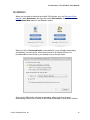
Installation
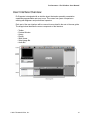
User Interface Overview
Free Media Content
Upgrading from ProPresenter 3
Configuring your computer for first use
Types of Connectors
Display Settings
Setting System Display Preferences in Windows
Setting Display Preferences in ProPresenter
Enabling the Output and Stage Display Output
Getting Started with ProPresenter
Configuring Preferences
General
Display
Label
DVD
Live
Sync
Toolbar
6
7
9
10
14
15
16
17
17
18
18
20
22
23
24
24
25
26
27
28
29
30
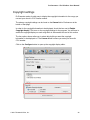
Copyright settings
Working with the Library
32
35
Adding new presentations
Creating multiple libraries
35
35
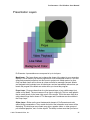
Presentation Layers
Working with Templates
Cues
Working with Media
Presentation File Formats
37
39
40
41
42
Working with Presentations
43
Working with the Library
Working with Playlists
Slide and Table View
Working with Slides and Media
Transitions
Basic Presentation Editing
Global Formatting
Quick Edit
© 2011 Renewed Vision, Inc.!
44
45
46
47
49
50
50
51
3