1
xxxix
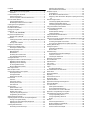
Contents
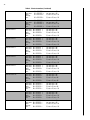
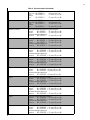
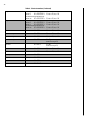
Getting to Know Your Security System .............................................. 3
Overview ........................................................................................... 3
Communicating with the Panel ............................................................ 3
Instructing the Panel ........................................................................ 4
How Your System Communicates with You .............................. 4
Fire and Smoke Alarms .......................................................................... 4
Clearing Smoke Sensors ................................................................. 4
What Happens When There is an Alarm .................................... 4
Opening and Closing Reports .............................................................. 4
No Activity Feature ................................................................................. 4
Domestic Dialer Feature......................................................................... 5
Arming Your System ............................................................................. 5
Quick Arm ................................................................................................ 5
Level 1—OFF (DISARMED) ............................................................ 5
Keychain Touchpad Arming ................................................................. 5
Arming Level 2—HOME .................................................................. 5
Quick Exit ................................................................................................. 6
If leaving the premises, exit through a designated delay door immediately. ....................................................................................... 6
Arming Level 3—AWAY .................................................................. 6
Using the Chime Feature ....................................................................... 6
Preventing Accidental Alarms .............................................................. 6
Aborting Accidental Alarms ........................................................... 6
Exit and Entry Delay Times .................................................................... 7
Extended Delay ................................................................................ 7
Exit Extension .................................................................................... 8
No Delay—For Instant Alarm ......................................................... 8
Auto HOME Arming Feature ......................................................... 8
Arming With Faults .................................................................................. 8
Arming While a Door or Window is Open ....................................... 8
Bypassing a Sensor Directly ........................................................... 9
Bypassing a Sensor Indirectly ........................................................ 9
To arm bypassed sensors ............................................................... 9
Was the Bypass Successful? ........................................................... 9
Basic Light Control .................................................................................. 9
Basic Output Control ............................................................................. 9
Checking the Status of Your System ................................................... 9
Short System Status ....................................................................... 10
Full System Status ........................................................................... 10
System Alarm Sounds .................................................................... 10
Panic Alarms .......................................................................................... 10
Fire Panic ......................................................................................... 10
Police Panic Alarm ......................................................................... 10
Auxiliary Panic Alarm .................................................................... 10
Siren Time-out ................................................................................. 10
Access Codes ......................................................................................... 11
System Master Code ..................................................................... 11
Partition Master Codes ................................................................. 11
Regular User Codes ....................................................................... 11
Using the Programming Menus .................................................. 11
Programming Access Codes ........................................................ 11
Setting the Time and Date .................................................................. 12
Adjusting System Sounds and Touchpad Brightness ..................... 12
Arming Your System Silently ....................................................... 12
Adjusting the Touchpad Display Brightness ............................. 12
Adjusting the Volume .................................................................... 13
Creating Time Schedules ..................................................................... 13
Scheduling Consecutive Days ..................................................... 13
Attaching Time Schedules ............................................................ 14
Time Schedules and Partitions .................................................... 14
Exception reports .................................................................................. 14
In the Event of . . . .......................................................................... 14
When Will this Feature Be Active? ............................................. 14
Assigning a Time Schedule to Exception Opening and Closing
14
Advanced Light Control ...................................................................... 14
Controlling Lights By Time Schedule ......................................... 14
Installer Programmable Lighting ................................................. 15
Controlling Outputs by Time Schedule .................................... 15
Using the Installer Access Feature .................................................... 15
Using a Partitioned System ................................................................. 15
Global Settings ............................................................................... 15
Partition-Specific Settings ............................................................. 15
Jumping Partitions .......................................................................... 15
Using the Panel Download Feature .................................................. 16
System Information .............................................................................. 16
Using a Touch Tone (or DTMF) Phone to Operate Your System 16
Phone Command Prefix ............................................................... 16
Accessing the System from Off-site ........................................... 16
Touch Tone (or DTMF) Phone System Operation ................. 17
Viewing Event History........................................................................... 18
Testing the System ................................................................................ 18
Automatic Test Features ............................................................... 18
Manual Tests ................................................................................... 18
Troubleshooting .................................................................................... 19
Trouble Beeps and Trouble Messages ...................................... 19
Common Concerns ....................................................................... 20
Checking the Panel Fuse .............................................................. 20
Appendix A: User Sheets ..................................................................... 22
Account Number .................................................................................. 22
System Sensors ...................................................................................... 22
User Codes ............................................................................................ 23
Output Control ..................................................................................... 24
Lights ....................................................................................................... 24
Touchpad Information .................................................................. 24
Accidental Smoke and Fire Alarms ................................................... 25
Dialer Abort ........................................................................................... 25
Arming Information .............................................................................. 26
Reporting ................................................................................................ 26
If the Power Goes Out ........................................................................ 27
No Activity Time ................................................................................... 27
System Information .............................................................................. 27
Appendix B: Planning For Emergencies ............................................ 28
Floor Plan Example ............................................................................... 28
Your Floor Plan ...................................................................................... 28
Alarm System Limitations ............................................................. 28
If Your System Needs Service ..................................................... 29
Floor Plan of Your Home or Business ........................................ 29
Appendix C: Programming Your System .......................................... 30
Two Methods to Program Your System .......................................... 30
Using Programming Menus ......................................................... 30
Using Programming Shortcuts .................................................... 33
Notes: ............................................................................................... 37
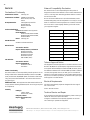
Notices .................................................................................................... 38
Telecom Approval Notice ............................................................ 38
Notice of Network Compatibility ............................................... 38
Electrical Requirements ................................................................ 38
Technical Service and Repair ...................................................... 38