1
June 20, 2000
5.4
What happens if I take the DNC CD-ROM out of the drive while FUND is still
reading the database?
CAUTION!
Removing a CD from the drive during operation
(lights are flashing on the drive) can cause FUND
to crash.
When utilizing the CD-ROM DNC media, removing the CD from the drive during operation can
have adverse effects on the program. In other words, DO NOT REMOVE THE DNC CD-ROM
DISK when the drive status light(s) are flashing on the drive, which indicates that the CD-ROM
drive is reading CD-ROM disk; wait for the read operation to finish--THEN, you can safely
replace the CD-ROM DNC disk with a different one.
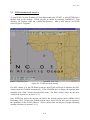
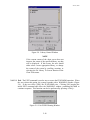
Note the DNC Database Server (DDS) status window in the lower right-hand corner of the
FUND chart display. This display should be enabled (which is the default; hot key is “D”) for
the database processing statuses to print to the screen; it will show you what current DNC chart
library is being read/loaded, and whether the operation is completed or is in progress.
5.5 How do I interpret the DNC Database Server (DDS) status messages?
Messages displayed in the DDS status window in the lower right-hand corner of the FUND chart
display are listed in reverse chronological order. That is, the most recent event will be visible at
the top of the list. All times are derived from the computer system clock, and then converted to
Universal Time (ie., Greenwich Mean Time [GMT]).
Here is an example of an event message indicating that DDS has successfully accomplished
database initialization:
JAN 09 16:20 DDS:database info complete
A pair of messages like the next two signals that FUND DDS began, then, completed processing
an entire chart library—every Retrieving library event message should have a matching Got
library message to indicate that the library processing cycle for the named library has finished:
MAY 31 16:02 Got library “H2617730”
MAY 31 16:00 Retrieving library “H2617730”
If the last message posted about a selected (or Auto-selected) DNC library is Retrieving …, then
the retrieval operation is still in progress and incomplete. On rare occasions, and if many
minutes have passed since the Retrieving library status was printed to the window, it may
indicate that the DDS has crashed.
Now, the FUND Man-Machine Interface (MMI) manages cached data from previous chart
library processing sessions. When a data cache exists for a particular library, the MMI will
report in this status window that it has found the previously cached library and is reading the
cache from the hard disk drive. When the operation is complete, the MMI, likewise, reports the
completion:
JUL 03 18:40 MMI done reading A2617730
5-2