1
I/ON
TM
USER MANUAL • 9 • SYSTEM SIGNAL CONNECTIONS AND SETTINGS
TWO CHANNEL CONFIGURATION
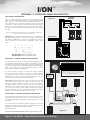
Figure 11 shows a typical two channel / stereo configuration using
a pair of I/ON Passive Studio Monitors in combination with Blue
Sky’s SUB 12. The required bass-management electronics for
stereo applications are included in Blue Sky’s SUB 12 and SUB
15 Universal. When using I/ON with Blue Sky’s SUB 15 Universal,
please set “Crossover Selector Switch” to the “Blue Sky” setting.
This will provide the proper bass-management filters for use with
the I/ON.
2 CHANNEL
AMPLIFIER
Figure 11
left channel
speaker
output
left channel
ballanced
input
+
–
+
–
right channel
ballanced
input
right channel
speaker
output
+
+
–
–
Bass-management uses electronic filters to redirect bass frequencies
from the main channels to the subwoofer.
Please Note: The I/ON Passive Studio Monitor is not compatible with
Blue Sky’s SUB 8 Universal, unless you are using it in combination
with Blue Sky’s BMC MK II, or other bass management electronics,
which provides the following bass management filters, shown
below.
FROM SOURCE
blue sky international R
R IG HT
IN
R IG HT
OUT
P US H
LE FT
IN
LE FT
OUT
P US H
S UB
IN
S UB
OUT
MUT E
P US H
P HA S E
A UT O
0
OF F
180
S UB
G A IN
REF
-3
100mV =90dB /1m
OF F
-6
-9
-12
-15
80 Hz
12 dB /OC T
80 Hz
12 dB /OC T
-18
-24
80 Hz
24 dB /OC T
sub 12
active subwoofer
200 watt
LUC A S F I LM
R
pm3
blue sky international
200 Sea Lane
Farmingdale, New York 11735
ON
P OWE R
4.0 A MP
S L OW
B L OW
120
VA C
60 Hz
High-Pass Filter: 80 Hz / 12 dB per octave
Low-Pass Filter: 80 Hz / 24 dB per octave
430
WAT T S
AV IS : R IS QUE DE C HOC E L E C T R IQUE
NE PA S OUV IR
C A UT ION
R IS K OF E L E C T R IC S HOC K
DO NOT OP E N
!
WARNING: To reduce the risk of fire or electrical
shock, do not expose this equipment to rain or
moisture. Do not remove cover
. No user serviceable
parts inside. Refer servicing to qualified personel.
designed and tested in the USA
made in China
SUBWOOFER
CONSUMER 5.1 CHANNEL SURROUND CONFIGURATION
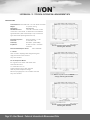
To to the right is a sample 5.1 channel surround configuration using
five I/ON Passive Studio Monitors, a SUB 12, along with a consumer
surround receiver for bass-management. For surround applications,
you must use either Blue Sky’s Bass-Management Controller (BMC)
MK II, an A/V controller / receiver (shown to the right), or similar
product that includes bass-management.
The chart included in Figure 12, shows the common settings
for a typical surround receiver or controller.
Please note that
the terminology used to describe these settings varies between
manufactures. Please consult the manual that came with your
receiver or surround controller for more information.
R eplac e
Only
with
S ame
R ating
and
Type
SAMPLE CONSUMER SURROUND RECEIVER SETTINGS
MAIN SETTINGS
XOVER FREQUENCY
SLOPE
LEFT
SMALL
80 Hz High Pass
12 dB Per Octave
CENTER
SMALL
80 Hz High Pass
12 dB Per Octave
RIGHT
SMALL
80 Hz High Pass
12 dB Per Octave
LEFT SRND
SMALL
80 Hz High Pass
12 dB Per Octave
RIGHT SRND
SMALL
80 Hz High Pass
12 dB Per Octave
YES
80 Hz Low Pass
24 dB Per Octave
SUBWOOFER
NOTE: Connection
to subwoofer may
require RCA to
XLR (M) adapter.
PLEASE NOTE: The above settings are only shown as an example of
a ‘typical’ consumer surround receiver. Many receivers may display
these options using different nomenclature. The above settings
are the typical default settings for a THX® Certified surround
receiver or controller.
Please Note: Because Blue Sky’s SUB 15 Universal and SUB
12 include balanced inputs and many consumer receivers and
processors included unbalanced outputs, you may need a RCA to
XLR (Male) adapter. This will allow you to connect the subwoofer
from the receiver’s unbalanced RCA type subwoofer output, to SUB
12 or SUB 15 Universal’s direct inputs, which uses a balanced
XLR type connector. For more information see the wiring diagram
included in the manual that came with the subwoofer.
PROFESSIONAL 5.1 CHANNEL SURROUND CONFIGURATION
The I/ON Passive Studio Monitor can also be used as part of a 5.1
professional studio monitoring system. This would require the use
of Blue Sky’s BMC MKII, along with a 5-channel amplifier, to power
the system.
If you would like more information about configuring a 5.1 channel
professional monitoring setup, please consult the manual for the
BMC MK II, available from the Blue Sky website:
www.abluesky.com
If you have any questions, please e-mail: [email protected]
Page 10 • User Manual • System Signal Connections and Settings
Figure 12