1
1、
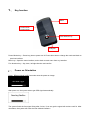
Key function
Menu
Power/mode
Power/mode
Five direction key
USB jack
Power/ Mode key----Press long time to power on/ off. Press short time to change the mode and back to
previous interface.
Menu key---Open the menu interface, and to back to main menu from any interface.
Five direction key----Up, down, left right direction and confirm.
2 、 Power on Orientation
Press 【Power/ Mode key】5 seconds enter the power on image.
GPS Data Logger
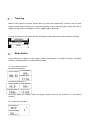
After power on, the system start to get GPS signal automatically.
Searching Satellites
The system finish the first signal fixing after 3 mins, if can not get the signal will continue until fix. After
orientation, the system will enter the user defined interface1.