1
www.brilliantechnology.com
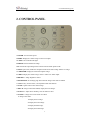
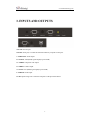
2. CONTROL PANEL
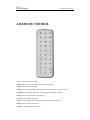
1. POWER: Turn on/off the power.
2. HOME: Display the i-3080’s image via the VGA output.
3. LAMP: Turn on/off the LED light.
4. FREEZE: Freeze/unfreeze the image.
5.T/P: Switch the output image between the text mode and the picture mode.
6. SPLIT: Split screen, enable the comparison between the frozen image and the live image.
7. COMPUTER: Display the connected computer image.
8. VIDEO: Display the i-3080’s image via the C-Video or S-Video output.
9. BRIGHT+/-: Image brightness control.
10.PAGE DOWN: Saved image page down when the image recall mode is enabled.
11. AUTO: Carry out auto focus, color adjustment and white balance.
12. SAVE: Capture and save the current image.
13. RECAL: Image recall mode enabled, display the saved images.
14. FOCUS+/-: Adjust focus manually, focus far and focus near.
15. ZOOM+/-: Image zoom in and zoom out control.
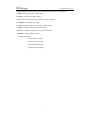
In image recall mode:
1: Display the first image.
2: Display the second image.
3: Display the third image.
4: Display the fourth image.
5