1
Installation Steps – Normal Configuration (continued)
7. Remove the Tempo RAID66 card from the packaging materials.
8. Locate an available PCI slot inside your computer and remove its port access
cover (if present) from the rear of the computer.
Tempo RAID66 Macintosh
ATA Hardware RAID Controller
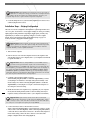
9. Install the Tempo card into the PCI slot; make sure the card is firmly seated
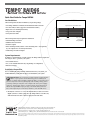
in the slot. Leave the DIP switches in the normal mode setting (Figure 14).
10. Route the ATA/66 cable to the Tempo RAID66 card; avoid the processor’s
heatsink and make sure they will not get crushed or pinched by any part of
the case when the computer is reassembled.
11. Attach the ATA/66 cables’ host connectors to the Tempo RAID66 card
(Figures 11 and 12).
12. Check the cable connections; make sure all cables are properly connected to
the Tempo RAID66 and the hard drives.
normal
mode
Figure 14
13. Close the computer and carefully replace its case cover; be very careful not to
crimp the cables.
14. Turn on your computer.
Support Note: IDE hard drives attached to the Tempo RAID66 will not
mount (appear on the desktop) until they are initialized (formatted.)
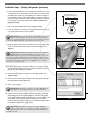
15. Prepare each of the newly installed hard drives by initializing (formatting)
them with Apple’s Drive Setup utility (Figure 15). (The Drive Setup application is installed during the Mac OS installation process and is usually located
in the Utilities folder on the hard drive containing your active System
Folder.) For drives larger than 2 Gigabytes, you should format them as HFS+
to take full advantage of their storage capacity.
Figure 15
Support Note: IDE hard drives attached to the Tempo Ultra ATA66 will
register as a SCSI devices to the computer. For example, in Figure 15 the
newly installed hard drives show up as <not initialized> under Volume Name(s)
and SCSI under Type.
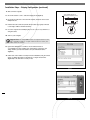
16. Name each of the drives once they have been initialized; each drive will
appear on the desktop as a single drive (Figure 16). Your drives are now
ready for use.
6
Figure 16