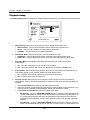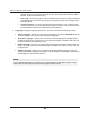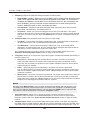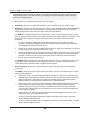
1
®
USER MANUAL
READ CAREFULLY BEFORE OPERATION
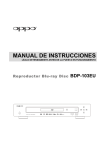
Blu-ray Disc Player
BDP-103EU
Table of Contents
IMPORTANT INFORMATION .......................................................1
Important Safety Instructions .................................................................................... 1
Precautions ................................................................................................................. 2
CE Statement .............................................................................................................. 2
Trademarks ................................................................................................................. 3
Compatible Disc Types ............................................................................................... 3
Discs that cannot be played.............................................................................................................4
Notes about BD-ROM compatibility .................................................................................................4
Disc care and handling ....................................................................................................................4
Copyright Protection ................................................................................................... 4
Cinavia Notice ............................................................................................................. 4
Gracenote Notice ........................................................................................................ 5
Region management information ............................................................................... 5
Accessories ................................................................................................................. 5
INSTALLATION ...........................................................................6
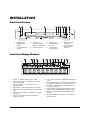
Front Panel Controls ................................................................................................... 6
Front Panel Display Windows ..................................................................................... 6
Rear Panel Connectors ............................................................................................... 7
Remote Control ........................................................................................................... 8
Remote Control Buttons...................................................................................................................8
Back Side.........................................................................................................................................9
Battery Installation ...........................................................................................................................9
Using the Remote Control................................................................................................................9
Changing the Remote Code ..........................................................................................................10
Changing the Backlight Method .....................................................................................................10
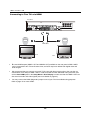
Common Connection Methods...................................................................................11
Connecting to an A/V Receiver via HDMI ......................................................................................11
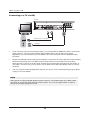
Connecting to a TV and A/V Receiver via Dual HDMI ...................................................................12
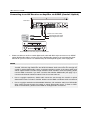
Connecting to a TV via HDMI ........................................................................................................13
Connecting to Two TVs via HDMI..................................................................................................14
Connecting to a TV via DVI............................................................................................................15
Alternate Audio Connections.....................................................................................16
Connecting to an A/V Receiver or Amplifier via Analogue Outputs ...............................................16
Connecting to an A/V Receiver or Amplifier via S/PDIF (Coaxial / Optical)...................................17
HDMI / MHL INPUT to BDP-103EU.............................................................................18
Connecting to the Internet .......................................................................................19
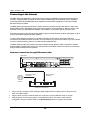
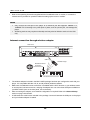
Internet connection through Ethernet cable................................................................................... 19
i
Internet connection through wireless adaptor................................................................................20
Custom Installation ...................................................................................................21
External IR (Infrared Remote) Installation......................................................................................21
RS232 Control................................................................................................................................21
Quick Start Guide ......................................................................................................22
Power On and Play ........................................................................................................................22
Select the Best Output Resolution .................................................................................................22
Determine the Display Aspect Ratio ..............................................................................................23
BASIC OPERATIONS ................................................................24
Disc Playback ............................................................................................................24
OPTION Menu.............................................................................................................24
Fast Playback ............................................................................................................25
Pause and Frame-by-Frame .......................................................................................25
Slow Playback............................................................................................................26
Blu-ray Disc Menu Playback ......................................................................................26
DVD Menu Playback...................................................................................................26
On-Screen Display......................................................................................................27
Volume Control ..........................................................................................................27
Mute............................................................................................................................28
Audio Language/Track Selection ..............................................................................28
Subtitle Selection ......................................................................................................28
HDMI / MHL INPUT Selection ....................................................................................29
Audio Return Channel (ARC) Selection.....................................................................29
BD-Live .......................................................................................................................30
ADVANCED OPERATIONS ........................................................31
Output Resolution ......................................................................................................31
Zooming and Aspect Ratio Control ...........................................................................32
Zoom Levels for HDMI Output .......................................................................................................32
Subtitle Shift ..............................................................................................................34
Repeat Playback ........................................................................................................34
Repeat a Selected Section........................................................................................35
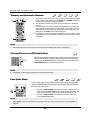
Shuffle and Random Playback ..................................................................................35
Playback by Chapter or Track Number.....................................................................35
Playback from a Specific Location ...........................................................................36
DVD and Blu-ray Discs ..................................................................................................................36
CD and SACD discs.......................................................................................................................37
Memory and Automatic Resume ...............................................................................38
Viewing Pictures on DVD-Audio Discs ......................................................................38
Pure Audio Mode ........................................................................................................38
ii
MEDIA FILE PLAYBACK ...........................................................40
Playback from USB Flash Drive ................................................................................ 40
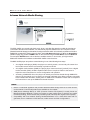
In-home Network Media Sharing .............................................................................. 41
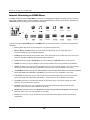
Internet Streaming on HOME Menu.......................................................................... 42
Playing Music Files ................................................................................................... 43
Playing Movie Files ................................................................................................... 45
Viewing Photo Files .................................................................................................. 46
Adding Background Music ........................................................................................ 47
SETUP MENU OPTIONS .......................................................... 48
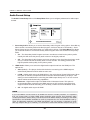
Using the Setup Menu System.................................................................................. 48
Playback Setup ......................................................................................................... 51
Video Setup ............................................................................................................... 53
Picture Adjustment.........................................................................................................................56
HDMI Options ................................................................................................................................59
Audio Format Setup .................................................................................................. 61
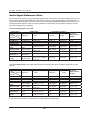
Audio Signal Reference Chart .......................................................................................................64
Recommended Audio Format Options ..........................................................................................65
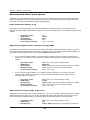
Audio Processing Setup ............................................................................................ 67
Speaker Configuration ...................................................................................................................67
Other Audio Processing Settings ...................................................................................................71
Device Setup ............................................................................................................. 72
Network Setup .......................................................................................................... 76
REFERENCES........................................................................... 80
Useful Notes.............................................................................................................. 80
Troubleshooting ........................................................................................................ 80
Specifications ........................................................................................................... 82
User Manual Updates Online .................................................................................... 82
Language Code List .................................................................................................. 83
Gracenote Terms of Use ............................................................................................84
LIMITED WARRANTY................................................................85
OPPO BD UK Ltd. Limited Two Years Warranty ...................................................... 85
iii
IMPORTANT INFORMATION
CAUTION:
CAUTION
DANGER OF EXPLOSION IF BATTERY IS INCORRECTLY
REPLACED. REPLACE ONLY WITH THE SAME OR
EQUIVALENT TYPE.
RISK OF ELECTRIC SHOCK.
DO NOT OPEN.
CAUTION: TO REDUCE THE RISK OF ELECTRIC
SHOCK, DO NOT REMOVE COVER (OR BACK).
NO USER-SERVICEABLE PARTS INSIDE. REFER
SERVICING TO QUALIFIED SERVICE
PERSONNEL.
THIS PRODUCT UTILIZES A LASER. USE OF CONTROLS
OR ADJUSTMENTS OR PERFORMANCE OF
PROCEDURES OTHER THAN THOSE SPECIFIED HEREIN
MAY RESULT IN HAZARDOUS RADIATION EXPOSURE.
DO NOT OPEN COVERS AND DO NOT REPAIR
YOURSELF. REFER SERVICING TO QUALIFIED
PERSONNEL.
The lightning flash with arrowhead symbol, within an
equilateral triangle, is intended to alert the user to
the presence of uninsulated “dangerous voltage”
within the product's enclosure that may be of sufficient
magnitude to constitute a risk of electric shock to persons.
The exclamation point within an equilateral triangle
is intended to alert the user to the presence of
important operation and maintenance (servicing)
instruction in the literature accompanying the appliance.
WARNING:
TO REDUCE THE RISK OF FIRE OR ELECTRIC
SHOCK, DO NOT EXPOSE THIS APPLIANCE TO RAIN
OR MOISTURE. DANGEROUS HIGH VOLTAGES ARE
PRESENT INSIDE THE ENCLOSURE. DO NOT OPEN
THE CABINET. REFER SERVICING TO QUALIFIED
PERSONNEL ONLY.
This label is located on the laser protective housing inside the
product.
THE APPARATUS SHALL NOT BE EXPOSED TO
DRIPPING OR SPLASHING AND THAT NO OBJECTS
FILLED WITH LIQUIDS, SUCH AS VASES SHALL BE
PLACED ON THE APPARATUS.
Important Safety Instructions
1)
2)
3)
4)
5)
6)
7)
Read these instructions.
Keep these instructions.
Heed all warnings.
Follow all instructions.
Do not use this apparatus near water.
Clean only with dry cloth.
Do not block any ventilation openings. Install in
accordance with the manufacturer’s instructions.
8) Do not install near any heat sources such as radiators,
heat registers, stoves, or other apparatus (including
amplifiers) that produce heat.
9) Do not defeat the safety purpose of the polarized or
grounding-type plug. A polarized plug has two blades
with one wider than the other. A grounding type plug
has two blades and a third grounding prong. The wide
blade or the third prong is provided for your safety. If
the provided plug does not fit into your outlet, consult
an electrician for replacement of the obsolete outlet.
10) Protect the power cord from being walked on or
pinched, particularly at plug, receptacle, and the point
where it exits from the apparatus.
11) Only use attachments/accessories specified by the
manufacturer.
12) Use only with the cart, stand, tripod,
bracket, or table specified by the
manufacturer, or sold with the
apparatus. When a cart is used, use
caution when moving the
cart/apparatus combination to avoid
injury from tip-over.
13) Unplug this apparatus during lightning storms or when
unused for long periods of time.
14) Refer all servicing to qualified service personnel.
Servicing is required when the apparatus has been
damaged in any way, such as power-supply cord or plug
is damaged, liquid has been spilled or objects have fallen
into the apparatus, the apparatus has been exposed to
rain or moisture, does not operate normally, or has been
dropped.
15) Batteries (battery pack or batteries installed) shall not be
exposed to excessive heat such as sunshine, fire or the
like.
1
I M P O R T A N T
I N F O R M A T I O N
Precautions
To ensure proper ventilation around this product, do not
place this product on a sofa, bed or rug. When installing
this product on a wall or bookshelf, you need to provide
appropriate space.
High temperature will lead to abnormal operation of this
unit. Do not expose this unit or batteries to direct sunlight
or near other heating objects.
When moving the player from a cold location to a warm
one, or vice versa, moisture may condense on the laser
pickup unit inside the player. Should this occur, the
player may not operate properly. In such a case please
turn the unit on for 1-2 hours (without a disc) to facilitate
moisture evaporation.
Before connecting the AC power cord to the appliance,
make sure the voltage designation of the appliance
corresponds to the local electrical supply. If you are
unsure of your power supply, contact your local power
company. The acceptable power input range is AC ~
100V-240V, 50/60Hz.
The apparatus with CLASS I construction shall be
connected to a MAINS socket outlet with a protective
earthing connection.
The player is still receiving power from the AC power
source as long as it is connected to the wall outlet,
even if the player itself has been turned off.
Unplug the power cord if you are not going to use the
product for an extended period of time. Hold the power
plug when unplug ing. Do not pull on the cord.
The main plug is used as the mechanism for cutting off
power, therefore make sure it is easy to unplug.
WEEE symbol
Correct Disposal of This Product. (Waste Electrical
& Electronic Equipment) Applicable in the European
Union and other European countries with separate
collection systems.
This marking on the product, accessories or literature
indicates that the product and its electronic accessories (e.g.
remote handset) should not be disposed of with other
household waste at the end of their working life. To prevent
possible harm to the environment or human health from
uncontrolled waste disposal, please separate these items from
other types of household waste and recycle them responsibly
to promote the sustainable reuse of material resources. Users
should contact either the retailer where they purchased this
product, or OPPO BD UK Ltd, for details of where and how
they can arrange for environmentally safe recycling.
CE mark
This product compiles with European Low Voltage
(2006/95/CE), Electromagnetic Compatibility (2004/108/EC)
and Environmentally-friendly design of Energy-related
Products (2009/125/EC) Directives when used and installed
according to this instruction manual.
2
I M P O R T A N T
I N F O R M A T I O N
Trademarks
x
“Blu-ray Disc”, “Blu-ray 3D”, “BONUSVIEW” and “BDLive” are trademarks of Blu-ray Disc Association.
x
Java and all Java-based trademarks and logos are
trademarks or registered trademarks of Sun
Microsystems, Inc. in the United States and other
countries.
x
DVD Logo is a trademark of DVD Format/Logo Licensing
Corp., registered in the U.S., Japan and other countries.
x
Super Audio CD, SACD and the SACD logo are joint
trademarks of Sony Corporation and Philips Electronics
N.V. Direct Stream Digital (DSD) is a trademark of Sony
Corporation.
x
“AVCHD” and the “AVCHD” logo are trademarks of
Panasonic Corporation and Sony Corporation.
x
Designed for Windows Media, Microsoft, HDCD, and the
HDCD logo are trademarks or registered trademarks of
Microsoft Corporation in the United States and/or other
countries.
“480i/480p/720p/1080i/1080p” up-converting arrow logo,
“Source Direct” and “True 24p” logos are trademarks of
OPPO Digital, Inc.
x
x
x
“Qdeo” is trademark of Marvell or its affiliates.
x
Manufactured under license under U.S. Patent Nos:
5,956,674; 5,974,380; 6,226,616; 6,487,535;
7,212,872; 7,333,929; 7,392,195; 7,272,567 & other
U.S. and worldwide patents issued & pending. DTSHD, the Symbol, & DTS-HD and the Symbol together
are registered trademarks & DTS-HD Master Audio is
a trademark of DTS, Inc. Product includes software.
© DTS, Inc. All Rights Reserved.
x
Manufactured under license from Dolby Laboratories.
Dolby and the double-D symbol are trademarks of
Dolby Laboratories.
x
HDMI, the HDMI logo and High-Definition Multimedia
Interface are trademarks or registered trademarks of
HDMI Licensing LLC.
x
“Pandora” is trademark of Pandora, Inc.
x
“Gracenote” is trademark of Gracenote, Inc.
x
“Cinavia” is trademark of Verance Corporation.
x
All other trademarks are the properties of their
respective owners.
“Netflix” is a registered trademark of Netflix, Inc.
Compatible Disc Types
Logo
Features
Manual Icon
BD: Supports Blu-ray with Bonus View and BD-Live content, including Blu-ray
3D discs. A 3D-capable display with compatible glasses is required for 3D
playback. BD-R/RE, both single- and dual-layer are also supported.
DVD: Plays commercially-released DVDs, as well as finalized DVD±R/RW.
DVD-A: High-resolution stereo or multi-channel audio. Some DVD-Audio discs
also contain a DVD-Video portion.
DVD-A
SACD: High-resolution stereo or multi-channel audio. Note: some SACDs use
a hybrid format with both a CD and a high resolution DSD layer.
SACD
CD: Supports standard Red Book CDs, as well as HDCD and CD-R/RW.
AVCHD: High-definition digital video camera format, often in the form of a
DVD±R or flash memory.
3
I M P O R T A N T
I N F O R M A T I O N
Discs that cannot be played
x
x
x
x
x
x
BDs with cartridge
DVD-RAMs
HD-DVDs
Data portion of CD-Extras
DVDs / Blu-Rays with a region code other than 2 or B
x
Some Dual-Discs: A Dual-Disc is a two-sided disc with
DVD-video on one side and digital audio on the other
side. The digital audio side does not meet the technical
specifications of the Red Book CD format so playback is
not guaranteed.
Audio discs with copy-protection may not be playable.
Notes about BD-ROM compatibility
Since the Blu-ray Disc specifications are new and evolving, some discs may not play properly depending on the disc type, version
and encoding. It is possible that a Blu-ray Disc manufactured after the player uses new features of the Blu-ray Disc specifications.
To ensure the best possible viewing experience, the player may need a firmware or software update from time to time. Please visit
OPPO BD UK Ltd web site www.oppo-bluray.co.uk to check if updates are available
Disc care and handling
x
x
x
x
To keep the disc clean from scratches or fingerprints,
handle the disc by its edge. Do not touch the recorded
surface.
Blu-ray Discs record data in very high density and the
recorded layer is very close to the disc surface. For this
reason, Blu-ray Discs are more sensitive to dust and
fingerprints than DVD. Should you encounter playback
problems and see dirty spots on the disc surface, clean
the disc with a cleaning cloth. Wipe the disc from the
center out along the radial direction. Do not wipe the
disc in a circular motion.
Do not use record cleaning sprays or solvents such as
benzene, thinner and anti-static spray.
x
x
Do not attach labels or stickers to discs as this may
cause the disc to warp or become too thick, resulting in
playback issues and a potentially stuck disc.
Avoid exposing the discs to direct sunlight or heat
sources.
Do not use the following discs:
o
Discs with exposed adhesive from removed stickers
or labels. The disc may get stuck inside the player.
o
Warped or cracked discs.
o
Irregularly shaped discs, such as heart or business
card shapes.
Copyright Protection
This product incorporates copyright protection technology that is protected by U.S. patents and other intellectual property rights of Rovi
Corporation. The use of Rovi Corporation's copyright protection technology in the product must be authorized by Rovi Corporation. Reverse
engineering and disassembly are prohibited.
Cinavia Notice
This product uses Cinavia technology to limit the use of unauthorized copies of some commercially-produced film and videos and their
soundtracks. When a prohibited use of an unauthorized copy is detected, a message will be displayed and playback or copying will be
interrupted.
More information about Cinavia technology is provided at the Cinavia Online Consumer Information Center at http://www.cinavia.com. To
request additional information about Cinavia by mail, send a postcard with your mailing address to: Cinavia Consumer Information Center,
P.O. Box 86851, San Diego, CA, 92138, USA.
4
I M P O R T A N T
I N F O R M A T I O N
Gracenote Notice
Music and Video recognition technology and related data are provided by Gracenote®. Gracenote is the industry standard in music
and video recognition technology and related content delivery. For more information visit www.gracenote.com.
CD, DVD, Blu-ray Disc, and music and video-related data from Gracenote, Inc., copyright © 2000 to present Gracenote. Gracenote
Software, copyright © 2000 to present Gracenote. One or more patents owned by Gracenote may apply to this product and service.
See the Gracenote website for a non-exhaustive list of applicable Gracenote patents. Gracenote, CDDB, MusicID, the Gracenote
logo and logotype, and the "Powered by Gracenote" logo are either registered trademarks or trademarks of Gracenote in the United
States and/or other countries.
Region management information
This player is designed and manufactured to respond to the region management information. If the region number of a BD-Video or
DVD disc does not correspond to the region number of this player, this player cannot play the disc.
BD-Video: This player plays Blu-Ray Discs with marks containing the region code B.
DVD-Video: This player plays DVDs with marks containing the region code 2 and ALL.
Accessories
Please check that the following parts are included in your BDP-103EU package:
User Manual
HDMI 1.4 Cable, about 183cm
USB Wireless-N Adapter (up to 150Mbps,
802.11b/g/n compatible, 2.4GHz)
USB Extension Cable, about 137cm
Power Cable, about 137cm
Remote Control with AA Batteries
5
INSTALLATION
Front Panel Controls
1
2
3
4
5
6
7
8
9 10
11
BDP-103EU
1.
POWER Button
4.
Disc Tray
7.
USB 2.0 Input
2.
POWER Status
Indicator
5.
OPEN/CLOSE Tray
Button (with backlight)
8.
3D Output Active
Indicator
3.
Front Panel Display
Window
6.
IR Sensor Window
9.
4K x 2K Output
Active Indicator
10. MHL-Compatible
HDMI Input
11. Playback Control
and Navigation
Buttons
Front Panel Display Windows
1
2
3
4
5
6
7
8
9
10
11
12
13
13
1.
Mute Icon – Indicates that the audio is muted
8.
2.
Audio Type Indication – Indicates the type of audio
tracks being played
Track – When illuminated, the displayed time applies to
a track
9.
3.
Disc Type Indication – Indicates the currently
playing disc type
Audio Channel Indication – Indicates whether the audio
being played is 2ch stereo or multi-channel surround
4.
Main Display – Text messages and numeric display
10. Remaining – When illuminated, the displayed time is
the remaining play time
5.
Title – When illuminated, the displayed time applies to
a title
11. Playback Status – Indicates playback status such as
Play, Pause, Repeat, Repeat All, and Random Mode
6.
Group – When illuminated, the displayed time applies
to a group
12. Ethernet – Indicates that an active Ethernet cable is
attached
7.
Chapter – When illuminated, the displayed time
applies to a chapter
13. Wireless – Indicates that the player is connected to a
wireless network
6
I N S T A L L A T I O N
Rear Panel Connectors
1
2
3
4
5
6
7
8
9
10
11
12
1.
Ethernet LAN Port
6.
HDMI 2 Output (3D Compatible)
11. RS-232C Serial Control Port
2.
HDMI Input (Back)
7.
HDMI 1 Output (3D Compatible)
3.
Diagnostic Video Output
8.
USB 2.0 Input
12. 7.1CH / 5.1CH / Stereo Analogue
Audio Outputs
4.
Coaxial Digital Audio Output
9.
USB 2.0 Input
5.
Optical Digital Audio Output
10. IR (Infrared) Signal Input
In addition to the above connectors, the AC power inlet is also located on the rear panel. The inlet is the IEC60320 C14 type. Only the included AC power cord or an approved power cord with an IEC60-320 C14 type plug
should be used.
7
I N S T A L L A T I O N
Remote Control
Remote Control Buttons
19
1
20
21
2
22
3
23
24
4
25
5
26
27
6
28
7
29
8
9
10
11
30
2
12
31
13
32
14
33
15
34
16
35
17
36
18
37
1. POWER: Toggle power
STANDBY and ON
2. NETFLIX: Netflix access
button
3. PURE AUDIO: Turn
off/on video
4. NUMBER Buttons:
Enter numeric values
5. CLEAR: Clear numeric
input
6. TOP MENU: Show BD
top menu or DVD title
menu
7. ARROW and ENTER
Buttons: Navigate menu
selection
8. OPTION: Brings up the
context-related menu
9. COLOUR Buttons:
Function varies by
content
10. PLAY: Start playback
11. STOP: Stop playback
12. REV: Fast reverse play
13. PREV: Skip to previous
14. AUDIO: Change audio
language or channel
15. SUBTITLE: Change
subtitle language
16. SETUP: Enter the
player Setup Menu
17. A-B REPLAY: Repeat
play the selected
section
18. RESOLUTION: Switch
output resolution
19. OPEN: Open/close the
disc tray
20. INPUT: Select the input
source
21. VUDU: VUDU access
button (USA only)
22. MUTE: Mute audio
23. VOLUME +/-:
Increase/Decrease
volume
24. HOME: Go to Home
Menu to select media
source
25. PAGE UP/DOWN:
Show the previous/next
page
26. INFO: Show/hide the
On-Screen Display
27. GOTO: Play from a
specified location
28. POP-UP MENU: Show
BD pop-up menu or
DVD menu
29. RETURN: Return to the
previous menu or mode
30. PAUSE: Pause
playback
31. FWD: Fast forward play
32. NEXT: Skip to the next
33. 3D: Enable 2D->3D
conversion or bring the
3D adjustment menu
34. ZOOM: Zoom in/out
and adjust aspect ratio
35. DIMMER: Dim the front
panel display
36. REPEAT: Repeat play
37. LIGHT: Activate the
back light for the
remote control
NOTE
When a button is pressed but its function is invalid or unavailable at the moment, the TV screen
displays a circle with a diagonal line:
8
I N S T A L L A T I O N
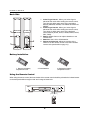
Back Side
1. Index Finger Notch 1: When your index finger is
placed at this notch while holding the remote control,
your thumb is within easy reach of the navigation
buttons (ARROW, ENTER, TOP MENU and POP-UP
MENU).
2. Index Finger Notch 2: When your index finger is
placed at this notch while holding the remote control,
your thumb is within easy reach of the playback
control buttons (STOP, PLAY, PAUSE, PREV, NEXT,
REV, FWD).
3. Battery Cover: Remove to replace batteries or set
remote code.
4. Batteries: Use 2 AA or LR6 batteries.
5. Remote Code Switch: Adjust the position of the
switch to set the remote control to use the indicated
remote code (see details on page 10).
1
2
4
3
5
With Battery Cover
Battery Cover Removed
Battery Installation
1. Remove the battery
compartment cover
2. Insert batteries
3. Replace the battery
compartment cover
Using the Remote Control
When using the remote control, the front window of the remote control should be pointed to the infrared sensor
on the front panel within an angle of ±30° and a range of about 26 ft.
BDP-103EU
Within about 26ft
9
I N S T A L L A T I O N
Changing the Remote Code
The remote control contains three OPPO remote codes. The default is “Code 1”. If you have other OPPO
products placed close to the BDP-103EU, they may inadvertently respond to the BDP-103EU remote control.
To prevent this, you can select a different remote code.
To select a new remote code, open the battery compartment cover of the remote control, and then use a ball
point pen to flip the switch to one of the positions marked as “1”, “2”, or “3”. Close the battery compartment
cover. Make sure that the BDP-103EU player is turned on and that the disc tray is ejected. Aim the remote
control at the player. Press and hold the ENTER button for 5 seconds. The player will start using the new
remote code.
Battery Compartment
Remote Code Switch
Changing the Backlight Method
The remote control supports one of two backlight methods. By default, pressing the LIGHT button will
turn on the backlight, and pressing any other button within 10 seconds will keep the backlight on. The
alternative method will activate the backlight whenever any button is pressed; in this mode, the light will
stay on for 10 seconds, and pressing any other button will keep the backlight on. To switch between
these two backlight methods, press and hold the LIGHT button for 5 seconds.
CAUTION
x
x
x
x
x
x
Never drop the remote control or expose it to moisture.
Never expose the infrared remote sensor on the front panel to direct sunlight or other
strong light sources.
Remote may not operate consistently when batteries become low. Replace them if
operation deteriorates.
If the remote control will not be used for a long time, please remove the batteries.
Use the batteries correctly to avoid possible leakage and corrosion. Do not leave the
batteries exposed to direct sunlight or in a high temperature environment for a long period
of time. Do not heat or expose to flame. Do not mix old and new batteries. Do not use
batteries of different types at the same time. Do not attempt to recharge the batteries.
If battery leakage occurs, do not touch the liquid with bare hands. Wipe out any liquid inside
the battery compartment, and insert new batteries.
10
I N S T A L L A T I O N
Common Connection Methods
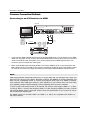
Connecting to an A/V Receiver via HDMI
Rear Panel
HDMI Cable
HDMI In
(to HDMI 1 or 2)
HDMI Cable
HDMI OUT
HDMI IN
AUDIO/VIDEO MULTI-CHANNEL RECEIVER
x
If you have an HDMI-capable receiver that can support HDMI audio, you can simply run an HDMI
cable from the player to your receiver and enable HDMI audio on the receiver (see your receiver’s
owner’s manual for more information). The receiver usually has an HDMI output that you can
connect to your TV to pass the video signal.
x
Either of the HDMI output terminals (HDMI 1 OUT and/or HDMI 2 OUT) on the rear panel of the
BDP-103EU can be connected to your receiver. Preference should be given to the HDMI 1 output
for video since it is the only output to benefit from the superior Marvell QDEO video processor.
NOTE
HDMI (High-Definition Multimedia Interface) is a single cable that can transport both audio and
video from your player to your display. Be aware, however, that HDMI is an evolving standard, and
there may be compatibility issues. A receiver that supports audio input over HDMI is required.
Some receivers offer HDMI ports solely for video switching. If your receiver does not have audio
input capability, please read the following sections regarding other connection methods.
In order to play multi-channel audio for all formats, the receiver must support HDMI v1.1 or later.
For Blu-ray Discs, a receiver that supports HDMI v1.4 with decoding capability for Dolby TrueHD
and DTS-HD Master Audio is preferred. Please check the specifications of your receiver to ensure
that it meets these requirements.
The HDMI outputs on the BDP-103EU are HDMI v1.4, which are compatible with HDMI v1.3
and earlier versions.
11
I N S T A L L A T I O N
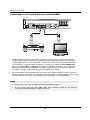
Connecting to a TV and A/V Receiver via Dual HDMI
Rear Panel
HDMI Cable 2
HDMI Cable 1
HDMI IN
HDMI IN
AUDIO/VIDEO MULTI-CHANNEL RECEIVER
x
The BDP-103EU provides a “Dual HDMI” connection to make sure you can enjoy the highest
possible video quality and resolution, in addition to high bit rate audio content. You can use the
included HDMI cable to connect the HDMI 1 output to your HDTV and use another HDMI cable
(not included) to connect the HDMI 2 output to your receiver by setting the Dual HDMI Output
option in the Setup Menu to Split A/V (see page 53 for details). In this way you can utilize the
dedicated video processor available for the HDMI 1 output, and allow your receiver which has
no HDMI 1.4 inputs to work without any loss to the digital audio signals.
x
This configuration is recommended when you have a 3D-compatible display, but your receiver is
not 3D-compatible. This allows you to send the video signal (3D, in this case) directly to the TV and
the audio signal to the receiver to be distributed to your speakers as it normally would.
NOTE
x
Please refer to the notes on HDMI connections available on page 11.
x
If your receiver does not have HDMI audio input capability, please try the alternate
connection methods discussed on pages 16 and 17.
12
I N S T A L L A T I O N
Connecting to a TV via HDMI
Rear Panel
Video In
Composite Cable (Optional)
HDMI In
HDMI Cable (to HDMI 1 or 2)
x
If your TV has an HDMI input, you can use the included HDMI cable to connect the player directly to
the TV. This connection method delivers both video and audio in a pure digital format via a single
cable. The HDMI output of the player allows for the highest possible video quality and audio
resolution.
x
There are two HDMI output terminals (HDMI 1 OUT and HDMI 2 OUT) on the rear panel of BDP103EU, both of which can be connected to your TV. We recommend using HDMI 1 OUT since it
benefits from the dedicated Marvell QDEO video processor.
x
You may remove the HDMI cable and connect the DIAG (diagnostic) output to the TV through a
regular composite video cable (not included) when there is a problem with HDMI video. Only the
Setup Menu will be visible on the TV when using this connection, so it is limited to troubleshooting
purposes only.
NOTE
x
This connection method will output sound via the TV’s speakers. For optimal sound
quality, it is recommended that audio be transferred from the BDP-103EU to an
A/V receiver with connected speakers.
x
If your A/V receiver does not accept audio via HDMI, or if your receiver does not have
HDMI inputs at all, see pages 16 and 17 for instructions on how to output audio to a
receiver using different connection types.
13
I N S T A L L A T I O N
Connecting to Two TVs via HDMI
Rear Panel
HDMI In
HDMI In
HDMI Cables
TV 2
TV 1
x
The two HDMI outputs (HDMI 1 OUT and HDMI 2 OUT) available on the rear panel of BDP-103EU
can be connected to two TVs at the same time, and each output can deliver both digital video and
audio singals.
x
We recommend that you connect your main TV (the one with larger screen size or the one that you
would watch more often) to HDMI 1 OUT in order to benefit from the dedicated video processor, and
set the Dual HDMI option in the Setup Menu to Dual Display to make sure that the HDMI 2 OUT can
also send out audio and video signals (see more details on page 53).
x
You may connect the DIAG (diagnostic) output to one of your TVs for troubleshooting purposes.
Refer to page 13 for more details.
14
I N S T A L L A T I O N
Connecting to a TV via DVI
Rear Panel
DVI
HDMI (from HDMI 1 or 2) - DVI Cable
DVI Audio
Audio Cable
x
If your TV has a DVI input that supports HDCP, you can purchase an HDMI-DVI cable to connect the
player to the TV. This connection method delivers digital video to the TV without any signal
degradation. We recommend that you use HDMI 1 OUT since it benefits from the dedicated video
processor.
x
Please use Red/White audio cables (not included) to connect the FL (Front Left) and FR (Front Right)
terminals of the player to the TV. Make sure the audio cables are connected to the same input
terminal group on the TV as the DVI input. Usually, the input terminals are marked as “DVI Audio” or
“PC Audio”. On some TVs you may need to use an RCA-3.5mm Mini-Jack adapter cable to connect
the audio.
x
You may connect the DIAG (diagnostic) output to one of your TVs for troubleshooting purpose. Refer
to page 13 for more details.
NOTE
HDCP stands for High-bandwidth Digital Content Protection. The HDMI outputs of the BDP-103EU
use HDCP to encrypt the digital audio and video content. The TV must support HDCP in order to
decrypt and properly display the content.
15
I N S T A L L A T I O N
Alternate Audio Connections
Connecting to an A/V Receiver or Amplifier via Analogue Outputs
Rear Panel
Audio Interconnect Cables
L
L
L
CENTER
R
R
FRONT
R
SURROUND SUBWOOFER S. BACK
AUDIO/VIDEO MULTI-CHANNEL RECEIVER
Receiver/Amplifier with 7.1ch Audio Input
x
Please use up to 8 RCA-style audio interconnect cables (not included) to connect the FL (Front Left),
FR (Front Right), SL (Surround Left), SR (Surround Right), C (Centre), SW (SubWoofer), SBL
(Surround Back Left) and SBR (Surround Back Right) analogue output terminals of the BDP-103EU to
the corresponding multi-channel analogue audio input jacks of your A/V receiver or amplifier.
x
If the A/V receiver or amplifier only has 5.1ch audio inputs, do not connect the SBL (Surround Back
Left) and SBR (Surround Back Right) terminals, and set the Down Mix option in the Setup Menu to
5.1 to make sure that any 7.1 channel signals are converted to 5.1 channels (refer to Down Mix Mode
on page 68).
x
If your audio system offers only stereo audio inputs, or if you would like to connect a dedicated stereo
audio system in addition to the surround audio system which is already connected to the HDMI or
S/PDIF outputs, you can connect the dedicated stereo audio system to the FL (Front Left) and FR
(Front Right) terminals of the player.
x
For the stereo outputs, if the audio system you are connecting to does not have surround speakers,
set the Down Mix option in the Setup Menu to Stereo. If the audio system has surround speakers
and Dolby Pro Logic or other surround audio decoding capabilities, set the down mix mode to “LT/RT”.
(For more information, refer to “Down Mix Mode” on page 68).
16
I N S T A L L A T I O N
Connecting to an A/V Receiver or Amplifier via S/PDIF (Coaxial / Optical)
Rear Panel
Connect one of these cables:
Coaxial Digital Audio Cable
Coaxial In
Optical Digital Audio Cable
Optical In
AUDIO/VIDEO MULTI-CHANNEL RECEIVER
Receiver/Amplifier with Dolby Digital or DTS Decoder
x
Please use either a 75-Ohm coaxial digital audio cable with RCA-style connectors or an S/PDIF
optical digital audio cable to connect one of the digital audio outputs to the corresponding input
terminal on your A/V receiver. For detailed setup of coaxial/optical signals, refer to page 66.
NOTE
x
Due to bandwidth limitations, high resolution audio formats such as Dolby Digital Plus, Dolby
TrueHD, DTS-HD High Resolution and DTS-HD Master Audio cannot be sent through the
coaxial or optical digital audio output. A reduced resolution version of the same audio track
will be output instead. To listen to high resolution audio formats in their best quality, please
use the HDMI connection if you have a receiver that handles HDMI audio (see page 11) or
use the multi-channel analogue outputs if you do not (see page 16).
x
Due to copyright restrictions, SACD audio cannot be sent through the coaxial or optical
digital audio output. To listen to SACDs, please use the HDMI or analogue audio connections.
x
Due to copyright restrictions and bandwidth limitations, full resolution audio from DVD-Audio
discs cannot be sent through the coaxial or optical digital audio output. To listen to DVDAudio in full resolution, please use the HDMI or analogue audio connections.
17
I N S T A L L A T I O N
HDMI / MHL INPUT to BDP-103EU
Front Panel
Rear Panel
HDMI Cable
HDMI Cable
or HDMI/MHL Cable
Audio/Video Source
x
The BDP-103EU provides two HDMI input ports, located on the front panel and the back panel separately,
both of which can accept up to 1080p high-definition video and digital audio. You can use the included
HDMI cable to connect a source device such as a digital TV box, mobile phone or camcorder to the
HDMI IN port(s). You can use the INPUT button on the OPPO remote to open the Input Source Menu,
which allows you to select the corresponding HDMI IN port.
x
Keep in mind that the HDMI IN port on the front panel is MHL (Mobile High-definition Link) compatible,
which means if it is connected to another MHL-enabled device (like a smartphone) through a MHL
cable or adaptor (not included), then this port is not only capable of accepting high-resolution digital
signals, but can also simultaneously charge the connected device.
18
I N S T A L L A T I O N
Connecting to the Internet
The BDP-103EU has significantly improved its internet streaming capabilities compared to its predecessors.
Currently, it supports Netflix, as well as in-home network media sharing via My Network which is capable of
connecting with DLNA and SMB/CIFS clients. Additional online streaming applications may also be added
with future firmware updates.
The BDP-103EU also supports the BD-Live feature offered on some Blu-ray Disc titles. BD-Live offers extra
downloadable content and additional online interactive programs. Content available on BD-Live varies by disc
and studio, and may include additional subtitles, commentaries, movie trailers, games, and online chat.
Connecting the player to the Internet will also allow the player to obtain firmware updates. (See pages 4 and 72
for more information regarding firmware updates.)
In order to utilize the BD-Live feature or to update the firmware via the Internet, the player needs to be
connected to a broadband Internet connection. It is not necessary to connect to the Internet if you do not intend
to use the network streaming, BD-Live or online firmware update features.
The BDP-103EU provides two network connection methods: through Ethernet cable or through the external
wireless adaptor included with the player. For the fastest and most stable network connection, we recommend
using an Ethernet cable whenever possible.
Internet connection through Ethernet cable
Rear Panel
Broadband Internet
Connection
Network Cable
(Ethernet)
Internet
WAN
1
2 LAN 3
4
Broadband Router/Modem
x
Plug one end of a network cable (Category 5/5E straight Ethernet cable) into the LAN port on the
back of the BDP-103EU.
x
Plug the other end of the network cable into a LAN port on the broadband router or modem.
x
After physically connecting the player to a broadband Internet connection, some network
configuration may be required. Refer to the Network Setup section on page 76 for details.
19
I N S T A L L A T I O N
x
Refer to the operating instructions supplied with the broadband router or modem, or contact the
Internet service provider for questions related to setting up the router or modem.
NOTE
x
Only connect the LAN port of the player to an Ethernet port that supports 10BASE-T or
100BASE-TX. Connecting to any other ports or jacks, such as a phone jack, can damage the
player.
x
Streaming services may require membership and may also be limited to service in the USA
only.
Internet connection through wireless adaptor
Rear Panel
USB IN
Wireless Dongle
Broadband Internet
Connection
Internet
Internet
WiFi
1
2 LAN 3
4
Wireless Router/Access Point
x
The wireless adaptor included in the BDP-103EU package has been pre-configured to work with your
player. It is compatible with 802.11B, G, and N (2.4GHz) wireless networks.
x
Make sure a broadband Internet connection is available and the Wi-Fi function on your wireless router
or access point has been turned on, and plug the adaptor into one of the three USB ports available on
your BDP-103EU (one on the front panel, two on the back).
x
After connecting the adaptor, some network configuration is required. Refer to the Network Setup
section on page 76 for details.
x
A USB extension cable is also included in the package. Connect it between the USB port on the player
and your wireless adaptor if needed.
20
I N S T A L L A T I O N
Custom Installation
External IR (Infrared Remote) Installation
The BDP-103EU features an IR IN port on its back panel. If the player is to be installed in an equipment cabinet
where direct line-of-sight is not available for the remote control, you can purchase an external IR Remote
Sensor and plug it into the IR IN port. Place the sensor head at a location where there is direct line-of-sight to
ensure reliable operation.
Rear Panel
3.5mm Mono Cable
External IR Remote Signal
IR IN Signal Identifications
3.5mm Mono Plug
Tip: IR carrier signal
Sleeve: Ground
NOTE
x
When an external IR sensor is plugged in, the original IR sensor window on the front panel
will be disabled.
x
The IR port on the BDP-103EU is NOT compatible with the prior generation of external IR
Remote Sensor (IR-ES1) which is used on BDP-83.
x
OPPO cannot guarantee that the IR IN port will be compatible with devices that are not
manufactured by OPPO. Connecting the IR IN port to an incompatible device may result in
damage to the connected device or the player.
x
Please contact OPPO customer support if you plan to integrate the player into an IR
distribution system. Customer support can provide recommendations on how to properly
connect the control signals.
RS232 Control
The BDP-103EU has an RS232 control port and can be integrated into most custom home theatre control systems.
Please ask your custom installer to contact OPPO for the RS232 control protocol, or check the OPPO BD UK Ltd
web site (www.oppo-bluray.co.uk) for the latest version of RS-232 protocol document.
21
I N S T A L L A T I O N
Quick Start Guide
Power On and Play
The BDP-103EU is pre-configured with settings that have been optimized for most home theatre systems, so it
can fit into your audio/video system without any additional adjustment. To begin, please follow these steps:
1. Connect the OPPO player into your system.
2. Turn on the TV and/or receiver/amplifier, and then turn on the player.
3. Switch the input selection on your TV or receiver so that the TV displays the signal from the
player.
Within a few seconds, the player will load the factory default settings and you will see the Home Menu with an
OPPO logo. The player is now ready for use. Enjoy your new OPPO Blu-ray Disc Player!
Please follow the rest of the user manual for information on basic and advanced operations.
Select the Best Output Resolution
One of the major advantages of the BDP-103EU is its ability to play high-definition Blu-ray video and also upconvert standard definition video stored on DVD discs to high definition. The sophisticated video processor
inside the player ensures that the video will have the best possible colour, detail and motion. The player offers
several standard and high definition video output resolutions. For best results, it is important to select an output
resolution that best matches your TV or display.
The rule of thumb when selecting an output resolution is to match the “native resolution” of your TV or display
as closely as possible. The “native resolution” is the resolution of the actual display component in the TV, such
as the Plasma panel, LCD panel, or DLP™ chip. The TV may accept input signals with lower or higher
resolutions than its native resolution. In such cases, the electronics in the TV will upscale or downscale the
video to fit its display component. Unfortunately, many TVs on the market only do an average job of scaling the
video. On the other hand, if you set the BDP-103EU to output a resolution that matches or is very close to the
native resolution of the TV, you are more likely to get a great picture.
For most new displays on the market, the best output resolution will be 1080p. A few early model “1080p”
displays did not accept a 1080p signal. For these displays, the best output resolution is 1080i. For small screen
digital TVs this will likely be 720p. For even earlier CRT tube or rear projection TVs this will likely be 1080i. For
EDTV displays (very rare if they have HDMI or DVI) this will be 480p (NTSC) or 576p (PAL). These are general
recommendations that work for most users, but there can be exceptions. Advanced users may want to try all
supported resolutions and choose the one that provides the best result visually.
The BDP-103EU supports a special Source Direct mode through its HDMI outputs. This resolution is
recommended for use with external video processors or high-end TVs. In Source Direct mode, the player
works as a “transport”. It decodes video from the discs and then sends the raw video signal in its native
resolution and format, without extra processing, to the external video processor or TV. The actual output
resolution varies by content:
Content
NTSC DVD
PAL DVD
Most Blu-ray Movies (film-source)
Most Blu-ray TV shows or Concerts
(video-source)
SACD and DVD-Audio
Source Direct Output Resolution
480i
576i
1080p 23.976Hz or 1080p 24Hz
1080i
1080p
22
I N S T A L L A T I O N
For both HDMI outputs, the following output resolutions are available: 4Kx2K, Auto, 1080p, 1080i, 720p,
480p/576p, 480i/576i, and Source Direct. If Auto is selected, the player will determine the output resolution
based on the best signal resolution that the TV can display.
To change the output resolution, press the RESOLUTION button on the remote to bring the Resolution Menu,
then press the UP/DOWN ARROW buttons to highlight the desired one, and press the ENTER button to
confirm and return. If your TV does not support the selected resolution, you may see a black screen or an error
message. In this case, try a different resolution that your TV can support.
Determine the Display Aspect Ratio
Standard Definition, or 4:3 TV
Wide screen, or 16:9 TV
The TV Aspect Ratio is the proportional ratio of a TV screen’s width and height. Older television sets generally
have a 4:3 aspect ratio – the width is 4/3 (or 1.33) times the height. Newer wide screen television sets have a
16:9 aspect ratio – the width is 16/9 (or 1.78) times the height. For best performance, the video output of your
player needs to match the screen aspect ratio of your TV. Since most Blu-ray discs and many DVD discs are
released in the wide screen format, it is highly recommended to use a wide screen TV with the BDP-103EU
.
The Aspect Ratio selections are 16:9 Wide and 16:9 Wide/Auto. Depending on your selection and the video
format recorded on the discs, image appearance on the TV screen can be one of the following:
Original Content
TV Screen Appearance
16:9
Wide
Wide/Auto
4:3
16:9
If you have a widescreen (16:9) display, select one of these options:
x
x
16:9 Wide – 16:9 (widescreen) sources will be displayed in their native aspect ratio, and 4:3
sources will be horizontally stretched.
16:9 Wide/Auto – 16:9 (widescreen) as well as 4:3 sources will be displayed in their native aspect
ratio. Please note that in this mode, 4:3 sources will be displayed with black borders on both left
and right sides to maintain the correct 4:3 aspect ratio.
23
BASIC OPERATIONS
DVD-A
Disc Playback
POWER
STOP
OPEN
PLAY
1ˊ Press the POWER button to turn on the player.
2ˊ Press the OPEN/CLOSE button to eject the disc tray.
3ˊ Place the disc with the label side facing up and the recorded
side facing down.
4ˊ Press the OPEN/CLOSE button again to retract the tray.
5ˊ The player will read the disc information and begin playback.
6ˊ Depending on the content of the disc, a menu or navigation
screen may appear. Use the navigation ARROW and SELECT
buttons to select the content to play.
7ˊ To stop playback, press the STOP button.
8ˊ To turn off the player, press the POWER button.
DVD-A
OPTION Menu
OPTION
SACD
SACD
1. During media file navigation and playback, press the OPTION
button on the remote to open the OPTION MENU, which allows
you to conveniently access various settings and playback
features.
2. When the OPTION MENU is displayed, press the LEFT/RIGHT
ARROW buttons on the remote to highlight a particular item, then
press the ENTER button to confirm.
The OPTION MENU selections may differ depending on content type. A summary of the selections and
their functionality is described as follows:
Within Disc Playback (CD, DVD, BD):
x
Disc info: Searches the Gracenote online database and display the available disc information (an
active internet connection is required).
24
B A S I C
O P E R A T I O N S
Within Music File Playback:
x
Music info: As with “Disc info”; searches and displays available music information from Gracenote.
Shuffle/Random: Activate Shuffle or Random mode. See details on page 35.
Repeat: Repeat the track or all tracks. See details on page 34.
Within Video Discs (DVD, BD) and Video File Playback:
x
Subtitle shift: Adjusts the position of subtitles on the screen. See details on page 34.
x
Picture adjustment: Opens the Picture Adjustment menu. See details on page 56.
x
Zoom: Opens the image zoom level menu. See details on page 32.
x
Angle: Changes the viewing angle. This function is only available when the DVD/BD is recorded
with multiple angles.
Within Photo File playback:
x
Zoom: Displays the image at different zoom levels.
x
Rotate – Left / Right / Mirror / Flip: Rotates the image on the screen.
Within HDMI INPUT playback:
x
Picture adjustment: Opens the Picture Adjustment menu. See details on page 56.
SACD
DVD-A
Fast Playback
You may fast forward or reverse during playback.
REV
FWD
1. Pressing the FWD button on the remote control to start fast
forwarding playback. Each press of the FWD button increases
the playback speed in the following increments:
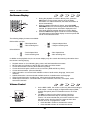
1
2
3
4
5
2. Pressing the REV button on the remote control starts fast reverse playback. Each press of the REV
button reverses the playback speed in the following increments:
NOTE
x
Certain Blu-ray Discs utilizing BD-Java technology may have their own fast forwarding and
reversing control. The actual speed varies by disc, and a progress scale may be displayed by
the disc.
DVD-A
Pause and Frame-by-Frame
PLAY
PAUSE
PREV
NEXT
SACD
1. During playback, pressing the PAUSE button temporarily pauses
the program. In this mode, a PAUSE icon will appear on the TV
screen.
2. While a DVD or Blu-ray Disc is paused, pressing the PREV or
NEXT button reverses or advances the video frame-by-frame.
3. Pressing the PLAY button resumes normal playback.
25
B A S I C
O P E R A T I O N S
Slow Playback
To play the video in slow-motion, follow these steps:
PLAY
PAUSE
REV
FWD
1. Press the PAUSE button on the remote control to pause
playback.
2. Press the FWD button to select a forward slow playback speed.
Each press of the FWD button increases the playback speed in
the following increments:
1/16
1/2
1/8
1/4
3. Press the REV button to select a reverse slow playback speed. Each press of the REV button
reverses the playback speed in the following increments:
1/16
1/2
1/8
1/4
4. To exit the slow playback mode, press the PLAY button.
NOTE
x
Certain Blu-ray Discs utilizing BD-Java technology may not support slow playback.
Blu-ray Disc Menu Playback
TOP
MENU
ARROW
BUTTONS
POP-UP
MENU
ENTER
COLOUR
BUTTONS
1. Blu-ray Discs usually contain a Top Menu and a Pop-up
Menu. The Top Menu normally appears at the beginning of
playback, after the previews and copyright messages. The
Pop-up Menu can be accessed during the movie without
interrupting playback.
2. During playback, press the POP-UP MENU button to
access the Pop-up Menu. Press the TOP MENU button to
access the Top Menu.
3. Navigate the menu using the ARROW buttons, and then
press the ENTER button to make a selection.
4. Some menus make use of the COLOUR buttons. You can
select menu functions by pressing the corresponding
COLOUR button on the remote control.
DVD-A
DVD Menu Playback
TOP
MENU
(TITLE)
ARROW
BUTTONS
POP-UP
MENU
(MENU)
ENTER
RETURN
1. Some DVDs contain title menu or chapter menu functions.
2. During playback, press the TOP MENU button to return to
the disc title menu. Press the POP-UP MENU button to
display the chapter menu. Depending on the disc, one or
both menus may not exist.
3. Navigate the menu using the ARROW buttons, and then
press the ENTER button to make the selection.
4. Press the RETURN button to return to the previous menu.
The return location varies by disc.
26
B A S I C
O P E R A T I O N S
DVD-A
On-Screen Display
SACD
1. During the playback of a DVD or Blu-ray Disc, press the
INFO button on the remote control to show its status
information. For CDs and SACDs, the status information is
shown automatically.
2. When the status information is shown, press the PAGE
UP/DOWN buttons to scroll through several different display
formats. The playback time information displayed on the
front panel changes together with the on-screen display.
3. Press the INFO button again to hide the on-screen display.
The playback time information display on the front panel will
remain in the selected format.
The following display formats are available:
DVD and Blu-ray Disc:
- Title elapsed time
–
- Title remaining time
- Chapter elapsed time
–
- Chapter remaining time
–
- Disc elapsed time
- Disc remaining time
CD and SACD:
–
- Track elapsed time
- Track remaining time
In addition to the playback time, the on-screen display may also contain the following information about
the content currently playing:
x
x
x
x
x
x
x
x
x
Playback status: an icon indicating play, pause, and fast forward/reverse status.
Bit rate meter: an indication of the bit rate of the audio and video stream.
Current and total title numbers. (DVD and Blu-ray Discs)
Current and total chapter numbers of the current title. (DVD and Blu-ray Discs)
Current and total tracks. (CDs and SACDs)
Audio information: current and total available number of audio tracks, language, format, and
channels.
Subtitle information: current and total available number of subtitle tracks and language.
Video format information: encoding type, frame rate and original aspect ratio.
HDMI output information: connection status, video resolution, frame rate, color space, audio
format and channels.
DVD-A
Volume Control
VOL -
VOL +
SACD
1. On the BDP-103EU, the volume control only affects the analogue
audio output. It does not apply to digital audio output (HDMI,
Coaxial and Optical) either in bitstream format or in LPCM
format.
2. The VOL +/- buttons on the player remote control are
provided as an alternative way of controlling the audio
volume. It is recommended that you use this control to make
the audio volume from the player the same as from other
sources, such as TV programs or a VCR.
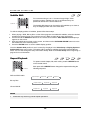
x Press the VOL – button to decrease the volume.
x Press the VOL + button to increase the volume.
27
B A S I C
O P E R A T I O N S
Mute
DVD-A
MUTE
SACD
1. Press the MUTE button on the remote control during
content playback to turn off audio output. The TV screen
displays a mute icon. The front panel MUTE indicator will
also light up.
2. Press the MUTE button again to resume audio output.
NOTE
Check the MUTE status on the front panel display of the player when there is no audio output. You
may also press the MUTE button to verify the MUTE status.
Audion Language/Track Selection
AUDIO
DVD-A
SACD
1. To select the audio language or track, press the AUDIO button on
the remote control during playback.
2. Repeat pressing the AUDIO button or use the UP/DOWN
ARROW buttons to choose from all available language or audio
tracks.
NOTE
Availability of languages and audio channels varies by disc. Some DVD-Audio discs allow audio
track selection with the AUDIO button, while others require the user to choose from the audio setup
menu of the disc. When playing an SACD with both multi-channel and stereo contents, the AUDIO
button can be used to switch between the two formats.
Subtitle Selection
SUBTITLE
1. When playing a DVD, Blu-ray Disc or other video programs
recorded with subtitles, press the SUBTITLE button on the
remote control to select the desired subtitle.
2. Repeatedly press the SUBTITLE button or use the UP/DOWN
ARROW buttons to choose from all available subtitles.
3. To turn off subtitles, select Off from the list.
28
B A S I C
O P E R A T I O N S
HDMI / MHL INPUT Selection
1. When sending external media sources to the BDP-103EU
through the front and back HDMI IN ports, press the INPUT
button on the remote to bring the “Input Source” menu.
2. Use the UP/DOWN ARROW buttons to choose the required
HDMI input port.
3. You can always select the BLU-RAY PLAYER to return to
OPPO HOME menu.
NOTE
The front HDMI IN port is MHL (Mobile High-definition Link) compatible. Please refer to page 18
for more details. A dedicated MHL cable or adapter is required (not included) and some
configuration may be required on the mobile device.
Audio Return Channel (ARC) Selection
1. When sending a digital audio signal from the TV back to the
BDP-103EU through an HDMI connection, press the INPUT
button on the remote to bring the Input Source menu.
2. Use the UP/DOWN ARROW buttons to choose the required
ARC channel.
3. You can always select BLU-RAY PLAYER to return to OPPO
HOME menu.
NOTE
x
Audio Return Channel (ARC) is a feature introduced in HDMI v1.4, which allows you to send
digital audio signals from the television back to the player or receiver. Instead of listening
through TV speakers, ARC allows the sound to be processed and produced by the home
theatre audio system.
x
A HDMI 1.4 cable is required (included) and you need to make sure the HDMI input port on
the TV is ARC capable. Usually, ARC has to be enabled in the TV’s settings.
29
B A S I C
O P E R A T I O N S
BD-Live
Some Blu-ray Disc titles are released with the BD-Live feature. BD-Live offers extra
downloadable content and additional online interactive programs. BD-Live content varies by
disc and studio, and may include additional subtitles, commentaries, preview trailers, games,
and online chat. A Broadband internet connection is required to enjoy BD-Live content (see page 19).
Depending on how the studios organize their BD-Live content, some Blu-ray Discs may start downloading BDLive content when playback starts, have a BD-Live selection on the main menu, show a prompt asking whether
you would like to start downloading, or ask you to sign up for a membership or account. Please follow the
instructions that come with the disc to enjoy BD-Live contents.
Your Internet connection speed and the capacity of the BD-Live content servers can all affect how fast BD-Live
content is downloaded. If you encounter slow downloading or intermittent playback, please play the disc without
accessing the BD-Live features, or try again at a different time.
When you use the BD-Live feature, the player or disc ID and your IP (Internet Protocol) address may be sent to
the content provider via the Internet. Generally, no personally identifiable information is sent. However
technologies exist to match your IP address to a certain geographical area or service provider. Your Internet
service provider also has the knowledge of who is using a particular IP address. If the BD-Live content provider
requires you to log in using a membership or account, the content provider will have access to your
membership or account information. Check with your Internet service provider and the BD-Live content
providers for their privacy policy.
You can choose to restrict BD-Live Network Access in the Setup Menu (details on page 76).
30
ADVANCED OPERATIONS
Output Resolution
The BDP-103EU supports multiple output resolutions. For a
detailed discussion on how to choose the best output resolution,
please refer to the Select the Best Output Resolution section
on page 22 of this manual.
If you would like to change the output resolution, you may do so by
pressing the RESOLUTION button on the remote.
RESOLUTION
1. Make sure the HDMI cable is properly connected.
2. Turn on the TV and adjust the TV to use its HDMI input port.
3. Make sure that the player is turned on. Although the output resolution can be changed while a disc is
playing, it is recommended that you stop playback and take out the disc before changing the output
resolution. Press the RESOLUTION button. The Resolution Menu appears on the TV screen. If the
TV does not support the current resolution and you cannot see the Resolution Menu, the current
resolution is also displayed on the player’s front panel.
4. Use the UP/DOWN ARROW buttons to select the new output resolution. You may also press the
RESOLUTION button multiple times to cycle through the available output resolutions.
5. Press the ENTER button to apply the selected output resolution. If you do not want to change the
output resolution, press the RETURN button to exit and return.
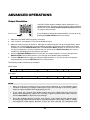
The following output resolutions are available:
NTSC output:
4Kx2K
Auto
1080p(60Hz/24Hz)
1080i 60Hz
720p 60Hz
480p
480i
Source Direct
Auto
1080p(50Hz/24Hz)
1080i 50Hz
720p 50Hz
576p
576i
Source Direct
PAL output:
4Kx2K
NOTE
x
Some TV sets may not support one or more output resolutions. If an incompatible output
resolution is selected, you will get a blank screen or an error message. If this occurs, please
select an output resolution that is supported by the TV.
x
If you cannot get a picture using HDMI, please remove the HDMI cable and connect the
player’s DIAG (diagnostic) output to the TV using a regular composite video cable, and then
use the Setup Menu to adjust the player settings.
x
Due to the “Analogue Sunset” provision, as of January 1, 2011 all Blu-ray Disc players made
and sold going forward will not be able to pass high definition video (720p, 1080i, or 1080p)
via Component Video outputs. Because of this, we have removed the Component and
31
A D V A N C E D
O P E R A T I O N S
Composite video outputs on the BDP-103EU, and only kept a standard definition DIAG
output for troubleshooting purposes.
Zooming and Aspect Ratio Control
This feature zooms in and out of the displayed frame and also
changes the aspect ratio (image width vs. height).
ZOOM
To change the zoom level, press the ZOOM button on the remote
control. Each press of the ZOOM button will switch the zoom level in
sequence.
Zoom Levels for HDMI Output
The available zoom levels depend on the TV Aspect Ratio setting in the Setup Menu and the encoded
aspect ratio on the BD/DVD Disc:
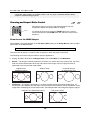
1:1 (No zoom), Stretch/Compress, Full Screen, Under Scan, 1.2X, 1.3X, 1.5X, 2X, 1/2X
The zoom level is reset to 1:1 when the disc is ejected, or when the player is turned off.
The following zoom levels may be useful for specific applications:
1) Playing 16:9 BD or DVD when TV Aspect Ratio is set to 16:9 Wide or 16:9 Wide/Auto
x
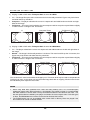
Stretch – The image is vertically stretched 1.33 times. For movies with 2.35:1 aspect ratio, this zoom
level cuts off the black borders at the top and bottom of the image. Users of a projector with an
anamorphic lens may find this mode helpful.
Original 2.35:1
Widescreen Movie
x
“Stretch” Zoom
Projected through
an Anamorphic Lens
Full Screen – The image is stretched by 1.33 times for both vertical and horizontal directions. For
movies with 2.35:1 aspect ratio, this zoom level cuts off the black borders at the top and bottom of the
image while maintaining the correct aspect ratio. The left/right sides of the image are slightly cropped.
Original 2.35:1 Widescreen Movie
32
“Full Screen” Zoom
A D V A N C E D
O P E R A T I O N S
2) Playing 4:3 BD or DVD when TV Aspect Ratio is set to 16:9 Wide
x
1:1 – The image fills up the entire 16:9 screen but is horizontally stretched. Figures may look shorter
and wider than they should be.
x
Compress – The player maintains the correct 4:3 aspect ratio and adds borders to the left and right
sides of the image.
x
Full Screen – This zoom level maintains the correct aspect ratio but crops the top and bottom slightly
in order to fit the 4:3 image to the 16:9 screen.
1:1
“Compress” Zoom
“Full Screen” Zoom
3) Playing 4:3 BD or DVD when TV Aspect Ratio is set to 16:9 Wide/Auto
x
1:1 – The player maintains the correct 4:3 aspect ratio and adds borders to the left and right sides of
the image.
x
Stretch – The image is horizontally stretched 1.33 times. This zoom level fills up the 16:9 screen, but
figures may look shorter and wider than they should be.
x
Full Screen – This zoom level maintains the correct aspect ratio but crops the top and bottom slightly
in order to fit the 4:3 image to the 16:9 screen.
1:1
“Stretch” Zoom
“Full Screen” Zoom
The “Under Scan” zoom level shrinks the image by 5%. This zoom level may be used to compensate for
TVs that over scan, so the viewer can see the entire image area with no cropping. All other zoom levels
are indicated by their respective zoom ratio.
NOTE
x
Some early DVD titles (released from 1997 until early 2000’s) use a 4:3 non-anamorphic
widescreen aspect ratio. When played on a 16:9 display, the content is shown in a small window
with black borders on all four sides. The top and bottom borders are encoded into the video. The
left and right borders are added by the player to maintain the correct aspect ratio. For these types
of discs, the Full Screen zoom mode can be used to eliminate the borders.
x
The ZOOM feature may not be available when certain DVD or Blu-ray Discs are played if the
disc’s author has chosen to disable ZOOM.
33
A D V A N C E D
O P E R A T I O N S
Subtitle Shift
For customers using a 2.35:1 “Constant Image Height” video
projection system, subtitles may get cut off because they are
positioned outside of the active video area.
SUBTITLE
The Subtitle Shift feature can be used to shift subtitles up or down so
they are displayed within the active video area.
To shift the display position of subtitles, please follow these steps:
1. When playing a DVD, Blu-ray Disc or other video programs recorded with subtitles, select the desired
subtitle from the disc menu or by using the remote. (Refer to page 28 for more information.)
2. Press and hold the SUBTITLE button on the remote control until the Shift Subtitle Position prompt
appears on the screen.
3. Wait until subtitle text is shown on the screen, and then use the UP/DOWN ARROW buttons to move
the subtitle text to the desired position.
4. Press the ENTER button to set the subtitle display position.
Once the Subtitle Shift position is set, it is saved by the player in the Video Setup > Display Options >
Subtitle Shift setup menu option. The setting will be applied to subtitles of all future DVD and Blu-ray
Discs. You can also change the setup menu item directly. Refer to the Video Setup section beginning on
page 53 for more information.
DVD-A
Repeat Playback
SACD
To repeat a certain chapter, title, track or disc, press the REPEAT button
on the remote control.
REPEAT
Each press of the REPEAT button changes the repeat mode using the
following sequence:
DVD and DVD-Audio:
Repeat Chapter
Repeat Title
Repeat All
Repeat Off
Blu-ray Disc:
Repeat Chapter
Repeat Title
Repeat Off
CD and SACD:
Repeat One
Repeat All
NOTE
x
Certain Blu-ray discs may prohibit repeat operations.
34
Repeat Off
A D V A N C E D
O P E R A T I O N S
DVD-A
Repeat a Selected Section
SACD
To repeatedly play a specific section, please follow these steps:
1. During normal playback, press the AB REPLAY button on
the remote at the desired beginning point (Point A) for the
repeat play. The TV screen displays “A-”.
AB REPLAY
3.
2. When playback reaches the desired ending point (Point B)
for the repeat play, press the AB REPLAY button again.
The player now repeatedly plays back the specified section
(A-B). The TV screen displays “A-B”.
Press the AB REPLAY button for the third time to resume normal playback.
NOTE
Not available for all disc formats or content. Certain Blu-ray discs may prohibit repeat operations.
SACD
Shuffle and Random Playback
BLUE
When playing a CD or SACD, press the BLUE button on the remote
control to activate the Shuffle and Random modes. Each press of the
BLUE button switches the playback mode in the following sequence:
Shuffle
Random
Normal
In normal playback mode, each track is played back in sequential order. As the name implies, the
Random playback mode randomly selects a track to play. The Shuffle mode also plays back the tracks
in random order, but it ensures that each track is played only once.
Selecting the Shuffle or Random mode cancels any Repeat mode you may be using. Similarly,
selecting a Repeat mode cancels any Shuffle or Random mode.
DVD-A
Playback by Chapter or Track Number
NUMBER
BUTTONS
During the playback of a disc, you can use the NUMBER buttons on
the remote control to directly jump to a specified chapter or track
number. For example:
x To select the seventh track, press the [7] button.
x
To select the 16th track, press [1] followed by [6] in quick
succession:
+
NOTE
x
SACD
Certain DVD-Audio and Blu-ray Discs may not allow for direct chapter selection.
35
A D V A N C E D
O P E R A T I O N S
Playback from a Specific Location
DVD-A
SACD
DVD and Blu-ray Discs
During the playback of a DVD or Blu-ray Disc, you may specify a
location to start playback by entering the title, chapter or time
directly. Press the GOTO button to bring up the on-screen display.
1/7
5 / 25
00:22:14
00:40:06
On top of the video screen, the on-screen display information has
the following components (from left to right): Playing Status, Title,
Chapter, Time Counter, Progress Indicator, and Total Time. After
pressing the GOTO button for the first time, the cursor will be
positioned at the Time Counter. This is the Time Search mode.
Each subsequent press of the GOTO button will switch the search
mode in the following sequence:
(Title or Chapter) Time Search
On-Screen Display
Chapter Search
Title Search
1. Title time search. Searches for a specific time within the currently playing title.
x
Press the GOTO button to bring up the on-screen display. The cursor will be positioned at the
Time Counter. Use the NUMBER or ARROW buttons to enter the hours, minutes and seconds for
your specific search and press the ENTER button.
1/7
5 / 25
00:22:14
00:40:06
2. Chapter time search. Searches for a specific time within the currently playing chapter.
x
Press the INFO button to bring up the on-screen display. Use the PAGE UP or PAGE DOWN
button to switch the display to Chapter Time mode (note the icon placed on the left of the Time
Counter changes from the Title icon to the Chapter icon). Press the GOTO button to position the
cursor at the Time Counter, then use the NUMBER or ARROW buttons to enter the hours,
minutes and seconds for your specified search and press the ENTER button.
1/7
5 / 25
00:06:48
00:08:33
3. Chapter search. Allows you to search for a particular chapter.
x
Repeatedly press the GOTO button until the cursor is positioned at the Chapter location. Use the
NUMBER or ARROW buttons to enter or select the chapter number and press the ENTER button.
1/7
5 / 25
00:22:14
00:40:06
4. Title search. Allows you to search for a particular title.
x
Repeatedly press the GOTO button until the cursor is positioned at the Title location. Use the
NUMBER or ARROW buttons to enter or select the title number and press the ENTER button.
1/7
5 / 25
00:22:14
36
00:40:06
A D V A N C E D
O P E R A T I O N S
NOTE
x
Some discs may prohibit the search operation. You will not be able to select a search location,
or you may get an “invalid operation” icon after specifying a search location.
Some Blu-ray Discs feature their own search function. Follow the on-screen instructions to use
the search function provided by such discs.
x
CD and SACD discs
You may specify a point to start playback by entering the disc elapsed time, track elapsed time or track
number directly. When playing CDs and SACDs, the on-screen display automatically shows on the TV
screen:
1/8
00:08:16
00:12:33
The on-screen display has the following components (from left to right): Playing Status, Track Number,
Time Counter, Progress Indicator, and Total Time.
To specify a playback location using one of the following search modes, press the GOTO button. Each
press of the GOTO button switches the search mode in the following sequence:
(Track or Disc)Time Search
Track Search
On-screen Display
1. Track time search. Searches for a specific time within the currently playing track.
x
Press the GOTO button to place the cursor on the track Time Counter. Use the NUMBER or
ARROW buttons to enter the hours, minutes and seconds for your specified search and press the
ENTER button.
1/8
00:08:16
00:12:33
2. Disc time search. Navigates you to a particular timestamp.
x
While the on-screen display is shown, press the PAGE UP or PAGE DOWN button to switch the
Time Counter to Disc Time mode. Press the GOTO button to place the cursor at the Disc Time
Counter. Use the NUMBER or ARROW buttons to enter the hours, minutes and seconds for your
specified search and press the ENTER button.
5/8
00:40:46
01:02:33
3. Select a track. To navigate to a particular track:
x
Repeatedly press the GOTO button until the cursor is placed on the Track Number position. Use
the NUMBER or ARROW buttons to enter or select the track number and press the ENTER button.
1/8
00:08:16
37
00:12:33
A D V A N C E D
O P E R A T I O N S
DVD-A
Memory and Automatic Resume
POWER
OPEN
STOP
PLAY
SACD
1. The player automatically saves the current position when playback
is interrupted. Operations such as OPEN, and POWER cause the
player to save the current playing position.
2. This position is saved even after turning off the unit or changing
the disc.
3. The next time a disc with a saved playing position is inserted, the
player will resume playback from that point. If you wish to cancel
the automatic resume and start playback from the beginning, you
must press the STOP button when prompted.
4. The player can save the playback position for up to 5 discs. When
the position from the sixth disc is saved, the oldest saved position
is replaced.
NOTE
x
Some Blu-ray Discs do not support resuming and will always play from the beginning.
DVD-A
Viewing Pictures on DVD-Audio Discs
PAGE
UP/DOWN
Some DVD-Audio discs contain static pictures, such as photos of the
band as well as album narration. When a DVD-Audio track is playing,
you may use the PAGE UP button to select the previous picture or the
PAGE DOWN button to select the next picture.
NOTE
x
Availability of static pictures depends on the DVD-Audio disc.
DVD-A
Pure Audio Mode
SACD
You can enjoy higher quality audio by turning off the video processing and
output. The Pure Audio mode reduces any potential interference between
the video and audio signals.
1. Press the PURE AUDIO button on the remote control to turn off
video and enter Pure Audio mode. Video output will cease, the
power light will dim and the front panel displays will turn off.
2. Press the PURE AUDIO button again to resume video and
cancel Pure Audio mode.
NOTE
x
Pure Audio mode is automatically canceled when the unit is switched off or when playback is
stopped.
38
A D V A N C E D
O P E R A T I O N S
Because HDMI carries audio together with video, the HDMI video signal cannot be completely
turned off. A black screen is transmitted instead to minimize any potential interference.
39
MEDIA FILE PLAYBACK
In addition to playing standard disc-based formats such as Blu-ray, DVD, CD and SACD, the BDP-103EU
can play media files. You can enjoy digital music, movies and photos stored on a data disc (recordable
CD, DVD or Blu-ray) or an external USB drive. Due to the variation of media, encoding software and
techniques used, compatibility cannot be guaranteed for all user-created or downloaded content.
Support for such content is on a best effort basis.
Playback from USB Flash Drive
U
DeSB
vic
e
USB
Device
The BDP-103EU is equipped with three USB ports: one on the front panel and two on the back. You may use
any of the available USB ports to plug in a USB drive.
The USB ports are rated to provide a maximum of 5V, 1000mA power to the USB drive. It is sufficient for USB
thumb drives and flash memory card readers, but may not be sufficient for USB hard disks. It is recommended
to check with your drive manufacturer for power requirements, or use an external power supply.
NOTE
x
This unit supports “USB Mass Storage Class Bulk-Only Transport” devices only. Most USB
thumbs drives, portable hard disk drives and card readers conform to this device class. Other
USB devices such as MP3 players, digital cameras, and mobile phones may not be compatible.
x
Supported USB drives can be formatted with the FAT (File Allocation Table), FAT32 or NTFS
(New Technology File System) file system.
x
In some cases, an incompatible USB device may cause the player to stop responding. If this
occurs, simply turn off the power, remove the USB device, and turn the player back on.
x
The player accesses the USB drive in read-only mode. In order to minimize the risk of data
corruption, it is recommended that you only unplug the USB device when playback is
completely stopped.
40
M E D I A
F I L E
P L A Y B A C K
In-home Network Media Sharing
…
The BDP-103EU can remotely play back music, photo, and video files stored on media devices that are
connected to the same home network. You will need to prepare hardware such as a computer or NAS
(Network Attached Storage) and install and configure software which is functionally equivalent to DLNA or
SMB/CIFS (a network file sharing protocol) client. Set the My Network selection to On in the Setup Menu
(details on page 76), press the HOME button on the remote to bring the Home Menu, select the Network
icon and press ENTER button to show the list of available servers. In some case, you might need to
disable the firewall on the hardware to allow BDP-103EU to see the server.
The BDP-103EU player can perform network sharing in one of the following three ways:
x
As a digital media player (DMP): the player can actively search, access and pull content from
local media servers which is functionally equivalent to DLNA.
x
As a digital media renderer (DMR): the player plays content received (“pushed”) from a digital
media controller (DMC). A DMC-capable media server is required. Refer to the server’s
respective user instructions for correct configuration and operation.
x
Accessing a SMB/CIFS client: the player can directly access files shared through SMB/CIFS
clients over the network, as if accessing an external USB hard drive. Most computers, especially
those installed with Windows, already have an SMB client embedded. Please refer to respective
OS instructions to set up the SMB/CIFS shared file/folder.
NOTE
x NAS is a networked appliance that provides file-based data storage services to other devices
on the network. Commercial products are available on the market.
x SMB (Server Message Block) or CIFS (Common Internet File System) is mostly known as
Microsoft Windows Network. It does not require an extra media server or perform any media
format transcoding, which reduces the processing load and keeps the original content quality.
x Compatibility with local network sharing hardware/software is on a best effort basis with no
guarantee, due to variations in NAS devices, media servers and their configurations.
41
M E D I A
F I L E
P L A Y B A C K
Internet Streaming on HOME Menu
The BDP-103EU presents a Home Menu to assist you in navigating and playing media files from an inserted
optical disc, USB flash drive, external hard drive, home network sharing and internet streaming. Basically, the
Home Menu is the starting point for accessing media files.
ᶑᶩᶰᶵᶰ
ᶎᶰᶷᶪᶦ
ᶏᶦᶵᶸᶰᶳᶬ
ᶔᶦᶵᶶᶱ
HOME
HOME
ᶑᶪᶤᶢᶴᶢ
ᶄᶪᶯᶦᶮᶢᶏᶰᶸ
ᶓᶩᶢᶱᶴᶰᶥᶺ
You can bring up the Home Menu with the HOME button on the remote control. Currently there are fourteen
selections:
x
Disc enables the player to start playback of an inserted optical disc.
x
Music, Movie and Photo allow you to access corresponding type of media files from a
connected USB drive and inserted data disc.
x
Network enables the player to stream audio, video and photos from media servers on the home
network. Capable hardware and software may be required.
x
Setup brings the player’s Setup Menu, just like pressing the SETUP button on the remote.
x
Netflix connects you to your Netflix account and provides online movie streaming capabilities.
x
VUDU connects you to your VUDU HD Movies account and provides online movie and TV Show
rental, purchasing and streaming capabilities. (This service is only available in the USA)
CinemaNow connects you to your CinemaNow account and provides online movie and TV episode
rental, purchasing and streaming capabilities. (This service is only available in the USA)
x
Film Fresh connects you to your Film Fresh account and provides online movie and TV Show
rental, purchasing and streaming capabilities. (This service is only available in the USA)
x
YouTube provides an uninterrupted stream of HD videos from YouTube as though you were
watching a normal television channel.
x
Pandora connects you to your Pandora account and provides personalized internet radio
services. (This service is only available in the USA)
Rhapsody connects you to your Rhapsody account and provides personalized internet music
services. (This service is only available in the USA)
x
Picasa connects you to your Picasa account and provides online photo viewing and sharing
capabilities.
42
M E D I A
F I L E
P L A Y B A C K
NOTE
The Network feature is not officially supported due to the variation in hardware and
software configurations. OPPO does not offer technical support via email or phone for this
feature. The OPPO Wiki located at wiki.oppodigital.com can be a useful resource to learn
about this feature.
Different internet streaming applications may have different function mappings on the
BDP-103EU remote control. To exit Netflix, YouTube or Rhapsody, press HOME button. To
exit VUDU, Film Fresh or Picasa, either press HOME button or repeatedly press RETURN
button until the Home Menu appears. To exit Pandora, either press HOME button or select
Exit Pandora in Pandora’s Menu selection. To exit CinemaNow, either press HOME
button or select Exit in CinemaNow’s Menu selection. Please contact OPPO customer
support if you need assistance.
Playing Music Files
To play digital music files stored on an optical
disc or USB drive, select Music from the Home
Menu. A file browser will appear to assist you in
navigating the files and folders.
The first step is to select the Data Disc or USB
device that contains the music files. The player
will take a moment to read the media and list the
folders and music files.
In the music browser, you can perform the
following operations:
x
Press the UP/DOWN ARROW or PAGE
UP/DOWN buttons to move the cursor and
select music files.
x
Press the OPTION button to gain access
to features such as music information.
Details can be found on page 24.
43
M E D I A
F I L E
P L A Y B A C K
x
Press the TOP MENU button to move the cursor to the category menu in the top of the screen. This
menu contains the following choices:
o Source – Allows you to switch between different connected storage devices.
o View – Allows you to switch between List View and Folder View modes.
o Sort – Lists music files/folders by different categories, such as Song name, Artist, Album and
Genre.
x
When a music file is highlighted by the cursor, press the ENTER or PLAY button to start playback.
NOTE
x When a data disc or USB drive is inserted, the player automatically starts to index files and
build a database in the background. Depending on the number and size of files, this process
could take up to several minutes. Customers can only access the Category list (Artist, Album
and Genre) when the database has been built, otherwise, a warning message will appear.
If a music file starts playing and there is no other user operation, the Now Playing screen will appear
after a few seconds. You can also get to this screen by pressing the OPTION button and then selecting
Now Playing. This screen provides the following information:
x
x
x
Shows playback status: Play, Stop, Pause, Track and Time.
Display and change playback mode: Shuffle/Random, Repeat One/All.
Music information: Displays information like album art and tags, either embedded in the original
file or found online from the Gracenote database.
The following operations are available while
the Now Playing screen is shown:
x
x
x
x
x
(This service is only available in the USA)
44
Normal playback control: PLAY, STOP,
PAUSE, PREV/NEXT, REV, and FWD
Special playback modes: REPEAT and
Shuffle/Random (BLUE colour button)
Press the OPTION button to access the
Option menu. (More details on page 24)
Return to the Browser without stopping
the music: RETURN
Stop playback and return to the
Browser: Press STOP
M E D I A
F I L E
P L A Y B A C K
Playing Movie Files
To play movie files stored on an optical disc or USB
drive, select Movie from the Home Menu. A file
browser will appear to assist you in navigating through
the files and folders.
The first step is to select the Data Disc or USB device
that contains the movie files. The player will take a
moment to read the media and list the folders and
movie files.
In the movie browser, you can perform the following
operations:
x
x
Press the UP/DOWN ARROW or PAGE
UP/DOWN buttons to move the cursor and
select movie files.
x
Press the OPTION button to access
features like video information. Details can
be found on page 24.
x
Press the TOP MENU button to move the
cursor to the category menu in the top of
the screen. This menu functions the same
as the one discussed in Playing Music
Files on page 43.
When a movie file is highlighted by the cursor, press the ENTER or PLAY buttons to start
playback.
Once a movie file starts playing, the normal playback control functions are available:
x
To stop the movie and return to the file browser, press the STOP button. You can also press
the HOME button at any time to stop the playback and return to the Home Menu.
x
Press the OPTION button to access features such as Video Information, Subtitle Shift,
Picture Adjustment and Picture Zooming. Details can be found on page 24.
45
M E D I A
F I L E
P L A Y B A C K
Viewing Photo Files
To view digital photo files stored on an optical
disc or USB drive, select Photo from the Home
Menu. A file browser will appear to assist you in
navigate the files and folders.
The first step is to select the Data Disc or USB
device that contains the photo files. The player
will take a moment to read the media and list
the folders and photo files.
In the photo browser, you can perform the
following operations:
x
x
Press the UP/DOWN ARROW or PAGE
UP/DOWN buttons to move the cursor and
select photo files.
x
Press the TOP MENU button to move the
cursor to the category menu in the top of
the screen.
When a photo file is highlighted by the cursor, press the ENTER or PLAY button to play back
the photos as a full screen slideshow.
The following operations are available during the photo slideshow:
x
Display the help screen: INFO
x
Normal playback controls: PLAY, STOP, PAUSE, and PREV/NEXT
x
Adjust slideshow speed: REV and FWD
x
Zoom: ZOOM. Once zoomed in, the ARROW buttons can be used to pan around the photo.
x
Reflect (flips the photo horizontally to make it upside-down): UP ARROW
x
Mirror (flips the photo vertically to make it a mirror image): DOWN ARROW
x
Rotate left (counterclockwise): LEFT ARROW
x
Rotate right (clockwise): RIGHT ARROW
x
Repeat: REPEAT
Switch between view modes: Red colour button
x
Show EXIF information: GREEN colour button.
x
Play in random sequence: BLUE colour button.
x
Change slideshow transition effect: YELLOW colour button.
x
Press the OPTION button to access to features like Image Zooming and Image Rotation.
Details can be found on page 24.
46
M E D I A
F I L E
P L A Y B A C K
Adding Background Music
You can also add background music to the photo slideshow. To do so, you will need to prepare digital music
files. The music files can be stored on the same disk as the photos, or on a different USB drive. Start music
playback first by selecting Music from the Home Menu. Once the music is playing, press the HOME button to
get back to the Home Menu, and start the photo slideshow by selecting Photo in the usual manner.
47
SETUP MENU OPTIONS
The Setup Menu of the BPD-103EU presents many setup and configuration options. For most users,
the default configuration will be sufficient and you will not require any changes to the settings. However,
if you need to configure the player to perfectly match your home theatre setup and viewing references,
please refer to the following sections for details about each configuration option.
Using the Setup Menu System
Like many other sections listed in this guide, the player’s Setup Menu allows you to make adjustments to
match your specific audio/video configuration. When performing menu adjustments, we will use the following
terminology to indicate the location of the desired function:
Setup Menu Section > Menu Item > Selection
Setup Menu Section is the uppermost Setup Menu level. Within the BDP-103EU, there are six Setup
Menu sections listed in the left column of the Setup Menu: Playback Setup, Video Setup, Audio
Format Setup, Audio Processing, Device Setup, and Network Setup.
Menu Item is the parameter to be adjusted which appears in the centre column of the Setup Menu. Once you
enter a Setup Menu Section, the list of Menu Items and their current value are displayed in a box.
Selection is the actual numeric or descriptive element that represents the change being made to the selected
parameter. It is the item located to the right of its corresponding Menu Item.
A Scroll Mark appears at the top or bottom of the menu when there are more Menu Items or Selections than
what can fit in a screen. You may use the UP and DOWN ARROW buttons to scroll the display in order to
access additional items.
The preceding diagram should give a good description of the various elements and their context. In this screen
we could, for example, instruct you to set the Auto Play Mode parameter to Off in the Playback Setup section.
To indicate where we were, you would see the following: Playback Setup > Auto Play Mode > Off.
48
S E T U P
M E N U
O P T I O N S
NOTE
It is possible that some setup items may be grayed-out and inaccessible. This can be caused
by a disc being played back or having changed a prerequisite setup item. Please stop
playback or eject the disc before trying to change these setup items. If you still cannot access
the setup item, please check for configuration conflicts and consistency. For example, if Video
Setup > 3D Output is set to Off, the 3D Setting menu item will be grayed-out. Setting 3D
Output to On (or Auto) will enable the 3D Setting menu.
To access the player’s Setup Menu simply press the SETUP button on the remote control. Since some Setup
Menu options can become inaccessible when a disc is being played, it is recommended that you operate the
Setup Menu when playback is fully stopped or when there is no disc in the player.
1. Press the SETUP button on the remote control, and the TV screen displays the following:
2. Press the UP/DOWN ARROW buttons to
select the section. Press the ENTER
button or the RIGHT ARROW button to
enter the selected section.
3. Press the UP/DOWN ARROW buttons to
select the setup item to be changed, and
press the ENTER or RIGHT ARROW
button to change the setting. When the
scroll icon is shown at the top or bottom of
the Setup Menu, it indicates that there are
more menu items that can be accessed by
scrolling with the UP/DOWN ARROW
buttons.
For example, in the Playback Setup
section, you may use the UP/DOWN
ARROW buttons to select the Auto Play
Mode setup item, and press the ENTER
button to change the Auto Play Mode
setting.
49
S E T U P
M E N U
O P T I O N S
4. To select a value from the list of available
settings, press the UP/DOWN ARROW
buttons and then press the ENTER button
to confirm.
For example, to select Off for Auto Play
Mode, use the UP/DOWN ARROW
buttons to highlight the Off selection and
press the ENTER button.
5. To exit the Setup Menu at any time, press
the SETUP button on the remote control or
select Exit from the Setup Menu sections.
Settings are permanently saved when the player is turned off using either the front panel power button or
the remote control. If the AC power is interrupted before the player enters standby, the settings will not
be saved. To ensure that the settings are saved, please turn off the player and turn it back on after you
make major changes to the Setup Menu options.
50
S E T U P
M E N U
O P T I O N S
Playback Setup
The Playback Setup section is designed to configure playback preferences. The setup items in this section are:
1.
SACD Priority: Select which audio layer to play for SACD (Super Audio CD).
x
x
x
Multi-Channel – Play the high resolution multi-channel surround audio layer
Stereo – Play the high resolution 2-channel stereo audio layer
CD Mode – Play the CD layer of a hybrid SACD disc
2.
DVD-Audio Mode: Select which portion of a DVD-Audio disc to play.
x DVD-Audio – Play the DVD-Audio portion of the disc with high-resolution audio
x DVD-Video – Play the DVD-Video portion of the disc with Dolby Digital or DTS audio
3.
Auto Play Mode: Select whether the player will start playing an audio CD or SACD
automatically.
x
x
4.
Auto Resume: Select whether disc playback will start from the previously saved point or not.
This setting applies to CDs, SACDs, DVDs and certain Blu-ray Discs.
x
x
5.
On – The disc starts playing upon insertion into the player.
Off – The player waits for the user to start playback by pressing the PLAY button.
On – Playback automatically starts from the previously saved point.
Off – Playback starts from the beginning.
Parental Control: Sets parental control ratings in order to prevent minors from watching
inappropriate content. This function depends on whether the disc has been properly rated and
encoded.
x
x
x
Press the ENTER button to bring up the rating selection menu.
Adjust the parental control settings by entering the current parental control password. If you
have not yet set a parental control password, default the password is “0000”.
The Parental Control Menu contains the following sub-items:
x
BD Ratings – Press the UP/DOWN ARROW buttons to select the rating allowed for Bluray Discs. Off means no ratings control and all discs are allowed to play. Numbers 1 to
21 corresponds to the age limit. Discs encoded with an age limit that is less than the
selected age will be allowed, and any rating equal to or above the selected age will be
blocked.
x
DVD Ratings – Press the UP/DOWN ARROW buttons to select the rating to allow for
DVDs. The available ratings are Kid, G, PG, PG-13, PGR, R, NC-17, Adult and Off. The
51
S E T U P
M E N U
O P T I O N S
selected rating and above will be blocked, and any rating below will be allowed. If Off is
selected, all discs are allowed to play.
6.
x
Area Code – Some Blu-ray Discs may have different parental control ratings for different
geographical areas. At this time the player only supports parental control ratings used in
the United States.
x
Change Password – To change the parental control password, enter a 4-digit number
as the new password. Enter the new password again to confirm. If the two entries match,
the new password replaces the old parental control password.
Language: Configures language preferences. This menu contains the following sub-items:
x
Player Language – Allows you to choose the language for the player’s Setup Menu and the
on-screen display. Currently the player supports 9 languages.
x
Disc Menu Language – Allows you to choose the preferred language for displaying DVD
and Blu-ray Disc menus. If a disc menu of the selected language is available, that menu will
be shown instead of the default disc menu.
x
Audio Language – Allows you to choose the preferred audio language for DVD and Blu-ray
Discs. If an audio track of the selected language is available on the disc, the audio track will
be played back.
x
Subtitle Language – Allows you to choose the preferred subtitle language for DVDs. If a
subtitle of the selected language is available, it will be displayed. When Auto is selected, the
subtitle display is determined by the disc.
NOTE
If your preferred language is not listed in the Audio, Subtitle or Disc Menu options, select
“Other” and enter the Language Code found on page 83 of this manual.
52
S E T U P
M E N U
O P T I O N S
Video Setup
The Video Setup section of the Setup Menu allows you to configure video output options.
ᵰᶂᶶᶵᶰ
1. Picture Adjustment: Adjusts picture control settings. The BDP-103EU provides a wide array of
picture controls. Please refer to the Picture Adjustment section on page 56 for details about
each control.
2. Dual HDMI Output: Allows you to select the output mode when both HDMI Output ports are in
use. If only one HDMI Output is active, this selection will not apply.
x
Split A/V (recommended) – Use HDMI 1 OUTas the dedicated video output port and
HDMI 2 OUT as the dedicated audio output port. Th is setting will ensure the best possible
picture quality and the highest possible audio resolution.
x
Dual Display – Send digital audio and video signals to both HDMI Outputs simultaneously.
This setting is only recommended when two HDMI displays are required, since the surround
sound audio signal may be down-mixed to stereo and the original audio quality may be lost.
NOTE
x The player can automatically adjust the resolution of digital audio and video signals depending
on the capabilities of the connected television and receivers.
x For HDMI 1 OUT, the dedicated QDEO video processor will be used unless Source Direct is
selected, in which case QDEO is bypassed.
In Split A/V mode, HDMI 1 OUT has video only with no audio, but HDMI 2 OUT will have audio
and possibly video. This is because HDMI embeds audio into video data so there must always
be a video signal, even if it’s only a blank screen, to carry audio through.
3. 3D Output: Allows you to choose the video output mode for 3D content.
x
Auto – Outputs 3D if supported both by both the disc content and the display. The player
automatically checks for the existence of 3D content on the disc and the 3D compatibility of
the TV or projector. If both criteria are met, the player sends 3D video from its HDMI output
terminals; otherwise, only 2D video is sent out. Active shutter 3D glasses (which are not sold
by OPPO) are required to enjoy the 3D movie on your TV.
x
Off – Always output 2D video format, even when 3D video exists on the disc. This
guarantees the video quality if your TV is not 3D compatible, or if some necessary
components (such as the 3D glasses) are missing.
x
Forced – Always output 3D video format for 3D Blu-ray Discs. You may experience a black
screen (no video output) if your TV is not 3D compatible.
53
S E T U P
M E N U
O P T I O N S
4. 3D Setting: Adjusts the playback settings for better 3D visual quality.
Blank HDMI 2 (Yes/No) – Allows you to force HDMI 2 OUT to output a blank 2D screen when
HDMI 1 OUT outputs 3D video. During 3D movie playback, when HDMI 1 is connected to a
3D display and HDMI 2 is connected to a non-3D receiver which is in turn connected to the
same 3D display, you may encounter an issue where there is no audio coming from the
receiver. Setting this option to "Yes" can resolve this issue.
x
2D->3D Depth – Adjusts the 3D depth perception when performing 2D-to-3D conversion
(also called “simulated 3D”). The default value is 8.
x
3D TV Size – Allows you to enter the diagonal screen size of the 3D HDTV. This option
applies to 3D mode only. Use the number buttons on the remote to enter the actual diagonal
size of the TV screen, and then press the ENTER button to confirm. The default value is 46
inches.
5. TV Aspect Ratio: Sets the aspect ratio of the player’s output image.
x
16:9 Wide – Choose when the display is widescreen 16:9. 16:9 material will be displayed in
its native aspect ratio, and 4:3 materials will be stretched horizontally.
x
16:9 Wide/Auto – Choose when the display is widescreen 16:9. 16:9 material will be
displayed in its native aspect ratio, and 4:3 materials will be displayed with black borders on
both sides in order to maintain the original 4:3 aspect ratio.
For a detailed description on how to choose a proper TV Aspect Ratio, please refer to the
Determine the Display Aspect Ratio section on page 23 of this manual.
6. TV System: Allows you to choose the output video system or broadcast standard (PAL/NTSC) to
match the type of TV.
x
PAL(default) – When playing PAL-encoded discs, no system conversion is performed.
NTSC-encoded content is converted to PAL output. Blu-ray Discs encoded with a 24Hz
frame rate are converted to a 50Hz frame rate if neither 1080p24 Output nor Source Direct
output resolution is enabled.
x
NTSC – When playing NTSC-encoded discs, no system conversion is performed.
PAL-encoded content is converted to NTSC output. Blu-ray Discs encoded at a 24Hz frame
rate are converted to a 60Hz frame rate if neither 1080p24 Output nor Source Direct output
resolution is enabled.
x
Multi-system – No system conversion is performed. The output video system is the same as
that encoded on the disc. Blu-ray Discs encoded with a 24Hz frame rate are converted to a
60Hz frame rate if neither the 1080p24 Output nor Source Direct output resolution is enabled.
Requires a TV that supports both NTSC and PAL systems.
NOTE
DO NOT select Multi-system if your TV does not support both NTSC and PAL systems. The
TV display may become a black screen when you insert a disc encoded in a different system
than your TV supports. Should this happen, you can press the OPEN button to eject the disc
tray, and then use the Setup Menu to correct the TV System setting.
7. Output Resolution: Allows you to choose the output resolution that best matches your
television’s native resolution. For a detailed description on how to choose a proper output
resolution, please refer to the Select the Best Output Resolution section on page 22 of this
manual.
8. 1080p24 Output: Allows you to set the 1080p 24Hz output options. This option only applies to
the HDMI output at 1080p resolution. Many Blu-ray Discs of theatrical movies are encoded using
24Hz frame rate, the same number of frames per second as the original theatrical film. If the TV
54
S E T U P
M E N U
O P T I O N S
properly supports 1080p 24Hz, smoother motion can be achieved by enabling 1080p24 Output
for these discs.
x
Auto (default) – Video encoded at a 24Hz frame rate will be output as 1080p 24Hz if the TV
informs the player that it can support the 1080p24 signal.
x
On – Video encoded at a 24Hz frame rate will be output as 1080p 24Hz without regard to
whether the TV can support the 1080p24 signal or not. This is useful if the TV can actually
support 1080p24 but does not properly state its capability. Please note that if the TV cannot
support 1080p24, selecting this option will result in no video.
x
Off – Video encoded at a 24Hz frame rate will be converted to 60Hz (NTSC) or 50Hz (PAL)
9. DVD 24p Conversion: Allows you to enable 24Hz frame rate conversion for DVD. This option is
only available when 1080p24 Output is enabled (set to Auto or On). Many DVDs that originate
from theatrical movies are encoded with a technique called “3:2 telecine” in order to convert the
24 frames per second film to 60Hz video signal. The player can convert the 60Hz video signal
back to 24 frames per second film and output as 1080P/24Hz. Smoother motion may be
achieved by enabling this option, if both the TV and the DVD disc meet the conversion conditions.
The available options are:
x
On – Converts DVD to 24Hz frame rate when possible. Remember that motion errors may
be observed if the DVD is not suitable for such conversion.
x
Off (default) – Does not convert DVD to 24Hz frame rate.
10. HDMI Options: Configures video options that apply only to the HDMI output. This item contains
a sub-menu with multiple configuration options. Please refer to the HDMI Options section on
page 59 of this manual for details of each option.
11. Display Options: Configures the options for displaying on-screen information.
x
Subtitle Shift – Sets the display position for subtitles.
When the Subtitle Shift is set at 0 (default), subtitles are displayed at the original position as
specified on the disc. When it is set at a value between 1 and 5, subtitles are shifted up.
When it is set at a value between -1 and -5, subtitles are shifted down.
This feature is helpful for customers using a 2.35:1 “Constant Image Height” video projection
system. Subtitles can be shifted to the active video area so they do not get cut off. You can
also press and hold the SUBTITLE button for 3 seconds to activate this selection.
x
OSD Position – Allows you to set the display position for the on-screen display (OSD).
When the OSD Position is set to 0, the OSD is shown at the top and bottom of the video
screen. When it is set at a value between 1 and 5, the OSD is shifted towards the centre of
the video screen.
Similar to the subtitle shift setting above, the OSD Position feature is helpful for customers
using a 2.35:1 “Constant Image Height” video projection system.
x
OSD Mode – Allows you to select how long the on-screen display (OSD) information, such
as playback operation icons (PAUSE, STOP, SKIP, etc.), stays on the TV screen.
Normal – OSD information stays on the TV screen until the user cancels it.
Minimal – OSD information stays on the TV screen for a few seconds and then
disappears. The front panel display still maintains the selected display information.
Remaining – OSD information stays on the TV screen until the user cancels it. By
default, displays remaining time instead of elapsed time.
55
S E T U P
M E N U
O P T I O N S
x
Angle Mark (On/Off) – Turns on/off the display of the angle icon when a DVD or Blu-ray
Disc with multiple angles is played. Keeping the angle mark off avoids distraction from
normal movie watching.
x
Screen Saver – Allows you to turn on/off the screen saver function. The screen saver is
designed to minimize burn-in concerns for plasma and CRT display devices.
On (recommended) – After about 3 minutes of inactivity, the player will show an
animated OPPO logo moving on a black background. This allows most areas of the
screen time to rest and gives all areas an equal opportunity to refresh.
Off – The screen saver will not be activated. Only use this option if your TV does not
have any burn-in issues.
Energy Saver – Video output will be turned off after 3 minutes of inactivity. Many
projectors and LCD TVs will go into a standby or sleep mode and turn off their projection
lamp or LCD backlight lamp, thus saving energy and prolonging the lamp life. When you
press any button on the OPPO remote control or the player’s front panel, the screen
saver will be canceled and video output will be restored. If your TV is already in standby
or sleep mode, you may need to wake up the TV by pressing a button on its remote or
control panel.
Picture Adjustment
Picture Adjustment is a special section of the Video Setup menu. It allows you to fine tune many picture
control parameters in order to achieve optimal picture quality. To enter the Picture Adjustment menu, press
the SETUP button on the remote control to enter the player’s Setup Menu and choose Video Setup > Picture
Adjustment and select the video output to be adjusted:
Use the LEFT/RIGHT ARROW to select the video output, and press the ENTER button to bring up the Picture
Adjustment menu. Depending on the selected video output, the Picture Adjustment menu may be slightly
different:
HDMI 1
Mode 1
Picture Mode
Brightness
0
-16
Contrast
0
-16
+16
0
-16
+16
0
-16
+16
0
-16
+16
+16
Hue
Saturation
Sharpness
Noise Reduction
0
0
+8
Color Enhancement
0
0
+4
0
0
+4
Contrast Enhancement
Exit
Picture Adjustment Menu for HDMI 1
56
S E T U P
M E N U
O P T I O N S
HDMI 2
Picture Mode
Mode 1
Brightness
0
-16
+16
Contrast
0
-16
+16
Hue
0
-16
+16
Saturation
0
-16
+16
Sharpness
0
0
+2
Noise Reduction
0
0
+3
Exit
Picture Adjustment Menu for HDMI 2
To change a picture adjustment parameter, use the UP/DOWN ARROW buttons to highlight the
parameter, and use the LEFT/RIGHT ARROW buttons to change its value.
To aid in the adjustment of picture control parameters, the picture adjustment menu will be reduced to
only show the parameter being adjusted once you press the LEFT/RIGHT ARROW buttons (except the
Picture Mode, which you will directly see the mode name switches between Mode 1, 2 and 3, and all the
other parameters are adjusted automatically to the stored value). The reduced menu will be positioned
near the bottom of the screen.
You can continue adjusting the current parameter by pressing the LEFT/RIGHT ARROW buttons. To
select another parameter, press the UP/DOWN ARROW buttons. Press the ENTER button to return to
the main Picture Adjustment menu.
To exit the Picture Adjustment menu and return to the Setup Menu, either select Exit in the menu, or
press the RETURN button.
The following picture adjustment controls are available for both HDMI 1 and 2:
1. Picture Mode: Allows you to choose a customized picture mode saved by you. The BDP-103EU
allows you to save up to three customized modes. Press the LEFT/RIGHT ARROW buttons to
switch the mode and all parameters will be automatically adjusted to their stored values.
Changes to the current parameter values will be stored automatically when you exit the Picture
Adjustment screen or switch to another Picture Mode.
2. Brightness: Allows you to adjust the brightness (black level) of the video output.
3. Contrast: Allows you to adjust the contrast (white level) of the video output.
NOTE
Proper brightness and contrast settings are necessary for a quality video output. If you do not
have the correct black and white levels, your images can appear washed out or can lose detail
in shadows when watching darker scenes. Televisions have brightness (black level) and
contrast (white level) controls; however, it may require a combination of tweaking both the
player and your television to get the optimal result. We recommend using a calibration disc
such as the Spears & Munsil™ High Definition Benchmark Blu-ray Edition or Digital Video
57
S E T U P
M E N U
O P T I O N S
Essentials HD Basics as aids for adjusting. First adjust the television’s picture controls for the
best possible picture. Once that is done, try changing the player’s settings to further refine the
picture to the optimal result.
4. Hue: Allows you to adjust the hue (tint) of the video output.
5. Saturation: Allows you to adjust the saturation (colour intensity level) of the video output.
6. Sharpness: Allows you to set the sharpness of video output. Sharpness (also called Detail/Edge
Enhancement in previous OPPO players) is a video processing function that can control the
image sharpness but at the same time may cause unwanted artifacts.
For HDMI 1, the sharpness level can be set between -16 and +16. The default is level 0, which
turns off sharpness enhancement. The negative levels may be used to reduce or eliminate overly
sharpened video. However, the picture may appear soft. The positive levels increase the
sharpness.
At level 1, the player applies low level Detail Enhancement, during which the video
processor isolates the detailed parts from the original image, processes them separately
and integrates back before the final output.
At level 2, the player increases Detail Enhancement to a higher level. Generally, to make an
image “sharper”, we recommend using level 1 and 2.
At level 3 and above, the player adds Luminance Transition Improvement (LTI) and Chroma
Transition Improvement (CTI), which further sharpen the luminance transition and chroma
transition. However, we do not recommend using level 3 and above unless the source
content is poorly produced and blurry.
For HDMI 2 OUT, the sharpness level can be set between 0 and +2. The default is level 0. The
higher the level, the sharper the video details are. However, too high a sharpness level may
cause white lines or halo-like effects to appear around objects.
7. Noise Reduction: Allows you to select whether the player will apply video noise reduction
processing.
For HDMI 1, the noise reduction level can be set between 0 and 8. The default is level 0, which
turns off noise reduction.
When set to level 1, the player adjusts the picture quality by reducing the “mosquito noise”
(artifacts around the outlines of objects) and “block noise” (mosaic-like patterns caused by
video compression). These two noise reduction methods are also called Compression
Artifacts Reduction (CAR) and have several levels of aggressiveness.
When set to level 2, the player applies the Motion Adaptive Video Noise Reduction (VNR),
which handles the random noise and the film-grain noise (natural variation of picture
intensity caused by film grain). Its level is automatic because there is noise estimator
circuitry in the video processor that calculates how much noise is present and adjusts the
level of VNR accordingly.
When set to 3 or 4, the player applies both CAR and Motion Adaptive VNR, with more
aggressive “block noise” reduction at level 4.
At level 5, the player applies aggressive CAR for low quality video content, and adds
Motion Adaptive VNR at level 6.
At level 7, the player applies the most aggressive CAR for very low quality video, and adds
Motion Adaptive VNR at level 8.
58
S E T U P
M E N U
O P T I O N S
Remember that excessive noise reduction may cause a loss of details. We recommend using
the noise reduction function only when you encounter poorly encoded or compressed video that
has apparent noise artifacts.
For HDMI 2, the noise reduction level can be set between 0 and +3. The default is level 0. When
this level is increased, the player adjusts the picture quality by applying mosquito noise
reduction, random noise reduction and MPEG block noise reduction at the same time. The
higher the level, the more aggressive noise reduction functions apply.
The following picture adjustment controls are only available for HDMI 1 video output:
8. Colour Enhancement : Allows you to adjust the colour enhancement level on the video output.
This enhances certain colours inthe spectrum and enables vivid colours in outdoor scenes without
causing hue shifts, loss of detail or changes in skin tones.
9. Contrast Enhancement: Allows you to adjust the contrast enhancement level on the video
output. This expands detail in shadows.
HDMI Options
HDMI Options is a sub-menu of the Video Setup menu. It allows you to configure some video settings that are
unique to the HDMI output. To enter this sub-menu, select HDMI Options from the Video Setup menu. To exit
this sub-menu, press the RETURN button or the LEFT ARROW key. The following HDMI options are available:
1. Colour Space (HDMI 1) – Allows you to select the colour space for the HDMI 1 output. The
available options are:
x
Auto (recommended) – The player checks with the display device to automatically
determine what colour space to use. If the display device supports YCbCr 4:4:4, then it will be
used to avoid extra colour space conversion.
x
RGB Video Level – The HDMI output uses RGB colour space and normal signal range
suitable for video displays.
x
RGB PC Level – The HDMI output uses RGB colour space and expands the signal range.
The expanded signal range is suitable for personal computer (PC) displays. Some TVs are
designed to be used as a PC monitor, and expect signal in expanded RGB range when the
DVI input is selected. For these displays if the video signal uses the normal RGB range, the
black-white contrast will be reduced. You can set the player to use the RGB PC Level output
and restore proper contrast.
x
YCbCr 4:4:4 – The HDMI output uses YCbCr 4:4:4 colour space.
x
YCbCr 4:2:2 – The HDMI output uses YCbCr 4:2:2 colour space. Generally this is the colour
space that is closest to the colour space encoded on the discs. (All discs are encoded in
YCbCr 4:2:0 colour space, and the video decoder decodes it into YCbCr 4:2:2.)
2. Colour Space (HDMI 2) –Allows you to select the colour space for the HDMI 2 output. The
available options are the same as those for Colour Space (HDMI 1)
.
3. Deep Colour (HDMI 1) –Allows you to select the Deep Colour mode for the HDMI 1 output. Deep
Colour is an option for some TVs or projectors that feature HDMI v1.3 or higher input. Normally,
each pixel of the video image is transmitted using 24-bit data (8-bit per channel for R, G, B or Y,
Cb, Cr). If Deep Colour is supported, each pixel of the video image can be transmitted using 30-bit
(10-bit per channel) or 36-bit (12-bit per channel) data. The increased bit depth should result in
smoother colour transitions and better gradients.
x
36 Bits – Uses the 36-bit per pixel Deep Colour mode.
59
S E T U P
M E N U
O P T I O N S
x
30 Bits (Dithered) – Uses the 30-bit per pixel Deep Colour mode with dithering technique.
x
30 Bits – Uses the 30-bit per pixel Deep Colour mode.
x
Off (Dithered) – Does not use Deep Colour, but applies the dithering technique.
x
Off (default) – Does not use Deep Colour.
4. Deep Colour (HDMI 2) – Allows you to select the Deep Colour mode for the HDMI 2 output. The
available options are the same as those for HDMI Deep Colour (HDMI 1)
.
NOTE
x
x
x
Since the Deep Colouur feature is optional and may not be supported by all TVs, enabling
Deep Colour while connected to a TV without this feature may result in no effect or no
video.
At this time, no disc is encoded with Deep Colour. Enabling Deep Colour will not magically
make colours richer, but will help preserve the maximum precision as a result of video
processing and picture control adjustment.
Dithering is a technique to improve the image colour depth with limited colour quantization.
60
S E T U P
M E N U
O P T I O N S
Audio Format Setup
The Audio Format Setup section of the Setup Menu allows you to configure preferences for audio output
formats.
1. Secondary Audio: Allows you to set the Secondary Audio Program mixing option. Some Blu-ray
Discs contain a secondary audio and video program, such as a director’s commentary. Some
Blu-ray Discs have a sound effect when you make menu choices. This Setup Menu item allows
you to decide whether to mix the Secondary Audio Program and menu sounds into the primary
audio.
x
On – The Secondary Audio Program and menu sounds are mixed into the primary audio.
Usually this will cause the primary audio volume to be slightly reduced.
x
Off – The Secondary Audio Program and menu sounds are not mixed into the primary audio
and you cannot hear the secondary audio or menu sounds. This setting preserves the
highest possible audio quality for the primary audio.
2. HDMI Audio: Allows you to select the digital audio output format from the HDMI port. The
options are:
x
Auto (default) – The player checks with the device connecting to the HDMI output to
automatically determine which audio format to use.
x
LPCM – Digital audio output via HDMI will be in the multi-channel Linear PCM format. When
this option is selected, compressed audio bit streams will be decoded by the player. This
setting is recommended when connecting the HDMI output directly to a TV or to a receiver
without advanced audio decoding capabilities.
x
Bitstream – Digital audio output via HDMI will be in bitstream format. This option is
recommended when connecting the HDMI output to an A/V receiver or processor that
supports advanced audio decoding, such as Dolby TrueHD and DTS-HD Master Audio.
x
Off – No digital audio output via HDMI.
NOTE
If you use HDMI to connect audio to an HDMI A/V receiver or audio processor, it is important
that you choose 720p or higher HDMI output resolution when playing high resolution audio
content (DVD-Audio, SACD, Dolby TrueHD and DTS-HD Master Audio). According to the HDMI
specification, the bandwidth available for audio is proportional to the total bandwidth used by
video. At 480p/576p resolution, the HDMI specification can only support 2 channels of audio
with high sample rate (up to 192kHz), or 8 channels of audio with standard sample rate (up to
61
S E T U P
M E N U
O P T I O N S
48kHz). If you play high resolution audio content at the 480p/576p resolution, you may get
reduced audio resolution, incomplete audio channels, or even no audio/video output at all.
Choosing a higher output resolution such as 720p or above allows enough bandwidth for all
high sample rate audio channels.
3. Coaxial/Optical Output: Allows you to set the audio format and the upper sample rate limit for
coaxial/optical (S/PDIF) digital outputs. The upper sample rate limit is used to decide whether the
player will down-sample audio (the player does not up-sample audio to higher sample rates).
x
48k LPCM – Forces down-mixed 2-channel, linear PCM (LPCM) digital audio format, and sets
the maximum sample rate to 48kHz. This is supported by most receivers/amplifiers.
x
96k LPCM – Forces down-mixed 2-channel, linear PCM (LPCM) digital audio format and sets
the maximum sample rate to 96kHz. It can result in better audio quality but ensure the
receiver/amplifier can support it.
x
192k LPCM – Forces down-mixed 2-channel, linear PCM (LPCM) digital audio format and sets
the maximum sample rate to 192kHz. It can result in better audio quality but ensure the
receiver/amplifier can support it.
x
Bitstream – Passes audio as compressed bitstream format to the receiver/amplifier. Choose
this setting if your receiver/amplifier is capable of decoding Dolby Digital and/or DTS.
NOTE
Due to copyright restrictions and bandwidth limitations, SACD audio cannot be sent through the
coaxial/optical audio output, and the high resolution audio on DVD-Audio and Blu-ray discs will
be sent out at reduced resolution. Details can be found on page 17.
4. SACD Output: Allows you to select HDMI the audio output format for SACD playback.
x
PCM – SACD data is converted into multi-channel, high-resolution PCM data. The converted
PCM data is then output through HDMI or the internal DAC (Digital to Analogue Converter) for
the analogue audio output ports. If you use a receiver that supports HDMI v1.1 to listen to
SACD, please select this option. You may also want to select this option if you prefer the sound
quality of the DSD-to-PCM conversion.
x
DSD – SACD Direct Stream Digital (DSD) data is output over HDMI without any conversion.
For the analogue audio outputs, DSD data is converted into an analogue signal directly by the
internal DAC. If you use a receiver that supports HDMI v1.2a with DSD over HDMI, or you
prefer the sound quality of straight DSD to analogue, please select this option.
NOTE
Due to the hardware limitation, DSD output is only available from the HDMI 2 OUT port. To listen
to SACD using the HDMI 1 OUT port, please set SACD Output to PCM.
5. HDCD Decoding: Allows you to set the audio decoding option for HDCD (High Definition
Compatible Digital) discs.
x
On – HDCD is decoded by the player. You can enjoy expanded dynamic range and improved
audio resolution.
x
Off – HDCD is treated as regular CD. This is useful when the player is connected to an HDCDcapable A/V receiver via a digital audio output link (Coaxial, Optical, or HDMI) so the A/V
receiver can perform HDCD decoding.
62
S E T U P
M E N U
O P T I O N S
NOTE
If your receiver is capable of HDCD decoding, it is recommended that you set the HDCD
Decoding setting to Off on the BDP-103EU in order to avoid decoding HDCD twice. This will
prevent the occasional pop or crackle sounds that occur when HDCD is decoded twice.
63
S E T U P
M E N U
O P T I O N S
Audio Signal Reference Chart
Blu-ray Discs may contain many types of audio signal formats, some of which are high resolution types such as
Dolby TrueHD and DTS-HD Master Audio. Blu-ray Discs also have many optional audio components such as
the Secondary Audio Program and menu clicking sound. The player’s Audio Format setup menu allows you to
configure the audio output to meet your specific preference. The following chart provides a reference to what
type of audio signal can be expected.
When Secondary Audio is set to Off:
Output Ports
Source
Format
Setting
HDMI Output
Coaxial/Optical Output
Analogue
Multi-Channel
Output
Bitstream
LPCM
Bitstream
LPCM
LPCM 2ch
LPCM 5.1ch
LPCM 7.1ch
Dolby Digital
Dolby Digital
Plus
LPCM 2ch
LPCM 5.1ch
LPCM 7.1ch
Dolby Digital
Dolby Digital
Plus
LPCM 2ch
LPCM 5.1ch
LPCM 7.1ch
LPCM 5.1ch
LPCM 2ch
LPCM 2ch
LPCM 2ch
Dolby Digital
LPCM 2ch
LPCM 2ch
LPCM 2ch
LPCM 2ch
2ch
5.1ch
7.1ch
5.1ch
LPCM up to 7.1ch
Dolby Digital
LPCM 2ch
Up to 7.1ch
Dolby TrueHD
Dolby TrueHD
Dolby Digital
LPCM 2ch
Up to 7.1ch
DTS
DTS-HD High
Resolution
DTS
DTS-HD High
Resolution
DTS
LPCM 2ch
Up to 7.1ch
LPCM up to 7.1ch
DTS (core)
LPCM 2ch
Up to 7.1ch
DTS-HD Master
Audio
DTS-HD
Master Audio
LPCM up to 96kHz
24-bit 7.1ch or 192kHz
24-bit 2ch
DTS (core)
LPCM 2ch
Up to 7.1ch
LPCM up to 192kHz
24-bit 7.1ch
LPCM up to 7.1ch
When Secondary Audio is set to On and the player encounters a disc with a secondary audio track or menu
sounds:
Output Ports
Source
Format
Setting
HDMI Output
Bitstream
Coaxial/Optical Output
LPCM
Bitstream
LPCM
Analogue
Multi-Channel
Output
LPCM 2ch
LPCM 5.1ch
LPCM 7.1ch
Dolby Digital
Dolby Digital
Plus
LPCM 2ch
LPCM 5.1ch
LPCM 7.1ch
Dolby Digital*
LPCM 2ch
LPCM 5.1ch
LPCM 7.1ch
LPCM up to 5.1ch
LPCM 2ch
LPCM 2ch
LPCM 2ch
Dolby Digital*
LPCM 2ch
LPCM 2ch
LPCM 2ch
LPCM 2ch
2ch
5.1ch
7.1ch
5.1ch
Dolby Digital*
LPCM up to 7.1ch
Dolby Digital*
LPCM 2ch
Up to 7.1ch
Dolby TrueHD
Dolby Digital*
DTS
DTS-HD High
Resolution
DTS-HD Master
Audio
Dolby Digital*
LPCM 2ch
Up to 7.1ch
DTS*
LPCM up to 192kHz
24-bit 7.1ch
LPCM up to 7.1ch
DTS*
LPCM 2ch
Up to 7.1ch
DTS*
LPCM up to 7.1ch
DTS*
LPCM 2ch
Up to 7.1ch
DTS*
LPCM up to 7.1ch
DTS*
LPCM 2ch
Up to 7.1ch
Note: All audio output signals are mixed with primary, second audio and menu sounds. “Dolby Digital*” and
“DTS*” denote mixed audio re-encoded into the original bitstream audio format.
64
S E T U P
M E N U
O P T I O N S
Recommended Audio Format Options
Depending on your specific audio/video connection method, the audio format options of the BDP-103EU may
need to be adjusted to match your configuration. Refer to the video and audio connection methods described
previously in this guide and the following audio setup guidelines.
Audio Connection Directly to TV
If the player is connected directly to the TV through HDMI (as described on page 13) or through DVI and
analogue L/R audio cables (as described on page 15), it is recommended that you use the following audio format
options:
o
o
o
o
o
Secondary Audio:
HDMI Audio:
SACD Output:
HDCD Decoding:
Coaxial/Optical Output:
On
LPCM
PCM
On
(any – not in use)
Multi-Channel Digital Audio to Receiver through HDMI
If the player is connected to an A/V receiver or processor with HDMI inputs (as described on page 11), you can
send all current audio formats to your receiver in pure digital form. To get the best possible audio via HDMI, you
may need to set the following options on the player’s Audio Format setup menu:
x
If your receiver supports HDMI v1.3 with decoding capability for high resolution lossless audio
formats such as Dolby TrueHD and DTS-HD Master Audio, please use the following audio format
options:
o
o
o
o
o
x
Secondary Audio:
HDMI Audio:
SACD Output:
HDCD Decoding:
Coaxial/Optical Output:
Off (or On if you need secondary audio)
Bitstream
PCM (or DSD if the receiver supports DSD over HDMI)
On (or Off if the receiver can decode HDCD)
(any – not in use)
If your receiver supports HDMI v1.1/1.2 Multi-Channel PCM audio, but not high resolution
lossless audio formats such as Dolby TrueHD and DTS-HD Master Audio, please use the
following audio format options:
o
o
o
o
o
Secondary Audio:
HDMI Audio:
SACD Output:
HDCD Decoding:
Coaxial/Optical Output:
Off (or On if you need secondary audio)
LPCM
PCM (or DSD if the receiver supports DSD over HDMI)
On (or Off if the receiver can decode HDCD)
(any – not in use)
Multi-Channel Analogue Audio to Receiver
If the player is connected to an A/V receiver through the 7.1ch or 5.1ch analogue audio jacks using 8 or 6 RCA
cables (as described on page 16), you can play all supported audio formats and listen to them with your A/V
receiver and surround sound systems. The following audio format setup options are recommended:
o
o
o
Secondary Audio:
HDMI Audio:
SACD/Output:
Off (or On if you need secondary audio)
Off
PCM or DSD (depending on your listening preference)
65
S E T U P
M E N U
o
o
O P T I O N S
HDCD Decoding:
Coaxial/Optical Output:
On
(any – not in use)
Also set the Speaker Configuration in the Audio Processing menu:
x
x
x
Set Down Mix to 7.1Ch or 5.1Ch.
Set the speaker size and subwoofer according to your actual audio hardware. (see page 69)
Enable or select the multi-channel analogue inputs on your receiver
Coaxial or Optical Digital Audio to Receiver
If the player is connected to an A/V receiver with Coaxial/Optical inputs (as described on page 17), and the A/V
receiver supports Dolby Digital and DTS decoding, the following audio format setup options are recommended:
o
o
o
Secondary Audio:
HDMI Audio:
SACD Output:
o
o
HDCD Decoding:
Coaxial/Optical Output:
Off (or On if you need secondary audio)
Off
(any – SACD is not available through optical/coaxial
output)
On (or Off if the receiver can decode HDCD)
Bitstream
Stereo Analogue Audio to Receiver
If you primarily listen to stereo content or if your receiver only offers stereo audio connections, please use the
analogue RCA-style cables to connect the FL (Front Left) and FR (Front Right) terminals of the player to your
receiver (as described on page 16). The following audio format options are recommended:
o
o
o
o
o
Secondary Audio:
HDMI Audio:
SACD Output:
HDCD Decoding:
Coaxial/Optical Output:
Off (or On if you need secondary audio)
Off
PCM or DSD (depending on your listening preference)
On
(any – setting to 192k LPCM may help to get the best
analogue audio quality)
66
S E T U P
M E N U
O P T I O N S
Audio Processing Setup
The Audio Processing section of the Setup Menu allows you to configure how the player will process audio
signals before sending them to the output. In this section, all of the settings only affect the analogue audio outputs,
except for Dynamic Range Control (DRC), which also affects HDMI audio.
Speaker Configuration
In the Speaker Configuration menu you can configure speaker settings such as down-mix mode,
number of speakers, their distance, size and trim level. The Speaker Configuration menu shows an
illustration of speaker placement to assist you in properly configuring your speakers.
Upon entering this menu, the cursor is positioned on the front left speaker. You may use the
LEFT/RIGHT ARROW buttons to move the cursor. The RIGHT ARROW button moves the cursor
clockwise, and the LEFT ARROW button moves the cursor counterclockwise. When the cursor is over
the Down Mix, Test Tone or Exit options, you can also use the UP/DOWN ARROW buttons to highlight
these options.
ᶅᶰᶸᶯᵡᶎᶪᶹ
ᶕᶦᶴᶵᵡᶕᶰᶯᶦ
ᶆᶹᶪᶵ
NOTE
Speaker Configuration applies to the multi-channel analogue audio outputs only. All digital
(bitstream and LPCM) outputs are unaffected by these settings.
67
S E T U P
M E N U
O P T I O N S
Down Mix Mode
Downmixing is the process of converting multi-channel audio to a lesser number of channels. For
example, converting a 5.1ch source to stereo or converting a 7.1ch source to 5.1ch. Downmixing allows
the audio output from the player to match the exact number of speakers available in your home theatre.
The current down mix mode is displayed in the lower right corner of the speaker placement illustration.
To change the audio down mix setting, press the ENTER button while the cursor is over the Down Mix
option. The following down mix modes are available:
x
LT/RT – Left Total/Right Total. The centre and surround channels are mixed into the two front
channels according to the LT/RT matrix. A Dolby Pro Logic receiver will decode the two-channel
audio into surround audio.
x
Stereo - This mode down mixes multi-channel audio to 2-channel stereo output. For original
stereo content the output will not change. For original multi-channel content the surround and
centre channels will be mixed with the left and right front channels. This is recommended for use
with TV sets or stereo receiver/amplifiers.
x
5.1Ch – This mode enables 5.1ch decoded audio output. The number of actual output channels
depends on the disc. If the source content has more channels, the surround back channels will
be mixed into the surround channels.
x
7.1Ch – This mode enables 7.1ch decoded audio output. The number of actual output channels
depends on the disc. For 6.1ch contents, the left and right surround back speakers will both
output the same surround back audio channel.
Test Tone
Test tones are artificially-created sounds that are used to test your audio speaker system and help to identify
any wiring faults. By default the Test Tone is set to Off, with the status displayed in the lower left corner of the
screen.
To begin the test, press the ARROW buttons to highlight the Test Tone option, and press the Enter button to
change the test tone status to On. Press the ARROW buttons to select a speaker, and you will hear the test
sounds. To stop the test process, press the ARROW buttons to highlight the Test Tone option and press the
Enter button to switch the status back to Off. Please note these test tones only apply on multi-channel audio
outputs.
68
S E T U P
M E N U
O P T I O N S
Speaker Settings
You can set the size, distance and trim level for each speaker by using the LEFT/RIGHT ARROW
buttons to move the cursor to highlight the speaker and then press the ENTER button. The Speaker
Settings menu on the right side of the screen will be activated. In Speaker Settings, use the UP/DOWN
ARROW buttons to select a parameter, and then press the ENTER button to change it. To exit the
Speaker Settings menu and return to the Speaker Configuration illustration, press the LEFT ARROW
button or select the Exit option. You can also move on to configure the next speaker by selecting the
Next Speaker option.
ᶅᶰᶸᶯᵡᶎᶪᶹ
ᶕᶦᶴᶵᵡᶕᶰᶯᶦ
ᶆᶹᶪᶵ
The following speaker parameters can be configured:
1. Size: The following speaker size parameters control bass filtering for the speakers.
x
Large – All audio content is passed to the appropriate speaker.
x
Small – All audio content, except for bass frequencies, is passed to the appropriate speaker.
The purpose is to reduce possible distortion. If a subwoofer is available, bass frequencies are redirected to the subwoofer, otherwise, they are discarded. The bass frequency upper limit is set
by the Crossover Frequency selection in the Setup Menu (see page 71 for details).
x
Off – Speaker for the corresponding position does not exist. Audio for the missing speaker is
redirected to other speakers or discarded if redirection is not possible.
x
On (for Subwoofer only) – Specifies that a subwoofer is available.
NOTE
The Size for Front, Surround and Surround Back speakers is configured in pairs. Changes to
the size of one speaker will automatically change the other of the pair.
2. Distance: The speaker distance parameters set delay control for the corresponding audio channel.
The delay is to compensate for the audio propagation time difference caused by the placement of
speakers.
Speaker distance compensation is not required if the A/V receiver has the capability to adjust
channel delay and compensate for speaker distance differences. However, if your receiver does not
have such functions (most receivers do not offer these functions for their multi-channel analogue input),
you may adjust them through the player. Speaker distance delay is only applied if the player is
decoding multi-channel audio. If you use bitstream audio output to your A/V receiver, the bitstream
audio is not adjusted for speaker distance delay.
69
S E T U P
M E N U
O P T I O N S
A typical 7.1-channel speaker layout and their speaker distance measurements are displayed as
below:
FL
FR
C
SW
2
Speaker Icons:
Distances:
1
FL - Front Left
FR - Front Right
C - Centre
SW - Subwoofer
SL - Surround Left
SR - Surround Right
SBL - Surround Back Left
SBR - Surround Back Right
1 - Listener to Front
2 - Listener to Centre
3 - Listener to Surround Left
SL
SR
3
SBL
SBR
In the above diagram, measure the distance (in feet) from the primary listening position to the Front
Left or Front Right Speaker. Enter the distance of the Front Speakers ( in the above picture) into
the Speaker Configuration menu.
Next, measure the distance (in feet) from centre speaker ( ) to the listening position. Move the
cursor to highlight the Centre speaker in the Channel Delay setup page, and enter the distance (as
close as possible) in feet. Repeat for each speaker in the system (Centre, Surround Left, Surround
Right, Surround Back Left, Surround Back Right and Subwoofer) as available. The player will insert
appropriate delay to make sure sound waves from different speakers arrive at the listener at the
same time.
It is possible to independently set distances for each speaker. Speaker distances can be set to the
actual spatial distance of the speakers.
If the channel delay settings cannot match your speaker configuration, please set all distances to the
same and use your receiver/amplifier to set the channel delay.
3. Trim: The speaker trim level parameters sets the volume of each individual channel. Channel trim
is generally not required since most A/V receivers have the capability to adjust channel trim and
compensate for speaker sensitivity differences. However, if your receiver does not have such
functions (many receivers do not support channel trim for their multi-channel analogue inputs), you
may adjust channel trim through the player. For most accurate results, it is recommended that you
use test tones from a calibration disc, such as Digital Video Essentials HD Basics , and a SPL
(Sound Pressure Level) meter. The trim level can be set to +/- 10dB in 0.5dB increments.
NOTE
x
Increasing the Trim Level above 0dB may result in distortion if the original audio level is
already high. When this occurs the waveform becomes clipped and audible distortion can
be heard. In this situation, it is necessary to reduce the Trim Level until the distortion is
removed. When using the Trim Level for speakers, it is recommended that you set the
least sensitive speaker’s Trim Level to 0dB, and set other speakers’ Trim Level to
negative values.
x
The Test Tone can be used in conjunction with the player’s trim control. Each speaker
can be set to independent trim levels and there is no linked pair limitation.
70
S E T U P
M E N U
O P T I O N S
Other Audio Processing Settings
In addition to Speaker Configuration, Crossover Frequency and Dynamic Range Control are audio
processing settings that can be configured:
1. Crossover: Allows you to set the Bass Management kick-in frequency for all speakers. When the
speaker size is set to Small in Speaker Configuration (see page 69), bass information below this
frequency is not passed to the speakers to reduce possible distortion, and if the subwoofer is
available, bass information will be redirected to the subwoofer. When all speaker sizes are set to
Large, there is no Bass Management.
x
40Hz / 60Hz / 80Hz / 90Hz / 100Hz / 110Hz / 120Hz / 150Hz / 200Hz / 250Hz – These are
the available crossover frequencies. You can press the UP/DOWN ARROW buttons and the
ENTER buttons to select it. This option applies to all speakers (centre, front, surround, and
surround back speakers). By default the crossover frequency is 80Hz.
2. Dynamic Range Control: Allows you to set the Dynamic Range Compression (DRC). DRC can
smooth out the sonic peaks and valleys common with wide-range digital audio. Enabling DRC may
make low level audio more audible during low-level listening. Turning off DRC restores the sonic
energy present in the original recording.
x
Auto – Plays at the dynamic range specified by the disc. This option applies to certain Bluray Discs only, which have DRC instructions encoded in the Dolby TrueHD audio tracks.
x
On – Turn on DRC for all Dolby and DTS audio formats. This option applies to all DVD and
Blu-ray Discs.
x
Off – Turn off DRC.
NOTE
Dynamic Range Compression is applied to the analogue audio output and digital audio outputs (HDMI,
Coaxial and Optical) when the audio format is set to PCM.
3. DTS Neo:6 Mode: Allows you to enable DTS Neo:6 audio processing and select the listening mode.
DTS Neo:6 is a digital signal processing that can expand the original stereo source to 7.0 (L, R, C, LS,
RS, LR, RR) or 7.1 (with Bass Management) surround.
x
Music – Enables DTS Neo:6 audio processing for stereo music sources.
x
Cinema – Enables DTS Neo:6 audio processing for digital TV box or stereo movie sources.
x
Off (default) – Turns off the DTS Neo:6 to keep the original audio quality.
4. Output Volume: Allows you to enable or disable the analogue volume controls (also known as Variable
Audio). The available options are:
x
Variable – Enables the analogue volume control. Use the VOL+/- buttons on the remote to
increase/decrease the analogue audio output level (the maximum is 100).
x
Fixed – Disables the analogue volume control. The VOL+/- buttons on the remote will no
longer affect the analogue audio output, and the volume level is fixed to 100.
71
S E T U P
M E N U
O P T I O N S
Device Setup
The Device Setup section of the Setup Menu system allows you to configure additional player options related
to the hardware and control functions.
ᵲᵱᶙᶆᶖᵮᶹᶹᵮᶹᶹᶹᶹ
ᶔᶵᶢᶯᶥᶣᶺᵡᶎᶰᶥᶦ
ᶆᶯᶦᶳᶨᶺᵡᶆᶧᶧᶪᶤᶪᶦᶯᶵ
ᶔᶭᶦᶦᶱᵡᶕᶪᶮᶦᶳ
1. Firmware Information: Displays the currently installed firmware version.
2. Firmware Upgrade: Upgrades the player’s firmware. This operation is only available when the
playback is completely stopped or when there is no disc loaded.
The firmware is the system software that controls the features and functions of the player. Since the
Blu-ray Disc specifications are new and evolving, it is possible that a Blu-ray Disc manufactured after
the player was manufactured uses certain new features of the Blu-ray Disc specifications. To ensure
the best possible viewing experience, the player may need a firmware update from time to time.
Please visit the OPPO BD UK Ltd web site www.oppo-bluray.co.uk to check for firmware updates and
instructions on installing the updates.
There are three ways to upgrade the player’s firmware:
x
Via USB – You may download the firmware files from the OPPO BD UK Ltd web site to a USB
drive and then use the USB drive to upgrade the player. Please follow the instructions on the
firmware download web page.
x
Via Disc– You may requests a firmware upgrade disc from OPPO BD UK Ltd or download a
disc image from the OPPO BD UK Ltd web site and burn an upgrade disc. Please follow the
instructions that come with the upgrade disc.
x
Via Network – If the player has a working Internet connection (see pages 19 and 76), you
may upgrade the player directly over the Internet. Please follow the instructions on your TV
screen.
3. Firmware Notification: Allows you to set whether the player should automatically check for new
firmware versions on the Internet server and notifies you about new firmware.
x
On – Checks for firmware updates automatically and notifies the user about new firmware.
Requires a working network connection.
x
Off – Does not check for new firmware version automatically.
4. Remote Control Code: The BDP-103EU can respond to one of four sets of remote control
codes. The default is “Code 1”. If you have other OPPO products in the vicinity of the
BDP-103EU, the other products may respond to the BDP-103EU remote control. To prevent this,
you can select a different remote code. The available codes are:
72
S E T U P
M E N U
O P T I O N S
x
Code 1 – OPPO disc player remote code is set to 1. This is the default remote code.
x
Code 2 – OPPO disc player remote code is set to 2. Use this code if you have other OPPO
products placed close to the BDP-103EU.
x
Code 3 – OPPO disc player remote code is set to 3. Use this code if you have other OPPO
products placed close to the BDP-103EU.
x
Alt. Code – Alternative remote code. The alternative remote control code enables users to
program their universal remote controls that come with TV, projector or A/V receiver to
operate the OPPO player. If the universal remote control has a DVD player control function,
please program it with the code for Toshiba, Philips, Magnavox, Marantz or Zenith DVD
players. Since each brand of remote control may have several sets of codes, you may need
to try several times using different codes to find a working code.
If you have selected a new remote code, you must set the remote control handset to use the same code.
Please refer to the Changing the Remote Code section on page 10 of this manual for details. If you have
selected Alt. Code, the supplied handset will not operate the player, and you must use a universal remote
control with the properly configured code set.
5. HDMI CEC: Allows you to set the HDMI Consumer Electronics Control (CEC) mode. CEC is an
optional HDMI feature that enables convenient remote control and automatic setup of consumer
electronics over the HDMI connection. The remote control function allows you to use a single remote
handset to operate multiple devices connected via HDMI. For example, you may use the TV remote
to control playback of the Blu-ray Disc player. The automatic setup function can automatically turn on
the TV and change to the proper input when you start playing a disc in the Blu-ray Disc player. It can
also turn off the player automatically when you turn off the TV. The implementation and compatibility
of this feature varies by device manufacturer. Each may only implement part of the features or add
their own proprietary functions. The manufacturer-specific implementation of the HDMI CEC function
is often given a proprietary name of “…Link” or “…Sync”. The BDP-103EU provides three HDMI CEC
function modes for each of its HDMI outputs:
x
HDMI 1 – HDMI CEC is enabled on HDMI 1 output. Use this mode if your other devices are
compatible with the player.
x
HDMI 1 (Limited) – HDMI CEC is enabled on HDMI 1 output, but the BDP-103EU will only
respond to playback control commands. It will not respond or issue power on/off and input
selection commands. Use this mode if you do not want the automatic setup function to turn
on/off your devices.
x
HDMI 2 – HDMI CEC is enabled on HDMI 2 output. Similar to HDMI 1.
x
HDMI 2 (Limited) – HDMI CEC is enabled on HDMI 2 output, but the BDP-103EU will only
respond to playback control commands. Similar to HDMI 1 (Limited).
x
Off (default) – HDMI CEC feature is turned off on both HDMI output terminals. The player will
not respond to HDMI CEC commands from other devices, nor will it setup other devices
automatically.
6. Standby Mode: Allows you to choose between two standby modes. In Energy Efficient mode, the
player consumes a minimal amount of power but takes more time to get ready for operation after
being turned on. In Quick Start mode, the player can start up significantly faster at the expense of
additional power consumption during the standby period.
x
Energy Efficient (default) – The player will take slightly longer to start up, but will
consume less power in standby mode. This mode is recommended for regular use.
73
S E T U P
x
7.
M E N U
O P T I O N S
Quick Start – The player takes less time to start up but consumes more power in standby
mode. This mode is recommended if the player is used frequently, or if you need to supply
power to a device connected to the player’s MHL port during the standby period.
Sleep Timer: Allows you to specify the amount of time before the player automatically turns itself off.
Off (default) – The player will not turn itself off automatically.
30/45/60/90/120 Min – These are the available time increments (in minutes) you can choose
before the player automatically shuts itself down. You can press the UP/DOWN ARROW
buttons and the ENTER button to select the desired time. Once selected, the remaining
minutes will be displayed to the right of the “Sleep Timer” option.
8. Front Panel Brightness: Allows you to control the display intensity of the front panel Vacuum
Fluorescent Display (VFD) information window and the OPEN/CLOSE tray button backlight. If you
feel that the display becomes a distraction to your enjoyment of the video, this option allows you to
dim it or turn it off.
x
Standard (default) - The VFD window and the OPEN/CLOSE tray button backlight are at full
brightness.
x
Dim - The VFD window and the OPEN/CLOSE tray button backlight are at reduced
brightness.
x
Off – The VFD window and the OPEN/CLOSE tray button backlight are turned off. In this
mode, the display and backlight will resume momentarily if there is any user operation.
9. Cache Media Info (On/Off) : Allows you to set the online media file information caching option. This
option can provide a better media file navigation experience by caching some of the media information
in an “OPPO_Media_Info” folder created on the root directory of the connected USB drive.
On (recommended) – The downloaded media information will be saved on the same USB hard
disk or thumb drive as the media files for faster navigation.
Off – The downloaded media file information is not saved. Retrieving the media information
from the internet may take some time and could slow down media file navigation.
10. Persistent Storage: Allows you to manage the persistent storage for BD-Video content. The
persistent storage is a data storage area that holds additional content for BonusView and BD-Live
features. The data will be kept even if you turn off the player. The following persistent storage
management options are available:
x
Storage Device – Allows you to select which storage device should be used as the persistent
storage. The BDP-103EU preserves about 1GB of internal flash memory that can be used for
persistent storage. There are also three USB ports on the player that can accept a USB drive
to be used as the persistent storage. You may choose from the following:
Internal Flash – Uses the internal flash memory for persistent storage.
USB Drive – Uses a USB drive for persistent storage. To meet the specification for
BD-Live, a USB flash drive of 1GB or larger is required. A USB hard drive is not
recommended.
74
S E T U P
M E N U
O P T I O N S
NOTE
The new storage device choice becomes effective only after the player is restarted. Please
make sure that you turn off the player and then turn it back on after changing the Storage
Device option.
x
Space Used – Displays the used space of the persistent storage. If too much space is used
and the available space becomes too low, some Blu-ray Discs may not play properly.
x
Erase Persistent Storage – Erases the BD-Video data from the persistent storage or
initializes a USB drive so it can be used for persistent storage.
11. Netflix: Allows you to de-activate your Netflix account.
x
Netflix ESN – Displays the Netflix ESN (Electronic Serial Number) for your player.
x
De-activate Netflix – De-activates the Netflix account on your player. Once de-activated, you
have to go to the Home Menu, select Netflix, and go through the activation procedure again
to be able to access Netflix from your player.
12. VUDU: Allows you to de-activate your VUDU HD Movies account (USA only).
13. Auto Power Off: To allow the player to auto-shutdown after 30 minutes of inactivity. This can help
to reduce power consumption and increase player life.
x
On – Enable the Auto Power Off.
x
Off (default) – Disable the Auto Power Off.
14. Reset Factory Defaults: To reset all settings to the factory default value. This operation also set
BD-Live Network Access to be Off (details on page 76) and performs Erase Persistent Storage
(details on page 74). However, the remote control code will not be reset. This operation is only
available when the playback is completely stopped or when there is no disc loaded.
x
Erase Accounts and Settings (default) – Resets all settings to the factory default value and
remove all application activations and account information, such as your Netflix and VUDU
accounts.
x
Erase Settings – Resets all settings to the factory default value, but keeps the application
activations and account information.
75
S E T U P
M E N U
O P T I O N S
Network Setup
The Network Setup section of the Setup Menu system allows you to configure the player’s network
connection, test the connection, and enable or disable BD-Live access.
ᶑᶭᶢᶺᶦᶳᵡᶏᶢᶮᶦ
ᶐᶑᶑᶐᵡᶃᶅᶑᵮᵲᵱᵴ
1. Connection Information: Displays the current internet connection information, such as connection
type, IP address, Ethernet MAC, Wireless MAC, etc.
2. Player Name: Enter and display the player’s identification name as it is displayed on local network
sharing products. To change it, press the ENTER button to bring the soft keyboard. The name can
contain maximum 12 characters including spaces.
3. BD-Live Network Access: Used to permit or restrict BD-Live content access.
x
On – BD-Live access is permitted.
x
Limited – BD-Live access is permitted only for content that has a valid content owner
certificate. Internet access is prohibited if the BD-Live contents does not have a certificate.
This option ensures that you are accessing only authentic content, although it may block
your access to smaller independent content providers.
x
Off (recommended) – BD-Live access is prohibited.
4. My Network: Configures the My Network (in-home media sharing) client. My Network enables the
player to stream audio, video, and photos from media servers within the home network.
x
On (default) – Enables local network streaming. A broadband internet connection is required
(details on page 19), and special hardware/software configurations are required (see Inhome Network Media Sharing on page 41). The available media servers are listed inside the
Network option of the Home Menu (details on page 42).
x
Off – Disables local network streaming. No media servers will be shown in the Network
menu, and a warning message will pop up once you try to enter the Network menu.
5. Gracenote Lookup: Allows you to access the Gracenote online database for additional media
information such as Disc Title, Genre, Year, Album, Artist and Cover Art.
x
On (default) – Enables the Gracenote service and allows the player to look up media
information and cover art from the Gracenote database. A broadband internet connection is
required (details on page 19).
x
Off – Disables the Gracenote service.
76
S E T U P
M E N U
O P T I O N S
6. Internet Connection: Allows you to select the internet connection type.
x
Ethernet (default) – Connect to the internet through an Ethernet cable. Please refer to the
connection instructions on page 19. Selecting this will make the Wireless Setting option
gray and un-selectable.
x
Wireless – Connect to the internet through the external wireless adaptor. Please refer to the
connection instructions on page 20. Choosing Wireless will start the Wireless Setup
Assistant, and will also make the Wireless Setting option in the next row selectable.
x
Off – Internet access is prohibited. This will make all the remaining options in the Network
Setup screen gray and un-selectable.
7. Wireless Setting – Start the Wireless Setup Assistant. You can start the Wireless Setup
Assistant by selecting the Wireless Setting option, or by selecting Wireless in Internet
Connection menu. The procedure is described as follows:
The player first searches for the last successful wireless settings. If they exist, a message
will pop up to remind you.
x
Use Previous – Uses the last successful wireless settings. A summary of the previous
wireless settings will display, showing information such as the SSID (network name),
Security Mode and Security Key (password).
After verifying the previous settings, the player will test the connection and display the
results.
x
Start New – Creates a new wireless configuration. The BDP-103EU supports three
wireless configuration methods:
Scan – Scans for an available wireless network. The player automatically scans for
any available wireless networks and displays the search results in a window. You
can press the UP/DOWN ARROW buttons to highlight a network and then press the
ENTER button to select it. If this network is secured, you will need to input the
security key using the remote control. The player will then test the connection and
display the results.
77
S E T U P
M E N U
O P T I O N S
Manual – Allows you to manually enter the information for a wireless network. You
need to use the remote control to input the SSID, select the Security Mode and
input the Security Key. The player will then test the connection and display the
results.
WPS – Starts the Wi-Fi Protected Setup. The BDP-103EU supports the WPS
standard to provide an easy and secure establishment of a wireless home network.
You may choose from the following setup options:
PIN– Configures the WPS using a Personal Identification Number. The
BDP-103EU will generate a PIN code and you will need to input it into
the software control panel of your wireless router or access point. Please
follow the on-screen instructions.
PBC - Configures the WPS using Push Button Control. You need to push a
PBC button on your wireless router or access point to initiate the wireless
connection. Please follow the on-screen instructions.
NOTE
SSID is short for Service Set Identifier. It is an identifier for each wireless router or
access point, and is also referred as a network name.
WPS is short for Wi-Fi Protected Setup (WPS). It is the latest standard for easy and
secure wireless home network configuration. It is also named Wi-Fi Simple Config. To
use WPS, a WPS compatible router or access point is required.
8. IP Setting: Determines how the player obtains its IP address.
x
Auto (DHCP) - The player automatically obtains its IP address information using DHCP
(Dynamic Host Configuration Protocol). This is the default setting. In most cases, automatic
IP configuration should be used.
x
Manual – Allows you to manually enter the numeric IP address. Set the IP configuration
manually only when the router has no DHCP server functions or when the router’s DHCP
server function is disabled. For more information on how to manually configure the Internet
connection and what values to use, please consult your broadband router/modem instruction
manuals or call your Internet service provider.
Internet Connection – Depending on the setting in Internet Connection, this can be
either “Wireless” or “Ethernet”.
IP Address: The Internet Protocol address of the player. When IP Setting is set to Auto
(DHCP), the value displayed here is obtained using DHCP and cannot be changed.
78
S E T U P
M E N U
O P T I O N S
Subnet Mask: Each IP address has an associated subnet mask. It is used by the player
to decide whether to route network traffic through the router or directly to another device
on the same network. When IP Setting is set to Auto (DHCP), the value displayed here
is obtained using DHCP and cannot be changed.
Gateway: The IP address of the router. It is also called “default gateway” or “default
router”. When IP Setting is set to Auto (DHCP), the value displayed here is obtained
using DHCP and cannot be changed.
DNS 1: The IP address of the primary DNS (Domain Name System) server. DNS is the
mechanism used to translate human-readable addresses (such as www.oppo-bluray.co.uk)
to numeric IP addresses. When IP Setting is set to Auto (DHCP), the value displayed
here is obtained using DHCP and cannot be changed.
DNS 2: The IP address of the secondary DNS server. When IP Setting is set to Auto
(DHCP), the value displayed here is obtained using DHCP and cannot be changed.
9. Proxy Setting: Allows you to configure the proxy server settings. The proxy server works as an
intermediary for network communication between clients and other servers, which can provide
benefits like security, anonymity, or even circumvention of regional restrictions.
x
On – Accesses the Internet via a proxy server.
Proxy Host: Input the proxy host name using the remote control.
Proxy Port: Input the proxy host port number using the remote control.
x
Off (default) – Disables the use of a proxy server.
We recommend keeping Proxy Setting set to Off, unless you have a working Proxy Host and
Proxy Port, and have to use the proxy server in order to access the internet.
10. Connection Test: Allows you to test the Internet connection. It is recommended that you test the
connection when you initially connect the player to the Internet, or whenever changes to Connection
Method, Wireless Setting, IP Setting and other network parameters are made.
79
REFERENCES
Useful Notes
x
x
x
x
x
In order to prolong the life of your player, it is recommended that you wait at least 30 seconds
before you power it on after switching it off.
Remove discs and turn the power off after operation.
Some functions of the player may not be applicable to certain discs.
Some discs with special features may not be fully supported by the player. This is not a
malfunction of the unit.
In the case of player malfunction, please turn it off, wait for 30 seconds and turn it back on. If the
problem still exists, please follow the troubleshooting instructions or contact an OPPO service
centre.
Troubleshooting
Use this chart to resolve general operational problems. If there are any problems that you cannot resolve,
please contact your OPPO service centre.
Symptom
Possible Cause
Audio cable is not properly
connected
Mute is activated
Volume is too low
No sound
SACD is played and the audio
connection is coaxial or optical
digital audio
DVD-Audio is played and the
audio connection is coaxial or
optical digital audio
No picture
No colour
Video cable is not properly
connected
TV input is not correctly
selected
“Pure Audio” mode engaged
Video output format is not
support by the TV
Video system is not supported
by the TV
Video system is not supported
by the TV
Saturation set too low
Incorrect video output port
Incorrect colour
Incorrect colour space setting
Picture rolling or
split picture
Video system is not supported
by the TV
No disc or incompatible disc
loaded in player
Dirty disc recording surface
“No Disc” or
“Unknown Disc”
error
Disc not properly loaded
Condensation on the Laser
pick-up head
Solution
Check audio cable, and then reconnect if necessary.
Reference
Page
11_17
Press the MUTE button to cancel the mute.
Press the VOL + button to increase the volume to 100.
This is not supported due to copyright restrictions of
SACD. Please use the analogue or HDMI audio output.
Alternatively, you may set SACD Priority to CD mode
and the player will play the CD layer.
This is not supported due to copyright restrictions of
DVD-Audio. Please use the analogue or HDMI audio
output. Alternatively, you may switch to the DVDVideo playback mode.
28
27
Check video cable; reconnect if necessary.
11_15
17, 51
17, 51
Select the input to which the player is connected.
Press the PURE button to cancel this mode.
Select a proper output resolution that is supported by
your TV.
When playback is completely stopped, set the correct
TV System in the Setup Menu.
When playback is completely stopped, set the correct
TV System in the Setup Menu.
Check the saturation setting on TV and player.
If using “DIAG.” output, check that the cable is not
incorrectly plugged into a component video jack.
If using HDMI for video output, check the colour space
setting on the TV and player.
When playback is completely stopped, set the correct
TV System in the Setup Menu.
38
Eject disc and check.
24
Eject the disc and clean any dirt or fingerprints.
Eject disc and make sure the label side is facing up
and the record side is facing down.
Turn on the player, eject the disc and leave the player
on for about an hour.
80
31
54
54
58
13
59
54
4
24
2
R E F E R E N C E S
Remote control
failure
Remote control is out of range
Low battery
Incorrect remote control code
Scratched or damaged disc is
used
Some functions are not
available during playback
Use the remote control within the effective range.
Replace the batteries.
Open the disc tray. Aim the remote at the player. Press
and hold the ENTER button on the remote for 5
seconds to set the remote code.
9
9
10
Replace the disc .
24
Stop playback completely, then try again.
24
Interference from other devices
Identify interference by turning off other devices, and
then relocate or replace the offending device
2
Some Setup
Menu items are
grayed out
Some setup options cannot be
changed while a disc is playing.
Some setup options may be
mutually exclusive with other
setup options.
Fully stop playback, eject the disc and try the Setup
Menu again.
49
“Connection
Test” fails
No internet connection.
“Network” shows
no server
No network connection. Media
server not properly configured.
Connected to wrong network.
Internet
streaming fails
Poor wireless signal. Incorrect
network settings.
Temporary
function failure
Verify that your router has a connection to the internet.
Try power cycling the modem and router. Try a direct
Ethernet connection if possible.
Verify that other network features are functional on the
device (YouTube, Netflix, etc.) If the network issues
are isolated to the “Network” feature, consult your
media server’s documentation to ensure proper
configuration.
Verify that the player is communicating with the router
(Setup Menu > Network Setup > Connection
Information). Change the DNS server information
(Google Public DNS / OpenDNS). If connecting
wirelessly, verify that your connection strength is >
50%. If it is lower, connect via Ethernet or use the USB
extension cable to move the Wi-Fi adapter closer to
your router.
81
19, 20, 77
19, 41
19, 42
R E F E R E N C E S
Specifications
Designs and specifications are subject to change without notice.
Disc Types*
BD-Video, Blu-ray 3D, DVD-Video, DVD-Audio, AVCHD, SACD, CD, HDCD,
Kodak Picture CD, CD-R/RW, DVD±R/RW, DVD±R DL, BD-R/RE
BD Profile
BD-ROM Version 2.5 Profile 5 (also compatible with Profile 1 Version 1.0 and 1.1)
Internal Storage
1GB (Actual space available for persistent storage varies due to system usage)
Output
Analogue Audio: 7.1ch, 5.1ch, stereo.
Coaxial/Optical Audio: up to 2ch/192kHz PCM, Dolby Digital, DTS.
HDMI Audio: up to 7.1ch/192kHz PCM, up to 5.1ch DSD, Dolby Digital, Dolby Digital Plus,
Dolby TrueHD, DTS, DTS-HD High Resolution, DTS-HD Master Audio.
HDMI Video: 480i/480p/576i/576p/720p/1080i/1080p/1080p24/4Kx2K, 3D frame-packing
720p/1080p24.
Input
HDMI Audio: up to 5.1ch/192kHz or 7.1ch/96kHz PCM, Dolby Digital, Dolby Digital Plus, DTS,
AAC.
HDMI Video: 480i/480p/576i/576p/720p/1080i/1080p/1080p24/1080p25/1080p30, 3D
frame-packing 720p/1080p24.
MHL Audio: up to 5.1ch/192kHz PCM, Dolby Digital, Dolby Digital Plus, DTS.
MHL Video: 480i/480p/576i/576p/720p/1080i/1080p24/1080p25/1080p30, 3D frame-packing
720p/1080p24.
Audio
Characteristics**
Frequency: 20Hz – 20kHz (±0.05dB), 20Hz – 96kHz (-4.5dB ~ +0.05dB)
Signal-to-Noise Ratio: >115dB (A-weighted)
THD+N: < 0.006% (1kHz at 0dBFS, 20kHz LPF)
General
Specification
Power Supply: ~100V – 240V, 50/60Hz AC
Power Consumption: 35W (Standby: 0.5W in Energy Efficient Mode)
Dimensions: 16.8 x 12.2 x 3.1 inches (430mm x 311mm x 79mm)
Mass: 10.8 lbs (4.9kg)
Operating
Temperature
41°F – 95°F
5°C – 35°C
Operating
Humidity
15% – 75%
No condensation
* Compatibility with user-encoded contents or user-created discs is on a best effort basis with no guarantee due
to the variation of media, software and techniques used.
**Nominal specification.
User Manual Updates Online
An updated version of the User Manual may be available online at the OPPO BD UK Ltd web site
(www.oppo-bluray.co.uk). To read or download the latest online User Manual, Click on the BDP-103EU
product, and open its “Support” tab.
Occasional updates are needed to reflect new features added to the player since the User Manual was
printed. As future firmware updates brings in new features and functions, the online version of the User
Manual will be updated accordingly.
82
R E F E R E N C E S
Language Code List
Code
6565
6566
6570
6577
6582
6583
6588
6590
6665
6669
6671
6672
6678
6679
6682
6765
6779
6783
6789
6865
6869
6890
6976
6978
6979
6983
6984
6985
7065
7073
7074
7079
7082
7089
7165
7168
7176
7178
7185
7265
7273
7282
Language Name
Afar
Abkhazian
Afrikaans
Amharic
Arabic
Assamese
Aymara
Azerbaijani
Bashkir
Byelorussian
Bulgarian
Bihari
Bengali, Bangla
Tibetan
Breton
Catalan
Corsican
Czech
Welsh
Danish
German
Bhutani
Greek
English
Esperanto
Spanish
Estonian
Basque
Persian
Finnish
Fi jian
Faroese
French
Frisian
Irish
Scots Gaelic
Galician
Guarani
Gujarati
Hausa
Hindi
Croatian
Code
7285
7289
7365
7378
7383
7384
7387
7465
7473
7487
7565
7575
7576
7577
7578
7579
7583
7585
7589
7665
7678
7679
7684
7686
7771
7773
7775
7776
7778
7779
7782
7783
7784
7789
7865
7869
7876
7879
7982
8065
8076
8083
Language Name
Hungarian
Armenian
Interlingua
Indonesian
Icelandic
Italian
Hebrew
Japanese
Yiddish
Javanese
Georgian
Kazakh
Greenlandic
Cambodian
Kannada
Korean
Kashmiri
Kurdish
Kirghiz
Latin
Lingala
Laothian
Lithuanian
Latvian,Lettish
Malagasy
Maori
Macedonian
Malayalam
Mongolian
Moldavian
Marathi
Malay
Maltese
Burmese
Nauru
Nepali
Dutch
Norwegian
Oriya
Panjabi
Polish
Pashto, Pushto
83
Code
8084
8185
8277
8279
8285
8365
8368
8372
8373
8375
8376
8377
8378
8379
8381
8382
8385
8386
8387
8465
8469
8471
8472
8473
8475
8476
8479
8482
8484
8487
8575
8582
8590
8673
8679
8779
8872
8979
9072
9085
Language Name
Portuguese
Quechua
Rhaeto-Romance
Romanian
Russian
Sanskrit
Sindhi
Serbo-Croatian
Singhalese
Slovak
Slovenian
Samoan
Shona
Somali
Albanian
Serbian
Sundanese
Swedish
Swahili
Tamil
Telugu
Tajik
Thai
Tigrinya
Turkmen
Tagalog
Tonga
Turkish
Tatar
Twi
Ukrainian
Urdu
Uzbek
Vietnamese
Volapuk
Wolof
Xhosa
Yoruba
Chinese
Zulu
Gracenote Terms of Use
This application or device contains software from Gracenote, Inc. of Emeryville, California (“Gracenote”).
The software from Gracenote (the “Gracenote Software”) enables this application to do disc or file
identification and obtain music-related information, including name, artist, track, and title information
(“Gracenote Data”) from online servers or embedded databases (collectively, “Gracenote Servers”) and to
perform other functions. You may use Gracenote Data only by means of the intended End-User functions
of this application or device.
This application or device may contain content belonging to Gracenote’s providers. If so, all of the
restrictions set forth herein with respect to Gracenote Data shall also apply to such content and such
content providers shall be entitled to all of the benefits and protections set forth herein that are available to
Gracenote.
You agree that you will use Gracenote Data, the Gracenote Software, and Gracenote Servers for your
own personal non-commercial use only. You agree not to assign, copy, transfer or transmit the
Gracenote Software or any Gracenote Data to any third party. YOU AGREE NOT TO USE OR EXPLOIT
GRACENOTE DATA, THE GRACENOTE SOFTWARE, OR GRACENOTE SERVERS, EXCEPT AS
EXPRESSLY PERMITTED HEREIN.
You agree that your non-exclusive license to use the Gracenote Data, the Gracenote Software, and
Gracenote Servers will terminate if you violate these restrictions. If your license terminates, you agree to
cease any and all use of the Gracenote Data, the Gracenote Software, and Gracenote Servers.
Gracenote reserves all rights in Gracenote Data, the Gracenote Software, and the Gracenote Servers,
including all ownership rights. Under no circumstances will Gracenote become liable for any payment to
you for any information that you provide. You agree that Gracenote may enforce its rights under this
Agreement against you directly in its own name.
The Gracenote service uses a unique identifier to track queries for statistical purposes. The purpose of a
randomly assigned numeric identifier is to allow the Gracenote service to count queries without knowing
anything about who you are. For more information, see the web page for the Gracenote Privacy Policy for
the Gracenote service.
The Gracenote Software and each item of Gracenote Data are licensed to you “AS IS.” Gracenote makes
no representations or warranties, express or implied, regarding the accuracy of any Gracenote Data.
Gracenote reserves the right to delete data from the Gracenote Servers or to change data categories for
any cause that Gracenote deems sufficient. No warranty is made that the Gracenote Software or
Gracenote Servers are error-free or that functioning of Gracenote Software or Gracenote Servers will be
uninterrupted. Gracenote is not obligated to provide you with new enhanced or additional data types or
categories that Gracenote may provide in the future and is free to discontinue its services at any time.
GRACENOTE DISCLAIMS ALL WARRANTIES EXPRESS OR IMPLIED, INCLUDING, BUT NOT
LIMITED TO, IMPLIED WARRANTIES OF MERCHANTABILITY, FITNESS FOR A PARTICULAR
PURPOSE, TITLE, AND NON-INFRINGEMENT. GRACENOTE DOES NOT WARRANT THE RESULTS
THAT WILL BE OBTAINED BY YOUR USE OF THE GRACENOTE SOFTWARE OR ANY GRACENOTE
SERVER. IN NO CASE WILL GRACENOTE BE LIABLE FOR ANY CONSEQUENTIAL OR INCIDENTAL
DAMAGES OR FOR ANY LOST PROFITS OR LOST REVENUES.
© 2012. Gracenote, Inc. All Rights Reserved.
84
LIMITED WARRANTY
OPPO BD UK Ltd. Limited Two Years Warranty
Your OPPO product has been manufactured to precise standards, and with rigid quality control
throughout every process of manufacturing. It is warranted by OPPO BD UK Ltd against faulty materials
or workmanship for two (2) full years from the original date of purchase.
This warranty applies only to OPPO brand products purchased from OPPO BD UK Ltd or an authorised
OPPO BD UK Ltd retailer within the United Kingdom or other European country. The warranty provided
is only applicable to the country in which the product was purchased and the warranty does not apply to
any OPPO brand products sold by unauthorised OPPO BD UK Ltd retailers, to any products purchased
outside the United Kingdom or other European countries or any products that are taken outside the
United Kingdom or other European country within which it was originally purchased.
During the warranty period OPPO BD UK Ltd will, at its option, repair or replace the product free of
charge provided that:
1.
the product has been registered at the website set out below;
2.
the product is returned to OPPO BD UK Ltd with evidence of the purchase date in accordance
with the claims procedure outlined below;
3.
the product has been purchased by the user for domestic, non-commercial use and has not
been used for hire purposes or other purposes for which this product was not intended;
4.
the product has not been misused or handled carelessly, deliberately damaged, neglected,
tampered with, incorrectly installed, used on a voltage supply other than that stamped on the
product or operated otherwise than in accordance with the operating and maintenance
instructions;
5.
the product or the serial number have not been altered or, in the case of the serial number,
removed;
6.
the product has not been damaged by any ancillary equipment not furnished or recommended
by OPPO BD UK Ltd that is attached to or used in connection with the product; and
7.
repairs have not been attempted other than by OPPO BD UK Ltd or an OPPO BD UK Ltd
authorised service centre and the warranty shall be invalidated if unauthorised persons carry out
any alterations and/or repairs.
This limited warranty does not cover cosmetic damage and/or non-functional parts which do not affect
the normal use of the product, consumer replaceable items including, but not limited to, batteries, cables,
light bulbs and other consumables, and any damage caused by electrical fluctuations or surges, fire,
water, lightning or other acts of nature.
OPPO BD UK Ltd does not warrant uninterrupted or error-free operation of the product. This limited
warranty shall not extend to anyone other than the original purchaser of the product. It is nontransferable.
This warranty does not confer any rights other than those expressly set out herein and does not cover
any claims for consequential loss or damage. The warranty provides benefits which are additional to
and do not affect your statutory rights as a consumer in the country in which the product was purchased.
OPPO BD UK Ltd provide the repair service without charge up to a cost equal to the original purchase
price paid for the product and the liability of OPPO BD UK Ltd or other OPPO BD UK Ltd authorised
service centre is limited to the original purchase price paid for the product.
TO REGISTER YOUR PURCHASE FOR WARRANTY COVER, please visit the following Website:
http://www.oppo-bluray.co.uk and visit the Customer Services area.
85
CLAIMS PROCEDURE, please follow these instructions:
Contact OPPO customer service via email at [email protected] or by phone at 0845
060 9395 with details of the defect claimed, product model, serial number, date and place of the
original purchase.
If it is determined by the OPPO customer services team that your product needs repairing or
replacing, a Return Merchandise Authorization (RMA) number will be issued to you along with
return instructions and address of an OPPO service centre.
The product should be packed securely, preferably in the original packaging, with your assigned
RMA number marked clearly on the outside of the package. Send the package carriage paid
and insured to the OPPO service centre together with evidence of the purchase date (preferably
a receipt or purchase invoice).
PLEASE NOTE that it is essential that any email or telephone call is received on the last day of
this warranty at the latest. Late claims will not be considered.
Thank you for choosing OPPO. Your satisfaction is our highest priority.
86
51977348
V1.6
®